Render an AI Character Image Generator (Game-Ready Stack)

By Arron R.15 min read
An AI character image generator turns a text prompt into a finished character image in 30 seconds. The Sorceress workflow stacks the five top 2026 image models

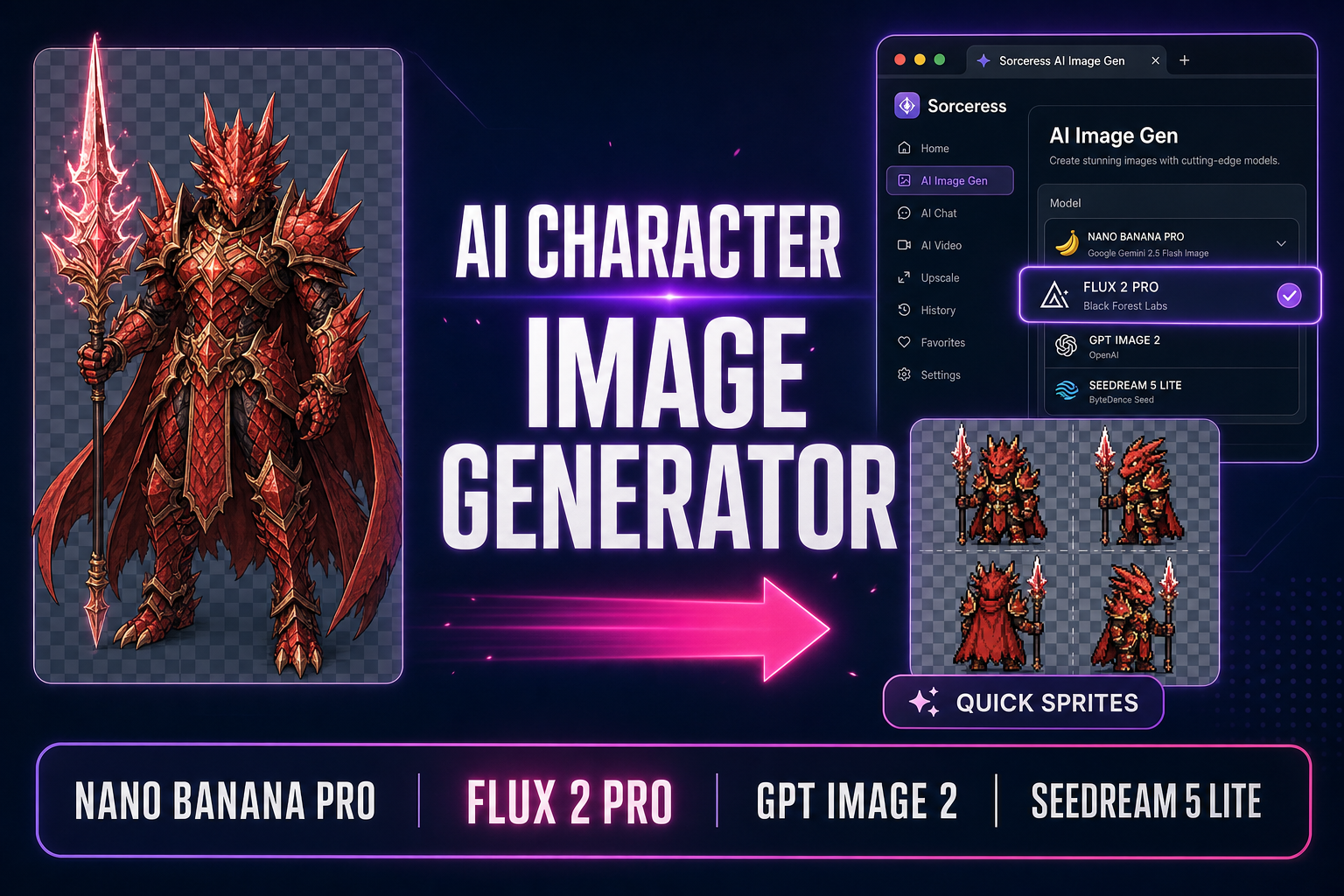
A 2026 AI character image generator is the difference between a solo indie dev rendering the first hero character at lunchtime and the same dev fiddling with Photoshop layers for an entire weekend. The Sorceress workflow stacks the five top image models in one browser panel: a single prompt into AI Image Gen returns a finished character image in 15 to 60 seconds, and one click routes it into Quick Sprites for a game-ready pixel-art sheet. This guide walks the stack end-to-end, every model version and credit cost verified May 26, 2026 against the live source in src/lib/models.ts.
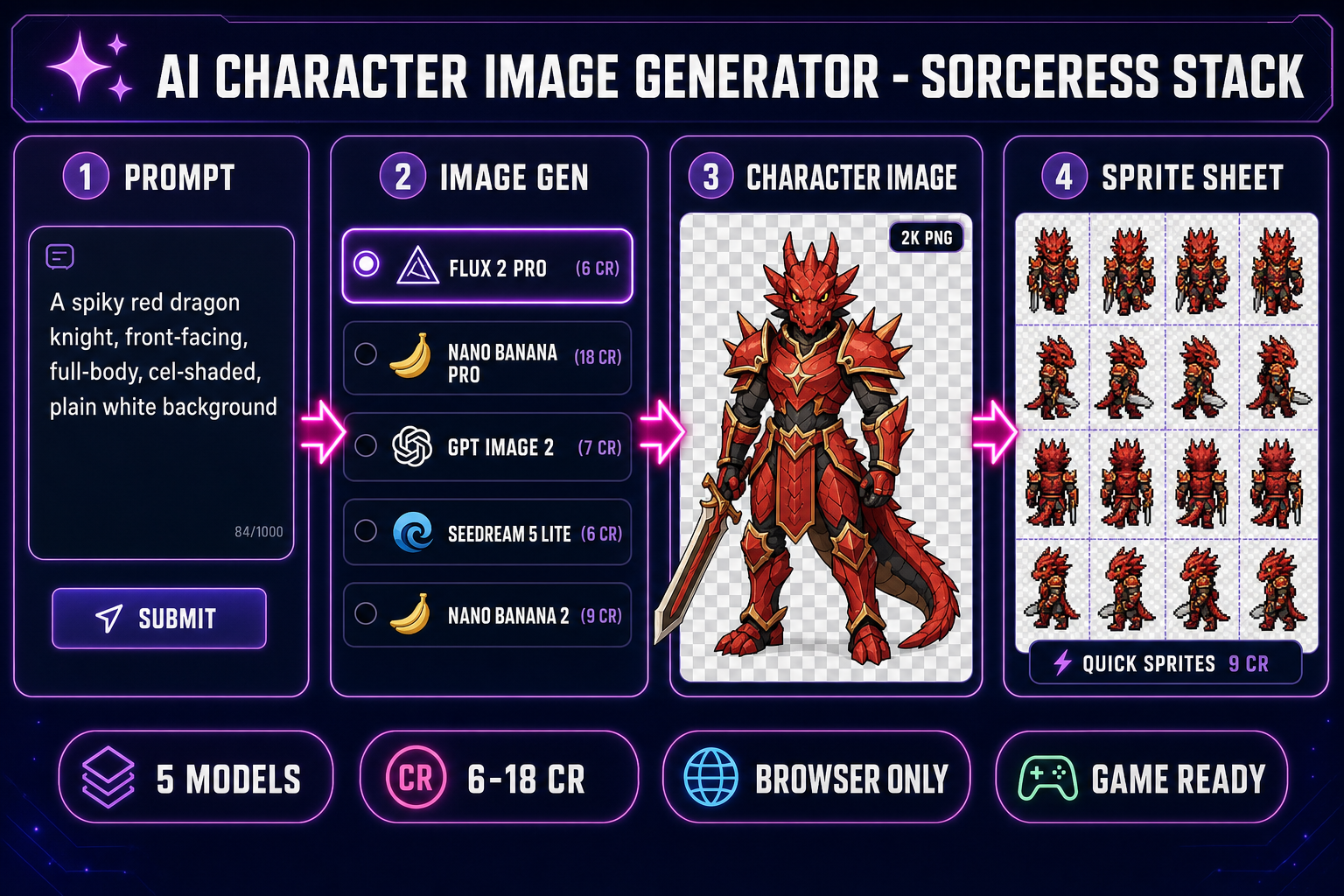
AI character image generator pipeline inside Sorceress: prompt to image gen to character image to game-ready sprite sheet
The four-stage browser stack for an AI character image generator. Prompt, image model picker, character image, then a pixel-art sprite sheet from Quick Sprites.

What an AI character image generator actually does in 2026

The phrase covers a narrow workflow with a sharp deliverable. The input is a text prompt that describes a character: subject, body type, costume, weapon or prop, expression, pose, art style, camera angle, background. The output is a single finished character image at a chosen aspect ratio, usually somewhere between 1024 pixels and 4K, with the subject on a transparent or plain background. The image is not a sprite sheet, not a 3D mesh, not a turnaround sheet of multiple poses; those are downstream products of separate routing steps covered later in this post. The image itself, though, is the kind of deliverable a small indie studio would have paid a freelance illustrator two days for in late 2024. In May 2026, the same image is one prompt and roughly 30 seconds away.

The technology under every modern AI character image generator is a diffusion or rectified-flow transformer trained on hundreds of millions of paired image-and-caption examples. The model learns the mapping between words ("dragon knight", "cel-shaded", "front-facing") and pixels (scaled silhouette, hard cel-shaded color boundaries, head-on camera framing). The 2026 generation layers a reasoning pass on top: Nano Banana Pro is built on the Gemini 3 Pro vision-language backbone, GPT Image 2 ships a thinking-mode option for richer prompt interpretation, and Seedream 5 Lite layers chain-of-thought reasoning on a multimodal unified architecture. The result is a model that does more than match keywords to pixels; it reads the full intent of a long prompt and stages composition, lighting, anatomy, and color before the first pixel is laid down.

The hard part of using an AI character image generator well, in 2026, is not the model. It is choosing the right model for the job, writing a prompt that locks the character, and routing the output into the next pipeline step without losing the look. The rest of this post walks each piece.

The 2026 AI character image generator field inside Sorceress (and how each model wins)

Sorceress AI Image Gen ships every top 2026 image model in a single picker. The lineup is verified against the IMAGE_MODELS registry in src/lib/models.ts on 2026-05-26: five models that work as a serious AI character image generator, plus a handful of cheaper or specialized models (Z-Image at 2 credits, Nano Banana at 6 credits, Seedream 4.5 at 6 credits, Grok Imagine at 6 credits returning 6 images per call when no references are attached). The five character workhorses are Nano Banana Pro, Flux 2 Pro, GPT Image 2, Seedream 5 Lite, and Nano Banana 2. Each has a distinct strength.
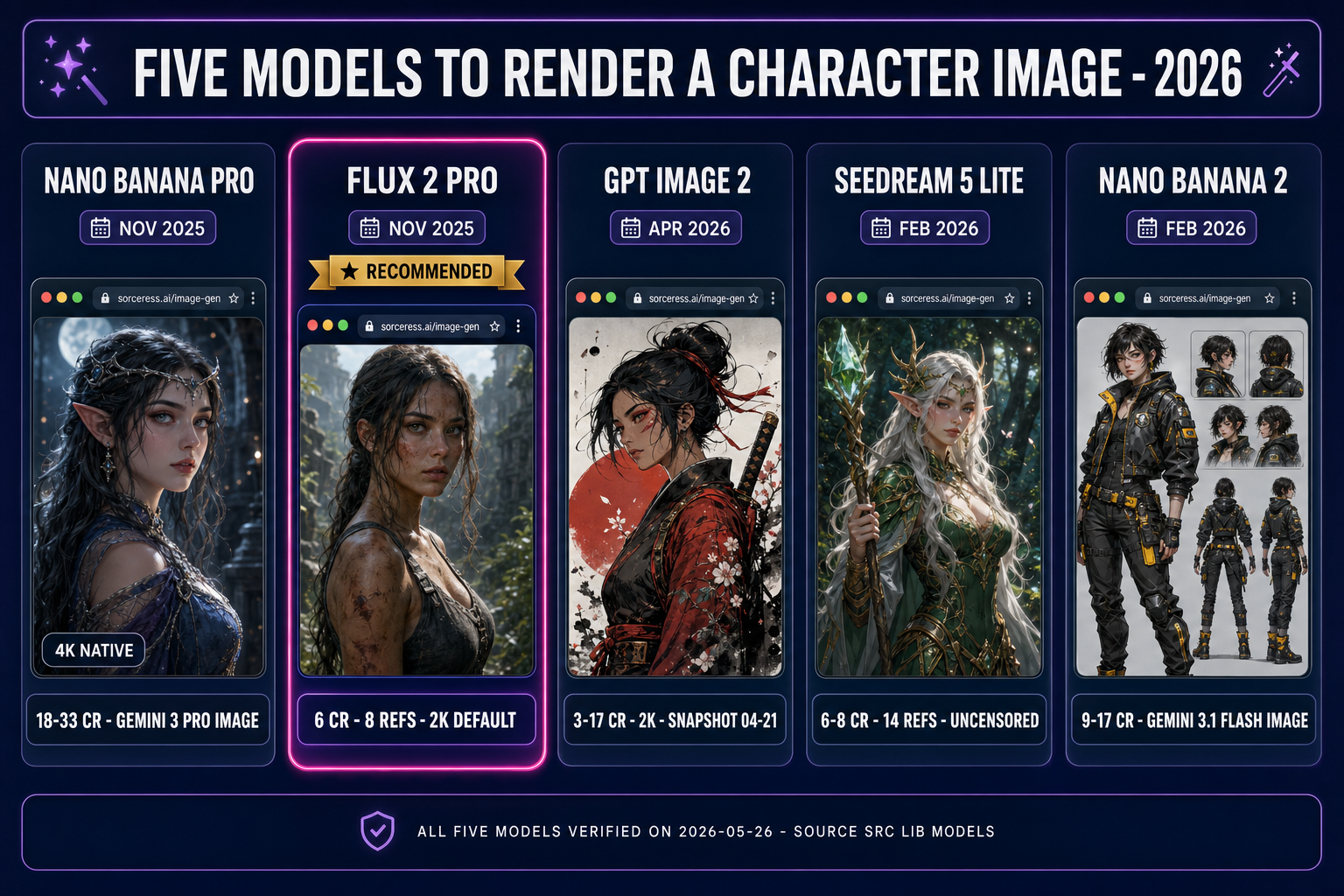
Five 2026 AI character image generator models compared inside Sorceress AI Image Gen: Nano Banana Pro, Flux 2 Pro, GPT Image 2, Seedream 5 Lite, Nano Banana 2
The five models that anchor the AI character image generator workflow inside AI Image Gen. Pick by the job, not by the headline benchmark.

Flux 2 Pro: the photorealistic-grounded pick (6 credits plus 3 per reference)

Flux 2 Pro from Black Forest Labs was released November 25, 2025 as the production tier of the FLUX.2 family, verified active on Replicate on 2026-05-26. The FLUX 2 line shipped four tiers (Pro for production API, Flex for developers, Dev as a 32B open-weight on Hugging Face, and Klein as an Apache 2.0 distilled variant). The Pro tier closes the gap between AI-generated and real photographic imagery; it is the photorealism leader in the 2026 lineup. For a character image that needs to feel grounded in real lighting and real materials (leather armor, brass buckles, weathered fabric, scaled hide), Flux 2 Pro is the workhorse and the recommended first pick. The Sorceress cost is 6 credits base plus 3 credits per reference image, up to 8 reference images supported, default 2K resolution, verified against lines 91 to 117 of src/lib/models.ts. Aspect ratios cover 16:9, 1:1, 9:16, 21:9, and 4:3.

Nano Banana Pro: the 4K text-friendly pick (18 credits at 2K, 33 credits at 4K)

Nano Banana Pro is the Gemini 3 Pro Image model, released November 20, 2025, model ID gemini-3-pro-image-preview, verified on 2026-05-26. The headline features for an AI character image generator workflow are native 4K output (3840x2160), legible embedded text in multiple languages, and the strongest reasoning-driven composition in the panel. For a character image with multilingual UI overlay text, a labeled stat block, or a costume callout printed onto the canvas, Nano Banana Pro is the only model that reliably renders the text readable at full resolution. The Sorceress credit cost is 18 credits at 1K or 2K resolution and 33 credits at 4K, verified against the getCredits function on lines 221 to 224 of src/lib/models.ts. Up to 8 reference images supported per generation.

GPT Image 2: the stylized-illustration pick (3 to 17 credits by quality)

GPT Image 2 (openai/gpt-image-2 on Replicate) was released April 21, 2026 with the snapshot alias gpt-image-2-2026-04-21 locking the version. The model jumped to the top of the Image Arena leaderboards within hours of launch with a roughly 240-point lead in text-to-image. The headline gain for an AI character image generator workflow is structured-generation strength: diagrams, infographics, posters, comics, and character turnaround sheets all render with cleaner composition and stronger multi-edit prompt adherence. Aspect ratios in the Sorceress picker are 1:1, 3:2, and 2:3, with the 3:2 ratio matching the home-v2 explainer aspect that the rest of the Sorceress visual brand uses. The credit cost scales with quality: 3 credits low, 7 credits medium, 17 credits high, verified against lines 320 to 328 of src/lib/models.ts. Up to 10 reference images supported, opaque background by default (transparent unsupported per the Replicate model card).

Seedream 5 Lite: the uncensored character pick (6 credits at 2K, 8 credits at 3K)

Seedream 5 Lite from the ByteDance Seed team was released February 13, 2026 with a chain-of-thought reasoning step layered over the multimodal unified architecture introduced in Seedream 4.0 the prior September. The model is the most lenient in the panel on safety filtering; for character images in adult, horror, or grimdark fantasy verticals where the other models refuse the prompt or sanitize the output, Seedream 5 Lite is the open-restrictions pick. The Sorceress integration sets nsfw_checker: false on every call (verified against line 165 of src/lib/models.ts), supports 14 reference images, defaults to 2K, with an optional 3K mode at 8 credits. Aspect ratios cover the widest range in the panel: 16:9, 1:1, 9:16, 21:9, 4:3, 3:2, and 2:3.

Nano Banana 2: the fast-iteration pick (9 credits at 1K, 17 credits at 4K)

Nano Banana 2 is the Gemini 3.1 Flash Image Preview model, released February 26, 2026 per the Gemini API release notes, model ID gemini-3.1-flash-image-preview. The model is positioned as the new go-to default for all-around image generation in the Gemini family, with Nano Banana Pro reserved for premium 4K and text-heavy jobs. For an AI character image generator workflow where the iteration loop matters (running 20 prompt variations to land the silhouette before committing to the hero pose), Nano Banana 2 is the right pick. The Sorceress cost is 9 credits at 1K (default), 12 credits at 2K, and 17 credits at 4K, verified against lines 245 to 253 of src/lib/models.ts. Up to 14 reference images supported.

The browser AI character image generator pipeline (prompt to engine, no install)

The entire workflow runs in a single browser tab. No local install, no GPU at home, no upstream account at OpenAI, Black Forest Labs, ByteDance, or Google. The AI Image Gen panel routes every model through one unified credit budget on the Sorceress account. Every signed-in user starts with 100 credits free; at the 6-credit average for Flux 2 Pro or Seedream 5 Lite, that covers roughly 16 character image runs before the meter clicks over to paid credits at one cent per credit through the Pricing page.

The architecture is intentionally narrow at the generator step. The panel does one thing: it accepts a prompt and optional reference images, runs the chosen model, and returns a downloadable PNG. The downstream routing (sprite extraction, 3D lift, animation) happens in separate Sorceress tools that compose with the Image Gen output without a manual file-format conversion step. The full pipeline from prompt to engine asset is two clicks: generate, then route.

The five-step AI character image generator workflow (prompt to game asset)

Five steps in a single browser tab. Every step except the generation itself is free.

Step 1: Write the prompt

The prompt is the lever. A weak prompt produces a weak character image regardless of which model you pick. A strong prompt for an AI character image generator follows a consistent shape: subject, body type, costume, weapon or prop, expression, pose, art style, camera angle, background. For example: a spiky red dragon knight, full-body, front-facing view, wearing scaled crimson plate armor and carrying a glowing magic spear, snarling expression with bared fangs, cel-shaded concept art style, plain white background. The prompt sits in the central text field of AI Image Gen. The Mic icon next to the field accepts voice input if typing is slower than speaking.

Three rules pay for themselves. First, specify the background explicitly: plain white background, transparent background, or plain studio background. Without that, the model invents a busy scene that you then have to remove. Second, specify the camera angle explicitly: front-facing full-body, three-quarter view from front-right, side profile. A vague prompt produces a different angle every generation, which kills consistency. Third, specify the art style explicitly: cel-shaded concept, painterly digital art, pixel-art 16-bit, realistic PBR render. The default model aesthetic is rarely what you want for a game pipeline.

Step 2: Pick the right model

The model picker is the second panel. The defaults set Flux 2 Pro selected and aspect 16:9. For a first character pass on any new design, leave Flux 2 Pro selected; the cost is the lowest of the five workhorses and the photorealism floor is the highest. Switch to Nano Banana Pro when the character image needs legible embedded text or native 4K. Switch to GPT Image 2 when the art style needs structured composition (a turnaround sheet, a model-sheet diagram). Switch to Seedream 5 Lite when the character is mature, horror, or grimdark and the other models refuse the prompt. Switch to Nano Banana 2 when iterating fast on prompt variations and credit burn matters. Multiple models can be selected at once; the panel runs every selected model in parallel and shows all results side by side, which is the right pattern when you are still picking the aesthetic for a new project.

Step 3: Set the aspect ratio and parameters

The aspect picker is the third panel. For a character image destined for a 2D sprite sheet, 1:1 is the right pick; the square crop slices cleanly into a sprite-sheet grid downstream. For a character image destined for a 3D lift, 1:1 or 4:3 works; the 3D Studio models expect a roughly square input. For a character image destined for a marketing splash or a Steam capsule, 16:9 or 21:9 to match the platform aspect at the source instead of cropping afterward. Each model exposes its own parameter set; the most useful knobs are Quality (GPT Image 2: low, medium, high) and Resolution (Nano Banana Pro: 1K, 2K, 4K; Flux 2 Pro: 1K or 2K; Nano Banana 2: 1K, 2K, 4K; Seedream 5 Lite: 2K or 3K).

Step 4: Generate (15 to 60 seconds, 3 to 33 credits)

Click Generate. The Sorceress backend queues the job, calls the upstream provider, polls for completion, and shows a live preview as soon as the image arrives. Wall-clock time depends on the model and the resolution: GPT Image 2 medium quality returns in 15 to 25 seconds, Flux 2 Pro 2K in 20 to 35 seconds, Nano Banana Pro 2K in 20 to 40 seconds, Nano Banana Pro 4K in 30 to 60 seconds, Seedream 5 Lite 2K in 20 to 40 seconds, Nano Banana 2 1K in 10 to 20 seconds. The first generation lands in the gallery on the right. Click to lightbox, star to favorite, drag into a Collection to lock the look for later reference.

Step 5: Route the character image into the engine

Pick a downstream path. For a 2D pixel-art game, push the character image through BG Remover for a clean alpha mask, then send the cutout into Quick Sprites as a reference image; the next section walks the full sprite-sheet routing. For a 2D HD game, route through Auto-Sprite v2 with an intermediate AI Video Gen step that animates the character image into a 4-second loop, then auto-extracts and aligns the frames. For a 3D game, route the front-view character image through 3D Studio for a Hunyuan 3D 3.1 lift to a textured glTF 2.0 GLB mesh in 30 to 60 seconds at 25 credits per generation (the recommended default in 3D Studio). The deep-dive workflow for the 3D path lives in the lift-a-2D-image-to-3D-model guide.

From AI character image generator output to Quick Sprites (the 2D sprite pipeline)

The 2D path is the cleanest first move for an indie dev shipping a top-down RPG, a platformer, or a roguelike. Quick Sprites runs on the retro-diffusion/rd-animation model on Replicate, verified May 26, 2026, the dedicated pixel-art animation model from the Retro Diffusion family. The cost is 9 credits per generation, verified against CREDITS_PER_GEN on line 21 of src/app/quick-sprites/page.tsx.

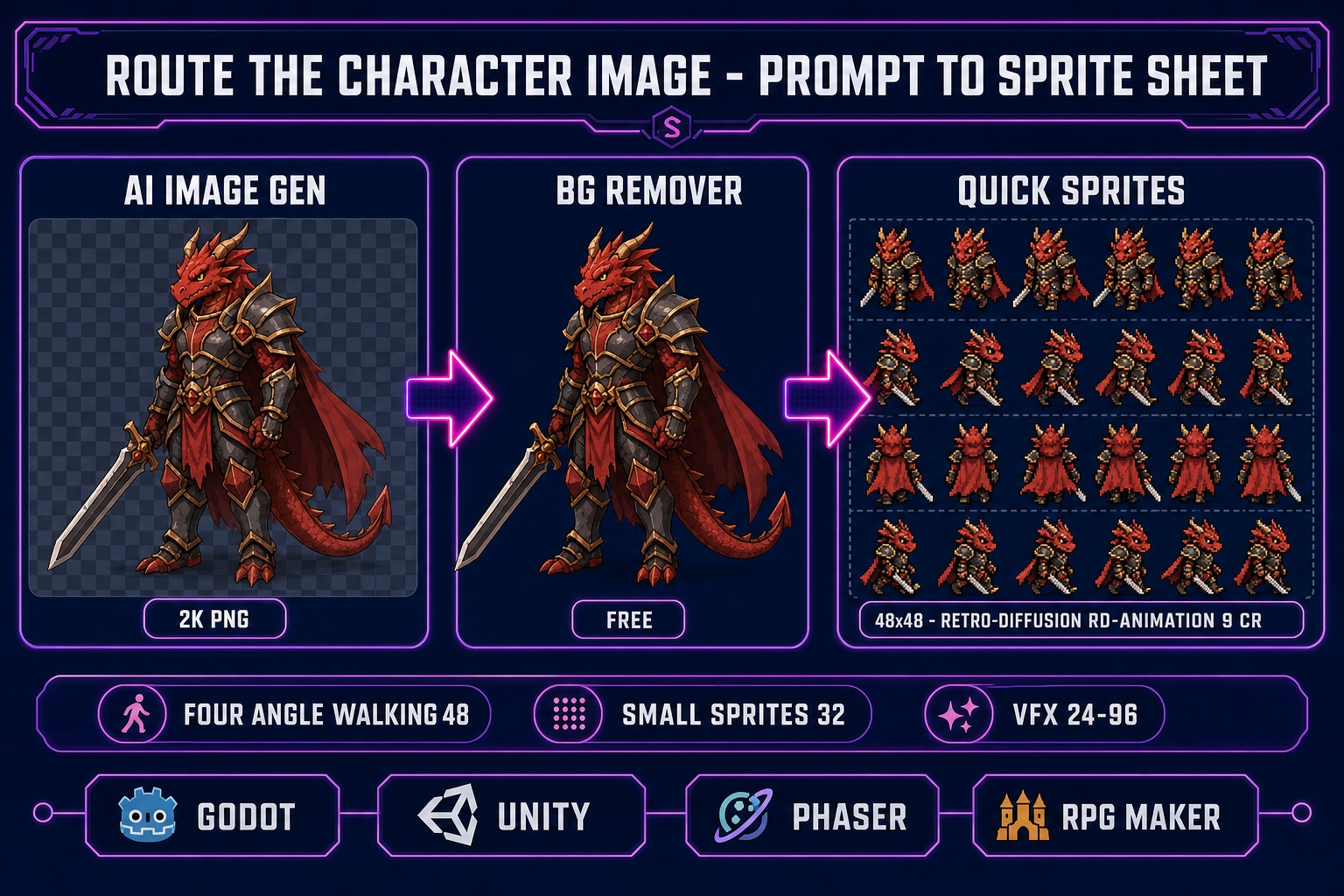
Route the AI character image generator output through BG Remover into Quick Sprites for a pixel-art sprite sheet
The cleanest 2D path: AI Image Gen, then BG Remover for a clean alpha cutout, then Quick Sprites for a four-direction walking sheet.

Quick Sprites ships three animation styles, verified against lines 35 to 39 of src/app/quick-sprites/page.tsx on 2026-05-26. Four Angle Walking outputs a four-direction, four-frame walking animation of humanoid characters at 48x48 pixels (the only supported size). Small Sprites outputs a 32x32 sheet with six rows: walking right, walking left, arm movement, looking, surprised, and laying down. VFX Effects outputs a single eye-catching effect (fire, explosion, lightning, particle burst) sized between 24 and 96 pixels per side at a 1:1 aspect.

The workflow from a generated character image to a Quick Sprites sheet is three clicks. Generate the character image in AI Image Gen with the prompt shape above, plain white background specified. Push the PNG through BG Remover for a clean alpha cutout (free for signed-in users; handles hair-grade matting on the AI-generated outputs cleanly). Open Quick Sprites, drag the cutout into the reference image slot, set the animation style (Four Angle Walking for a classic NES warrior, Small Sprites for a Game Boy-era hero, VFX for a particle effect), type the character description into the prompt field as a text anchor (the underlying retro-diffusion model uses both inputs together), toggle the Return Spritesheet switch on if you want a single PNG grid (off for an animated GIF preview), then click Generate. The output lands in the gallery in 30 to 90 seconds and downloads as a single grid-formatted PNG (or a looping GIF), sized for direct import into Godot, Unity, Phaser, or RPG Maker.

Five mistakes that ruin AI character image generator runs (and the fix for each)

  1. A vague prompt that leaves the model guessing. "A fantasy warrior" produces a different character every generation. The fix is the consistent prompt shape from Step 1: subject, body type, costume, weapon, expression, pose, art style, camera angle, background. Lock every axis the model would otherwise invent.
  2. Forgetting to specify the background. The model defaults to a busy scene: a forest, a battlefield, a tavern interior. For an AI character image generator pass destined for downstream sprite or 3D work, the busy background is noise. Specify plain white background or transparent background in the prompt, then push the output through BG Remover for a clean alpha mask.
  3. Switching models mid-iteration. Each model has a distinct aesthetic prior. Generating five poses with Flux 2 Pro and then one pose with GPT Image 2 produces six characters that look like five-plus-one, not six-of-a-kind. Lock one model for the full pass, then switch models only when starting a new project.
  4. Not using reference images for the second generation onward. The first generation produces the character. Every subsequent generation of the same character (different pose, different costume, different expression) needs the first generation locked into the reference slot. Without the reference, the face drifts, the silhouette shifts, the palette wanders. Every model in the panel supports reference-image input: use it.
  5. Picking the high-cost 4K resolution for the iteration loop. Nano Banana Pro at 4K costs 33 credits. GPT Image 2 high quality costs 17 credits. If you are still picking the silhouette and the costume, every iteration is a 33-credit burn for output you are about to throw away. Drop to Nano Banana 2 at 1K (9 credits) or GPT Image 2 low (3 credits) for the iteration loop, then return to the high-resolution path for the final hero pass.

The verdict: when an AI character image generator is the right pick

The 2026 AI character image generator is the right pick when three conditions hold. First, you need a finished character image in the next 30 minutes; the wall-clock generation time is 15 to 60 seconds, and the iteration loop turns over in single-digit minutes. Second, the character is a class the 2026 priors handle well: humanoid characters, animals, fantasy creatures, mechs, common props in clean front-facing or three-quarter views. Third, you have a downstream pipeline that consumes the PNG output: a sprite-extraction step, a 3D lift step, a marketing splash, or a portfolio piece. Without the downstream consumer, you have a nice image and nowhere to put it.

It is not the right pick when (1) you need pixel-perfect art-direction match to an existing 200-asset library where every line weight and every color value has to align; a human artist with the style guide loaded in front of them still wins on consistency at that scale, (2) the character is wildly asymmetric or anatomically novel in a way the priors do not cover (six-armed elemental construct with floating geometry, for example) and you need anatomical correctness more than aesthetic punch, or (3) the project has the budget and the timeline for a commissioned illustrator and the team explicitly prefers human craft for the hero work.

For the core indie game dev use case in May 2026 (taking a prompt, generating a character image, routing it into a sprite sheet or a 3D mesh, and shipping the asset into a Godot or Three.js scene this afternoon) the Sorceress AI character image generator stack is the cleanest browser path. Five models, one credit budget, one prompt, one click to route. Compare that to the cost of a commissioned illustrator (typically $200 to $600 per character at indie rates) or the time of self-drawing in Photoshop (4 to 20 hours per polished character depending on skill), and the math on the AI character image generator path is the right on-ramp for any project that needs characters in the engine this week, not next month.

For adjacent context, see the companion AI character art generator guide, the stay-on-model with reference images guide, the consistent character generator deep-dive, the anime character generator workflow, the free character generator picks, the NPC bio generator companion, the sprite sheet generator walkthrough, the game art generator for backgrounds and props, and the lift-2D-to-3D guide. For a tour of the rest of the Sorceress toolset, see the tools guide.

Frequently Asked Questions

What does an AI character image generator actually do in 2026?

An AI character image generator takes a text prompt (and optionally a reference image or two) and returns a finished single-frame character image. The output is a PNG at a chosen aspect ratio, usually 1024x1024 to 4K, with the subject on a transparent or plain background. It is not a sprite sheet, not a turnaround, not a 3D mesh; those are downstream products of separate routing steps. The 2026 generation of models inside Sorceress AI Image Gen, Nano Banana Pro (Gemini 3 Pro Image, November 20, 2025), Flux 2 Pro (Black Forest Labs, November 25, 2025), GPT Image 2 (OpenAI, April 21, 2026, snapshot gpt-image-2-2026-04-21), Seedream 5 Lite (ByteDance Seed, February 13, 2026), and Nano Banana 2 (Gemini 3.1 Flash Image, February 26, 2026), all verified against the live IMAGE_MODELS registry in src/lib/models.ts on 2026-05-26, reliably produce a clean character image from a single prompt in 15 to 60 seconds.

Which model in the Sorceress AI character image generator picker should I pick first?

Pick by the job. For a photorealistic-grounded character image (real lighting, real materials), Flux 2 Pro is the workhorse: 6 credits base plus 3 per reference image, up to 8 references, 2K default. For a 4K character image with legible embedded text labels (turnaround pose names, costume callouts), Nano Banana Pro is the only model in the panel that reliably renders the labels readable at full resolution: 18 credits at 2K, 33 credits at 4K. For a stylized 3:2 or 2:3 illustration with OpenAI batch-consistency lock, GPT Image 2 is the right pick: 3 credits low quality, 7 medium, 17 high. For uncensored character images (mature, horror, grimdark fantasy), Seedream 5 Lite: 6 credits at 2K, 8 at 3K, 14 reference images supported. For fast iteration where credit burn matters, Nano Banana 2: 9 credits at 1K. Every model in the picker is a viable AI character image generator; the differences are aesthetic, not capability.

How do I lock a character across multiple AI character image generator runs?

Use reference images. Every model in the panel accepts reference-image input: Flux 2 Pro up to 8 references, Nano Banana Pro up to 8, Nano Banana 2 up to 14, GPT Image 2 up to 10, Seedream 5 Lite up to 14. The workflow is: (1) generate the first character image with a text-only prompt and lock the look. (2) Save the favorite to a Collection. (3) For every subsequent generation of the same character (different pose, different costume, different expression, different camera angle), upload the locked reference into the reference slot and re-prompt. The model uses the reference to keep face, hair, silhouette, and palette consistent. The deep-dive workflow for reference-locked character runs lives in the consistent character generator guide; the 14-reference Seedream 5 Lite path is the strongest in the panel for character lock across a 30-shot pose library.

Can the AI character image generator output go straight into a game engine?

Not as a single image, but the Sorceress pipeline routes it into one click away. For a 2D game (pixel art, retro, RPG Maker, Phaser, Godot), send the generated PNG into Quick Sprites as a reference image. The underlying retro-diffusion/rd-animation model on Replicate converts the concept into an animated pixel-art sprite sheet (four-direction walking at 48x48, small-sprite set at 32x32 with arms/look/surprise/lay-down rows, or VFX effects at 24-96 pixels). Cost is 9 credits per generation, verified against CREDITS_PER_GEN on line 21 of src/app/quick-sprites/page.tsx. Output formats are animated GIF or grid-formatted PNG spritesheet (toggle in the UI). For a 3D game, route the front-view character image through 3D Studio for a Hunyuan 3D 3.1 lift to a textured GLB mesh at 25 credits.

How much does it cost to run an AI character image generator in Sorceress?

Every signed-in account starts with 100 credits free. The AI Image Gen panel shows the per-generation credit cost next to each model: Z-Image (2 credits, the cheapest baseline), Nano Banana (6 credits, basic), Nano Banana 2 (9 credits at 1K, 12 at 2K, 17 at 4K), Flux 2 Pro (6 credits 2K plus 3 per reference), Seedream 4.5 (6 credits, 2K or 4K), Seedream 5 Lite (6 credits 2K, 8 at 3K), GPT Image 1.5 / GPT Image 2 (3 credits low, 7 medium, 17 high), Nano Banana Pro (18 credits at 1K/2K, 33 credits at 4K), Grok Imagine (6 credits, returns 6 images per call if no refs). At the 6-credit average, 100 starter credits cover roughly 16 AI character image generator runs. After the starter allowance, additional credits ship at one cent per credit through the Pricing page. The credit cost is verified against the IMAGE_MODELS registry in src/lib/models.ts on 2026-05-26.

What is the difference between an AI character image generator and an AI character art generator?

They are sibling terms that DataForSEO treats as distinct queries with different SERPs. An AI character image generator emphasizes the literal image output: the single-frame PNG, the deliverable that a game pipeline consumes. An AI character art generator emphasizes the artistic intent: the styled illustration, the concept-art deliverable that a portfolio or a marketing splash consumes. The same five models in the Sorceress AI Image Gen panel serve both queries; the choice between them is a matter of which downstream pipeline you are feeding. For a quick 2D sprite sheet or a 3D lift, the image-generator framing is the cleaner mental model. For a polished hero piece for a Steam capsule or a turnaround sheet for a portfolio review, the art-generator framing is the cleaner mental model. The companion guide to this post walks the art-generator angle in detail.

Does the AI character image generator support transparent backgrounds?

It depends on the model. GPT Image 1.5 supports a transparent background toggle directly in the picker, verified against lines 267 to 274 of src/lib/models.ts on 2026-05-26. GPT Image 2 hardcodes opaque backgrounds because the underlying Replicate model card does not support transparency. The other models in the panel default to opaque. The cleanest reliable path for a transparent PNG is to (1) include 'plain white background' or 'plain solid background' in the prompt, then (2) push the output through BG Remover for a clean alpha mask. BG Remover is free for signed-in users and handles hair-grade matting on the AI-generated character images cleanly. The two-step flow takes one extra click and produces a sharper alpha than the in-model transparency on every model except GPT Image 1.5.

Sources

  1. Character (arts) - Wikipedia
  2. Sprite (computer graphics) - Wikipedia
  3. glTF 2.0 specification (Khronos Group)
  4. GPT Image 2 on Replicate (openai/gpt-image-2)
  5. Flux 2 Pro on Replicate (black-forest-labs/flux-2-pro)
  6. RD Animation on Replicate (retro-diffusion/rd-animation)
Written by Arron R.·3,362 words·15 min read

Related posts