Piece How to Make a Jigsaw Puzzle (Browser Snap Loop 2026)

By Arron R.12 min read
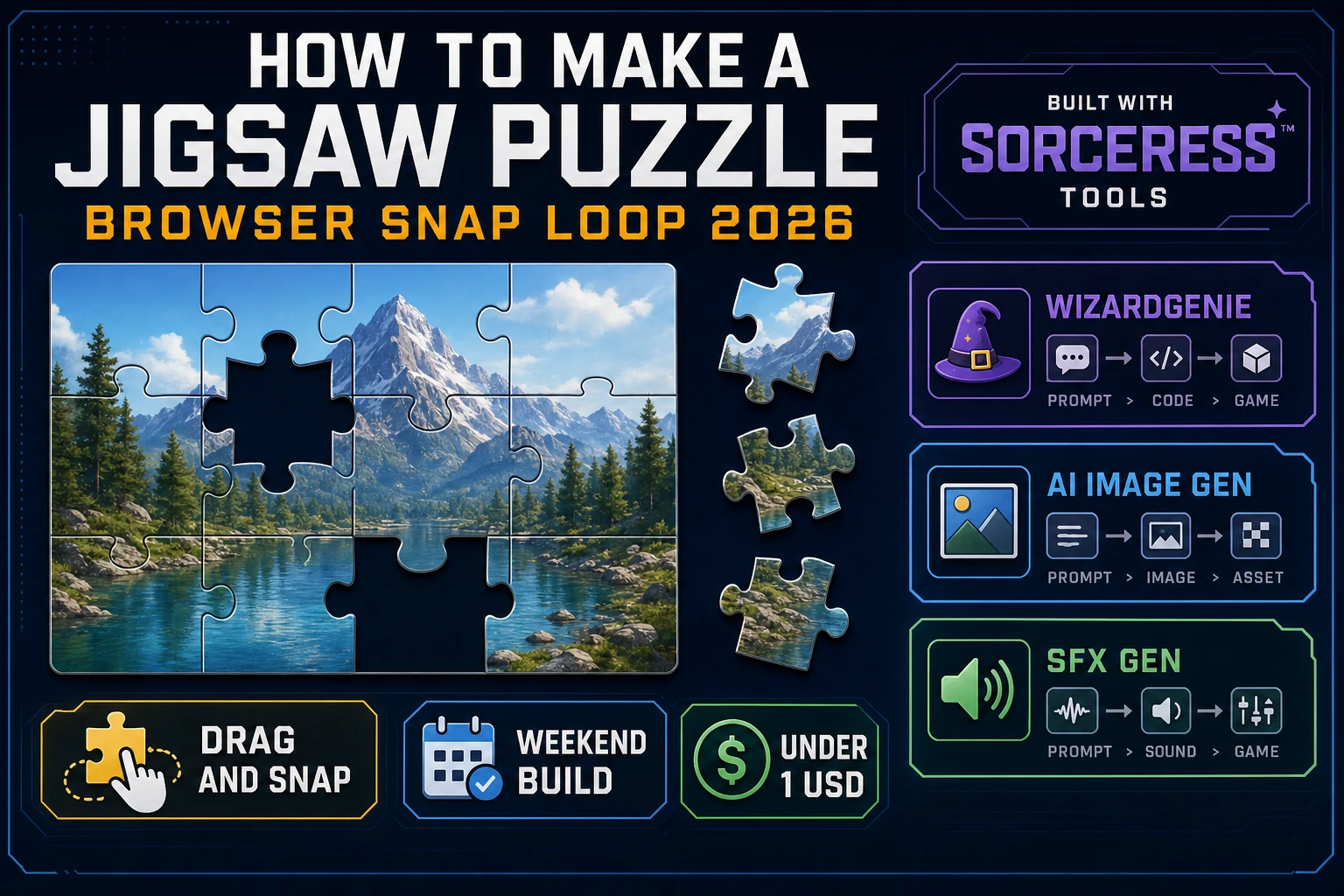
How to make a jigsaw puzzle in 2026: generate one high-res AI Image Gen source, slice it into a grid of pieces, wire drag-and-snap in WizardGenie, and add SFX G

Most beginners who search "how to make a jigsaw puzzle" want one image, a grid of pieces they can drag with the mouse, and a satisfying snap when a piece lands on its target - not a Ravensburger-scale 1000-piece render pipeline on day one. A commercial jigsaw storefront with laser-cut wooden dies and custom cutting patterns is a specialist craft. A browser jigsaw is different. A coding agent scaffolds the image slicer, drag handlers, and snap tolerance from one prompt, and AI generation covers the source artwork plus the small pool of audio cues. On desktop or web, that means AI Image Gen for the source picture, WizardGenie for the drag-snap interpreter, and SFX Gen for pick-up, snap, and victory clips. This guide is the honest end-to-end for how to make a jigsaw puzzle in 2026, as a weekend build you can actually finish.
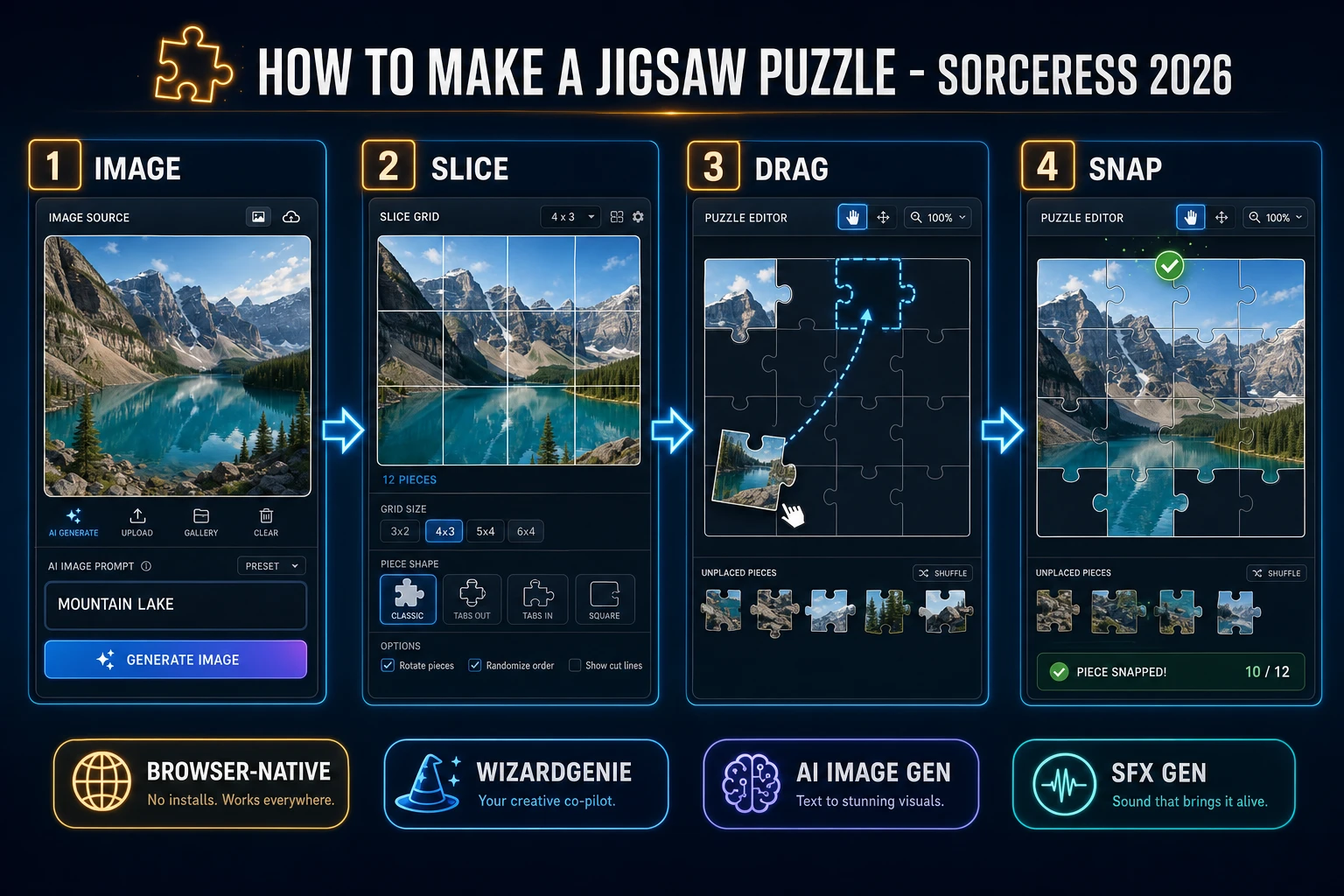
How to make a jigsaw puzzle browser pipeline: generate one source image, slice the grid, wire drag-and-snap in WizardGenie, and add SFX Gen cues
The 2026 how to make a jigsaw puzzle recipe: generate one AI Image Gen source, slice a 4x3 grid, model drag-and-snap in WizardGenie, then add SFX Gen cues.

What how to make a jigsaw puzzle actually means in 2026

The query "how to make a jigsaw puzzle" hides three intents. Some searchers want a physical print-and-cut pipeline - photo to cardboard, laser die, cellophane wrap - that is a manufacturing brief, not a playable browser loop. A second intent is a generic how to make a puzzle game guide covering match-3, sudoku, and sliding tiles under one umbrella - useful, but too broad to answer the jigsaw-specific "drag piece, snap into slot" mental model. The intent this guide targets is the third: a browser jigsaw that boots into a menu, splits a single image into a small grid of rectangular pieces, shuffles them into a tray, and lets the player drag each one onto its correct slot until the picture is whole. That is a weekend build, it demos the Sorceress toolset, and it is the format most jigsaw puzzle tutorial and javascript jigsaw searchers actually want.

The presentation contract is small and strict. A title screen shows the puzzle name, control hints (pick a piece from the tray, drag it onto the frame, release near its target to snap), and Play. The play screen shows a bordered frame the size of the source image, a piece tray along the bottom or side, an optional preview thumbnail, and a Victory panel with elapsed time when every piece is placed. The jigsaw puzzle overview on Wikipedia (verified 2026-08-29) defines the genre as "a tiling puzzle that requires the assembly of often irregularly shaped, interlocking, and mosaicked pieces," each containing a portion of one image - cite that page when you write your itch.io blurb so players know you shipped a browser puzzle game snap loop, not a click-fest matcher.

The jigsaw browser snap loop in one minute (shuffle, pick, drag, snap, finish)

Five moving parts, repeated until every piece is placed. First, shuffle - randomize the piece order in the tray and clear any placed flags. Second, pick up - on pointer-down, hit-test the top-most tray or free-floating piece; lock it to the cursor and raise it above the others. Third, drag - update the piece position each pointer-move; optionally draw a dashed guide line from the piece center to its target cell so beginners see where it belongs. Fourth, snap - on pointer-up, measure the distance between the piece center and its target cell center; if the distance is under a fixed tolerance (18 pixels feels right on a 480x360 frame), lock the piece to the target, mark it placed, remove it from the draggable pool, and play a snap cue. Fifth, finish - when every piece is placed, freeze input, tint the frame briefly, and reveal a Victory panel with elapsed time and Retry. Irregular interlocking tabs, piece rotation, and multi-stage packs are polish layered after one honest 4x3 grid feels satisfying.
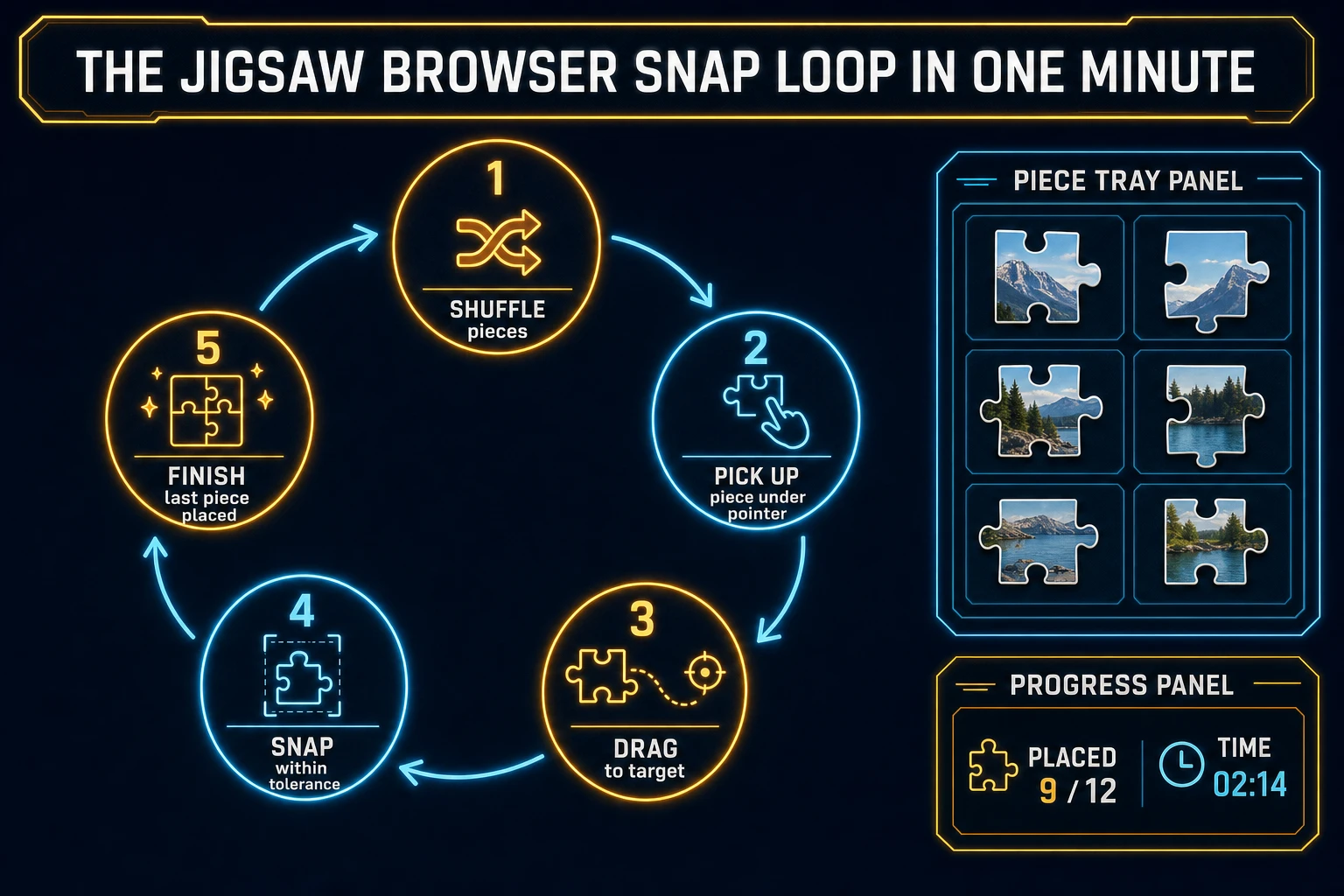
Jigsaw browser snap loop state machine diagram showing shuffle pieces, pick up under pointer, drag to target, snap within tolerance, and finish last piece placed
The jigsaw browser snap loop: shuffle the tray, pick up under the pointer, drag to the target, snap inside tolerance, and finish when the last piece lands.

Pick your engine for how to make a jigsaw puzzle: Phaser, Canvas, or WizardGenie

Three good targets in 2026, each with a different trade-off. Vanilla Canvas is the honest default and the pick this guide recommends for a first build. Draw the source image once into an off-screen canvas, then use ctx.drawImage(src, sx, sy, sw, sh, dx, dy, dw, dh) to blit each piece from its source rectangle to its current position. Convert pointer events to canvas coordinates with getBoundingClientRect() and test which piece contains the cursor by iterating pieces top-down. The MDN Canvas API docs (verified 2026-08-29) cover everything you need for an html5 jigsaw prototype in under 200 lines including source-rectangle slicing, pointer capture, and a fixed-tolerance snap check.

Snap tolerance versus interlocking tabs matters for jam scope: a rectangular grid with a distance-based snap is one afternoon of work. Irregular interlocking tabs (the classic Ravensburger silhouette) require per-piece SVG clip masks and rotation-aware hit-tests, and can double the timeline. For a first drag snap puzzle, keep the pieces as clean rectangles and add tabs in a v2 build after the loop reads well.

Phaser v4.2.1 "Giedi" (released 9 July 2026, verified 2026-08-29 on the official Phaser stable download page) becomes the right pick if you want Scene stacks (menu, play, win), a camera that pans a larger source image, tweened snaps with easing, or a stage-select carousel across multiple puzzles. Phaser does not invent your snap rule - you still need the same drag-and-tolerance state machine. Use Phaser when Scene stacks and camera work are the product; use raw Canvas when the product is a jigsaw puzzle tutorial people can read in one sitting. A phaser jigsaw campaign is a fine v2 once the Canvas prototype proves the feel.

WizardGenie is not a separate puzzle engine - it scaffolds whichever of the two you pick from a single natural-language prompt. WizardGenie ships as both a desktop app (Windows installer with auto-update, available to Early Access supporters and above) and a no-install web build. Its coding-model lineup covers Claude Opus 4.7, Claude Sonnet 4.6, GPT-5.5, Gemini 3.1 Pro, DeepSeek V4 Pro, Kimi K2.5, Grok 4.2, and MiniMax M2.7 (verified 2026-08-29 in src/app/_home-v2/_data/tools.ts). For a jigsaw snap loop, any frontier model scaffolds the slicer, drag handlers, and tolerance check in one prompt. Pair a frontier planner with a budget executor like DeepSeek V4 Pro or Kimi K2.5 for the typing pass - the Dual-agent pattern lands most projects at roughly one-fifth the single-frontier cost.
Step 1 - source image, grid split, and pieces

Nothing else in the pipeline matters if pieces render wrong or the snap check drifts. Start with a small, testable model:

const FRAME_W = 480, FRAME_H = 360; // source image size
const COLS = 4, ROWS = 3;           // 12-piece grid
const PIECE_W = FRAME_W / COLS;     // 120
const PIECE_H = FRAME_H / ROWS;     // 120
const SNAP_TOLERANCE = 18;          // pixels

const source = new Image();
source.src = "puzzle-mountain-lake.webp";

const pieces = [];
for (let r = 0; r < ROWS; r++) {
  for (let c = 0; c < COLS; c++) {
    pieces.push({
      id: r * COLS + c,
      // where this piece belongs in the frame
      targetX: c * PIECE_W,
      targetY: r * PIECE_H,
      // source rectangle inside the loaded image
      srcX: c * PIECE_W,
      srcY: r * PIECE_H,
      // current on-canvas position (shuffled later)
      x: 0,
      y: 0,
      placed: false,
    });
  }
}

function shuffleToTray(trayX, trayY, trayCols) {
  const order = [...pieces].sort(() => Math.random() - 0.5);
  order.forEach((p, i) => {
    p.x = trayX + (i % trayCols) * (PIECE_W + 8);
    p.y = trayY + Math.floor(i / trayCols) * (PIECE_H + 8);
    p.placed = false;
  });
}

function drawPiece(ctx, p) {
  ctx.drawImage(source,
    p.srcX, p.srcY, PIECE_W, PIECE_H,
    p.x, p.y, PIECE_W, PIECE_H);
  ctx.strokeStyle = p.placed ? "#3ba55d" : "#222";
  ctx.strokeRect(p.x + 0.5, p.y + 0.5, PIECE_W - 1, PIECE_H - 1);
}

function trySnap(p) {
  const cxNow = p.x + PIECE_W / 2;
  const cyNow = p.y + PIECE_H / 2;
  const cxTarget = p.targetX + PIECE_W / 2;
  const cyTarget = p.targetY + PIECE_H / 2;
  const d = Math.hypot(cxNow - cxTarget, cyNow - cyTarget);
  if (d <= SNAP_TOLERANCE) {
    p.x = p.targetX;
    p.y = p.targetY;
    p.placed = true;
    return true;
  }
  return false;
}

function isWin() { return pieces.every(p => p.placed); }

Unit-test three cases before you generate art: a piece dropped exactly on its target snaps and flags placed; a piece dropped one tile away does not snap and remains draggable; and when every piece is placed isWin() returns true. Those three tests catch ninety percent of javascript jigsaw bugs. Keep the tray outside the frame on the first build - overlapping pieces at boot is a readability nightmare for a first drag snap puzzle.

Step 2 - wire drag-and-snap in WizardGenie

With slicer and snap check drafted, open WizardGenie. Drop in a bare index.html shell that loads a 720x480 canvas (480x360 frame on the left, a piece tray on the right), a HUD for elapsed time and pieces placed, and a Reset button. Give the agent one paragraph: Build a browser jigsaw puzzle. Load one source image at 480x360. Split it into a 4x3 grid of 120x120 rectangular pieces. Shuffle the pieces into a two-column tray beside the frame. Pointer-down picks up the top-most piece under the cursor; pointer-move drags it; pointer-up tests distance from the piece center to its target center. If distance is within 18 pixels, lock the piece to the target and mark it placed. When every piece is placed, freeze input and show a Victory panel with elapsed time. Autosave best clear time to localStorage. Feed that to any coding model in the lineup and the interpreter scaffolds in under five minutes.

The remaining hour is polish via follow-up prompts. Add a preview thumbnail - a small version of the completed image in the top-right corner - eight lines. Add a drop-shadow lift - the picked-up piece renders slightly larger with a soft shadow - ten lines. Add a snap animation - a 120ms tween from drop position to target with an ease-out curve - twelve lines. Add a restart that reshuffles without reloading the page - eight lines. Each item is a follow-up prompt, and the whole browser puzzle game comes together over a Saturday afternoon.

Optional siblings: if your jam needs a grid-fill puzzle instead of a picture reassembly, borrow the fill loop from how to make a crossword. For a memory-style card matcher on the same asset budget, see how to make a memory game. For a broader puzzle-genre survey, the generic how to make a puzzle game guide is the umbrella entry.

Persist clear times with the MDN localStorage API (verified 2026-08-29) so a refresh still shows the player's best snap loop. Keep the save payload tiny: puzzle id and elapsed seconds - not a full replay buffer.

Step 3 - AI Image Gen sources and SFX Gen cues

A wireframe grid reads as a tech demo even when the state machine is perfect. Two asset passes cover the whole html5 jigsaw experience:

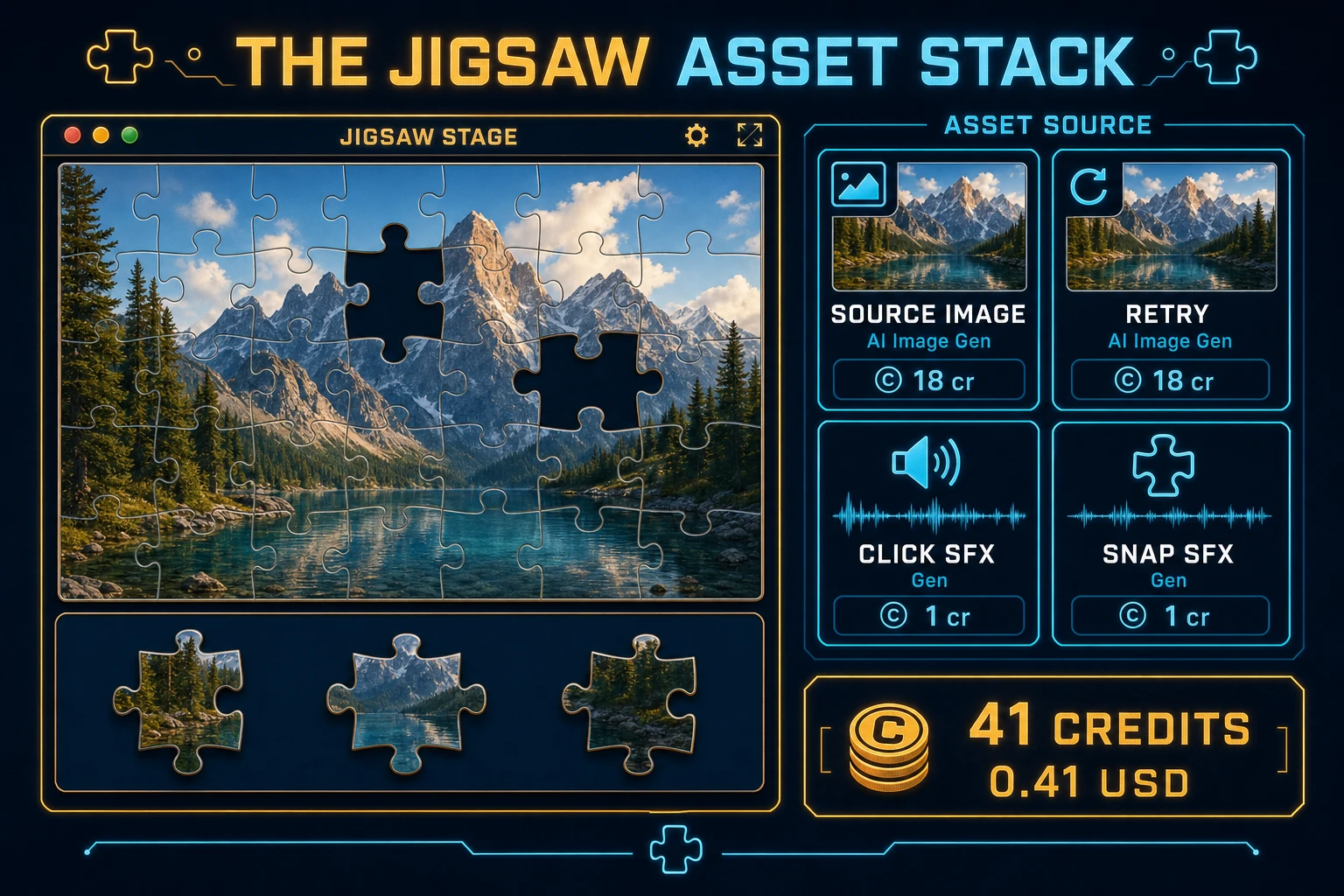
  • Source image - one high-resolution picture from AI Image Gen. Prompt for a subject with clear regions: "mountain lake at golden hour, forested shoreline, calm water, painterly, no text, high detail" or "fantasy castle on a cliff at dusk, dramatic sky, painterly, no text." Generate with Nano Banana Pro at 18 credits per generation at 2K (src/lib/models.ts). Keep a second 18-credit retry budget in case the first crop does not slice cleanly into your grid. Downscale the delivered image to your frame size (480x360 for a 4x3 grid, 600x400 for a 5x3 grid) before slicing.
  • Retry policy - if the generated image has a distracting text watermark or an off-center subject, one retry at the same 18 credits is usually enough. Do not chain more than two retries per puzzle - swap the prompt instead.
  • Optional stage pack - four more AI Image Gen sources at 18 credits each give you a five-stage carousel for the whole afternoon. Each new source drops in without a code change; just point the loader at a new URL and rerun the shuffle.

Open SFX Gen, describe each clip in plain language ("soft UI blip on piece pick-up", "short muted thud on drop miss", "crisp click on snap", "rising chime on Victory"), and export WAV into your assets/audio/ folder. Billing is roughly 1 credit per second of generated audio per src/app/sfx-gen/page.tsx - four short clips land around 5 credits total. Mute by default with a toggle - mobile browsers often block autoplay until the first click anyway.

Jigsaw puzzle asset stack diagram showing AI Image Gen source and retry, SFX Gen click and snap cues, with roughly 41 credit total
The jigsaw asset stack: AI Image Gen for the source image plus one retry, SFX Gen for pick-up, drop, snap, and victory cues - roughly 41 credits total.

Step 4 - playtest the browser snap loop like a jam judge

Before you share the build, run a five-minute checklist borrowed from game-jam judging:

  1. Pick up is honest - the piece under the cursor at pointer-down is the piece that lifts; placed pieces cannot be re-picked.
  2. Drag feels weighted - the piece follows the cursor 1:1 with no lag; releasing off-frame returns the piece to a safe tray position.
  3. Snap tolerance is fair - a piece dropped roughly on its target snaps; a piece dropped a full tile away does not silently teleport in.
  4. Progress reads at a glance - the HUD shows placed count and elapsed time; the preview thumbnail is visible without covering the frame.
  5. Victory is celebratory, not silent - the last snap plays the victory cue, freezes input, and offers Retry without a page reload.

Log issues as WizardGenie follow-ups, not rewrites. "Lift the picked piece 4 pixels with a shadow" is one prompt. "Add a shuffle-again button that reshuffles the same source" is another. The Sorceress tools guide lists every asset tool if you want to swap AI Image Gen for a hand-photo source later - the drag-and-snap code does not change.

What how to make a jigsaw puzzle costs on Sorceress in 2026

An honest budget for the stack above against the 2026 Sorceress rate card (verified 2026-08-29 against local source):

  • One AI Image Gen source at Nano Banana Pro 2K + one retry: 36 credits (0.36 USD)
  • Four SFX Gen clips (~5 seconds total): ~5 credits (0.05 USD)
  • Coding-model API time with planner + budget executor: under 0.40 USD

Total roughly 41 credits or 0.41 USD in generation, plus a small model bill. The free 100-credit signup grant (SIGNUP_GRANT in src/app/api/admin/credits/route.ts) covers a single-stage jigsaw outright, with headroom for a couple of extra AI Image Gen retries. Lifetime Early Access sits at 49 USD (LIFETIME_PRICE in src/app/plans/page.tsx) if you want desktop WizardGenie with auto-update for the next jam. Credits convert at 100 per dollar (CREDITS_PER_DOLLAR in src/lib/models.ts). Adding three more AI Image Gen sources to build a six-stage pack lifts the total to roughly 113 credits or 1.13 USD, still well under the two-dollar ceiling this guide targets.

That is the whole path for how to make a jigsaw puzzle as a browser snap loop in 2026: generate one source image, slice it into a 4x3 grid on Canvas, let WizardGenie scaffold the drag-and-snap interpreter, dress the frame with AI Image Gen retries and SFX Gen cues, and ship the puzzle before the weekend ends. When you are ready for interlocking tabs, rotation, or a 100-piece stage, graduate slowly - but finish one honest snap loop first.

Frequently Asked Questions

What separates a jigsaw puzzle from a match-3 or sliding puzzle?

A jigsaw puzzle asks the player to reassemble a single picture from irregular pieces by dragging each one onto its correct slot. Wikipedia jigsaw puzzle entry (verified 2026-08-29) defines it as a tiling puzzle that requires the assembly of often irregularly shaped, interlocking, and mosaicked pieces, each containing a portion of one image. A match-3 game clears colored gems by triple; a sliding 15-puzzle moves fixed tiles inside a frame. A first browser jigsaw only needs one image, one grid split, and a snap tolerance to feel authentic.

Phaser or vanilla Canvas for a first browser jigsaw?

Vanilla Canvas plus a 2D grid split is the honest default for a first how to make a jigsaw puzzle tutorial - draw each piece with drawImage() using source rectangles, track drag with pointer events, and test snap distance to the target cell in a hundred-ish lines. Phaser v4.2.1 Giedi (released 9 July 2026, verified 2026-08-29 on phaser.io/download/stable) is the right pick when you want Scene stacks for menu/play/win, a camera that pans a big image, and tweened piece snaps. Pick Canvas when the product is a readable jigsaw puzzle tutorial; pick Phaser when Scene stacks and camera work are the product.

How should piece snapping actually work on a first build?

Keep it embarrassingly simple. Store each piece target cell (row, column) and its current on-canvas position. On drag end, compute the distance from the piece center to its target center. If distance is less than a fixed snap tolerance (for example 18 pixels), lock the piece to the target position, flag it as placed, and remove it from the draggable list. Do not add irregular interlocking tabs or piece rotation until one honest 4x3 grid feels satisfying. Unit-test three cases: a piece dropped on its target snaps, a piece dropped one tile away does not snap, and every-piece-placed triggers Victory.

Why feature AI Image Gen on a jigsaw source?

AI Image Gen (/generate) generates high-resolution artwork from one prompt and keeps the license clean for a browser build. Generate a Nano Banana Pro image at 18 credits per generation at 2K resolution (src/lib/models.ts) - a mountain lake, a fantasy castle, a cyberpunk city - and slice it into a grid. The gameplay loop stays the same across images; the art is what makes the browser puzzle game feel intentional instead of a wireframe. Rotate through six generated sources and you have a stage-select without extra code.

How much does it cost to build a jigsaw puzzle on Sorceress?

A first-project browser snap loop budgets like this against the 2026 Sorceress rate card (verified 2026-08-29 against local source). One AI Image Gen source at Nano Banana Pro 2K plus one 18-credit retry = 36 credits. Four SFX Gen clips (pick up, place miss, snap, victory chime) at roughly 1 credit per second of audio = around 5 credits. Coding-model API time under 0.40 USD with a planner plus budget executor. Total roughly 41 credits or 0.41 USD in generation. Add three more AI Image Gen sources for a six-stage pack and it is 113 credits, still under 1.20 USD. The free 100-credit signup grant covers a single-stage build outright.

Sources

  1. Jigsaw puzzle - Wikipedia
  2. Phaser v4.2.1 Giedi download
  3. MDN - Canvas API
  4. MDN - localStorage
Written by Arron R.·2,597 words·12 min read

Related posts