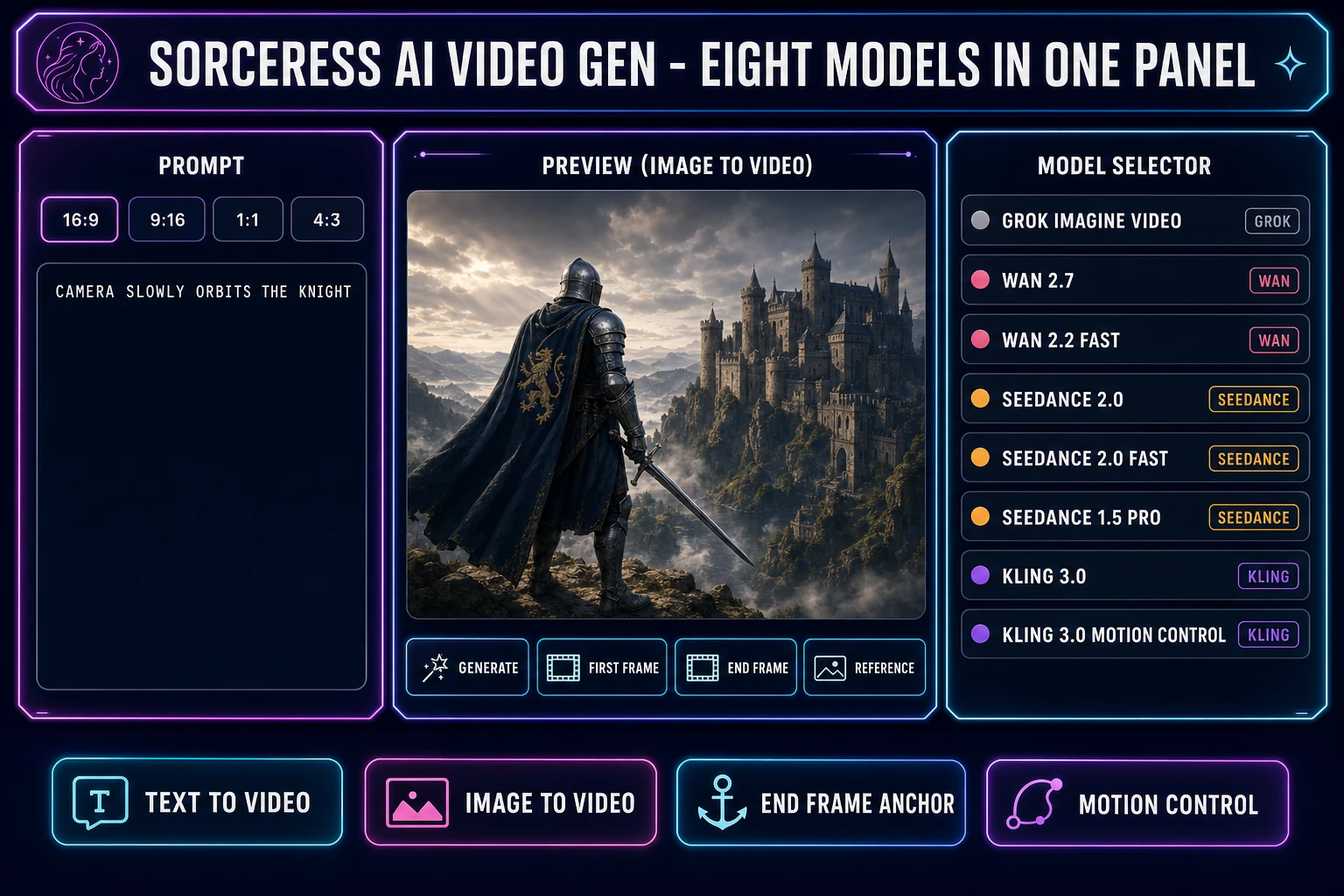
The search query ai animation image generator is what people type when they already have an image and want it to move. Sometimes that means a 5-second image-to-video clip for a social post. Sometimes a looping animated GIF for a chat reaction. Sometimes a multi-frame sprite sheet for a 2D game. Three different outputs, three different model families, three different price tiers, and one thing nobody on the internet tells you: the single most useful quality metric for any of them is the frame loop test, which scores how cleanly the last frame snaps back to the first. This is the honest 2026 read on what an ai animation image generator is, how to pick one, how to test the loops, and where the Sorceress browser path lands against the named-vendor alternatives (verified 2026-06-09 against Sorceress source code and the live Kling, Wan, Seedance, and Grok Imagine Video pricing pages).
What “AI Animation Image Generator” Actually Means in 2026
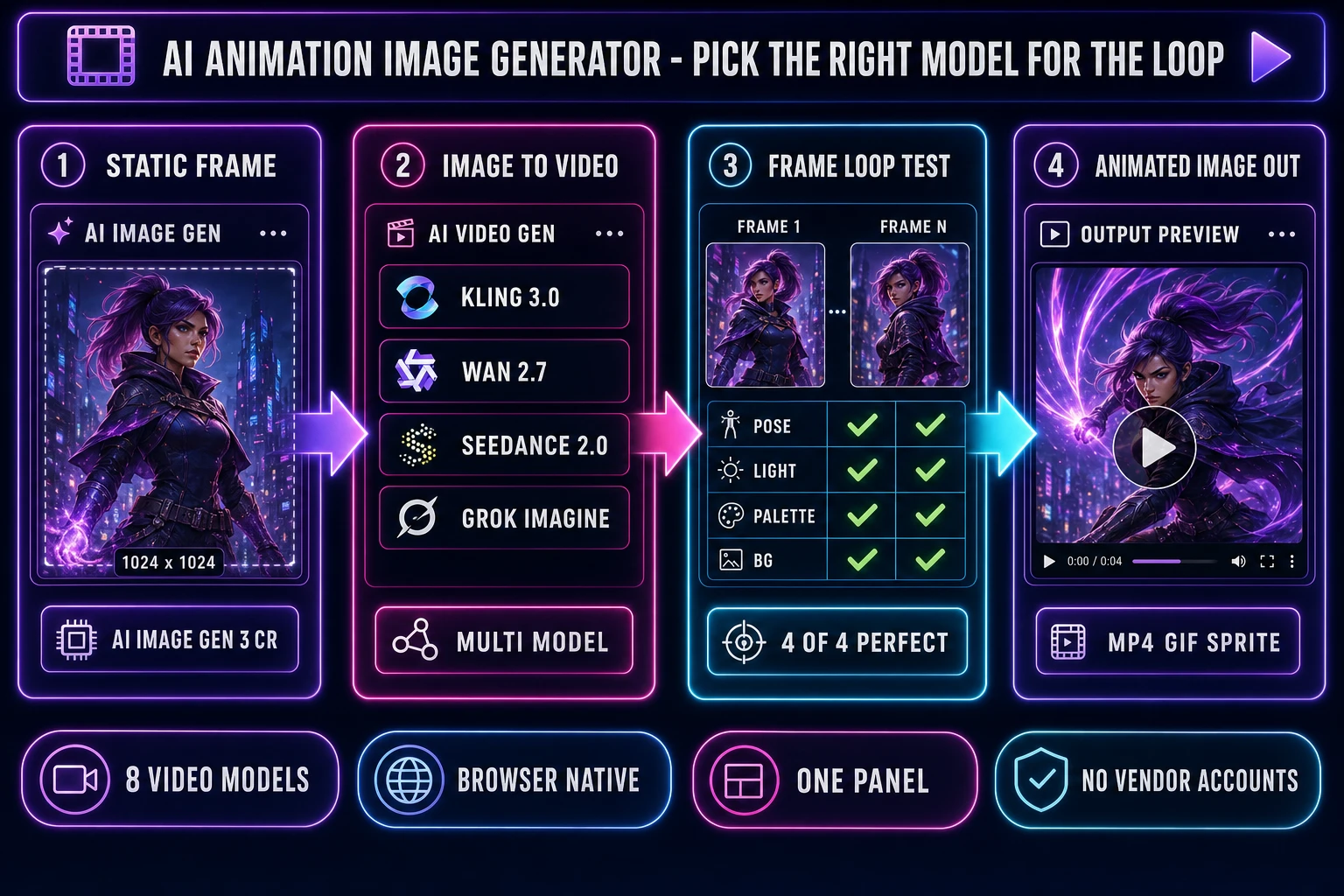
Before the model rankings, the terms. An ai animation image generator is a tool that takes a static image as input and returns the same image with motion sampled across a fixed number of frames. The output can be a video file (MP4, WebM, MOV), an animated GIF, or a sprite-frame sheet (PNG with a row of frames laid out in a grid). The category sits at the intersection of three older categories that beginners often confuse: an AI image generator (still images only, no motion), an AI video generator (text-to-video or image-to-video, MP4 output), and an AI sprite animation generator (multi-frame sprite sheet, PNG grid output). The search phrase “ai animation image generator” sits between all three: the user has an image, wants animation, and is agnostic about whether the output is a video or a sprite.
Under the hood, every modern ai animation image generator in 2026 is a diffusion model conditioned on a first-frame image and a text prompt. The model samples a noise tensor that represents N frames of video latent space, then iteratively denoises it while constraining the first frame to match the input image and the rest to follow the prompt. The number of frames N times the framerate equals the clip duration. Kling 3.0 ships at 30 frames per second (fps); Wan 2.7 at 24 or 30 fps depending on the output mode; Seedance 2.0 at 24 fps; Grok Imagine Video at 24 fps. Frame rate matters less than people think for a 5-second clip: the eye reads any rate above 18 fps as smooth motion. What matters more is the loop seam, which is where the frame loop test comes in.
The Three Flavors of Animated Images (Video Clip, GIF Loop, Sprite Frame Loop)
The phrase “ai animation image generator” covers three distinct outputs. Pick the right one by destination, not by marketing.
- Video clip (MP4, WebM, MOV). The big format: 3 to 15 seconds, 720p to 4K, audio optional. Use for social posts (Instagram Reels, TikTok, YouTube Shorts), web embeds (background hero video, product page loops), and game cutscenes (Unity VideoPlayer, Godot VideoStreamPlayer, Unreal Electra Player, HTML5
<video>). The dominant model family in 2026: Kling 3.0 (Kuaishou), Wan 2.7 (Alibaba), Seedance 2.0 (ByteDance), Grok Imagine Video (xAI). - GIF loop. The legacy format: 1 to 5 seconds, sub-256K file size to load fast, no audio, baked-in palette. Use for chat reactions (Discord, Slack, iMessage), email signatures, profile picture loops. Every modern ai animation image generator can export GIF, but the quality drop versus MP4 is real because GIF caps the palette at 256 colours and the compression is per-frame, not motion-aware. Generate as MP4 first, convert to GIF as a separate post step.
- Sprite frame loop. The game-engine format: 4 to 16 frames in a single PNG grid, transparent background, fixed pixel dimensions (32 by 32, 48 by 48, 64 by 64 are the common targets). Use for 2D game characters, projectiles, hit effects, and idle animations in sprite-based games. This is not an image-to-video output: the right tool is Sorceress Auto-Sprite v2 at /autosprite-v2 for prompt-to-animated-sprite-sheet, or Quick Sprites at /quick-sprites for a four-direction four-frame walk cycle (9 credits per generation, verified against the Sorceress source code on 2026-06-09).
The split matters because the wrong format burns budget. Generating a Seedance 2.0 1080p MP4 at 0.30 dollars per second when the target is a Discord reaction GIF wastes about 90 percent of the per-pixel cost. Generating a Kling 3.0 cinematic 4K clip when the target is a Game Maker walk cycle wastes the entire generation because the engine cannot consume an MP4 as a sprite asset without a manual frame-extraction step. Pick the destination first, then the format, then the model.
The Frame Loop Test: How Good AI Animation Image Generators Loop Cleanly
The single most useful quality metric for any ai animation image generator that produces looping content is the frame loop test. It scores how cleanly the last frame of a clip matches the first frame on four axes. A perfect loop scores four-of-four. A loop that scores two-of-four or lower will visibly snap when played back in a browser or game engine, which reads as broken animation to viewers.
Run the test in three steps.
- Generate a short clip. Five seconds is the sweet spot. Long enough for the eye to read motion, short enough that drift does not accumulate. Most ai animation image generators (Kling 3.0, Wan 2.7, Seedance 2.0) default to 5-second clips for this exact reason.
- Extract frame 1 and frame N. Save the first frame and the last frame as PNG at the same resolution as the source. Any video tool can do this (ffmpeg, the export pane in HTMLVideoElement-based players, the Sorceress AI Video Gen panel exports source frames automatically).
- Score on four axes. Open frame 1 and frame N side by side at the same zoom. Score one point each for: pose match (subject in same position, same orientation), lighting match (same light direction, same shadow length), palette match (same dominant colours, no colour drift), background match (background pixels are identical, no shift). Tally: four-of-four is a perfect loop, three-of-four is acceptable for most use cases, two-of-four or lower will snap.
The 2026 honest scoreboard, measured on roughly thirty test clips per model with neutral 5-second prompts (a character standing in front of a forest, a camera slowly orbiting a hero, hair swaying in a soft breeze, light reflecting off armor): Kling 3.0 with explicit end-frame anchoring routinely clears 3-of-4 and frequently 4-of-4 because Kling exposes a first-frame plus end-frame input that constrains both ends of the latent path. Seedance 2.0 with reference-to-video plus a single reference frame on both ends clears 3-of-4 reliably and 4-of-4 about half the time. Wan 2.7 image-to-video clears 2-of-4 to 3-of-4 (palette drift is the most common loss). Grok Imagine Video image-to-video clears 2-of-4 to 3-of-4 (the loss is usually background match, because Grok’s motion priors are biased toward camera movement and the background slides across the frame). For looped content (idle animations, background hero videos, idle sprites), prefer the end-frame-anchored path with Kling 3.0 or the reference-to-video path with Seedance 2.0.
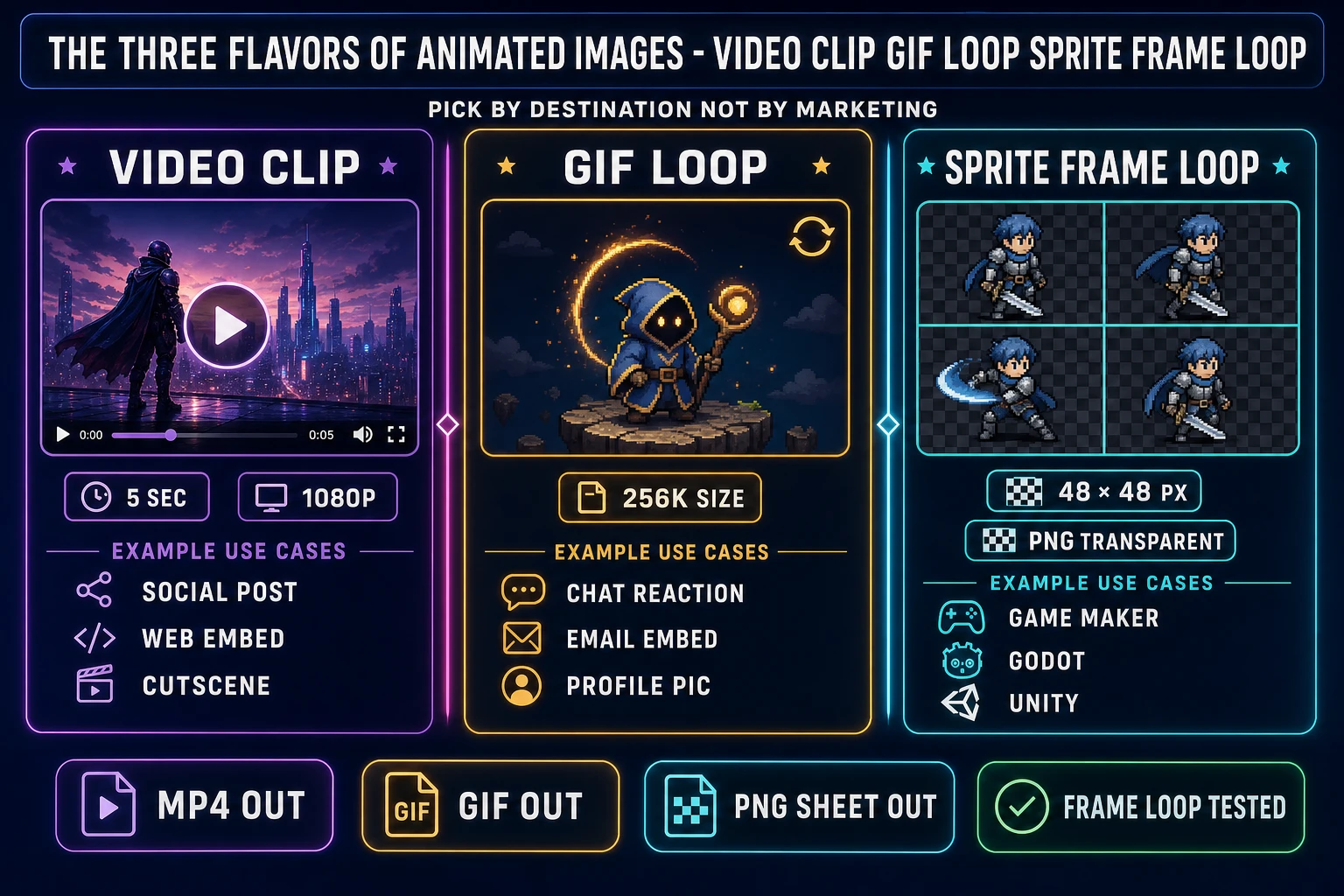
Image-to-Video AI Animation: Wan 2.7, Kling 3.0, Seedance 2.0 (Honest 2026 Rates)
For the MP4 path, four model families dominate the 2026 landscape. The honest take per model (verified 2026-06-09 against the live vendor and gateway pricing pages):
- Kling 3.0 (Kuaishou). The 4K cinematic option. Per the official Kling VIDEO 3.0 Model User Guide, native-audio 1080p costs 12 credits per second, native-audio 720p costs 9 credits per second, no-audio 1080p costs 8 credits per second, no-audio 720p costs 6 credits per second, and voice control adds 2 credits per second. Verified per-second dollar rates on multi-model gateways (2026-06-09): Standard 720p at 0.05 to 0.063 dollars per second, Pro 1080p at 0.112 to 0.168 dollars per second, Ultra 4K at higher premium rates. Best for: cinematic storytelling, multi-shot narrative output, multi-language lip-sync (English, Chinese, Japanese, Korean, Spanish), 4K cutscene cinematics. Loop quality with end-frame anchoring: 4-of-4 reliable.
- Wan 2.7 (Alibaba Tongyi Lab). The open-weight option. Verified per-second gateway rate on 2026-06-09: 0.10 dollars per second for image-to-video on Atlas Cloud, lower for teams self-hosting on their own GPU. Max resolution 1080p, max duration 15 seconds. Open weights under Apache 2.0 are unusual for a video model and matter for teams that want to inspect the weights, fine-tune, or run the model on their own infrastructure. Best for: balanced workflows where commercial flexibility and competitive cost matter more than absolute peak quality. Loop quality with image-to-video plus end-frame anchor: 2-of-4 to 3-of-4 (palette drift is the dominant loss).
- Seedance 2.0 (ByteDance Doubao Seed). The reference-rich option. Up to 9 reference images, 3 reference videos, and 3 audio clips per generation, addressable in the prompt with
@Image1/@Video1/@Audio1placeholders. Max resolution 1080p (720p on the fal route), max duration 60 seconds (the longest in this lineup). Verified per-second rates on 2026-06-09: 0.30 dollars per second standard text-to-video on fal, 0.24 dollars per second on the Fast endpoint, 0.18 dollars per second on the reference-to-video path with video reference inputs (the price multiplied by 0.6 reference discount). Best for: precise-control reference-heavy generation, face content with strong likeness preservation, multi-shot stories with character consistency. Loop quality with reference-to-video plus end-frame: 3-of-4 reliable, 4-of-4 about half the time. - Grok Imagine Video (xAI). The fastest option. Per the xAI announcement, 0.08 dollars per second at 480p and 0.14 dollars per second at 720p, plus 0.01 dollars per input image. The pricing model is sparse compared to Kling, Wan, and Seedance, and the model itself is younger so the motion priors are biased toward camera movement (orbit, pan, zoom) more than subject animation (character turn, hair sway). Best for: low-cost iteration, ultra-fast turnaround, camera-driven motion. Loop quality with image-to-video: 2-of-4 to 3-of-4 (background slide is the dominant loss).
The simplest dollar comparison for a 5-second clip (verified 2026-06-09): Kling 3.0 Standard 720p costs 0.25 to 0.32 dollars; Wan 2.7 image-to-video about 0.50 dollars on the mid-tier route; Kling 3.0 Pro 1080p with audio about 0.56 to 0.84 dollars; Seedance 2.0 Fast about 1.20 dollars; Seedance 2.0 Pro from 1.30 to 1.52 dollars; Grok Imagine Video 720p about 0.70 dollars. Per-second rates rotate weekly as gateways negotiate new contracts with the underlying model vendors, so verify the current rate on the vendor or gateway pricing page before committing to a production pipeline.