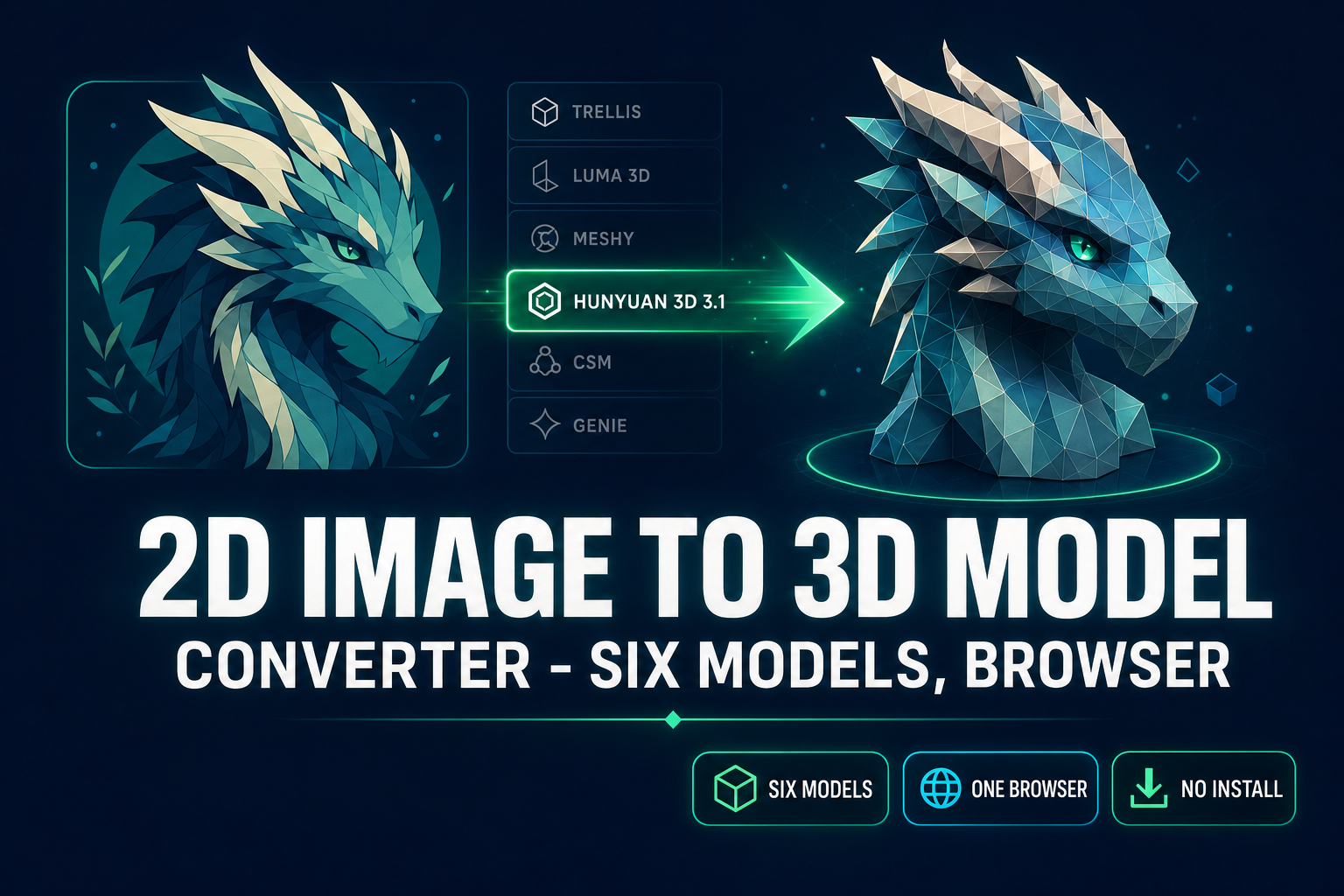
A 2D image to 3D model converter as a search query is unusual because it isn’t asking for a brand or a specific model. It is asking for a category — a tool that takes a 2D image (a photograph, an AI-generated character render, a hand-drawn concept) and returns a 3D mesh you can drop into a game engine. Most search results land on a single-vendor surface: meshy.ai, tripo3d.ai, kaedim.com — each pinned to one model, one pricing tier, one quality envelope. That works if you are certain Meshy 6 is the right model for every input you will ever convert. Most workflows are not certain. Sorceress 3D Studio is a browser-based 2D image to 3D model converter that routes six AI models on one credit balance — Hunyuan 3D 3.1, Meshy 6, TRELLIS 2, TRELLIS, Rodin 2.0, and Tripo v3.1 — and lets you swap between them per generation. Below is what the tool does, the five-step workflow, the six-model rail with credit costs and use cases, the Three.js loader code that drops the resulting GLB straight into a browser scene, and the five mistakes that ruin converter outputs. Verified May 18, 2026 against src/lib/threed-models.ts, the live Three.js r184 release notes (April 16, 2026), and the glTF 2.0 specification.
What “2D image to 3D model converter” actually means in 2026
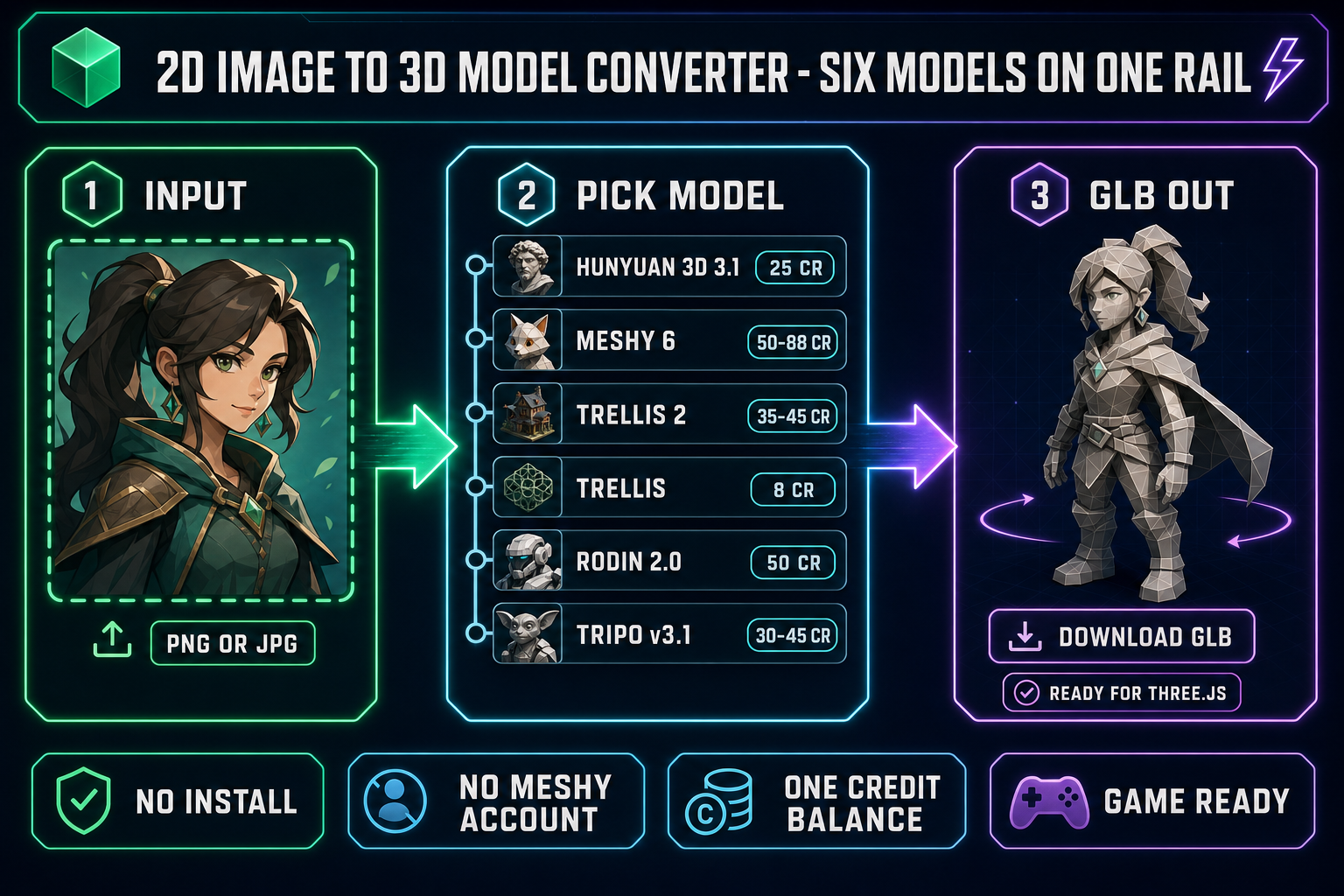
A 2D image to 3D model converter is a tool that takes a single image and returns a textured 3D mesh. The default output is a glTF 2.0 binary file (.glb), with mesh, UV maps, and material textures embedded into a single drag-and-droppable asset. Some models — Tripo v3.1 with the quad-mesh option, Rodin 2.0 with its multi-format export — emit FBX, OBJ, USDZ, or STL instead, but GLB is the canonical default because every modern engine loads it natively.
The thing a 2D image to 3D model converter is not is photogrammetry. Photogrammetry needs sixty or more photos taken from every angle of a real physical object and reconstructs the geometry from the parallax between views. A 2D image to 3D model converter takes one image and infers the back of the mesh from the front using a generative reconstruction model trained on millions of meshes. The trade-off is named honestly: photogrammetry is metrologically accurate (the geometry mirrors the real object to within millimeters), and a 2D image to 3D model converter is creatively plausible (the geometry looks right but is a synthesized guess for everything the camera could not see).
The output ships engine-ready in 2026. Three.js r184 (April 16, 2026 release) loads GLB through GLTFLoader. Phaser 4 handles 3D scenes through Three.js under the hood, so the same loader works inside a browser game. Godot, Unity, and Unreal all consume GLB natively. PBR materials (base color, metallic, roughness, normal) travel inside the GLB — no relinking step after the download, no separate texture-import dance. That portability is the reason a converter output is a finished asset rather than a starting point.
The converter intent: one tool, six AI models on tap
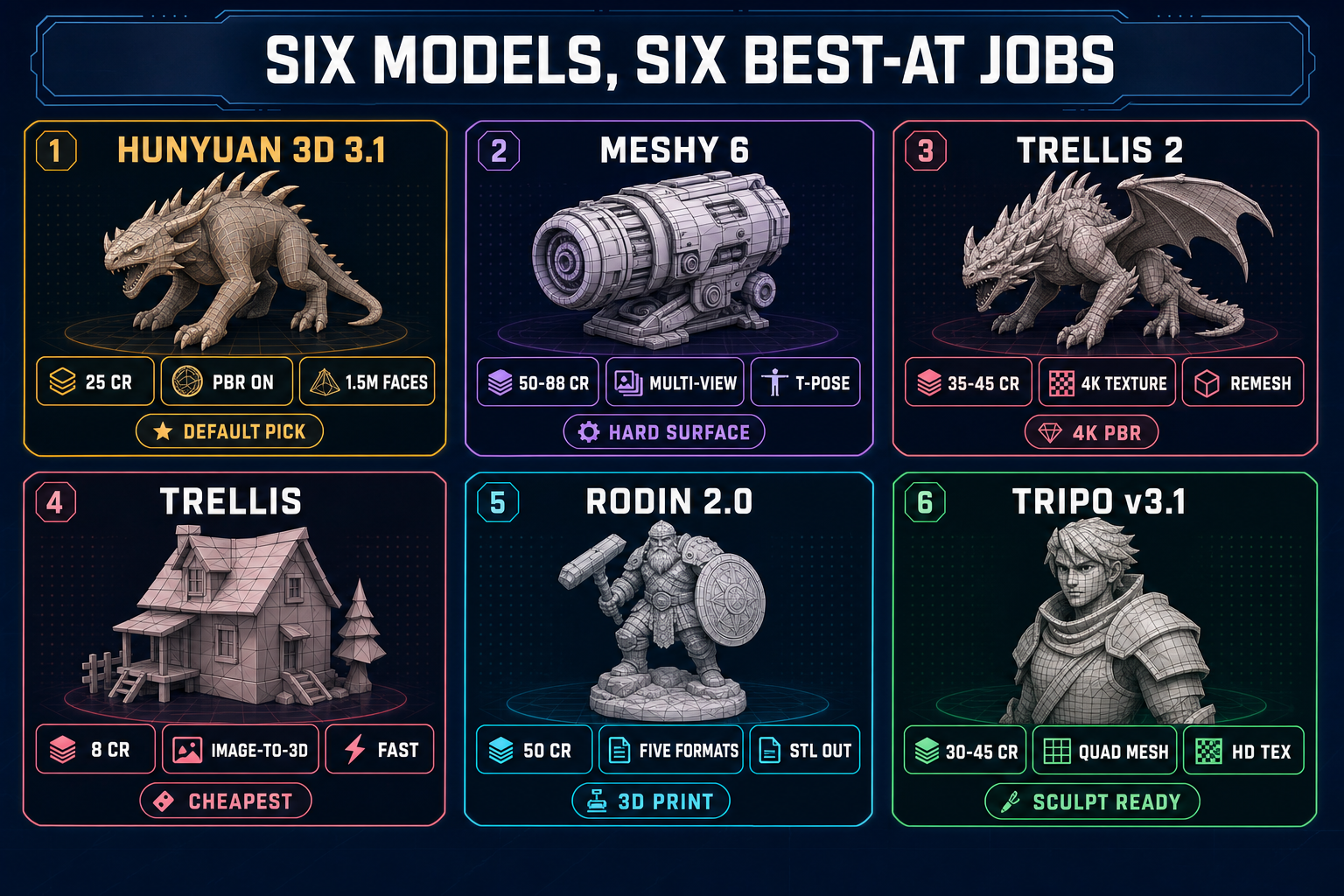
The reason “2D image to 3D model converter” is a separate query from “Meshy AI” or “Tripo” is intent. Brand-anchored searches (meshy ai image to 3d, tripo ai image to 3d model) come from someone who already picked a model and wants the workflow for that model. The converter query comes from someone who has not picked yet — usually because they have multiple input types (characters, props, environments, hard-surface mechanical parts) and one model rarely wins on all of them.
That mismatch is why a single-vendor 2D image to 3D model converter forces compromise. Meshy 6 is excellent at hard-surface props with sharp creases and weak on stylized creatures. TRELLIS 2 has the cleanest 4K textures but does not emit quad meshes. Tripo v3.1 emits true quads but is slower than Hunyuan 3D 3.1 on most subjects. The honest answer is to pick per input, which means you need a converter with a model picker, not a converter with one model.
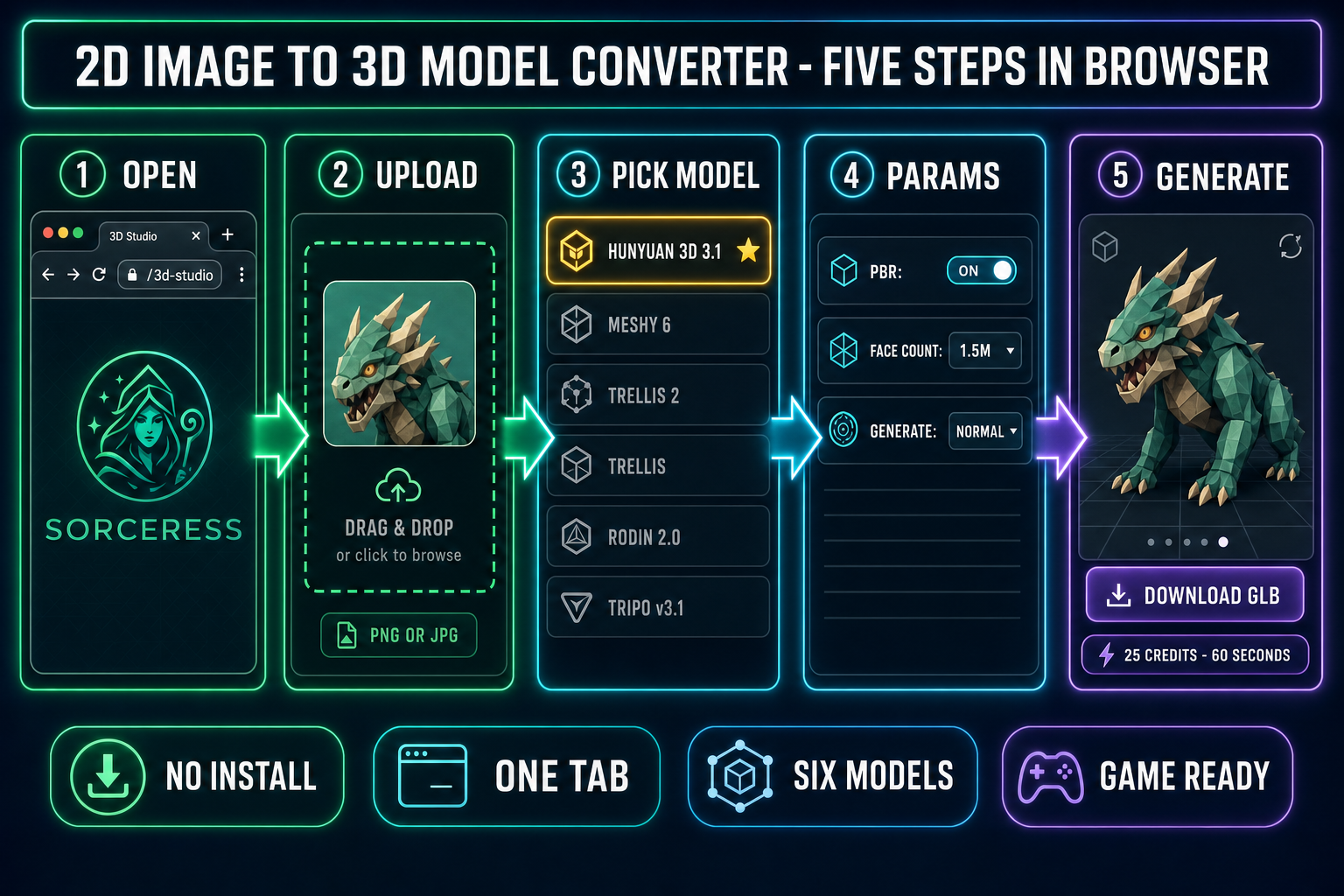
Sorceress 3D Studio is built around that picker. The left panel of the app is a six-model rail. The center panel is the canvas where the 2D input renders alongside the resulting 3D preview. The right panel is the per-model parameter sheet. Switch models with one click; the parameter sheet swaps to the new model’s knobs. One Sorceress credit balance covers all six. No separate Meshy account, no separate Tripo subscription, no install. The whole thing runs in a browser tab. Verified May 18, 2026 against the THREED_MODEL_ORDER array in src/lib/threed-models.ts.
The five-step 2D image to 3D model converter workflow (in your browser)
- Step 1 — open 3D Studio. Sorceress 3D Studio loads inside any modern browser tab, no install. The left panel is the model rail (six entries). The center panel is the canvas where the input image and resulting 3D preview render. The right panel is the parameter sheet for whichever model you select.
- Step 2 — upload your 2D image. Drag a PNG or JPG onto the canvas. The cleanest converter output comes from a single subject on a transparent or solid-color background, lit from a soft front-facing angle, no harsh sun shadows or busy background patterns. Run the input through BG Remover first if the original photo has a busy background — every visual conflict in the input becomes geometric noise in the output mesh.
- Step 3 — pick a model from the rail. The rail shows six options in this order, verified against
THREED_MODEL_ORDER: Hunyuan 3D 3.1 (the recommended default), Meshy 6, TRELLIS 2, TRELLIS, Rodin 2.0, and Tripo v3.1. Hunyuan 3D 3.1 is the right pick for almost any character or creature input. Switch only when the input has a specific need a different model handles better — covered in the next section. - Step 4 — tune the params that matter. The right panel swaps to the selected model’s parameter sheet. Defaults are honest for most subjects. The high-leverage knobs across models: PBR on/off (on for any real-lit scene), face count or polycount (max for best textures, decimate afterwards for web/mobile targets), pose (T-pose or A-pose for humanoids you plan to rig), and texture quality (HD on Tripo v3.1, 4K on TRELLIS 2). Skip the rest unless you have a specific reason to touch them.
- Step 5 — click Generate. The model picks up the input, runs through Replicate or fal.ai depending on the model, and returns a downloadable GLB (or FBX / STL / USDZ on the models that emit those) plus a real-time 3D preview rotating in the canvas. Drag the file into your engine project. That is the entire 2D image to 3D model converter workflow in your browser.