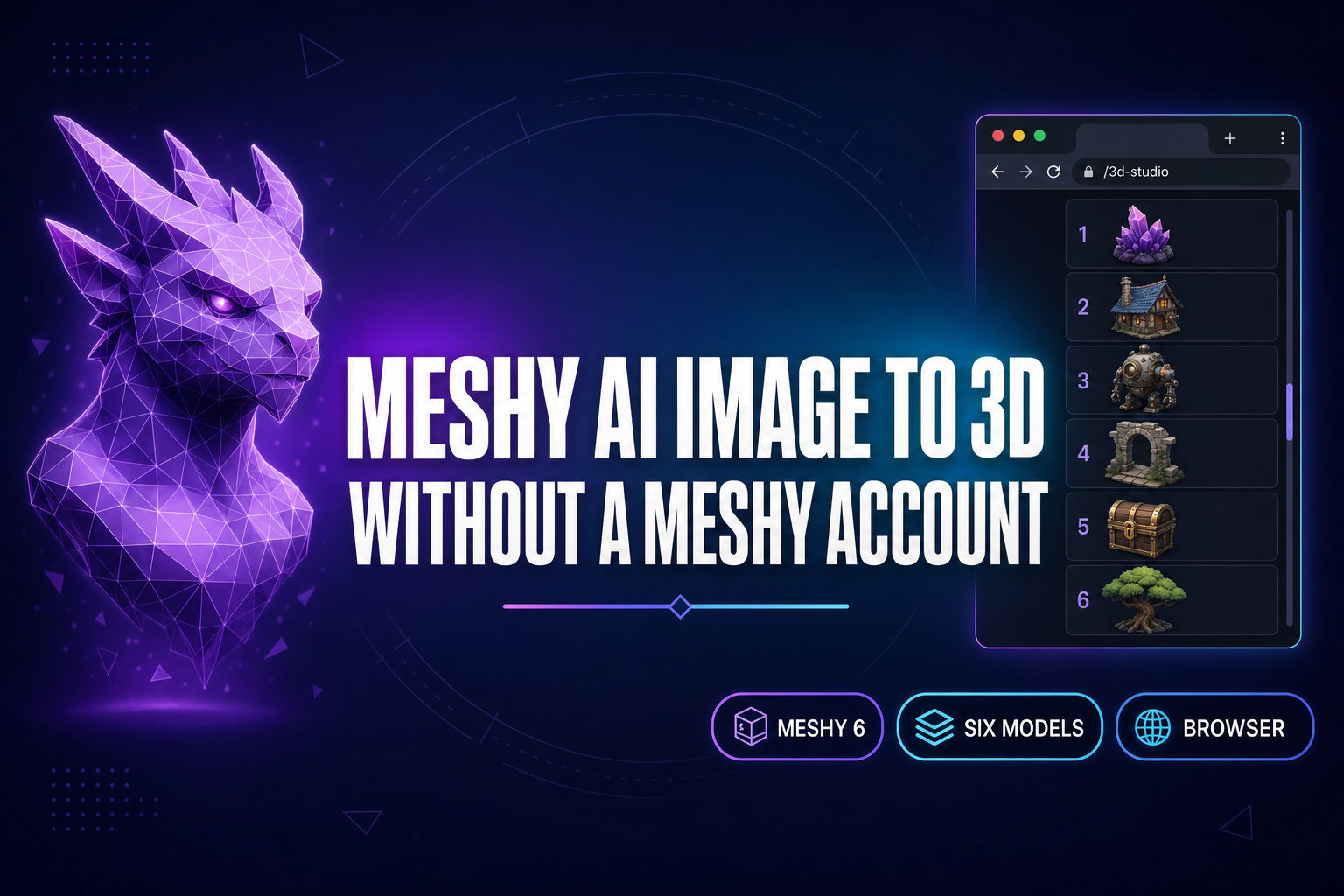
Meshy AI image to 3D turns a single photograph or AI-generated image into a textured GLB mesh, and most of the searches landing on this query in May 2026 hit meshy.ai’s pricing page first — Free tier locked to the older Meshy 5 model with a ten-download monthly cap, $20 per month for Pro, $60 for Studio. That price is reasonable if Meshy is the only 3D model you will ever need. Most game-dev workflows want a model picker, not a single-vendor subscription. Sorceress 3D Studio routes Meshy 6 in your browser via Replicate, no Meshy account required, alongside five other image-to-3D models on a single credit balance. Below is the five-step Meshy AI image to 3D workflow inside 3D Studio, the Meshy 6 settings that actually move the output, the comparison between Meshy 6 and the other five models, and the Three.js loader code that drops the GLB straight into a browser game. Verified May 17, 2026 against src/lib/threed-models.ts, the live Meshy.ai pricing page, the Meshy 6 launch notes, and the glTF 2.0 specification.
What “Meshy AI image to 3D” actually does in 2026
Meshy AI image to 3D is the workflow that takes a single image — a photograph, an AI-generated character render, a hand-drawn concept — and returns a textured 3D mesh. The output is a glTF 2.0 binary file (.glb), with mesh, UV maps, and material textures embedded into a single drag-and-droppable asset. It is not photogrammetry. Photogrammetry needs sixty-plus photos taken from every angle of a real physical object. Meshy AI image to 3D needs one image, and infers the back of the model from the front using a diffusion-style 3D generation model trained on millions of meshes.
Meshy 6, the model behind most Meshy AI image to 3D results in 2026, was released by Meshy on January 18, 2026. It supersedes Meshy 5 with sharper hard-surface geometry, a low-poly mode for stylized output, multi-color 3D printing support, and an updated API surface that partner platforms can call directly. The model accepts three input modes verified against THREED_MODELS['meshy-6'].inputModes: image-to-3D, text-to-3D, and multi-image-to-3D (front, back, and side reference simultaneously, which sharpens the inferred geometry).
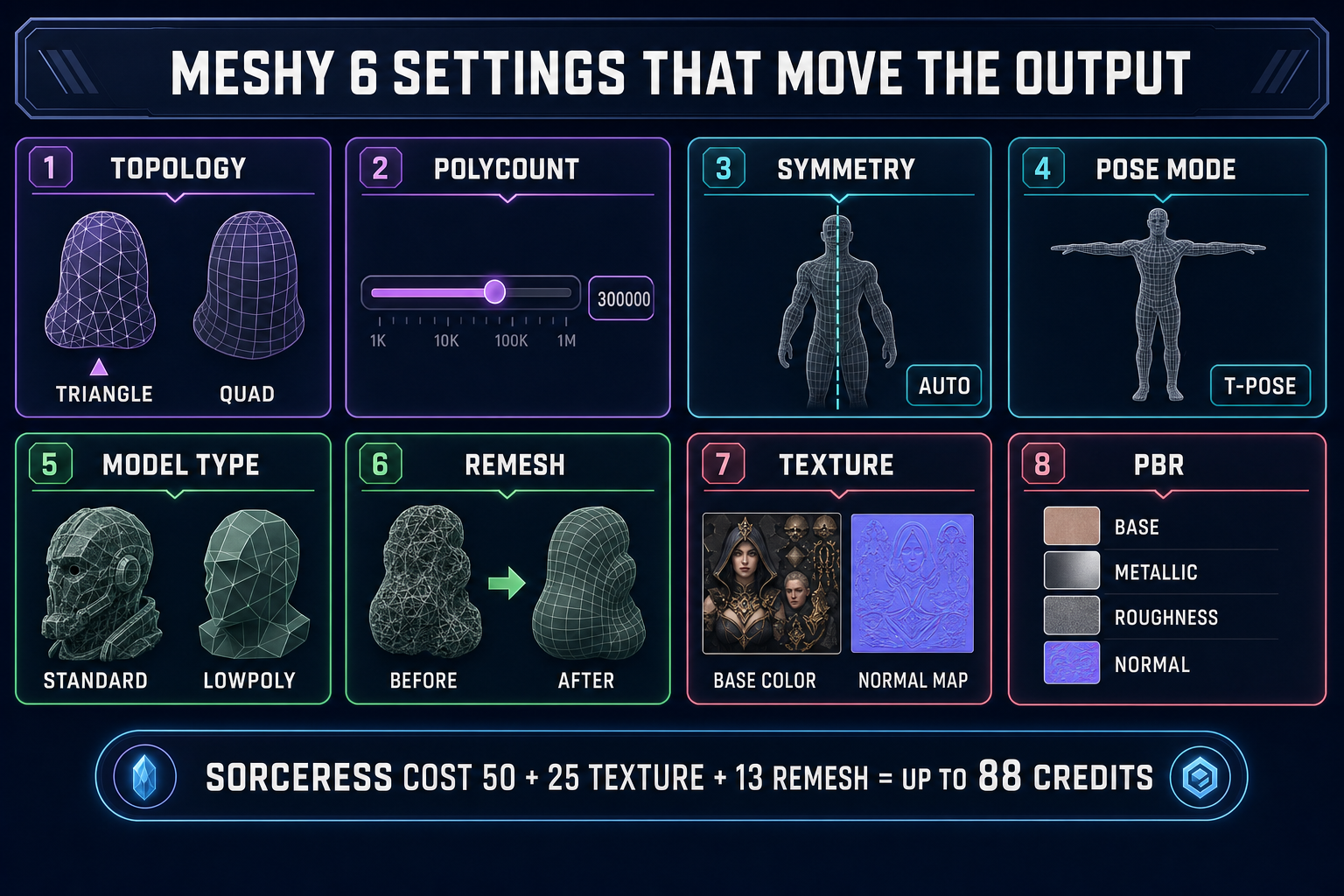
The output is engine-ready out of the box. Three.js, Phaser’s 3D scenes, and every modern 3D modeling pipeline load GLB natively. The textures travel with the file, so there is no relinking step after the download. The mesh comes UV-unwrapped at up to 300,000 polygons. With PBR materials enabled, the GLB ships with base color, metallic, normal, and roughness maps already mapped to the geometry — ready for a real-lit scene the moment it lands in the engine.
Meshy 6 vs Meshy 5: what changed in January 2026
The Meshy 6 release notes name four upgrades worth knowing about before you pick a model. First, geometry. Meshy 5 occasionally produced fused arms or smudged edges on hard-surface objects (weapons, mechanical props with sharp creases). Meshy 6 holds those edges. Second, low-poly mode. Meshy 6 added a model_type=lowpoly flag that produces stylized low-polygon output without losing silhouette quality — useful for handheld and mobile game targets where draw-call budgets matter. Third, multi-color 3D printing. The new model emits per-vertex color data in a format compatible with multi-color FDM and resin printers (relevant for the image to 3D print pipeline). Fourth, the API. Meshy 6 ships parameter-rich endpoints that make Replicate-style routing cleaner.
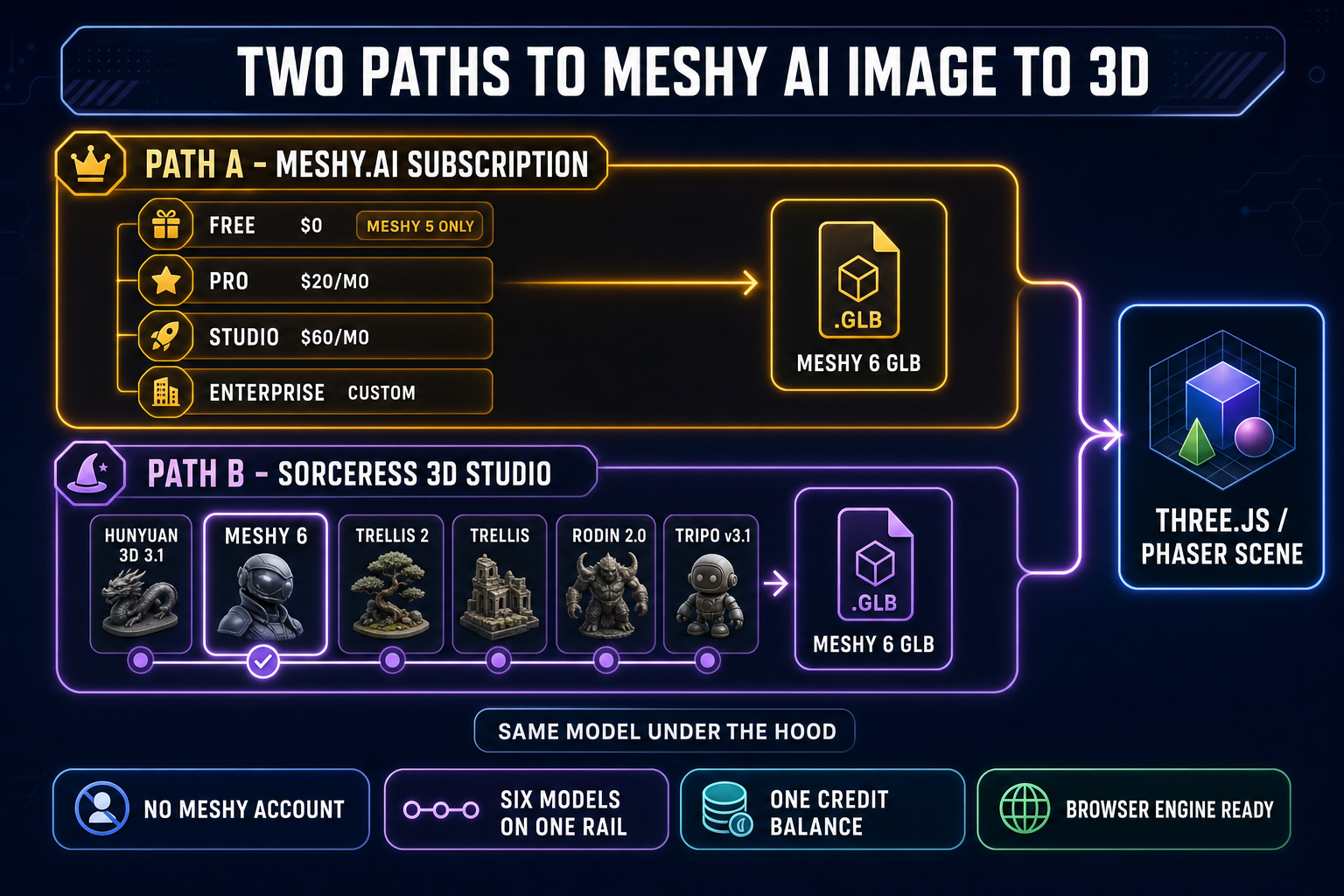
The catch — and this is why the Meshy AI image to 3D search query matters — Meshy gates Meshy 6 behind paid plans. The Free tier on meshy.ai gives 100 monthly credits but caps total downloads at ten per month and locks you to the older Meshy 5 model. The Pro tier ($20 per month or $192 per year) lifts both limits and adds API access, four free retries per generation, and high queue priority. The Studio tier ($60 per month or $720 per year) raises monthly credits to 4,000, lifts concurrency to twenty parallel tasks, and adds team management. Enterprise is custom. Verified May 17, 2026 against the meshy.ai pricing page.
Per-generation cost on meshy.ai is 20 credits for Meshy 6 image-to-3D without textures, 30 credits with textures — against 5 and 15 credits respectively for the older models. The Sorceress 3D Studio cost denomination is different, so the like-for-like comparison happens at the dollar level, not the credit level.
Two paths to use Meshy AI image to 3D today
Path A is Meshy direct. Sign up at meshy.ai, pick a tier, get 100 / 1,000 / 4,000 monthly credits depending on plan, generate inside Meshy’s web app. Each Meshy 6 image-to-3D run on meshy.ai costs 20 credits without textures or 30 credits with textures. Free-tier downloads are restricted to Meshy 5, so a Free-tier account effectively does not give you Meshy 6 access.
Path B is Sorceress 3D Studio. Sorceress runs Meshy 6 through Replicate’s public API surface, no separate Meshy account required. The model parameters are exposed in the Sorceress UI directly — the same topology, polycount, symmetry, pose, and PBR knobs Meshy exposes on its own dashboard. The Sorceress credit cost for Meshy 6 image-to-3D is 50 credits base, plus 25 if textures are enabled, plus 13 if remesh is enabled — up to 88 credits per generation, verified May 17, 2026 against THREED_MODELS['meshy-6'].getCredits in the source.
The reason Path B exists is straightforward. Replicate hosts Meshy 6 as a publicly callable model. Sorceress 3D Studio routes through Replicate, alongside five other 3D models, and surfaces them all in one browser tab on a single credit balance. The trade-off is real and worth naming. Meshy direct gives you a vendor-native UI tuned to Meshy alone, support that knows Meshy quirks, and the latest Meshy features the same day they ship. Sorceress 3D Studio gives you Meshy 6 plus five other models, a unified workflow that does not require a Meshy account, and a credit pool that also covers the rest of the Sorceress tool catalog. Pick by what you actually need: if Meshy is the one model your pipeline depends on, the meshy.ai subscription is the cleanest answer. If you want to compare Meshy 6 against Hunyuan 3D 3.1, TRELLIS 2, TRELLIS, Rodin 2.0, and Tripo v3.1 inside one tab, the Sorceress route is the lighter setup.
The five-step Meshy AI image to 3D workflow (in your browser)
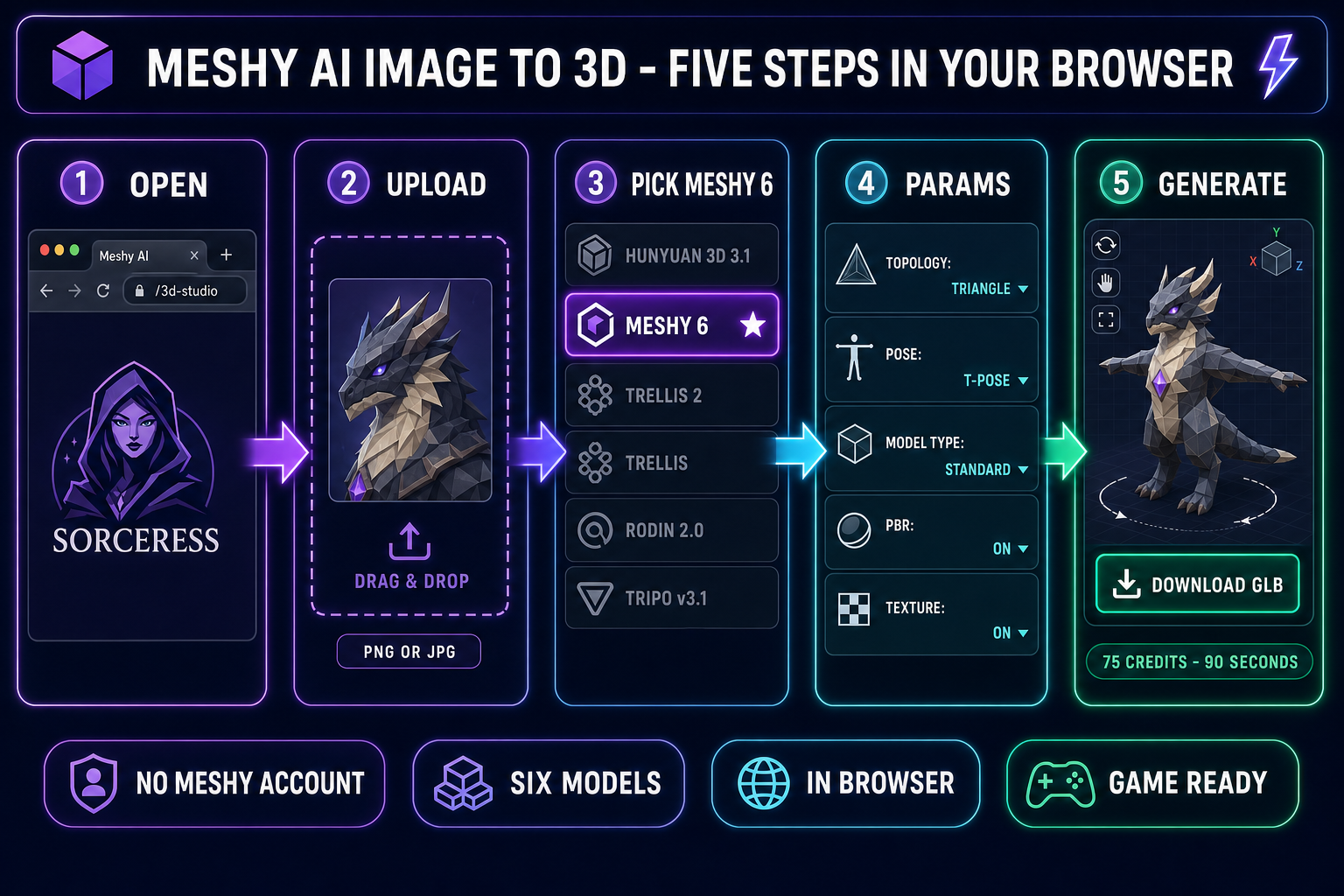
- Step 1 — open 3D Studio. Sorceress 3D Studio loads inside any modern browser, no install. The left panel is the model rail (six models). The center panel is the canvas where the input image and the resulting 3D preview render. The right panel is the parameter sheet for whichever model you select.
- Step 2 — upload your image. Drag a PNG or JPG onto the canvas. The input that produces the cleanest Meshy AI image to 3D output is a single subject on a transparent or solid-color background, lit from a soft front-facing angle, no harsh sun shadows. Clean the input through BG Remover first if the original photo has a busy background — every visual conflict in the input shows up as geometric noise in the mesh.
- Step 3 — pick Meshy 6 from the model rail. The rail shows six options in this order: Hunyuan 3D 3.1 (the Sorceress default), Meshy 6, TRELLIS 2, TRELLIS, Rodin 2.0, and Tripo v3.1. Click Meshy 6. The right-panel parameter sheet swaps to Meshy 6’s settings.
- Step 4 — set the parameters that matter. Defaults are honest for most subjects. The five settings worth touching:
topology(triangle for an engine asset, quad for sculpting prep),pose_mode(set toa-poseort-poseif you plan to rig the character),model_type(standardfor detailed,lowpolyfor stylized),enable_pbr(turn on for game-ready PBR maps), andshould_texture(leave on; the geometry-only run is rarely what you actually want). - Step 5 — click Generate. Meshy 6 typically returns in one to three minutes depending on Replicate queue depth. The result lands as a downloadable GLB plus a real-time 3D preview rotating in the canvas. Drag the GLB into your engine project. That is the entire Meshy AI image to 3D workflow in your browser, no Meshy.ai account.