Map How to Make a Game With AI (Indie 2026 Path)

By Arron R.12 min read
How to make a game with AI in 2026 — map the indie path across eight layers (code, art, 2D, 3D, rigging, animation, voice, music, SFX) using browser-native Sorc

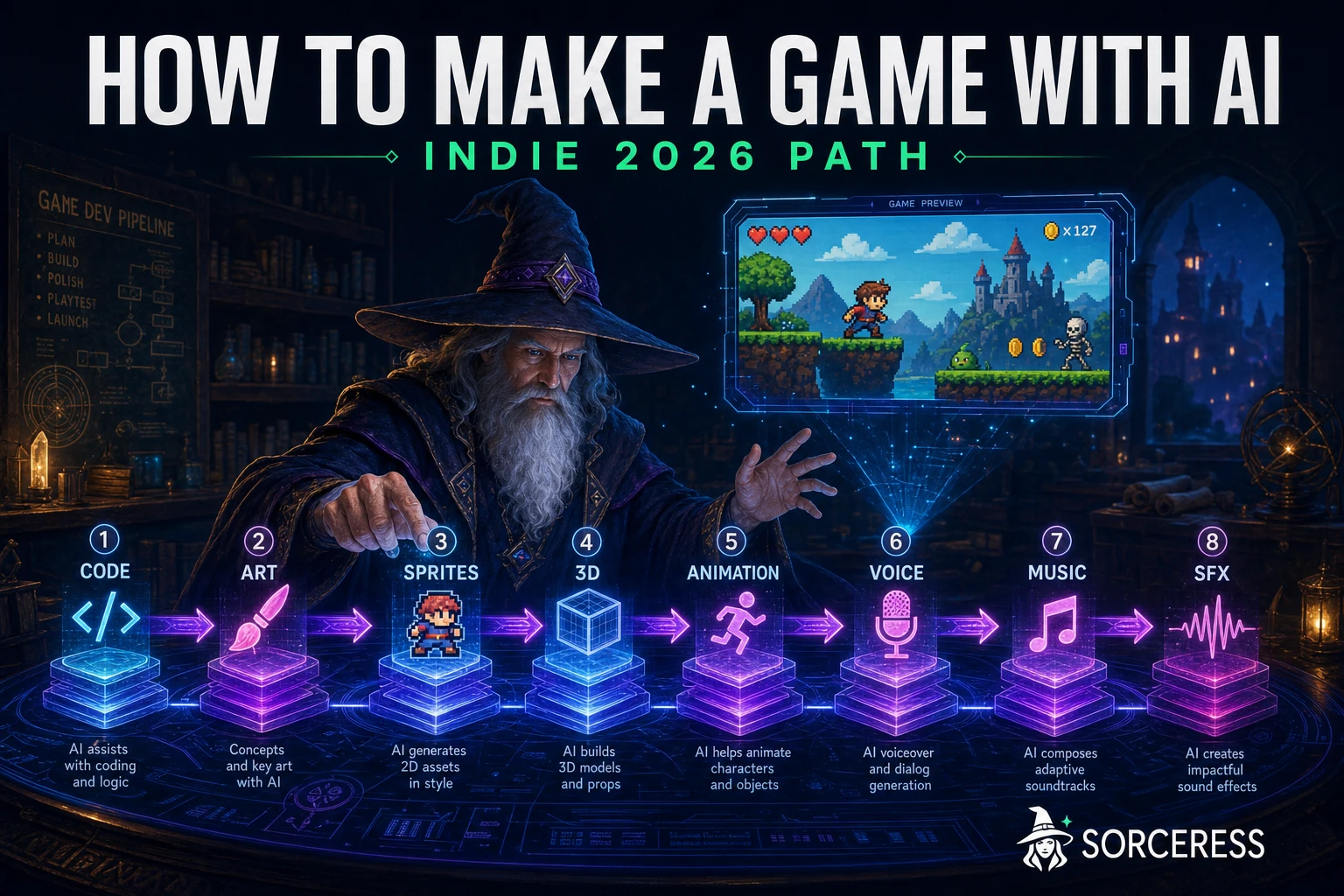
Figuring out how to make a game with AI in 2026 looks like a single question with a single answer — pick a tool, type a prompt, ship a game. The reality is closer to a map than a button. An honest indie pipeline crosses eight tool layers — code, art, 2D sprites, 3D models, animation, voice, music, and SFX — and the right answer is not which tool, but how the layers connect. This guide maps the whole path with every credit cost, model name, and Sorceress feature verified against the live source on June 16, 2026, and frontier model pricing fetched the same day.
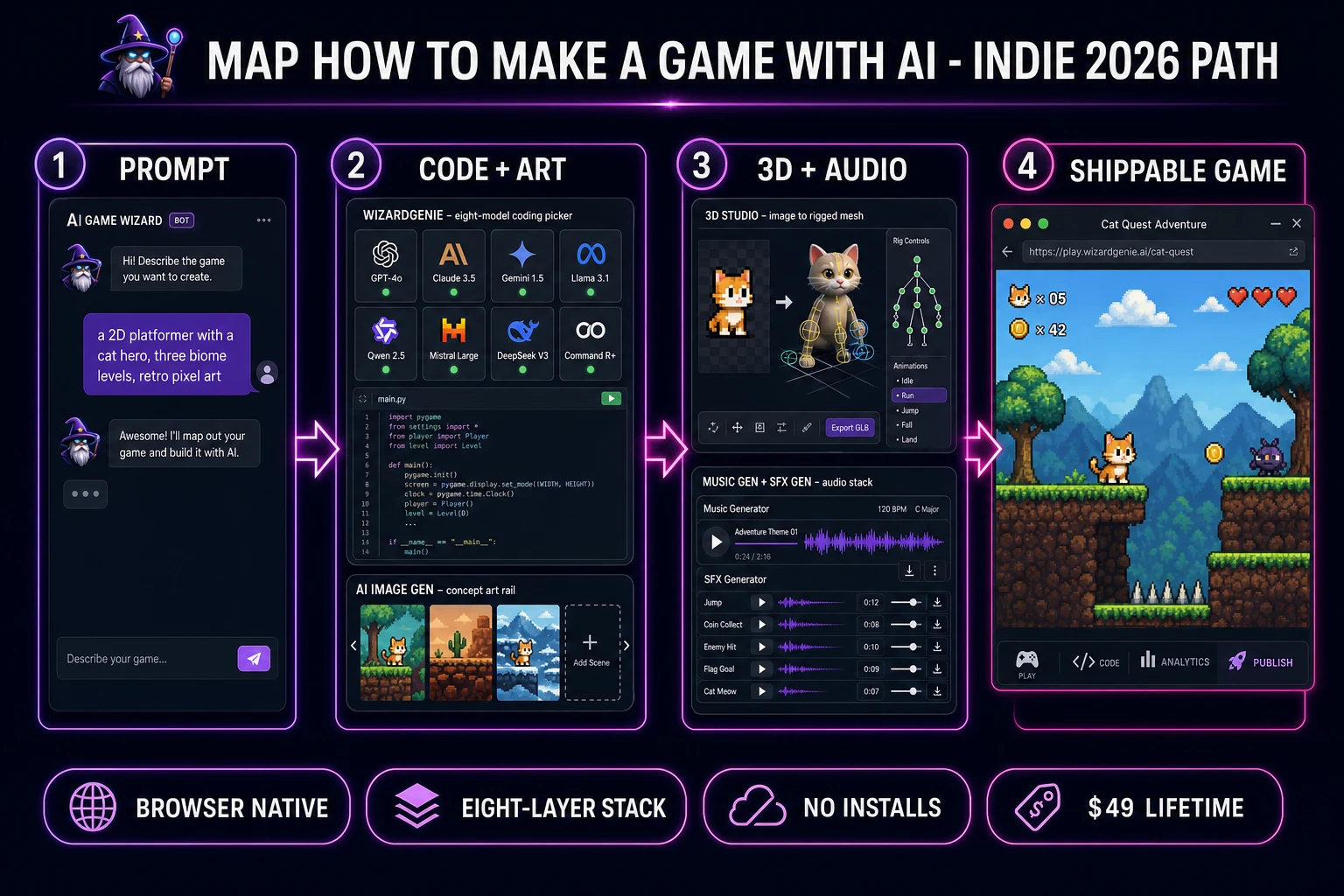
How to make a game with AI in 2026 four-step pipeline showing prompt, code and art generation, 3D and audio layers, and a shippable browser game
The 2026 path on how to make a game with AI crosses four phases in one browser tab — prompt, code-plus-art, 3D-plus-audio, and a shippable build — with WizardGenie driving the engine layer and the full Sorceress catalog covering the asset layers.

What “how to make a game with AI” actually means in 2026

The phrase how to make a game with AI hits the search engines roughly 90 times per month in 2026, but the search intent splits along two axes. The no-code axis covers someone with zero programming background who wants a large language model to write the code, run the build, and ship the game. The asset-pipeline axis covers a developer who can code (or who is happy to let an AI engine handle scaffolding) but wants AI to do the heavy lifting on the art, music, voice, and 3D layers. Both axes are valid intent.

The 2026 answer to either axis is the same architecture — an AI-powered game engine on the code side, paired with a full asset-generation suite for everything the engine cannot create on its own. The engine writes the source files in a real framework (Three.js for 3D web, Phaser for 2D web, occasionally a server-side engine if the project warrants it). The asset suite produces the sprites, tilesets, characters, animations, voices, music tracks, and sound effects that the engine code references. Neither half of the answer is optional. A prompt-to-code engine with no asset pipeline ships a colored-rectangle demo; an asset pipeline with no engine ships a folder of files that nobody can play.

The honest indie definition of how to make a game with AI in 2026 is this — a single browser tab covering both halves, a single credit pool covering both halves, and a developer in the driver’s seat for taste, scope, and direction. The rest of this guide maps the eight layers and the tools that fill them.

The honest 2026 AI game-dev stack — eight layers, browser-native

An end-to-end indie game-with-AI stack is not one tool; it is a stack of eight specialised layers, and a good 2026 pipeline runs all eight inside the browser without installing an editor, an SDK, or a model runtime.

  1. Code. The AI engine that turns a natural-language prompt into a working game scaffold, then iterates on the source files. Sorceress’ answer is WizardGenie at /wizard-genie/app, which exposes an eight-model picker spanning Claude Opus 4.7, Sonnet 4.6, GPT-5.5, Gemini 3.1 Pro, DeepSeek V4 Pro, Kimi K2.5, Grok 4.2, and MiniMax M2.7.
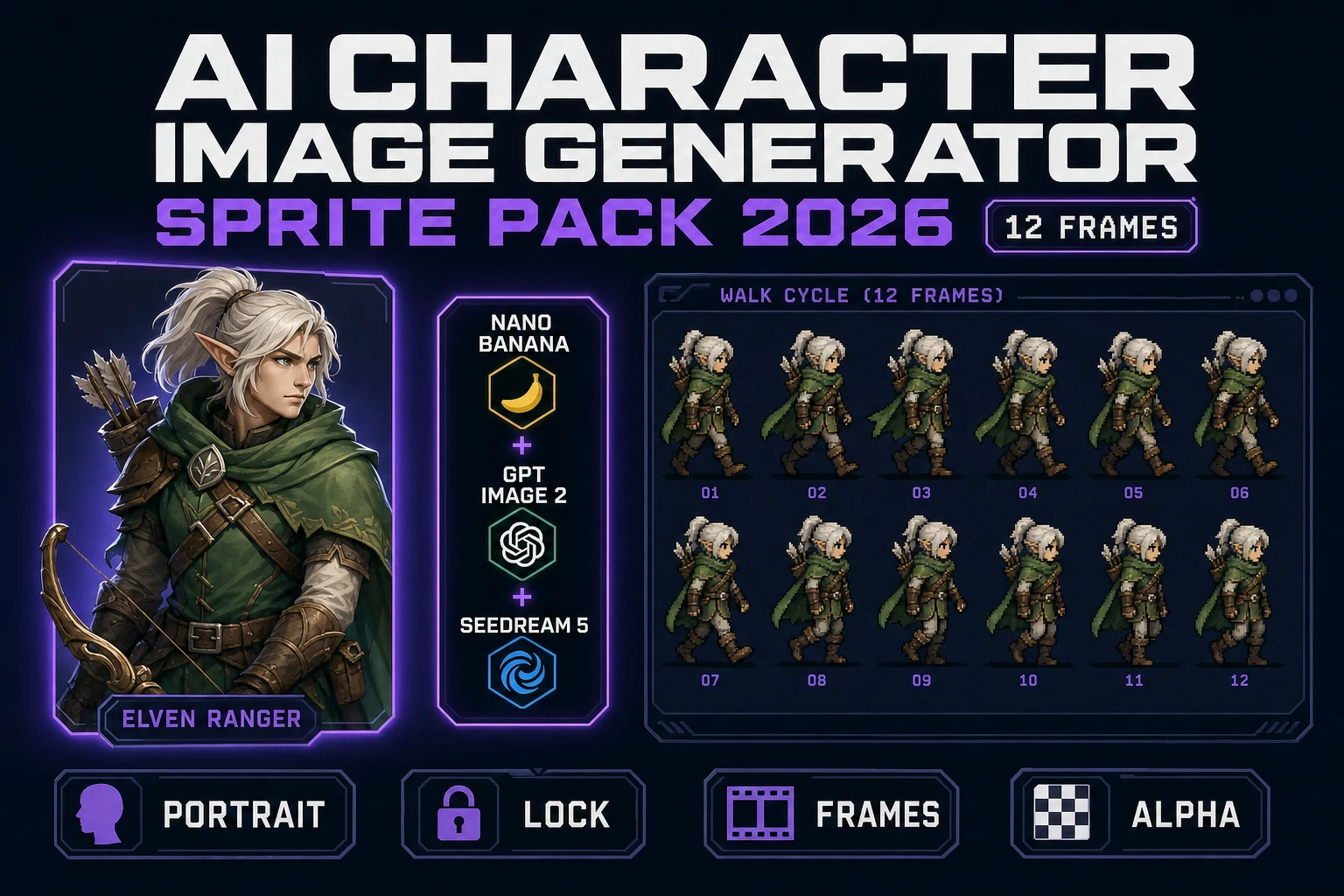
  2. Concept art. The text-to-image rail for backgrounds, props, character concepts, and reference frames. AI Image Gen at /generate runs seven image models (Nano Banana Pro, Nano Banana 2, GPT Image 2, Seedream 5 Lite, Flux 2 Pro, Z-Image Turbo, Grok Imagine) so the developer can pick the right balance of speed, photorealism, and creative freedom per shot.
  3. 2D sprites. The frame-based animation layer — walk cycles, idles, attacks, VFX. Quick Sprites at /quick-sprites handles four-direction walk cycles, small-sprite icons, and visual-effects spritesheets at 9 credits per generation, then Pixel Snap handles pixel-perfect quantization.
  4. Tilesets. Grid-aligned level art for platformers, top-down maps, and tile-based RPGs. Tileset Forge at /tileset-creator runs a three-phase upload-detect-build pipeline with nine-anchor placement, four stretch modes, and rotation and flip controls.
  5. 3D models. Image-to-3D mesh generation with auto-rigging for humanoid characters. 3D Studio at /3d-studio routes through seven image-to-3D providers (Tripo, Meshy, Hunyuan, Trellis, Hyper3D Rodin, Real3D, Tencent Hunyuan 3D 3.1 Enhanced) plus a built-in auto-rigging path.
  6. Animation. Motion data for rigged 3D characters and animated 2D sprite sheets. The 3D Studio Animate tab covers AI Text-to-Animation; Auto-Sprite v2 covers 2D motion generation from a single character frame.
  7. Voice. NPC dialogue, narrator lines, voice barks. Speech Gen at /speech-gen runs voice generation with optional voice-clone seeding.
  8. Music and SFX. Loopable tracks, stings, and the in-world sound layer. Music Gen at /music-gen runs at 10 credits per track via Suno V5.5; SFX Gen at /sfx-gen runs at 3 credits per sound; SFX Editor is client-side and free.

Every layer above shares a single credit pool, a single project workspace, and the same $49 Lifetime tier at the plans page. The full lineup is at the tools guide.
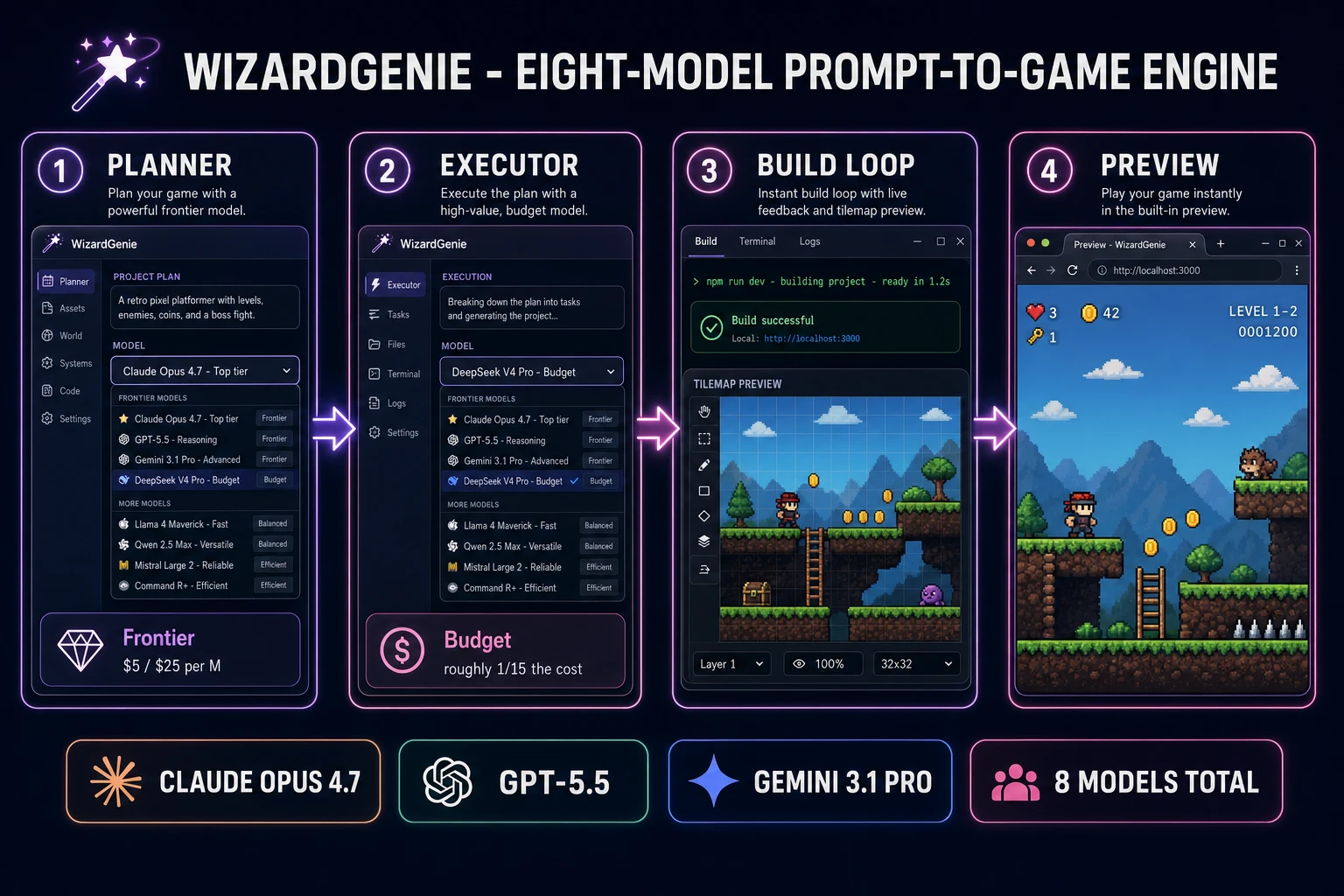
WizardGenie eight-model coding picker showing Claude Opus 4.7 as Planner, DeepSeek V4 Pro as Executor, terminal build output, and a browser preview of a side-scrolling pixel platformer
The code half of how to make a game with AI in 2026 routes through an AI-powered game engine that exposes the full frontier-model lineup — pin Claude Opus 4.7 for hard reasoning, swap DeepSeek V4 Pro for cheap typing-side execution.

Map the genre to the tools — how to make a game with AI for platformer, RPG, and roguelike

The eight-layer stack does not change between genres, but the relative weight on each layer does. The honest 2026 map on how to make a game with AI for the three most-shipped indie genres — platformer, RPG, roguelike — runs like this.

Platformer. Heavy on the 2D-sprite layer (a hero with four-direction walk plus idle plus jump plus attack), heavy on the tileset layer (ground, walls, decorations, hazards), light on the 3D layer (none), moderate on music and SFX (one looping track per biome, a dozen jump and land sounds). The Sorceress pipeline: WizardGenie writes the Phaser scaffold, AI Image Gen produces concept art for the hero and biomes, Quick Sprites generates the animated sprite sheets, Tileset Forge produces the grid-aligned levels, Music Gen produces the per-biome tracks, SFX Gen produces the jump and impact stack.

RPG. Heavy on the character-art layer (dozens of NPCs and enemies), heavy on the tileset layer (multiple biomes plus interior scenes), heavy on the voice layer (NPC barks and main-quest dialogue), moderate on the 3D layer (optional — pure 2D RPGs are still common in 2026). The pipeline shifts: WizardGenie writes the quest, save, and dialogue systems; AI Image Gen produces character portraits; Quick Sprites generates the overworld sprite sheets; Speech Gen voices the NPCs; Music Gen produces town, dungeon, and battle tracks.

Roguelike. Heavy on the procedural-generation logic (the code half), moderate on the sprite and tileset layers, light on dedicated voice work, moderate on music and SFX. The pipeline: WizardGenie writes the procedural-generation algorithms (room layout, item drop tables, enemy spawn logic), Quick Sprites generates the enemy and item icons, AI Image Gen produces card art for any meta-progression cards, Music Gen produces the run-based loop, SFX Gen produces the hit and pickup sounds.

The same eight tools cover all three genres; only the time spent on each layer rebalances. This is what makes the answer to how to make a game with AI a map, not a single tool — the developer routes their effort across the layers based on the game’s shape.
The code half — WizardGenie’s eight-model picker for prompt-to-game

The code half of how to make a game with AI in 2026 routes through an AI-powered game engine — not a code-completion tool, not a chat sidebar, but a real engine that writes source files, runs the build, opens a preview, and iterates on the project. WizardGenie is the Sorceress version of that engine, and the key 2026 feature is the eight-model picker.

The frontier reasoners. Claude Opus 4.7 launched on April 16, 2026 at $5 per million input tokens and $25 per million output tokens, with a 1M-token context window and a verified SWE-bench Verified score of 87.6%. GPT-5.5 launched on April 23, 2026 at $5 input and $30 output per million tokens, with a 1M API context window and a 400K Codex window. Gemini 3.1 Pro launched on February 19, 2026 in preview state with a 1M context window. Grok 4.2 rounds out the frontier tier with 2M context.

The execution-tier models. DeepSeek V4 Pro, Kimi K2.5, MiniMax M2.7, and Anthropic’s lower-tier Claude Sonnet 4.6 all sit at roughly an order of magnitude below the frontier prices and absorb the bulk-typing turns — renaming variables, applying a refactor across files, writing test fixtures, swapping one library for another. The classic Planner-Executor pattern (frontier reasoner on the plan, cheap fast model on the typing) cuts a typical session’s cost to roughly one fifth of a single-frontier baseline without losing accuracy on the hard turns.

The output is real source code in a real game framework. WizardGenie produces Three.js scaffolds for 3D web games, Phaser scaffolds for 2D web games, and the project download includes the full source — no sandbox lock-in, no proprietary runtime. The developer can host the build anywhere static HTML runs. Frontier-model prices verified June 16, 2026 against the vendor documentation pages.

The art pipeline — AI Image Gen, Quick Sprites, Pixel Snap, Tileset Forge

The art half of how to make a game with AI is where the time goes for most indie projects, because every screen the player sees passes through it. The Sorceress 2026 art pipeline runs four tools in a connected workflow — AI Image Gen for concept art and references, Quick Sprites for animated sprite sheets, Pixel Snap for pixel-perfect quantization, and Tileset Forge for grid-aligned level art.

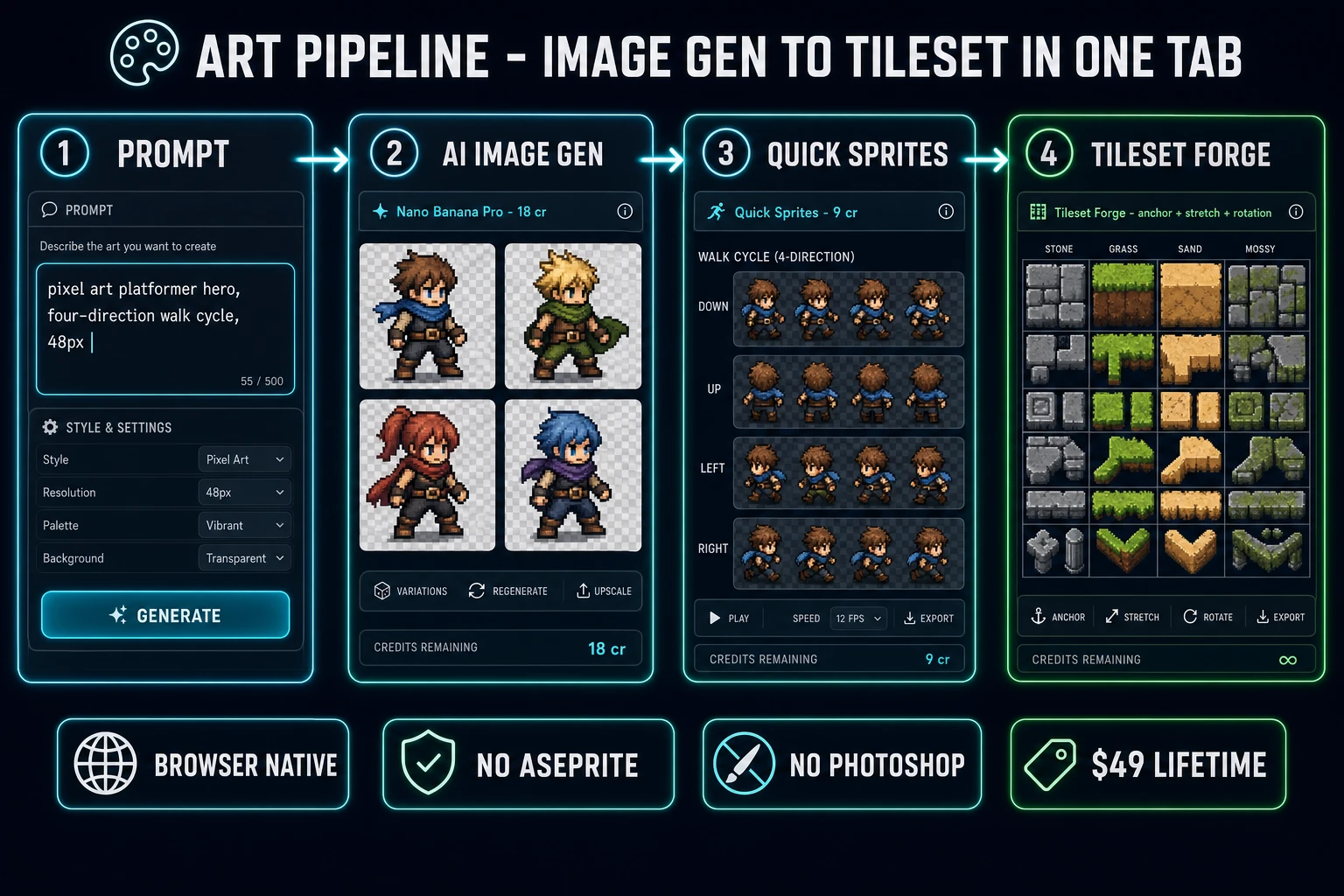
AI Image Gen at /generate runs seven image models behind a single chat-style prompt input — Nano Banana Pro at 18 credits for top-tier composition, Nano Banana 2 at 9 to 17 credits for fast iteration, GPT Image 2 for photoreal output, Seedream 5 Lite at 6 credits for uncensored creative work, Flux 2 Pro at 6 credits plus 3 per reference image, Z-Image Turbo at 2 credits for ultra-fast iteration, and Grok Imagine for stylized output. The right pick depends on the shot — character portraits favor Nano Banana Pro, prop iteration favors Z-Image Turbo, photoreal references favor GPT Image 2.

Quick Sprites at /quick-sprites generates animated sprite sheets at 9 credits per generation. The three preset styles — four-direction walking at 48 by 48, small-sprites at 32 by 32, and VFX at 24 to 96 — cover the canonical indie 2D needs. The output is a packed atlas ready for Phaser, Godot, Unity, or a custom Three.js sprite shader.

Pixel Snap and Tileset Forge close the pipeline. Pixel Snap quantizes any AI-generated image to a target pixel grid for clean 1-bit, 4-color, or 8-color retro art. Tileset Forge takes a concept image and produces a fully grid-aligned tileset with nine-anchor placement, four stretch modes (fill, fit-width, fit-height, original), and rotation and flip controls per cell.

Art pipeline four-step diagram showing prompt input, AI Image Gen character concepts, Quick Sprites animated sprite sheet, and Tileset Forge grid-aligned tiles for a 2D platformer
The art half of how to make a game with AI connects four browser tools in one tab — prompt to concept art to animated sprite sheet to grid-aligned tileset, all sharing the same credit pool.

The 3D + animation half — image to rigged mesh in one tab

For projects that need a 3D layer, the 2026 pipeline on how to make a game with AI still runs entirely in the browser. 3D Studio at /3d-studio routes through seven image-to-3D providers, with each model offering a distinct quality and credit-cost trade-off. The lineup covers Tripo (multi-image input and strong topology), Meshy (high-fidelity textures), Hunyuan (the Tencent series, with the 3.1 Enhanced variant supporting both text and image input at 25 credits per generation), Trellis (research-grade detail), Hyper3D Rodin (native STL export for 3D-printing pipelines), Real3D (real-time fast generation), and Tencent Hunyuan 3D 2.1 Simple (the older 20-credit baseline retained for legacy job display).

The mesh half is only one step. A character that does not move is a statue. The 3D Studio Animate tab covers the motion side — AI Text-to-Animation lets the developer describe a movement in natural language (“a confident sword overhead, then a recovery step”) and produces the matching keyframed animation on the rigged skeleton. The animation costs 2 credits per generation. Multi-leg creatures route through Procedural Walk for biomechanically plausible quadruped or hexapod motion.

The auto-rigging step bridges the static mesh and the animated character. The Sorceress Auto-Rigging tool detects humanoid topology from an uploaded mesh and produces a Mixamo-compatible skeleton with weight painting. The export targets are GLB for browser and Three.js, FBX for Unity and Unreal asset pipelines, and OBJ for static use cases. No Blender, no Maya, no 3ds Max install at any point — the entire 3D pipeline runs in the same browser tab as the code engine.

The audio half — Music Gen, SFX Gen, Speech Gen, Sound Studio

Audio is the layer indie developers most often skip, then regret. The 2026 path on how to make a game with AI closes that gap with four tools that cover music, sound effects, voice, and procedural audio.

Music Gen at /music-gen runs at 10 credits per generation via Suno V5.5 and produces roughly two variations per job. Simple mode takes a song description; advanced custom mode takes literal lyrics, a style brief, and a title. The output is a downloadable MP3 ready to drop into a Phaser sound key or a Three.js positional audio source. Music Gen covers the looping background tracks (one per biome, one per menu screen, one per boss); SFX Gen covers the per-event audio.

SFX Gen at /sfx-gen runs at 3 credits per generation via the Suno Sounds V5.5 family. The 500-character prompt limit covers most indie sound briefs (“a heavy metallic door slam with low rumble”, “a coin pickup with sparkle and a pitched-up final note”). The optional loop flag generates a seamless looping version for ambient noises like fire, wind, or machinery.

Speech Gen at /speech-gen handles the voice layer — NPC dialogue, narrator lines, voice barks. The pricing model is per-character text-to-speech for normal use plus an optional voice-clone path at 400 credits for a custom voice seed. Sound Studio at /sound-creator closes the loop with a chat-driven procedural audio tool — a Sorceress agent runs at 1 credit per turn across a four-model picker (GPT-5 Nano default, Gemini 2.5 Flash, Gemini 3 Pro, Claude Opus 4.6) and produces Web Audio API code for synth tones, drum kits, and procedural ambient layers. SFX Editor is the only fully client-side audio tool — zero credits for cuts, loops, fades, MP3 export.

The verdict on how to make a game with AI in 2026

The honest 2026 read on how to make a game with AI is that the answer is no longer a single tool. It is a map across eight layers, and the difference between a shippable game and a tech demo is whether every layer is filled. The Sorceress catalog at /tools-guide exists because no single tool can credibly span all eight; the platform’s job is to make the layers reachable from the same browser tab, the same credit pool, the same $49 Lifetime tier.

The 2026 indie reality is that the eight-layer pipeline runs end-to-end in roughly four to eight hours of active work for a small first game — one character, three levels, a tileset, a music track, ten SFX, and a Three.js or Phaser scaffold. The starter 100 credits at signup cover the asset half for that scope; the $49 Lifetime tier plus a $20 credit top-up at /plans covers a full first release including iteration. There is no per-tool subscription, no watermark on the generated assets, and a commercial license is included from the first generation.

The next steps for a developer mapping out how to make a game with AI today: open WizardGenie and prompt the engine layer; open AI Image Gen and concept the visual layer; route the sprites through Quick Sprites and the tilesets through Tileset Forge; layer in Music Gen and SFX Gen for the audio; close with Speech Gen for voice. For a 3D project, fold in 3D Studio and the AI Text-to-Animation pipeline. The map is the same; the time per layer is what the developer controls.

The full Sorceress lineup — every tool listed above plus the rest of the catalog — is at the tools guide, or the Sorceress home for the featured-tool overview. The blog cross-links: how to make a video game with AI for the broader umbrella, the vibe-coding tools comparison for engine-layer alternatives, and the 2026 AI tools field guide for the full catalog roundup.

Frequently Asked Questions

How to make a game with AI in 2026 without writing code yourself?

The 2026 path on how to make a game with AI without manually writing code routes the prompt through an AI-powered game engine that drives a frontier coding model in a real-time loop. The Sorceress version of that loop is WizardGenie at /wizard-genie/app — the user describes a game in natural language, WizardGenie writes the source files, runs the build, opens the live preview, and iterates against feedback. The eight-model picker (Claude Opus 4.7, Sonnet 4.6, GPT-5.5, Gemini 3.1 Pro, DeepSeek V4 Pro, Kimi K2.5, Grok 4.2, MiniMax M2.7) lets the developer pin Opus 4.7 for hard reasoning passes and DeepSeek V4 Pro or Kimi K2.5 for cheap bulk-typing turns. The output is a real browser game with Three.js or Phaser scaffolding, not a sandboxed demo — the developer downloads the source and ships it. The starter 100 credits at signup cover a small game; the $49 Lifetime tier at the plans page plus a $20 credit pack covers a full first release.

What AI tools are actually needed to make a game end-to-end in 2026?

An honest end-to-end indie game-with-AI stack in 2026 covers eight layers, not one. Code (an AI-powered game engine like WizardGenie that drives a frontier model). Art (AI Image Gen at /generate for concept art, backgrounds, and props). 2D sprites (Quick Sprites for animated sprite sheets, Pixel Snap for pixel-perfect quantization). Tilesets (Tileset Forge at /tileset-creator for grid-aligned level art). 3D models (3D Studio at /3d-studio for image-to-3D meshes with auto-rigging). Animation (Auto-Sprite v2 for 2D animation, AI Text-to-Animation in 3D Studio for 3D). Voice (Speech Gen at /speech-gen for NPC dialogue). Music and SFX (Music Gen at /music-gen and SFX Gen at /sfx-gen). The Sorceress catalog at /tools-guide covers all eight layers inside a single browser tab, a single credit pool, and a single $49 Lifetime tier — no per-tool subscriptions, no separate logins.

How to make a game with AI for free in 2026?

The 100 starter credits granted at Sorceress signup are the cleanest free path on how to make a game with AI in 2026 — they cover roughly five to ten Quick Sprites generations (9 credits each), three to ten Music Gen tracks (10 credits each), thirty SFX Gen sounds (3 credits each), and a handful of 3D Studio meshes (20 to 50 credits depending on the model). For a single small game (one character, a tileset, a song, a dozen SFX, a few props), the starter credits often cover the full asset pipeline without a top-up. WizardGenie sessions also consume credits per agent turn — the prompt-to-game half scales with project complexity. Beyond the starter credits, the $49 Lifetime tier at /plans removes the per-month subscription floor; credit top-ups run from $10/1000 (Starter) to $100/10000 (Studio) at a flat $0.01 per credit. There is no watermark on any generated asset, and the commercial license is included from the first generation.

Which AI model is best for the code half of how to make a game with AI?

The honest 2026 read on the code half of how to make a game with AI is that no single AI model wins every task — the right pattern is a frontier model for planning paired with a cheap fast model for execution. The frontier candidates: Claude Opus 4.7 (released April 16, 2026, $5 input / $25 output per million tokens, 1M context, SWE-bench Verified 87.6%), GPT-5.5 (released April 23, 2026, $5 input / $30 output per million tokens, 1M API context window), Gemini 3.1 Pro (released February 19, 2026, 1M context, preview state). The execution candidates: DeepSeek V4 Pro, Kimi K2.5, MiniMax M2.7, Gemini 3.1 Flash, GPT-5.5 Mini — all roughly an order of magnitude cheaper than the frontier tier. WizardGenie at /wizard-genie/app exposes all eight CODING_MODELS in a dropdown so the developer can pin a Planner and Executor without rewriting any code. Pricing verified June 16, 2026.

How to make a 2D game with AI vs how to make a 3D game with AI in 2026?

The 2D path on how to make a game with AI is materially shorter than the 3D path because the art layer is simpler — flat sprites, tilesets, and backgrounds. AI Image Gen for concept art at /generate, Quick Sprites for animated walk cycles and idle frames at /quick-sprites, Pixel Snap for pixel-perfect quantization, Tileset Forge for grid-aligned levels at /tileset-creator. The 3D path adds a mesh layer and a rigging layer — 3D Studio at /3d-studio routes through seven image-to-3D models (Tripo, Meshy, Hunyuan, Trellis, Hyper3D Rodin, Real3D, Tencent Hunyuan 3D 3.1 Enhanced) with auto-rigging for humanoid characters, plus AI Text-to-Animation for the motion layer. The browser-native pipeline never installs Blender, Maya, or 3ds Max; the export targets are GLB (for browser/Three.js), FBX (for Unity/Unreal pipelines), and OBJ (for static models). Verified against src/lib/threed-models.ts and the Sorceress 3D Studio source on June 16, 2026.

How to make a game with AI without subscribing to Unity, Adobe, or Blender add-ons?

The honest 2026 path on how to make a game with AI without paid game-engine seats, Adobe Creative Cloud, or Blender plugin licenses is a fully browser-native pipeline — Sorceress at /tools-guide covers the visual, audio, and asset-creation layers at the $49 Lifetime tier plus optional credit packs, and WizardGenie at /wizard-genie/app covers the engine-and-code layer at the same credit pool. There is no Unity Personal vs Pro license question (Unity Personal is free below the revenue threshold but the editor itself is a multi-gigabyte install with a separate account). There is no Adobe Substance 3D Sampler subscription ($24.99/mo Texturing plan as of 2026) — Material Forge at /material-forge derives PBR maps client-side at zero credit cost after the initial image generation. There is no Auto-Rig Pro license ($50 to $227 depending on seat count via the SuperHive store) — the Sorceress Auto-Rigging tool at /rigging is included in the credit pool. Verified June 16, 2026.

How long does it actually take to make a small game with AI in 2026 end-to-end?

An honest 2026 measurement on how to make a small game with AI end-to-end — one character, three levels, a tileset, a music track, ten SFX, and a Three.js or Phaser scaffold — runs roughly four to eight hours of active work for a developer with basic familiarity with the tools. The breakdown: WizardGenie engine scaffolding (one to two hours of prompt-and-iterate), AI Image Gen concept art (twenty to forty minutes), Quick Sprites character animation (thirty to sixty minutes for a four-direction walk cycle plus idle and attack), Tileset Forge level art (forty to sixty minutes), Music Gen and SFX Gen audio pass (thirty to forty minutes), iteration and playtesting (one to two hours). Beyond the small-game scope, the multiplier is roughly linear with content volume (more characters, more levels, more music tracks). The browser-native nature removes the install-and-configure friction that historically inflated indie game-dev project timelines.

Written by Arron R.·2,766 words·12 min read

Related posts