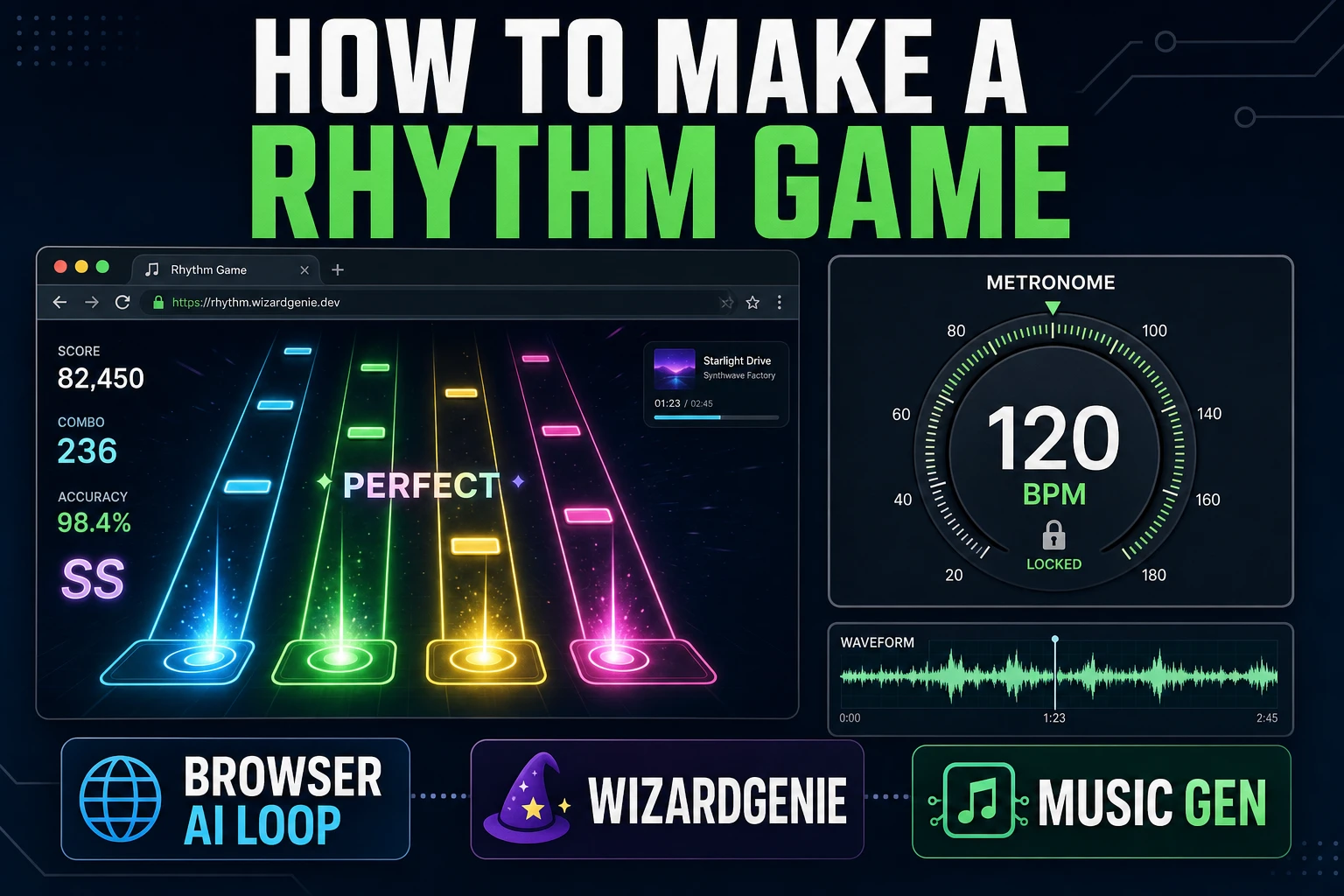
Rhythm games are the honest jam-scope target: one loop, one input reader, one bar of playable feedback. If the beat lands with the hit, the game reads as fun; if it drifts, no amount of polish saves it. This post walks the browser-only path for how to make a rhythm game on Sorceress — one prompt for the track in Music Gen, four one-second cues in SFX Gen, one WizardGenie session for the input loop. Every credit and model version verified against source on August 1, 2026.
What how to make a rhythm game actually needs
DataForSEO lists how to make a rhythm game at 110 monthly searches with KD 0 (verified 2026-07-11 and cross-checked against sibling how to make a music game at 40/mo, KD 7 in research-supplement.md on August 1, 2026). The two queries look adjacent but split on intent. A music game (Rhythm Doctor, PaRappa the Rapper, Crypt of the NecroDancer) foregrounds the audio and asks the player to make music; a rhythm game (osu!, Beat Saber, Guitar Hero) foregrounds a note chart and asks the player to read a scrolling pattern in time with the audio. This post targets the second intent — the note-chart pattern reader — because that is the mechanic new devs stall on.
Three ingredients decide whether the loop lands: a locked BPM, one bar of playable input, one visible cue. Skip any of the three and the game is a screensaver with buttons.
Locked BPM means a single tempo (120 is a safe default) held across the whole session. Playable input means a single verb the player types — one lane, one key, one time window in which a press counts. Visible cue means the falling tile or hit ring the player reads before they press. If those three read cleanly, you have a rhythm game. You do not have a menu, you do not have a scoreboard, you do not have a leaderboard — you have the smallest interactive object in the genre, and everything else scales from there.
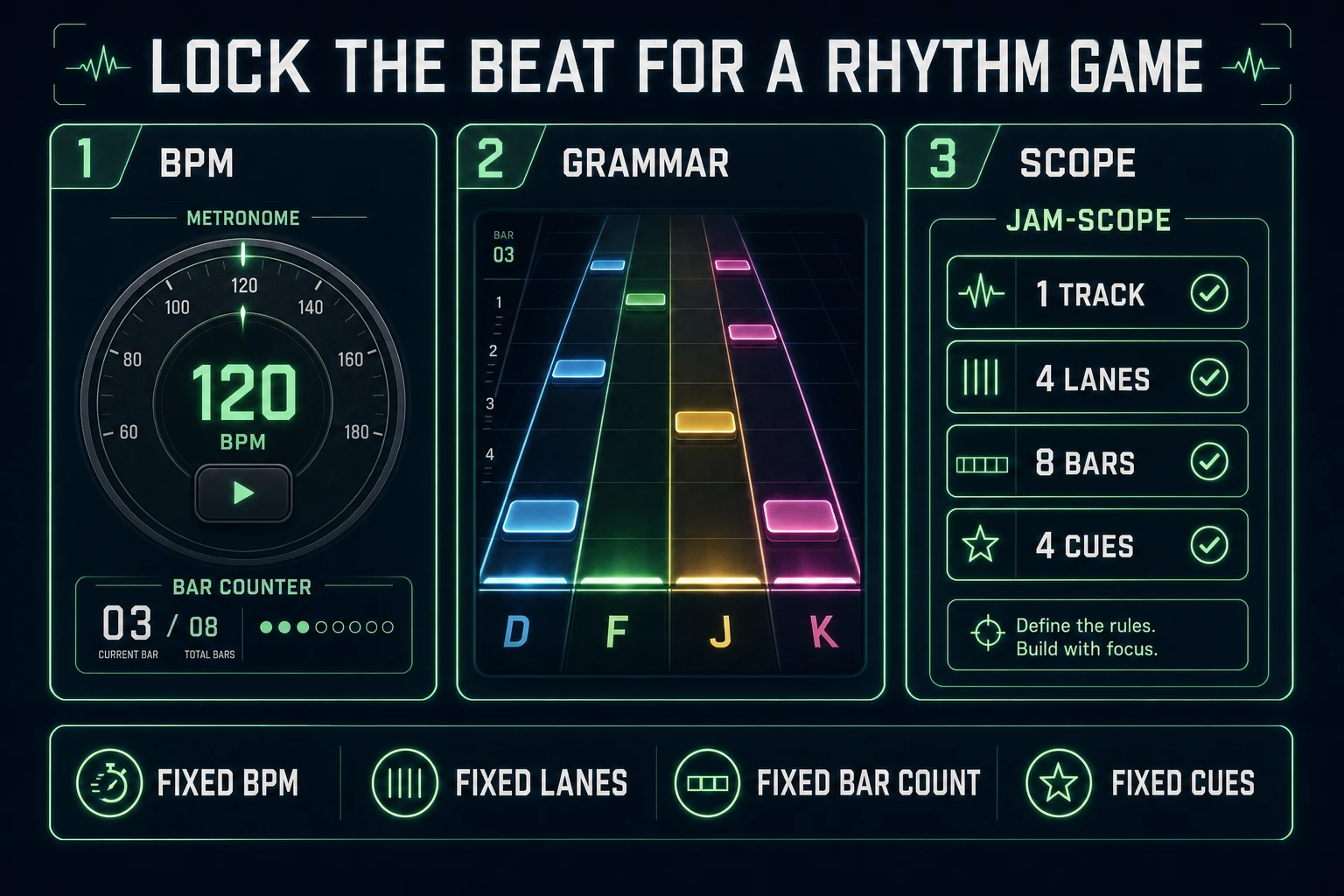
Lock the beat first: BPM, bar, note grammar
Every rhythm game brief starts in the wrong place. Devs open the code editor and start typing input handlers. The right start is a text file with four lines:
- BPM: 120 (or 90 for a mellow lo-fi loop, 140 for chiptune).
- Time signature: 4/4 unless you are ready to defend an odd meter.
- Loop length: 8 or 16 bars. 8 is playable in a jam; 16 is enough content for a first release.
- Lane count: 3 or 4 for a keyboard game. 5 is Guitar Hero territory and adds a week of chart-authoring per song.
Those four numbers govern every downstream decision. A 120 BPM 4/4 loop plays exactly two beats per second, so a note falling from the top of a 720-pixel play area at 720 divided by 2 equals 360 pixels-per-second lands on the hit line right on the beat. Change BPM to 100 and every falling note has to move slower, but the audio driver has not changed — the audio still runs on the AudioContext clock in the browser, and your visual code just reads that clock and interpolates. Get the numbers locked first and the code writes itself.
The Web Audio API is what you are building on. Its AudioContext exposes a currentTime value that ticks in seconds with sample-accurate precision, unlike performance.now() or the frame delta from requestAnimationFrame. Every browser rhythm engine — every serious one, from osu!web to Beatmania IIDX clones — reads AudioContext.currentTime once per frame and calculates note positions from that single clock. If you use the frame clock, your notes drift 30 milliseconds or more per minute at 60 fps, and the player feels the game skipping in a way they cannot name but will not stop mentioning.
The Sorceress how to make a rhythm game pipeline in four steps
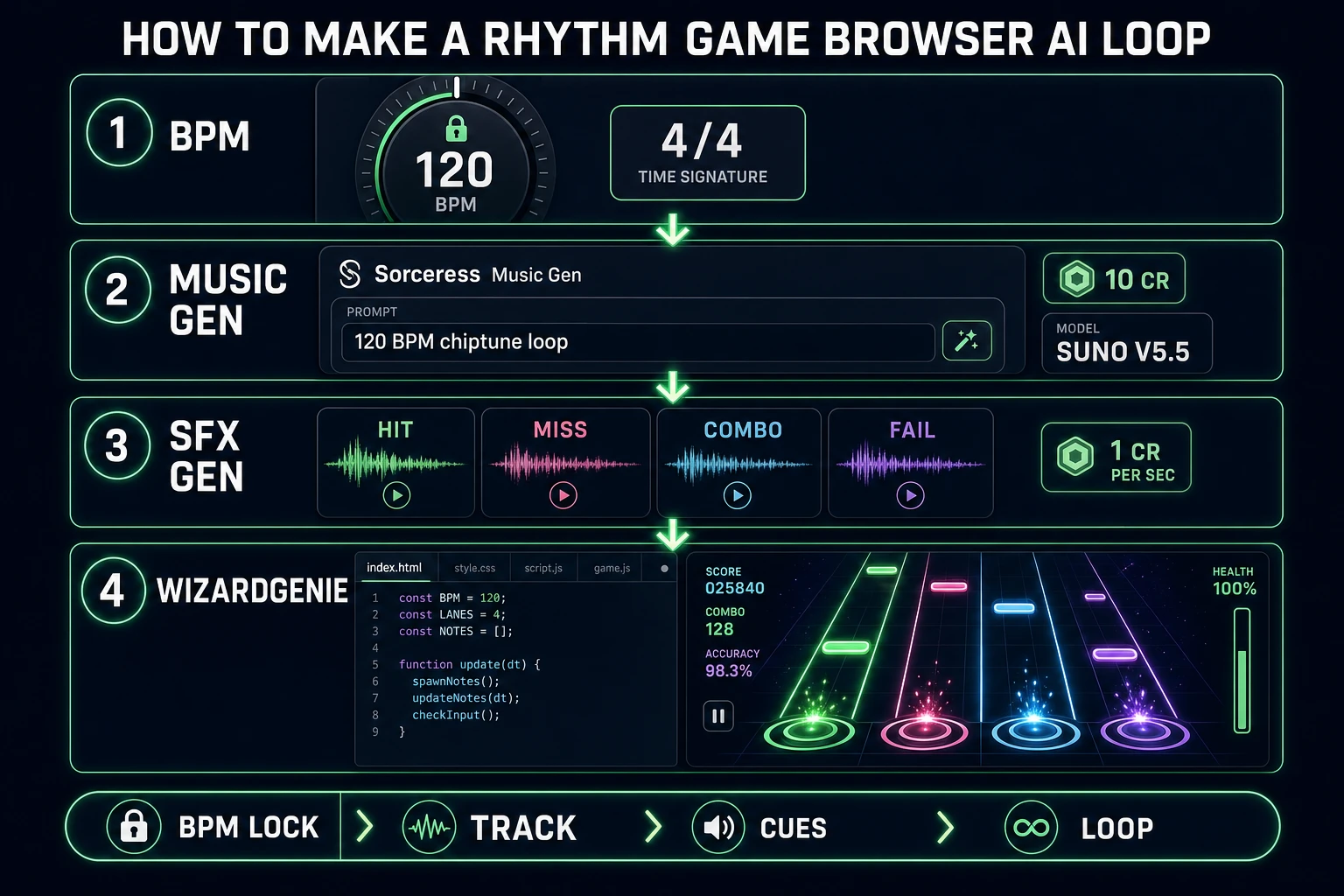
The full workflow for a browser rhythm game on Sorceress fits in one session:
- Score the track in Music Gen. One prompt, 10 credits, Suno V5.5. Export WAV for 2 more credits.
- Cut cues in SFX Gen. Four one-second stems for hit, miss, combo, fail — 1 credit per second on the byteplus-seed-audio model.
- Author the note chart. A JSON file with note events. Open the WAV in a browser waveform viewer, mark the downbeats, save to disk.
- Wire the input loop in WizardGenie. One prompt for the falling-note reader, the input window, the score counter, and the audio-clock sync.
Total budget for a four-lane jam scope: 16 credits (10 track + 2 WAV + 4 SFX) plus your WizardGenie BYO-key model cost. WizardGenie itself is a browser-based coding agent that lets you plug your own API key in for the code side, so there is no Sorceress markup on the coding step — you pay for tokens directly to the model provider. On the free tier every Sorceress account starts with enough credits to cover the audio side of one jam-scope game; the Sorceress $49 Lifetime Access tier adds a durable credit stipend if the plan is to ship multiple songs.
Step 1 — score a loopable track in Music Gen
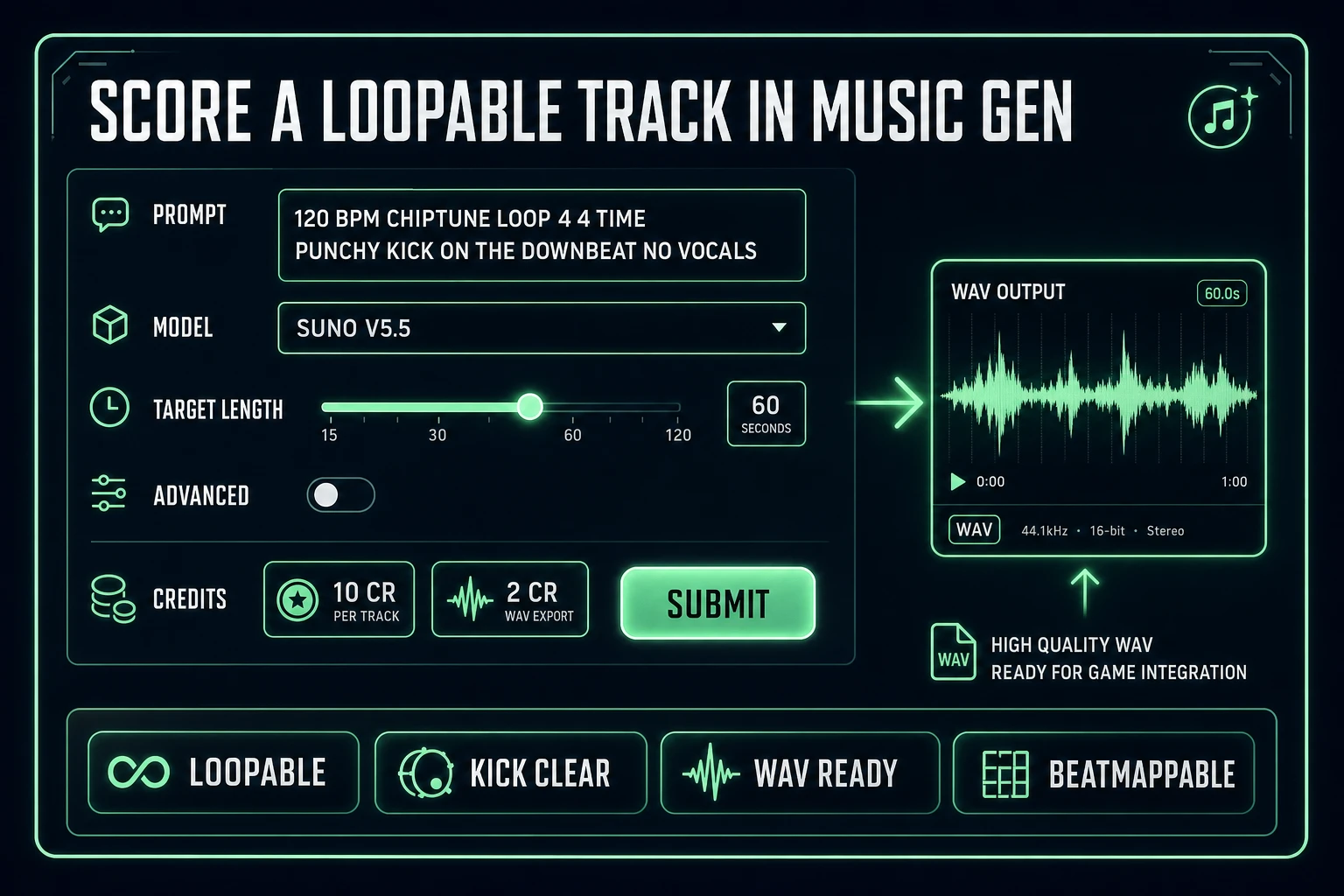
Open Music Gen. The tool wraps Suno V5.5 in a browser UI that accepts a plain-English prompt and returns a music stem. Verified against src/app/music-gen/page.tsx on August 1, 2026: MUSIC_CREDIT_COST is 10 credits per track, the model key is kie-suno-music, and the V5_5 model surface supports a target-length slider from 10 to 360 seconds. WAV export via the sibling WAV_CREDIT_COST constant is 2 credits.
Prompt shape for a rhythm-game loop: three tokens the model reads, one hard rule at the end. Example:
120 BPM chiptune loop, 4/4 time, punchy kick on the downbeat, no vocals. 60 seconds.The three tokens: tempo, meter, timbre. The one hard rule: no vocals. Vocals fight the SFX cues at hit time, and a jam-scope game does not need lyrics. If Music Gen returns a loop with an unclear downbeat, the note chart will feel loose; re-run once with a more emphatic kick line in the prompt. A model with a clear downbeat costs a second 10-credit run — cheaper than the two hours a soft downbeat will cost you when the beat map does not land.
Advanced mode inside Music Gen exposes a target-length field (10 to 360 seconds) and a lyric hook — leave both off for pure instrumental loops. Once the stem generates, hit Export WAV (2 credits) so you have a lossless file to run the waveform inspection against. MP3 works for playback but not for surgical beat mapping — the compression artifacts blur the amplitude spikes you rely on for note-event timestamps.
Suno is a hosted music generation service and the same one Sorceress Music Gen bed post covers for background loops. Suno V5.5 is the model that ships inside Sorceress Music Gen today; if the model version rotates upstream, the Sorceress source picks up the new model_key value and the credit cost stays 10 unless the Sorceress team explicitly updates it.