Layout an AI Character Generator From Photo (Game-Ready)

By Arron R.12 min read
An AI character generator from photo uses a reference image as the latent anchor, then generates poses and expressions that share the same face. Sorceress AI Im

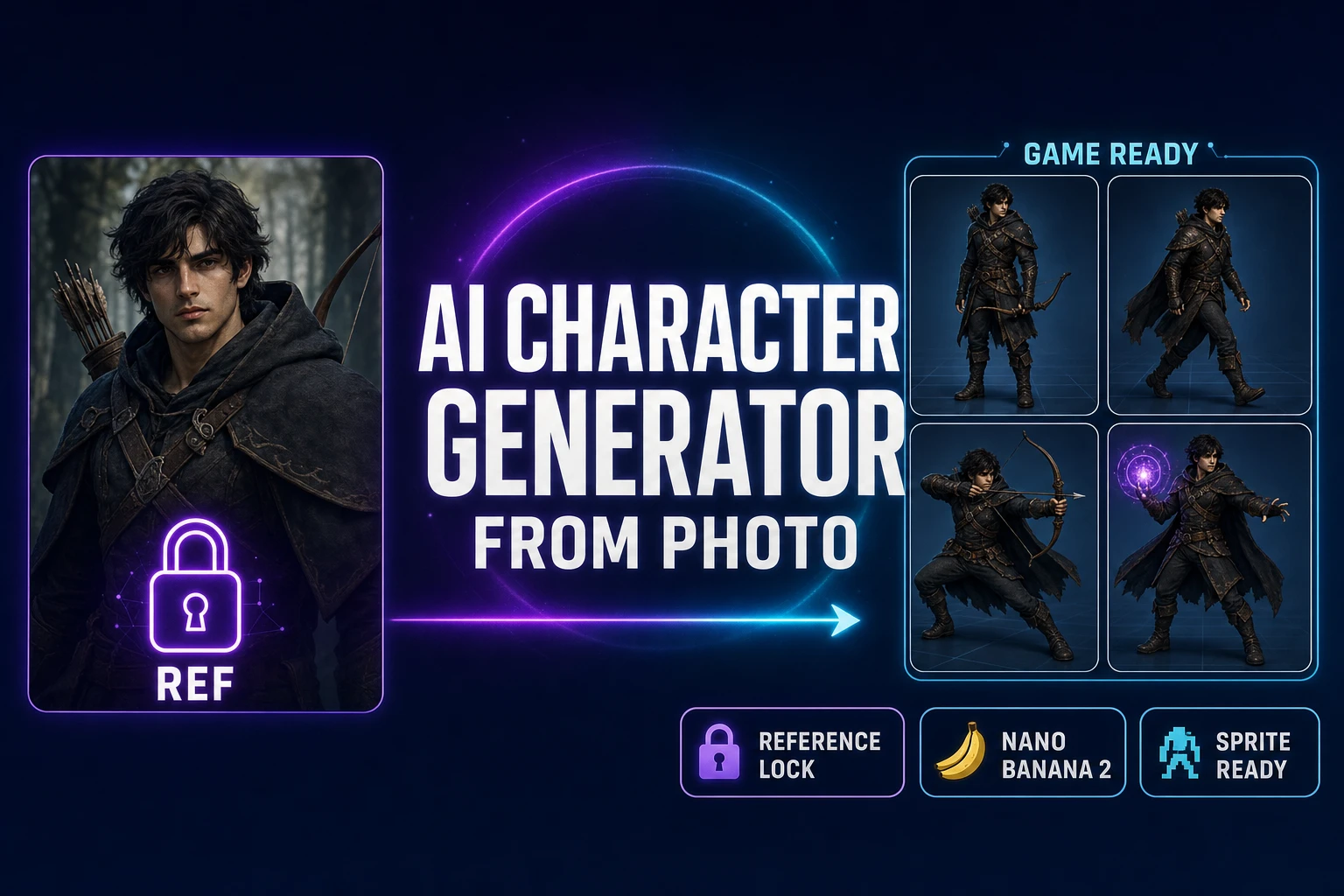
An AI character generator from photo takes a single reference image — a selfie, a friend’s photo with permission, an AI render from a different session, a 3D character screenshot — and produces eight on-model pose variants of the same hero. The text-only route fails this job by construction: each generation samples fresh noise, and the second prompt produces a different jawline, a different hair color, a different outfit silhouette, even when the words match exactly. The fix is the reference-image lock that every modern image model now ships, and the workflow built on top of it has a name searchers actually type into Google. This walkthrough covers what the AI character generator from photo workflow really does in 2026, which Sorceress models run it cleanly, the eight-pose recipe that produces a sprite-sheet-ready hero from a single source photograph, and how to bridge the photo-locked character into Quick Sprites for the sheet pack and into 3D Studio for the textured GLB. Verified June 5, 2026 against src/lib/models.ts, src/app/quick-sprites/page.tsx, src/lib/threed-models.ts, and the live /generate reference-image UI.
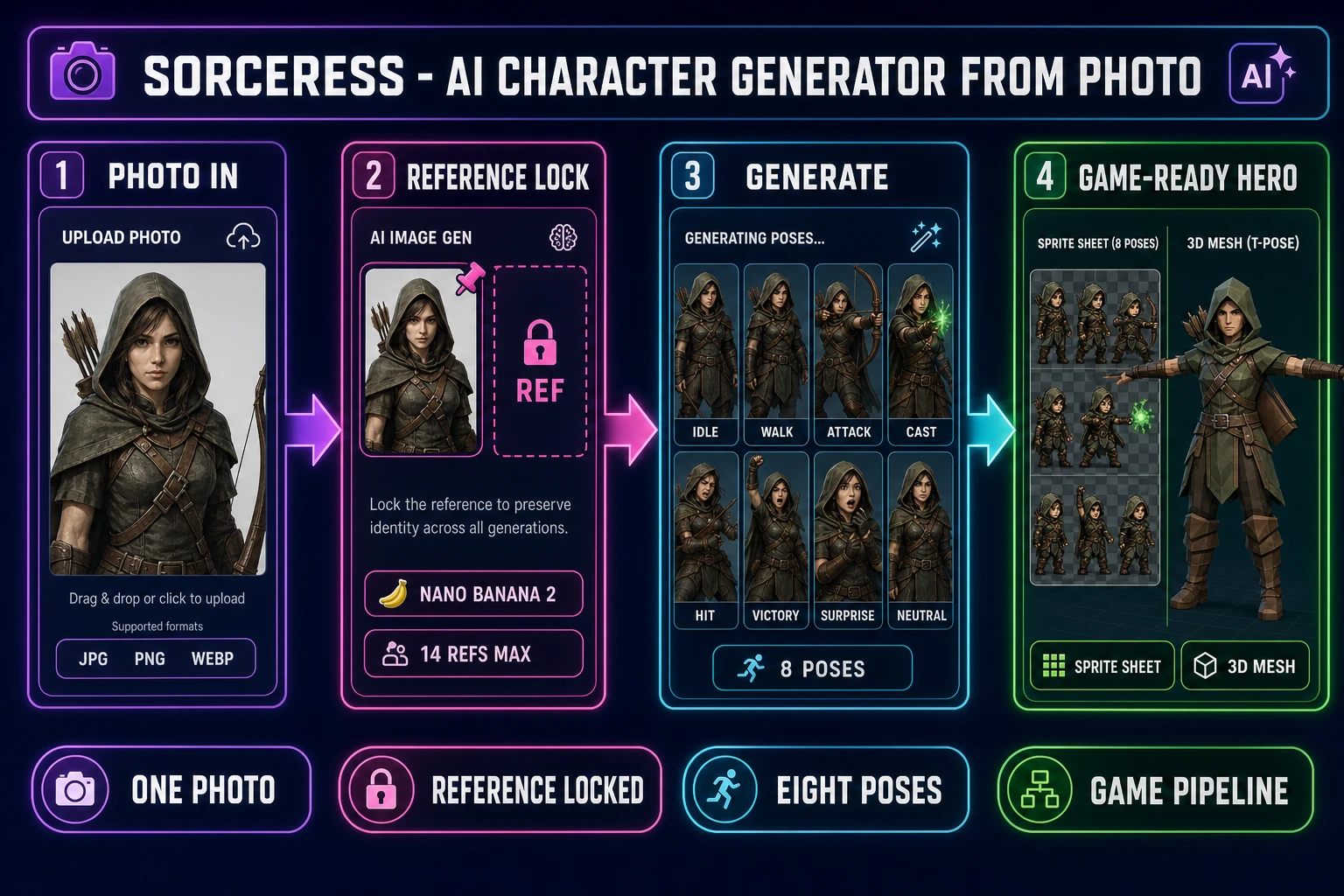
Sorceress AI character generator from photo pipeline showing four steps, photo input as a single portrait, reference lock inside AI Image Gen with Nano Banana 2 and 14 reference slots, generate eight pose variants of the same character, ship a game-ready hero with a packed sprite sheet and a low-poly 3D mesh, on a dark navy background with purple, fuchsia, cyan, and emerald accents
The full Sorceress AI character generator from photo pipeline: one source image becomes a sprite sheet and a 3D mesh of the same hero. Verified June 5, 2026.

What an AI character generator from photo actually does in 2026

The phrase “AI character generator from photo” describes a specific kind of image-generation workflow, not a single tool. The common shape across every modern implementation is a diffusion model that accepts two inputs at sampling time: a text prompt and one or more reference images. The reference images are encoded into the same latent space the noise sampler is iterating against, and the diffusion process is biased toward latents that match the reference photo’s facial geometry, hair structure, skin tone, and outfit topology. The text prompt still drives pose, expression, action, and scene, but the model now has a commitment to a specific character that survives across calls.

That commitment is the difference between a photo prompt that produces eight different-looking strangers in eight different poses and a photo prompt that produces the same hero in eight different poses. For a game project, only the second outcome ships. An idle frame, a walk cycle, an attack pose, a casting animation, a hit reaction, and a victory pose all need to read as the same character or the sprite sheet looks like a glitched costume swap.

The technical underpinning is latent diffusion conditioned on reference embeddings — the same architecture that powers Stable Diffusion, Flux, Nano Banana, and the rest of the modern image-model lineup. The 2021 latent-diffusion paper from Rombach and colleagues is the academic primary source for the architecture; the practical takeaway is that reference conditioning is now a built-in feature on every flagship model and not an optional adapter the user has to install. The reference slot is where the photo goes; everything downstream is prompt engineering plus the right model pick.

How the reference-image lock actually works inside AI Image Gen

The reference-image input on Sorceress AI Image Gen at /generate exposes a single dashed slot that accepts JPG, PNG, and WebP files. Drop a portrait into the slot, and the next generation runs against that reference. The slot is persistent across consecutive prompts in the same session: the photo stays pinned until explicitly cleared, so the eight pose generations that follow all use it as the latent anchor without re-uploading. The maximum number of references depends on which model is selected in the picker:

  • Nano Banana 2 (Google) — up to fourteen reference images. Verified at refImages: { max: 14, param: 'image_input', ... } in src/lib/models.ts on June 5, 2026. Nine credits per generation at 1K resolution, twelve at 2K, seventeen at 4K.
  • Nano Banana Pro (Google) — up to eight reference images. The “Top tier” pick when the project needs maximum portrait quality. Verified at refImages: { max: 8 } in src/lib/models.ts.
  • Flux 2 Pro (Black Forest Labs) — up to eight reference images. Six credits base plus three per reference image. The model leans painterly and is the right pick when the prompt is heavy on stylized fantasy or hand-drawn aesthetic.
  • GPT Image 2 (OpenAI) — up to ten reference images. The photoreal pick when the goal is a realistic in-game portrait rather than a stylized character.
  • Seedream 5 Lite (ByteDance) — up to fourteen reference images at six credits per generation. The cheap iteration pick when the project needs to burn through a lot of pose variants.
  • Grok Imagine (xAI) — up to five reference images. The creative-outlier pick.

Z-Image Turbo is the seventh model in the home-page rail (verified at src/app/_home-v2/_data/tools.ts lines 713 to 721 on June 5, 2026), but it does not currently accept reference images, so it is the wrong pick for an AI character generator from photo workflow even though its two-credit cost is the cheapest in the lineup. The pattern is to use Z-Image Turbo for prompt-only iterations during exploration and to switch to a reference-supporting model the moment the project commits to a specific hero.
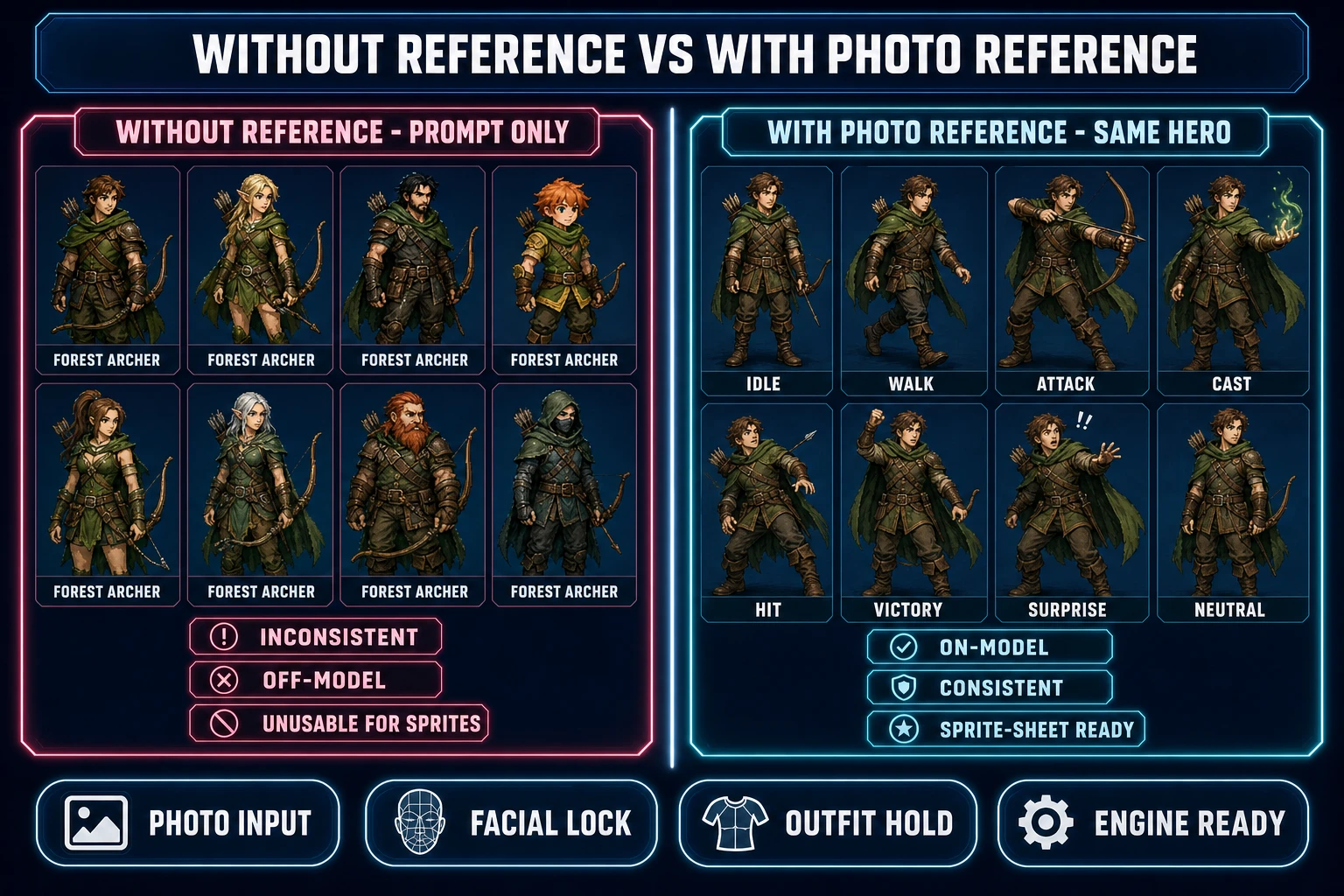
Comparison of two AI character generator outputs side by side, left lane labeled Without Reference Prompt Only showing eight character thumbnails all labeled forest archer but each with a different face hair color and outfit, right lane labeled With Photo Reference showing the same eight thumbnails all sharing the same face green hood and leather armor in eight different poses, on a dark navy background with rose and cyan accents
The on-model lock is the entire point. Eight prompt-only generations drift; eight photo-locked generations hold. Verified June 5, 2026.

Best Sorceress models for character-from-photo work

The seven-model lineup inside Sorceress AI Image Gen is not a generic pile of options — each model has a specific strength, and for character-from-photo work three of the seven are the genuine workhorses. The other four still play a role at the margins, but the recipe below is what actually ships.

  • Default pick: Nano Banana 2. Nine credits per generation at 1K, twelve at 2K. Up to fourteen reference images. The strongest facial-stability lock in the lineup — the eyes, jawline, and outfit hold tighter across pose generations than any other model in the rail. The right starting point for almost every AI character generator from photo session unless the project explicitly needs a different aesthetic.
  • Quality pick: Nano Banana Pro. Eighteen credits at 2K, thirty-three at 4K. Up to eight reference images. Tagged “Top tier” in the home-page model rail. The right pick when the hero portrait is the marketing key art and not just a sprite-sheet anchor — the extra resolution and detail justifies the credit cost when the output is for a Steam capsule, a launch trailer, or a key-art landing page.
  • Stylized pick: Flux 2 Pro. Six credits base plus three per reference. Up to eight references. Leans painterly and hand-drawn. The right pick when the photo is a real-life input but the game art style is fantasy painterly or comic-style and the project wants the model to translate the photo into the painted aesthetic during the from-photo conversion.
  • Photoreal pick: GPT Image 2. Seven credits at medium quality, seventeen at high. Up to ten references. The right pick when the game is a contemporary or near-future setting and the character should read as a photograph — the model holds photoreal facial detail across the eight pose variants.
  • Iteration pick: Seedream 5 Lite. Six credits per generation at 2K. Up to fourteen references. The cheap-but-still-good model for exploring forty pose variations before locking the eight that ship. Useful when the project budget cares about per-generation cost and the prompt is uncertain enough that a lot of iteration is expected.

The pattern in practice is to start the photo lock on Nano Banana 2 (default), iterate with Seedream 5 Lite if the prompt needs more exploration, lock the final eight poses on Nano Banana 2 again for consistency, and only switch to Flux 2 Pro or GPT Image 2 when the aesthetic explicitly needs the model swap. Verified against src/lib/models.ts on June 5, 2026.
Step-by-step: from one photo to a game-ready hero

The recipe below produces a sprite-sheet-ready hero from a single source photograph in roughly fifteen minutes of active work and around one hundred to one hundred forty credits, well within the starter credit pool. Every step references a real Sorceress UI verified on June 5, 2026.

  1. Prepare the source photo. Crop tight to the subject, remove the busy background if there is one (Sorceress 3D Studio ships an integrated background remover, or any standalone tool works), and confirm the photo shows a centered subject with even lighting at between five hundred and two thousand pixels along the longest edge. JPG, PNG, and WebP all work. Multiple photos of the same subject from different angles improve the lock significantly — if the project has a portrait, a three-quarter shot, and a profile, use all three as references.
  2. Open AI Image Gen and pick a model. Navigate to /generate. Open the model picker and select Nano Banana 2 as the default starting point for character-from-photo work.
  3. Pin the photo (or photos) in the reference slot. Drop the prepared image into the dashed reference-image slot. Add up to fourteen reference images for Nano Banana 2 (the recommended count for tight on-model lock is three to five). The reference stays persistent across consecutive prompts in the session.
  4. Write the prompt skeleton. Build a prompt that names the character archetype, the canonical outfit, and a single pose. Example: “forest archer, green hood, leather armor with brown straps, full-body shot, idle stance, neutral expression, transparent background.” Keep the skeleton stable; only the pose word will swap across the eight generations.
  5. Generate the first pose (idle). Click Generate. Nano Banana 2 returns a 1K output in roughly twenty to thirty seconds. Check the result against the reference photo: the face should read as the same person, the outfit should match the prompt, the pose should be idle. If the lock is loose, add another reference image and regenerate.
  6. Iterate the eight poses. Swap the pose word in the prompt skeleton one generation at a time: idle, walking forward, attacking, casting spell, taking hit, victory pose, surprised expression, neutral run. Eight generations against the same pinned reference produce eight on-model variants of the same hero. Total cost: 8 × 9 = 72 credits at 1K with Nano Banana 2, or 8 × 12 = 96 credits at 2K.
  7. Save the eight outputs to a collection. The Collections panel inside AI Image Gen organizes the eight outputs under a single named hero collection so the next workflow steps can pull all eight at once.
  8. Bridge to Quick Sprites for the sprite sheet. Open /quick-sprites. Quick Sprites runs the Retro Diffusion rd-animation model at nine credits per generation (verified at MODEL_ID = 'retro-diffusion/rd-animation' and CREDITS_PER_GEN = 9 in src/app/quick-sprites/page.tsx on June 5, 2026). Pick the four-angle walking style at 48×48 pixels for a directional sprite sheet, the small-sprites style at 32×32 for a compact roster sheet, or VFX between 24×24 and 96×96 for effects-only output.
  9. Bridge to 3D Studio for the textured mesh. Open /3d-studio. Pick a model from the lineup (verified against src/lib/threed-models.ts on June 5, 2026): Hunyuan 3D 3.1 at twenty-five credits is the cheap pick, Tripo v3.1 at forty credits ships multi-image-to-3D support that uses three of the eight pose variants for tighter geometry, Meshy 6 at fifty credits supports image-to-3D plus text-to-3D plus multi-image-to-3D with optional quad topology, and Rodin 2.0 at fifty credits is the fourth flagship pick.

The total credit cost for the full pipeline (eight poses on Nano Banana 2 at 1K plus one Quick Sprites pass plus one Hunyuan 3D 3.1 pass) is roughly 72 + 9 + 25 = 106 credits, comfortably inside the 1,000-credit Starter tier at ten dollars verified at src/app/plans/page.tsx on June 5, 2026, and inside the no-recurring 49-dollar Lifetime tier that unlocks every tool without a monthly bill.

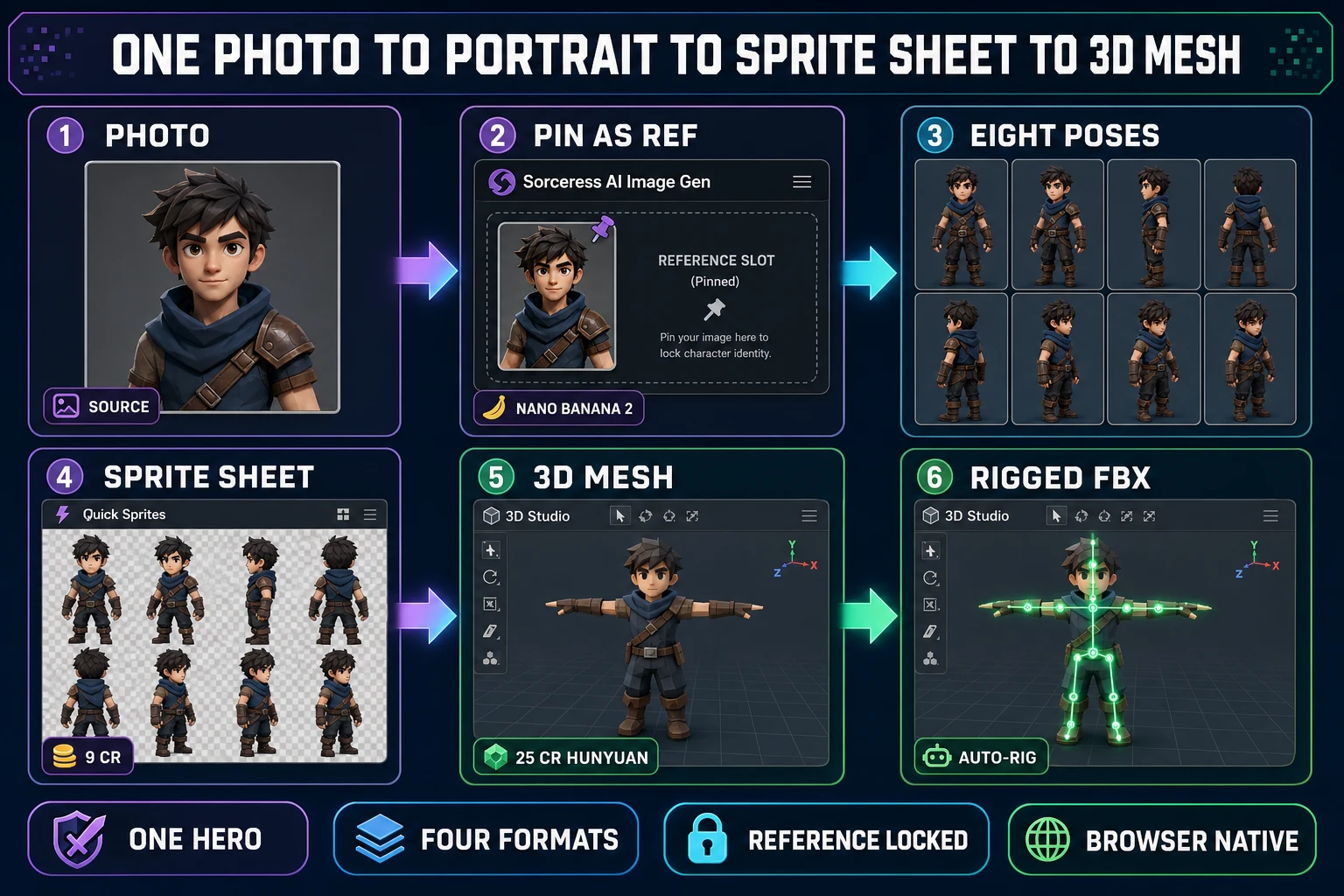
Six-step bridge from one source photograph to a fully game-ready character, panels showing photo input then pin as reference in Sorceress AI Image Gen with Nano Banana 2 then generate eight pose variants then pack into a sprite sheet via Quick Sprites at nine credits then convert to a low-poly 3D mesh in 3D Studio at twenty-five credits with Hunyuan then auto-rig for FBX export, on a dark navy background with purple cyan and emerald accents
One photo, four output formats. Portrait, sprite sheet, textured 3D mesh, rigged FBX — all sharing the same locked face. Verified June 5, 2026.

Common failure modes when working from a photo (and how to fix them)

Three classes of failure account for almost every “the AI character generator from photo did not produce my hero” complaint. Each has a specific fix that does not require switching tools.

  • The face drifts across pose generations. Cause: only one reference image is pinned, and the diffusion sampler has too much latent freedom to interpret the face. Fix: add two to four more reference images of the same subject from different angles. Three to five references is the sweet spot for Nano Banana 2 — tight enough lock to read as one hero across the sprite sheet, loose enough that the AI can still generate the requested pose variations.
  • The outfit shifts color or style across poses. Cause: the prompt skeleton is changing more than just the pose word, or the reference photo shows the subject in different clothing across the multi-reference set. Fix: keep the prompt skeleton stable (only the pose word swaps), and curate the reference set so every reference shows the same outfit. If the source photos are inconsistent, regenerate one canonical hero portrait from the original photo first, then use that single canonical portrait as the reference for the eight pose generations.
  • The generated character looks photoreal when the game style is stylized (or vice versa). Cause: the model is doing exactly what it is built to do — the photo input pulls toward photoreal output by default. Fix: switch the model to Flux 2 Pro for stylized fantasy aesthetic, or add an explicit style descriptor to the prompt skeleton (“painted hand-drawn fantasy illustration style”, “cel-shaded anime style”, “low-poly stylized 3D render style”). The reference photo still anchors the facial structure; the model and prompt control the rendering aesthetic.
  • The eight outputs all look similar but each one has a different background. Cause: the prompt does not specify a background or specifies a different one each time. Fix: append “transparent background” or “flat color background” to every prompt in the eight-generation run so the sprite sheet packing pass downstream does not have to fight inconsistent scene art.
  • One generation produces a wildly different face. Cause: a random seed landed on a low-probability latent. Fix: regenerate that single pose. The reference lock is statistical, not deterministic — eight out of ten generations will hold, and the occasional outlier is normal. Do not change the prompt or the reference; just regenerate.

The verdict: when from-photo beats from-prompt (and when it does not)

Three concrete recommendations based on the actual project shape:

  • From-photo is the right call when the project commits to a specific hero. A protagonist with a name, a backstory, and a sprite sheet that has to read as the same character across hours of gameplay is exactly the use case the reference-image lock is built for. The fifteen minutes of setup pays off across the entire production.
  • From-prompt is the right call for background NPCs and crowd characters. A village scene with twenty distinct citizens, a tavern with eight bar patrons, a battlefield with a dozen extras — none of those characters need on-model consistency across generations. Prompt-only generation on Z-Image Turbo at two credits each is the right tool. Save the from-photo lock for the heroes.
  • From-photo plus Quick Sprites plus 3D Studio is the right call for a full hero pipeline. The same locked face holds as a portrait, a sprite sheet, a textured GLB mesh, and (with the auto-rig pass) a rigged FBX. One source photograph drives every format. This is the workflow the seven-model lineup plus the Quick Sprites and 3D Studio bridges were designed to ship together, and it is the genuine differentiator over single-step character generators that stop at the first PNG.

An AI character generator from photo is a tooling pattern, not a product category. The tooling pattern works because diffusion models now ship reference conditioning natively, and the reference slot inside Sorceress AI Image Gen exposes that capability across seven models with explicit per-model reference-count limits. Pin the photo, pick the right model, run the eight-pose recipe, bridge to Quick Sprites for the sheet pack and 3D Studio for the 3D mesh, and the same hero ships in every format the engine asks for. Pair it with the broader stay-on-model recipe, the reference-locked consistent-character workflow, the Fotor bridge, and the concept-to-sprite art-generator path for the full character toolkit on Sorceress.

Frequently Asked Questions

What does an AI character generator from photo actually do, and how is it different from a text-only generator?

An AI character generator from photo treats a reference image as the latent anchor for every downstream generation. A text-only generator reads a description (&ldquo;a forest archer in a green hood&rdquo;), samples noise, and renders one independent image per call &mdash; the model has no commitment to a specific face, so the second generation almost always drifts. A from-photo generator pins the reference inside the prompt encoder so the diffusion process biases toward the photo&rsquo;s facial geometry, hair, skin tone, and outfit topology while still listening to the text prompt for pose, expression, and scene. Sorceress <a href="/generate?ref=blog">AI Image Gen</a> exposes this through the reference-image slot on every model that supports it: Nano Banana 2 accepts up to fourteen references, Nano Banana Pro accepts eight, Flux 2 Pro accepts eight, GPT Image 2 accepts ten, and Seedream 5 Lite accepts fourteen (verified against <code>src/lib/models.ts</code> on June 5, 2026). The practical effect for a game project is that one source photo can drive eight pose variants that all read as the same character &mdash; which is the whole point of an AI character generator from photo for a sprite sheet.

Can I really use any photo as the source &mdash; a selfie, a friend, a pet, a drawing?

Almost any image works as input, but the shape that converts cleanly into a game character is a centered subject with even lighting on a clean background between five hundred and two thousand pixels along the longest edge. Selfies, portrait photographs, full-body shots, character drawings, AI-rendered concept art, and 3D screen captures all parse fine. The shapes that fight the reference-image system are extreme close-ups (the model needs to see the body to generate poses), heavily filtered photos with crushed shadow detail, group shots with multiple faces (the model picks one and inconsistently), and photos with depth-of-field haze where the subject edge blurs into the background. The Sorceress AI Image Gen reference slot accepts JPG, PNG, and WebP at up to a few megabytes each. For a real person, the right legal practice is to use your own photo or a photo where you have explicit permission &mdash; which is no different from any other from-photo image tool and is independent of the Sorceress pipeline.

Which Sorceress model is best for an ai character generator from photo workflow?

Nano Banana 2 is the default pick for game-character work from a photo: it accepts up to fourteen reference images, runs at nine credits per generation at 1K and twelve at 2K, and ships the strongest facial-stability lock of the seven-model lineup (verified against <code>src/lib/models.ts</code> on June 5, 2026). Nano Banana Pro is the &ldquo;Top tier&rdquo; pick when the project needs maximum portrait quality and accepts eight references at higher per-generation cost. Flux 2 Pro is the second pick when the prompt is heavy on stylized fantasy or hand-drawn aesthetic &mdash; six credits base plus three per reference, and the model leans more painterly than the Nano Banana family. Seedream 5 Lite is the cheap iteration pick at six credits with fourteen reference slots. GPT Image 2 is the photoreal pick when the goal is a realistic in-game portrait rather than stylized art. The pattern in practice is to start the photo lock on Nano Banana 2, generate the eight poses, and only switch models when the aesthetic needs a hand-drawn or photoreal pivot.

Will the AI character actually look like my photo, or just &ldquo;inspired by&rdquo; it?

The fidelity depends on how many reference images the workflow pins and which model runs the generation. With one reference image and Nano Banana 2, the output is recognizably the same person in the same outfit but slightly stylized &mdash; the eyes, jawline, hair color, and outfit topology all hold. With three to five reference images of the same subject from different angles (front, three-quarter, profile, full-body, action pose), the lock tightens significantly: the model now has multiview signal to disambiguate facial geometry from photographic angle, and the generated poses share a single coherent facial structure. With eight to fourteen references on Nano Banana 2 or Seedream 5 Lite, the output is essentially a photo-faithful character with intentional stylization controlled by the prompt. For a game project, three to five references is the sweet spot: tight enough lock to read as one hero across the sprite sheet, loose enough that the AI can still generate the pose variations the prompt requests. Verified against the live <code>/generate</code> page reference-image UI on June 5, 2026.

How do I keep the same character on-model across multiple poses, expressions, and outfits?

The on-model discipline is half tooling and half prompt structure. The tooling side: pin the same reference image (or images) on every generation in the session. Sorceress <a href="/generate?ref=blog">AI Image Gen</a> keeps the reference slot persistent across consecutive prompts, so once the photo is loaded the next eight prompts all use it as the latent anchor without re-uploading. The prompt side: change exactly one variable per generation. Pose first (idle, walking, attacking, casting), then expression (neutral, surprised, focused, victorious), then outfit (only if the outfit is a costume swap and not the canonical hero look). Mixing all three at once causes the model to negotiate between competing signals and the on-model lock loosens. The practical recipe for a sprite sheet: same reference, same prompt skeleton (&ldquo;forest archer, green hood, leather armor, [POSE]&rdquo;), one pose word swapped per generation, eight generations total. Then drop the eight outputs into <a href="/quick-sprites?ref=blog">Quick Sprites</a> for the sheet packing pass.

What if my photo has bad lighting, multiple subjects, or a busy background?

The fix is to clean the photo before it goes into the reference slot. For multiple subjects, crop tight to the one you want as the hero &mdash; the model picks one face anyway, and an explicit crop is more reliable than letting it guess. For busy backgrounds, run a background removal pass first (Sorceress <a href="/3d-studio?ref=blog">3D Studio</a> ships an integrated background remover, or any standalone tool works) so the reference is just the subject on transparent or flat color. For bad lighting, the AI can compensate to a degree but uneven shadows on the face read as outfit detail to the diffusion model and the generated poses inherit the artifact. The cleanest fix is to use a different photo of the same subject under better lighting if one exists; the second-cleanest is to feed three or four photos under different lighting conditions as multiple references so the model averages them into a coherent face. Verified against the live reference-image UI on the <code>/generate</code> page on June 5, 2026.

Can I bridge the photo-locked character into a sprite sheet and a 3D model?

Yes &mdash; that is the full Sorceress sprite-ready path and the reason the from-photo lock is worth setting up in the first place. After eight pose variants land in <a href="/generate?ref=blog">AI Image Gen</a>, drop them into <a href="/quick-sprites?ref=blog">Quick Sprites</a> at <code>/quick-sprites</code> for the sprite-sheet layout pass: the tool runs the Retro Diffusion <code>rd-animation</code> model at nine credits per generation (verified at <code>MODEL_ID = 'retro-diffusion/rd-animation'</code> and <code>CREDITS_PER_GEN = 9</code> in <code>src/app/quick-sprites/page.tsx</code> on June 5, 2026) and outputs a packed PNG plus an animated GIF preview at four-angle walking 48&times;48, small sprites 32&times;32, or VFX between 24&times;24 and 96&times;96. For the 3D bridge, send the front-facing pose into <a href="/3d-studio?ref=blog">3D Studio</a>: Hunyuan 3D 3.1 ships at twenty-five credits, Tripo v3.1 at forty, Meshy 6 at fifty (with multi-image-to-3D support), and Rodin 2.0 at fifty (verified against <code>src/lib/threed-models.ts</code> on June 5, 2026). The same photo-locked face now lives as a portrait, a sprite sheet, and a textured GLB mesh.

Sources

  1. Diffusion model — Wikipedia
  2. Latent diffusion — High-Resolution Image Synthesis paper (arXiv)
  3. Stable Diffusion — Wikipedia
  4. Flux text-to-image model — Wikipedia
  5. Texture atlas (sprite sheet) — Wikipedia
  6. Sprite (computer graphics) — Wikipedia
  7. glTF 2.0 specification — Khronos
Written by Arron R.·2,694 words·12 min read

Related posts