Layer How to Make Good Video Game Music (AI Loops 2026)

By Arron R.15 min read
How to make good video game music in 2026 comes down to five layers: a loopable 30-second base, a memorable 4-note motif, dynamic stems that swap on game-state

The search intent for how to make good video game music in 2026 is not the same as the search intent for “how to make music” or even “how to make video game music.” The word good flips the whole question. A reader looking up how to make video game music wants a mechanics tutorial — open a DAW, drop in a preset, hit render. A reader looking up how to make good video game music wants craft principles: what makes a loop actually loopable, why a 4-note motif is more useful than a 32-bar melody, when to layer stems and when to pare back, how to leave headroom for SFX and voice, and where the AI-first workflow saves a week without making everything sound like generic elevator music. This article is the second answer — five craft layers, each verified against the Sorceress Music Gen, Sound Studio, and SFX Gen source on July 2, 2026, with no outbound links to competitor music-generation platforms.
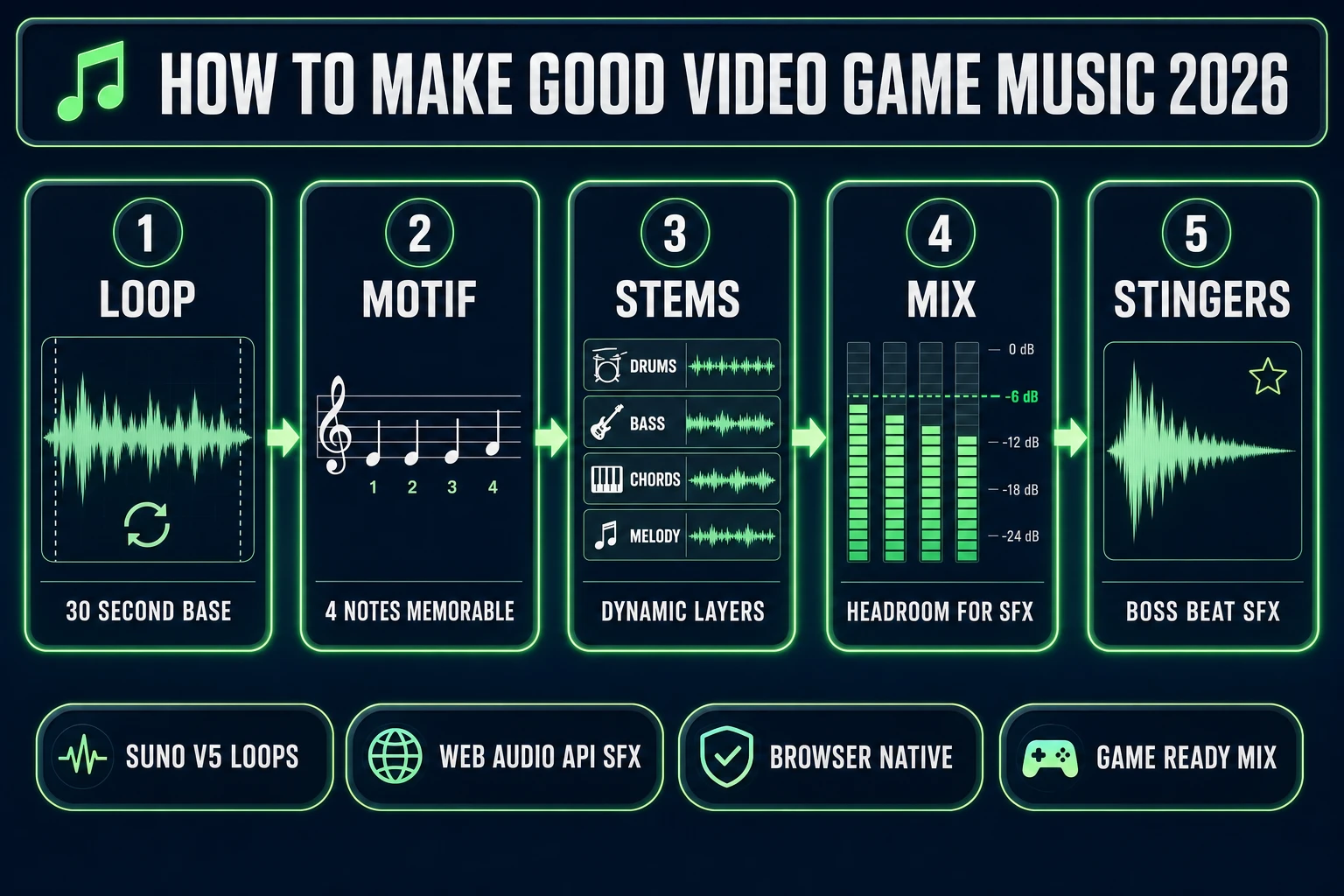
How to make good video game music - five-layer pipeline showing loop, motif, stems, mix, and stingers with panel headers and mock UI elements
The five craft layers that separate good video game music from generic AI wallpaper: a loopable 30-second base, a memorable 4-note motif, dynamic stems that swap on game state, a mix that leaves headroom for SFX and voice, and one-shot stingers for beats. Sorceress Music Gen handles the loops, Sound Studio handles the ambience, SFX Gen handles the stingers — all in one browser tab.

What “good” video game music actually means in 2026

Video game music is a specific craft with hard constraints that most other music forms do not have. Film cues do not have to loop — they play once and stop. Pop tracks do not have to leave 6 to 9 dB of mix headroom for gunshots and voice lines. Ambient tracks do not have to swap stems when a game state changes. But every good video game track has to do at least three of those five things at once, and the ones that hit all five are the tracks that players remember years after the game is done. The history of video game music from the SID chips of the C64 through the current 2026 wave of AI-composed indie soundtracks is basically a story of composers learning to satisfy those constraints with whatever hardware they had. The constraints did not go away; the tools got better.

The word good in how to make good video game music is doing the entire work. A track that satisfies zero of the five craft constraints is still music — it just does not sound right in a game. The player experience is a subtle rejection: the music feels like it is playing over the game instead of inside it, the loop point clunks every 90 seconds, the combat feels flat because the music never intensifies, the SFX get lost because the music sits at full loudness. None of these failures are audible if you listen to the track in isolation. They only surface when the track has to run for 40 minutes underneath actual gameplay, which is exactly the test that determines whether the music is any good.

The rest of this article is organized around five layers. Each layer is a specific craft principle plus the Sorceress tool that implements it. The order matters: you build good video game music from the loop up, not from the melody down.

Layer 1: The 30-second loop is the atom of video game music

The single most important craft decision in video game music is loop length and loop seam quality. A track that ends with a fade or a full stop cannot loop in a game engine without a noticeable gap. The engine plays the track, hits the end, restarts — and the player hears a 200 ms hole in the audio. That hole is the difference between music that plays underneath the game and music that interrupts the game every 90 seconds. The fix is small and technical: write tracks that end on the same beat and the same chord they started on. Better still, write tracks where the last 500 ms and the first 500 ms are the same phrase, so the ear cannot tell where the loop point is.

Loop length itself has a practical sweet spot for indie games. Research on repetitive stimulus indicates the ear registers a loop consciously somewhere between 90 and 120 seconds of unchanged repetition, so any single loop under 90 seconds can play indefinitely without the player thinking “this is the same 20 seconds again.” The Loop (music) Wikipedia entry covers the history of the technique from sampling through modern DAW-based composition. For background exploration music, 30 to 60 seconds is the workhorse. For combat music, 15 to 30 seconds is short enough to stay tense without becoming a jingle. For long-form ambient passages (a peaceful town, a slow puzzle screen), 60 to 120 seconds gives room for a real musical arc before the loop point.

Sorceress Music Gen at /music-gen defaults to Suno V5.5, which is the correct backend for game loops in 2026. Verified against src/app/music-gen/page.tsx on July 2, 2026: MUSIC_CREDIT_COST is 10 credits per generation (line 26), the model list is V5.5 default, V5, V4.5+, V4.5, V4 (lines 376-382), and the four creation modes are create, extend, mashup, and uploadCover (lines 386-393). The extend mode is the game-composer’s friend — it takes an existing generation and produces a continuation that shares the tempo and key, which is exactly the shape needed for building a longer loopable phrase from a shorter seed. Lyrics generation costs 2 credits per set for vocal tracks (line 384). At Starter tier ($10 for 1,000 credits per src/app/plans/page.tsx line 45), a single music loop is $0.10 — low enough that iterating five or six loops per gameplay area is a rounding-error line on any indie budget.

Layer 2: The 4-note motif and why leitmotif still works

A memorable game soundtrack is almost always built on a small number of short motifs, not on long developed melodies. The leitmotif technique goes back to Wagner in the 19th century and shows up in every major game score from the 1980s onward — the Legend of Zelda main theme is essentially a 5-note motif that reappears in a dozen variations across every game in the series. The reason leitmotif works so well in games is the same reason it works in opera: the player hears the motif enough times that it stops being a musical phrase and starts being a signal. When the motif returns in a new context (a new area, a returning character, a callback to an earlier scene), the player recognizes it emotionally without having to think.

The craft principle is: pick a motif of about 4 notes, use it as the melodic seed for every track in the score, and resist the urge to add a second theme. Four notes is short enough to hum, long enough to be distinctive, and small enough that a player can identify it after hearing it two or three times in gameplay. Cramming a second theme into the same loop dilutes the recognition — the ear cannot lock onto two competing motifs in a 30-second phrase. Save the second theme for a different area (villain theme, dungeon theme, town theme) and reuse the first motif across the primary gameplay areas.

The AI workflow for motif-driven composition is straightforward on Sorceress Music Gen. Generate an initial track with a prompt that specifies the motif in words (“a rising four-note fantasy motif in D minor, harp and strings, 60 bpm”), listen to the output, and either accept the motif the AI produced or feed the successful output back into extend mode to build a variation that keeps the motif but changes the harmonic context. This is how a single 4-note motif turns into an exploration loop, a combat loop, a boss loop, and a victory sting — four separate tracks that all share the DNA. On Suno V5.5 at 10 credits per generation, iterating five prompts to find the right motif seed is 50 credits ($0.50 at Starter tier), which is genuinely trivial for the amount of leverage the right motif provides across the whole score.
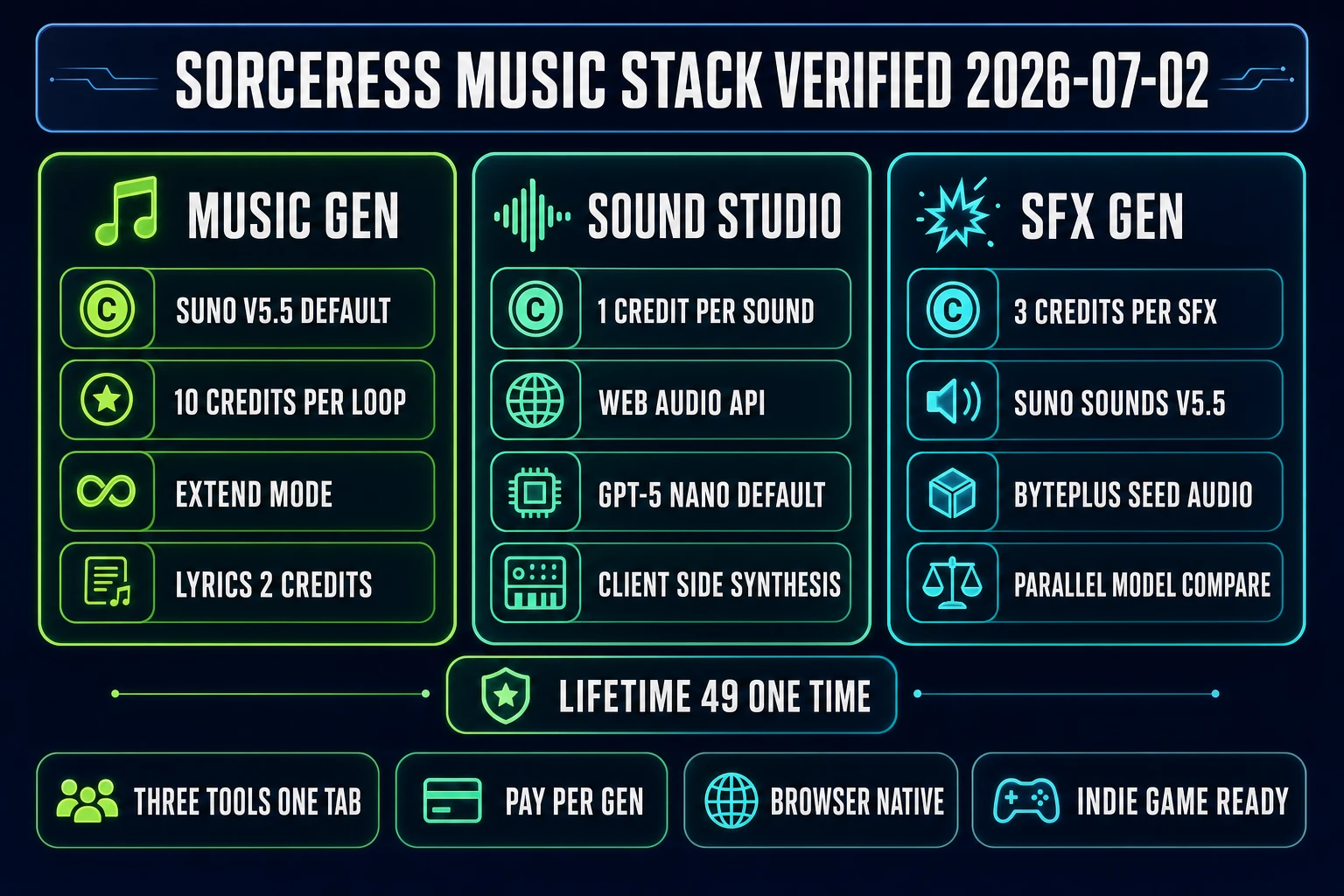
Sorceress music stack comparison - Music Gen with Suno V5.5, Sound Studio with Web Audio API, and SFX Gen with Suno Sounds V5.5 side by side with credit costs and features
The three Sorceress music tools at a glance, verified July 2, 2026: Music Gen ships Suno V5.5 at 10 credits per loop, Sound Studio writes Web Audio API code at 1 credit per sound, SFX Gen runs Suno Sounds V5.5 or BytePlus Seed Audio at 3 credits per one-shot. Every layer of the good-video-game-music workflow is browser-native and pay-per-generation.

Layer 3: Dynamic music — swapping stems when the game state changes

Dynamic music (also called adaptive music) is the technique of playing multiple synchronised stems and muting or unmuting them based on game state. This is the single biggest jump in quality from “music that plays underneath a game” to “music that responds to the game.” Static music plays the same loop regardless of whether the player is exploring, sneaking, being chased, or fighting a boss. Dynamic music adds a drum stem when combat starts, brings in a bass line when an enemy is detected, and strips back to just the chord bed during exploration. The player hears the world respond musically to what they are doing, and it registers as agency even if the player never consciously notices the audio change.

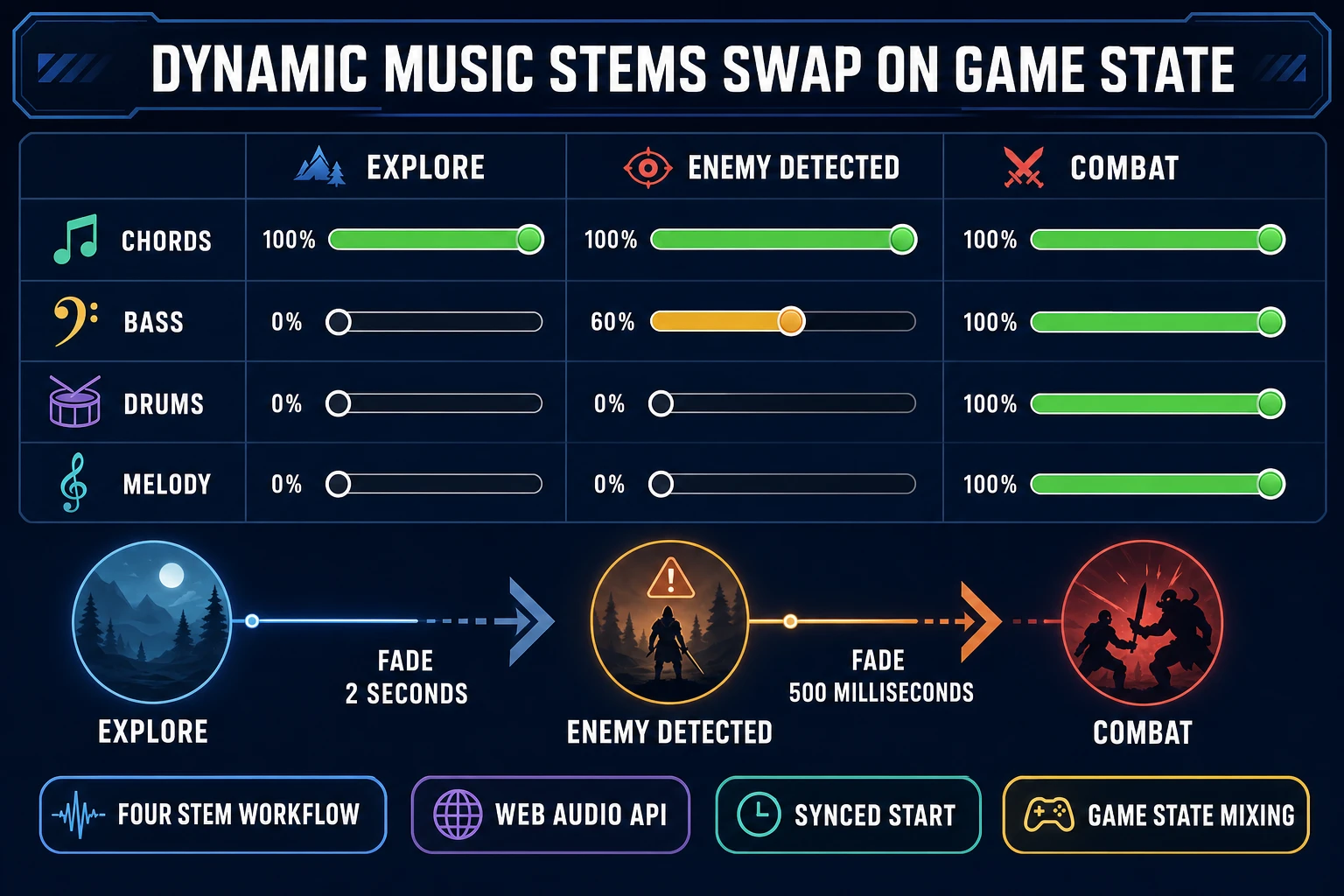
The mechanical implementation is well described by the Web Audio API documentation on MDN. The composer writes the track once, exports it as four separate stems (drums, bass, chords, melody), and the game engine loads all four stems into synchronised AudioBufferSourceNodes started at the exact same time. Each stem routes through its own GainNode. The game state controls the gain values: exploration state sets drums and melody gain to 0 and chords gain to 1; combat state fades drums and melody up to 1 over 500 ms while keeping chords at 1. All four stems share the same tempo, key, and loop length, so any subset sounds intentional. In a browser game built with WizardGenie or any Phaser or Three.js project, the pattern is a dozen lines of code plus four audio files.

The workflow question is where the four stems come from. In a traditional composer’s DAW, the composer exports the stems by muting tracks selectively and rendering each pass separately. In an AI workflow, the trick is to generate variations of the same base track that share the tempo and key but differ in instrumentation. On Sorceress Music Gen, generate the base track first (the “chords” stem), then use extend mode to render variations that add drums, add bass, add melody — each variation shares the base and adds the new layer. Save each generation separately and treat them as stems. Suno V5.5 is not perfect at holding tempo across variations, so budget a couple of retries; at 10 credits per generation, 4 stems plus 2 retries per track is 60 credits ($0.60) per song, which is still trivial compared to hiring a composer for stem-separated originals.
Layer 4: Mixing for games — leaving room for SFX and voice

The mix decision that most non-game composers get wrong is loudness. A pop track mixed for streaming targets around -14 LUFS integrated loudness. A film score targets around -23 LUFS to leave headroom for dialogue and sound design per broadcast standards. Video game music has to sit somewhere in the -20 to -24 LUFS range because the game engine mixes it underneath SFX (footsteps, weapons, impacts, UI beeps) and voice lines, and every extra dB of music loudness is a dB the SFX and voice have to fight against. A track mastered to full loudness will drown the sound design; a track mastered with 6 to 9 dB of headroom lets the game’s audio stack breathe.

The practical craft rule is: master the music so the loudest peak sits at -6 to -9 dBFS, and let the game engine mix the whole audio stack up to reasonable output levels. This is the opposite of what most modern music mastering does — modern loudness wars push tracks to -1 dBFS true peak — but it is what game engines want. If the composer delivers a track at -1 dBFS, the game engine has to attenuate it by 10 dB or more before layering SFX on top, which introduces headroom for the SFX at the cost of dynamic range in the music. Better to leave the headroom in the master and let the game engine play the music at the composer’s intended dynamics. The audio mixing reference covers the general craft; the game-specific application is the headroom rule.

Sorceress Sound Studio at /sound-creator is the tool that fills the audio-space around the music — layered ambience, background audio beds, world texture. Verified against src/app/sound-creator/page.tsx on July 2, 2026: SOUND_CREDIT_COST is 1 credit per sound (line 28), and the tool runs by having an LLM write Web Audio API code that synthesises the sound in the browser (no server audio processing, no third-party sample library). The model list is GPT-5 Nano default, Gemini 2.5 Flash, Gemini 3 Pro, and Claude Opus 4.6 (lines 38-63). This synthesise-in-browser approach is exactly the shape you want for game-native ambience because the output has no third-party audio embedded — the code is generated by the model and the audio is synthesised on the player’s machine at runtime if you ship the code, or exported as a rendered WAV if you bake it into the game. At 1 credit per sound, a full 20-sound ambience pack for a town or forest area is 20 credits ($0.20 at Starter tier).

Layer 5: The AI-first workflow — Music Gen loops, Sound Studio ambience, SFX Gen one-shots

The end-to-end pipeline for good video game music in 2026 uses three Sorceress tools in sequence. Music Gen at /music-gen generates the loopable base tracks and stem variations. Sound Studio at /sound-creator fills the ambience layer — wind, water, distant machinery, room tone. SFX Gen at /sfx-gen generates the one-shot stingers, hit sounds, UI beeps, and combat SFX. All three tools run in the same browser account, share the same credit pool, and export standard audio formats that drop directly into WebAudio, Unity, Godot, Unreal, or a browser game built with WizardGenie.

Sorceress SFX Gen verified against src/app/sfx-gen/page.tsx on July 2, 2026: SFX_CREDIT_COST is 3 credits per SFX (line 24), and the model options are Suno Sounds V5.5 (default) and BytePlus Seed Audio 1.0 (lines 26-43). The tool supports selecting multiple models in parallel to A/B compare outputs for the same prompt — useful when the correct sound is a matter of taste (a boss reveal stinger can go orchestral hit, synth swell, or bass drop, and hearing all three in one click saves an iteration). At 3 credits per generation, generating 20 SFX for a full indie game is 60 credits ($0.60), and doubling that with parallel model comparison is 120 credits ($1.20).

Cost math for a complete 8-track indie game score verified against the source on July 2, 2026: 8 music generations at 10 credits each = 80 credits (the base loops), 4 stem variations per track × 8 tracks at 10 credits each = 320 credits (the stems for dynamic music), 20 SFX at 3 credits = 60 credits, 10 Sound Studio ambience sounds at 1 credit = 10 credits. Total: 470 credits, which is $4.70 at the Starter tier ($10 for 1,000 credits) or $2.35 at the Plus tier ($50 for 5,000 credits at $0.005 per credit). This is one to two orders of magnitude cheaper than commissioning a human composer for a stem-separated original score, and the composer can be the game designer working in the same browser tab as the level editor. That collapsed feedback loop is the actual unlock — you can rewrite a boss theme five times in an afternoon because the cost floor is measured in dimes, not weeks. The Sorceress plans page confirms the credit tiers, and the $49 one-time lifetime unlock covers the non-AI-generative tools (3D Studio, Auto-Rigging, Text-to-Animation) if the project needs those too.

Dynamic music stem workflow - four rows for chords bass drums melody across three columns for explore enemy detected combat game states with volume slider mockups
Dynamic music implementation: four stems (chords, bass, drums, melody) synchronised at the same tempo and loop length, with gain values that swap based on game state. Explore plays only chords; enemy detected fades in bass over 2 seconds; combat brings in drums and melody over 500 ms. The Web Audio API on Sound Studio uses the same pattern for SFX layering.

The verdict: how to make good video game music vs music that sounds like wallpaper

The honest verdict on how to make good video game music in 2026 comes down to whether the composer treats the five craft layers as constraints or as afterthoughts. The composers who write music that sounds like wallpaper — pleasant, technically competent, and instantly forgettable — skip the loop-seam craft, skip the motif, skip the stems, master to full loudness, and never write stingers. The composers who write music that players remember 10 years later hit all five layers. The tools have changed radically in the last three years (Suno V5.5 in Music Gen, LLM-authored Web Audio API in Sound Studio, BytePlus Seed Audio in SFX Gen); the craft principles have not changed at all since the SNES era. Better tools mean the craft is faster to apply, not less important to know.

For an indie developer starting a soundtrack in 2026, the honest workflow order is: pick a 4-note motif on Music Gen with 5 to 10 generations of iteration (50-100 credits, $0.50-$1.00). Generate the base tracks for each gameplay area using the motif as the prompt seed, 8 tracks at 10 credits each ($0.80). Generate stem variations for each track using extend mode, budgeting 4 stems per track at 10 credits each ($3.20 for 8 tracks). Master each track to -6 dBFS peak in a free DAW like Audacity or Reaper trial. Fill the ambience layer with Sound Studio for 20 sounds at 1 credit each ($0.20). Generate 20 to 40 SFX and stingers on SFX Gen at 3 credits each ($0.60-$1.20). Wire the dynamic music into the game engine using the four-stem synchronised-source pattern per the MDN Web Audio API docs. The complete stack for a full indie game score lands under $10 in credits, ships in a browser tab, and hits all five craft layers if the composer treats them as first-class constraints rather than nice-to-haves.

The one honest failure mode worth naming: AI music generation is genuinely fast, and the temptation is to generate 50 tracks, pick the best three, and call it done. That approach produces the wallpaper result. The composers whose scores land are the ones who pick one motif and hold it across every track, whose loops end where they start, whose stems really do sync at the sample level, whose mixes really do leave 8 dB of headroom, and whose stingers really do land on beat 1 of the boss reveal. The AI is not the composer; the AI is the section of a symphony orchestra that reads the composer’s score and plays it. The composer still has to write the score. Read the full Sorceress tool catalog for the rest of the game-audio and game-art stack, and check the Sorceress plans for the credit-pack pricing and the one-time $49 lifetime supporter unlock. Every price, credit cost, and model version above was verified against the Sorceress source code on July 2, 2026 — verify again before you ship, because Suno V5.5 will be Suno V6 or V7 by the time you read this in six months, and the specific model version behind Music Gen will have moved with it. The five craft layers, though, will still be the answer.

Related reading in this stack: the head how to make video game music (AI loops in your browser) post for the mechanics tutorial, the AI game music generator (indie track pipeline) post for the Music Gen deep-dive, the how to make a music game (rhythm beats with AI tracks) post for the rhythm-game angle, the sound effects generator AI (browser SFX library) post for the SFX Gen deep-dive, and the sound effects AI generator (game SFX pipeline) post for the pipeline-level view. Together those cover every audio surface a game project needs; this article covers the craft that makes any of them worth using.

Frequently Asked Questions

What actually separates good video game music from generic AI-generated tracks?

Good video game music satisfies five constraints that generic music (film cues, pop tracks, background beats) does not have to. First, it loops cleanly without a noticeable seam — a 4-minute track that ends with a fade will replay wrong the moment the loop point hits. Second, it holds a motif of about 4 notes that the player can hum after 10 minutes of play (leitmotif, per the Wikipedia entry, is the technique behind almost every memorable game soundtrack from the 1980s onward). Third, it layers into stems (drums, bass, harmony, melody) that the engine can crossfade based on game state — combat music adds the drum stem, exploration removes it. Fourth, it leaves 6-9 dB of headroom in the mix so gunshots, voice lines, and UI beeps land on top of the music without ducking to zero. Fifth, it pairs with one-shot stingers for narrative beats (level clear, boss reveal, character death). Generic AI music platforms optimise for a single polished-sounding track. Video game music optimises for a loopable, layerable, mix-aware track. The distinction is what makes something good in a game context vs merely pleasant to listen to.

How long should a video game music loop actually be?

The practical answer for indie games in 2026 is 30 to 60 seconds for background loops and 15 to 30 seconds for combat loops. The reasoning is player perception: research on repetitive stimulus indicates the ear starts to register a loop consciously around 90 to 120 seconds of unchanged repetition, so any single loop under that window can play indefinitely without the player thinking ‘this is the same 20 seconds again.’ Longer loops (2 to 3 minutes) sound more ‘composed’ but require the player to actually stay on one screen for that long, which almost never happens in a game with fast level transitions. Shorter loops (under 15 seconds) start to feel like a jingle rather than a soundtrack. Sorceress Music Gen at /music-gen defaults to 30 to 60 second generations on Suno V5.5, which is the correct order of magnitude for game loops; the extend mode adds a continuation that can build the loop out to 90 seconds if the game needs a longer atmospheric passage. Verified against src/app/music-gen/page.tsx on July 2, 2026: 10 credits per generation, 2 credits per lyrics generation for vocal tracks.

How do dynamic and adaptive music systems actually work in a game?

Dynamic music (or adaptive music per the Wikipedia entry on adaptive music) is a system where the engine plays multiple synchronised stems and mutes or unmutes them based on game state. The classic implementation: the composer writes a track once, exports it as four separate stems (drums, bass, chords, melody), and the engine loads all four stems into synchronised audio buffers. Exploration state: only the chords stem plays. Enemy detected: the bass stem fades in over 2 seconds. Combat engaged: the drums and melody stems fade in over 500 ms. Combat ends: drums and melody fade out. All four stems share the same tempo, key, and loop length, so any subset sounds like an intentional mix rather than a chopped track. Implementation in a browser game is straightforward with the Web Audio API (per the MDN Web Audio API documentation): create four AudioBufferSourceNodes started at the exact same time, route each through its own GainNode, and animate the gain values based on game state. Sorceress Sound Studio at /sound-creator uses the same Web Audio API primitive on the SFX side, verified against src/app/sound-creator/page.tsx on July 2, 2026 (1 credit per sound, LLM writes the code, browser synthesises). For a full four-stem music workflow, generate the base track on Music Gen, then use the extend mode to render variations that share the tempo, and treat the base as one stem and each variation as another.

How much does the Sorceress music stack actually cost?

Verified against src/app/music-gen/page.tsx, src/app/sfx-gen/page.tsx, src/app/sound-creator/page.tsx, and src/app/plans/page.tsx on July 2, 2026: Music Gen is 10 credits per generation (Suno V5.5 default; V5, V4.5+, V4.5, V4 also available). Lyrics generation for vocal tracks is 2 credits. SFX Gen is 3 credits per SFX (Suno Sounds V5.5 default or BytePlus Seed Audio 1.0). Sound Studio is 1 credit per sound effect (Web Audio API code generated by GPT-5 Nano, Gemini 2.5 Flash, Gemini 3 Pro, or Claude Opus 4.6 — the model synthesises client-side in the browser, no server audio processing). Credit tiers per the plans page: Starter $10 for 1,000 credits ($0.01 per credit), Creator $20 for 2,000, Plus $50 for 5,000, Studio $100 for 10,000. Lifetime supporter unlock is $49 one-time and covers the non-AI-generative tools (3D Studio, Auto-Rigging, Text-to-Animation) forever; AI generation stays credit-based because the cost floor is the model provider’s inference bill. A complete 8-track indie game score (8 music generations at 10 credits + 4 stems per track at 10 credits + 20 SFX at 3 credits + 10 Sound Studio ambience sounds at 1 credit) costs 8×10 + 32×10 + 20×3 + 10×1 = 80 + 320 + 60 + 10 = 470 credits = $4.70 at Starter tier.

What are the top mistakes to avoid when making video game music?

Six common mistakes account for most bad video game music in 2026. One: writing tracks that end on a fade or a full stop. Game music loops; a fade or a full stop creates a visible seam every time the loop point hits. Fix: write tracks that end on the same beat and same chord they start on. Two: cramming too many melodic ideas into one loop. If the player hears the loop 40 times per session, more ideas equals more cognitive load, not more richness. Fix: pick a 4-note motif, repeat it with variation, and resist the urge to add a second theme. Three: mixing music to full-loudness. Games play music underneath SFX and voice; a full-loudness master leaves no room for the sound design to breathe. Fix: master music with the loudest peak at -6 to -9 dBFS, and let the engine mix it up to reasonable levels. Four: forgetting to write a combat / tension variation. Constant exploration music makes combat feel flat, even if the combat SFX are strong. Fix: for every exploration loop, write a combat variation in the same key at the same tempo. Five: over-relying on drums. Game music that leans hard on drums competes with footstep SFX, weapon SFX, and impact sounds — the mix ends up muddy. Fix: use drums as an accent stem, not the base. Six: skipping the stinger cues. A boss reveal without a stinger is a shrug; a boss reveal with a 3-second orchestral hit lands. Fix: budget SFX Gen credits for stingers as a separate pass. All six fixes are compatible with an AI-first pipeline — the AI does the heavy lifting on generation, but the composer still owns the compositional decisions.

Can I use AI-generated video game music commercially in my indie game?

The commercial-use answer in 2026 depends on the specific generator and the specific tier you use to generate the track. On Sorceress Music Gen (Suno V5.5 backend, verified July 2, 2026), Music Gen output belongs to the account that generated it, subject to the underlying Kie Suno API terms of service — commercial use is permitted for paid credit generations. Sound Studio output (LLM-written Web Audio API code that synthesises client-side) is straightforward: the code is authored by the model and the audio is synthesised on your machine, so there is no third-party sample or third-party recording embedded in the output. SFX Gen (Suno Sounds V5.5 or BytePlus Seed Audio 1.0) follows the same pattern as Music Gen — commercial use permitted for paid generations. In practice, verify the generator’s current terms of service on the day of ship because vendor terms shift; if commercial rights are the priority, generate on paid credits (not free tier bonuses), and archive the generation invoice as proof. For an indie game shipping to Steam, itch.io, or a browser storefront in 2026, the AI-generated music path is legally clean when the pay-per-generation model is used and the generator’s commercial-use clause covers game audio. Explore the full Sorceress music stack at the /music-gen, /sound-creator, and /sfx-gen tools, and the Sorceress plans page for the credit-pack pricing that unlocks paid-tier commercial rights.

Sources

  1. Video game music (Wikipedia)
  2. Leitmotif (Wikipedia)
  3. Adaptive music (Wikipedia)
  4. Web Audio API (MDN Web Docs)
  5. Loop (music) (Wikipedia)
  6. Audio mixing (recorded music) (Wikipedia)
Written by Arron R.·3,390 words·15 min read

Related posts