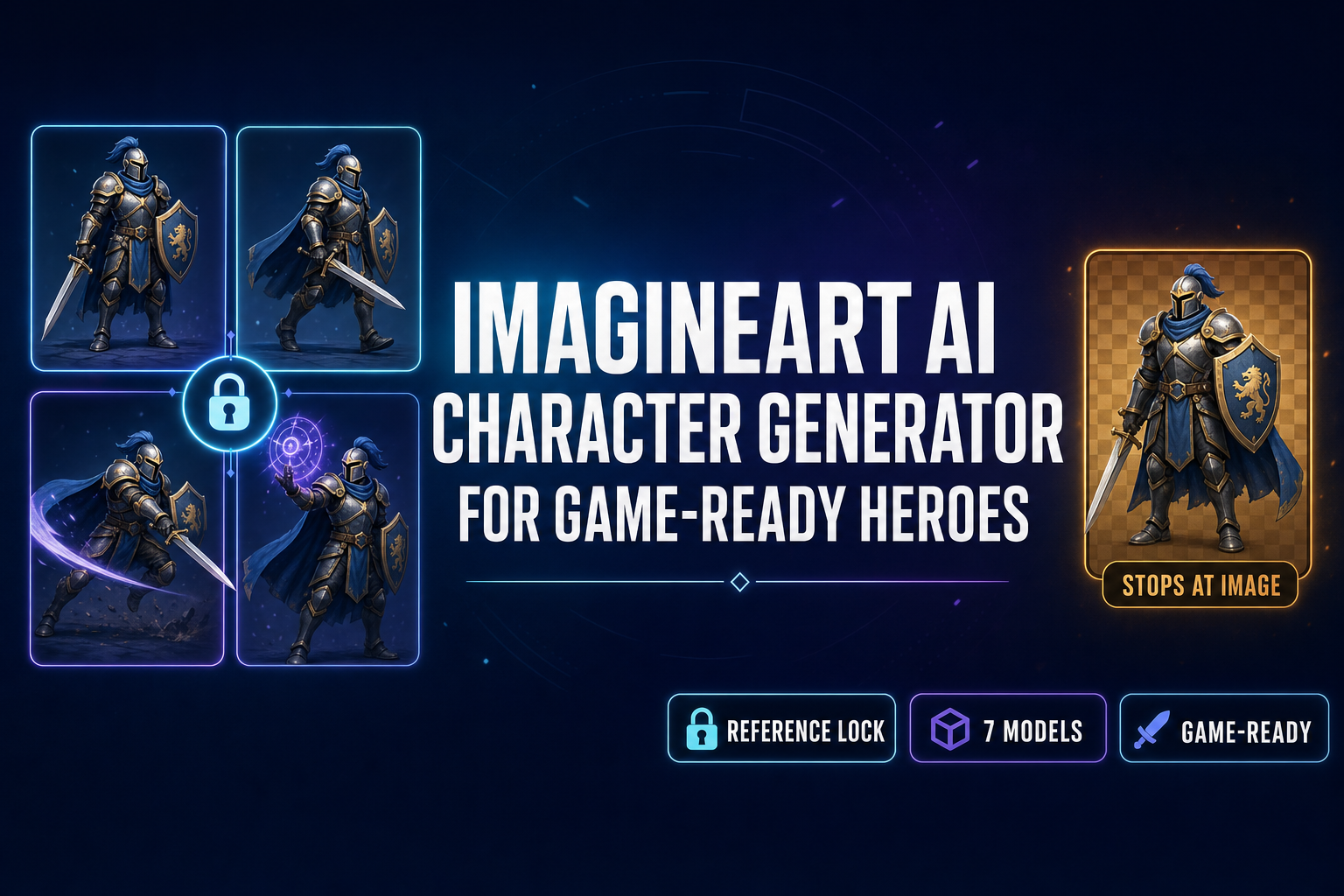
Imagineart AI Character Generator (For Game-Ready Heroes)

By Arron R.12 min read
The Imagineart AI character generator (imagine.art) is a free-tier creative suite with reference images, prompt enhancement, and 4K upscaling. It’s great for on

The Imagineart AI character generator is genuinely close to what game devs want from a browser-based character tool. It ships a multi-model picker (Flux, Flux Dev, Imagen 3, and the proprietary ImagineArt 2.0), it accepts reference images, it can upscale to 4K, and it offers 100 free credits per day that reset every 24 hours so a hobbyist can stay inside the free tier indefinitely. The gap that matters for a game project is what happens after the portrait lands. Imagineart outputs stop at a single PNG. There is no sprite-sheet packer, no engine-format atlas, no 3D-mesh bridge. Below is what the Imagineart AI character generator actually does in 2026, where it shines, where it stops cold for a game pipeline, and the reference-locked alternative inside Sorceress AI Image Gen that runs the same model families straight through to a sprite sheet and a rigged 3D model. Verified May 19, 2026 against the live imagine.art help center, the Sorceress IMAGE_MODELS array in src/app/_home-v2/_data/tools.ts, and the per-model credit costs in src/lib/models.ts.
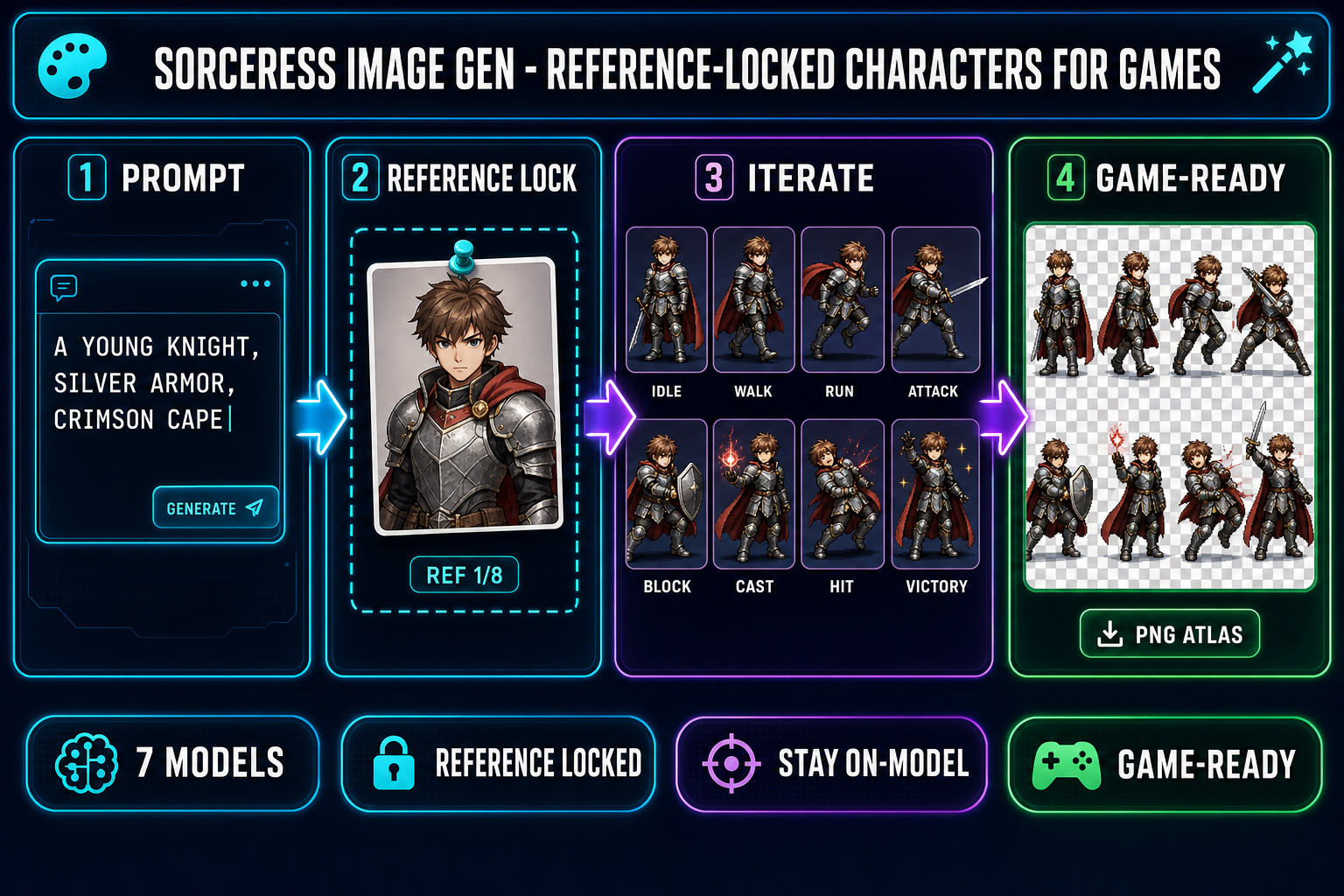
Reference-locked AI character generation pipeline showing four steps inside Sorceress AI Image Gen, type a prompt, pin a reference image, iterate eight character variants from the same source portrait, export a game-ready sprite sheet, on a dark navy background with cyan and purple accents
The reference-locked alternative to the Imagineart AI character generator. One source portrait, eight matching poses, one ready-to-ship sprite sheet. Verified May 19, 2026.

What the Imagineart AI character generator actually does in 2026

Imagineart (the brand styles itself ImagineArt, the URL is imagine.art) is an AI creative suite that bundles image generation, character art, video, voice, and a handful of editing utilities behind a single login-gated dashboard. The character-specific entry points live at imagine.art/features/ai-person-generator and imagine.art/features/realistic-ai-character-generator, and the underlying generator routes prompts through four models that the help center documents in docs.imagine.art/ai-models/image:

  • ImagineArt 2.0 — the proprietary flagship. The vendor benchmarks it at 97 percent realism and 96 percent prompt accuracy, with cinematic lighting control, precise text rendering, and enhanced spatial reasoning. The product page positions it as the “every generation is indistinguishable from a photograph” tier.
  • Flux (Black Forest Labs) — the open-weight diffusion model that became the open-source default in 2024. Strong on stylized art, slightly slower to steer than ImagineArt 2.0 for photoreal output.
  • Flux Dev — the developer-tuned Flux variant. Easier to coax with adjective-heavy prompts; better for fantasy or anime-style characters.
  • Imagen 3 (Google) — the photoreal heavyweight. The right pick when the goal is “this character looks like a real person” for cinematic cutscenes.

Every generation costs credits. New accounts receive 100 free credits per day that reset every 24 hours, with no credit card required — but a login is mandatory, with sign-in options for Google, Facebook, Discord, or email. For users who need more than the daily 100, the platform sells subscription plans that lift the daily cap; specific pricing tiers are surfaced inside the dashboard post-sign-in. The Imagineart AI character generator accepts reference images on most models, exposes an AI prompt-enhancement helper, and supports 4K upscaling on completed images. Verified May 19, 2026 via the imagine.art help center and the docs.imagine.art product pages.

Where the Imagineart AI character generator shines (and where it stops for game devs)

Three cases where Imagineart is a strong pick:

  • One-shot hero portraits for menus and key art. The ImagineArt 2.0 model produces clean, high-fidelity character portraits at 4K with cinematic lighting baked in. For a title screen, a Steam capsule, or a key-art splash, the single-PNG output is exactly what you need.
  • Brainstorming a roster of NPCs. The 100 free credits per day reset every 24 hours, so a hobbyist project can run ten or twelve different character ideas a day without paying. Hand the outputs to a writer, refine the survivors.
  • Stylistic experiments across model families. The model picker lets you regen the same prompt across Flux, Flux Dev, Imagen 3, and ImagineArt 2.0 to compare style fingerprints. Useful when you have not locked the visual direction of the project.

And three cases where Imagineart stops cold for a game pipeline:

  • Sprite sheets. The Imagineart AI character generator outputs a single image, not a frame-aligned grid. There is no sprite-sheet packer, no transparent-background batch mode, no engine atlas export. Generating eight pose images and laying them out is on you.
  • 3D bridge. Outputs stop at 2D. There is no image-to-3D path inside the platform — no GLB export, no mesh generation, no auto-rigging.
  • Engine-native asset formats. Phaser wants a sprite sheet plus a JSON atlas, Godot wants an AtlasTexture, Unity wants a sliced sprite. Imagineart ships a PNG and stops.

The Imagineart model lineup vs the Sorceress AI Image Gen rail

Sorceress AI Image Gen ships seven image models on the homepage rail (verified May 19, 2026 against src/app/_home-v2/_data/tools.ts lines 669–676), and every one accepts reference images. The two lineups overlap on the Flux family but diverge sharply on the newer 2025–2026 flagships:

FamilyImagineartSorceress AI Image Gen
GoogleImagen 3Nano Banana Pro, Nano Banana 2
OpenAIGPT Image 2
Black Forest Labs (Flux)Flux, Flux DevFlux 2 Pro
ByteDanceSeedream 5 Lite
xAIGrok Imagine
Tongyi-MaiZ-Image Turbo
ProprietaryImagineArt 2.0

Per-model reference-image caps and credit costs for the Sorceress lineup (verified May 19, 2026 against src/lib/models.ts):

ModelProviderMax ref imagesCredits (default)Best for
Nano Banana ProGoogle818 (2K) / 33 (4K)Highest-fidelity portrait
Nano Banana 2Google149 (1K) / 12 (2K) / 17 (4K)Iterating poses cheaply
GPT Image 2OpenAI107 (medium) / 17 (high)Photoreal style
Seedream 5 LiteByteDance146 (2K) / 8 (3K)Uncensored / horror genres
Flux 2 ProBlack Forest Labs8 (+3 cr per ref)~9 + 3 per refStylized illustration
Z-Image TurboTongyi-Mai5~3Ultra-fast iteration
Grok ImaginexAI5~6Creative-style portraits

The honest read: Imagineart and Sorceress draw from overlapping model pools (both ship Flux variants), but Sorceress’s rail leans into the newer 2025–2026 flagships (the Nano Banana family from late 2025, GPT Image 2, Seedream 5 Lite). Imagineart’s differentiator is the proprietary ImagineArt 2.0 model, which is genuinely strong for one-shot photoreal portraits; Sorceress’s differentiator is the downstream game pipeline. Pick the rail that matches the bottleneck you actually have.

The game-asset gap: why Imagineart AI character generator outputs stop at PNG

Game art has a hard requirement that single-portrait art does not: character identity is constant, only pose changes. A sprite sheet of a hero walking right has eight frames where the same face, hair, armor, and color palette must repeat. The walking animation in your sprite atlas is read frame-by-frame at 12 fps; if the face shifts between frames, the player’s eye registers it as a glitch.

The Imagineart AI character generator handles the first half of that requirement: reference-image input on most models lets the prompt steer pose without changing identity. The second half — turning eight on-model pose images into a frame-aligned grid the engine can load with one function call — is where the platform stops. There is no Imagineart endpoint that takes “here are eight matching character images, please pack them into a 4×2 atlas at 48×48 px with transparent backgrounds”, because that is not what the platform is built to do. It is a creative suite for one-shot images, not a game-asset pipeline.

The same thing happens at the 3D step. A modern RPG cutscene needs the same hero who appeared on the menu portrait to render as a 3D mesh inside the scene. That bridge requires an image-to-3D model (Hunyuan 3D, Meshy, TRELLIS, Rodin, Tripo), an auto-rigging pass that fits a humanoid skeleton to the mesh, and an export to glTF 2.0 binary (GLB) that the engine reads. Imagineart ships none of those steps. They have to live somewhere else in the toolchain.
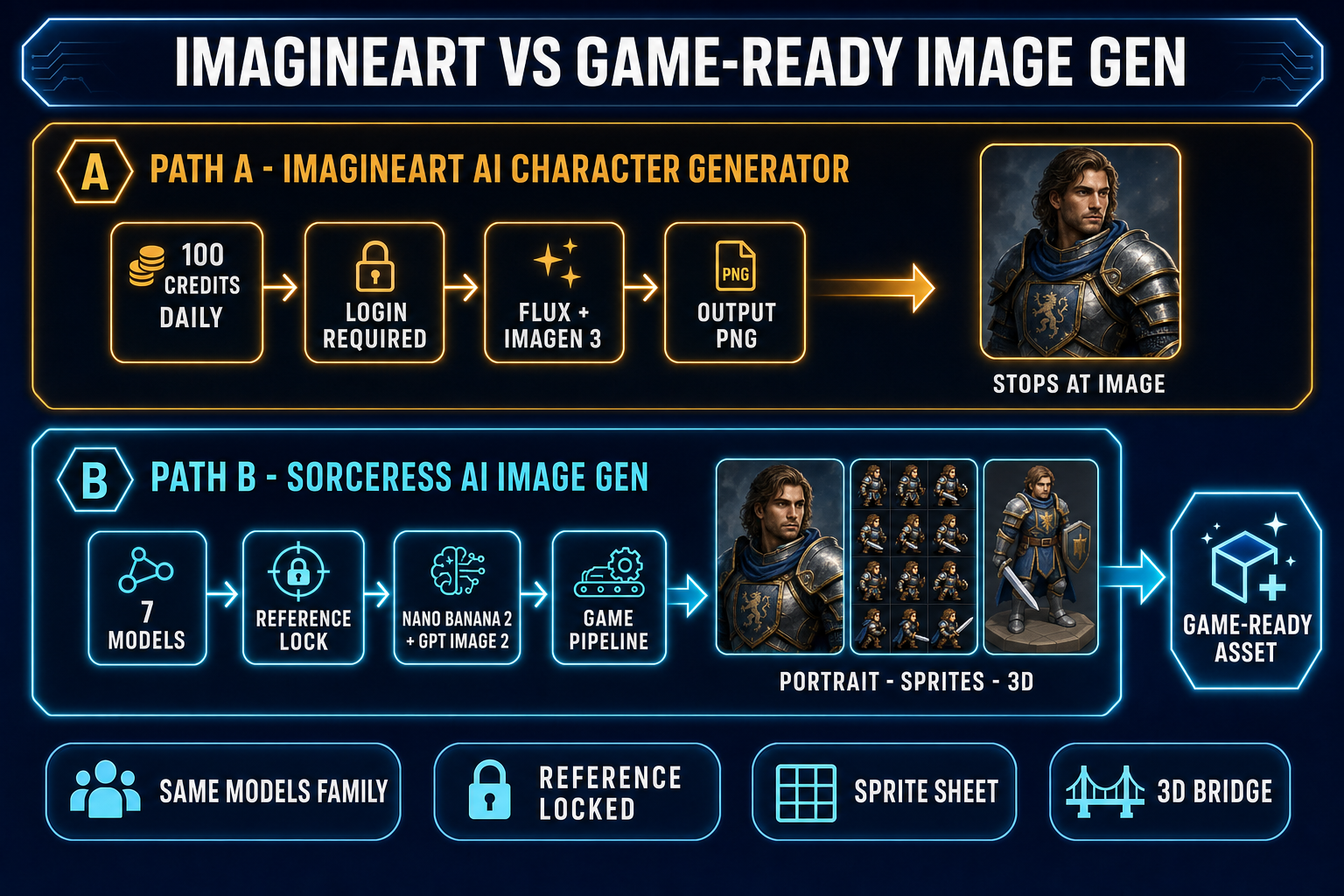
Side-by-side comparison diagram of Imagineart AI character generator versus Sorceress AI Image Gen, top lane shows Imagineart with 100 daily credits, Flux plus Imagen 3, and a single PNG output, bottom lane shows Sorceress with seven models including Nano Banana 2 and GPT Image 2, a reference-locked pipeline, and outputs across portrait, sprite sheet, and 3D mesh formats, both lanes on a dark navy background with amber and cyan accents
Both platforms generate strong character portraits with reference-image input. The downstream is where they diverge — Imagineart stops at the PNG, Sorceress hands the same image into a sprite sheet and a rigged 3D mesh.

The reference-locked Imagineart AI character generator alternative

The Sorceress workflow that closes the game-pipeline gap is four steps, all inside one browser tab, with no swapping between platforms:

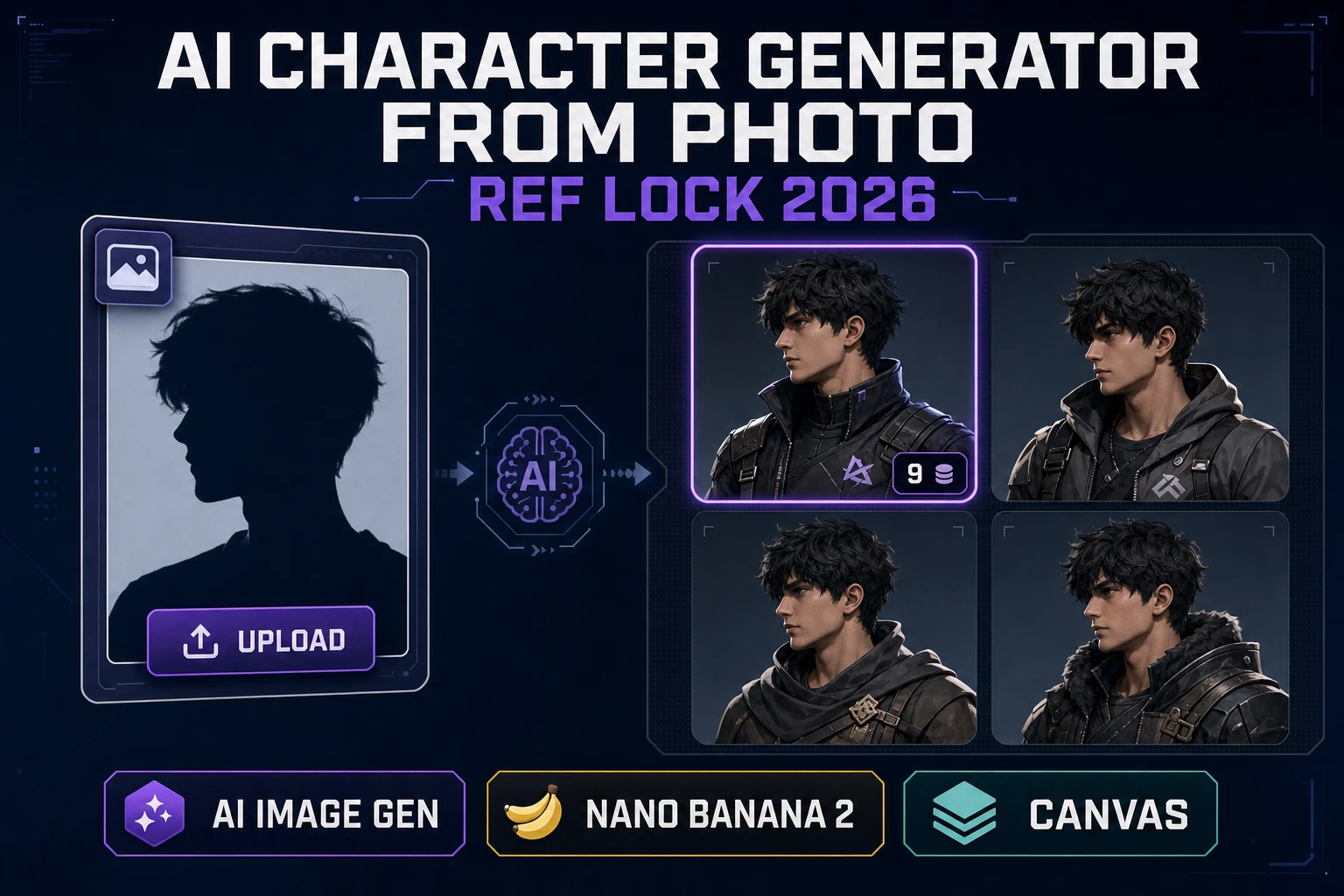
  1. Generate the canonical character once at high quality. Open Sorceress AI Image Gen, pick Nano Banana 2 at 2K resolution (12 credits), and type a detailed prompt: “a young human knight, mid-twenties, short auburn hair, polished silver plate armor with brass trim, crimson cape, sheathed longsword on hip, soft natural daylight, full-body front-facing portrait, neutral standing pose, transparent background”. One generation, one canonical hero. Save the image to your local downloads.
  2. Pin the canonical hero as a reference image. In the same panel, drop the saved image into the reference slot. Nano Banana 2 accepts up to fourteen reference images per call — you will use one for character lock and optionally one more for pose direction.
  3. Run seven follow-up prompts at 1K resolution (9 credits each): “same character, idle standing pose”, “same character, walking to the right, side view”, “same character, running to the right”, “same character, mid-air jump”, “same character, attacking with longsword swing”, “same character, raising shield to block”, “same character, reacting to being hit”, “same character, victory celebration with sword raised”. Each generation is anchored to the reference, so the knight’s face, hair, armor, and palette stay constant across the eight-frame pack.
  4. Lay the eight outputs out as a sprite sheet. Drop them into Quick Sprites for transparent-background cleanup and grid layout, or into Canvas for manual frame arrangement. The pack ships as a single PNG atlas the engine reads in one this.load.spritesheet() call.

The full eight-pose pack lands at 75 credits — well inside the 100-credit starter pack a new Sorceress account ships with. The hero stays on-model because every generation after the first is anchored to the same reference image, which is the same capability the Imagineart AI character generator exposes — but the Sorceress workflow keeps the pipeline going past the single PNG.

From the character image to a game-ready sprite sheet

The reference-locked outputs are already pose-consistent and identity-consistent; the remaining job is to align them into a uniform grid for the engine. Quick Sprites handles that step end-to-end — verified May 19, 2026 against src/app/quick-sprites/page.tsx: MODEL_ID = 'retro-diffusion/rd-animation', CREDITS_PER_GEN = 9, animation styles include four_angle_walking at 48×48 px and small_sprites at 32×32 px, plus a configurable vfx mode (24–96 px). For a top-down RPG hero, the eight-frame walk cycle in four directions (north, south, east, west) drops into RPG Maker, Phaser, or Godot using the same one-line spritesheet loader call:

// Phaser 4 - load and play the sprite sheet
this.load.spritesheet('hero', '/assets/hero_walk.png', {
  frameWidth: 48,
  frameHeight: 48,
});

this.anims.create({
  key: 'hero-walk-right',
  frames: this.anims.generateFrameNumbers('hero', { start: 0, end: 7 }),
  frameRate: 12,
  repeat: -1,
});

const hero = this.physics.add.sprite(100, 100, 'hero');
hero.play('hero-walk-right');

That is the full integration. The Quick Sprites output rides a clean transparent background, frames are aligned to the same pixel grid, and Phaser’s generateFrameNumbers walks the atlas left-to-right and top-to-bottom in the order the sprite sheet was laid out. The reference-locked workflow keeps the character identity tight enough that the player’s eye never reads a frame transition as a glitch. For a deeper sprite-sheet walkthrough, see the sprite-sheet how-to; for the broader on-model pipeline, see the reference-image character workflow; for an alternate brand-anchored comparison, see the Perchance comparison and the Canva comparison.

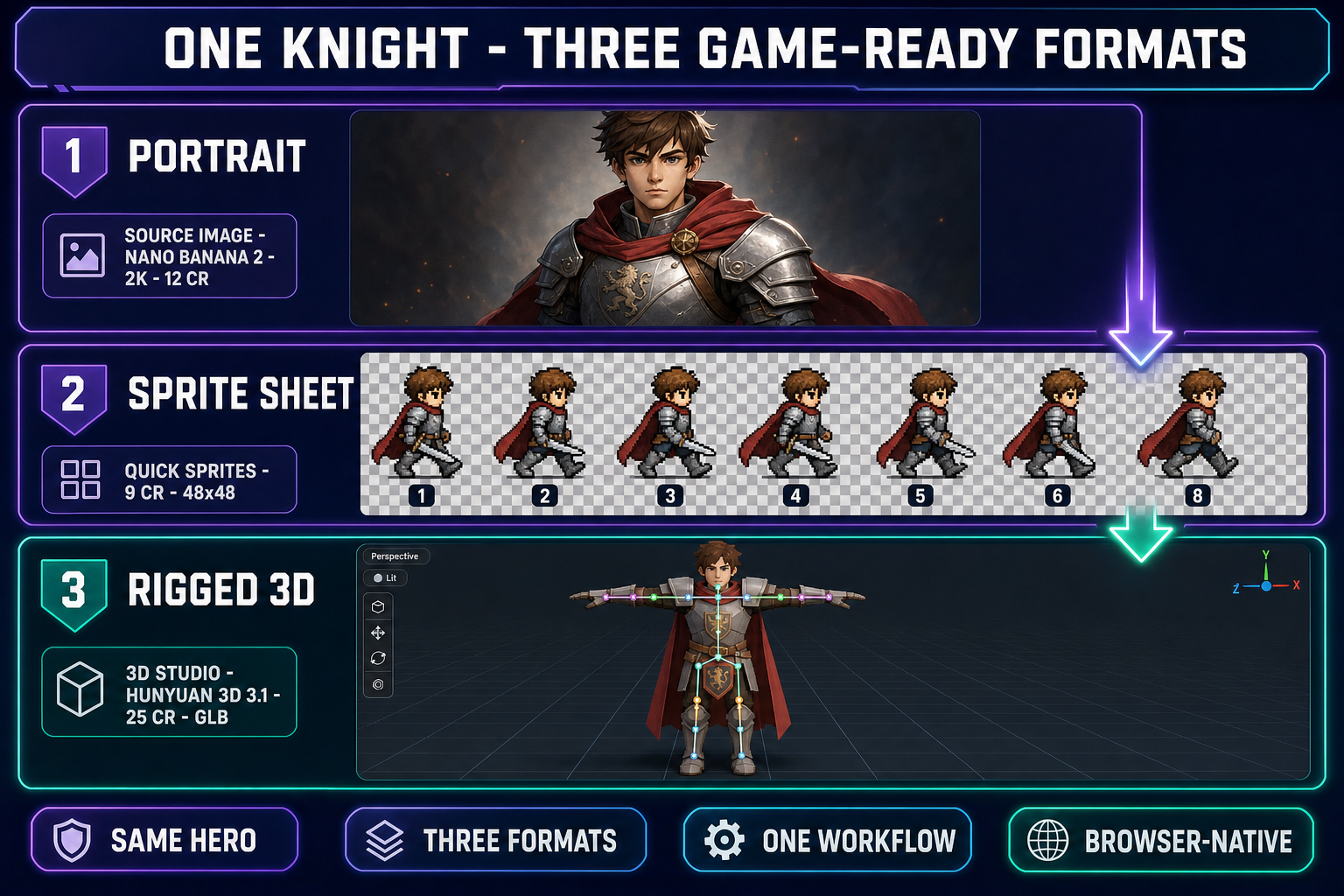
Diagram showing one knight character transformed into three game-ready formats, a high-resolution portrait from Nano Banana 2, an 8-frame walk cycle sprite sheet from Quick Sprites at 48 by 48 pixels, and a rigged 3D model in T-pose from 3D Studio using Hunyuan 3D 3.1, on a dark navy background with purple and emerald accents
One canonical character, three game-ready exports. The reference image anchors identity across all three formats so the knight looks the same in the menu portrait, in the 2D walk cycle, and in the 3D scene.

From the character image to a rigged 3D model

If the game needs a 3D version of the same hero (an RPG cutscene, a 3D platformer, a VR title), the canonical portrait flows into Sorceress 3D Studio through the same reference-image input. The six 3D models available in 3D Studio (verified May 19, 2026 against THREED_MODEL_ORDER in src/lib/threed-models.ts — Hunyuan 3D 3.1, Meshy 6, TRELLIS 2, TRELLIS, Rodin 2.0, Tripo v3.1) accept a single image and output a textured GLB mesh.

The recommended default for character work is Hunyuan 3D 3.1 (25 credits per generation), which produces a clean low-poly mesh with PBR textures baked in. Send the portrait, wait roughly two minutes, and the 3D Studio viewer renders the result. From there click Rig for the browser-based auto-rigging pass (humanoid skeleton, no marker placement required), then click Animate for the text-to-motion pass. The whole portrait-to-rigged-animated-character path runs in roughly five minutes inside a browser tab, anchored to the same character description that started the project. That is the bridge the Imagineart AI character generator does not ship — and it is the bridge a game project actually needs.

Five mistakes that ruin AI character consistency across Imagineart AI character generator outputs

  1. Prompting with a generic role instead of a specific look. “A knight” is a cloud of millions of possible characters. “A man in his mid-twenties with chin-length auburn hair, a scar above the left eyebrow, polished silver plate armor with brass shoulder pauldrons, and a crimson cape” is a much narrower region of latent space. Each adjective tightens the cloud. Imagineart accepts reference images, but the prompt is still the primary steering mechanism on the first generation — spend an extra ninety seconds on it.
  2. Comparing two generations and calling them consistent because the armor color matches. Sprite-sheet consistency means the face is the same. Stand the two outputs side by side and cover everything below the chin. If the faces are clearly different people, the color match is cosmetic.
  3. Skipping the reference image after the first generation. Imagineart and Sorceress both expose a reference slot. Leaving it empty for pose iterations is the single fastest way to end up with eight different-looking characters in eight different poses. Upload the canonical portrait once and pin it for every follow-up.
  4. Re-rolling at different resolutions across the same pack. A 4K render and a 1K render of the same prompt sample different detail layers of the diffusion model. Pick one resolution for the whole eight-pose set so the texture detail reads as consistent. Nano Banana 2 at 2K (or ImagineArt 2.0 at its native flagship resolution) is the sweet spot for portrait work; downscale at export time, not at generation time.
  5. Mixing models within one character pack. Flux Dev and ImagineArt 2.0 have different style fingerprints — the same reference-image prompt produces visibly different stylistic interpretations on each. Lock to one model for an entire character’s pose set, and only switch models when you start a new character. Same rule applies inside the Sorceress rail (Nano Banana 2 versus Seedream 5 Lite is a noticeable jump in style).

The verdict — when each tool is the right pick

Use the Imagineart AI character generator when the goal is a single high-fidelity character portrait, a key-art splash, a Steam capsule image, or any case where the deliverable is one PNG (optionally upscaled to 4K). The proprietary ImagineArt 2.0 model is genuinely strong at photoreal one-shots, the 100 free credits per day reset every 24 hours so the free tier supports indefinite hobbyist use, and the dashboard’s creative-suite bundling (image plus video plus voice plus editing) makes it a clean home for non-pipeline creative work.

Use Sorceress AI Image Gen when the goal is “the same hero in eight poses” or any pipeline that bridges from a canonical character to a sprite sheet, a 3D model, or an engine import. The reference-image input is the shared capability that closes the gap from one-shot art to game-ready art, and the seven-model rail leans into the newer 2025–2026 flagships (Nano Banana 2, GPT Image 2, Seedream 5 Lite) that the Imagineart rail does not include. The 100-credit starter pack covers a full eight-pose character pack with credits to spare, and the downstream Quick Sprites, 3D Studio, and auto-rigging passes ship the asset all the way to the engine without a tool swap. The two platforms are complementary, not competitive — generate the portrait in whichever rail produces the look you want, and run the game-asset bridge in Sorceress.

Frequently Asked Questions

What is the Imagineart AI character generator and is it really free?

The Imagineart AI character generator is a feature of imagine.art, an AI creative suite that bundles image generation, character art, video, voice, and editing tools behind a single dashboard. The character-specific entry points are imagine.art/features/ai-person-generator and imagine.art/features/realistic-ai-character-generator. It is free to start: every new account ships with 100 free credits per day that reset every 24 hours, no credit card required, but a login is mandatory (sign-in options include Google, Facebook, Discord, or email). The underlying models route prompts through Flux, Flux Dev, Imagen 3, and ImagineArt’s own proprietary ImagineArt 2.0 model, which the vendor benchmarks at 97 percent realism and 96 percent prompt accuracy. Verified May 19, 2026 via the imagine.art help center and the docs.imagine.art product pages.

How is the Sorceress AI Image Gen different from the Imagineart AI character generator?

Both tools are browser-native, both support reference-image inputs, and both ship a multi-model picker — so the head-to-head difference is what happens after the image lands. The Sorceress AI Image Gen homepage rail ships seven models (verified May 19, 2026 against src/app/_home-v2/_data/tools.ts lines 669-676: Nano Banana Pro, Nano Banana 2, GPT Image 2, Seedream 5 Lite, Flux 2 Pro, Z-Image Turbo, Grok Imagine), each accepting between three and fourteen reference images per generation. The Imagineart AI character generator routes to Flux, Flux Dev, Imagen 3, and ImagineArt 2.0. The big functional gap is the downstream: Imagineart outputs stop at a single PNG (or 4K upscale of that PNG); Sorceress hands the same portrait into Quick Sprites for a sprite sheet and into 3D Studio for a textured GLB mesh, anchored by the same reference image so the character stays on-model across all three formats. For pure portrait work the two tools are close peers; for a game pipeline, Sorceress closes the loop.

Can I make a game-ready sprite sheet with the Imagineart AI character generator?

Not natively. The Imagineart AI character generator outputs a single character image at the resolution you picked, optionally upscaled to 4K via the platform’s upscaler. There is no sprite-sheet packer, no transparent-background batch export, no engine-format atlas (no Phaser frame layout, no Godot AtlasTexture, no Unity sprite-slice). You can still take an Imagineart output and run it through a separate sprite-sheet tool, but you will need to manually generate eight pose images (with the reference-image input pinned for on-model consistency), then drop them into Sorceress Quick Sprites or a desktop tool like Aseprite for the grid layout. Sorceress AI Image Gen plus Quick Sprites runs that pipeline in one place: type a prompt, pin the reference, generate eight poses, drop into Quick Sprites for the sheet — about 75 credits total against the 100-credit starter pack.

Which Imagineart model is best for a game character portrait?

For game-character work specifically, ImagineArt 2.0 is the vendor’s recommended pick — the proprietary flagship benchmarks at 97 percent realism and ships precise text rendering, cinematic lighting, and enhanced prompt comprehension per the imagine.art/apps/imagineart-2-0 product page. For stylized or fantasy art, Flux Dev (the open-weight version of Flux) tends to be the easier model to steer with adjective-heavy prompts. Imagen 3 (Google) is the strongest pick when you need photoreal output for cinematic cutscenes. The model picker is exposed in the imagine.art dashboard and lets you switch per-generation. Verified May 19, 2026 via docs.imagine.art/ai-models/image. For a side-by-side with Sorceress’s Nano Banana 2 and GPT Image 2 (which lean newer in the model release cycle), see the model-lineup table earlier in this post.

How many credits does the Imagineart AI character generator cost per image?

The imagine.art platform charges a variable credit cost per generation depending on the model and resolution. New accounts receive 100 free credits per day that reset every 24 hours, which is enough for several generations on the lighter-weight Flux Dev model but only one or two on the heavier ImagineArt 2.0 or 4K-upscaled outputs. There is no per-image dollar price for the free tier — the credit pool is the rate limit. For users who need more than the daily 100, imagine.art sells subscription plans that lift the daily cap; specific pricing tiers are surfaced inside the dashboard after sign-in. The Sorceress AI Image Gen credit costs are more transparent because they’re surfaced in the model picker itself (verified May 19, 2026 against src/lib/models.ts): Nano Banana 2 costs 9 credits at 1K, 12 at 2K, 17 at 4K; Nano Banana Pro costs 18 at 2K, 33 at 4K; GPT Image 2 costs 7 at medium quality, 17 at high; Seedream 5 Lite costs 6 at 2K, 8 at 3K; Flux 2 Pro costs roughly 9 credits plus 3 per reference image.

Does the Imagineart AI character generator give me commercial rights for indie game release?

Imagineart’s terms of service grant users commercial-use rights to outputs generated on their paid tiers, with restrictions on illegal content and platform-abuse cases. The free tier permits personal use and small-scale commercial use, but the language around indie-game release specifically is worth reading carefully on the imagine.art terms-of-service page before shipping a paid game. The underlying models also carry their own license layers — Flux (Black Forest Labs) and Imagen 3 (Google) have explicit commercial-output terms via their respective API providers, while the proprietary ImagineArt 2.0 model’s commercial terms flow through imagine.art’s account agreement. For a Steam release or a paid mobile launch, the safer practice is to generate on a paid plan and keep receipts of the prompts plus generation timestamps. Sorceress AI Image Gen runs the same Flux 2 Pro plus Google models with explicit commercial-output terms documented per-provider. Verified May 19, 2026 via the imagine.art terms-of-service page.

Sources

  1. Flux text-to-image model — Wikipedia
  2. Stable Diffusion — Wikipedia
  3. Latent diffusion model — Wikipedia
  4. Texture atlas (sprite sheet) — Wikipedia
  5. glTF 2.0 specification — Khronos
  6. Non-player character — Wikipedia
Written by Arron R.·2,671 words·12 min read

Related posts