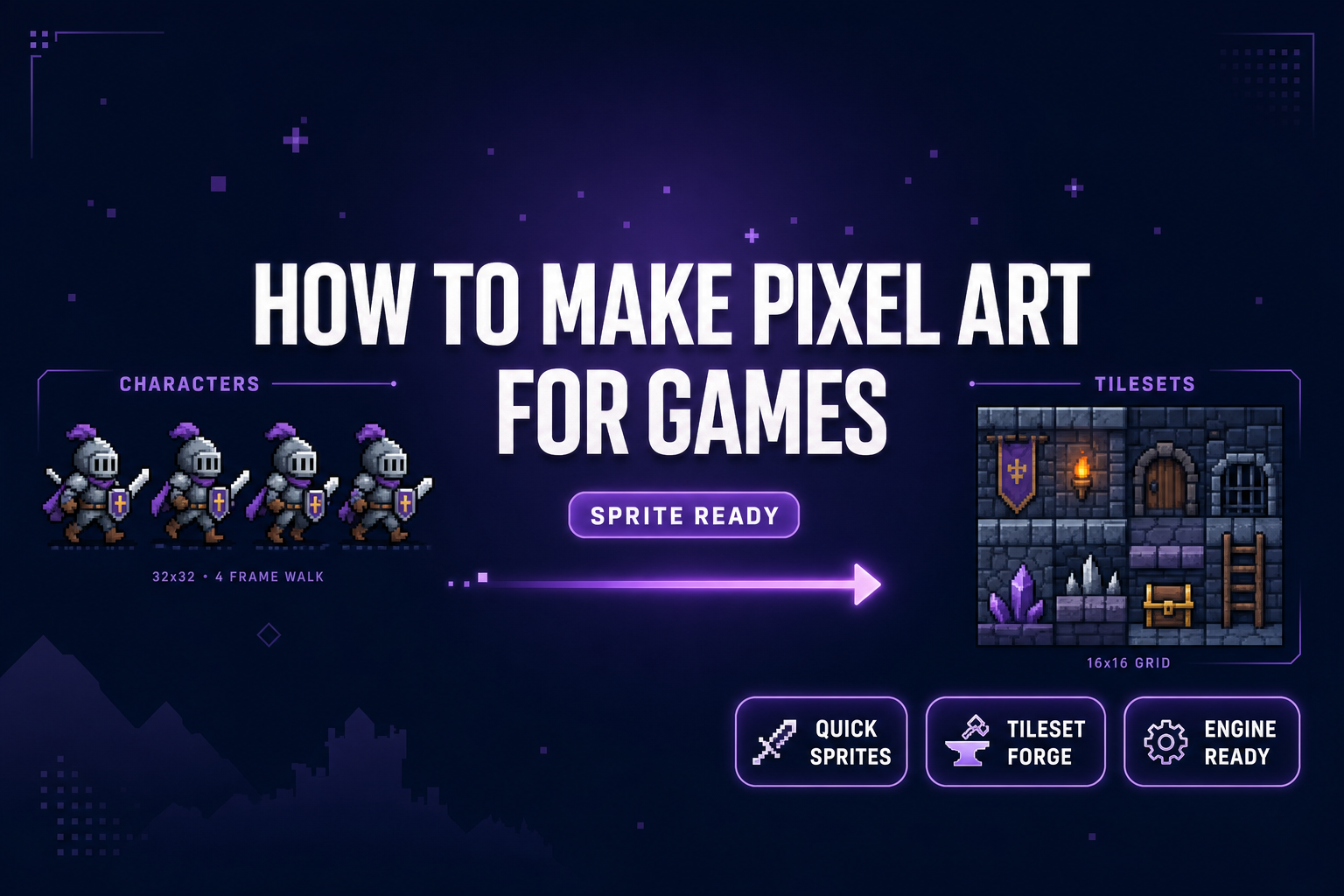
How to Make Pixel Art for Games (Sprite-Ready)

By Arron R.13 min read
How to make pixel art for games in 2026 without Aseprite: prompt animated sprites in Sorceress Quick Sprites, align tiles in Tileset Forge, export a packed PNG,

A solo indie dev who needs pixel art for a 2D game in 2026 hits the same fork every time. The dominant desktop pixel-art tool is Aseprite at $19.99 USD on Steam and itch.io (latest stable v1.3.17.2, verified against the live aseprite.org release-notes on May 30, 2026), which assumes the dev is going to hand-draw every sprite at 16×16 or 32×32. The dominant free browser editors are excellent for hand-drawn work and a poor fit for shipping a 50-frame sprite roster in an afternoon. The third path — prompt an AI sprite-sheet generator, align AI tile art onto a clean grid, drop the packed PNG into the engine — finally got good enough in 2026 to be the default for a one-person team. This post walks the five-step pipeline inside Sorceress, end to end, with every credit cost, model ID, and frame layout verified against the live source code on May 30, 2026.
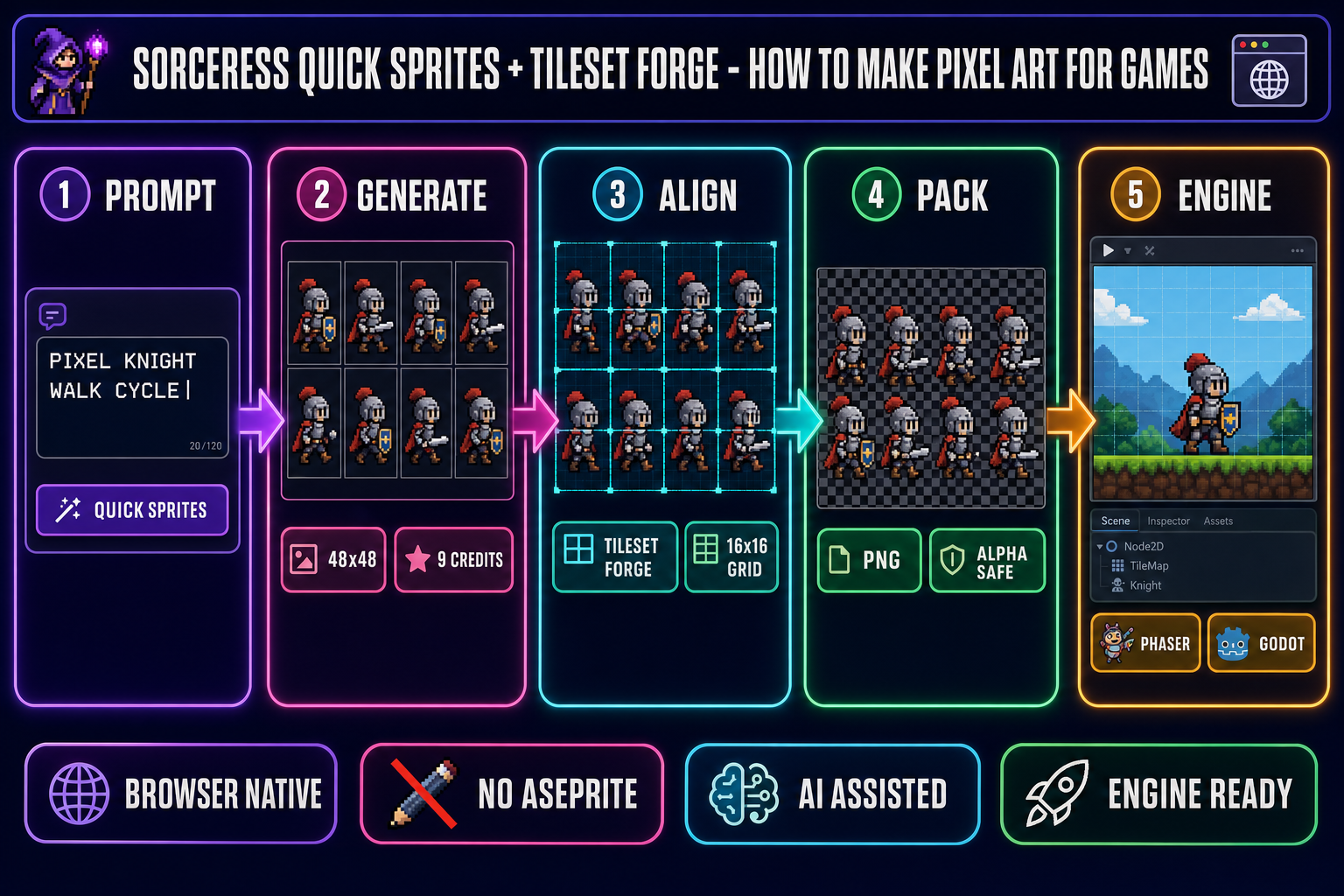
Five-panel browser pipeline diagram showing how to make pixel art for games — prompt, generate, align, pack, engine — with Sorceress Quick Sprites and Tileset Forge
The five-step Sorceress pipeline for how to make pixel art for games — Quick Sprites for animated characters, Tileset Forge for grid-aligned world tiles, packed PNG out to Phaser or Godot. Hero image generated with GPT Image 2.

What “how to make pixel art for games” actually means in 2026

Pixel art for games is a constrained image format with three rules that separate it from pixel-shaped illustration. First, every pixel is intentional — the canvas is small enough (typically 16×16 to 96×96 per sprite) that the artist or the model is making each pixel a deliberate choice. Second, the color palette is locked, usually between 4 and 32 colors, so the entire animation reads as one coherent piece instead of a sequence of slightly different recolors. Third, the output is a packed sprite-sheet PNG with transparent background and uniform frame dimensions, because that is the only format a 2D game engine accepts for a sprite atlas.

How to make pixel art for games is a different question from how to make pixel art in general. A pixel-art portrait for a Twitter avatar can be 64×64 with whatever palette looks good; a pixel-art sprite for a game has to ship at the exact resolution the engine expects, with alpha transparency end-to-end, with one shared palette across every animation frame, and with a layout the engine’s loader can slice without further conversion. The constraints come from the engine pipeline, not from the aesthetic.

The 2026 pixel-art-for-games landscape has three browser-native paths that ship today. Sorceress Quick Sprites generates animated sprite sheets directly from a text prompt — the path for protagonists, enemies, NPCs, and VFX loops. Sorceress True Pixel converts an existing image or video into palette-locked pixel art — the path for reusing a character render or extracting frames from a recorded animation. Sorceress Tileset Forge aligns AI-generated tile art onto a perfect 16×16 or 32×32 grid — the path for dungeons, overworld terrain, and any tiled world geometry. The three tools cover the entire pixel-art surface a 2D game needs.

How to make pixel art for games in five steps

The five-step pipeline below is the same one a multi-person studio uses with a hand-pixel artist, with the generation and alignment steps replaced by AI-assisted browser tools. The order matters for how to make pixel art for games at any scale: target resolution comes before generation, and generation comes before alignment, because every later step inherits constraints from the earlier ones.

Step 1: Pick the target resolution before anything else

The single biggest decision in how to make pixel art for games is the per-sprite resolution, because it locks the era, the palette range, and the readable detail level for the entire project. Every later step in how to make pixel art for games — prompt, generate, align, pack — assumes the target resolution is already locked. 16×16 is the smallest practical sprite size for a top-down RPG character or a single tile, mirroring the NES generation. 32×32 is the modern indie default for top-down RPGs and platformers; it gives enough room for clothing, expressions, and basic shading. 48×48 is the workhorse format for a humanoid character with a readable walk cycle, which is why the Quick Sprites Four Angle Walking preset is locked at 48×48 (verified in the live /quick-sprites page source on May 30, 2026 at ANIMATION_STYLES[0].size = '48x48'). 64×64 to 96×96 fits VFX loops — explosions, fires, lightning. Anything above 128×128 stops reading as pixel art and starts reading as low-res illustration.

Step 2: Prompt the sprite sheet in Quick Sprites

Open Quick Sprites in a browser. Pick one of three animation styles verified in the live /quick-sprites page source on May 30, 2026: Four Angle Walking generates a consistent four-direction four-frame walking cycle of a humanoid character at 48×48, Small Sprites generates a six-row layout (right, left, arms, look, surprise, lay-down poses) at 32×32, and VFX Effects generates single-direction loops for fire, explosions, and lightning between 24×24 and 96×96 on a square aspect. Type a prompt that names the character, the era, and the palette anchor — pixel knight, NES era, 4-color palette, walking, top-down view, transparent background is a complete prompt for the four-angle preset. Each generation costs CREDITS_PER_GEN = 9 (verified at line 21 of the live page source) and runs against the Retro Diffusion rd-animation model (verified at line 20 as MODEL_ID = 'retro-diffusion/rd-animation').

Step 3: Convert any existing art with True Pixel

If the source is already a finished character render, a video clip, or a photographic reference, skip the prompt step and route the input through True Pixel instead. Drop the image or video onto the canvas, pick a classic palette preset (PICO-8 16, Sweetie-16, Endesga 32, Game Boy 4, NES 54, CGA 16, grayscale, or 1-bit) or cap the auto-quantizer between 16 and 32 colors, run the conversion, and the tool writes a packed sprite sheet with transparent background. The temporal-stability pass locks one shared palette across every frame in a video conversion, which is the single feature that stops sprite sheets from flickering between frames at runtime. For a deeper read on the conversion-first path, see the existing post on the image to pixel art converter pipeline.

Step 4: Align AI tile art with Tileset Forge

For world geometry — dungeons, overworlds, parallax backgrounds — the pixel-art surface is a tileset, not a sprite sheet. AI image models produce stunning tile mock-ups but rarely on a clean 16×16 or 32×32 grid, which is why Tileset Forge exists. Drop the AI tile art onto the canvas, the tool runs alpha-aware tile detection to find each tile’s natural boundary, snaps the result onto the target grid, and exposes per-tile nudge, flip, rotate, and overscale controls so the artist can fine-tune. Verified against the live /tileset-creator page source on May 30, 2026: the tool supports StretchMode options for fill, fit-width, fit-height, or original, a nine-position anchor selector (tl through br), per-tile flip-X / flip-Y / rotation (0°, 90°, 180°, 270°), and an alphaThreshold for detecting tile boundaries inside semi-transparent source art. The output is a packed tileset PNG plus an optional JSON manifest.

Step 5: Pack and export to the engine

The last step in how to make pixel art for games is the packed-PNG export. Both Quick Sprites and Tileset Forge export packed PNG sheets with transparent backgrounds and uniform frame dimensions, which is the only format a 2D game engine accepts as a sprite atlas or a tilemap source. Quick Sprites also exports an animated GIF for preview, and Tileset Forge can bundle the tileset PNG with a Tiled-compatible JSON manifest. Both packed formats drop into Phaser, Godot, Unity, GameMaker, Construct, RPG Maker, and Defold without further conversion. The engine-side import code is one to four lines per loader, covered in the engine section below.
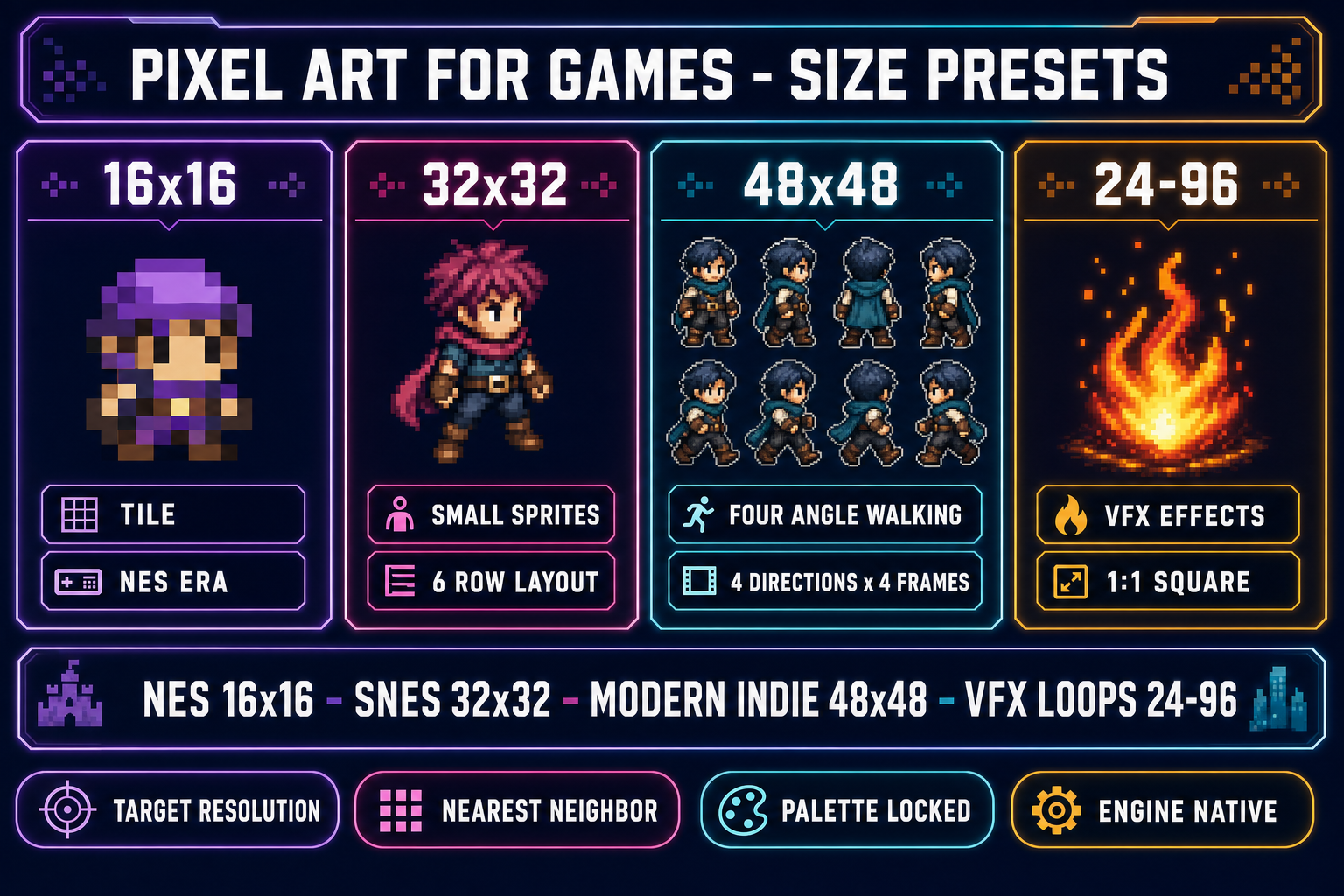
Four-panel diagram showing pixel art for games size presets — 16x16, 32x32, 48x48, 24-96 — with hardware era anchors and the matching Quick Sprites animation styles
Pick the per-sprite resolution before generating anything — 16×16 for NES-era tiles, 32×32 for the Quick Sprites Small Sprites layout, 48×48 for the Four Angle Walking preset, 24-96 for VFX loops.

From Quick Sprites animated frames to game-ready sprite sheets

The Four Angle Walking preset writes a 4×4 grid of frames: four rows for up, right, down, left direction, four columns for the walking cycle keyframes. The 48×48 frame size means the packed sheet is 192×192 pixels at 1× raw resolution. The Small Sprites preset writes a 4×6 grid: six rows for right, left, arms, look, surprise, lay-down poses, four columns for the keyframes per pose. The packed sheet is 128×192 pixels. The VFX preset writes a single horizontal strip of frames; frame count and frame size are configurable between 24 and 96 pixels square. All three presets ship transparent backgrounds and a shared palette across every frame.

The standard workflow for an indie game character roster is: generate one base sprite sheet per character class with Quick Sprites, run the protagonist through twice (once for the four-angle walk, once for the small-sprites pose set), then generate the enemy roster with the same animation preset to keep the visual rhythm consistent. A six-enemy roster at 9 credits per generation costs 54 credits — under the cost of one Aseprite seat — and finishes in the time it takes to write the prompts. The Sorceress 100-credit starter grant (verified against src/app/_home-v2/page.tsx on May 30, 2026) covers the protagonist plus the first six enemies.

The output integrates with the existing Sorceress sprite-pipeline tools the same way any browser-generated sprite sheet does. The Spritesheet Analyzer tool reads the packed PNG, detects frame boundaries, lets the user preview the animation at custom FPS, and exports a tighter atlas with frame metadata. The Slicer tool re-slices a packed sheet onto a different grid if the engine pipeline expects a different frame layout. The BG Remover tool runs a model-driven alpha cleanup pass on any frame whose background bled past the chroma-key threshold. The four tools chain naturally without leaving the browser.

From a still or AI render to a pixel-art tileset for the game world

A 2D game world is built from tiles, not sprites, and the pixel-art-for-games question for world geometry is different from the question for characters. The standard 2026 pipeline is: generate the tile art at a higher resolution with an AI image model in AI Image Gen, then align the result onto a clean 16×16 or 32×32 grid with Tileset Forge. The reason the alignment step is separate is that current AI image models — Nano Banana Pro, Flux 2 Pro, GPT Image 2, Seedream 5 Lite, Z-Image Turbo, and the rest of the AI Image Gen lineup — ship beautiful tile mock-ups but place the tile boundaries wherever the diffusion process puts them. Tileset Forge runs alpha-aware boundary detection to find the natural edge of each tile, then snaps each detected tile onto the target grid with sub-pixel precision.

Once the tiles are aligned, the workflow opens up into a full tiled-world pipeline. The packed tileset PNG drops directly into the Tiled level editor (free, open source, verified active at mapeditor.org on May 30, 2026), which exports to a JSON format the engine reads natively. Verified against the live Tiled mapeditor.org page on May 30, 2026, Tiled supports orthogonal, isometric, hexagonal, and staggered map orientations, multi-layer tile editing, terrain rule-based painting, and exports to Phaser JSON, Godot TileMapLayer, GameMaker (1.4 and 2.3), Defold, tBIN, and Lua formats. The path from Sorceress Tileset Forge through Tiled to the engine is browser-native end-to-end.

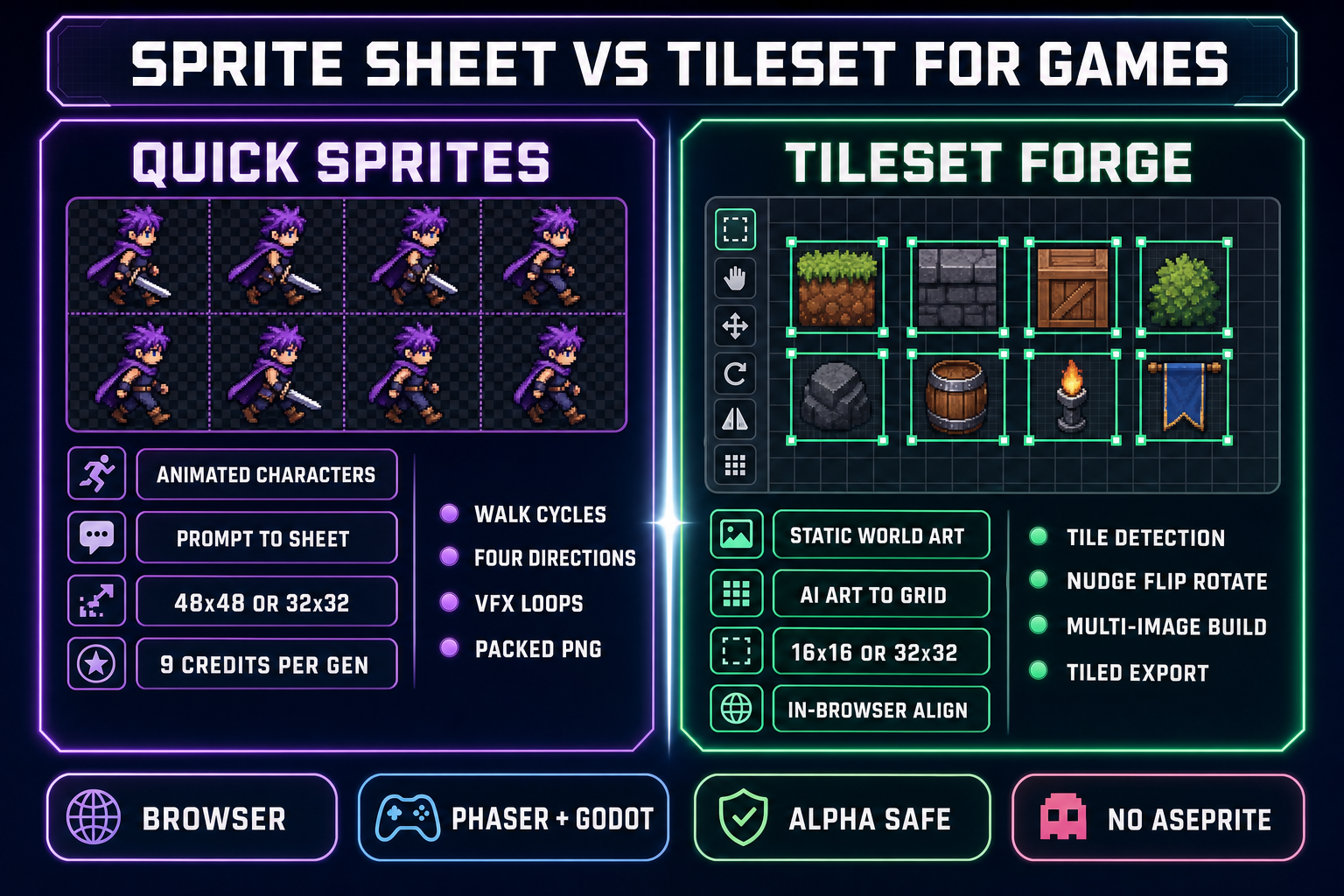
Side-by-side comparison of Quick Sprites versus Tileset Forge for game pixel art — animated characters in Quick Sprites at 48x48 versus aligned dungeon tiles in Tileset Forge on a 16x16 grid
Quick Sprites handles animated characters and VFX loops; Tileset Forge handles static world geometry on a perfect grid. The two tools cover the entire pixel-art-for-games surface.

Engine-side import: Phaser 4.1, Godot 4.3, and Unity

Verified against the live Phaser API docs on May 30, 2026, Phaser 4.1.0 ships a unified TilemapLayer class that handles both static and dynamic layers in one API, plus a separate this.load.spritesheet loader for character atlases. The minimum integration code for a Quick Sprites four-angle walk cycle is one preload line and one anims-create block:

// Phaser 4.1 sprite-sheet import for a Quick Sprites 48x48 four-angle walk
this.load.spritesheet('hero', '/assets/hero-walk.png', {
  frameWidth: 48,
  frameHeight: 48,
});
this.anims.create({
  key: 'hero-walk-down',
  frames: this.anims.generateFrameNumbers('hero', { start: 8, end: 11 }),
  frameRate: 8,
  repeat: -1,
});

For tilemaps, Phaser 4.1 reads Tiled JSON output via this.load.tilemapTiledJSON and instantiates the layer via map.createLayer. The useSpriteSheet flag on the sprite config keeps the tileset and the local tile IDs in sync. For static maps that need maximum performance, the gpu flag on map.createLayer generates a WebGL-only TilemapGPULayer at the cost of dropping per-tile dynamic edits.

Verified against the live Godot 4.3 migration guide on May 30, 2026, Godot 4.3 deprecated the legacy TileMap node in favor of one TileMapLayer per visual layer, all sharing a single TileSet resource. The Tiled-to-Godot importer plugin targets TileMapLayer as of 2025 (per the active migration thread on the Tiled GitHub issue tracker), which means a Sorceress Tileset Forge export goes through Tiled into Godot without any TileMap-deprecation warnings. For sprite sheets, Godot 4 reads the same packed PNG via the SpriteFrames resource, with each animation row sliced into an animation track.

Unity reads packed PNG sheets through the 2D Sprite importer with Multiple sprite mode and the Sprite Editor for slicing. The 2D Pixel Perfect Camera component snaps the camera to integer pixel positions and renders every sprite at point-sampled nearest-neighbor, which is the right setup for a pixel-art game on any screen resolution. Unity, Phaser, and Godot all accept the same Sorceress sprite-sheet and tileset PNG output without further conversion.

Five mistakes that ruin pixel art for games (and the fix for each)

Five issues account for almost every “why does my sprite look wrong in the engine” question after a how-to-make-pixel-art-for-games run. First, the alpha channel is silently lost — the generated sheet had transparency, the engine import did not, and every sprite ships with a hard background color. The fix is to verify the export is a transparent-background PNG and confirm the engine’s import settings have alpha preserved (Alpha Is Transparency in Unity’s 2D Sprite importer, filter: false, mipmaps: false in Godot 4’s pixel-art import preset, pixelArt: true in Phaser’s game config).

Second, the resolution is wrong for the era — a 128×128 character generated at 4× the target size and then downsampled loses every intentional pixel placement. Generate at the canonical target resolution exactly (48×48 for the Quick Sprites Four Angle Walking preset, 32×32 for Small Sprites) and let the engine’s pixel-perfect camera upscale at render time with nearest-neighbor scaling.

Third, the palette is not locked across frames — each frame in the sprite sheet ends on a slightly different palette and the animation flickers between colors at runtime. The Quick Sprites preset writes one shared palette across every frame by default; True Pixel’s temporal-stability pass enforces the same constraint for converted video. Verify the export is a packed sheet from a single conversion run, not a stitch of several runs with different palette seeds.

Fourth, the tile boundaries do not snap onto the engine’s grid — the tileset PNG has 17-pixel-wide tiles instead of 16-pixel-wide tiles because the AI image model placed each tile a pixel off. Run the source through Tileset Forge before exporting; the alpha-aware boundary detection plus the per-tile nudge controls fix the offset in two clicks per tile.

Fifth, the engine import setting is left on default bilinear filtering, which renders pixel art as blurry mush at any non-1× zoom. Switch to nearest-neighbor / point sampling in the engine’s texture import settings before complaining the sprite looks wrong. Every 2D engine ships a pixel-art preset; use it.

The verdict on how to make pixel art for games in 2026

The honest answer to how to make pixel art for games in 2026 is no longer “buy Aseprite and push pixels for a month.” That path still works and ships some of the best-looking indie games on the market, but it is not the only path. A solo dev can ship a full sprite roster, an animated VFX pack, and a grid-aligned dungeon tileset in an afternoon by prompting Quick Sprites for the characters and animations, dropping AI tile art into Tileset Forge for the world geometry, and packing the output as engine-ready PNGs.

The pixel-art-for-games workflow that wins in 2026 is the one that combines both. Generate the bulk with Sorceress, hand-touch the three or four hero frames that define the art direction, then ship. The AI-generated 90 percent gives the game its volume; the hand-drawn 10 percent gives it personality. That is the shape every solo indie pixel-art project on Steam in 2026 is going to settle on, and the browser-native Sorceress pipeline is the cleanest way to get there. For the deeper-cut companion guides on the individual stages, see the existing posts on browser-native image to pixel art conversion, an AI pixel sprite generator without Aseprite, spinning up an AI sprite sheet generator, and making a 2D game with AI in the browser. Together those four pieces plus this one cover the complete browser-native pixel-art-for-games pipeline from prompt to playable.

Frequently Asked Questions

How do I make pixel art for games without buying Aseprite?

Aseprite is the dominant desktop pixel-art DCC at $19.99 USD on Steam and itch.io (latest stable v1.3.17.2 + v1.3.18-beta3 released April 29, 2026, verified against the live Aseprite release-notes page on May 30, 2026), but it is not the only way to make pixel art for games in 2026. The browser-native path that ships today is Sorceress Quick Sprites for animated sprite sheets generated from a text prompt (verified at <code>MODEL_ID = retro-diffusion/rd-animation</code> and <code>CREDITS_PER_GEN = 9</code> in the live <code>/quick-sprites</code> page source on May 30, 2026), Sorceress True Pixel for converting an existing image or video into palette-locked pixel art, and Sorceress Tileset Forge for aligning AI-generated tile art onto a perfect grid. The three tools cover every common pixel-art-for-games task: characters, animations, and tilemaps. No desktop install, no license fee for the alignment and conversion steps, and the output is a packed PNG ready for any 2D engine.

What sprite size should I use to make pixel art for a 2D game?

Match the canonical hardware era your art direction is borrowing from, because the source pixel grid is the most visible style signal a game ships. 16&times;16 is the smallest practical sprite size for an overworld RPG character or a tile, mirroring the NES generation. 32&times;32 is the modern indie default for top-down RPGs and platformers &mdash; the Sorceress Quick Sprites <em>Small Sprites</em> preset is locked at 32&times;32 with a six-row layout for right, left, arms, look, surprise, and lay-down poses (verified in the live <code>/quick-sprites</code> page source on May 30, 2026). 48&times;48 is the size the Quick Sprites <em>Four Angle Walking</em> preset uses for a humanoid character with consistent four-direction four-frame walking, which is the workhorse format for any top-down 2D game. 64&times;64 to 96&times;96 fits VFX loops &mdash; explosions, fires, lightning &mdash; and the Quick Sprites <em>VFX</em> preset spans 24 to 96 pixels on a square aspect. Anything above 128&times;128 stops reading as pixel art and starts reading as low-res illustration; that line is a design choice, not a hardware constraint, but most pixel-art games stay below it.

How do I make pixel art tilesets for a game without hand-drawing every tile?

Generate the tile art at a larger resolution with an AI image model, then align the result onto a clean grid with a tileset alignment tool. Sorceress Tileset Forge (<code>/tileset-creator</code>) is built for exactly this pipeline: drop in AI-generated tile art, the tool detects tile boundaries, aligns each tile onto a 16&times;16 or 32&times;32 grid, lets the user nudge, flip, rotate, or scale individual tiles, and exports a packed tileset PNG plus a JSON manifest. The output drops directly into the Tiled level editor (free, open source, exports to Phaser JSON / Godot TileMapLayer / GameMaker / Defold / Lua, verified against the live mapeditor.org and Tiled GitHub issue 4106 on May 30, 2026). The standard pipeline is: Sorceress AI Image Gen for the source tile art, Tileset Forge for alignment, Tiled for level design, the engine for runtime. None of the four steps requires hand-drawing every tile.

Should I make pixel art for games at the target resolution or upscale later?

Make the art at the canonical target resolution and upscale at render time with nearest-neighbor scaling. Drawing or generating pixel art at 4&times; the target size and then downsampling loses the intentional pixel placement the format requires. The right pipeline is: pick a target resolution that matches the era (16&times;16 for NES, 32&times;32 for SNES-era indie, 48&times;48 for modern indie), generate or convert at that resolution exactly, save the packed sprite sheet at 1&times; raw pixels, and let the engine&rsquo;s camera or render pipeline upscale with point sampling (Phaser&rsquo;s <code>pixelArt: true</code> game config flag, Godot 4&rsquo;s <code>2d_pixel</code> filter preset, Unity&rsquo;s 2D Pixel Perfect Camera). That keeps every pixel sharp on a 4K display and lets the same sprite ship to a Steam Deck, a Switch, and a mobile screen without artifacts.

How do I make pixel art animations for a game without hand-drawing every frame?

Use a prompt-to-sprite-sheet generator that locks pose consistency across frames. Sorceress Quick Sprites runs the Retro Diffusion <code>rd-animation</code> model and ships three production-ready animation presets verified in the live <code>/quick-sprites</code> page source on May 30, 2026: <em>Four Angle Walking</em> generates consistent four-direction four-frame walking cycles of humanoid characters at 48&times;48, <em>Small Sprites</em> generates a six-row layout (right, left, arms, look, surprise, lay-down) at 32&times;32, and <em>VFX Effects</em> generates single-direction loops for fire, explosions, and lightning between 24 and 96 pixels square. Each generation costs nine credits and writes a packed PNG sprite sheet plus an animated GIF preview to the user&rsquo;s collection, with one shared palette across every frame so the animation does not flicker between colors at runtime. The output drops directly into Phaser 4.1&rsquo;s <code>this.load.spritesheet</code> + <code>this.anims.create</code> pipeline.

How do I make pixel art for a game that imports cleanly into Phaser, Godot, or Unity?

Export a packed sprite-sheet PNG with a transparent background, uniform frame dimensions, and one shared palette across every frame. Verified against the live Phaser 4.1.0 API documentation on May 30, 2026: Phaser&rsquo;s <code>this.load.spritesheet(key, url, { frameWidth, frameHeight })</code> loader reads the packed PNG as indexed frames, <code>this.anims.create({ frames: this.anims.generateFrameNumbers(key, { start, end }) })</code> builds animation clips, and the unified <code>TilemapLayer</code> class in Phaser 4.1 renders both sprite atlases and tilemap layers. Godot 4.3 deprecated the legacy <code>TileMap</code> node in favor of one <code>TileMapLayer</code> per visual layer sharing one <code>TileSet</code> resource (verified against the Godot 4.3 release notes and the Tiled-to-Godot migration guide on May 30, 2026). Unity reads the same PNG sheets via the 2D Sprite importer with <em>Multiple</em> sprite mode + the Sprite Editor for slicing. All three engines accept the Sorceress Quick Sprites and Tileset Forge output without further conversion.

Is it better to make pixel art for games by hand or generate it with AI?

Both, in sequence. The fastest 2026 pipeline for a one-person indie is: generate the bulk of the sprite sheet with Sorceress Quick Sprites (or convert an existing render with True Pixel) for the protagonist&rsquo;s walk cycle, the enemy roster, and the VFX loops; then open the resulting PNG in Aseprite or any browser pixel editor for a final hand-touch on three or four key frames where the art lead wants a specific expression or pose. AI generation handles the volume; hand-touch handles the highlights. That two-stage pipeline ships a 50-frame sprite sheet in an afternoon instead of a week, without sacrificing the small hand-drawn moments that make pixel art feel intentional. For a deeper read on the AI-only path, see the Sorceress posts on AI sprite generation and the image-to-pixel-art converter workflow.

Sources

  1. Pixel art - Wikipedia
  2. Sprite (computer graphics) - Wikipedia
  3. Tile-based video game - Wikipedia
  4. Indexed color - Wikipedia
  5. Texture atlas - Wikipedia
  6. Tiled - Flexible level editor
Written by Arron R.·2,837 words·13 min read

Related posts