How to Make an RPG in Godot (Quest + Save System)

By Arron R.13 min read
How to make an RPG in Godot 4.6.3 with AI in 2026: scaffold the CharacterBody2D player and TileMapLayer maps, write the quest state machine and FileAccess save

A first-time Godot creator opening 4.6.3 stable in 2026, an indie developer dropping their Unity project after the latest licensing rumble, and a vibe-coder trying to find an engine the AI actually writes well all land on the same question: how to make an RPG in Godot without spending the first six months writing systems instead of shipping content. Godot 4.6.3 (verified June 4, 2026) ships everything a 2026 RPG actually needs — the TileMapLayer node split, signal-driven Resource patterns, a steady FileAccess save surface, and an HTML5 export template — but it ships them as plumbing, not as a starter project. This post walks the honest five-pillar RPG project structure inside Godot 4.6.3, then maps the Sorceress browser stack that produces every art, audio, and GDScript layer the engine asks for: WizardGenie for the scripts, Quick Sprites for the character sheets, AI Image Gen for the tilesets and backgrounds, and Music Gen and Sound Studio for the audio.
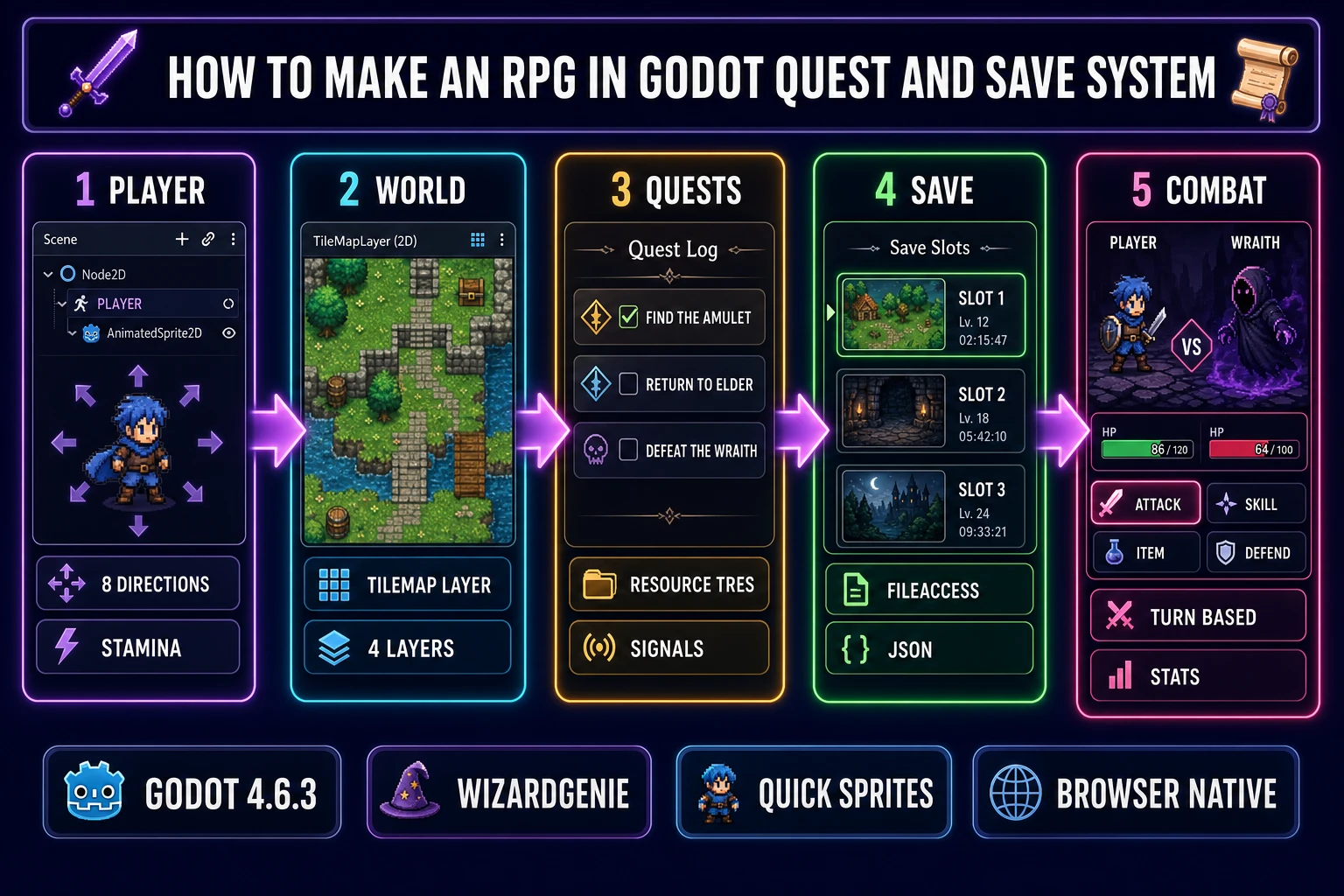
Five-panel diagram of how to make an RPG in Godot — CharacterBody2D player, TileMapLayer world, Resource quest system, FileAccess save system, and turn-based combat loop
The five pillars of a Godot 4.6.3 RPG project: a CharacterBody2D player, TileMapLayer maps, a Resource-driven quest system, a FileAccess plus JSON save system, and a stat-driven combat loop. The Sorceress browser stack supplies every asset and script.

What “how to make an RPG in Godot” actually means in 2026

An RPG is the genre with the largest surface area: a controllable player with persistent stats, a tilemap world that holds state, an inventory and equipment system, a quest tracker, an NPC dialogue layer, a save and load surface, and a combat loop (turn-based, action, or hybrid). Every other 2D genre is a subset; a platformer is an RPG minus quests minus inventory, a roguelike is an RPG plus procedural generation, an action-adventure is an RPG with a thinner stat layer. So when the question is how to make an RPG in Godot, the answer is the union of all those systems, not any one of them in isolation.

The 2026 honest framing is that Godot 4.6.3 ships every primitive the RPG needs and zero of the systems pre-assembled. CharacterBody2D handles the player movement and collision. TileMapLayer (split out as its own node in 4.6, replacing the old single-TileMap-with-many-layers pattern) handles the world. Resource and class_name handle the data definitions. The FileAccess object plus JSON handle the saves. Signals handle the cross-system events. The developer’s job is to wire those primitives together into the systems the genre requires, which is exactly where an AI coding agent earns its keep: the wiring is repetitive, the patterns are well-documented, and a 2026 frontier model writes the boilerplate faster than a human can type it.

The five pillars of a Godot 4.6.3 RPG project

Every Godot RPG worth shipping in 2026 is built on the same five pillars. Naming them up front gives the AI a clean target for each prompt and keeps the project from drifting into a single 2,000-line script-of-everything.

Pillar 1: The player node. A CharacterBody2D scene with a child AnimatedSprite2D for the visuals, a CollisionShape2D for the world collision, and a Camera2D that follows. The script exposes stats (max_hp, current_hp, attack, defense, speed), inventory state, and the input handling for 8-direction movement. Signals fire on damage_taken, level_up, item_picked_up, and died for the rest of the project to subscribe to.

Pillar 2: The world (maps). A WorldScene with one TileMapLayer per render layer (ground, walls, decorations, overhead foreground). Tile-based world structure is the idiomatic Godot 4.6 approach; each TileMapLayer is a separate node that holds its own tile data, navigation polygon, and Y-sort. NPCs, enemies, and interactables instance as child Area2D nodes parented to a separate Entities node.

Pillar 3: The quest system. A QuestManager autoload (Project Settings → Autoload) that holds Dictionary[String, Quest] of active quests, where Quest is a custom Resource class (class_name Quest extends Resource) with id, title, current_step, total_steps, and is_completed fields.

Pillar 4: The save system. A SaveSystem autoload that exposes save(slot_index) and load(slot_index) functions, writing to user://save_slot_N.json via FileAccess plus a per-scene tilemap .sav file for the TileMapLayer state.

Pillar 5: The combat loop. A CombatScene (turn-based) or in-world combat (action-RPG) that consumes the player’s stats Resource, an Enemy Resource for the opposing side, and a UI overlay that subscribes to the player’s damage signals.

Generating the RPG art and audio with the Sorceress browser stack

Every pillar above demands assets, and the Sorceress browser tools generate every asset class an RPG needs from a text prompt inside a browser tab.

Quick Sprites generates the character sprite sheets. The tool runs the Retro Diffusion rd-animation model at 9 credits per generation (verified at MODEL_ID = 'retro-diffusion/rd-animation' and CREDITS_PER_GEN = 9 in src/app/quick-sprites/page.tsx on June 4, 2026). The three preset shapes are Four Angle Walking at 48×48 (four-direction four-frame walk cycles, ideal for the player character), Small Sprites at 32×32 (six-row layout with right walk, left walk, arm movement, look, surprise, and lay-down poses, perfect for NPCs), and VFX Effects at 24-96 pixels for spell effects, fire, and explosions. Output is a packed PNG sheet plus an animated GIF preview, ready for direct import into Godot 4.6 as a Texture2D or as a SpriteFrames resource.

AI Image Gen handles the tilesets, backgrounds, props, and UI panels. Seven leading models drive the picker: Nano Banana Pro (Google, top tier), Nano Banana 2 (Google, fast and sharp), GPT Image 2 (OpenAI, photoreal text-in-image), Seedream 5 Lite (ByteDance, uncensored), Flux 2 Pro (Black Forest Labs), Z-Image Turbo (Tongyi-Mai, ultra fast at 2 credits), and Grok Imagine (xAI, creative) — verified against src/app/_home-v2/_data/tools.ts on June 4, 2026. Z-Image Turbo at 2 credits is the workhorse for tileset iteration; Seedream 5 Lite at 6 to 8 credits is the photoreal pick for hero backgrounds.

Music Gen produces full vocal or instrumental tracks for towns, dungeons, boss fights, and the title screen from a text prompt (“ominous cathedral organ with distant choir, slow tempo, minor key”). Sound Studio bundles AI music, SFX, text-to-speech with voice cloning, and a built-in audio editor for the sword-hit, footstep, and NPC voice surface. Godot 4.6 imports MP3, OGG, and WAV directly into an AudioStreamPlayer node.
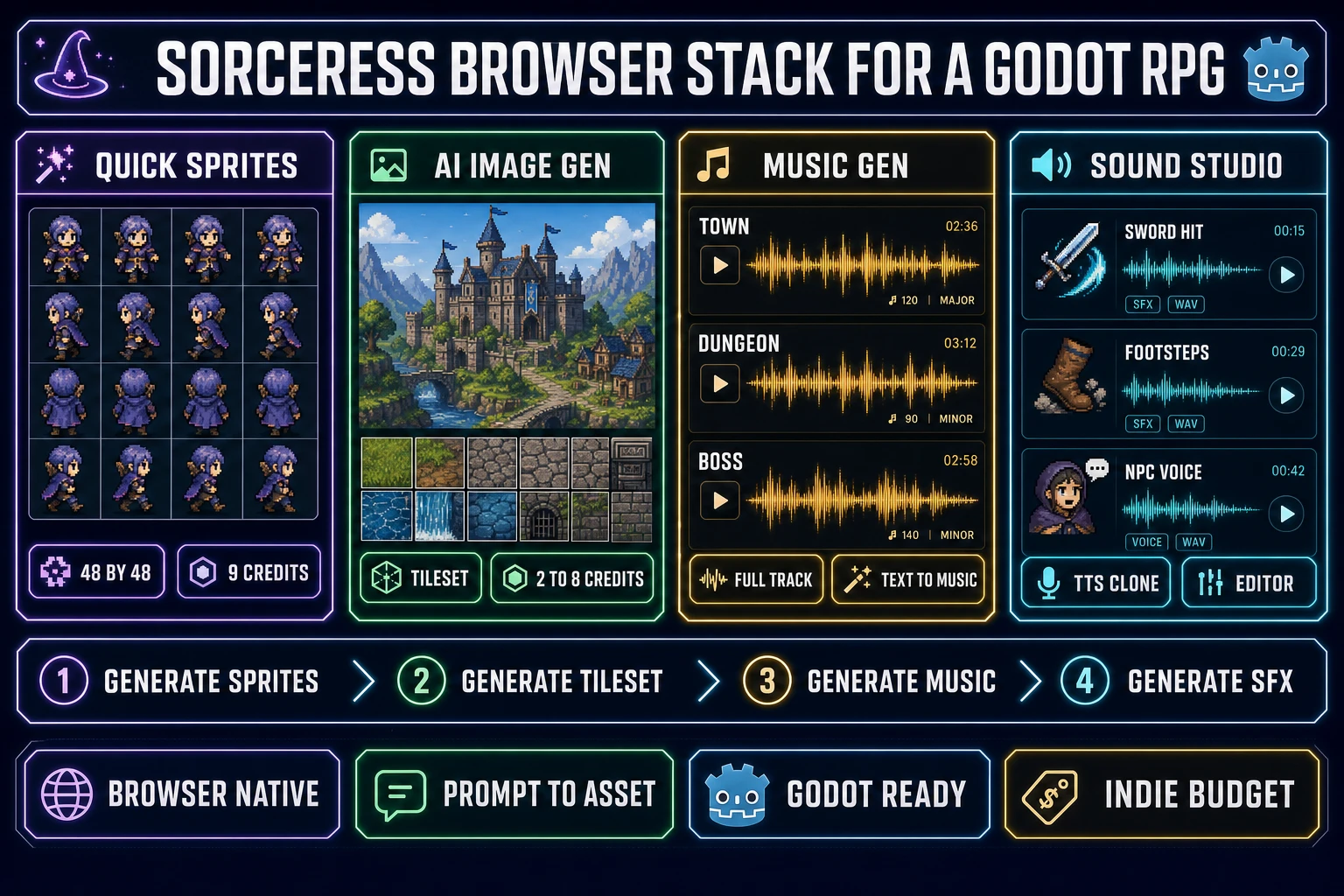
Four-panel diagram of the Sorceress browser stack for a Godot RPG — Quick Sprites for character sheets, AI Image Gen for tilesets, Music Gen for soundtracks, and Sound Studio for SFX
The Sorceress browser stack supplies every asset class a Godot RPG needs: Quick Sprites for the character and NPC sheets, AI Image Gen for the tilesets and backgrounds, Music Gen for the music, and Sound Studio for the SFX and NPC voice lines.

Writing GDScript for the player, world, and combat loop with WizardGenie

The AI side of how to make an RPG in Godot lives in WizardGenie, the Sorceress browser-native AI game engine that drives every leading coding model from a single unified picker. The model lineup (verified against src/app/_home-v2/_data/tools.ts on June 4, 2026) includes Claude Opus 4.7 and Claude Sonnet 4.6 (Anthropic top tier and fast smart tier), GPT-5.5 (OpenAI frontier), Gemini 3.1 Pro (Google, 1M context), DeepSeek V4 Pro (cheap fast executor), Kimi K2.5 (256K coding context), Grok 4.2 (xAI 2M context), and MiniMax M2.7 (agent-ready). All eight write accurate GDScript when prompted with the Godot 4.6 idiom in the system message.

The Planner+Executor pattern that makes the cost math work pairs an expensive reasoner (Claude Opus 4.7 or GPT-5.5) on the planning side with a cheap fast typer (DeepSeek V4 Pro, Kimi K2.5, or MiniMax M2.7) on the code-emission side. The planner reads the project structure, decides the pillar-1-through-5 wiring for a new feature, and produces a short editable plan; the executor types the GDScript. The cost ratio lands around one-fifth of single-frontier cost, which is what turns a 200-feature RPG from a frontier-only budget question into something an indie can actually ship.

A representative prompt for pillar 1 looks like this: “Write a CharacterBody2D player script for Godot 4.6.3 with 8-direction movement, a SPEED constant of 220, a stamina meter that drains while sprinting (Shift held) and regenerates while idle, and signal emit when stamina hits zero. Include a child AnimatedSprite2D reference and play walk_up, walk_right, walk_down, walk_left animations based on the velocity vector.” WizardGenie returns a script with the expected extends CharacterBody2D header, a signal stamina_depleted declaration, a typed Vector2 velocity, and the AnimatedSprite2D animation switch — ready to paste into the local Godot 4.6.3 editor and attach to the Player node. The split is the same split every external-engine AI workflow accepts in 2026: the browser writes the code, the local engine runs the code.
Building the quest system with Resources and signals

The idiomatic Godot 4.6 quest system is built on Resources, not on a single quest manager script. The Resource pattern keeps quest data as editable .tres files that the editor previews live, makes save and load trivial because Godot already serializes Resources, and avoids the recompile cycle every time a quest line changes.

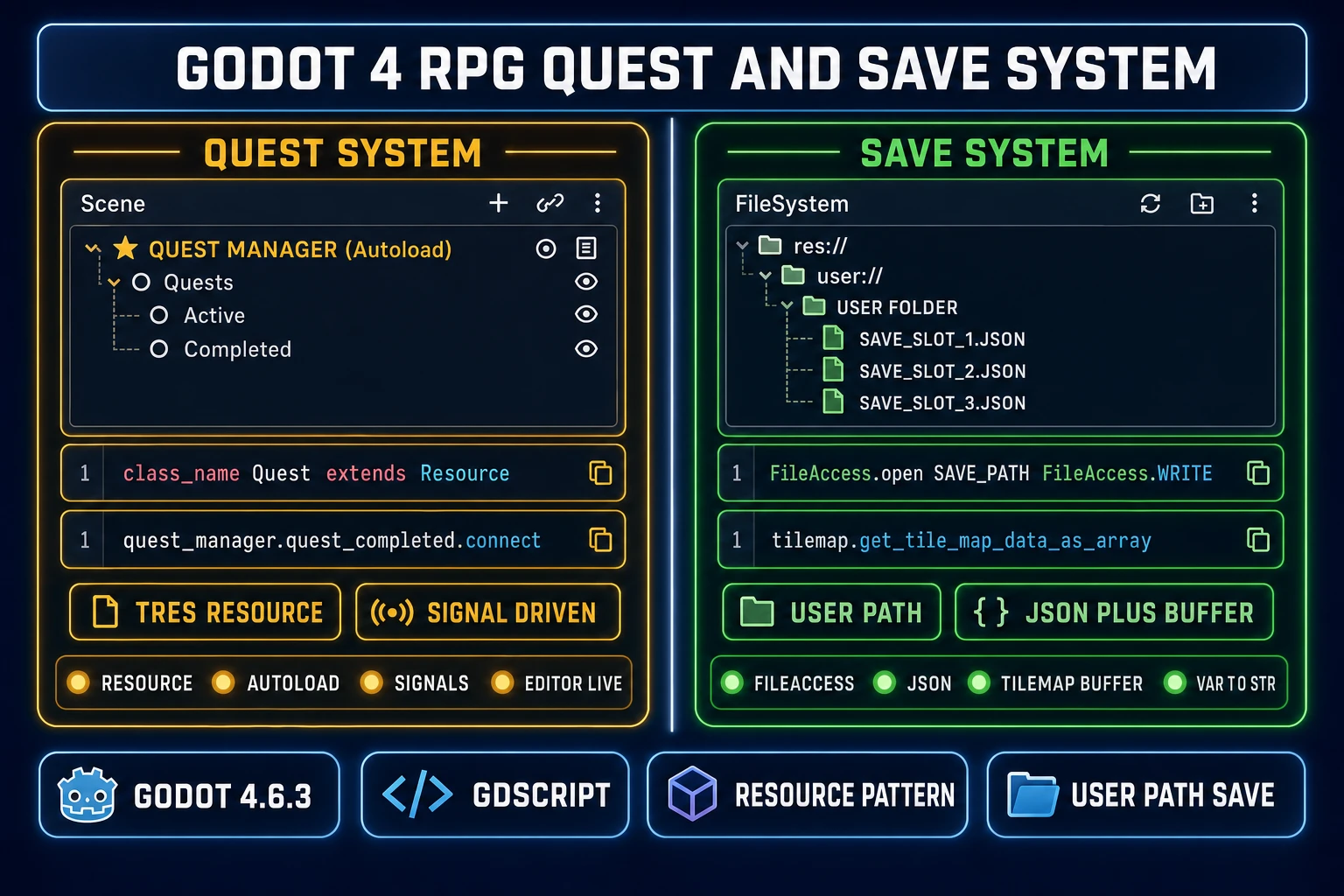
Step one: define the Quest class. Create res://scripts/quest.gd with class_name Quest extends Resource and export id (String), title (String), description (String), current_step (int), total_steps (int), is_completed (bool), and an Array of QuestStep sub-resources. The QuestStep sub-resource holds the per-step description, the optional NPC the player must talk to, the optional item the player must collect, and the optional enemy the player must defeat.

Step two: create the quest data. In the FileSystem dock, right-click a quests folder and create New Resource → Quest, then fill in the fields in the inspector. Each .tres file is a single quest the editor can edit live and the codebase can preload (const FIND_AMULET = preload("res://data/quests/find_lost_amulet.tres")).

Step three: build the QuestManager autoload. Project Settings → Autoload → add quest_manager.gd as a singleton. The script holds var active_quests: Dictionary[String, Quest] = {}, exposes start_quest(quest), advance_step(quest_id), and complete_quest(quest_id) functions, and declares signals quest_started(quest), quest_advanced(quest, step_index), and quest_completed(quest).

Step four: wire the signals into the UI. The QuestLog UI scene connects to QuestManager.quest_started.connect(_on_quest_started) in its _ready() function, and the connected handler appends a new entry to the visible quest list. The same pattern handles advancement (cross off a sub-step) and completion (move from active to completed list). The finite-state-machine shape of quest progression maps cleanly onto Godot signals: each step advance is a transition, each transition fires a signal, the UI subscribes to the signal. WizardGenie writes all four scripts in one session if the prompt names the four files and the signal contracts.

Building the save and load system with FileAccess and JSON

Saving an RPG is two separate problems. The player and quest data is small structured state that goes through JSON; the TileMapLayer state is a large packed byte array that goes through Godot’s native tile serializer. Doing both correctly is what separates an RPG that survives engine updates from one that corrupts every save on patch day.

The structured-state half lives in a SaveSystem autoload. The script exposes save_game(slot_index) and load_game(slot_index). The save function builds a Dictionary with player_stats (level, exp, current_hp, max_hp, attack, defense), inventory (Array of item ids and counts), active_quests (Array of quest ids and current_step), completed_quests (Array of quest ids), and current_scene_path (String for restoring the scene tree on load). The Dictionary is serialized with JSON.stringify(data) and written through FileAccess.open("user://save_slot_%d.json" % slot_index, FileAccess.WRITE), then file.store_string(json_text). Load reverses the path with FileAccess.READ and JSON.parse_string(file.get_as_text()).

The TileMapLayer state lives in a separate per-scene .sav buffer. Because TileMapLayer stores tile data as a PackedByteArray internally, the right serializer is the native one: file.store_buffer(tilemap.get_tile_map_data_as_array()) on save, and tilemap.set_tile_map_data_from_array(FileAccess.get_file_as_bytes(path)) on load (verified against the official Godot 4.6 TileMapLayer documentation on June 4, 2026). This round-trips every tile, source ID, atlas coordinate, and alternative tile value losslessly without forcing the developer to hand-serialize Vector2i positions.

Two specific gotchas matter. First, JSON does not preserve Vector2i directly — if the save data dictionary includes a player position, serialize it with var_to_str(player.global_position) on save and reconstruct it with str_to_var(data.player_position) on load. Second, the user:// path resolves to the OS-specific Application Support folder (AppData on Windows, Library/Application Support on macOS, ~/.local/share on Linux), so saves survive engine updates and live outside the project folder. A short prompt to WizardGenie like “Write a SaveSystem autoload for Godot 4.6.3 with three slot support, JSON for player + quests, get_tile_map_data_as_array for the current scene’s tilemap, and var_to_str for the player position Vector2” produces a working pair of save_game and load_game functions in one turn.

Side-by-side diagram of a Godot 4 RPG quest system versus save system — Resource-driven Quest with QuestManager autoload, FileAccess plus JSON with TileMapLayer buffer
The quest system on the left runs on Resource (.tres) data plus a signal-driven QuestManager autoload. The save system on the right combines FileAccess + JSON for player and quest state with the native TileMapLayer byte-array serializer for the world.

How to make an RPG in Godot in five honest steps

The full project loop, end to end, looks like this. The numbers below assume a single-developer indie cadence with two or three hours of focused work per session.

Step 1: Scaffold the five pillars in Godot 4.6.3. Create the project (4.6.3 stable from godotengine.org, Forward+ renderer for desktop or Compatibility for web export), then build out the five scene-tree skeletons: Main, Player, WorldScene with TileMapLayer children, QuestManager autoload, SaveSystem autoload. Leave the scripts empty for now — the goal is the project shape, not the logic.

Step 2: Generate the first wave of assets in the Sorceress browser. One Quick Sprites generation for the hero character (Four Angle Walking, 48×48, 9 credits). Two or three AI Image Gen generations for the first tileset and a hero background. One Music Gen track for the starting town. Three or four SFX from Sound Studio (footstep, sword hit, menu select, level up). Total cost: under five dollars at standard Sorceress credit pricing.

Step 3: Wire the player and the first map. Prompt WizardGenie to write the CharacterBody2D player script with 8-direction movement and an AnimatedSprite2D switch tied to the velocity vector. Paste it into the editor, attach it to the Player node, import the Quick Sprites PNG sheet as a SpriteFrames resource on the AnimatedSprite2D child, and assign the tileset to the TileMapLayer. Press F6 and walk around.

Step 4: Layer the systems. Add the QuestManager and SaveSystem autoloads. Define the first Quest resource (find_lost_amulet.tres) with three steps. Add a save and load menu that calls SaveSystem.save_game(0) and SaveSystem.load_game(0). Add a simple turn-based or action combat scene that consumes the player’s stats Resource.

Step 5: Iterate. Each new quest is one prompt to WizardGenie, one new .tres file, and one playtest. Each new map is one AI Image Gen tileset, one drag into the TileMapLayer, and one playtest. Each new boss fight is one Quick Sprites sheet plus one combat scene tweak. The project loop tightens substantially around the fifth session as the pillar scripts settle and most new work is content rather than systems.

Common mistakes when starting an AI RPG project in Godot

Five mistakes account for most of the “why does my AI Godot RPG not work” questions in 2026.

First, writing a single GameManager script that does everything. The autoload + Resource + signals split is what scales. A single 2,000-line GameManager that holds player stats, quest state, save logic, and combat is the anti-pattern. Split it into Player.gd, QuestManager.gd (autoload), SaveSystem.gd (autoload), CombatScene.gd, and Quest.gd (class_name extends Resource). The AI writes each one cleaner because the prompt is narrower.

Second, using the old TileMap node instead of TileMapLayer. Godot 4.6 split the single-TileMap-with-many-layers pattern into one TileMapLayer node per layer. If WizardGenie writes tile_map.set_cell(0, position, source, atlas) with a layer index argument, the model is targeting the pre-4.6 API. Re-prompt with “Godot 4.6.3 TileMapLayer (not TileMap), no layer index argument, each layer is its own node.”

Third, storing save data in res:// instead of user://. The res:// path is read-only in exported builds, so a save written to res://saves/ on the desktop build silently fails to write in the web export. Always use user://, which Godot resolves to the OS-specific writable location.

Fourth, hard-coding quest logic in NPC scripts. The NPC script should not know about quest state; it should emit a signal (npc_talked_to) and let the QuestManager react. Otherwise every quest change requires editing every NPC script. The signal-driven Resource pattern is the entire point.

Fifth, skipping the playtest loop. AI-generated GDScript ships subtle bugs the editor will not catch (signal connected twice, autoload referenced before ready, Resource preload path typo). Playtest after every prompt. Treat the editor’s Output panel as the second AI — it tells the model what went wrong in plain text.

The verdict on how to make an RPG in Godot with AI in 2026

The honest 2026 answer to how to make an RPG in Godot is the five-pillar project structure (player, world, quests, saves, combat), built on Godot 4.6.3’s native primitives (CharacterBody2D, TileMapLayer, Resource, FileAccess, signals), with the Sorceress browser stack producing every asset and the AI side of every script. The engine cost is zero (MIT license). The asset and AI cost lands around 15 to 50 dollars per month at moderate indie cadence (verified against src/app/plans/page.tsx on June 4, 2026 — 1000 credits cost 10 dollars, 5000 cost 50, 10000 cost 100, with a 49 dollar Lifetime Access tier).

WizardGenie writes the GDScript and the planner-executor cost pattern keeps the bill sane. Quick Sprites makes the character sheets at 9 credits each. AI Image Gen handles the tilesets and backgrounds. Music Gen and Sound Studio close the audio loop. 3D Studio is there when the project crosses into the 3D-RPG variant. The local Godot 4.6.3 editor runs every script, owns the playtest, and exports to desktop, mobile, and HTML5 through WebAssembly. For the companion guides that close the loop, see the existing posts on making a 2D game in Godot with browser AI, picking the best AI for Godot, making a sprite sheet for Godot, making an engine-agnostic RPG with AI, and making a roguelike with AI procgen. Together they cover the practical decision tree from “does the project belong on Godot?” to “ship the playable demo by Friday.”

Frequently Asked Questions

What version of Godot should I use to make an RPG in 2026?

Godot 4.6.3 stable, released on May 20, 2026 (verified against the official Godot Engine release notes and the godotengine/godot GitHub release on June 4, 2026). The 4.6 line is a feature release that introduced the TileMapLayer node split (each tile layer is its own node rather than a layer inside a single TileMap), the 2D physics interpolation improvements, and a steadier multithreaded resource loader, all of which matter for an RPG with many maps and stateful entities. The 4.6.3 maintenance release is the recommended adoption target for new RPG projects because the 4.7 branch is still in active development and the 4.5.x line is on long-term-support drift. Godot itself is free and open source under the MIT license, with Windows, macOS, Linux, and a self-hosted web editor build available, so the engine cost on the RPG is zero before the asset and AI bills start.

Should I use GDScript or C# for a Godot RPG with AI?

GDScript for most RPG projects. GDScript is the engine-native language, has the tightest signal and node integration, ships with the standard editor build, and is what every leading AI coding model in 2026 writes most fluently because the open-source corpus is dominated by GDScript examples. The eight models in <a href="/wizard-genie/app?ref=blog">WizardGenie</a> (Claude Opus 4.7, Claude Sonnet 4.6, GPT-5.5, Gemini 3.1 Pro, DeepSeek V4 Pro, Kimi K2.5, Grok 4.2, MiniMax M2.7) all generate accurate GDScript with TileMapLayer, CharacterBody2D, signals, and Resource patterns when prompted clearly (verified against src/app/_home-v2/_data/tools.ts on June 4, 2026). C# is a valid choice for teams already on .NET or for projects that need a specific .NET library, but it requires the mono / .NET build of Godot, doubles the export pipeline complexity, and the AI model fluency on Godot-flavored C# is noticeably lower than on GDScript.

How do I save and load an RPG in Godot 4.6.3 without losing the TileMapLayer state?

Use the FileAccess object plus JSON for the player and quest data, and use TileMapLayer.get_tile_map_data_as_array and set_tile_map_data_from_array for the tile state itself (verified against the official Godot 4.6 TileMapLayer documentation on June 4, 2026). The data dictionary holds player stats, inventory, quest flags, and the current scene path, gets serialized with JSON.stringify, and writes to user://save_slot_1.json through FileAccess.open(path, FileAccess.WRITE). The TileMapLayer state lives in a separate per-scene .sav file written through file.store_buffer(tilemap.get_tile_map_data_as_array()) and loaded with tilemap.set_tile_map_data_from_array(FileAccess.get_file_as_bytes(path)). JSON does not preserve Vector2i directly, so positions and atlas coordinates are serialized with var_to_str on save and reconstructed with str_to_var on load. The user:// path resolves to the OS-specific Application Support folder so saves survive engine updates.

Can WizardGenie write the full Godot RPG project end to end?

WizardGenie writes the GDScript scripts, the scene-tree wiring, the signal connections, the Resource definitions, the quest state machine, and the save and load functions. It does not directly open the local Godot editor, so the workflow is: prompt WizardGenie for a system (&ldquo;write a CharacterBody2D player with 8-direction movement, a stamina meter, and signal emit on stamina depletion&rdquo;), copy the GDScript output into the local Godot 4.6.3 editor, attach the script to the matching node, and run the scene. The browser preview surface inside WizardGenie runs Phaser and Three.js targets natively because both are JavaScript libraries, while Godot runs in its local desktop editor. The split is the same split that any external-engine AI workflow accepts in 2026 &mdash; the AI generates the code, the engine runs the code. The model lineup writes accurate GDScript across all eight rails.

What does a Godot RPG quest system actually look like in 2026?

A Resource-based quest system is the idiomatic Godot 4.6 pattern. Define a Quest resource class with id, title, description, current_step, total_steps, and is_completed fields (extending Resource with class_name Quest), then create .tres instances for each quest in the project (res://data/quests/find_lost_amulet.tres). A QuestManager autoload tracks active quests in a Dictionary[String, Quest] and exposes start_quest, advance_step, and complete_quest functions plus matching signals (quest_started, quest_advanced, quest_completed). UI nodes connect to those signals through the editor or in code with quest_manager.quest_completed.connect(_on_quest_completed). The signal-driven Resource pattern keeps the quest data editable without recompiling, and the Dictionary keys make save and load trivial because the same .tres path round-trips through JSON. Avoid hard-coding quest logic in the player script; the autoload + signals split is what scales when the project grows past three quests.

How much does the browser AI stack cost when you make a Godot RPG at indie scale?

The full Sorceress browser stack for a one-developer Godot RPG project lands around 15 to 50 dollars per month at moderate iteration cadence, plus the zero-cost Godot engine itself. Quick Sprites at 9 credits per generation handles every character sprite, NPC, and enemy sheet (verified at CREDITS_PER_GEN = 9 in src/app/quick-sprites/page.tsx on June 4, 2026). AI Image Gen at 2 to 8 credits per image handles concept art, tilesets, and UI panels (Z-Image Turbo at 2 credits is the cheap workhorse, Seedream 5 Lite at 6 to 8 credits is the photoreal pick). Music Gen produces full vocal or instrumental tracks for towns, dungeons, boss fights, and the title screen, and Sound Studio handles SFX and text-to-speech for NPC voice lines. WizardGenie consumes the equivalent of a few hundred thousand tokens against the chosen coding model per quest implemented. At standard Sorceress pricing (verified against src/app/plans/page.tsx on June 4, 2026), 1000 credits cost 10 dollars, 5000 cost 50, and 10000 cost 100, with a 49 dollar Lifetime Access tier that unlocks every non-AI-generative tool forever.

Can I ship a Godot RPG to the browser the way Phaser games ship?

Yes, through the Godot HTML5 export template (verified against the official Godot 4.6 export documentation on June 4, 2026). The 4.6.3 release ships precompiled web export templates and a self-hosted web editor build, so a finished RPG project exports to a static HTML + WASM + PCK bundle that runs on any modern browser tab. The trade is performance: a 2D RPG built with the standard Godot 2D nodes runs comfortably on web, but a 3D RPG with heavy shaders runs faster on the desktop build. For the web target, the recommendation is to set the export-template resolution down, use compressed audio (Vorbis instead of WAV), and avoid threading-dependent code paths. The HTML5 build then drops onto itch.io, a custom domain, or any embed surface. Desktop, mobile, and console export templates are also part of the same export pipeline; Godot is a true cross-platform engine in 2026.

Where does AI Godot game development go in 2027?

Three honest predictions for the AI Godot stack in 2027 based on the 2026 baseline. First, the AI coding models keep getting better at GDScript signal and Resource patterns specifically because the open-source Godot codebase is one of the highest-quality training datasets available and gets continuously refreshed by Godot Foundation releases. Second, the editor-side AI surface (currently limited to community plugins and a few experimental MCP servers like godot-tilemap-mcp) becomes a first-class part of the editor, with Resource-aware code completion and scene-tree-aware refactors. Third, the cross-engine AI workflow normalizes: the same Sorceress browser stack that drives Phaser and Three.js today drives GDScript, C#, Luau, and Bevy tomorrow with the same prompt patterns. For the indie RPG developer, the practical implication is that the choice of engine becomes less load-bearing because the AI moves the heavy lifting up one layer.

Sources

  1. Role-playing video game - Wikipedia
  2. Tile-based video game - Wikipedia
  3. Sprite (computer graphics) - Wikipedia
  4. Finite-state machine - Wikipedia
  5. JSON - Wikipedia
  6. Procedural generation - Wikipedia
  7. WebAssembly - Wikipedia
Written by Arron R.·2,967 words·13 min read

Related posts