How to Make a Music Game (Rhythm Beats With AI Tracks)

By Arron R.14 min read
How to make a music game in 2026 splits into three layers: generate an instrumental AI track at a known BPM in Music Gen, write a JSON chart of note timestamps,

Searches for how to make a music game in 2026 land in two places: a developer who wants to build a rhythm game in the browser and needs the music, the chart format, and the on-beat hit-detection loop spelled out from scratch, and a music-curious indie who has the gameplay idea but no track to score it with. Both groups end up at the same architecture: an AI-generated track up front, a JSON chart in the middle, and a Web Audio API scheduler at the back. This post walks the full stack end-to-end, names the actual tools that produce each layer in 2026, shows the canonical lookahead-scheduler pattern that prevents the on-beat hits from drifting, and finishes with the no-coding-required vibe path through the Sorceress browser harness. Every API behavior and version in this post was verified against the live source on June 7, 2026.
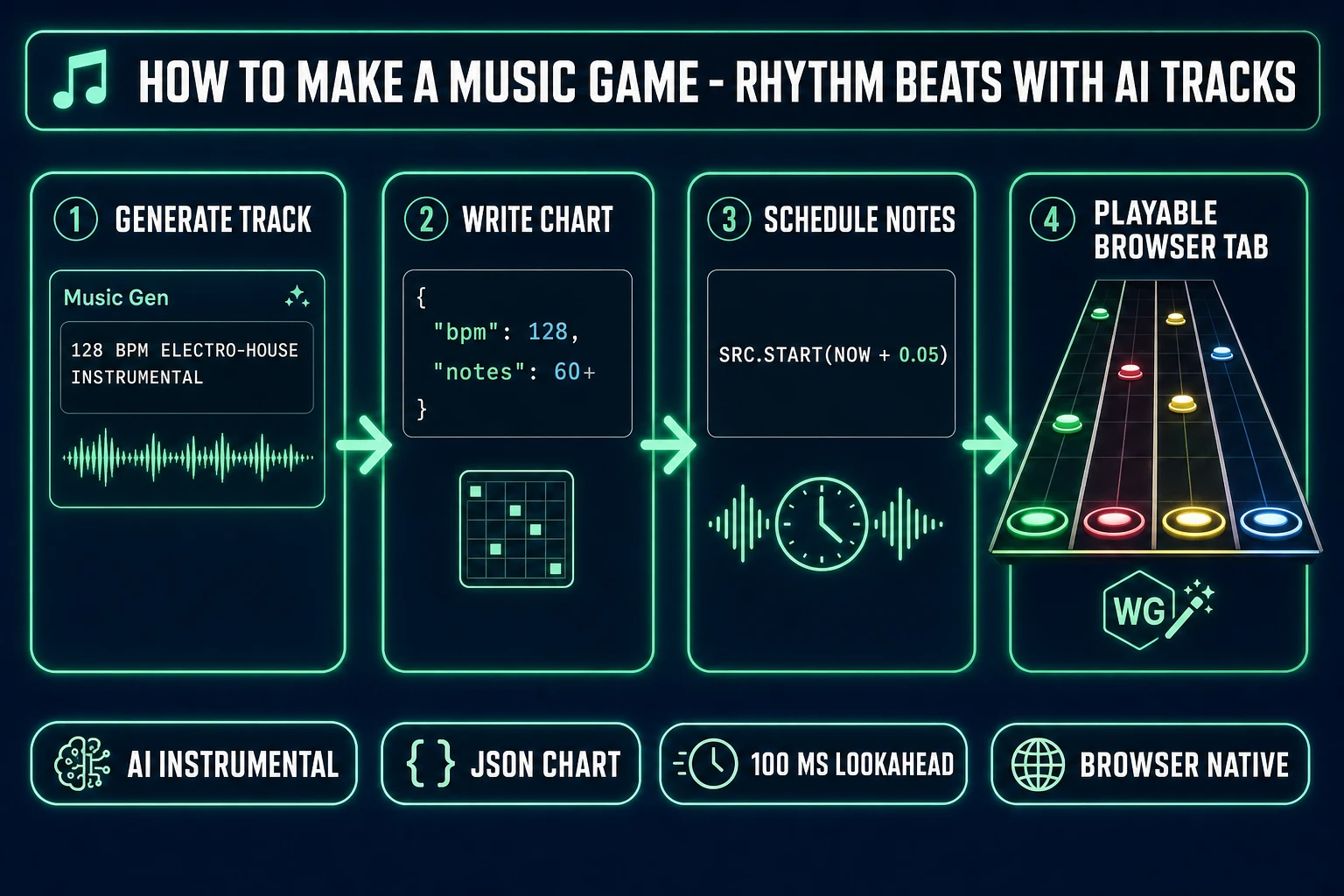
How to make a music game rhythm beats with AI tracks - 4-step pipeline from track generation to chart to Web Audio scheduler to playable rhythm game
The decision path for how to make a music game in 2026: generate the track in Music Gen, write the chart, schedule notes against the audio clock, and ship the playable browser build through WizardGenie.

What “how to make a music game” means in 2026

The phrase music game has a precise technical meaning: a game where the gameplay is locked to musical timing — the player presses a button, taps a key, swings a controller, or moves the mouse on a beat that the music itself defines. The genre is also called a rhythm game (per the Rhythm game Wikipedia entry), and it covers everything from one-button mobile tappers to multi-lane keyboard games to full-body motion-controlled play. The reader landing on “how to make a music game” in 2026 is almost always asking for the simplest version: a single track, a list of timestamps, a falling-note display, and a hit window where pressing the right key inside ~50–100 ms of the timestamp scores the hit.

What changed in 2026 is the asset bottleneck. Pre-2024, the hard part of how to make a music game was getting an interesting track: licensed music was expensive, royalty-free libraries sounded generic, and commissioning a composer cost more than the rest of the build combined. The 2026 generation of AI music models — Suno V5, Udio V3, Sorceress Music Gen V5, MusicGen Pro — produces full vocal or instrumental tracks at a per-track cost in the dollars-not-hundreds range, with a stable BPM, a known structure, and the option to extend or remix without re-recording. Tracks at scale was the wall; that wall is gone. The remaining work is the gameplay code, and that part is the same as it was in 2014: an audio clock, a chart, and a hit window.

The three layers of every rhythm game (track, chart, hit detection)

Every rhythm game decomposes into three independent layers. Building each layer separately and wiring them together at the end is the cleanest path through the build. The layers are universal across desktop, browser, and mobile (per the Music video game Wikipedia entry — the genre lineage runs from Dance Dance Revolution through Guitar Hero through Beat Saber, all built on the same three-layer skeleton).

  • The track — a single audio file (typically 1–3 minutes, 44.1 kHz stereo MP3 or OGG, encoded at 192 kbps or higher). The track has a known BPM (beats per minute, per the Beats per minute Wikipedia entry) and a known starting offset (the time in seconds before the first downbeat). Every other timing in the game is measured relative to those two numbers.
  • The chart — a structured list of notes mapped to the track. The simplest chart format is JSON: { bpm: 128, offset: 0.42, notes: [{ time: 0.42, lane: 0 }, { time: 0.89, lane: 2 }, ...] }. time is the timestamp in seconds when the note must be hit; lane is which key or column the note belongs to. For a four-lane DDR-style game, lanes are 0–3 mapped to D, F, J, K. For a one-button mobile tapper, lanes collapse to a single value.
  • The hit-detection loop — a per-frame check that compares the current audio-clock time against the upcoming notes in the chart and, when the player presses a key, rates the press as Perfect / Good / Miss based on how close the press time is to the note time. The hit window is typically ±30 ms for Perfect, ±80 ms for Good, anything beyond that is a miss. The window numbers come from human reaction-time research, not a designer’s feel.

The mistake every beginner makes is treating the three layers as one. They write a single function that loads the track, hard-codes the note positions, and uses setInterval to advance the visual notes. It works for one song, then breaks the moment a different track or a different BPM enters the project. Build the layers separately, with clean boundaries, and you can swap any of the three without touching the other two.

Generate the track first (Music Gen + Sound Studio)

The asset half of how to make a music game in 2026 starts with the track because the chart and the hit detection both depend on the track’s BPM. Generating the track first locks the BPM so the chart writer knows what timestamp grid to work against. The fastest 2026 path is Sorceress Music Gen at /music-gen: a prompt-based generator running model V5, verified against src/app/music-gen/page.tsx on June 7, 2026 (line 769 sets the default model identifier to 'V5'; line 26 sets MUSIC_CREDIT_COST = 10 per generation; line 386 declares the four creation modes create, extend, mashup, and uploadCover).

The prompt pattern that produces a clean rhythm-game-friendly track: name the genre, name the BPM, name the structure, and name the energy level. A working example: “128 BPM electro-house instrumental, 90-second arrangement with an 8-bar intro, 16-bar verse, 16-bar chorus, 16-bar verse, 16-bar chorus, 8-bar outro, prominent kick on every beat, hi-hats on the offbeats, melodic synth lead in the chorus.” That prompt in Music Gen produces two variations per generation (each costs 10 credits), at the requested BPM with a clean kick on every beat, which is exactly what the chart writer needs.

The instrumental toggle (verified at line 420 of music-gen/page.tsx: instrumental: boolean) is non-optional for rhythm games — vocals make charting harder because the vocal melody competes with the chart for the player’s attention. Instrumental tracks let the chart use the kick, the snare, and the melodic hooks as anchor beats without the vocal line distracting. If the design wants vocals, generate them as a separate stem via the vocalGender hint (line 423) and the auto-lyrics mode (lyricsMode = 'auto' costs an extra 2 credits per LYRICS_CREDIT_COST at line 384), and mix them in at lower volume than the instrumental bed.

Once the track is rendered, the Sorceress Sound Studio at /sound-creator handles the trim, fade, and master pass. Trim the silence at the head, fade the tail to avoid an abrupt cut at the end of the chart, and run a gentle limiter pass so the kick does not clip when stacked against the in-game SFX. The Continue mode (one of the four CreationMode values verified above) is useful when the track ends earlier than the chart needs — pick a continueAt second from the existing track and Music Gen extends it in style without breaking the BPM. For deeper Music Gen prompting recipes, the how to make game music in minutes with AI piece walks the genre-specific prompt patterns end-to-end.

The audio clock: why setInterval will never hit on beat

The single most common cause of broken rhythm games is using setInterval or requestAnimationFrame to drive audio scheduling. The Web Audio API ships with a sample-accurate audio clock (AudioContext.currentTime on MDN) that runs on the audio thread — a high-priority OS-level thread separate from the main JavaScript event loop — and that is the only clock fit for music timing. JavaScript timers run on the main thread, get throttled the moment the tab loses focus, and stutter every time React re-renders or the garbage collector pauses. The result is notes that drift several frames off-beat within the first 30 seconds of a song.

The canonical fix, documented in the “A tale of two clocks” article on web.dev, is the lookahead-scheduler pattern. Instead of triggering each sound at audioContext.currentTime, schedule each sound 50–100 ms in the future against the same audio-clock value. The audio thread reads the queue and starts every scheduled sound on the exact requested sample. A naive setInterval-based scheduler tick that runs every 25 ms refills a 100 ms-deep lookahead window:

const audioCtx = new AudioContext();
let nextNoteTime = 0; // in seconds, on the audio clock
const SCHEDULE_AHEAD = 0.1; // 100 ms lookahead
const TICK_MS = 25; // refill interval

function scheduler() {
  while (nextNoteTime < audioCtx.currentTime + SCHEDULE_AHEAD) {
    scheduleNote(nextNoteTime);
    nextNoteTime += secondsPerBeat();
  }
}
setInterval(scheduler, TICK_MS);

function scheduleNote(when) {
  const src = audioCtx.createBufferSource();
  src.buffer = noteBuffer; // pre-decoded AudioBuffer
  src.connect(audioCtx.destination);
  src.start(when); // sample-accurate timing
}

The setInterval here is fine because it is only refilling the lookahead window — the actual sound timing comes from src.start(when) against the audio clock, not the JavaScript timer. Two more rules from the W3C Web Audio API specification (verified at the Web Audio API Wikipedia entry): use one AudioContext per app (multiple contexts means multiple clocks, which defeats the entire pattern), and call audioCtx.resume() inside a user-gesture handler because browsers ship the context in the suspended state for autoplay policy reasons.
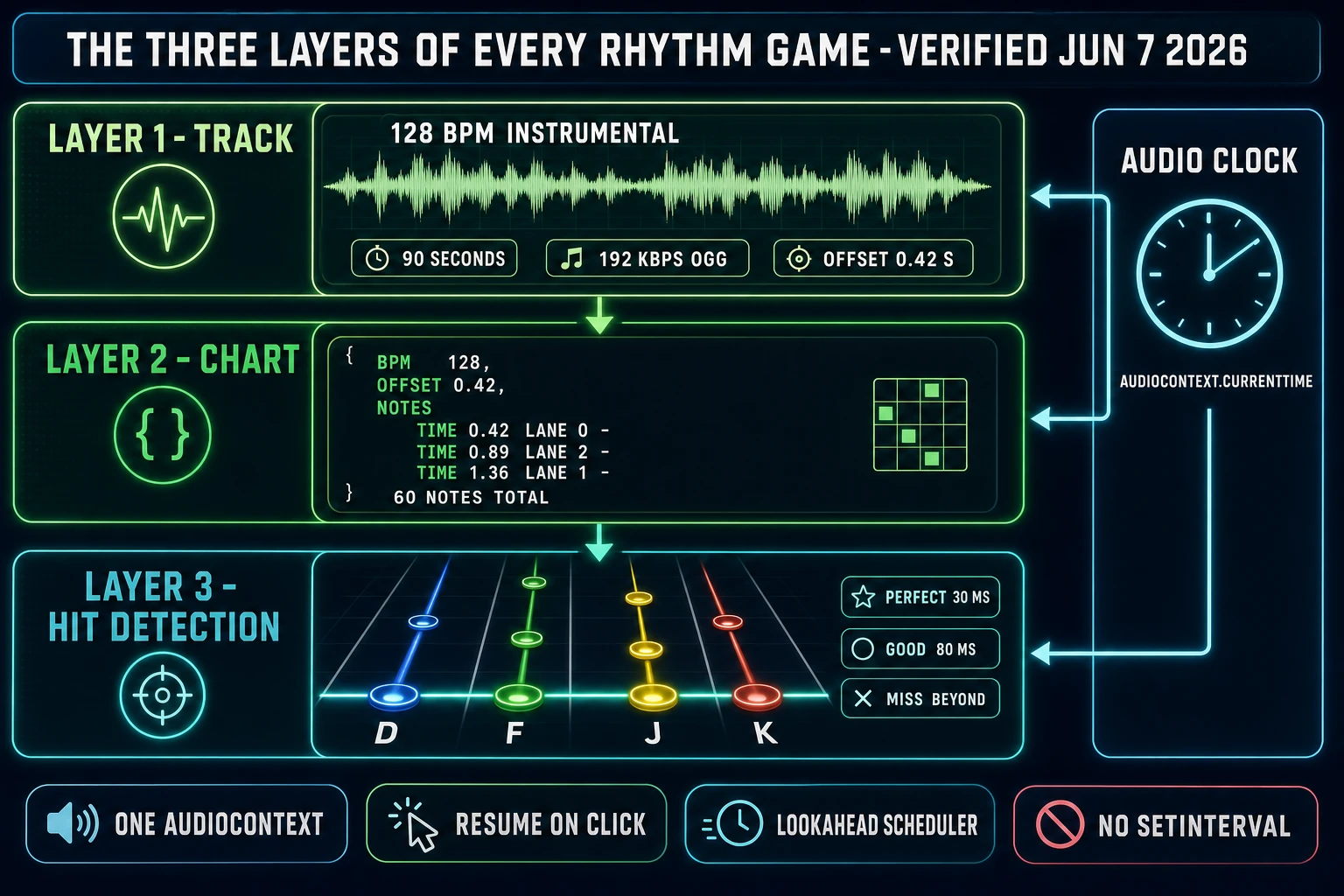
Three-layer rhythm game architecture - track on top, chart in middle, hit detection on bottom, with audio clock driving all three
The three-layer rhythm-game architecture. The track sets BPM and offset; the chart maps notes to timestamps; the hit-detection loop compares player input against the audio clock. Build the layers separately and the engine is reusable.

How to make a music game that actually hits on beat

The hit-detection layer is the part of how to make a music game that separates a satisfying rhythm game from a frustrating one. The mechanism is straightforward: every animation frame, read audioCtx.currentTime, compute the time delta to each upcoming note, and render the visual note position as a function of that delta. When the player presses a key, capture the press timestamp from audioCtx.currentTime (not performance.now() — the audio clock is the single source of truth for music time), find the nearest unhit note in the matching lane, compute the delta in milliseconds, and rate the press: ±30 ms = Perfect, ±80 ms = Good, beyond that = Miss.

The visual position of each note on the falling-notes screen comes from the same audio clock. If the screen is 600 px tall, the hit zone is 50 px from the bottom, and each note takes 1.5 seconds to fall from the top to the hit zone, then a note at chart.notes[i].time = 12.4 seconds renders at a y-coordinate of (audioCtx.currentTime - (chart.notes[i].time - 1.5)) / 1.5 * 550. No physics engine, no per-frame velocity integration — the audio clock drives the position directly. This pattern matches every modern rhythm-game engine and prevents the visual notes from drifting from the audio over a long session.

Calibration is the second half of how to make a music game that hits on beat. End-to-end audio-output latency varies by hardware (Bluetooth headphones add 150–300 ms, wired headphones add 5–15 ms, built-in laptop speakers add 30–80 ms), and visual latency varies by display (60 Hz LCD adds ~16 ms, OLED gaming monitor adds ~3 ms, projector can add 50–100 ms). A calibration screen at the start of the game asks the player to tap on a metronome beat, measures the average offset between the metronome timestamp and the player’s tap timestamp, and saves that offset as a per-player calibrationOffset. Every later hit-detection comparison applies the offset before the timing rate. Without calibration, Bluetooth players will report “the game feels off” even when the underlying scheduler is perfect.

Visual polish, SFX, and combo pops (AI Image Gen + SFX Gen)

The audio side handles timing; the visual side handles satisfaction. A working rhythm game needs five graphic assets: a track-select cover image, a four-lane fretboard background, four note shapes (one per lane, with distinct colors), a hit-zone glow, and a combo counter font. Sorceress AI Image Gen at /generate handles all five from a single prompt session. The unified panel runs Nano Banana Pro, Nano Banana 2, GPT Image 2, Seedream 5 Lite, Flux 2 Pro, Z-Image Turbo, and Grok Imagine — for note shapes, GPT Image 2 produces the cleanest geometric icons; for the cover image, Nano Banana Pro renders illustrative key art most reliably.

The SFX side is where the rhythm game lives or dies on feel. Every press needs a hit sound, every miss needs a flat thud, and every five-note combo needs a satisfying pop. Sorceress SFX Gen at /sfx-gen generates batch SFX from text prompts. A working rhythm-game SFX pack: “short crystalline ding for a perfect hit, 0.3 seconds, bright and clean,” “dull wooden thud for a miss, 0.2 seconds, low and damp,” “rising pitched chime for a 5-combo, 0.4 seconds, ascending,” “cymbal swell for a 10-combo, 0.6 seconds, building.” Schedule the SFX through the same Web Audio context as the music so they share the audio clock and never drift from the track.

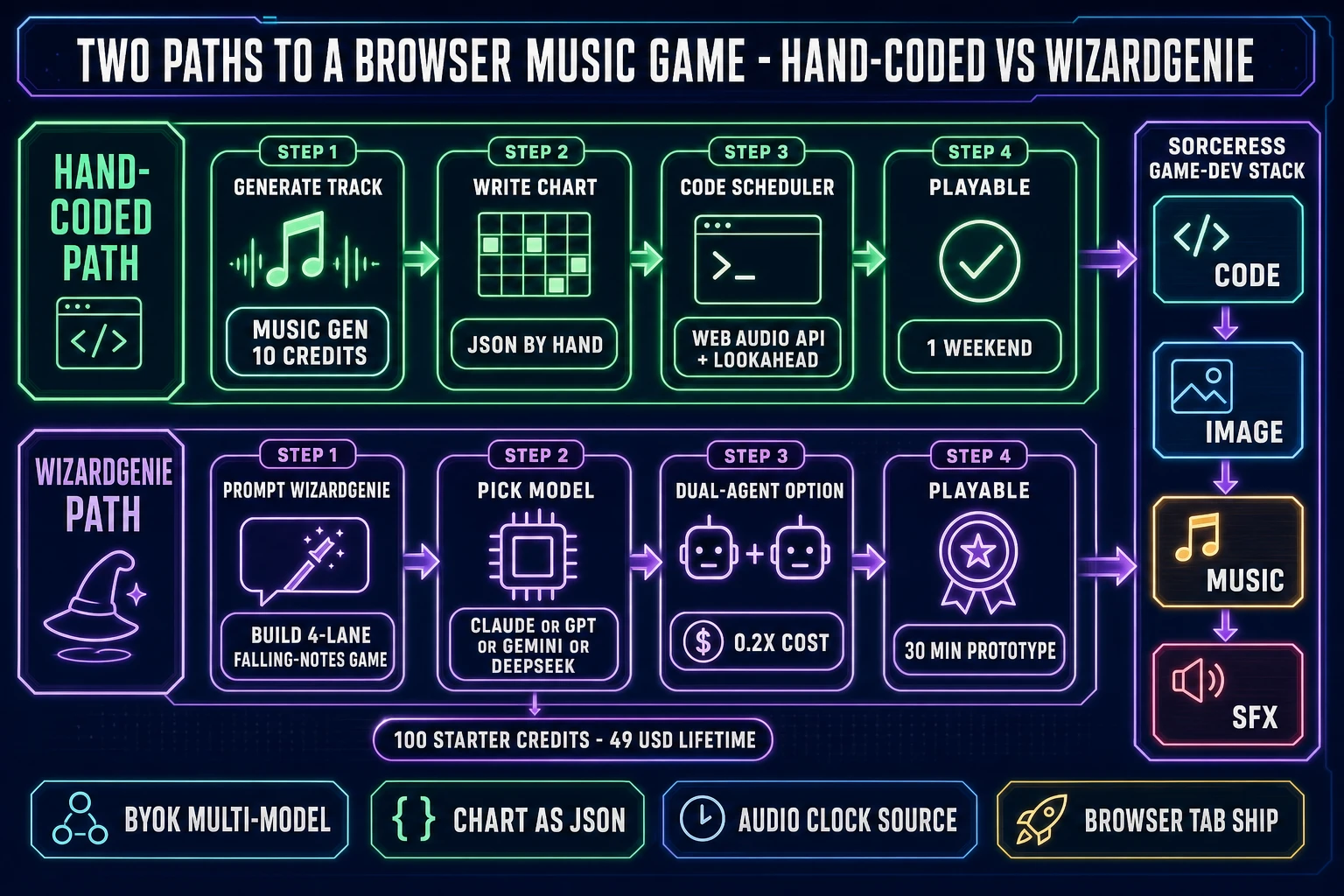
Two paths to a browser music game - hand-coded path with Web Audio API vs vibe-coded path with WizardGenie
Two paths to a finished browser rhythm game. Hand-coded with Web Audio API and a chart JSON for full control; vibe-coded through WizardGenie for a 30-minute prototype to playable. Both ship to the same browser tab.

The volume balance matters more than the individual sounds. The track sits at -6 dB, the hit SFX sit at -12 dB (loud enough to confirm the press, quiet enough not to drown the kick on the downbeat), and the miss SFX sits at -18 dB so a missed note feels like an absence rather than a rebuke. The Sorceress Sound Studio editor handles the per-clip volume trim before the export. For the surrounding cluster on AI-generated SFX, the build a full SFX pack from prompts piece covers the prompt patterns in depth.

WizardGenie: vibe-code the rhythm game in your browser

WizardGenie at /wizard-genie/app is the AI-native game engine at the heart of Sorceress, and it is the fastest 2026 path to a working music-game prototype for a developer who wants the gameplay code written rather than typed by hand. Verified June 7, 2026 against src/app/_home-v2/_data/tools.ts lines 373–386 (WizardGenie card at /wizard-genie/app, marketing landing at /wizard-genie) and lines 734–743 (the CODING_MODELS array exposes Claude Opus 4.7, Claude Sonnet 4.6, GPT-5.5, Gemini 3.1 Pro, DeepSeek V4 Pro, Kimi K2.5, Grok 4.2, and MiniMax M2.7), the engine drives all eight frontier coding models from a browser tab or a Windows desktop client.

The vibe-coding session for a music game starts with a single prompt: “Build a four-lane falling-notes rhythm game in HTML5 and the Web Audio API. Read the chart from a JSON file with bpm, offset, and a notes array of { time, lane }. Use a 100 ms lookahead scheduler against AudioContext.currentTime. Hit windows are 30 ms for Perfect, 80 ms for Good. Map lanes to D, F, J, K. Render falling notes that take 1.5 seconds to reach the hit zone. Show a combo counter and a score.” A frontier model in WizardGenie produces a working scaffold in 30–90 seconds. Iterate from there: paste the track URL, paste the chart JSON, ask for the calibration screen, ask for the cover-image upload, ask for the score-submission endpoint.

The Dual-agent Planner + Executor mode in WizardGenie is the right setup for music-game prototyping because rhythm-game code has a high boilerplate-to-architecture ratio. The Planner half (Claude Opus 4.7 or GPT-5.5 or Gemini 3.1 Pro) designs the architecture and breaks the work into typed steps; the Executor half (DeepSeek V4 Pro or Kimi K2.5 or MiniMax M2.7 or GPT-5.5 Mini) types the boilerplate scheduler, the JSON parser, and the input handlers. The split drops long-session cost to roughly one-fifth of single-frontier billing because the typing side runs on a cheap model. Never put a frontier-priced model on the Executor side — that erases the cost advantage that makes the pattern worth using.

The starter terms verified against src/app/plans/page.tsx on June 7, 2026: the lifetime plan is $49 for the non-AI tools (line 44, LIFETIME_PRICE = 49); credit packs are $10 / 1000 Starter, $20 / 2000 Creator, $50 / 5000 Plus, $100 / 10000 Studio (lines 46–51, CREDIT_TIERS), all no-expiry. New accounts receive 100 starter credits, which covers ten Music Gen track generations end-to-end — enough to demo a full music-game prototype before committing to a paid pack. For developers who want the same browser harness without the game-specific asset panels, Sorceress Code exposes the same eight cloud rails for general projects. The plans page covers the credit math, the Sorceress tools guide maps every panel to the rhythm-game pipeline step it owns.

The verdict on how to make a music game in your browser

The verdict on how to make a music game in 2026 is shaped by the asset bottleneck collapsing. The AI track-generation half of the build — pre-2024 the hardest, most expensive, most time-consuming step — is now a 10-credit prompt in Music Gen that returns two variations in under a minute. The chart-writing half is a JSON file. The hit-detection half is the canonical Web Audio API lookahead-scheduler pattern from the W3C spec, written once and reused across every rhythm game. The remaining engineering decisions — lane count, hit-window tuning, calibration UX, score-submission endpoint — are gameplay design choices, not blocking tech work.

The pragmatic path for a beginner asking how to make a music game: start with a single instrumental track at a known BPM (use Music Gen, prompt for the genre and the BPM explicitly), write a 30-note chart by hand to learn the format, build the four-lane scaffold in WizardGenie with a one-paragraph prompt, add the calibration screen before the first playable build, generate the SFX pack and the cover art in parallel, and ship the playable browser tab to a friend within 24 hours. That timeline used to take a month; in 2026 it is a single weekend with credits to spare. For deeper reading on the surrounding cluster, the how to make a video game with AI flagship covers the broader vibe-coding pattern, the best vibe-coding tools for building games piece compares the browser-native harnesses head-to-head, and the best AI model for coding roundup covers which of the eight WizardGenie rails to pick for the gameplay prompt. On the technical primitives, the Web Audio API Wikipedia entry covers the API history, the Web Audio API on MDN covers the canonical reference, and the W3C Web Audio API specification is the authoritative source on every behavior referenced above.

Frequently Asked Questions

What is the easiest way to make a music game in 2026?

The easiest way to make a music game in 2026 is to split the build into the three layers every rhythm game shares and tackle each one separately. First, generate the instrumental track in Sorceress Music Gen at a prompt-locked BPM (10 credits per generation, two variations returned, model V5 verified at line 769 of src/app/music-gen/page.tsx). Second, write a JSON chart of note timestamps relative to the track BPM and offset; for a one-minute song at 128 BPM, plan on roughly 60 to 120 notes for a beginner-friendly difficulty. Third, build the hit-detection layer in HTML5 with the Web Audio API, scheduling notes against AudioContext.currentTime with a 100 ms lookahead window. WizardGenie at /wizard-genie/app writes the gameplay scaffold from a single prompt that includes the lane count, hit windows, and key bindings, so the entire chain from idea to playable browser tab fits inside a weekend.

Why does setInterval not work for rhythm-game timing?

setInterval and requestAnimationFrame both run on the main JavaScript thread, which is throttled when the browser tab loses focus, stutters every time React re-renders or the garbage collector pauses, and is generally unfit for sample-accurate audio scheduling. The Web Audio API ships with a high-priority audio thread that runs separately from the main thread and exposes a sample-accurate clock at AudioContext.currentTime. The canonical fix, documented in the web.dev article A tale of two clocks, is the lookahead-scheduler pattern: use setInterval only to refill a 100 ms-deep window of upcoming events, but trigger every sound through bufferSource.start(when) where when is a future timestamp on the audio clock. The audio thread reads the queue and starts every scheduled sound on the exact requested sample, drift-free across a multi-minute song. A naive setInterval that triggers sounds at audioCtx.currentTime drifts within the first 30 seconds of a song; the lookahead pattern stays locked across an hour-long session.

What format should I use for the chart in a music game?

The simplest and most engine-portable chart format for a music game is JSON: { bpm: 128, offset: 0.42, notes: [{ time: 0.42, lane: 0 }, { time: 0.89, lane: 2 }, ...] }. The bpm field locks the timing grid the chart writer works against; the offset is the time in seconds before the first downbeat (every other timestamp is measured against this offset); the notes array is a flat list of { time, lane } objects where time is the timestamp in seconds when the note must be hit and lane is which key or column the note belongs to (0 to 3 for a four-lane DDR-style game, 0 to 5 for a six-lane Guitar Hero-style game, single value for a one-button mobile tapper). Storing the chart as JSON instead of a hard-coded array lets the same engine play any track by swapping the chart file. For tooling, a chart editor that renders the waveform and lets the designer click to drop notes onto the grid is the right next step once the gameplay scaffold is working.

What hit window should a music game use for Perfect, Good, and Miss?

The hit windows that match human reaction-time research and feel right across the rhythm-game genre are plus or minus 30 ms for Perfect, plus or minus 80 ms for Good, and beyond 80 ms registers as Miss. The numbers come from human perception research: at around 30 ms of audio-visual offset most listeners cannot reliably distinguish a tap from on-beat, and around 80 ms is where the offset becomes obviously wrong. Some games tighten the Perfect window to 20 ms for hard difficulty modes and loosen it to 50 ms for easy modes, but the 30 / 80 / Miss baseline is the safe default for a first build. Pair the windows with a per-player calibration screen that measures the player's tap offset against a metronome at game start; without calibration, Bluetooth-headphone players will report the game feels off even when the underlying scheduler is perfect because Bluetooth output adds 150 to 300 ms of end-to-end latency.

How do I generate the music for a music game with AI?

The fastest 2026 path to a rhythm-game-ready instrumental is Sorceress Music Gen at /music-gen with a prompt that names four things explicitly: the genre, the BPM, the structure, and the energy level. A working example: 128 BPM electro-house instrumental, 90-second arrangement with an 8-bar intro, 16-bar verse, 16-bar chorus, 16-bar verse, 16-bar chorus, 8-bar outro, prominent kick on every beat, hi-hats on the offbeats, melodic synth lead in the chorus. Music Gen runs model V5, costs 10 credits per generation per MUSIC_CREDIT_COST at line 26 of src/app/music-gen/page.tsx, and returns two variations per call. The instrumental toggle (line 420, instrumental: boolean) is non-optional for rhythm games because vocals compete with the chart for the player's attention. Use Sound Studio at /sound-creator to trim the head, fade the tail, and run a gentle limiter pass before exporting the final audio file.

Do I need to detect BPM from the audio file?

For a music game where the developer controls the music generation, BPM detection is unnecessary because the BPM was set in the prompt that produced the track. Music Gen generates a track at the prompt-specified BPM, the chart writer works against that BPM directly, and the audio file ships with the BPM stored as metadata in the chart JSON. BPM detection only matters when the player uploads their own track and the game has to chart it automatically. The 2026 libraries that handle that case are web-audio-beat-detector on npm (offline analysis, returns a single tempo value from an AudioBuffer) and realtime-bpm-analyzer (AudioWorklet-based, low-pass filter at 200 Hz to isolate kick drums and bass transients, then peak detection and interval analysis). For a first music-game build, skip BPM detection entirely; for a v2 that imports user tracks, the realtime-bpm-analyzer pattern is the canonical 2026 recipe.

Can WizardGenie write the entire music-game scaffold for me?

Yes, WizardGenie at /wizard-genie/app writes a working four-lane falling-notes scaffold from a single paragraph prompt in 30 to 90 seconds. The prompt that works: Build a four-lane falling-notes rhythm game in HTML5 and the Web Audio API. Read the chart from a JSON file with bpm, offset, and a notes array of { time, lane }. Use a 100 ms lookahead scheduler against AudioContext.currentTime. Hit windows are 30 ms for Perfect, 80 ms for Good. Map lanes to D, F, J, K. Render falling notes that take 1.5 seconds to reach the hit zone. Show a combo counter and a score. WizardGenie drives all eight frontier coding models (Claude Opus 4.7, Claude Sonnet 4.6, GPT-5.5, Gemini 3.1 Pro, DeepSeek V4 Pro, Kimi K2.5, Grok 4.2, MiniMax M2.7) per src/app/_home-v2/_data/tools.ts lines 734 to 743. The Dual-agent Planner + Executor mode pairs an expensive reasoner for architecture with a cheap executor for boilerplate, dropping long-session cost to roughly one-fifth of single-frontier billing on the typing side.

What hardware-related issues should I expect when shipping a browser music game?

Two hardware-related issues every browser music game has to handle. First, end-to-end audio-output latency varies across listening setups: wired headphones add 5 to 15 ms, built-in laptop speakers add 30 to 80 ms, and Bluetooth headphones add 150 to 300 ms. Without a calibration screen, Bluetooth players will rate the game as broken even when the underlying scheduler is sample-accurate. The fix is a calibration screen at the start of the game that asks the player to tap on a metronome beat, measures the average offset between the metronome timestamp and the player's tap timestamp, and saves the offset as a per-player calibrationOffset applied to every later timing comparison. Second, browsers ship AudioContext in the suspended state for autoplay-policy reasons, so calling audioCtx.resume() inside a user-gesture handler (typically the first click) is required before any sound plays. Use one AudioContext per app for a single shared clock; multiple contexts means multiple clocks and the visual notes will drift from the audio.

Sources

  1. Web Audio API (MDN)
  2. AudioContext.currentTime (MDN)
  3. A tale of two clocks (web.dev)
  4. Web Audio API specification (W3C)
  5. Rhythm game (Wikipedia)
  6. Music video game (Wikipedia)
  7. Web Audio API (Wikipedia)
  8. Beats per minute (Wikipedia)
Written by Arron R.·3,132 words·14 min read

Related posts