Mold Image to 3D (Browser GLB Path)

By Arron R.9 min read
Run image to 3D in Sorceress 3D Studio: strip the matte, match the prop to a credit tier, generate once, orbit-check the silhouette, then export GLB for a one-s

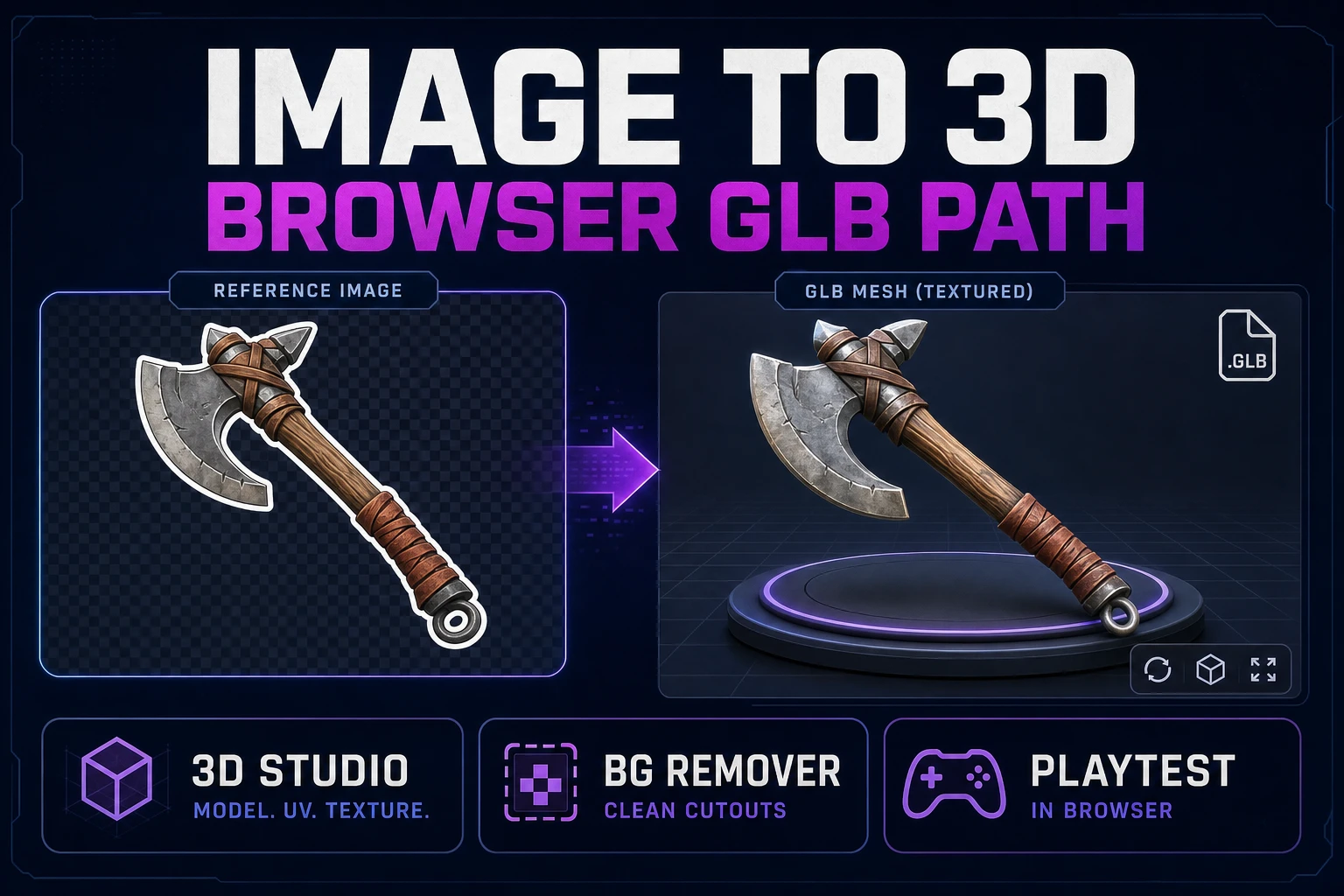
Game props fail in playtests for boring reasons: a fused handle, a hollow back, a silhouette that reads as a blob at camera distance. This guide molds a single reference into a browser GLB you can drop into a one-screen scene before you burn another generation.
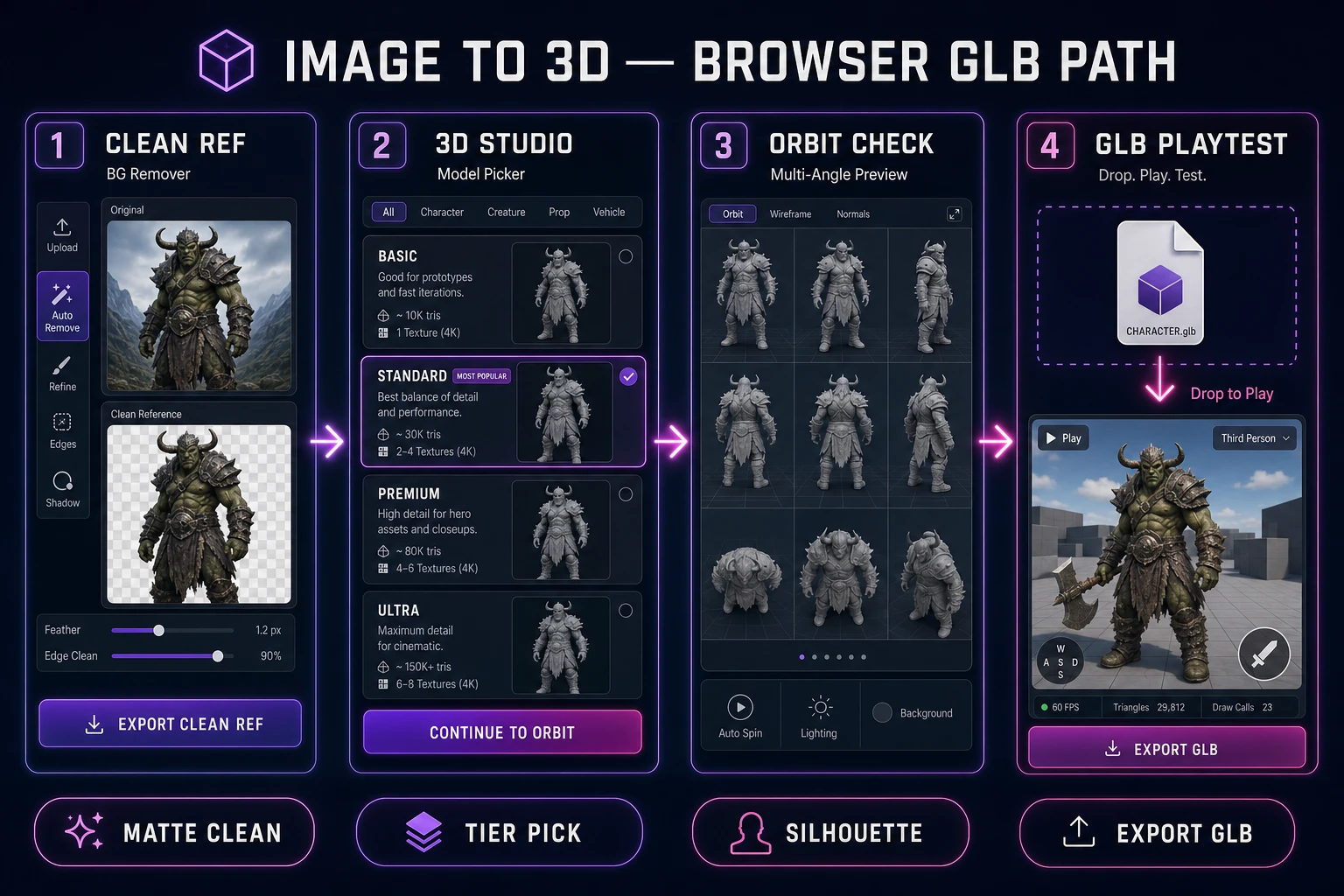
image to 3d browser pipeline from cleaned reference through 3D Studio to GLB playtest
Clean reference → model tier → orbit check → GLB playtest. Keep the loop inside the browser so you ship props, not gallery meshes.

What an image to 3d search must deliver for games

People typing image to 3d usually want a mesh they can load tonight — not a research paper on reconstruction. For indie games that means a textured prop or character chunk that survives a real camera: readable outline, sane polycount, and a file format engines already understand. A pretty turntable that collapses into mush at play distance is a failed run even when the gallery thumbnail looks sharp.

The practical deliverable is a GLB: the binary glTF 2.0 container with media type model/gltf-binary, standardized by the Khronos Group and described in the live glTF 2.0 specification (verified July 22, 2026). One file carries geometry, materials, and embedded textures. Browser loaders treat that as the default handoff; the three.js loading manual and the Library of Congress glTF/GLB format description both treat it as the portable runtime package.

Sibling write-ups cover adjacent angles: Convert Image to 3D Model (Browser GLB Out) and Hatch an Image to 3D Model Free Workflow. This article is the mold-and-playtest path — cleanup, tier pick, orbit inspect, export — optimized for props you will actually place in a level.

Reject cinema goals early. You are not reconstructing a film asset with eighty angles. You are lifting one clear plate into a mesh that holds silhouette under game lighting. That constraint is what makes the browser path fast enough for a jam week.

Also reject “infinite variations” as a success metric. One prop that loads, reads, and survives a pick-up animation is worth more than a folder of near-duplicates. Treat each generation as a production take with a pass/fail gate, the same way you would treat a sprite sheet before it enters the build.

Clean the reference before you lift

Garbage mats invent garbage limbs. Before you open 3D Studio, strip the subject onto a flat or transparent background in BG Remover. Tables, patterned wallpaper, and second props in the frame become fused geometry that no parameter tweak will fully heal.

Frame one subject. Prefer a three-quarter view that shows front volume plus a hint of the side. Pure profile hides the face of the prop; extreme top-down flattens height. Keep resolution in a useful mid band — roughly 1024–2048 on the long edge — so the model is not fighting a tiny thumbnail or an oversized phone dump.

No photo yet? Generate a concept in AI Image Gen with an explicit plain backdrop and hard silhouette language, then cut the matte. A clean AI plate often beats a cluttered real photo for single-image lifts. Name the file something boring like prop_lantern_ref_v01.png so you can version re-shoots without guessing which plate produced which mesh.

Lighting on the plate should be even. Hard baked shadows become fake ridges on the mesh. If the photo has a hot specular blob, reshoot or regenerate under softer key light before you spend credits on a lift.

Scale cues help too. Include a known relative size in the brief even if you do not put a ruler in frame: “hand-held lantern,” “crate you can vault,” “door-width shield.” When the playtest camera finally sees the GLB, you will already know whether the mesh should dominate the frame or sit as set dressing.
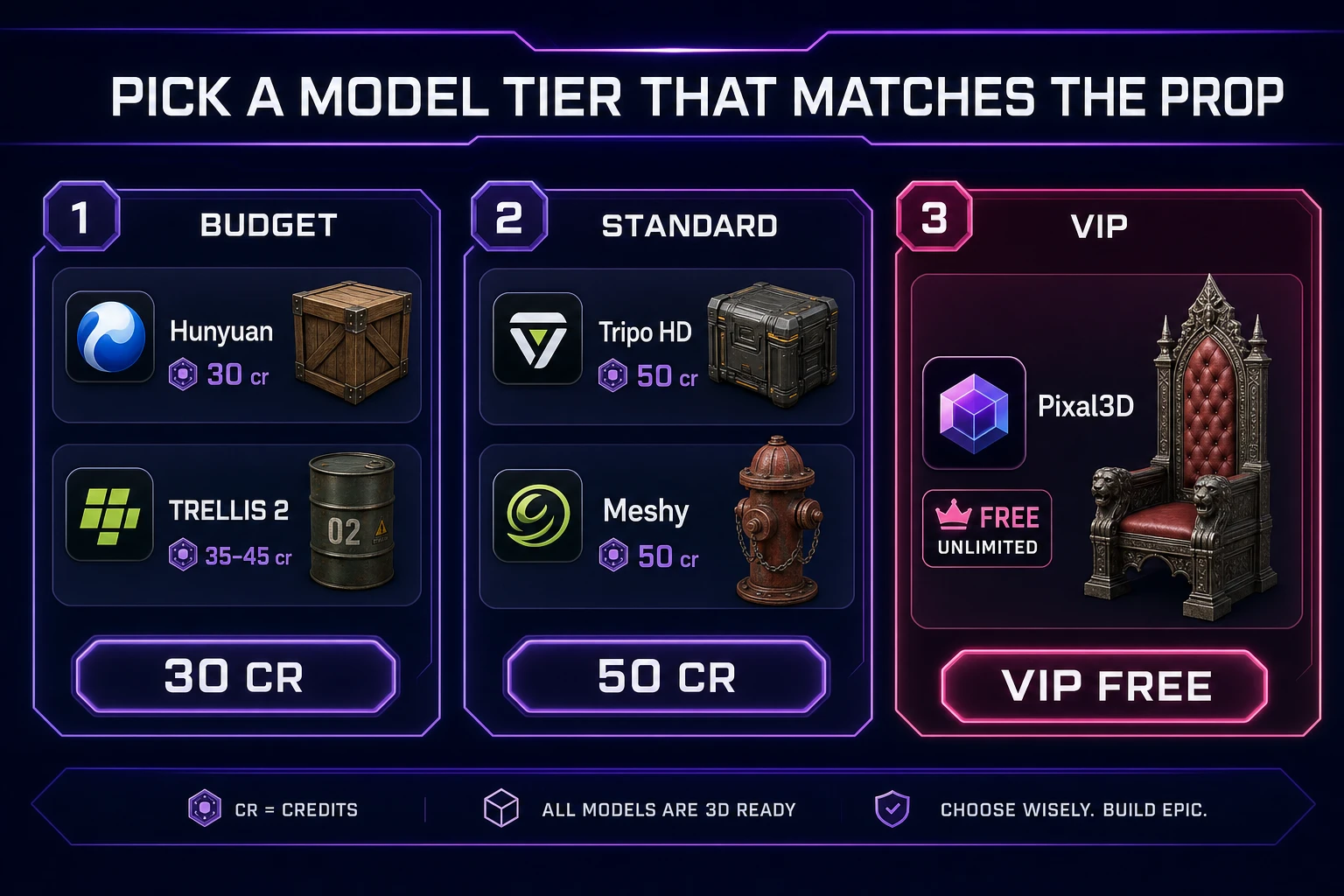
image to 3d model tier picker in 3D Studio with credit chips for Hunyuan TRELLIS Tripo Meshy Rodin Pixal3D
Match the prop to a credit tier before you click Generate. Budget props start cheaper; hero props earn the 50-credit HD path.

Pick a model tier that matches the prop

Visible order in the 3D Studio picker, verified July 22, 2026 against THREED_MODEL_ORDER in src/lib/threed-models.ts: Tripo v3.1, Meshy 6, Hunyuan 3D 3.1, Pixal3D (VIP free unlimited), TRELLIS 2, Rodin 2.0. Credits on the same date:

  • Hunyuan 3D 3.1 — 30 credits. Strong default for everyday props when you want geometry-plus-texture without spending a half grant.
  • TRELLIS 2 — 35 / 40 / 45 credits at 512 / 1024 / 1536. Use 512 while iterating shape; bump resolution only when the silhouette already works.
  • Tripo v3.1 image HD — 50 credits. Reach for HD when texture fidelity is the bottleneck on a hero prop.
  • Meshy 6 textured single-image default — 50 credits. Same mid-high band; also exposes multi-image-to-3D when one plate is not enough.
  • Rodin 2.0 — 50 credits. Useful when you want quad-friendly topology language for later cleanup.
  • Pixal3D — VIP free unlimited. If you are on VIP, burn exploration here before paid tiers.

Tripo and Meshy support multi-image-to-3D. Hunyuan 3.1 and TRELLIS 2 are image-to-3D only. That split matters: if the back of a prop keeps collapsing, do not spam single-image Hunyuan runs — add a second plate and switch to a multi-image-capable model.

Tier the asset, not your ego. A background crate earns Hunyuan or TRELLIS 2 at 512. A player-held weapon earns Tripo HD or Meshy once. Mixing those budgets is how starter credits vanish on scenery nobody notices.

Write the tier next to the prop name before you open the picker: crate_bg → hunyuan, sword_hero → tripo_hd. That one line prevents “just this once” upgrades on assets the player never inspects up close. VIP Pixal3D exploration is the exception — use it to learn what the plate needs, then spend paid credits only on the winner plate.
Run the image-to-3D pass in 3D Studio

Open 3D Studio, drop the cleaned reference, pick the tier, leave first-pass parameters at defaults unless you already know you need A/T-pose or a face limit. Click Generate and wait for the gallery preview. Credits deduct on submission; failed jobs refund — still treat each click as real spend.

One intentional pass beats three anxious retries. If the front looks right and the back is soft, that is a reference problem, not a “run it again with the same plate” problem. Log the model name, credit cost, and plate version in a one-line note beside the download so the next jam day can reproduce winners.

When you need a second angle, shoot or generate a back or side plate with the same lighting language, then use multi-image mode on Tripo or Meshy. Keep the subject scale consistent across plates; mismatched zooms confuse reconstruction more than mild pose differences.

Do not chase provider brand names in new tabs. The picker already routes Tripo, Meshy, Hunyuan, TRELLIS, Rodin, and Pixal3D through one Sorceress credit ledger. Stay in-studio so your budget and filenames stay coherent.

If the job fails or returns an empty preview, do not immediately change five parameters. Re-check the matte, confirm the subject fills enough of the frame, and resubmit once on the same tier. Parameter thrash usually masks a plate problem and burns the same credits twice.

Inspect silhouette from multiple views

Orbit the preview like a playtester, not like an art director on a beauty still. Check front, three-quarter, side, and back. Zoom under the feet and behind the head. Thin straps, gun barrels, and lantern handles are the first parts to fuse; if they read as lumps, the mesh will fail at game scale even when the albedo looks painted.

Silhouette is the gate. Shrink the preview mentally to the on-screen size the prop will occupy. If the outline loses the distinctive notch, fork, or grip that sells the object, reject the run. Texture polish cannot restore a silhouette that never existed.

Watch for hollow backs and mirrored nonsense. Single-image priors invent the unseen half; they are often good enough for distant set dressing and often wrong for hero interactables. When the invented back breaks the prop’s story, re-shoot rather than re-rolling the same front plate.

Polycount gut-check: if the mesh looks noisy in the preview, plan a later optimize pass inside the Sorceress tools instead of assuming the first export is final. Generation quality and runtime cost are separate problems — solve readability first.

Take three screenshot orbits (front, side, back) and keep them beside the GLB. Future you will forget why a take was rejected; the screenshots make the silhouette gate objective when you compare a re-shoot against the failed lift.

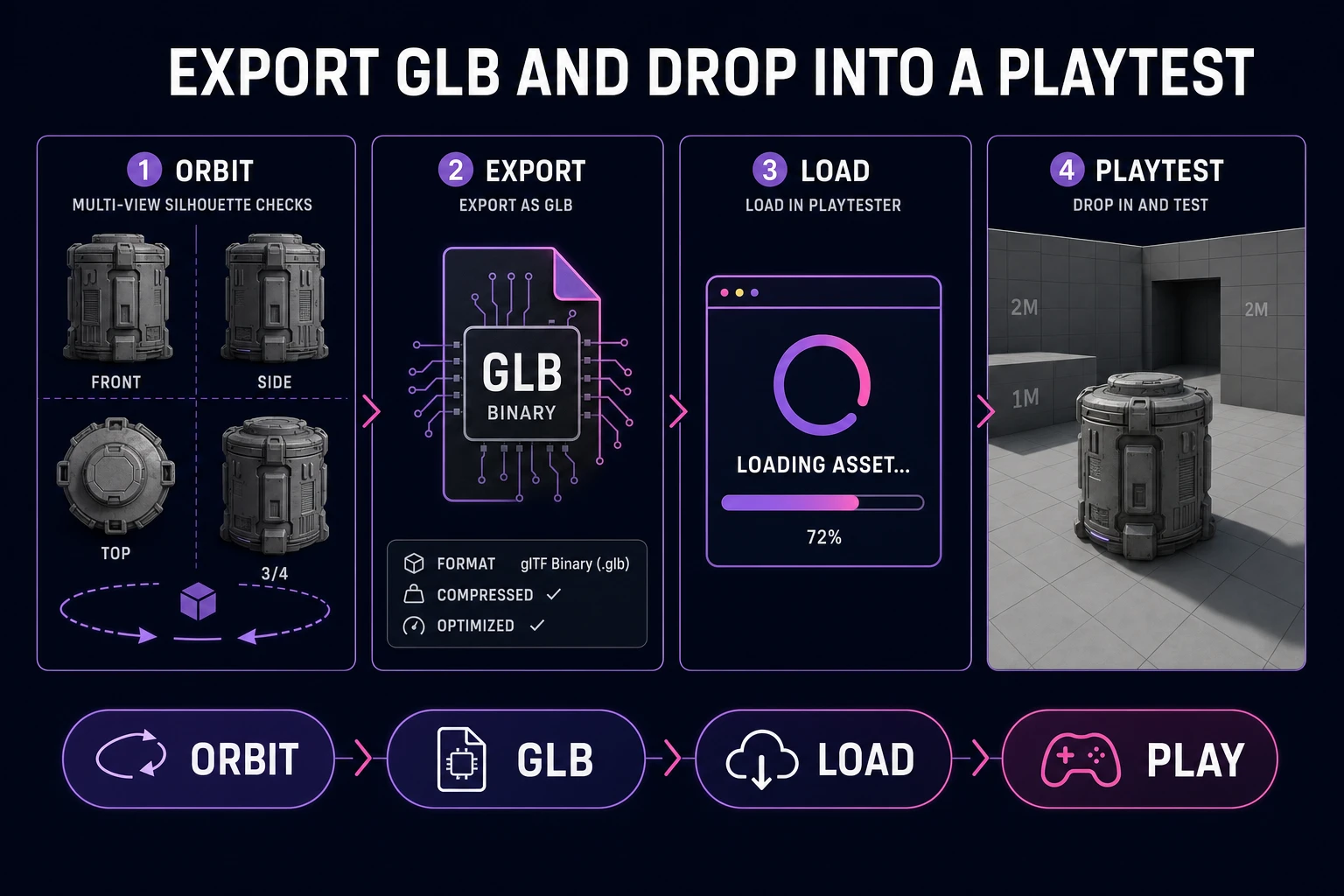
Export image to 3d GLB from 3D Studio and drop into a one-screen playtest scene
Orbit until the silhouette holds, export GLB, then prove the prop in a one-screen playtest before another credit burn.

Export GLB and drop into a playtest

Export GLB as the default playtest package. It is the binary glTF 2.0 container Khronos documents for runtime delivery — one blob, textures included, media type model/gltf-binary. That matches how browser pipelines expect to load models and how most quick engine drops want to ingest a prop without babysitting sidecar files.

Name the download with the same versioning habit as the plate: prop_lantern_tripo_hd_v02.glb. Drop it into a one-screen graybox: floor, key light, camera at play distance. Walk around it. Pick it up if it is a held item. If the outline fails in motion, you learned something a gallery orbit alone would miss.

Keep the playtest boring on purpose. No post stack, no fancy GI, no cinematic camera. You are validating silhouette, scale, and material readability under game-ish lighting. When that pass succeeds, then promote the GLB into the real level or a further cleanup step.

If your runtime already loads glTF, prefer GLB over splitting JSON + bins for jam speed. The Library of Congress format note and the Khronos overview both emphasize the self-contained binary package for interchange — use that property.

If the playtest runtime struggles, shrink textures or optimize later — do not block the first drop-in on perfection. The point of the graybox scene is proof of silhouette and scale. Performance tuning is a second pass after the prop earns its place in the level.

Cost math and when to re-shoot the reference

Rough starter-credit math with the July 22, 2026 rates: three Hunyuan lifts cost 90 credits; two Tripo HD or Meshy default textured lifts cost 100; a TRELLIS 2 ladder of 512 → 1024 is 35 + 40 = 75 before you ever touch a 50-credit hero pass. Plan the sequence on paper so exploration stays on cheaper tiers.

Re-shoot when any of these show up: fused thin parts, collapsed backs, wrong camera height versus the in-game view, or a matte that still includes table edges. Re-generate on the same plate only when the failure is clearly stochastic noise and the silhouette was already almost right.

Multi-image is the middle path. One front + one back on Tripo or Meshy often beats four single-image retries. Keep lighting matched. If you cannot shoot a second angle, generate a matching turn in AI Image Gen with the same prompt prefix and cut both mattes before the lift.

Stop when the playtest passes, not when the gallery is perfect. Extra generations after a readable silhouette are taste spends — fine on VIP Pixal3D exploration, expensive on 50-credit HD. Park winners in a dated folder with the plate, the GLB, and a one-line note of model + credits so the next prop reuses the recipe.

Common issues

  • Blob silhouette at play distance: The plate was too soft or too far. Re-frame tighter, cut the matte, and re-lift on a mid tier before HD.
  • Great front, melted back: Stop single-image spam. Add a second plate and use Tripo or Meshy multi-image-to-3D.
  • Credits gone after two props: You started on 50-credit HD for scenery. Move set dressing to Hunyuan (30) or TRELLIS 2 at 512 (35).
  • Fused handles and straps: Thin features need clearer edges on the reference. Increase contrast on the plate or choose a three-quarter angle that separates the part from the body.
  • Pretty GLB that fails in-level: You skipped the graybox playtest. Export, drop, walk — then decide on re-shoots.

Frequently Asked Questions

What does an image to 3d search need to deliver for a game prop?

A playable mesh, not a gallery render. You need a single textured asset that loads as GLB (binary glTF 2.0), keeps a readable silhouette at game camera distance, and does not explode polycount on mobile or web runtimes. Photogrammetry-style photo dumps and cinema-quality hero sculptures are the wrong targets for a jam prop. The Sorceress path is: clean reference → one image-to-3D pass in 3D Studio → orbit inspect → GLB export → one-screen playtest.

Which 3D Studio models support image-to-3D, and what do they cost?

Visible picker order (src/lib/threed-models.ts, verified July 22, 2026): Tripo v3.1, Meshy 6, Hunyuan 3D 3.1, Pixal3D (VIP free unlimited), TRELLIS 2, Rodin 2.0. Credits: Hunyuan 3D 3.1 = 30; TRELLIS 2 = 35/40/45 at 512/1024/1536; Tripo v3.1 image HD = 50; Meshy 6 textured single-image default = 50; Rodin 2.0 = 50. Tripo and Meshy also support multi-image-to-3D; Hunyuan 3.1 and TRELLIS 2 are image-to-3D only.

Should I remove the background before lifting an image to 3D?

Yes for most props. Busy backgrounds bleed into geometry and invent fake limbs or table edges. Run the reference through BG Remover, keep a flat or transparent matte, and frame a single subject. If you do not have a photo yet, generate a clean concept in AI Image Gen with a plain backdrop, then cut the matte before 3D Studio.

What is a GLB file, and why export it for playtests?

GLB is the binary glTF 2.0 container (media type model/gltf-binary) defined by the Khronos Group. One file embeds mesh, materials, and textures, which is ideal for browser loaders and quick engine drops. Export GLB from 3D Studio, drop it into a one-screen playtest, and only then decide whether to re-shoot the reference or spend another generation.

When should I re-shoot the reference instead of regenerating?

Re-shoot when the silhouette fails from the side or back, when thin props fuse into the body, or when the camera angle hid the volume you need in-game. A second clean photo (or a multi-image pass on Tripo/Meshy) beats burning three identical single-image runs on a bad plate. Fix lighting, framing, and matte first; regenerate second.

Sources

  1. glTF Overview — Khronos Group
  2. glTF 2.0 Specification — Khronos Registry
  3. Loading 3D models — three.js docs
  4. GLB / glTF Format Description — Library of Congress FDD
Written by Arron R.·1,998 words·9 min read

Related posts