Hoop How to Make a Basketball Game (Browser Court Loop 2026)

By Arron R.12 min read
How to make a basketball game in 2026: model half-court player movement with aim-and-shoot arc physics, wire hoop collision and a 60-second shot clock in Wizard

Most beginners who search “how to make a basketball game” want a hardwood half-court you can see clearly, a player you move with the keyboard, a ball that arcs through the air with gravity until it drops through the rim or clangs off iron, and a scoreboard that ticks up when the swish registers. An NBA 2K-grade sim with motion-capture dribble moves, licensed rosters, and broadcast replays is a studio franchise. A browser court loop is different. A coding agent scaffolds half-court movement, aim-and-shoot arc physics, and hoop collision from one prompt, and AI generation covers jersey sprites, court art, and arena audio. On desktop or web, that means WizardGenie for the move-aim-score interpreter, Quick Sprites for player sprites, AI Image Gen for the court texture, SFX Gen for swish and bounce audio, and optional Music Gen for a crowd bed. This guide is the honest end-to-end for how to make a basketball game in 2026, as a weekend build you can finish once.
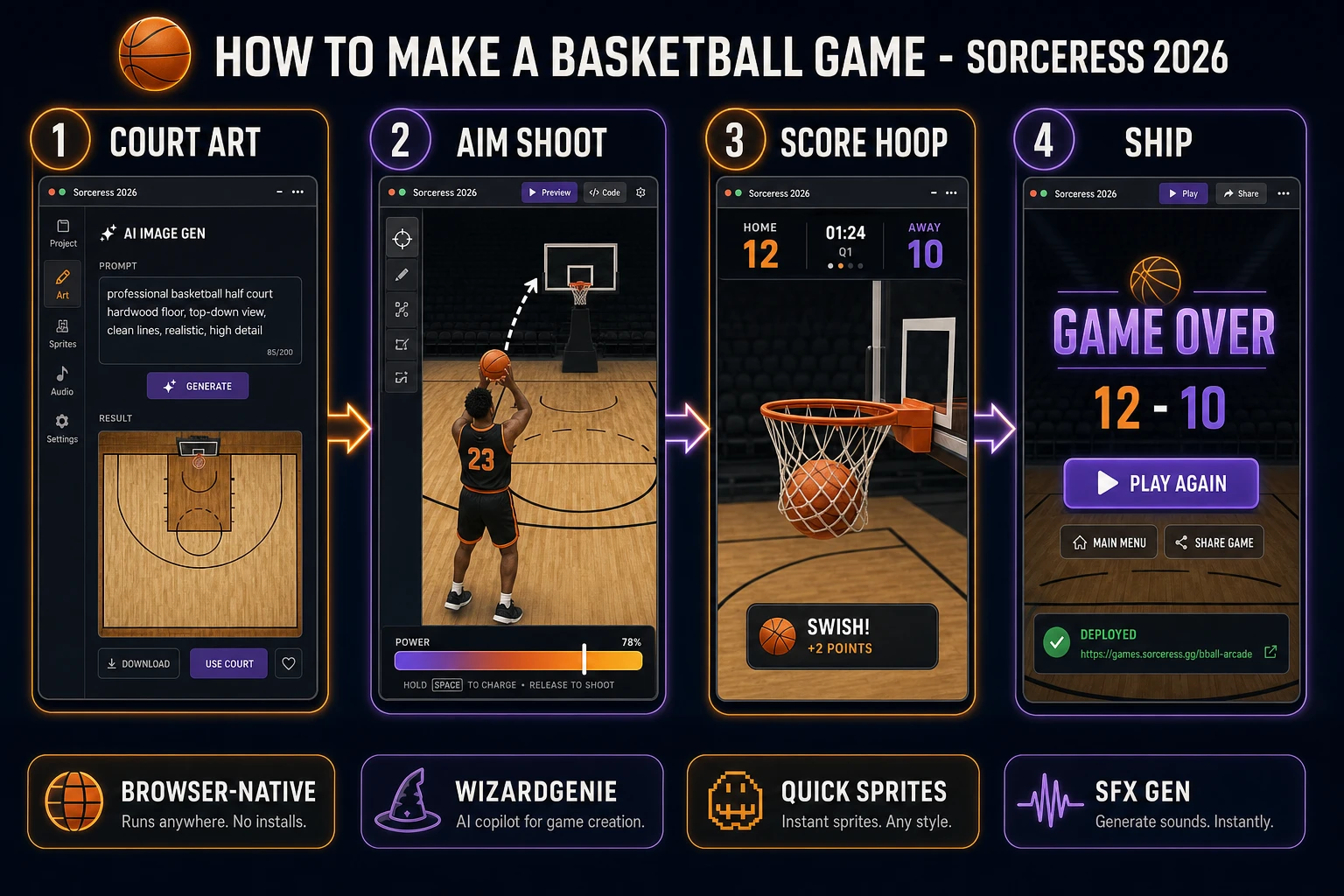
How to make a basketball game browser pipeline: model half-court movement and shot arc physics, wire hoop scoring and shot clock in WizardGenie, and ship a browser court loop
The 2026 how to make a basketball game recipe: generate court art and jerseys, model aim-shoot arc physics in WizardGenie, then add SFX Gen swish audio and Music Gen arena bed.

What how to make a basketball game actually means in 2026

The query “how to make a basketball game” hides three intents. Some searchers want a Unity asset pack with arena meshes, crowd animations, and licensed player likenesses — that is engine shopping, not a minimal playable loop. A second intent is a broadcast-style hardwood sim with pick-and-roll AI, foul calls, and season mode trades — a product team, not a solo jam. The third intent, and the one this guide targets, is a browser court loop: one half-court viewed from above or the side, keyboard movement for the human player, mouse or arrow aim for shot direction, Space to release with a visible power meter, gravity on the ball arc, and a 60-second shot clock that declares a winner by total baskets. That is a weekend build, it demos the Sorceress toolset, and it is the format most basketball game tutorial and javascript basketball searchers actually want.

The presentation contract is small and strict. A title screen shows the match name, control hints (WASD to move, mouse to aim, Space to shoot), and Play. The play screen shows the half-court, the hoop with rim and backboard marked, a scoreboard (0–0), a countdown timer, and optional mute toggle. On shoot, play a short release squeak and apply velocity along the aim vector scaled by power. On swish, pause for 1.2 seconds, increment the scorer’s tally, reset ball and player to the key, and resume the clock. On timer expiry, show Game Over with final score and Play Again. The Basketball overview on Wikipedia (verified 2026-08-27) traces the sport from James Naismith’s 1891 peach-basket rules through modern league formats — cite it when you write your itch.io blurb so players know you shipped an arcade half-court, not a full roster sim. If you already shipped another sports loop, the sibling guide on how to make a soccer game covers top-down kick impulse and goal-line scoring; this post owns aim arcs, rim collision, and swish detection instead.

The basketball loop in one minute (move, aim, shoot, arc, score)

Five moving parts, repeated until the shot clock hits zero. First, move — read WASD or arrow keys each frame and translate the human player by a fixed speed (roughly 3 pixels per frame at 60 FPS), clamped inside the half-court paint and three-point line you drew. Second, aim — read mouse position relative to the player or use arrow keys to rotate an aim indicator; store the angle in radians for the release vector. Third, shoot — when Space is pressed and the player holds the ball (distance under possession radius, 16 pixels), set ball velocity from aim angle times power (8 to 14 pixels per frame depending on how long Space was held). Fourth, arc — each frame move the ball, add gravity to vertical velocity (roughly 0.35 pixels per frame squared), and reflect off backboard and rim with a damp factor. Fifth, score — if ball center crosses the rim plane while moving downward and horizontal position is within rim radius plus ball radius, increment score and trigger swish celebration. Slide tackles, alley-oops, and full-court press defense are polish layered after one honest match finishes with a declared winner.
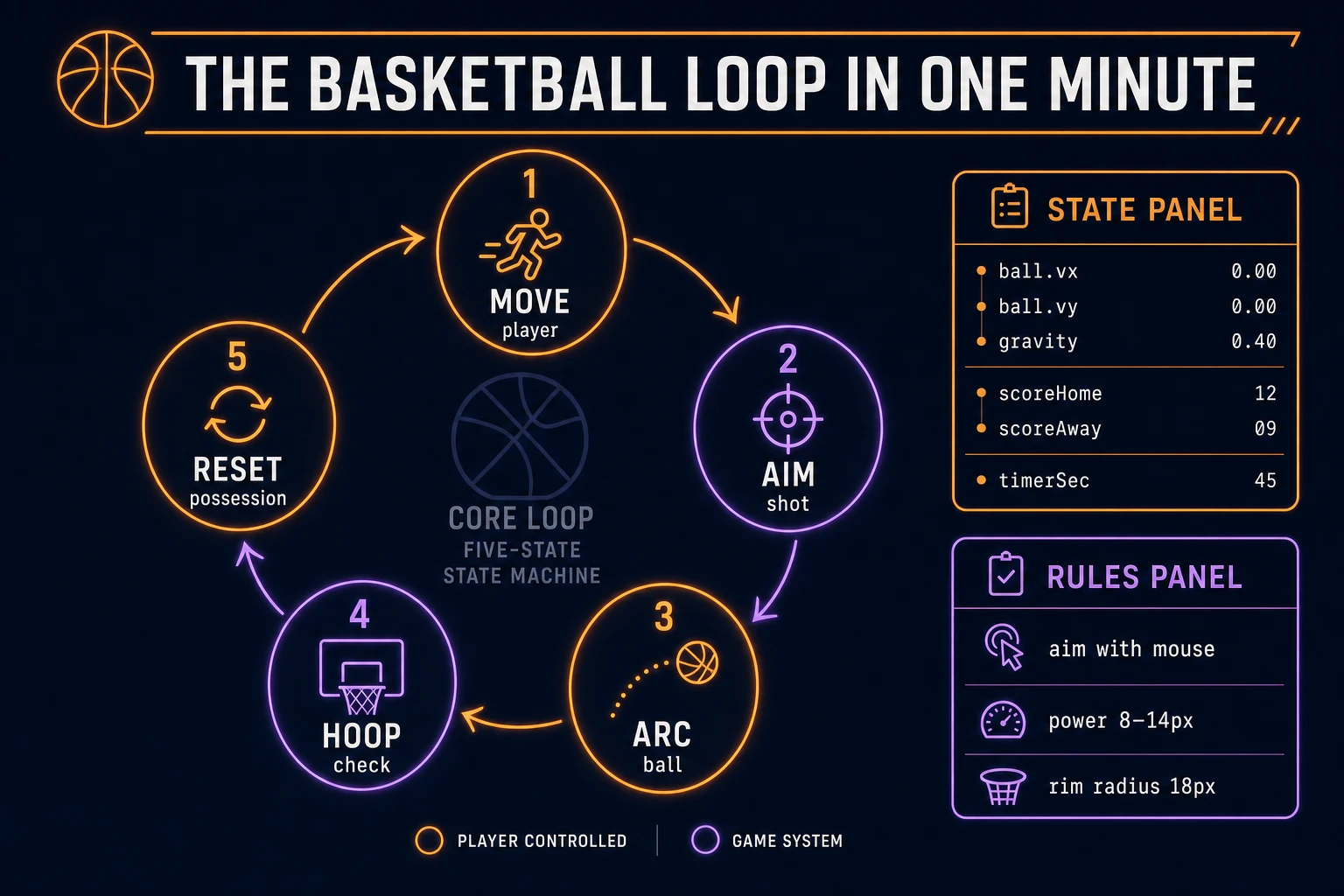
Basketball loop state machine diagram showing player move, aim shot, ball arc with gravity, hoop collision check, and possession reset
The basketball loop: move toward the key, aim at the hoop, release on Space, let gravity curve the arc, score when the ball drops through the rim, then reset for the next possession.

Pick your engine for how to make a basketball game: canvas, Phaser, or WizardGenie

Three good targets in 2026, each with a different trade-off. Vanilla JavaScript with canvas is the honest default and the pick this guide recommends for a first build. One <canvas> draws the hardwood rectangle, backboard, rim ellipse, players as circles or sprites, and the ball each frame. Integrate ball position with velocity and gravity, run circle-rectangle collision between ball and backboard, and test rim overlap with a band test on the descending arc. Total code footprint for a working browser basketball game is under 450 lines including CPU defender, timer, and scoreboard. The MDN Canvas API docs cover drawing, and 2D collision detection covers circle-rectangle overlap for rim and backboard checks.

CPU defender without pathfinding stays readable: each frame, if the CPU is between the ball and its assigned hoop side, slide toward the ball carrier at 65 percent of player speed; otherwise hold a spot near the paint. That produces honest one-on-one defense good enough for a free throw game jam build without zone AI grids.

Phaser 4.1.0 (verified 2026-08-27 on the official Phaser API documentation page) becomes the right pick if you want Arcade Physics gravity bodies, tweened net ripple on swish, or pointer aim with gamepad fallback. Phaser does not invent your rim collision band — you still need the same gravity curve and hoop-plane tests. Use Phaser when animated player spritesheets and camera pan on fast breaks are the product; use raw canvas when the product is an html5 basketball walkthrough people can read in one sitting.

WizardGenie is not a separate rendering engine — it scaffolds whichever of the two you pick from a single natural-language prompt. WizardGenie ships as both a desktop app (Windows installer with auto-update, available to Early Access supporters and above) and a no-install web build. Its coding-model lineup covers Claude Opus 4.7, GPT-5.5, Gemini 3.1 Pro, DeepSeek V4 Pro, Kimi K2.5, Grok 4.2, and MiniMax M2.7 (verified 2026-08-27 in src/app/_home-v2/_data/tools.ts). For basketball loops, any frontier model scaffolds movement, shot arc, and hoop detection in one prompt. Pair a frontier planner with a budget executor like DeepSeek V4 Pro or Kimi K2.5 for the typing pass — the dual-agent pattern lands most projects at roughly one-fifth the single-frontier cost.
Step 1 — model player movement, shot arc, and hoop collision

Nothing else in the pipeline matters if the ball tunnels through the backboard or swishes register twice on one arc. Start with a small, testable model:

const COURT_W = 480;
const COURT_H = 360;
const PLAYER_R = 14;
const BALL_R = 7;
const POSSESS_R = 16;
const RIM_X = 420;
const RIM_Y = 120;
const RIM_R = 18;
const GRAVITY = 0.35;
const PLAYER_SPEED = 3;

const player = { x: 120, y: 240, hasBall: true };
const cpu = { x: 300, y: 200 };
const ball = { x: 120, y: 240, vx: 0, vy: 0, held: true };
let scoreHome = 0;
let scoreAway = 0;
let timerSec = 60;
let aimAngle = -0.6;
let shootPower = 10;

function updatePlayer(keys) {
  if (!ball.held) return;
  let dx = 0, dy = 0;
  if (keys.has('ArrowLeft') || keys.has('a')) dx -= 1;
  if (keys.has('ArrowRight') || keys.has('d')) dx += 1;
  if (keys.has('ArrowUp') || keys.has('w')) dy -= 1;
  if (keys.has('ArrowDown') || keys.has('s')) dy += 1;
  if (dx || dy) {
    const len = Math.hypot(dx, dy) || 1;
    player.x += (dx / len) * PLAYER_SPEED;
    player.y += (dy / len) * PLAYER_SPEED;
  }
  player.x = Math.max(PLAYER_R, Math.min(COURT_W - PLAYER_R, player.x));
  player.y = Math.max(PLAYER_R, Math.min(COURT_H - PLAYER_R, player.y));
  ball.x = player.x;
  ball.y = player.y - PLAYER_R;
}

function releaseShot() {
  if (!ball.held) return;
  ball.held = false;
  ball.vx = Math.cos(aimAngle) * shootPower;
  ball.vy = Math.sin(aimAngle) * shootPower;
}

function updateBall() {
  if (ball.held) return;
  ball.vy += GRAVITY;
  ball.x += ball.vx;
  ball.y += ball.vy;
  // backboard bounce (simple AABB)
  if (ball.x > RIM_X - 4 && ball.y > RIM_Y - 30 && ball.y < RIM_Y + 10) {
    ball.vx *= -0.7;
  }
  // rim band — descending through hoop plane
  const inRimX = Math.abs(ball.x - RIM_X) < RIM_R + BALL_R;
  if (inRimX && ball.vy > 0 && ball.y > RIM_Y && ball.y < RIM_Y + 12) {
    scoreHome += 1;
    resetPossession();
  }
  if (ball.y > COURT_H + 20) resetPossession();
}

function resetPossession() {
  ball.held = true;
  ball.vx = ball.vy = 0;
  player.x = 120;
  player.y = 240;
  ball.x = player.x;
  ball.y = player.y - PLAYER_R;
}

Unit-test three cases before you generate art: a short release from the key falls front-rim; a perfect swish from mid-range increments score exactly once; and a backboard bank reverses horizontal velocity without the ball leaving the court bounds. Those three tests catch ninety percent of javascript basketball bugs. Keep the half-court aspect ratio near 4:3 so the hoop reads large enough for arcade aim without turning every possession into a layup drill.

Step 2 — wire shot clock, CPU defense, and swish celebration in WizardGenie

With movement and shot helpers drafted, open WizardGenie. Drop in a bare index.html shell referencing placeholder circle draws for players and ball. Give the agent one paragraph: Build a browser half-court basketball game. Court 480x360. Human player WASD, mouse aim angle, hold Space to charge power 8-14, release to shoot. Ball gravity 0.35, backboard bounce 0.7. Hoop at x=420 y=120 rim radius 18. CPU slides toward ball carrier at 65% speed. 60-second shot clock, scoreboard top center. On basket pause 1.2s, increment score, reset to key. Game Over when timer hits zero. Autosave high score to localStorage. Feed that to any coding model in the lineup and the interpreter scaffolds in under five minutes.

The remaining hour is polish via follow-up prompts. Add a swish flash — orange rim glow fade on score — six lines. Add a aim reticle — dashed arc preview for two frames before release — ten lines. Add a power meter — horizontal bar filling while Space is held — eight lines. Add a buzzer horn on timer expiry — hook to your SFX clip. Each item is a follow-up prompt, and the whole half court basketball browser experience comes together over a Saturday afternoon.

Optional sibling: if your jam needs networked two-human play instead of CPU defense, borrow the lobby pattern from how to make a multiplayer game — same court, different input routing.

Step 3 — Quick Sprites jerseys, AI Image Gen court, SFX Gen swishes, Music Gen crowd

Flat colored circles read as a tech demo even when arc math is perfect. Four asset passes cover the whole browser basketball game experience:

  • Player jersey sprites — two top-down or side-view character variants from Quick Sprites. Prompt for “basketball player sprite, 32x32, [home/away] jersey, shorts, transparent background, arcade sports game asset”. Quick Sprites bills 9 credits per generation per src/app/quick-sprites/page.tsx. Two teams is 18 credits.
  • Court texture — one seamless hardwood half-court from AI Image Gen. Prompt for “basketball half-court hardwood texture, orange three-point arc, key paint, 480x360, game asset, top-down or side view, no players”. Nano Banana Pro costs 18 credits per generation per src/lib/models.ts.
  • Dribble bounce — short floor impact under 0.2 seconds when possession resets.
  • Swish net — 0.3 to 0.5 second clean make sound on score.
  • Rim clang — metallic bounce under 0.4 seconds on miss.
  • Buzzer end — flat horn under 1 second when timer expires.

Open SFX Gen, describe each clip in plain language (“basketball swish through net, clean make, single hit”), and export WAV into your assets/audio/ folder. Billing is 1 credit per second of generated audio per src/app/sfx-gen/page.tsx — four short clips land around 6 credits total.

For the background loop, open Music Gen and prompt for “arena crowd ambience loop, 95 BPM, subtle shoe squeaks and distant chants, no vocals, seamless loop, 30 seconds”. Music Gen costs 10 credits per generation (MUSIC_CREDIT_COST in src/app/music-gen/page.tsx). Mute by default with a toggle — mobile browsers often block autoplay until the first click anyway.

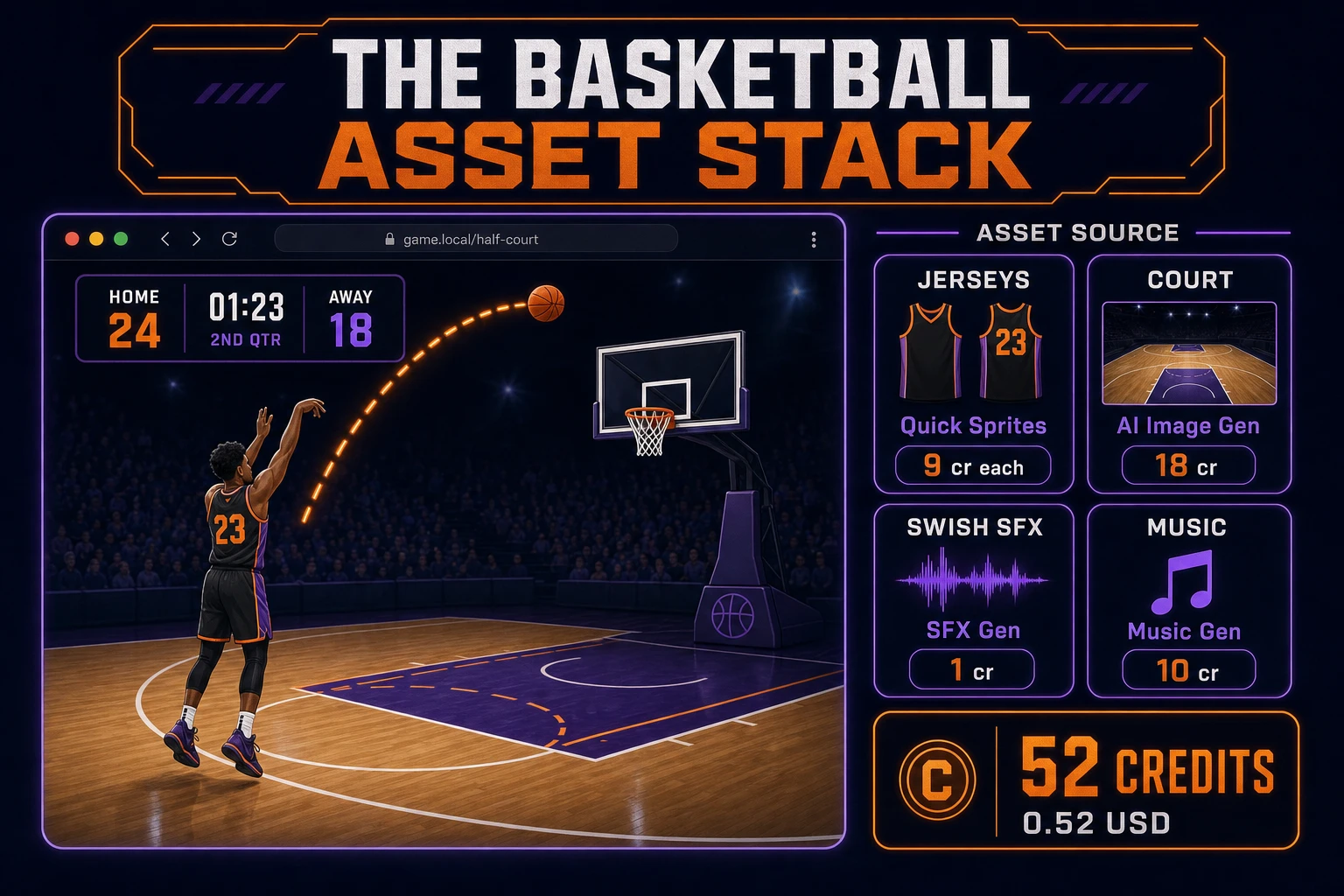
Basketball asset stack diagram showing Quick Sprites jerseys, AI Image Gen court texture, SFX Gen swish audio, and Music Gen arena bed with 52 credit total
The basketball asset stack: Quick Sprites for jerseys, AI Image Gen for court art, SFX Gen for swish and rim clips, Music Gen for optional crowd bed — roughly 52 credits total.

Step 4 — playtest the browser court loop like a jam judge

Before you share the build, run a five-minute checklist borrowed from game-jam judging:

  1. Shot feels responsive — Space release always applies velocity along the aim vector; no dead frames after movement stops.
  2. Gravity reads honest — short shots fall short of the rim; long shots arc over the backboard without manual tuning each frame.
  3. Swishes register once — ball hovering on the rim plane does not double-count; reset positions player and ball cleanly at the key.
  4. CPU is beatable — human can score at least three baskets in 60 seconds against default slide defense.
  5. Shot clock is visible — countdown never stalls during swish pause; Game Over appears exactly at zero.

Log issues as WizardGenie follow-ups, not rewrites. “CPU stays between ball and hoop when ball is in paint” is one prompt. “Add dotted arc preview while charging power” is another. The Sorceress tools guide lists every asset tool if you want to swap Music Gen for Sound Studio on a longer loop.

What how to make a basketball game costs on Sorceress in 2026

A honest budget for the stack above against the 2026 Sorceress rate card (verified 2026-08-27 against local source):

  • Two Quick Sprites jersey passes: 18 credits (0.18 USD)
  • One AI Image Gen court texture at Nano Banana Pro: 18 credits (0.18 USD)
  • Four SFX Gen clips (~6 seconds total): ~6 credits (0.06 USD)
  • One Music Gen arena bed: 10 credits (0.10 USD)
  • Coding-model API time for WizardGenie scaffolding: under 0.40 USD with a planner plus budget executor pair

Total art and audio: roughly 52 credits or 0.52 USD. The free 100-credit signup grant (src/app/api/admin/credits/route.ts) covers the full stack outright. If you already built a bowling game or golf game in the same jam week, reuse the SFX Gen buzzer clip and Music Gen loop — sports audio generalizes well.

Frequently Asked Questions

Which basketball rules should a beginner implement first?

Start with one half-court viewed from above or the side, one human-controlled player, aim with the mouse or arrow keys, shoot on Space with a visible power meter, and score when the ball center passes through the hoop rim band. Run a 60-second shot clock and declare a winner by total baskets. Skip three-pointers, fouls, and full five-on-five AI until one honest match resolves. That is what most how to make a basketball game and basketball game tutorial searchers expect from a weekend build.

How does shot arc physics work in javascript basketball code?

Each frame apply gravity to ball vertical velocity (add roughly 0.35 pixels per frame squared at 60 FPS). On shoot, set ball velocity from aim angle times power (8 to 14 pixels per frame). Reflect horizontal velocity off backboard and rim with a damp factor of 0.7. Detect a made basket when ball y crosses the rim center line while moving downward and x is within rim radius plus ball radius. Unit-test three cases: a short shot falls short, a perfect swish increments score once, and a rim bounce does not double-count.

Canvas or Phaser for a browser basketball game?

Canvas with arc draws and manual circle-rectangle collision is the honest default for a first html5 basketball build — under 450 lines including player movement, shot arc, and hoop detection. Phaser 4.1.0 (verified 2026-08-27 on the official Phaser API documentation page) adds Arcade Physics gravity bodies, tweened net animations, and pointer aim if you plan five or more court layouts. Pick Phaser when animated player spritesheets and camera follow on fast breaks are the product; pick raw canvas when the product is a half court basketball browser walkthrough people can fork in one file.

How should shot clocks, CPU defenders, and scoring behave?

Run a 60-second arcade timer displayed top-center. On basket, pause play for 1.2 seconds, increment the scorer tally, reset ball to the player at the key, and resume the clock. A simple CPU defender that slides toward the ball carrier at 65 percent of player speed is enough for solo play — no zone defense required. On timer expiry, show Game Over with final score and Play Again. Persist high score in localStorage. Most free throw game searchers forgive binary win/loss if the hoop and backboard read clearly.

How much does it cost to build a basketball game on Sorceress?

A first-project browser court loop with art and audio budgets like this against the 2026 Sorceress rate card (verified 2026-08-27 against local source). Two player jersey sprites from Quick Sprites at 9 credits each = 18 credits. One court texture from AI Image Gen at Nano Banana Pro 18 credits = 18 credits. Four SFX clips at 1 credit per second (src/app/sfx-gen/page.tsx) — dribble bounce, swish, rim clang, buzzer end — roughly 6 credits. One Music Gen arena bed at 10 credits (MUSIC_CREDIT_COST in src/app/music-gen/page.tsx). Total roughly 52 credits or 0.52 USD plus under 0.40 USD in coding-model API time. The free 100-credit signup grant (src/app/api/admin/credits/route.ts) covers the full stack outright.

Sources

  1. Basketball - Wikipedia
  2. MDN - Canvas API
  3. MDN - 2D collision detection
  4. Phaser 4.1.0 API Documentation
Written by Arron R.·2,682 words·12 min read

Related posts


