Fuse a Multi Image to 3D Model (Browser-Native 2026)

By Arron R.13 min read
Multi image to 3D model in 2026 — drop four reference views (front, left, back, right) into Sorceress 3D Studio, pick Meshy 6 (55 credits), Tripo v3.1 (50 credi

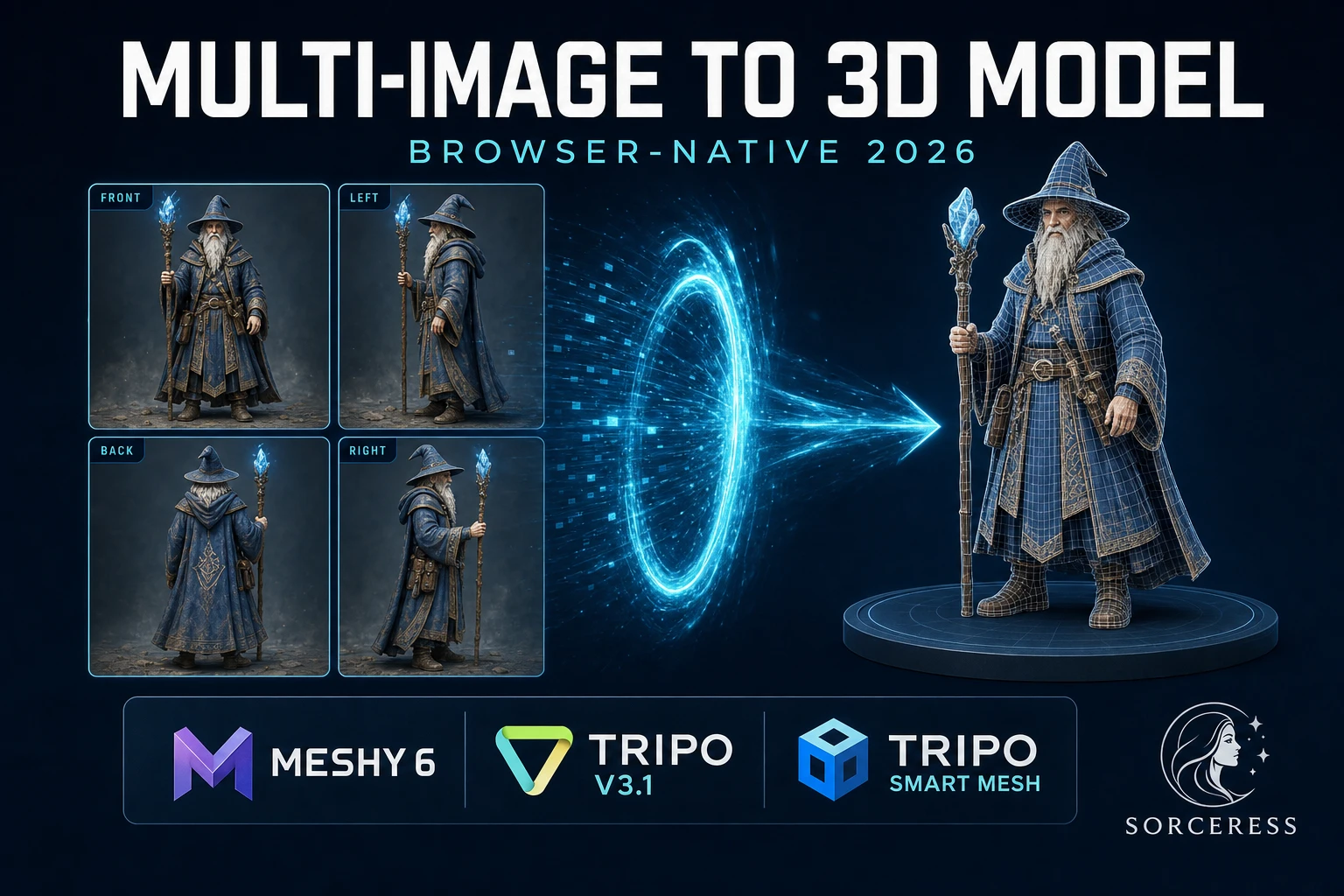
A multi image to 3d model pipeline in 2026 takes four reference views of the same character or prop — a front view, plus optional left, back, and right views — and fuses them into one game-ready GLB inside a single browser tab. The four-view path is the honest answer to the single-image occlusion problem: when only one camera saw the character, the rear of the mesh is whatever the diffusion model decided was most plausible. With four views feeding the network, the rear is the actual rear. This guide walks the full multi image to 3d model pipeline inside Sorceress 3D Studio — from prepping the four reference frames in AI Image Gen, through the three multi-view-capable models (Meshy 6, Tripo v3.1, Tripo Smart Mesh), to the auto-rig handoff and the engine export. Every credit cost and capability verified against src/lib/threed-models.ts and src/components/studio/generate/GenerateTab.tsx on June 25, 2026.
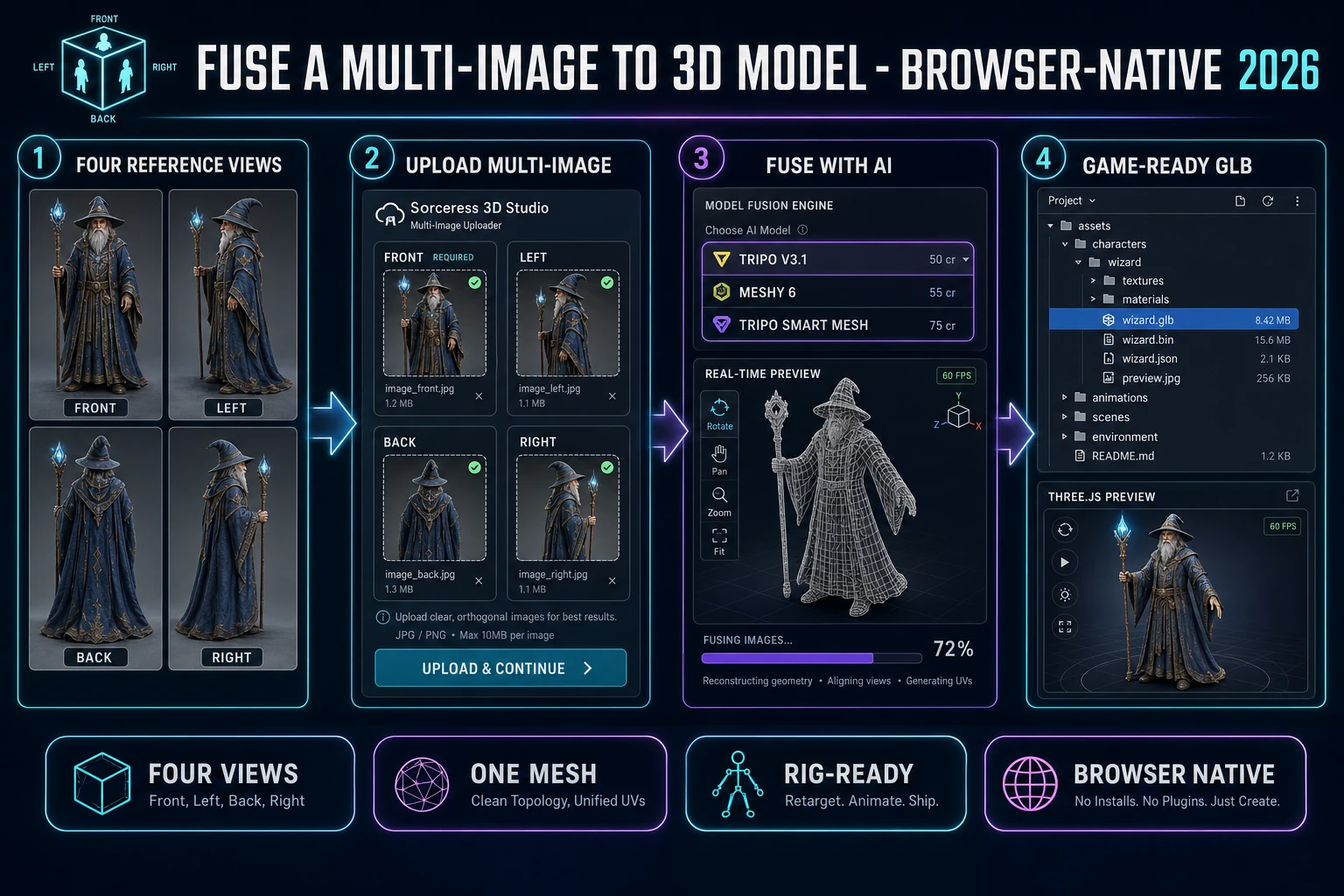
Multi image to 3D model pipeline diagram showing four reference views (front, left, back, right) being uploaded into Sorceress 3D Studio multi-image mode, three model picker entries Tripo v3.1 at 50 credits Meshy 6 at 55 credits and Tripo Smart Mesh at 75 credits, and a textured rotating GLB mesh exported as the final game-ready output
The 2026 multi image to 3d model pipeline runs four steps in one Sorceress 3D Studio tab — four reference views, multi-image upload, AI fusion, GLB export — with verified credit costs from src/lib/threed-models.ts on June 25, 2026.

What multi image to 3d model actually means in 2026

The category covers any tool that takes multiple 2D reference images of the same subject — typically a front view plus one to three additional angles — and outputs a single polygon mesh with a UV unwrap and a baked texture atlas. The technical primitive is a multi-view diffusion-based mesh generator: a neural network trained on millions of paired multi-view-image-to-mesh examples that learns to fuse the silhouettes from every angle into one consistent 3D structure.

The dominant 2026 architecture extends single-image diffusion mesh generators with a cross-view attention layer that lets the network reason about the same surface point seen from multiple cameras simultaneously. Stage one learns the sparse 3D structure with full multi-view supervision — the silhouette from every camera, the volume that satisfies all four constraints, the gross spatial relationships. Stage two refines a structured latent into surface detail and texture, sampling the source images at every UV coordinate to produce textures that match the inputs faithfully. The diffusion model primitive is identical to the single-view path; the multi-view extension is in the conditioning signal.

For an indie or solo developer, a multi image to 3d model in 2026 is the difference between a mesh that looks right from one angle and a mesh that looks right from every angle. The honest baseline: Sorceress 3D Studio ships nine total 3D models, three of which (Meshy 6, Tripo v3.1, Tripo Smart Mesh) accept the multi-image-to-3d input mode per the inputModes array on each model in src/lib/threed-models.ts. The four-slot uploader (front required, plus left, back, right optional) lives in src/components/studio/generate/GenerateTab.tsx and feeds the views straight to the chosen provider with no additional preprocessing step. Verified June 25, 2026.

Why four photos beat one — the multi-view advantage

A single-image-to-3D pipeline has to invent everything the camera did not see. The front of the character is grounded in real pixels; the back is whatever the diffusion model decided was most plausible. For a generic prop seen from any angle that does not require fidelity to a specific design, the invented rear is acceptable. For a hero character whose back is going to be on-camera in a third-person game, the invented rear is a problem. Game devs commonly run the same character through three or four single-image generations and pick the run where the rear hallucination matches the design — not because that is good practice, but because it is the only way to brute-force the occlusion problem with a single-view model.

Multi-view fuses the inputs at the diffusion-model level instead of brute-forcing at the output level. The network sees the silhouette from front, left, back, and right simultaneously and solves for the 3D volume that satisfies all four constraints at once. There is no rear hallucination because the rear is a real input. The texture is sampled from the actual rear pixels, not invented. The silhouette is consistent because the silhouette constraints are mathematically consistent.

The cost is in the inputs. A single-view bake takes one reference image; a multi-view bake takes two to four. For an AI-generated character, the cost is one extra trip through AI Image Gen per additional view, with the front view as the reference-image lock so the model preserves the same character identity from every angle. For a real-world capture, the cost is four phone snapshots from the cardinal angles. Either way, the marginal input cost buys a much better mesh — enough that for any character that will be auto-rigged and animated, the multi-view path is worth it. The photogrammetry tradition has known this since the 1990s; AI mesh generation in 2026 has finally caught up to the same insight.

How to fuse a multi image to 3d model with the honest 2026 browser stack

The full multi image to 3d model pipeline runs four steps in two browser tabs. Tab one is AI Image Gen for prepping the four reference views; tab two is 3D Studio for the multi-image upload, the model pick, and the export. No third-party software, no Photoshop, no Blender, no Maya seat, no FBX exporter plugin. Verified against the live UI on June 25, 2026.

  1. Step 1 — prep the four reference views. Open AI Image Gen at /generate. Generate the front view first as the lock. Then generate left, back, and right views using the front view as a reference image so the same character identity carries across all four frames.
  2. Step 2 — upload the views into 3D Studio multi-image mode. Open 3D Studio at /3d-studio. Switch to the multi-image-to-3d input mode. Drop the four PNG, JPG, or WebP files into the four labeled slots: front (required), left (optional), back (optional), right (optional).
  3. Step 3 — pick the multi-view model and run the bake. Choose Tripo v3.1 (50 credits with HD texture, the cheapest), Meshy 6 (55 credits with texture, the cleanest for humanoid characters), or Tripo Smart Mesh (75 credits, the cleanest low-poly). Submit the job; the browser tab does not block during generation.
  4. Step 4 — retopo, PBR-texture, and auto-rig the result. The completed bake lands in the gallery as a GLB. Optionally route into Material Forge for additional PBR maps, then into Auto-Rigging for a humanoid skeleton in the same browser tab.

The pipeline runs entirely in the browser. The four-step framing maps the entire multi image to 3d model workflow into one half-hour session for a hero character or one ten-minute session for a supporting prop — versus the days a hand-modeled, hand-rigged equivalent would take in a desktop 3D suite.
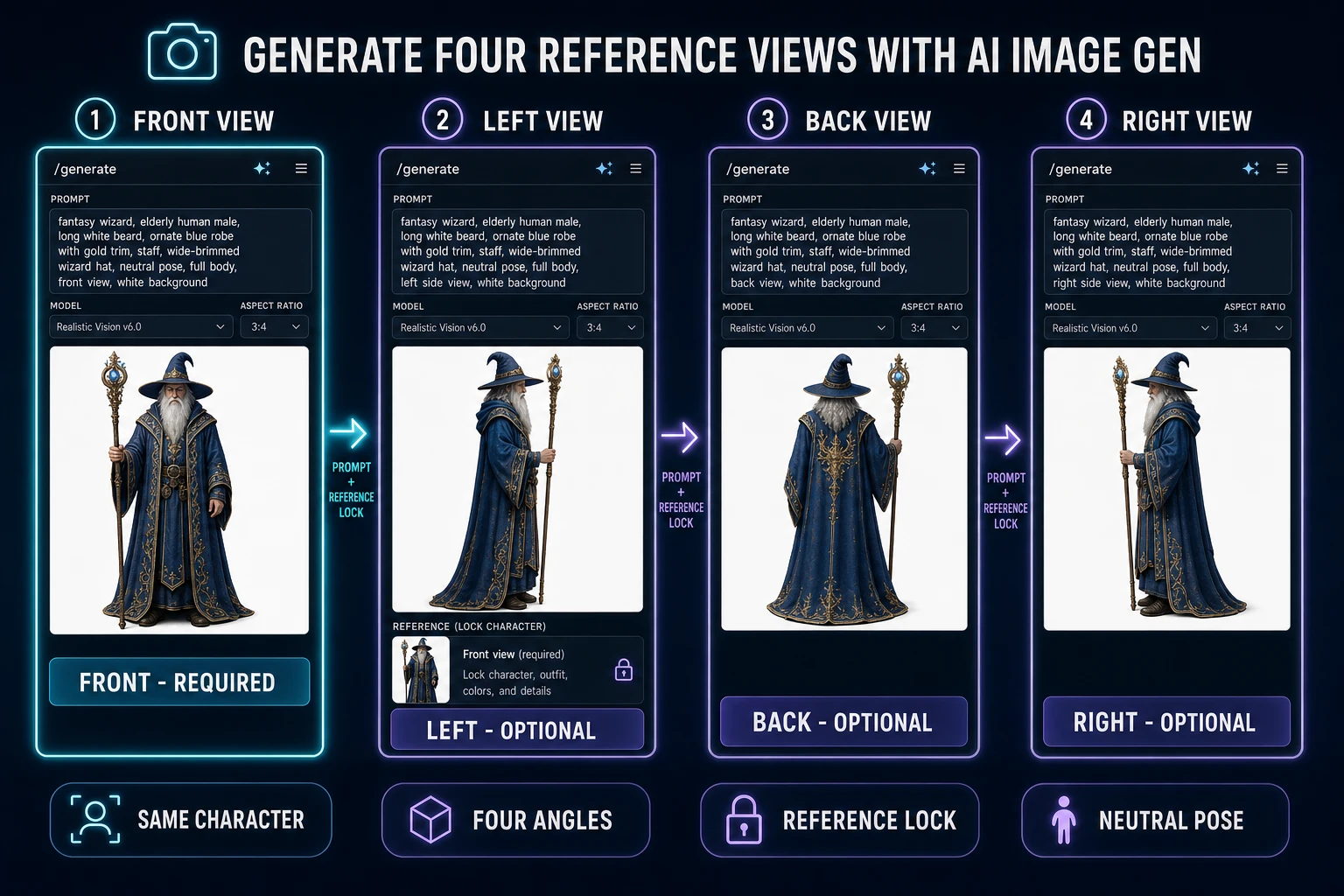
Four reference views generated in AI Image Gen for multi image to 3D model fusion - front view as the required input, plus optional left profile back view and right profile of the same fantasy wizard character with consistent identity across all four angles
Generate the four reference views in AI Image Gen with the front view as the reference lock so the same character identity carries across all four angles.

Step 1 — prep the four reference views (front, left, back, right) in AI Image Gen

The cleanest 2026 multi-view source pipeline starts with the front view. Open AI Image Gen at /generate and prompt for a front-facing, neutral-pose, clean-background reference image. Phrase the prompt with the character description, the pose constraint ("front-facing, arms slightly out from body, neutral expression"), and the background constraint ("clean white background, studio lighting, no shadows, no props"). Pick a model from the lineup that excels at character consistency — Nano Banana Pro and Nano Banana 2 lead the multi-frame consistency benchmarks; GPT Image 2, Seedream 5 Lite, Flux 2 Pro, Z-Image Turbo, and Grok Imagine round out the picker.

Lock the front view by using it as a reference image for the next three generations. The reference-image input is the same control that lets the model preserve a character across multiple poses; for multi-view, it preserves the character across multiple angles. Prompt for the left profile next: "left side profile of the same character, 90-degree side view, same pose, same outfit, same neutral background". Then the back: "rear view of the same character, facing away from camera, same pose, same outfit". Then the right profile: "right side profile, 90-degree side view from the right". Each generation drops into the gallery alongside the front view so all four are available for download.

The front view is the only mandatory upload at the next step — the 3D Studio multi-image uploader marks front as required and the other three slots as optional. A reasonable production pattern is to commit two views (front plus back) for fast asset turnover, three views (front plus left plus back) for anything that will be seen rotating in-game, and all four views for hero characters that will be on-camera in cinematics. The diffusion model accepts whatever subset is provided and fills missing angles from learned priors.
Step 2 — upload the views into 3D Studio multi-image mode

Open 3D Studio. Switch the input mode picker from the default image-to-3d to multi-image-to-3d. The uploader rewrites the single drag-and-drop zone into a four-slot grid: front (required), left (optional), back (optional), right (optional). The slot labels match the MULTIVIEW_SLOTS array in src/components/studio/generate/GenerateTab.tsx verified June 25, 2026.

Drag each reference image into its corresponding slot. The four-view tooltip on each slot prevents the most common mistake — dropping the rear view into the front slot, which produces a mesh facing backwards. The uploader supports PNG, JPG, and WebP at any resolution; the 3D Studio backend resizes to the model-specific maximum at submission time. Files upload through the same compressed-multi-view endpoint at x-key-prefix: threed/multiview-sources; the upload runs in parallel across the four slots.

The image-to-3d single-view mode and the text-to-3d mode remain available on the same picker for any model that supports them. Switching modes does not lose the uploaded files; the uploader caches the four-slot state and the single-image state separately so the developer can flip between modes during iteration. Once all four slots are populated (or the front slot plus any subset), the model picker activates the multi-view-capable models and disables the single-view-only ones.

Step 3 — pick the multi-view model (Tripo, Meshy, or Tripo Smart Mesh) and run the bake

The 3D Studio multi-view model picker exposes three choices, each with distinct strengths. Verified against src/lib/threed-models.ts on June 25, 2026.

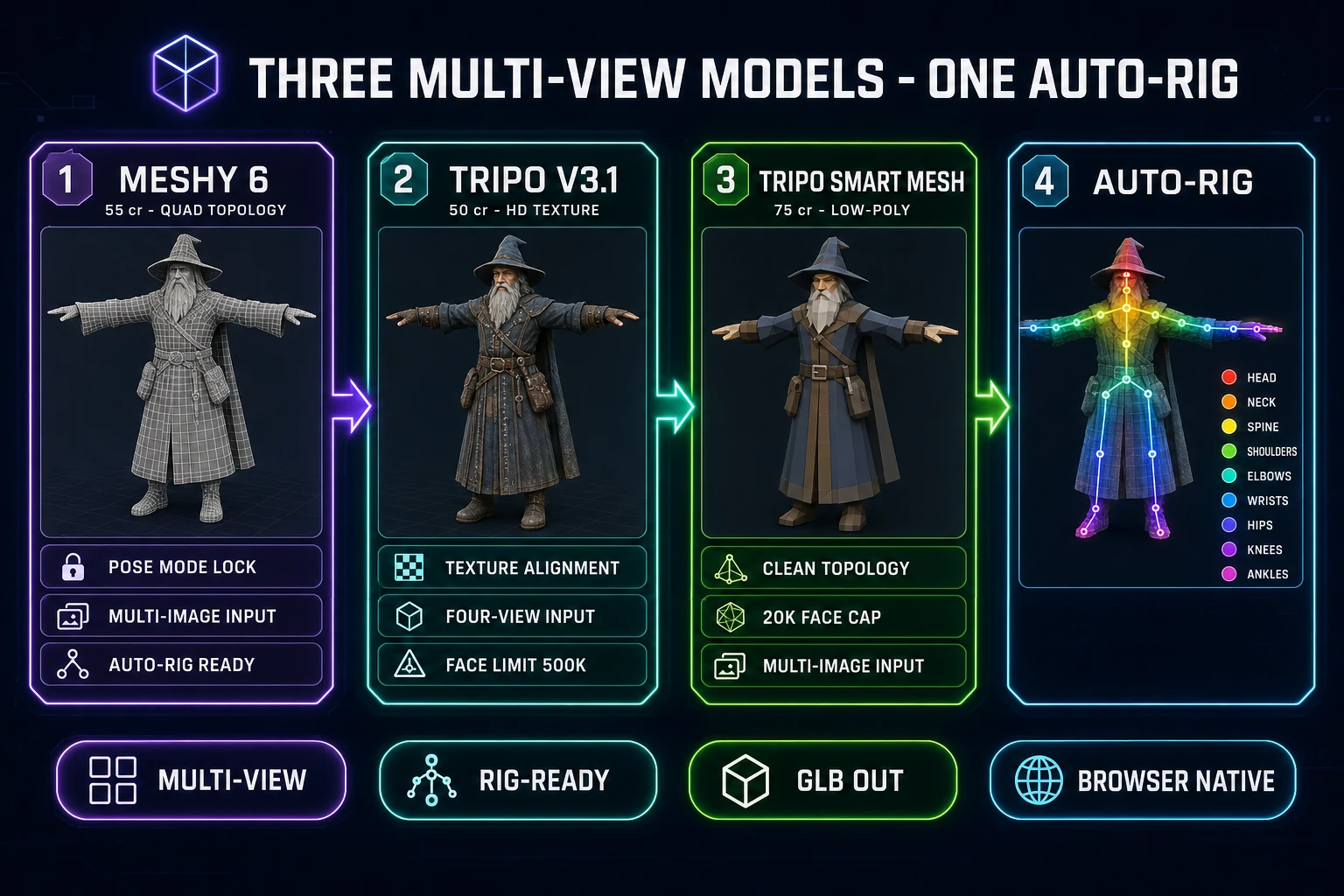
  • Tripo v3.1. 30 credits without texture, 40 with standard texture, 50 with HD texture (default), +5 if Quad Mesh is enabled, +30 for the detailed geometry quality option. Image, text, and multi-image input modes. Texture alignment knob that prioritises matching the source images or matching the geometry. Pick Tripo v3.1 when texture fidelity to the source images is the primary win condition and the budget is tight.
  • Meshy 6. 40 credits base for multi-image, +15 for texture (default on, so 55 typical), +15 for remesh (so 70 with all options). Quad topology option for clean edge flow on humanoid characters. Pose Mode locks output to A-Pose or T-Pose for the cleanest auto-rig handoff. Pick Meshy 6 when the target is a humanoid character that will be rigged, animated, or further sculpted in a downstream polygon mesh editor.
  • Tripo Smart Mesh. 55 credits without texture, 65 with standard texture, 75 with HD texture (default). PBR enabled by default. Face limit caps at 20,000 (range 48 to 20,000 per the face_limit parameter in source). Built specifically for clean low-poly realtime topology rather than maximum visual fidelity. Pick Tripo Smart Mesh for hero props, weapons, vehicles, and any asset where the polycount budget is tight and the mesh edges need to land cleanly.

The model-specific knobs are visible inline in the picker before submission. For Meshy 6, set topology to triangle (default, faster) or quad (cleaner edges, +0 cr), set Pose Mode to a-pose or t-pose if the character will be rigged, leave PBR off unless the target engine needs it. For Tripo v3.1, pick texture quality (no, standard, HD), enable PBR if the engine reads PBR, leave Quad Mesh off unless the rig pipeline expects FBX with quads. For Tripo Smart Mesh, the PBR-on default and 20,000-face cap mean the only knob worth touching is texture quality.

Submit the job. Generation time runs roughly 60 seconds to 4 minutes depending on the model and the texture settings; the job runner does not block the browser tab during generation. A reasonable iteration pattern is to queue the same four-view input across two or three models simultaneously — Meshy 6 for the rigging pass, Tripo v3.1 for the texture-fidelity pass, Tripo Smart Mesh for the low-poly pass — and pick the best output once all three finish. The Sorceress credit ledger debits at submission, not at generation time, so the operator commits the budget upfront.

Three multi-view models in Sorceress 3D Studio for fusing a multi image to 3D model - Meshy 6 at 55 credits with quad topology and Pose Mode lock for humanoid auto-rig, Tripo v3.1 at 50 credits with HD texture alignment, Tripo Smart Mesh at 75 credits with low-poly clean topology, and a one-click auto-rig step with humanoid skeleton overlay
The three multi-view-capable models in Sorceress 3D Studio plus the one-click auto-rig step — each model serves a distinct asset type. Verified against src/lib/threed-models.ts on June 25, 2026.

Step 4 — retopo, PBR-texture in Material Forge, and auto-rig the result

The completed multi-view bake lands in the 3D Studio gallery as a GLB. For most game-ready use cases, the GLB out of Meshy 6 or Tripo v3.1 is shippable as-is — the texture map, the UV unwrap, and the polygon topology all sit at game-engine quality. For hero characters that need additional surface detail, the Material Forge tool bakes additional PBR maps (base color, metallic, normal, roughness, height) onto the existing mesh — useful when the source images had simpler texture work than the target engine can render.

For humanoid characters, the next step is Auto-Rigging at /rigging. The auto-rig pipeline detects humanoid character topology, places a standard biped skeleton (head, neck, spine, two arms with shoulder, elbow, wrist, hand; two legs with hip, knee, ankle, foot), computes vertex weights, and writes the rigged GLB ready for any modern engine that consumes skeletal-animation GLB natively. Meshy 6 with Pose Mode locked to A-Pose or T-Pose is the cleanest source for the rig step — the auto-rig solver expects the conventional rigging stance, which Meshy 6 enforces upstream.

The retopo pass is rarely needed in 2026. Both Meshy 6 (with the optional Remesh flag enabled) and Tripo v3.1 (with the Quad Mesh flag enabled) produce clean topology directly out of the multi-view bake. Tripo Smart Mesh produces clean low-poly topology by design; its 20,000-face cap is the cleanest game-ready realtime mesh in the picker. The full multi image to 3d model pipeline — four reference views, multi-image upload, model pick, optional retopo, optional Material Forge bake, optional auto-rig — runs end-to-end in two browser tabs without any desktop 3D suite.

Game-engine handoff — GLB to Three.js, Phaser, Godot, or Unity

Every modern game engine in 2026 reads GLB natively. The binary glTF format is the universal handoff for AI-generated meshes — the format that browser-side and engine-side runtimes converge on, with consistent skeletal-animation, PBR-material, and morph-target support across the ecosystem. Three.js reads GLB through its GLTFLoader module; WebGL renders the result inside any modern browser tab. Phaser 3 reads GLB through its 3D plugin (the engine remains 2D-first but supports GLB as an asset). Modern Godot 4 reads GLB through the Import dock with no conversion. Modern Unity (2021.2+) reads GLB through the Universal Render Pipeline’s glTF importer or through the open-source UnityGLTF package. Modern Unreal (5.1+) reads GLB through the built-in glTF importer.

The handoff pattern for a Three.js project: download the GLB from the 3D Studio gallery, drop it into the project’s public/models/ directory, instantiate the GLTFLoader, and call loader.load("models/wizard.glb", (gltf) => scene.add(gltf.scene)). The full mesh, the textures, the rig, and the keyframed animations (if Auto-Rigging produced them) all hydrate from a single file. No extra texture upload, no separate animation file, no rig-import-config dialog box.

For projects that target FBX-only legacy pipelines, the Tripo v3.1 model exposes a Quad Mesh option that forces FBX output. For projects that target Apple Reality Composer or Quick Look on iOS, the Rodin 2.0 single-image-to-3d model exposes USDZ output (the multi-view models default to GLB). For 3D-printing pipelines, Rodin 2.0 also exposes STL. The multi-view path stays GLB-first because GLB is what game engines actually consume; the alternate formats are downstream conversions handled by the single-view models when needed. The companion read for the full single-image picker is the seven-model AI image to 3D model walkthrough.

The verdict on multi image to 3d model in 2026

The honest 2026 stack for any indie team shipping 3D content commercially with a multi-view path: open Sorceress 3D Studio, prep the four reference views in AI Image Gen with the front view as a reference lock, switch the input mode to multi-image-to-3d, drop the four views into the slot grid, pick Meshy 6 for humanoid characters that will be rigged (55 credits with texture), pick Tripo v3.1 for stylized props with tight texture fidelity (50 credits HD), pick Tripo Smart Mesh for low-poly hero props with a clean polycount budget (75 credits HD), route the rigged humanoids through Auto-Rigging, layer additional PBR detail through Material Forge where the bake matters, and ship to GLB for any modern engine target.

A multi image to 3d model pipeline is the honest 2026 answer to the single-image occlusion problem. The single-view path is good enough for many props and for any character that will only be seen from one camera; the multi-view path is the right call any time the same character will be on-camera from every angle, which is the default in any third-person game, any rotation-required UI piece, and any cinematic. The 100-credit signup grant covers one Meshy 6 multi-view bake plus a couple of TRELLIS v1 silhouette tests — enough to ship one hero character from start to engine before any credit purchase. The $49 Lifetime tier at /plans removes the per-month subscription floor; credit top-ups run $10 for 1,000 credits up to $100 for 10,000.

The companion reads for adjacent layers are the seven-model single-image walkthrough, the free 3D model generator picks, and the AI-in-game-development reality check. The catalog roundup and pricing breakdown live at /tools-guide and /plans. Verified against src/lib/threed-models.ts, src/components/studio/generate/GenerateTab.tsx, src/app/_home-v2/_data/tools.ts, and src/app/plans/page.tsx on June 25, 2026.

Frequently Asked Questions

What does multi image to 3D model actually do in 2026?

A multi image to 3D model pipeline in 2026 takes a small set of reference images of the same subject — usually a front view plus one or more of left, back, and right views — and fuses them into a single textured polygon mesh through a diffusion-based mesh generator that learns the subject’s silhouette and surface from every angle simultaneously. The Sorceress 3D Studio source at src/lib/threed-models.ts (verified June 25, 2026) supports the multi-image-to-3d input mode on three of its nine models — Meshy 6, Tripo v3.1, and Tripo Smart Mesh — and feeds the views into a four-slot uploader (front required, plus left, back, right optional) defined in src/components/studio/generate/GenerateTab.tsx. The fused mesh exports as GLB by default and rides directly into the Sorceress auto-rigging tab without any export-and-reimport step.

Why fuse multiple images instead of just using one image to 3D model?

A single image to 3D model has to invent the back side and any occluded geometry from learned priors, because it never sees them. The mesh that drops out is plausible but not faithful — the rear of the character is whatever the model decided was most likely given the front, not the rear of the actual character. Fusing multiple images solves the occlusion problem directly. With front, left, back, and right views feeding the network, the diffusion model has direct evidence of the silhouette at every angle and the surface detail on every face. The result is a mesh that matches the character on every side, not just the side the camera saw. For game-dev work where the same character is going to be auto-rigged, animated, and rotated in front of the camera all the time, the multi-view path produces visibly cleaner output than the single-image path.

Which multi image to 3D model in 3D Studio is best for game-ready characters in 2026?

The honest 2026 read on the best multi image to 3D model in Sorceress 3D Studio depends on the asset type, and the picker logic comes down to three choices. Meshy 6 (55 credits with texture, 70 with texture and remesh) is the cleanest path for humanoid characters that will be auto-rigged — it ships quad topology and a Pose Mode lock that forces A-Pose or T-Pose output. Tripo v3.1 (50 credits with HD texture) is the cheapest multi-view model and produces the best texture alignment to the source images on stylized props. Tripo Smart Mesh (75 credits with HD texture) is the highest-quality option for clean low-poly geometry — it caps at 20,000 faces per the face_limit parameter and is built specifically for game-ready realtime topology rather than maximum visual fidelity. Verified against src/lib/threed-models.ts on June 25, 2026.

How many reference views does multi image to 3D model in 3D Studio actually need?

The Sorceress 3D Studio multi-view uploader at src/components/studio/generate/GenerateTab.tsx exposes four slots — front (required), left (optional), back (optional), right (optional). The front view is the only mandatory upload; the other three are optional but each one improves the fused mesh. A reasonable production pattern in 2026 is to commit two views (front plus back) for fast asset turnover, three views (front plus left plus back) for anything that will be seen rotating in-game, and all four views for hero characters that will be on-camera in cinematics. The diffusion model accepts the slot configuration as-is and fills in the missing angles from learned priors — it does not error when only a subset is provided.

Can I generate the four reference views with AI before running multi image to 3D model?

Yes — the cleanest 2026 multi-view pipeline starts inside Sorceress AI Image Gen at /generate, which exposes a multi-model image lineup (Nano Banana Pro, Nano Banana 2, GPT Image 2, Seedream 5 Lite, Flux 2 Pro, Z-Image Turbo, Grok Imagine) tuned for the kind of front-facing, neutral-pose, clean-background reference image that fuses cleanly. The pattern is to generate the front view first as a lock, then prompt the same character at left, back, and right angles using the front view as a reference image so the model preserves the same character identity across all four views. The four images then drop directly into the 3D Studio multi-image uploader without any external editing step. The full image-to-mesh pipeline runs end-to-end in two browser tabs without Photoshop, Krita, or any other intermediate editor.

How long does multi image to 3D model take in your browser in 2026?

Wall-clock generation time on multi image to 3D model in Sorceress 3D Studio runs roughly 60 seconds to 4 minutes depending on the model and the texture settings. Meshy 6 multi-image with texture and remesh enabled lands around 90 to 180 seconds. Tripo v3.1 multi-image with HD texture lands around 60 to 120 seconds. Tripo Smart Mesh multi-image with HD texture lands around 90 to 150 seconds for its 20,000-face cap. The browser tab does not block during generation — the developer can queue multiple multi-view bakes across all three models from the same upload and pick the best output once they all finish. The job runner mirrors the rest of 3D Studio: queue, walk away, return to a gallery of completed meshes.

Can I auto-rig the multi image to 3D model output for animation in 2026?

Yes — the multi image to 3D model output at /3d-studio routes directly into Sorceress Auto-Rigging at /rigging in the same browser tab without an export-and-reimport step. The auto-rig pipeline detects humanoid character topology, places a standard biped skeleton (head, neck, spine, two arms with shoulder, elbow, wrist, hand; two legs with hip, knee, ankle, foot), computes vertex weights, and writes a fully rigged GLB ready for animation. Meshy 6 is the strongest source for the rigging step because the Pose Mode parameter forces A-Pose or T-Pose output, which is the conventional rigging stance the auto-rig solver expects. Tripo v3.1 multi-image works for rigging when the source images themselves show a clean front-facing pose. Tripo Smart Mesh produces the cleanest low-poly geometry but its face cap means it is better suited to props than to characters that need detailed deformation.

What does multi image to 3D model cost in 3D Studio with the Sorceress credit system?

Costs verified against src/lib/threed-models.ts and src/app/plans/page.tsx on June 25, 2026. Meshy 6 multi-image runs 40 credits base, +15 for texture (default on, so 55 typical), +15 for remesh (so 70 with all options). Tripo v3.1 multi-image runs 30 credits without texture, 40 with standard texture, 50 with HD texture (default), +5 if Quad Mesh is enabled, +30 for the detailed geometry quality option. Tripo Smart Mesh multi-image runs 55 credits without texture, 65 with standard texture, 75 with HD texture (default). The 100-credit signup grant covers one Meshy 6 multi-view bake (55 credits) plus three TRELLIS v1 silhouette tests at 8 credits each, or two Tripo v3.1 multi-view bakes at 50 credits each. The $49 Lifetime tier at /plans removes the per-month subscription floor; credit top-ups run $10 for 1,000 credits (Starter), $20 for 2,000 (Creator), $50 for 5,000 (Plus), and $100 for 10,000 (Studio).

Written by Arron R.·3,013 words·13 min read

Related posts