Blast How to Make Asteroids (Browser Vector Loop 2026)

By Arron R.13 min read
How to make Asteroids in 2026: draw the ship as a vector triangle on HTML5 Canvas, wire rotate-thrust-drag physics with screen-wrap edges, spawn rocks that brea

The 1979 Atari original sold over 70,000 arcade cabinets and topped the US RePlay charts through March 1981, dethroning Space Invaders (verified against en.wikipedia.org/wiki/Asteroids_(video_game) on 2026-08-10). Almost every browser-game weekender who wants to relearn the classics starts with how to make Asteroids, hits a wall on rotation math or screen-wrap edges, and quietly abandons the project. The 2026 pipeline is very different: HTML5 Canvas renders the vector look for free with white 1-pixel strokes on a black background, a coding agent scaffolds the six moving parts in one prompt, and the whole game ships in a weekend. In a browser, that means WizardGenie to scaffold the Canvas project with the rotate-thrust-drag ship, screen-wrap, and rock-break cascade already wired, Sorceress AI Image Gen for a cover-art card or a stylised nebula backdrop, SFX Gen for thrust rumble and laser blip, and Music Gen for the classic arcade heartbeat that quickens as the wave gets tighter. This guide is the honest end-to-end for how to make Asteroids in 2026.
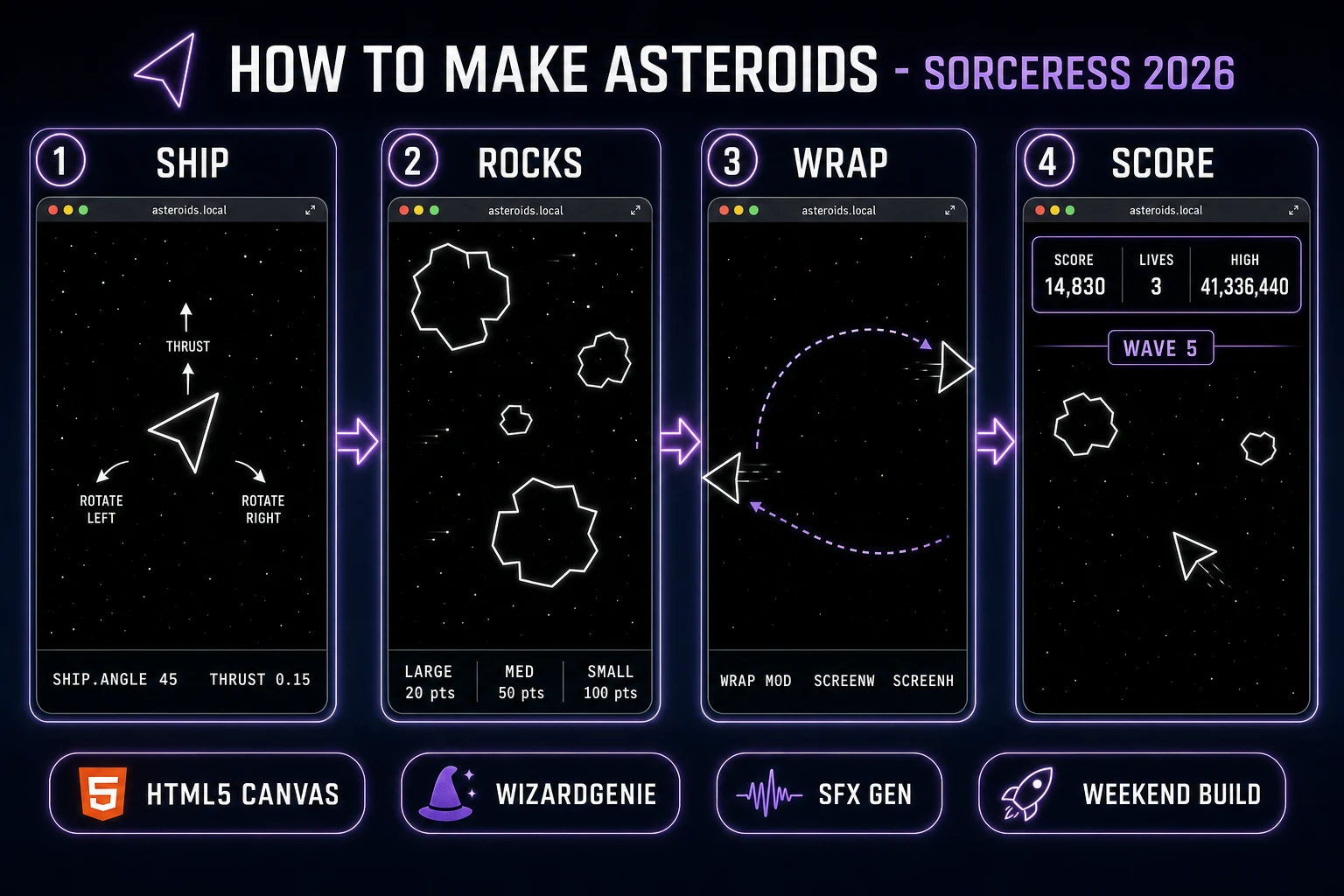
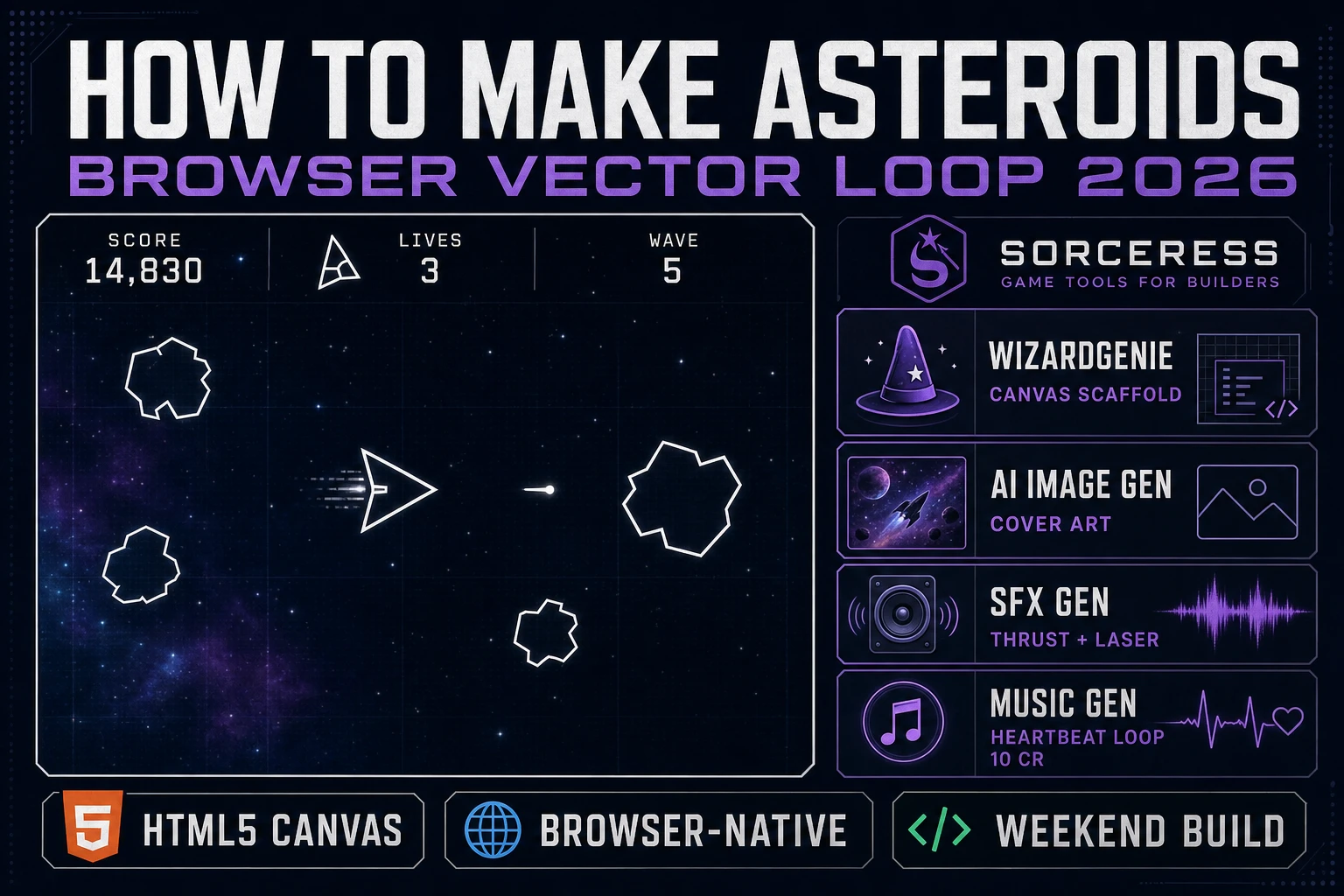
How to make Asteroids browser pipeline: vector triangle ship, jagged asteroid polygons, screen-wrap edges, and score HUD with WizardGenie and Sorceress toolset
The 2026 how to make Asteroids browser recipe: draw the ship as a vector triangle on HTML5 Canvas, wire rotate-thrust-drag physics with screen-wrap edges, spawn rocks that split into smaller rocks on hit, and layer the audio from SFX Gen and Music Gen.

What "how to make Asteroids" actually means in 2026

The query "how to make Asteroids" hides two very different requests. Some searchers want an honest tribute to the 1979 Atari arcade original - white vector polygons on a pure black background, a triangle ship, jagged rocks, and the signature Newtonian inertia where the ship keeps drifting after you release the thrust. Some searchers want a modernised interpretation - rendered 3D rocks, a nebula backdrop, particle explosions, screen shake, and a chase camera. This guide targets the first, because the classic vector look is the reason the query is still trending forty-six years after Ed Logg and Lyle Rains locked the design in an Atari meeting in April 1979 (per the Retro Gamer interview archived on en.wikipedia.org/wiki/Asteroids_(video_game), verified 2026-08-10). The classic look is also the fastest to ship: vector line rendering on Canvas 2D is essentially free, no textures, no shaders, no asset pipeline.

A quick trademark note before the technical section starts. Atari owns the Asteroids trademark, the cabinet art, and the specific bitmap assets used in every ported release. You cannot name your game Asteroids on a store page or use any Atari-owned art. The core mechanic - a rotate-thrust vector ship, screen-wrap physics, and rocks that split when hit - is a game-design pattern, and game-design patterns are not protected by copyright or trademark. Dozens of published clones since 1980 (Quality Software's Asteroids in Space for the Apple II, MineStorm bundled with the Vectrex, Quicksilva's Meteor Storm for the ZX Spectrum, Astrosmash on the Intellivision) built on the same mechanic under different names. Pick a different name for your build (Blast Field, Rock Split, Vector Void), draw your own art, write your own code, and you stand on the same fair-use footing.

The Asteroids game loop in one minute (rotate thrust fire break)

Six moving parts and nothing else, in a strict order per frame. First, read player input - rotate-left, rotate-right, thrust, fire, and hyperspace (the classic panic button that teleports you to a random point at the risk of respawning inside a rock). Second, update the ship - angle += rotate-input times 4 radians per second times delta, velocity += thrust-input times a unit heading vector times 0.15 per frame, then apply drag of 0.99 per frame so the ship coasts to a stop when you release thrust. Third, spawn a bullet on fire input (cap at four in-flight bullets, that is the Atari original constraint) with velocity equal to eight times the ship's heading vector plus the ship's own velocity. Fourth, update every rock - move by its velocity vector, apply the same screen-wrap. Fifth, resolve collisions - bullet-rock overlap breaks the rock and increments score; ship-rock or ship-saucer-bullet overlap kills a life and respawns the ship at center. Sixth, on wave-clear (no rocks left), spawn the next wave with one more large rock than the last.

That is the entire game. Six steps, executed once per frame at 60 frames per second, driven by requestAnimationFrame. Everything else - the two saucer types, the extra-life-every-10000-points progression, the wave-quickening heartbeat soundtrack, the hyperspace teleport, the initials high-score table (a feature the original 1979 game pioneered per its Retro Gamer entry) - is polish layered on top of this core loop. If you keep the loop tight and the six-step order strict, the browser build feels arcade even on a mid-range phone. Fight the temptation to write real-physics gravitational orbits or particle explosions on the first pass. Ship the pure vector loop, then extend.
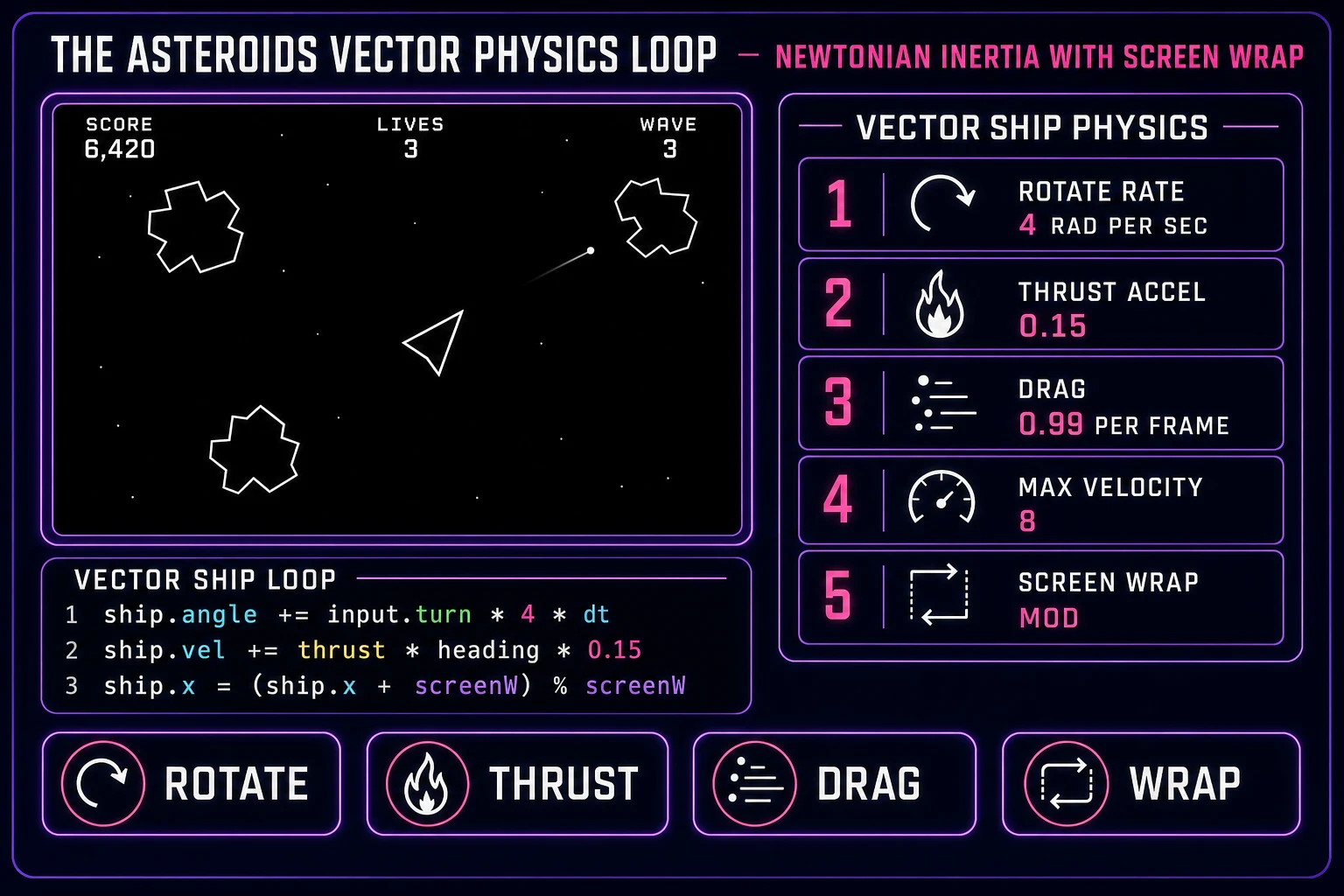
Asteroids-inspired vector shooter physics cheat sheet: rotate rate 4 radians per second, thrust acceleration 0.15, drag 0.99 per frame, max velocity 8, screen wrap via modulo, with ship loop pseudo-code
The five numbers that define the feel of a how to make Asteroids build: rotate rate 4 radians per second, thrust acceleration 0.15, drag 0.99 per frame, max velocity 8, screen wrap via modulo of screen width and height. Newtonian inertia, not Mario Kart drag.

Pick your engine for how to make Asteroids: vanilla Canvas, Phaser 4, or WizardGenie

Three good browser targets in 2026, each with a very different trade-off. Vanilla HTML5 Canvas 2D plus requestAnimationFrame is the honest default and the one this guide recommends for a first build. Asteroids is a five-primitive game (ship polygon, bullet dots, rock polygons, saucer polygon, HUD text) and the CanvasRenderingContext2D API renders all five natively with strokeStyle, moveTo, lineTo, and fillText. A working build is roughly 300 lines of JavaScript and ships under 10 KB minified - eligible for JS13K-style code-golf jams. The vector aesthetic is essentially free: white 1-pixel strokes on #000, no textures, no sprite sheets, no atlas packing.

Phaser 4.2.1 "Giedi" (released 9 July 2026, verified against phaser.io/download/stable on 2026-08-10) is the right choice if you plan to extend the game with power-ups, multiple stages, or fancier particle systems, or if you want the arcade physics body's built-in velocity, angular velocity, drag, and overlap-detect to save you writing those primitives by hand. Phaser bundles Scene management, an asset loader, and audio playback in one file - roughly 900 KB minified, which is fine for a mobile browser build. It is also the pick if you have already used Phaser on a previous game and know the framework; there is no advantage to switching to vanilla Canvas just because Asteroids is small.

WizardGenie is not a separate rendering engine - it scaffolds whichever of the above you pick, from a single natural-language prompt. WizardGenie is the Sorceress game-native coding agent. It ships as both a desktop app (Windows installer with auto-update, available to Early Access supporters and above) and a no-install web build at the same URL. Its coding-model lineup (verified 2026-08-10 in src/app/_home-v2/_data/tools.ts lines 734 to 743) covers Claude Opus 4.7, Claude Sonnet 4.6, GPT-5.5, Gemini 3.1 Pro, DeepSeek V4 Pro, Kimi K2.5, Grok 4.2, and MiniMax M2.7. For an Asteroids-scale project, any of the frontier models scaffolds the whole game in one prompt. If you want to run cheap, pair a frontier planner (Claude Opus 4.7 or GPT-5.5) with a budget executor (DeepSeek V4 Pro or Kimi K2.5) and let the executor do the typing.
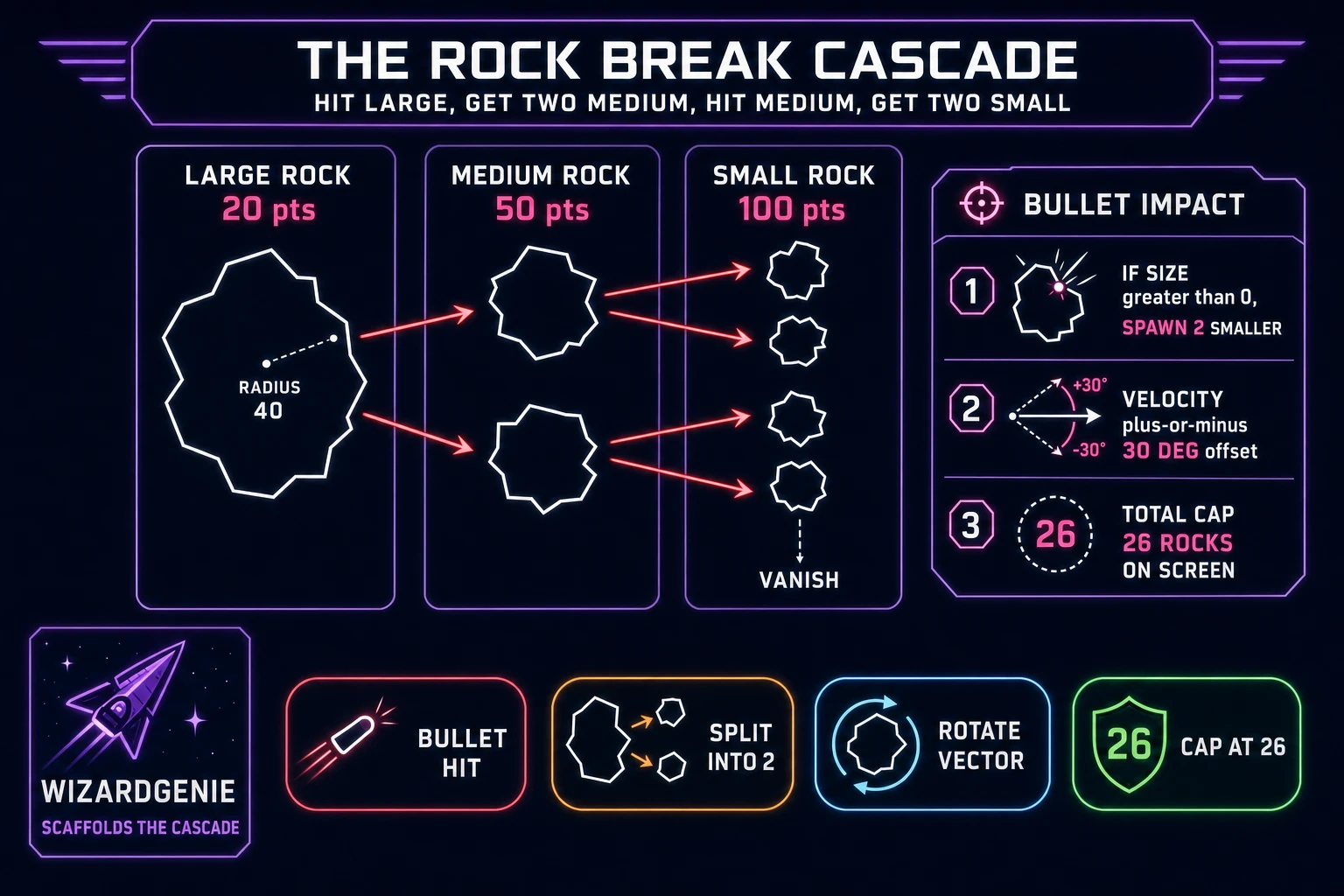
Asteroids rock-break cascade diagram showing large rock splits into two medium rocks, medium splits into two small, small vanishes, with total cap of 26 rocks on screen
The rock-break cascade: hit a large rock, get two medium; hit a medium, get two small; small vanishes on hit. The original 1979 game caps the on-screen count at 26; when the cap is reached, hits produce one child rock instead of two.

Step 1 — render the ship polygon, wire rotation and thrust physics with drag

Open a fresh HTML file with a <canvas> element sized 800 by 600. Grab a 2D context and set strokeStyle = "#fff", fillStyle = "#000", lineWidth = 1.5. In your game loop (driven by requestAnimationFrame), clear with a fillRect of black, then draw everything as white line strokes. The ship is three lineTo calls: nose at angle zero relative to ship.angle, back-left at 140 degrees, back-right at 220 degrees, close path, stroke. Twenty lines of Canvas code and you have a ship rendered on screen.

Wire the physics. Track five values per ship: x, y, angle (radians), vx, vy. Keyboard listeners set flags for turnLeft, turnRight, thrust. Per frame: ship.angle += (turnLeft ? -1 : 0 + turnRight ? 1 : 0) * ROT_SPEED * dt where ROT_SPEED is 4 radians per second. If thrust is on, add Math.cos(angle) * THRUST to vx and Math.sin(angle) * THRUST to vy, where THRUST is 0.15. Every frame multiply both velocities by DRAG (0.99). Clamp velocity magnitude to MAX_VEL (8). Update position by adding velocity to x and y. Finally apply screen-wrap: ship.x = ((ship.x % W) + W) % W, same for y with height. The double-modulo pattern handles negative x correctly when the ship crosses the left edge.

Play the build. The ship should rotate crisply, drift with inertia when you thrust, coast to a stop over about two seconds when you release, and wrap the screen edges without a hitch. If the ship feels floaty on turns, bump ROT_SPEED to 5 or 6. If the ship feels like driving on ice, lower DRAG to 0.98 so it decelerates faster (higher drag = closer to 1.0 = less deceleration, which is a small trap the first time you tune this). If the ship feels like a car with brakes, raise DRAG back toward 1.0. Do not add real friction or air resistance - the "float in space" feel is the entire point of the Asteroids control scheme, and the reason the original 1979 game asked players to unlearn Space Invaders muscle memory (documented in the Retro Gamer interview archived on en.wikipedia.org/wiki/Asteroids_(video_game), verified 2026-08-10).

Step 2 — spawn rocks, wire wrap-around collision, and break-into-smaller-rocks in WizardGenie

Open WizardGenie and drop your working ship-only Canvas file in as the seed. Give the agent one paragraph: "Extend this Canvas Asteroids-style prototype. Add a rocks array. Spawn 4 large rocks at random screen edges on wave 1, moving with random velocity magnitude 1 to 2 at random angle. Each rock is a jagged polygon of 8 to 12 vertices at random radius offsets from a base radius (large: 40, medium: 20, small: 10). Each rock has a size property (2 large, 1 medium, 0 small) and a rotation-drift so it slowly spins on screen. Apply the same screen-wrap as the ship. Add a bullets array (cap at 4 in-flight), fire on Space key. Bullet velocity is 8 times ship heading. On bullet-rock circular overlap, remove the bullet, and if rock.size > 0, spawn 2 new rocks at the same position with size - 1 and radius / 2 and velocity rotated plus-or-minus 30 degrees. If rock.size == 0, just remove. Increment score by 20/50/100 for large/medium/small. Cap total rocks on screen at 26 per Atari's original design. When the rocks array is empty, start wave N+1 with 4 + N large rocks." Feed that to any coding model in the lineup and you get the full rock system in under two minutes.

Ship-rock collision is the next paragraph. "Add a lives counter starting at 3. On ship-rock circular overlap, decrement lives, respawn the ship at center with zero velocity, and give it 2 seconds of invulnerability (no collision, but render at 50 percent alpha and blink). If lives hits zero, show GAME OVER, freeze the loop, and offer a restart on any key." Twenty more lines of code and the game has stakes.

Tuning happens after the scaffold. Play the build, notice that when a rock straddles a screen edge it teleports rather than smoothly crossing, "draw each rock twice - once at its real position, once at the wrapped position on the opposite side - so rocks visibly cross the edge instead of teleporting". Play again, notice that bullet-rock collision is too generous because the bullet dot is only 1 pixel, "increase bullet collision radius to 3 pixels so shots feel snappy". Play again, notice that wave-clear feels flat because a new wave just appears, "pause 1.5 seconds on wave-clear, then show WAVE N flash for 1 second before spawning". Each pass is a natural-language iteration; the agent edits the code, the browser reloads. Ten or fifteen passes and the game feels arcade. This is vibe coding for game dev in one sitting.

Step 3 (bonus) — thrust rumble, laser blip, and rock crunch from SFX Gen and Music Gen

Asteroids without audio feels wrong within three seconds of a play test. The original 1979 arcade cabinet had no dedicated sound chip - engineer Wendi Allen (then known as Howard Delman) wired a hardware circuit for thirteen individual sound effects by hand onto the board (verified against en.wikipedia.org/wiki/Asteroids_(video_game) on 2026-08-10). Your browser build gets those thirteen for pennies from Sorceress in about ten minutes.

Open SFX Gen. Sorceress SFX Gen bills at 1 credit per second (verified 2026-08-10 in src/app/sfx-gen/page.tsx line 23 as SEED_AUDIO_CREDITS_PER_SECOND = 1). The classic Asteroids audio pack is five clips. First, a looping thrust rumble - prompt "looping deep spaceship thrust rumble, low subby, 2 seconds, seamless loop". Fire on thrust-key-down, fade out on thrust-key-up. Two credits. Second, a laser blip on fire - prompt "short retro laser pew shot, 0.25 seconds, high pitch descending". One credit (SFX Gen rounds up to the minimum). Third, a rock-crunch on bullet-hit - prompt "cartoon rock explosion, 0.5 seconds, dry with a low thump tail". One credit. Fourth, a life-lost boom on ship death - prompt "deep space explosion, 0.8 seconds, dramatic". One credit. Fifth, a saucer-siren while the small saucer is on screen - prompt "pulsing UFO drone, 2 seconds, seamless loop, ominous". Two credits. Total under 10 credits (10 cents) for a full audio pack.

The final audio touch is the wave-quickening heartbeat. The 1979 arcade original used a two-note heartbeat that sped up as the wave progressed and slowed at wave-clear - a genuine tension-building trick. Open Music Gen. Music Gen bills 10 credits per generation (verified 2026-08-10 in src/app/music-gen/page.tsx line 28 as MUSIC_CREDIT_COST = 10). Prompt "two-note synth bass heartbeat, 4 seconds seamless loop, minor key, 60 BPM, ominous, arcade classic". In your Canvas loop, track rocksAlive / rocksAtWaveStart as a tension ratio; use it to modulate the audio playback rate from 1.0 (calm) to 2.0 (frenzy). Music Gen returns an MP3 by default; add 2 credits for WAV (WAV_CREDIT_COST = 2, verified in the same file line 31) if you want lossless. Two or three generations to nail the loop, so budget 20 to 30 credits. A single 30-second heartbeat loop is enough for the whole build - do not overthink the music track.

What a how to make Asteroids project costs on Sorceress in 2026

Concrete asset and generation budget for a browser Asteroids-inspired vector shooter, from empty repo to zip-and-ship playable, all numbers verified 2026-08-10 against local Sorceress source:

  • Ship, rocks, saucer, bullets, HUD art: zero credits. All five game primitives are white-line Canvas 2D primitives; the vector aesthetic is the correct look for how to make Asteroids and needs no image generation. This is the biggest cost saving vs. sprite-heavy browser classics.
  • Optional cover-art card or nebula backdrop (AI Image Gen): 5 to 20 credits per asset depending on model and quality, 0 to 2 optional assets, so 0 to 40 credits (0.00 to 0.40 USD). Skip entirely for the pure-vector look and you save the whole line item.
  • Audio pack (SFX Gen): 5 clips at 1 credit per second, average clip 0.5 to 2 seconds each, so about 7 to 10 credits total (0.07 to 0.10 USD).
  • Wave-quickening heartbeat loop (Music Gen): 10 credits per generation, 2 to 3 tries typical, so 20 to 30 credits (0.20 to 0.30 USD). Add 2 more credits if you want WAV.
  • WizardGenie coding time: effectively free on the Sorceress side (bring your own model API key, or use one of the built-in trial-key options for the smaller models). Model-side API cost for a 2-to-4-hour prompt session on a cheap Executor like DeepSeek V4 Pro is typically under 0.60 USD.
  • Total for one complete browser Asteroids-inspired build: 27 to 80 credits, or roughly 0.27 to 0.80 USD in Sorceress credits, plus under 0.60 USD in model API time. Under 1.40 USD end-to-end for a first Asteroids-style vector shooter.

Sorceress bills 100 credits per dollar at the standard rate (CREDITS_PER_DOLLAR = 100 in src/lib/models.ts line 69). New accounts start with 100 free credits (SIGNUP_GRANT = 100 in src/app/api/admin/credits/route.ts line 12), which covers the audio pack and the heartbeat loop with room for iteration. The Sorceress Lifetime tier at 49 USD one-time (LIFETIME_PRICE = 49 in src/app/plans/page.tsx line 51) covers unlimited Music Gen and SFX Gen use, which matters if you plan to make this the first of a series of arcade-classic ports (a common progression is Asteroids, then Missile Command, then Battlezone, then Star Castle). For a single-game build the free grant plus a small top-up covers everything.

For related browser-game pipelines that share this generate-the-assets-prompt-the-coder-ship-the-browser-build spine, the closest reads are Flap How to Make Flappy Bird (Browser Loop 2026) for the same one-mechanic-plus-scoring pattern on another arcade classic, Volley How to Make Pong (Browser Two Paddle 2026) for the other zero-image-generation vector-primitive weekender that predates Asteroids by seven years, Stack How to Make Tetris (Browser Falling Blocks 2026) for another zero-shipped arcade classic in the same weekend budget, and Chomp How to Make Pac-Man (Browser Dot Muncher 2026) for the maze-based sibling from a year later that leans on the same trademark caveat. The Sorceress Tools Guide is the master index for every tool the guide referenced. Under a dollar fifty, one weekend, and how to make Asteroids is a done deal.

Frequently Asked Questions

Do I need permission from Atari to make an Asteroids clone?

The Asteroids trademark is owned by Atari, so you cannot name your game Asteroids, use Atari-owned marketing art, or copy the exact original cabinet artwork. The core mechanic - a rotate-thrust vector ship, screen-wrap physics, and rocks that split into smaller rocks when shot - is a game-design pattern, and game-design patterns are not protected by copyright or trademark. The 1979 arcade original inspired dozens of clones dating back to Quality Software's Asteroids in Space (1980) for the Apple II, Vectrex's MineStorm, and ZX Spectrum's Meteor Storm. Ship your clone under a different name (Blast Field, Rock Split, Vector Void), draw your own art, write your own code, and you are on the same fair-use footing every browser clone since 1980 has stood on. Do not ship anything with the word Asteroids in the store listing or bundle any Atari-owned bitmap art, and do not claim any affiliation with Atari on the store page or in the credits.

Should I use HTML5 Canvas or Phaser 4 for a browser Asteroids clone?

Vanilla HTML5 Canvas is the honest default because Asteroids is a five-primitive game (ship polygon, bullet dots, rock polygons, saucer polygon, HUD text) and Canvas 2D renders all five natively with strokeRect, moveTo, lineTo, and fillText. A working build is roughly 300 lines of JavaScript and ships under 10 KB minified, which qualifies for JS13K-style code-golf jams. Phaser 4.2.1 Giedi (released 9 July 2026, verified against phaser.io/download/stable on 2026-08-10) is the right pick if you want the scene, input, audio, and asset pipeline handled for you, if you plan to extend the game beyond the classic loop with power-ups and multiple stages, or if you want the arcade physics body's built-in velocity, angular velocity, and overlap-detect to save you writing the physics primitives by hand. Both engines can render the vector look because vector-style is just white 1-pixel strokes on a black background - the engine choice affects how much boilerplate you write, not the visual style. Pick vanilla Canvas for a code-golf entry, pick Phaser 4 for a game you intend to keep polishing.

How do I handle screen-wrap on the ship, bullets, and rocks?

Screen-wrap is the trademark Asteroids trick that makes the playfield feel infinite despite living on a fixed rectangle. Every frame, after updating position, you take the modulo of position against screen width and height. In pseudo-code: ship.x = (ship.x + screenWidth) % screenWidth, and the same for ship.y with screenHeight. The plus-screenWidth term is there so that a negative x (ship crossed the left edge) wraps to the right edge instead of throwing a negative modulo. Bullets and rocks get the exact same wrap. For the visual polish, if a rock is straddling an edge (its position minus its radius is negative, or its position plus its radius is greater than the screen dimension), draw it twice - once at the real position and once at the wrapped position - so the reader sees a rock that appears to genuinely cross the boundary rather than teleport. Collision detection also has to account for wrap: check circular overlap against the position and against the position plus-or-minus the screen dimension. Twenty extra lines of code and the game feels right.

How do the rocks break into smaller rocks when shot?

The classic Asteroids progression is large rock breaks into two medium rocks on hit, each medium rock breaks into two small rocks on hit, and small rocks vanish on hit. Points scale inversely to size: a small rock is worth more than a large rock because it moves faster and is harder to hit. In code, each rock carries a size property (2 for large, 1 for medium, 0 for small), a radius (say 40 for large, 20 for medium, 10 for small), and a velocity vector. On bullet-rock overlap, if size is greater than zero, spawn two new rocks at the same position with size minus one, radius halved, and velocity vectors rotated plus-or-minus 30 degrees from the original with a small magnitude bonus - the fragments should be a bit faster than the parent. If size is zero, just remove the rock. Increment the score based on which size was hit. The original 1979 game caps the total on-screen rock count at 26 (per Atari's Retro Gamer interview verified against en.wikipedia.org/wiki/Asteroids_(video_game) on 2026-08-10); when the cap is reached, hitting a large rock produces one medium rock instead of two, and a medium rock produces one small instead of two. Copying the 26-rock cap is a nice historical touch.

How do I add the small saucer and large saucer as AI opponents?

The two saucers are the classic Asteroids escalation. The large saucer fires randomly in all directions and is easy to dodge, worth 200 points. The small saucer aims at the player and is worth 1,000 points; its aim tightens as the player's score climbs, and after 40,000 points only the small saucer spawns. Implementation is a timer plus a state machine. Every 30 to 45 seconds of game time, spawn a saucer at a random edge with a random horizontal velocity, and let it drift across the screen with occasional 90-degree turns. For the large saucer, fire a bullet in a random direction every 1.5 seconds. For the small saucer, compute the vector to the player, add per-shot noise inversely scaled by the player's score (huge noise at low score, near-zero noise at 40,000-plus), and fire on the same 1.5-second cadence. The saucer despawns when it exits the opposite edge or is destroyed. The original 1979 game has a well-known quirk where the saucer cannot aim across a screen boundary, which enabled the classic lurking exploit; you can copy or fix this at your discretion. Under 60 lines of WizardGenie-scaffolded code.

Sources

  1. Asteroids (video game) - Wikipedia
  2. Phaser 4 - HTML5 Game Framework
  3. MDN - CanvasRenderingContext2D (vector line rendering)
  4. MDN - requestAnimationFrame (game loop timing)
Written by Arron R.·2,990 words·13 min read

Related posts