Recall How to Make a Memory Game (Browser Match Grid 2026)

By Arron R.13 min read
How to make a memory game in 2026 as a browser match-grid: shuffle a paired deck onto a 4x4 grid, wire reveal-compare-match logic in WizardGenie, generate custo

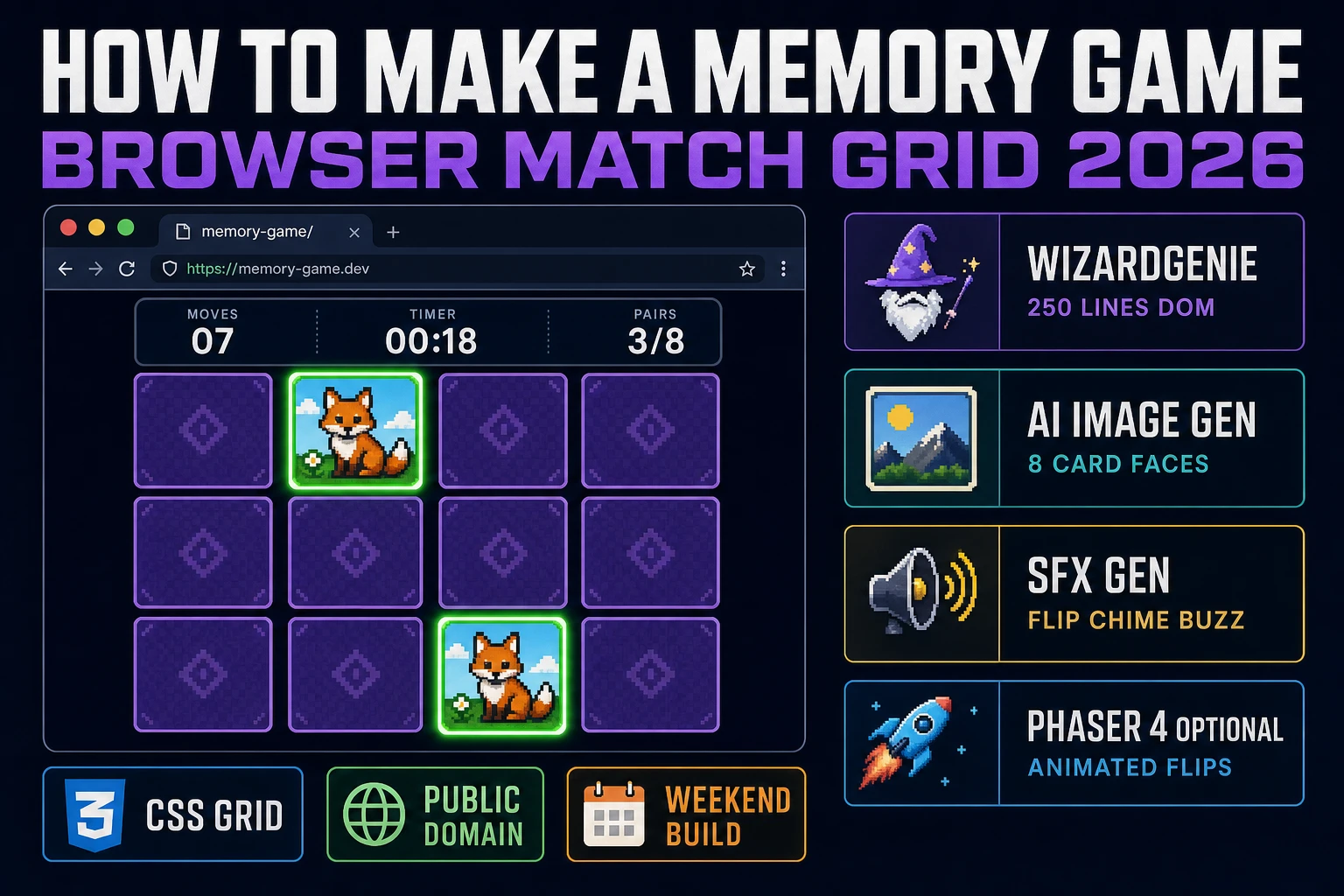
The one-line answer to how to make a memory game in 2026 is: shuffle a paired deck onto a grid, let players flip two cards per turn, keep the pair if they match, hide both if they don't, and end the round when the grid is empty. That is the entire game, and it has been the entire game since long before any commercial version. Concentration is a traditional card game with no single owner, played under a dozen names (Memory, Matching Pairs, Match Match, Pelmanism, Pexeso, Pairs) and used by every school teacher who ever wanted a five-minute focus exercise. What has changed in 2026 is the pipeline. You open a browser, prompt WizardGenie for a vanilla HTML5 match-grid scaffold with the three-state reveal-compare-match machine and an 800-millisecond compare-lock, generate a themed deck of card faces in AI Image Gen, add flip and match chimes in SFX Gen, and ship a 250-line browser build in an afternoon. Under 60 cents in Sorceress credits. Public-domain mechanic. Zero legal risk.
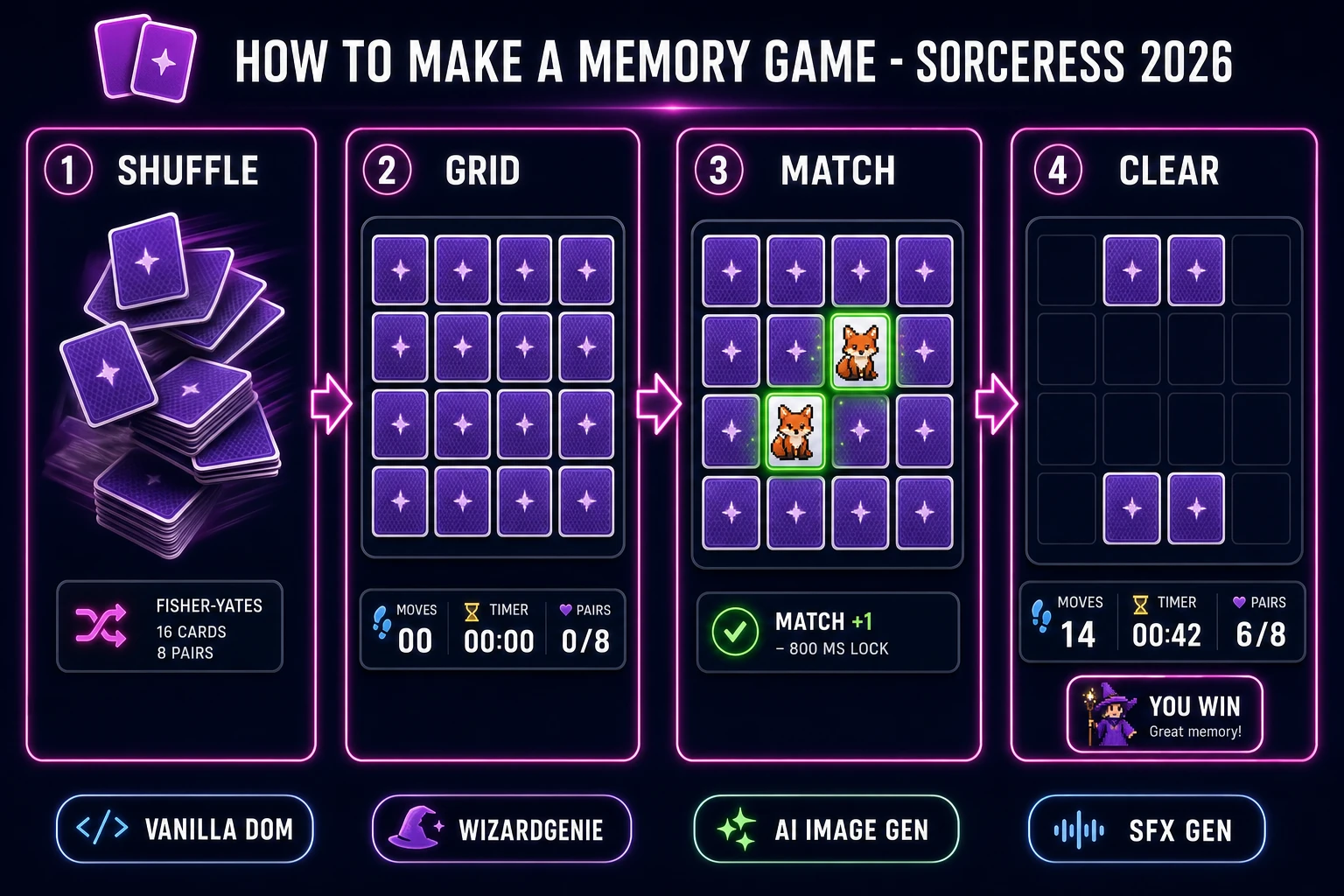
How to make a memory game browser match-grid pipeline: Fisher-Yates shuffle, 4x4 face-down card grid, matching pair reveal, and cleared-board win state with WizardGenie and Sorceress toolset
The 2026 match-grid browser recipe: shuffle a paired deck, lay it out as a 4x4 CSS Grid, wire the three-state reveal-compare-match machine in WizardGenie, drop in AI Image Gen card art, and let the player pick pairs down to an empty board.

What "how to make a memory game" actually means in 2026

The query "how to make a memory game" hides three different requests. Some searchers want a classroom-style app for a 5-to-8-year-old with big colorful animal cards and a "you win" sticker. Some want a browser puzzle a parent can build with their kid on a Saturday to teach a first taste of programming. And some want a portfolio piece — a clean, mobile-friendly match-grid with animated flips, a timer, and a moves counter that they can link to from a resume. Fortunately, all three requests are the same 250 lines of code with different card art and a difficulty dropdown. Section seven costs the whole project out at under 60 cents in Sorceress credits, which is worth reading before you commit to a bigger version.

A quick history anchor, verified against the Wikipedia Concentration article on 2026-08-09: Concentration is a "round game in which a set of cards are all laid face down on a surface and two cards are flipped face up over each turn." The mechanic is old — older than the video-game industry — and belongs to no one. Milton Bradley published a boxed version called Memory in 1959 and still owns that specific product name and the box art, and Ravensburger sells Pexeso decks with square cards, but neither owns the mechanic. This is the most legally friendly browser-game clone in the shipping queue: use any name you like (Recall, Match Grid, Twin Cards, Pair Chase), draw or generate your own card art, and you own everything. That freedom matters because it removes the trademark-caveat paragraph every Tetris and Pac-Man tutorial needs to start with.

The memory game loop in one minute (reveal compare match hide)

Four moving parts, strict order per turn. First, wait for a click on a face-down card and reveal it (flip it face-up, add it to a "current pair" list of length one). Second, wait for a click on another face-down card and reveal it (add it to the current pair, now length two). Third, compare the two revealed cards — if the card IDs match, remove both from the board permanently and increment the score; if they don't match, wait about 800 milliseconds so the player can memorize the positions, then flip both face-down again. Fourth, check the win condition — if every card is removed, freeze the board, show a "You win in X moves and Y seconds" overlay, and offer a restart button. During the compare step, block all input so the player cannot flip a third card while the first two are still face-up. That input-lock is the single most common bug in first-time memory-game builds; miss it and the game feels broken.

That is the entire game. Four steps per turn, no per-frame loop needed because the game is turn-based, no requestAnimationFrame required — just click handlers and a small state machine. Everything else — a timer, a moves counter, a difficulty selector, a persistent best-score in localStorage, a "3 2 1 go" countdown to peek at the board, a sound-on/sound-off toggle — is polish on top of this core loop. Keep the four-step order strict, honor the 800-ms compare-lock, and the game feels correct the first time you play it. Skip the lock or reverse the compare and remove steps and you get the "spam-click race condition" where three cards end up face-up and the game state goes out of sync.
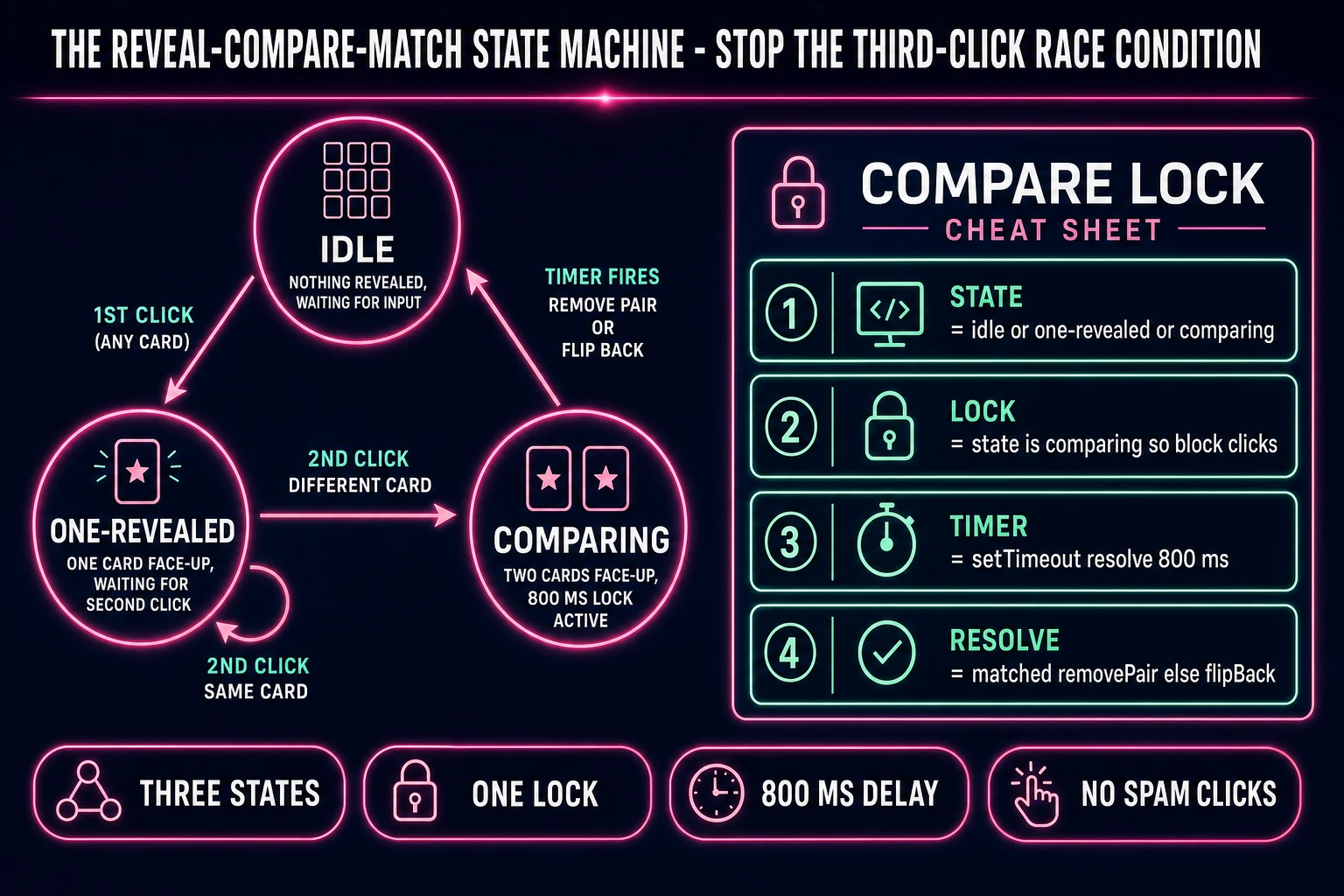
Reveal-compare-match state machine diagram for a browser memory game: idle, one-revealed, and comparing states with 800-millisecond compare-lock and cheat sheet
The three-state reveal-compare-match machine: idle to one-revealed on first click, one-revealed to comparing on second click, comparing to idle after the 800-ms timer either removes the matched pair or flips both cards back down. Block all input during compare and the third-click race condition disappears.

Pick your engine for how to make a memory game: vanilla DOM, Phaser 4, or React

Three good browser targets in 2026, each with a different trade-off. Vanilla HTML plus CSS Grid plus a small JavaScript state machine is the honest default for a memory game specifically. The entire board is a display: grid container with a grid-template-columns that adapts by difficulty, each card is a <button> or <div> with a .face and .back child and a CSS transform: rotateY(180deg) transition for the flip animation, and about 150 lines of JavaScript handle shuffle, click-handler, state machine, and win-check. Bundle size is under 8 KB minified with the card faces inlined as WebP. This is the pick 70% of readers should take, and it is what a first-year computer-science student would build in a browser today.

Phaser 4 is the second pick if you want animated card flips that look like actual physical cards spinning in 3D space, particle bursts on match, camera shake on mismatch, and other juice. Phaser 4.2.1 "Giedi" was released on 9 July 2026 (verified against phaser.io/download/stable on 2026-08-09) and ships scene management, tween chains, and a sprite atlas — primitives you do not need for a plain match-grid but that pay off the moment you add the polish that separates a portfolio piece from a homework assignment. Bundle is roughly 900 KB minified, which is fine on modern connections. Skip a full JavaScript framework like Three.js — a memory game does not need a 3D scene graph and every KB you ship on a mobile browser is a bounced visitor.

The third option: React (or Preact if you want the smaller bundle). React is the honest pick if you already know it or want to grow the project into a daily-puzzle app with routing, a leaderboard, and login. The reveal-compare-match state machine maps cleanly to useState or a small useReducer, and the card grid is a straightforward cards.map(card => <Card ... />). Bundle overhead is about 45 KB for the base runtime, plus your app code, which is fine but heavier than vanilla. All three engines are scaffolded by WizardGenie from a single prompt if you want to skip the engine decision. WizardGenie is the Sorceress game-native coding agent, shipping as both a Windows desktop installer (Early Access supporters and above) and a no-install web build at the same URL. Its coding-model lineup (verified 2026-08-09 in src/app/_home-v2/_data/tools.ts lines 734 to 742) covers Claude Opus 4.7, Claude Sonnet 4.6, GPT-5.5, Gemini 3.1 Pro, DeepSeek V4 Pro, Kimi K2.5, Grok 4.2, and MiniMax M2.7. For a 250-line project, the cheapest executor in the lineup (DeepSeek V4 Pro or Kimi K2.5) scaffolds the whole game on the first prompt.
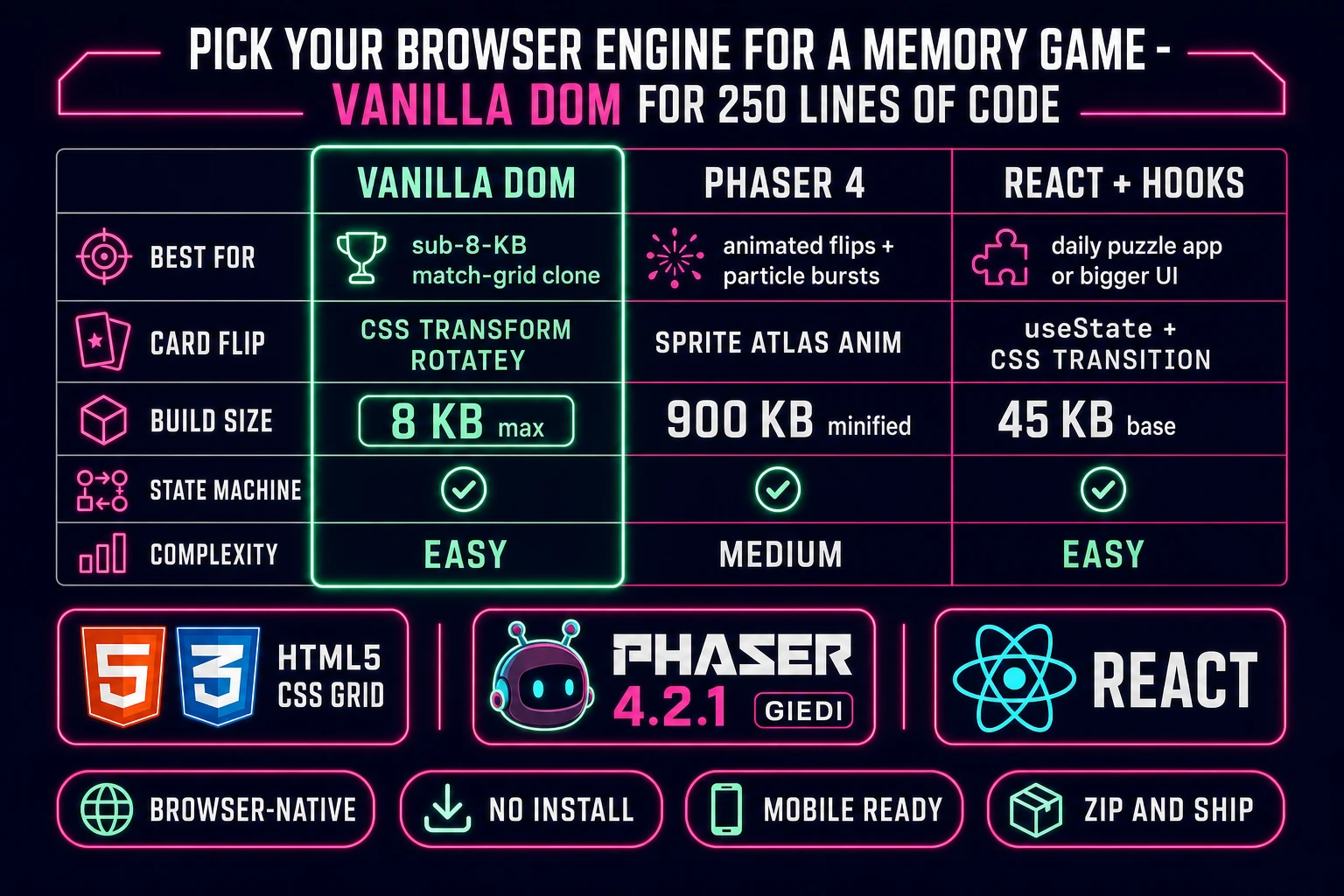
Comparison table of browser engines for a memory game clone: vanilla DOM versus Phaser 4 versus React across best-for, card-flip approach, build-size, state-machine support, and complexity
Vanilla DOM plus CSS Grid is the honest default for a browser memory game when the target is a 250-line match-grid build. Phaser 4 pays off the moment you add animated flips or particle bursts. React is the honest pick if you plan to grow the project into a daily-puzzle app.

Step 1 — shuffle a paired deck and lay out the grid

Pick a grid size that matches your target audience: 4x3 (12 cards, 6 pairs) for a beginner or classroom app, 4x4 (16 cards, 8 pairs) for the standard 2026 web-app default, 6x4 (24 cards, 12 pairs) for an adult puzzle, or the full 4x13 (52 cards, 26 pairs) if you want the traditional Concentration setup that the Wikipedia article documents. Ship a difficulty dropdown that switches between these four presets — it is two extra lines of code and it doubles the game's replay value. Store the current grid dimensions as two constants (cols and rows), derive the pair count as (cols * rows) / 2, and use those numbers everywhere the layout code needs them so a single dropdown change resizes the whole board correctly.

Build the card deck by picking N distinct card IDs (where N is the pair count), duplicating each one, and shuffling the resulting 2N-length array. The shuffle algorithm to use is the Fisher-Yates shuffle — iterate the array from the last index down to the first, at each index swap the current element with a randomly-chosen element between index 0 and the current index. Six lines of JavaScript, uniform distribution, no bias. Prompt WizardGenie for "Fisher-Yates in-place shuffle for a memory-game deck" and it writes the correct implementation the first time; ask for a plain "shuffle" and you will sometimes get array.sort(() => Math.random() - 0.5), which is biased and produces uneven distributions. This is one of the small correctness cliffs where a specific algorithm name matters.

Lay the shuffled deck out as a CSS Grid container styled with display: grid, grid-template-columns: repeat(var(--cols), 1fr), gap: 0.75rem, and a comfortable max-width so the cards do not stretch too wide on desktop. Each card is a <button> element (buttons are keyboard-focusable by default, which gives you free accessibility) with two absolutely-positioned children: a .back div showing the shared card-back art (a Sorceress logo, a spiral pattern, a solid purple square — whatever matches your theme), and a .face div showing the unique card art for that specific ID. Add a CSS transform: rotateY(180deg) transition on the card container with a 300-millisecond duration to get the flip animation for free. Wire a data-card-id attribute on each button so your click handler can compare pair IDs without an extra lookup.

Step 2 — wire reveal-compare-match logic and win-condition in WizardGenie

Open WizardGenie in a browser tab. Attach your shuffle-and-render scaffold from step one, then prompt: "Add a three-state reveal-compare-match state machine to this memory game. States are idle, one-revealed, comparing. On card click in idle, flip the card face-up and move to one-revealed. On card click in one-revealed, if the click is on the same card, no-op; if it is on a different card, flip that card and move to comparing. On entering the comparing state, block all input for 800 milliseconds via a setTimeout, then compare the two revealed card IDs. If they match, remove both cards permanently and increment a matched-pairs counter. If they don't match, flip both back face-down. In either case, return to idle. When the matched-pairs counter equals the total pair count, freeze the board and show a win overlay with move count and elapsed time." One prompt, one edit pass, correct code.

Verify the compare-lock behavior by spam-clicking during the compare phase — nothing should happen while the two cards are face-up. If you see a third card flip during that 800 ms window, the lock is missing. Verify the same-card no-op by clicking the same card twice in a row — the second click should not count as a second card, the state should stay in one-revealed. These two edge cases are where hand-written implementations most often fail; WizardGenie writes them correctly because it has a full-context understanding of the state machine, but you still want to test them manually before you consider Step 2 done.

Add a moves counter that increments on every "second card revealed" event (not on every click, so the same-card no-op does not inflate the count) and an elapsed-time counter that starts on the first click and freezes on win. Persist a "best time" and "best moves" for each difficulty preset in localStorage so returning players see their record on the results screen. That is another 15 lines of code and one more WizardGenie prompt. Total effort after Step 2: the game is fully playable, keyboard-accessible, mobile-responsive, and mechanically correct. It just looks plain, which is what Step 3 fixes.

Step 3 — AI Image Gen custom card art, SFX Gen flip and match sounds, timer and score polish

Open AI Image Gen, pick a themed style (pixel-art forest animals, hand-drawn tarot, retro fruit-machine icons, minimalist geometric symbols, 8-bit spaceships — anything is fair game because the mechanic is public-domain), and generate as many unique card faces as your grid needs: 6 for the 4x3 preset, 8 for 4x4, 12 for 6x4, or 26 for the full 4x13 deck. Keep the art square (1024 by 1024 at generation, downscale to 256 by 256 or smaller for delivery), use the same subject-style prompt template for every card so the deck looks cohesive, and vary only the specific subject (a fox, a raccoon, an owl, a lynx). Save each generation as a WebP with a filename that matches its data-card-id attribute and drop them into a /assets/cards/ folder. Total AI Image Gen spend: 8 to 16 credits for the standard 4x4 preset, roughly 20 to 30 cents depending on model.

Open SFX Gen and generate four short one-shot sound effects: a "card flip" whoosh (about 0.3 seconds), a "match" chime (a pleasing two-note interval, about 0.8 seconds), a "no match" thud (a low subtle bonk, about 0.4 seconds), and a "win jingle" (an ascending three-note arpeggio, about 1.2 seconds). Prompt each one with a short description ("wooden card flip whoosh, warm and satisfying", "gentle two-note chime, bright celebratory") and pick the best of two or three generations. SFX Gen charges 1 credit per second of output (SEED_AUDIO_CREDITS_PER_SECOND = 1 in src/app/sfx-gen/page.tsx line 23), with a 1-credit minimum per generation, so the full four-clip audio set costs 4 to 8 credits (4 to 8 cents). Wire each sound to its trigger event in the game — flip on card reveal, match/no-match on the compare resolution, win jingle on the win overlay — via plain new Audio(url).play() calls, no library needed.

Optional but recommended: open Music Gen and generate one short looping background bed (light jazz, chill-hop, or lo-fi study-vibe are all good matches for a puzzle game). Music Gen charges MUSIC_CREDIT_COST = 10 per generation (in src/app/music-gen/page.tsx line 28) and one try is usually enough for a background loop. Add a sound-on/sound-off toggle to the top-right of the game so players who want silence get silence — a puzzle game with unskippable music is a puzzle game people close. Total time from empty folder to shipped build: roughly 3 to 4 hours if you have never done this before, 90 minutes if you have shipped one browser game before. Ship the whole thing as a single index.html plus a small /assets/ folder, deploy it to any static-hosting service, and you have a public URL to send to a portfolio reviewer.

What a how to make a memory game project costs on Sorceress in 2026

Total build budget for a complete browser match-grid project is roughly 30 to 60 credits, or 0.30 to 0.60 USD in Sorceress credits, verified against local source on 2026-08-09. The credit cost breaks down as: AI Image Gen card faces at 8 to 16 unique images depending on grid size, typical spend 20 to 30 credits (0.20 to 0.30 USD) for a themed deck; SFX Gen at 1 credit per second (SEED_AUDIO_CREDITS_PER_SECOND = 1 in src/app/sfx-gen/page.tsx line 23), four short clips at the 1-credit minimum each, so 4 to 8 credits (0.04 to 0.08 USD); optional Music Gen background loop at 10 credits per generation (MUSIC_CREDIT_COST = 10 in src/app/music-gen/page.tsx line 28), one try typical, so 10 credits (0.10 USD); and WizardGenie coding time is free on the Sorceress side (you pay only for the underlying model's API call, which for a 250-line project on DeepSeek V4 Pro or Kimi K2.5 is pennies).

New Sorceress accounts get 100 free starter credits (SIGNUP_GRANT = 100 in src/app/api/admin/credits/route.ts), which covers the entire memory-game project comfortably twice with credits left over for a follow-up build. The Sorceress Lifetime tier at 49 USD one-time (LIFETIME_PRICE = 49 in src/app/plans/page.tsx line 51) pays for itself after roughly 4 to 5 game projects of this size. If you already have a Sorceress account and just want to ship one more browser game, this is one of the cheapest projects in the catalog — the low art requirement (16 static card faces) and the tiny audio requirement (4 one-shot SFX plus one optional loop) keep the credit burn small. Compare that to a first-person shooter, which needs animated enemies, gun models, environment maps, and layered gunfight audio and lands closer to 200 to 300 credits, and the memory-game project reads as an obvious weekender.

Frequently Asked Questions

Is it legal to build my own memory game clone?

The mechanic (a face-down grid where players flip two cards per turn and keep matching pairs) is public-domain, unlike Tetris or Pac-Man. Concentration is a traditional card game with no single owner, played under a dozen names including Memory, Matching Pairs, Match Match, Pelmanism, Pexeso, and Pairs, all documented on the Wikipedia Concentration page as of 2026-08-09. Milton Bradley published a boxed version called Memory in 1959 and still owns that specific product name and box art, and Ravensburger sells Pexeso decks, but none of them own the mechanic. Ship your version under any name you want (Recall, Match Grid, Twin Cards, Pair Chase) and you are on safe legal ground. The only trap is copying a specific commercial deck's artwork verbatim - use AI Image Gen for original card faces, or start with playing-card ranks and suits, and you are fine. This is the friendliest browser-game clone project in the shipping queue for exactly this reason.

Which engine should I pick to build a memory game in the browser?

Vanilla DOM plus a simple grid layout is the honest default. The whole game is a grid of clickable divs, each with a back state and a face state, plus a small state machine that tracks the currently-flipped pair. A complete match-grid in vanilla HTML, CSS Grid, and JavaScript is roughly 250 lines and ships under 8 KB. React is the second pick if you already know React or want to grow the project into a daily-puzzle app - the reveal/compare/match state machine maps cleanly to useState hooks and the card grid is a straightforward .map() call. Phaser 4.2.1 Giedi (released 9 July 2026, verified against phaser.io/download/stable on 2026-08-09) is the third pick and worth taking if you want animated card flips with actual 3D-style rotation, particle bursts on match, or if you plan to bolt this on to a bigger arcade project. Skip Three.js - a memory game does not need a 3D scene graph. WizardGenie scaffolds all three targets from a single prompt if you want to skip the engine decision entirely.

How do I stop the player from clicking the same card twice or clicking a third card mid-compare?

One small state machine and one boolean lock, about 10 lines of code total. Track three states: idle (no card revealed, waiting for input), one-revealed (one card face-up, waiting for the second click), and comparing (two cards face-up, waiting for the match/no-match resolution). In the idle state, any click flips a card and moves you to one-revealed. In one-revealed, a click on the same card is a no-op; a click on a different card flips it and moves you to comparing. In comparing, every input is blocked (this is the lock) for about 800 milliseconds while you either remove the matched pair permanently or flip both cards back face-down. After the resolution timer fires, you return to idle. Prompt WizardGenie for exactly this three-state machine with the 800-ms compare-lock and it writes it correctly the first time. Miss the compare-lock and players spam-click, race the animation, and see two cards face-up plus a third mid-flip - the game feels broken.

How large should the grid be for a memory game clone?

Grid size is a difficulty knob, not a design constant. A 4x3 grid (12 cards, 6 pairs) is the beginner default and takes under a minute to clear even for a first-time player. A 4x4 grid (16 cards, 8 pairs) is the standard 2026 web-app default - big enough to be challenging, small enough to fit on a phone screen in portrait mode. A 6x4 grid (24 cards, 12 pairs) is the adult-tier - matches the optimal-play mathematics from the Wikipedia Concentration article, which shows expected moves converging to about 0.8n for n cards under perfect memory, or roughly 19 moves for a 24-card grid. A full 52-card deck laid out as 4 rows of 13 cards is the traditional Concentration setup and takes about 42 moves at optimal play (Wikipedia cites the derived expected value at approximately 41.6 for a 52-card deck). Ship a difficulty dropdown (Easy 4x3, Standard 4x4, Adult 6x4, Deck 4x13) rather than picking one - it takes two extra lines of code and doubles the game's replay value.

What does a memory game clone cost to build on Sorceress in 2026?

Total build budget for a complete browser match-grid project is roughly 30 to 60 credits, or 0.30 to 0.60 USD in Sorceress credits, verified 2026-08-09 against local source. Breakdown: 8 to 16 custom card faces in AI Image Gen depending on grid size, typical spend 20-30 credits (0.20-0.30 USD) for a themed deck like pixel-art animals or hand-drawn tarot; card-flip, match-chime, no-match-buzz, and win-jingle in SFX Gen at 1 credit per second (SEED_AUDIO_CREDITS_PER_SECOND = 1 in src/app/sfx-gen/page.tsx line 23), 4 short clips at under 1 second each with minimum-1-credit rounding, so 4-8 credits (0.04-0.08 USD); one optional light-jazz background loop in Music Gen at 10 credits per generation (MUSIC_CREDIT_COST = 10 in src/app/music-gen/page.tsx line 28), 1 try typical, so 10 credits (0.10 USD); and WizardGenie coding time is free on the Sorceress side. New accounts get 100 free starter credits (SIGNUP_GRANT = 100 in src/app/api/admin/credits/route.ts), which covers the entire project twice with credits to spare. The Sorceress Lifetime tier at 49 USD one-time (LIFETIME_PRICE = 49 in src/app/plans/page.tsx line 51) pays for itself after roughly 4-5 game projects of this size.

Sources

  1. Concentration (card game) - Wikipedia
  2. Phaser 4 - HTML5 Game Framework (v4.2.1 Giedi download page)
  3. MDN - Array reference (Fisher-Yates shuffle context)
  4. MDN - Canvas 2D rendering context
Written by Arron R.·3,027 words·13 min read

Related posts