Pen How to Make a Visual Novel (Browser Scene Loop 2026)

By Arron R.14 min read
How to make a visual novel in 2026: write a branching scene graph with labels, choices, and jumps; generate character sprites and backgrounds; add voice acting

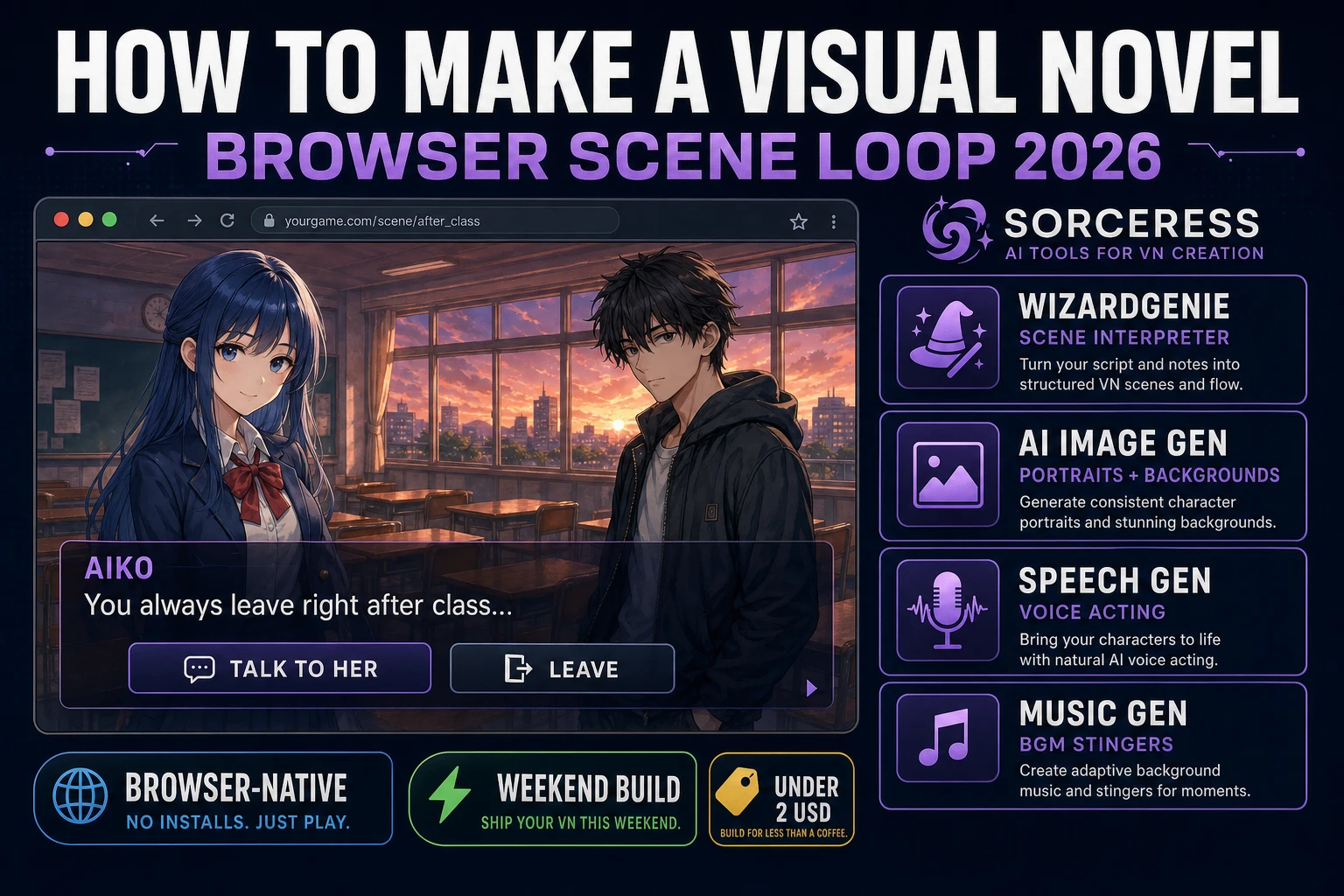
Visual novels are the most under-served genre in the browser-game weekend-build canon. The format has a proven audience — Steam counts more than 3,000 published VNs across paid and free tiers, and 5pb / MAGES titles like the Steins;Gate series have sold well past two million units lifetime (verified against en.wikipedia.org/wiki/Visual_novel on 2026-08-10) — but almost every "how to make a visual novel" tutorial still assumes you will download Ren'Py, learn a Python-adjacent DSL, and treat the browser as an afterthought. The 2026 pipeline is very different. HTML5 layered images render the classic full-bleed background plus character-portrait layout for free, a coding agent scaffolds the scene interpreter in one prompt, and AI generation covers every asset a VN needs. In a browser, that means WizardGenie to scaffold the scene interpreter, Sorceress AI Image Gen for reference-consistent character portraits and painted backgrounds, Speech Gen for full voice acting or a specific cloned voice, Music Gen for the mood-shifting soundtrack, and SFX Gen for page-flip stingers and ambient loops. This guide is the honest end-to-end for how to make a visual novel in 2026, in a browser, in a weekend.
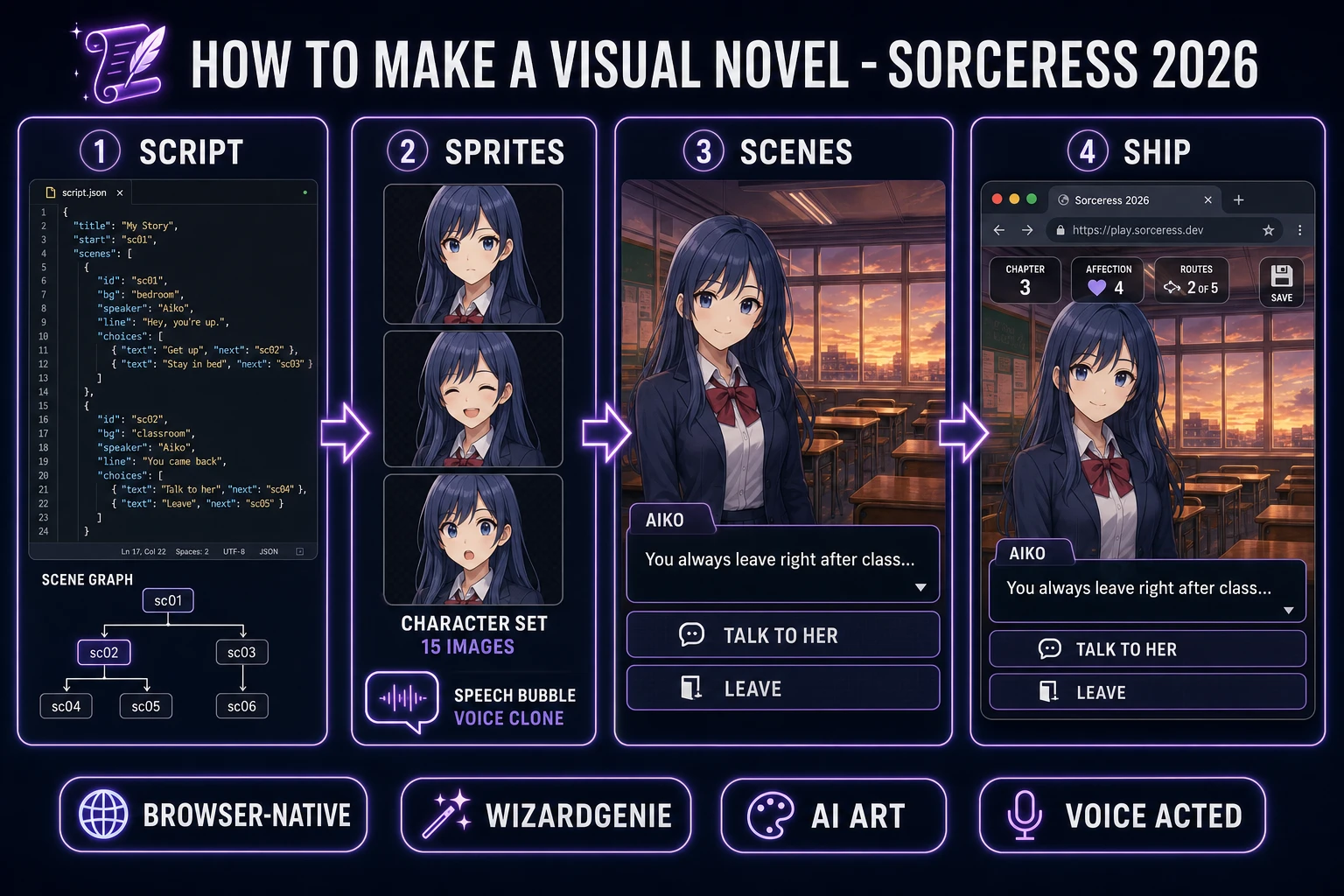
How to make a visual novel browser pipeline: scene script, character sprites, layered scene layout, and shipped browser build with WizardGenie and Sorceress toolset
The 2026 how to make a visual novel browser recipe: write the branching scene graph, generate expressive character sprites and backgrounds with Nano Banana Pro, wire the scene interpreter in WizardGenie, add voice acting from Speech Gen and adaptive BGM from Music Gen.

What "how to make a visual novel" actually means in 2026

The query "how to make a visual novel" almost always hides one of two very different intents. Some searchers want a kinetic novel — a linear illustrated story you click through, no branches, no choices, essentially an animated e-book with voiced dialogue and BGM. Others want a full branching-narrative VN with multiple endings, affinity variables, and route unlocks in the tradition of Fate/stay night or Doki Doki Literature Club. This guide targets the second, because the branching version is what "visual novel" means to most players in 2026 and because the linear kinetic case is just the branching case with a single default choice per scene. Once the interpreter can handle branches, the linear case is free.

The presentation contract is the same in either case. A full-bleed painted background fills the browser window. One to three character portraits layer on top in canonical slot positions (left, center, right) with a slight vertical anchor at the bottom so the head sits above the dialogue box. A dialogue box sits along the bottom fifth of the screen, with a name-tag identifying the current speaker and a typed-in line of dialogue. When the current line ends, either a click advances to the next scene or a choice UI appears as inline buttons on top of the dialogue box. That is the whole layout. Every published VN from 1990s NEC PC-9801 releases through modern Nintendo Switch entries honours the same four-element stack, which is why the format renders so cleanly in a browser: it is fundamentally a positioned-image UI, and HTML has been positioning images since 1993.

The visual novel game loop in one minute (show scene, present choice, branch, save)

Six moving parts and nothing else, in strict order per scene tick. First, load the current scene node from the scene graph — a JavaScript object with an id, a background image path, an optional music-track path, a speaker, a line of dialogue, and either a next id (linear) or a choices array. Second, cross-fade the background image if it changed since the last scene. Third, position the character portraits — add sprites to their slot positions, fade out ones that left the scene, fade in ones that entered. Fourth, render the dialogue box — set the speaker name tag, type the line of dialogue with a small per-character delay (the classic VN feel is roughly 30 milliseconds per character, with a Space or Enter press to instantly complete the line). Fifth, on click after the line completes, either jump to next or render the choices array as inline buttons and wait for a click. Sixth, on choice click, apply any variable mutations, jump to the chosen next id, and loop.

Every three or four scenes, autosave — write the current scene id and all variables to localStorage under a key like vn.autosave. On page load, if an autosave exists, offer a "Continue" button next to "New Game". That is the entire game. Six steps, executed once per scene click, driven by a plain JavaScript state machine. Everything else — the CG gallery, the achievements grid, the localisation-switch dropdown, the character-affection tracker sidebar, the log-of-past-lines panel — is polish layered on top. Keep the core loop tight, ship the first three scenes end-to-end, and only then start layering polish. A first-time VN that ships one linear route with two endings will teach you more than a partially-built VN with a full features spec.
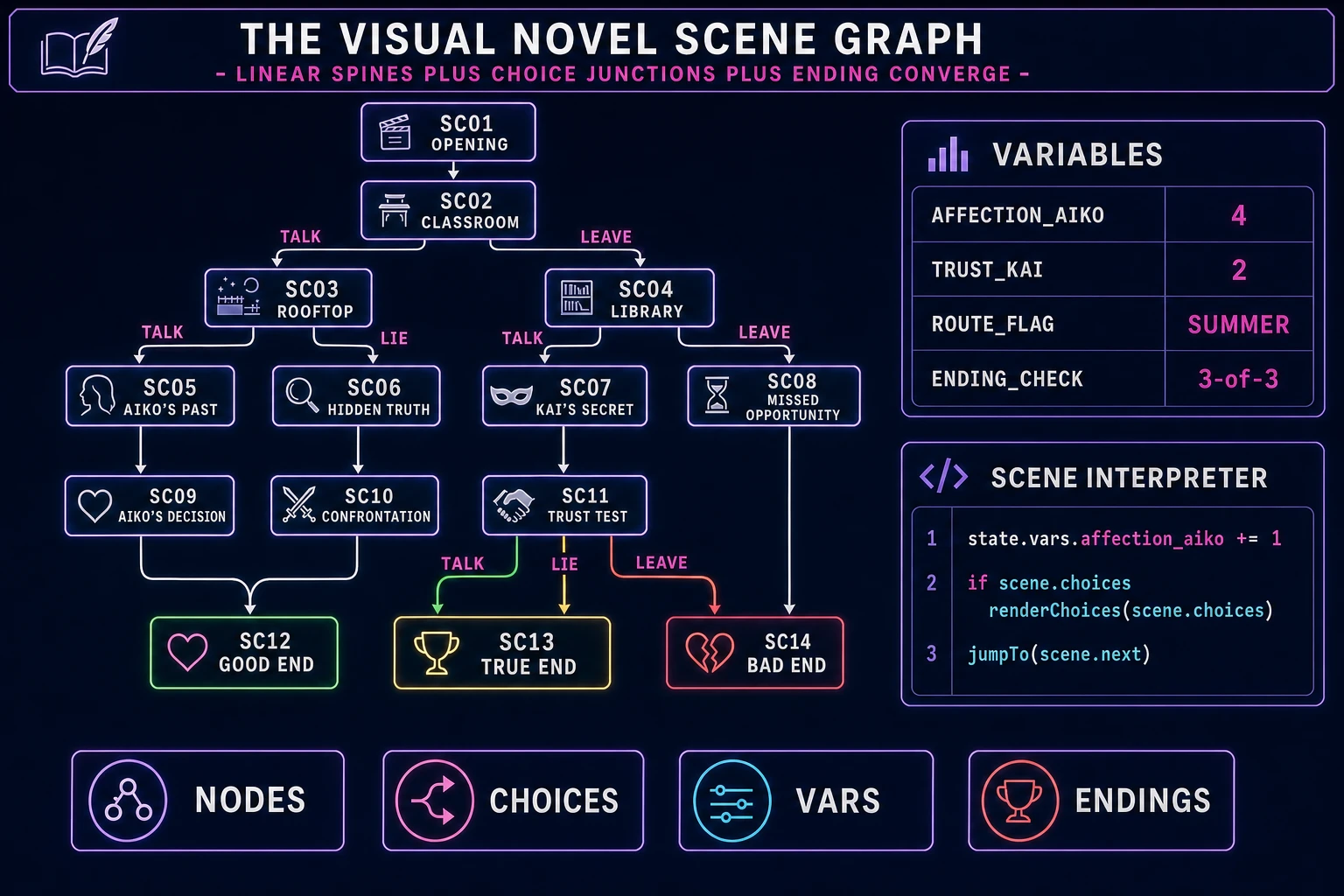
Visual novel scene graph diagram showing scene nodes with linear and choice branches, ending nodes for good, true, and bad endings, and a variables panel tracking affection and trust values
The visual novel scene graph: linear spines of scenes punctuated by choice junctions, colored end-nodes for the multiple endings, and a small variables panel tracking affection and trust values used at the ending-check convergence.

Pick your engine for how to make a visual novel: vanilla JS, Phaser 4, or WizardGenie

Three good browser targets in 2026, each with a very different trade-off. Vanilla JavaScript with a DOM-based layout is the honest default and the pick this guide recommends for a first build. A VN is fundamentally a stacked-image UI: three CSS-positioned img elements (background, character-left, character-right) plus a dialogue-box div plus a scene-interpreter script is under 400 lines and ships as a static HTML file. The HTMLAudioElement API handles BGM and dialogue voice playback natively; the Fetch API or a dynamic import() loads scene JSON on demand. No engine to install, no build step, deploy the whole game to any static host including GitHub Pages.

Phaser 4.2.1 "Giedi" (released 9 July 2026, verified against phaser.io/download/stable on 2026-08-10) becomes the right pick if you want smooth character-portrait tweening (fade-in, slide-in-from-left, subtle idle bob, sprite-shake on angry lines), particle effects for scene transitions, integrated audio timeline management so BGM cross-fades cleanly with voice ducking, or if the VN has any real-time gameplay interludes (rhythm mini-games, timed choices, action segments). Phaser bundles Scene management, an asset loader, and audio playback in one file — roughly 900 KB minified — and its Scene lifecycle maps cleanly onto VN chapter breaks. If you have already used Phaser on a previous game, use it here too; there is no benefit to switching back to vanilla DOM just because the presentation is static.

WizardGenie is not a separate rendering engine — it scaffolds whichever of the above you pick, from a single natural-language prompt. WizardGenie is the Sorceress game-native coding agent. It ships as both a desktop app (Windows installer with auto-update, available to Early Access supporters and above) and a no-install web build at the same URL. Its coding-model lineup covers Claude Opus 4.7, Claude Sonnet 4.6, GPT-5.5, Gemini 3.1 Pro, DeepSeek V4 Pro, Kimi K2.5, Grok 4.2, and MiniMax M2.7 (verified 2026-08-10 in src/app/_home-v2/_data/tools.ts). For a VN-scale project, any frontier model scaffolds the whole scene interpreter in one prompt. If you want to run cheap, pair a frontier planner (Claude Opus 4.7 or GPT-5.5) with a budget executor (DeepSeek V4 Pro or Kimi K2.5) and let the executor do the typing — the Dual-agent planner-and-executor pattern is the whole reason WizardGenie exists, and it lands most projects at roughly one-fifth the single-frontier cost.

Step 1 — write the script and design the branching choice tree

Nothing else in the pipeline matters if the script is not written first. A VN lives or dies on the writing, and every hour spent on assets before the script is a bet against the story. Open a plain text editor, sketch three to seven characters with one-paragraph bios each, pick a setting, and draft the branching outline as a bulleted tree: opening scene, first choice, two branches, first convergence, second choice, four branches, second convergence, ending selection. Do not write dialogue yet. Verify the tree is finite (no infinite loops), that every branch reaches an ending, and that every ending is reachable from at least one opening-choice combination. Twelve to twenty scenes is the sweet spot for a first VN — enough to feel like a story, small enough to finish.

Now convert the outline into the scene-graph JSON. Each scene is one object: {id: 'sc02_classroom', bg: 'bg_classroom_sunset', bgm: 'bgm_calm', speaker: 'Aiko', line: 'You always leave right after class...', choices: [{label: 'Talk to her', next: 'sc03_talk', effects: {affection_aiko: 1}}, {label: 'Leave', next: 'sc03_leave', effects: {trust_kai: -1}}]}. Linear scenes drop the choices array and take a next field instead. Convergence scenes look identical to linear scenes — the interpreter does not care that four different paths land on the same id. Ending scenes have neither choices nor next, and set a special ending field with a name.

Now write the dialogue. This is the part that cannot be delegated. A VN reader spends more time inside a single well-written line than any other browser genre, so the words carry the whole experience. Use short lines (a VN line is one to three sentences, not a paragraph), keep the speaker's voice distinctive per character, and lean on ellipses and short beats between speakers rather than long stage-direction paragraphs. If a scene needs an emotional beat, do it in one line and cut. When a scene grows past four lines, split it into two scenes chained with next so the click cadence stays snappy. Total dialogue for a one-hour first VN comes out around 400 lines — that is a real evening's work, not a weekend.
Step 2 — generate character sprites, backgrounds, and typed dialogue box in WizardGenie

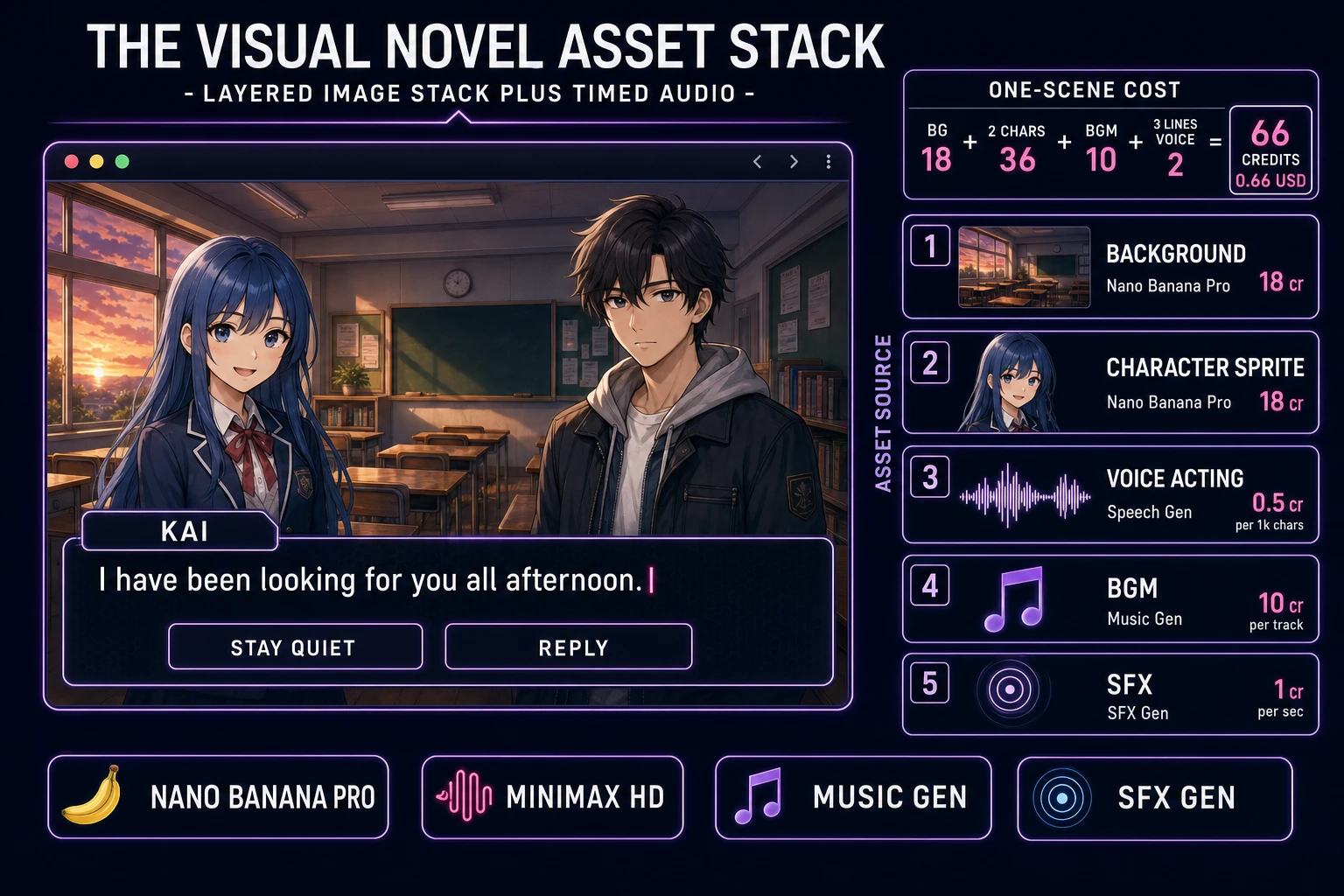
With the script written, open Sorceress AI Image Gen for the character sprites. Nano Banana Pro is the model to use for consistent character work: at 18 credits per generation (verified 2026-08-10 in src/lib/models.ts line 303 as credits: 18) it accepts up to 10 reference images per prompt (line 313 in the same file), which is exactly what a character with three expressions needs. Generate the neutral pose first at 3:4 or 2:3 aspect for portrait framing. Once the neutral is locked, feed the neutral back in as a reference image and prompt the smile, surprised, and angry variants — the reference-conditioning is how Nano Banana Pro keeps the face, hair, and outfit consistent across expressions. Five characters at three expressions each is 15 images, roughly 270 credits or 2.70 USD.

Now the backgrounds. Painted VN backgrounds are 16:9 full-bleed with no perspective tricks — the character sprites live above the background, so the background just needs to be a beautiful painted scene at a fixed camera angle. Four backgrounds (an exterior, an interior, a night scene, an emotional-peak scene) cover a first VN with room to reuse. Nano Banana Pro at 18 credits per generation lands 4 backgrounds at 72 credits or 0.72 USD. Prompt in the "anime background painting, 16:9, no characters, soft golden hour light" register so backgrounds compose cleanly under the character portraits without competing for attention.

Now the interpreter. Open WizardGenie, drop in your scenes.json plus a bare-bones index.html shell, and give the agent one paragraph: "Build a browser visual novel scene interpreter. Read scenes.json on load. Render a full-bleed background image, up to two character portraits in left and right slots with fade transitions, and a dialogue box at the bottom with a name-tag and typed-in text (30 milliseconds per character, Space or Enter to skip typing). On click after the typing completes, either jump to scene.next or render scene.choices as inline buttons over the dialogue box. On choice click, apply scene.choices[N].effects to state.vars and jump to next. Autosave state to localStorage every scene. Add a New Game and a Continue button on the title screen. Add a menu bar with Save, Load, Back to Title, and Volume." Feed that to any coding model in the lineup and the interpreter scaffolds in under two minutes. The remaining hour of coding is naming polish — a settings modal, a log-of-past-lines panel, a save-thumbnail generator — each layered on with follow-up prompts.

Visual novel asset stack showing a rendered VN scene with painted background, two character portraits, dialogue box with speaker name and choice buttons, plus per-asset credit costs from Sorceress tools
The visual novel asset stack: layered painted background plus stacked character portraits plus a typed dialogue box, with each asset sourced from the matching Sorceress tool at its verified 2026 credit cost.

Step 3 — Speech Gen for voice acting, Music Gen for OST, SFX Gen for stingers

A VN with voice acting reads more than twice as long per session as a silent one, per the same audience-behaviour analysis the genre has tracked since the CD-ROM PC-98 era (documented on en.wikipedia.org/wiki/Visual_novel and verified 2026-08-10). Voice acting is also the single asset category where AI generation has closed the largest gap in the last twelve months, so the 2026 pipeline treats voice acting as the default rather than the optional add-on. Open Speech Gen. Sorceress Speech Gen bills at 0.5 credits per 1,000 characters on the MiniMax HD model or 0.3 credits per 1,000 characters on Turbo (verified 2026-08-10 in src/app/speech-gen/page.tsx lines 28 to 29). A first VN of 400 lines averaging 60 characters is 24,000 characters — 12 credits or 0.12 USD on HD, essentially free. Pick a preset voice per character from the 17 built-in voices (9 male, 8 female), assign an emotion per line from the 8 available emotion tags (Neutral, Happy, Calm, Sad, Angry, Fearful, Disgusted, Surprised), and batch-generate. If you want a distinctive cloned voice for the protagonist, VOICE_CLONE_CREDITS is 400 credits (line 31 of the same file) for one clone that then reads all subsequent lines for free.

Now the soundtrack. Open Music Gen. Music Gen bills 10 credits per generation (verified 2026-08-10 in src/app/music-gen/page.tsx line 28 as MUSIC_CREDIT_COST = 10). Three tracks cover a first VN: a menu-and-title loop (light, hopeful, 60 seconds), a calm scene bed (piano-forward, ambient, 90 seconds), and a tense scene bed (strings-forward, tighter tempo, 90 seconds). Prompt each with mood plus BPM plus lead instrument. Two or three generations per track to nail the loop, so budget 60 to 90 credits for the trio (0.60 to 0.90 USD). Add 2 credits per WAV render if you want lossless (WAV_CREDIT_COST = 2, same file line 31); MP3 is fine for browser delivery.

Finally the stingers. Open SFX Gen. SFX Gen bills 1 credit per second (verified 2026-08-10 in src/app/sfx-gen/page.tsx line 23 as SEED_AUDIO_CREDITS_PER_SECOND = 1). Four stingers cover a first VN: a page-flip on scene advance, a ui-click on choice select, an ambient rain loop for the sad scene, and a heartfelt swell for the emotional peak. Each is 1 to 5 seconds. Total under 10 credits (0.10 USD). Wire each stinger into the interpreter as a one-line new Audio(path).play() call at the right scene event. Voice ducking (drop BGM to 50 percent volume while dialogue voice plays, restore on line end) is a five-line addition to the interpreter and one of the biggest audio-quality improvements a VN can make.

What a how to make a visual novel project costs on Sorceress in 2026

Concrete asset and generation budget for a browser visual novel — five characters, three expressions each, four background locations, one hour of playtime, roughly 400 lines of voiced dialogue — from empty repo to zip-and-ship playable, all numbers verified 2026-08-10 against local Sorceress source:

  • Character portraits (AI Image Gen): 15 images at Nano Banana Pro 18 credits each = 270 credits (2.70 USD). Reference-conditioning keeps face, hair, and outfit consistent across the three expressions per character.
  • Background paintings (AI Image Gen): 4 backgrounds at Nano Banana Pro 18 credits each = 72 credits (0.72 USD). Full-bleed 16:9, no characters, painted anime register.
  • Voice acting (Speech Gen): 400 lines averaging 60 characters = 24,000 characters at MiniMax HD 0.5 credits per 1,000 characters = 12 credits (0.12 USD). Preset voice plus emotion tag per line. Add one 400-credit voice clone (4.00 USD) if you want a specific actor timbre for the protagonist.
  • Background music (Music Gen): 3 tracks at 10 credits per generation, 2 to 3 tries each = 60 to 90 credits (0.60 to 0.90 USD). Add 2 credits per WAV render if you need lossless.
  • Stingers and ambient loops (SFX Gen): 4 clips at 1 credit per second, 1 to 5 seconds each = under 10 credits (0.10 USD).
  • WizardGenie coding time: effectively free on the Sorceress side. Model-side API cost for a 3-to-5-hour prompt session on a cheap Executor like DeepSeek V4 Pro is typically under 0.75 USD.
  • Total for one complete browser VN: roughly 420 to 460 credits without voice clone, or 820 to 860 credits with one voice clone, or roughly 4.20 to 8.60 USD in Sorceress credits, plus under 0.75 USD in model API time. Under 10 USD end-to-end for a first voiced visual novel with painted anime backgrounds.

Sorceress bills 100 credits per dollar at the standard rate (CREDITS_PER_DOLLAR = 100 in src/lib/models.ts line 69). New accounts start with 100 free credits (SIGNUP_GRANT = 100 in src/app/api/admin/credits/route.ts line 12), which covers the full audio pack (voice acting plus BGM plus stingers) with room for a first character portrait. The Sorceress Lifetime tier at 49 USD one-time (LIFETIME_PRICE = 49 in src/app/plans/page.tsx line 51) covers unlimited Speech Gen, Music Gen, and SFX Gen use — a serious win for a VN because voice acting and BGM are the two per-line asset categories, and a longer story quickly outgrows a small credit balance. For a single-VN build, the free grant plus a modest top-up covers everything.

For related browser-game pipelines that share this write-the-script-generate-the-assets-scaffold-the-interpreter-ship-the-browser-build spine, the closest reads are Branch an AI Text Adventure (Browser Quest Loop 2026) for the sibling text-only branching-narrative format, Ink a Visual Novel Maker (Browser AI 2026 Path) for the tools-focused companion piece on picking a VN authoring stack, Compose an AI Character Description Generator (Bio Card) for the character-bio companion piece that pairs with the portrait pipeline, and Guess How to Make Wordle (Browser Guess Grid 2026) for the other zero-image-generation weekender in the same browser-classic series. The Sorceress Tools Guide is the master index for every tool the guide referenced. Under ten dollars, one weekend, and how to make a visual novel is a done deal.

Frequently Asked Questions

Do I need Ren'Py or TyranoBuilder to make a visual novel?

No. Ren'Py 8.5.3 (released 15 May 2026, verified against renpy.org/latest.html on 2026-08-10) and TyranoBuilder are the two most-recommended VN engines because both hide the scene-graph plumbing behind a scripting DSL. They ship a lot of features you do not need on day one - full localisation, save-game slots with thumbnails, transition libraries, gallery unlocks, achievement systems. For a first visual novel, a scene object with an id, a background image, a speaker, a line of dialogue, and a choices array is enough, and that data structure fits in twenty lines of JSON. The browser-first path in this guide skips the engine install and gives you a working VN loop in a single HTML file with a JavaScript scene interpreter. Ship a first VN in this pattern, learn what you actually need, and only reach for a heavier engine if you hit its real strengths (like Live2D animation for character portraits, which Ren'Py 8.5 now supports on the web platform).

How is a visual novel different from a text adventure or an interactive fiction Twine story?

The three formats share DNA and diverge on presentation. A text adventure like Zork parses free-text commands (GO NORTH, TAKE LAMP) and renders responses as prose - no character art, no voice, no BGM required. An interactive fiction Twine story renders labelled passages of text with hyperlinked choices and optional variables - Twine 2.12.0 (released 10 April 2026, verified against twinery.org on 2026-08-10) is the canonical tool, and the format leans on prose and typography. A visual novel commits to a specific audiovisual layout: a full-bleed background painting, one to three character portraits layered on top with slot positions (left, center, right), a dialogue box at the bottom with speaker name and typed-in text, and background music that changes with scene mood. The choice UI appears as inline buttons over the dialogue box. All three share a branching-graph substrate. If your idea is more prose than presentation, Twine ships faster. If your idea leans on character expressions, painted backgrounds, and voice acting, the visual novel format earns its bigger asset budget.

How do I structure the branching scene graph so choices actually change the ending?

The simplest branching structure that produces multiple endings is a directed acyclic scene graph with numeric affinity variables. Each scene is a node with an id, dialogue, and either a next-id (linear next scene) or a choices array (each choice has a label and a next-id). Choices can also mutate variables - for example, choosing to help NPC A adds one to affection_a and subtracts one from trust_b. At convergence points (the end of a chapter, or the final scene), branch on the variables: if affection_a is greater than or equal to three and trust_b is greater than or equal to two, jump to the good ending; if only one variable clears its threshold, jump to a middle ending; otherwise a bad ending. Three variables and three thresholds yield seven distinct endings from a modest scene count. This is the same pattern Ren'Py, TyranoBuilder, and most published VNs use under the hood, and it fits in two dozen lines of JSON plus a fifteen-line interpreter. Do not build a full state machine with combinatorial explosion on the first VN; three variables is plenty.

Should I use Phaser 4 or vanilla JavaScript with DOM for the VN engine?

Vanilla JavaScript with a DOM-based dialogue box is the honest default for a first visual novel because 95 percent of the VN loop is showing an image, layering another image on top, typing text into a box, and waiting for a click. A single HTML file with three CSS-positioned img elements (background, character-left, character-right), a dialogue-box div, and a scene-interpreter script is under 400 lines and ships as a static site. Phaser 4.2.1 Giedi (released 9 July 2026, verified against phaser.io/download/stable on 2026-08-10) becomes the right pick if you want smooth character-portrait tweening (fade-in, slide-in-from-left, subtle idle bob), particle effects for scene transitions, integrated audio timeline management for BGM cross-fade with voice ducking, or if the VN has any real-time gameplay interludes (mini-games, timed choices, action segments). Both engines can render the classic full-bleed layout because it is fundamentally a stacked-image UI - the engine choice affects how much tweening polish you get for free. Ship your first VN in vanilla JS with a static site, learn what the players actually notice, then port to Phaser for the second one if the tween polish would matter.

How much does it cost to generate all the assets for a visual novel on Sorceress?

A short kinetic-novel-scale VN (five characters, four background locations, one hour of playtime, roughly 400 lines of dialogue) budgets like this against the 2026 Sorceress rate card (all constants verified against local source on 2026-08-10). Character portraits: five characters with three expressions each is 15 images from AI Image Gen. Nano Banana Pro at 18 credits per generation (src/lib/models.ts line 303) is the model of choice for consistent character reference; 15 images is 270 credits or 2.70 USD. Backgrounds: four locations at high quality is 4 images; at Nano Banana Pro that is another 72 credits or 0.72 USD. Voice acting: MiniMax HD TTS bills at 0.5 credits per 1,000 characters (src/app/speech-gen/page.tsx line 28). 400 lines averaging 60 characters is 24,000 characters, or 12 credits, or 0.12 USD - basically free. Add one 400-credit VOICE_CLONE_CREDITS (line 31) per unique cloned voice if you want a specific actor timbre. Background music: three tracks (menu, calm scene, tense scene) at 10 credits each (src/app/music-gen/page.tsx line 28) is 30 credits or 0.30 USD. Sound effects: page-flip stinger, ambient rain loop, ui-click, and a heartfelt swell is 5 to 10 seconds at 1 credit per second (src/app/sfx-gen/page.tsx line 23) - under 10 credits or 0.10 USD. Total for one full VN: roughly 400 credits (4.00 USD) plus optional voice-clone credits. The free 100-credit signup grant (src/app/api/admin/credits/route.ts line 12) covers the audio pack outright and pays for the first character portrait; a small top-up covers the rest.

Sources

  1. Visual novel - Wikipedia
  2. Phaser 4 - HTML5 Game Framework
  3. MDN - Fetch API and dynamic import (scene loader)
  4. MDN - HTMLAudioElement (dialogue voice playback)
Written by Arron R.·3,068 words·14 min read

Related posts