Volley How to Make Pong (Browser Two Paddle 2026)

By Arron R.14 min read
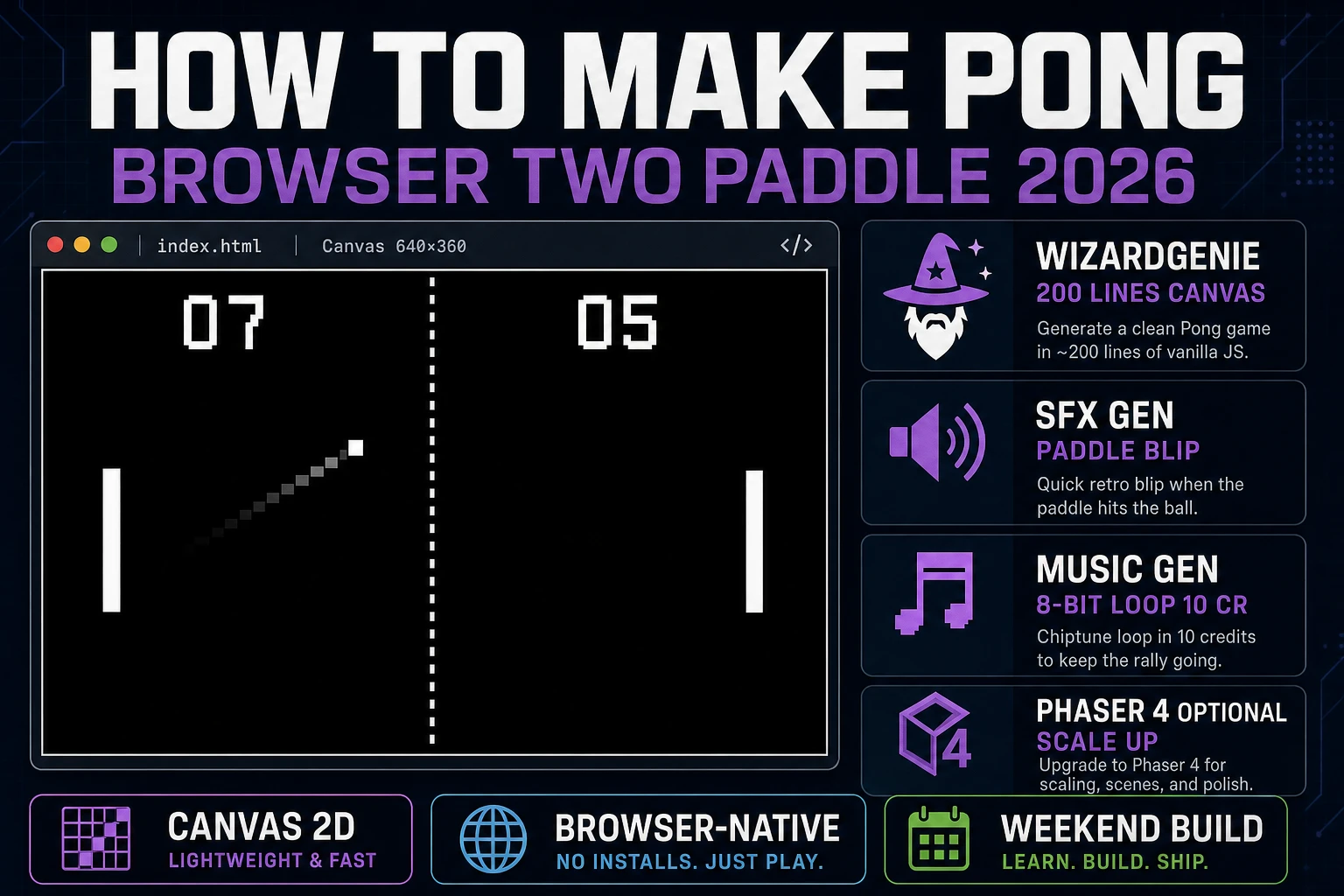
How to make Pong in 2026 as a browser two-paddle game: draw the arena as Canvas rectangles, prompt WizardGenie for the 8-segment paddle reflect and speed-up-on-

The one-line answer to how to make Pong in 2026 is: two rectangles, one square, a game loop that reads two keyboard inputs and reflects the square off the rectangles at an angle based on where it hits. That is the entire game, and it has been the entire game since Allan Alcorn built it as a training exercise at Atari in 1972. What has changed is the pipeline. In 2026, you do not solder a Hitachi television to a wooden cabinet like Alcorn did. You open a browser, prompt WizardGenie for a vanilla HTML5 Canvas Pong scaffold with the eight-segment paddle reflect and speed-up-on-return physics, generate a paddle-blip and an 8-bit chase loop in SFX Gen and Music Gen, and ship a 200-line browser build in an afternoon. Zero art credits required. The paddles are white rectangles; that is not a limitation, that is the correct look.
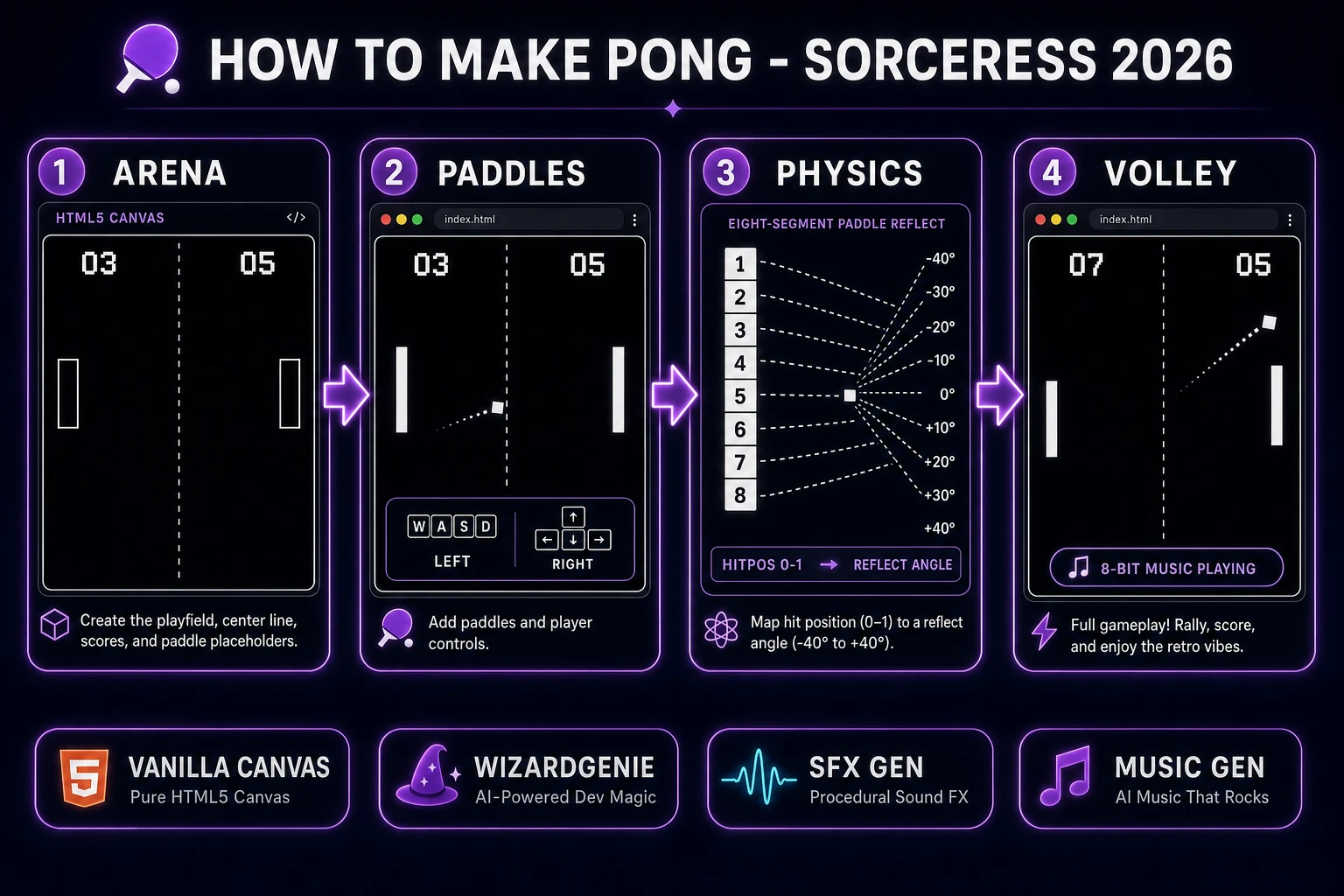
How to make Pong browser two-paddle pipeline: Canvas arena with dashed center line, two white paddles, eight-segment reflect diagram, and finished volley scene with WizardGenie and Sorceress toolset
The 2026 two-paddle browser recipe: draw the arena on a black Canvas, wire keyboard input for both paddles, let WizardGenie scaffold the eight-segment paddle reflect and speed-up-on-return physics from Alcorn's 1972 original, and add 8-bit chase music and paddle-blip SFX from Sorceress.

What "how to make Pong" actually means in 2026

The query "how to make Pong" hides three different requests. Some searchers want a faithful clone of Alcorn's 1972 arcade original with the exact eight-segment paddle reflect, the speed-up-on-return ball, the paddle that cannot reach the top of the screen (a defect Alcorn kept because it added difficulty), and the score-to-eleven win condition. Some want a modern two-player browser game they can share with a friend over a link. And some want to learn a game loop, keyboard input, and collision response on the smallest possible playing field before moving on to a bigger project. The honest default is the first: a faithful reproduction. Pong is small enough that the "faithful clone" and the "portfolio starter" are the same 200 lines of code. Section seven costs the whole project out at under 45 cents in Sorceress credits, which is worth reading before you commit.

A quick history anchor, verified against Wikipedia's Pong page on 2026-08-09: Pong is a 1972 sports video game developed and published by Atari, designed by Allan Alcorn as a training exercise Nolan Bushnell secretly assigned to him under the cover story of a General Electric contract. The prototype was installed at Andy Capp's Tavern in Sunnyvale in August 1972 and had to be serviced within days because the coin box overflowed with quarters. Atari announced the coin-op cabinet on 29 November 1972 and shipped over 8,000 units by the end of 1974. Home Pong reached Sears in October 1975 at USD 98.95 with a one-year warranty. Alcorn's decisions that made the game feel alive were the eight-segment paddle (the ball's return angle depends on where it hits), the speed-up-on-return physics (the ball accelerates the longer the rally lasts, resetting only on a miss), and the deliberately imperfect paddle top-bound (the paddle cannot reach the top of the screen so a two-skilled-player rally cannot go forever). Every one of those design choices is fair game to replicate. The name "Pong" and the Atari Fuji logo are not.

The Pong game loop in one minute (input paddle ball bounce score)

Five moving parts, one strict order per frame. First, read player input — W/S for the left paddle, Up/Down for the right paddle (or add an AI opponent flag that overrides one side). Second, advance both paddles by their input direction times their max speed, clamped to the top and bottom of the arena (or to the top-minus-a-little to honour Alcorn's deliberate top-bound defect). Third, advance the ball by its current velocity. Fourth, check collisions in this exact sub-order: top and bottom wall (reflect vertical velocity, no speed change), left and right paddle (reflect horizontal velocity, adjust vertical velocity by the eight-segment hit-position math, and increase overall speed by about 3%), and left and right edge of the arena (award a point to the opposite side and re-serve the ball toward the losing side at the base speed). Fifth, check win state — if either score reaches 11, freeze the arena, display a game-over overlay, and wait for a restart input.

That is the entire game. Five steps, executed once per frame at 60 frames per second, driven by requestAnimationFrame. Everything else — a scoreboard font, a serve-toward-loser rule, a countdown before serve, an AI opponent for solo play, a Pong Doubles four-paddle mode — is polish on top of this core loop. Keep the five-step order strict, resolve wall collisions before paddle collisions before edge collisions, and the game feels arcade the first time you play it. Reverse the collision order or skip the speed-up-on-return step and it feels like a homework assignment.
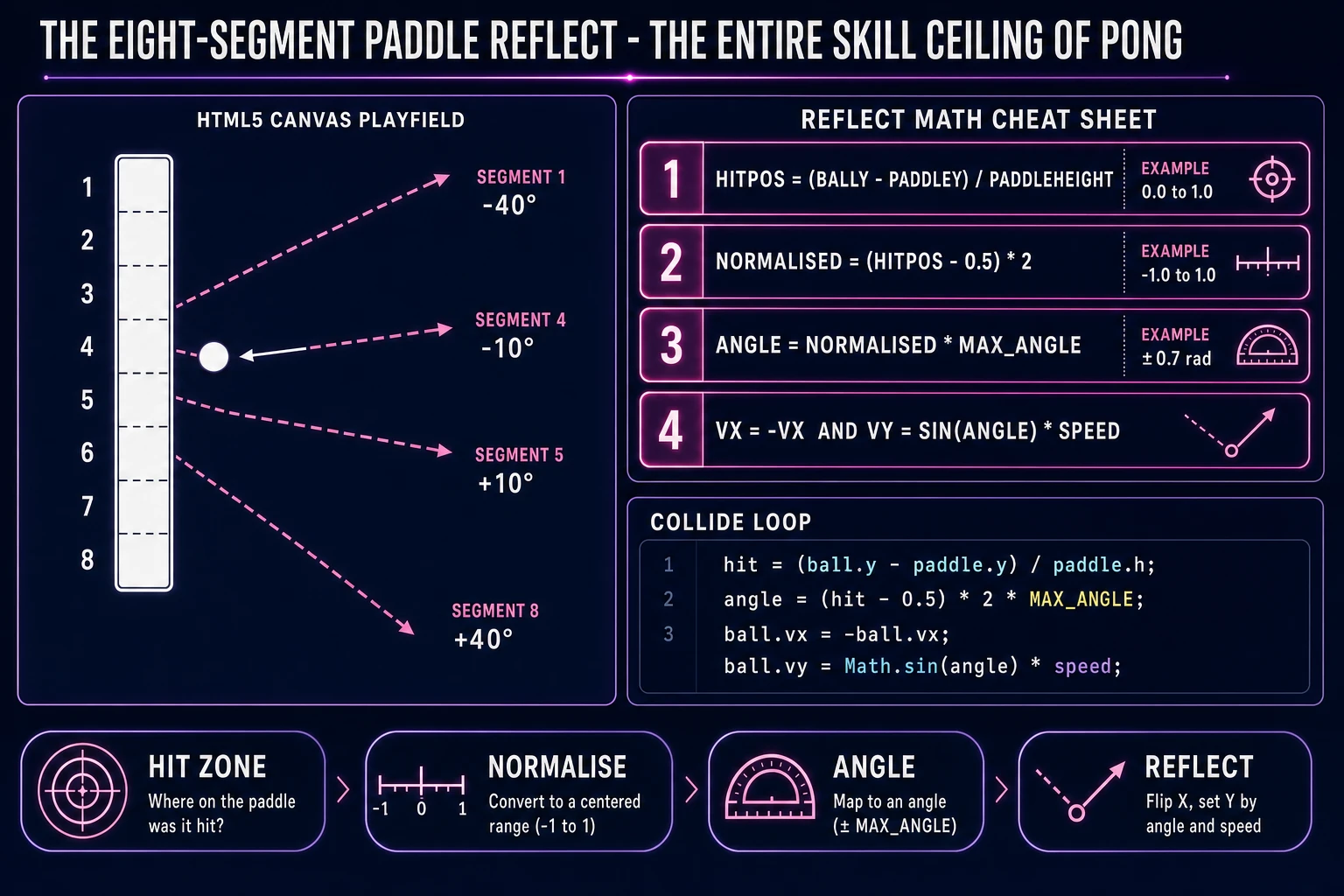
Eight-segment paddle reflect physics cheat sheet: hit-position normalise, angle calc, and reflect code snippet for a Pong-style two-paddle game
The eight-segment paddle reflect, verified against Alcorn's 1972 design per the Pong Wikipedia article on 2026-08-09: compute the hit position, normalise it to -1..1, multiply by a max-angle constant, and use the result as the new vertical velocity while flipping the horizontal velocity. Six lines of JavaScript.

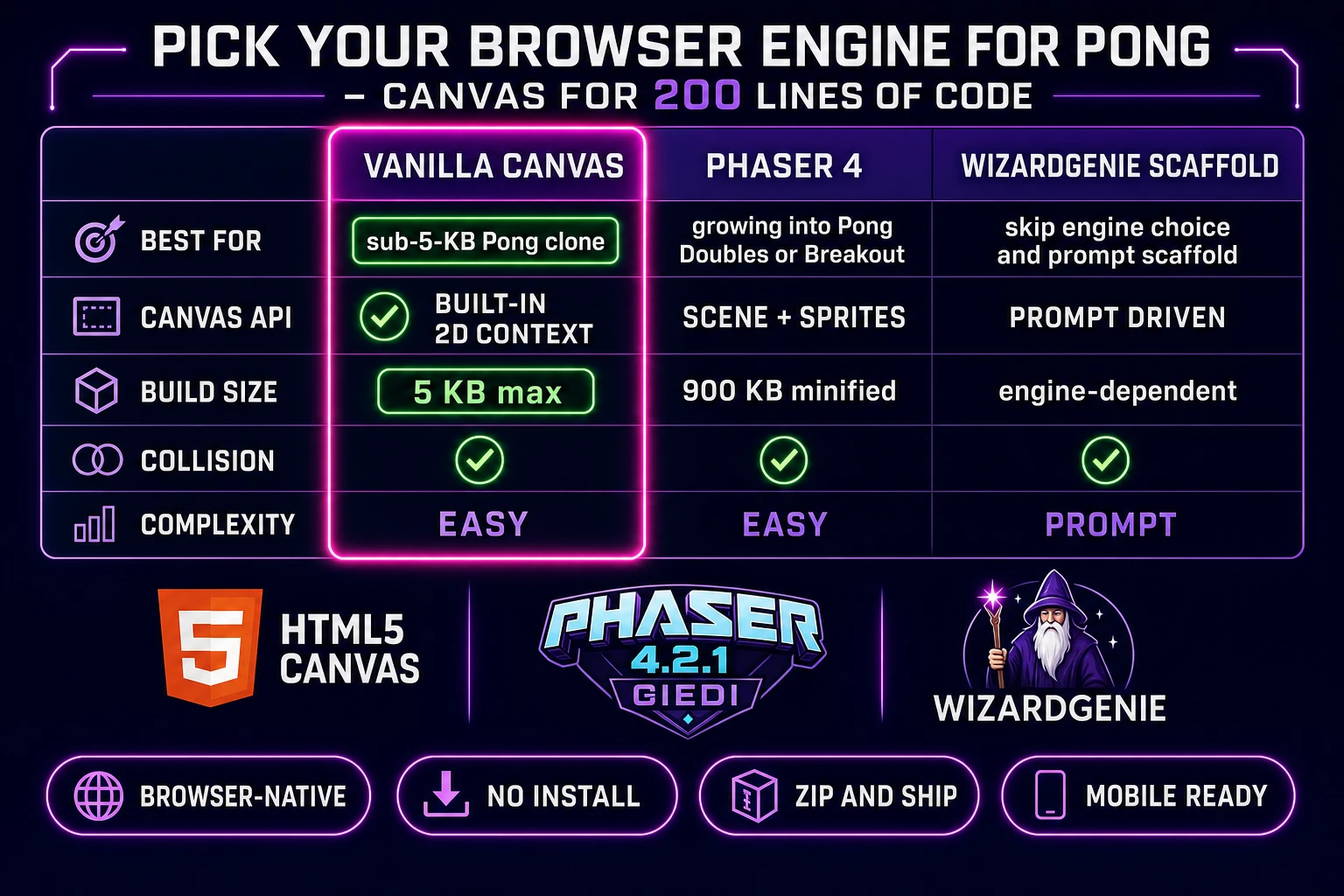
Pick your engine for how to make Pong: vanilla Canvas, Phaser 4, or WizardGenie

Three good browser targets in 2026, each with a different trade-off. Vanilla HTML5 Canvas 2D plus requestAnimationFrame is the honest default for Pong specifically. The entire game is two white fillRect() calls for paddles, one fillRect() for the ball, one fillText() for the scoreboard, a keydown/keyup pair for input, and about 150 lines of physics. Bundle size is under 5 KB minified, which loads instantly on a bad hotel wifi. This is the pick 80% of readers should take, and it is what Alcorn would build today if he were doing the training exercise in a browser.

Phaser 4 is the second pick if you intend to grow the project. Phaser 4.2.1 "Giedi" was released on 9 July 2026 (verified against phaser.io/download/stable on 2026-08-09) and ships arcade physics, scene management, and animated sprites — primitives you do not need for a bare Pong clone, but that pay off the moment you add a Pong Doubles four-paddle mode, an intro screen, a settings scene, or a Breakout follow-up (Atari's own 1976 Pong follow-up, which is Pong with the right paddle replaced by a wall of bricks). Bundle is roughly 900 KB minified, which is fine on modern connections. If the goal is "ship one Pong and stop", pick vanilla Canvas; if the goal is "ship one Pong, then one Pong Doubles, then one Breakout", pick Phaser 4 and grow the scaffold. Three.js is the wrong pick for this project because Pong is a two-dimensional table-tennis simulation with no camera perspective — the entire 3D scene graph is overhead you never use.

The third option: skip the engine choice and prompt WizardGenie for a scaffold in whichever framework you name. WizardGenie is the Sorceress game-native coding agent, shipping as both a Windows desktop installer (Early Access supporters and above) and a no-install web build at the same URL. Its coding-model lineup (verified 2026-08-09 in src/app/_home-v2/_data/tools.ts lines 734 to 742) covers Claude Opus 4.7, Claude Sonnet 4.6, GPT-5.5, Gemini 3.1 Pro, DeepSeek V4 Pro, Kimi K2.5, Grok 4.2, and MiniMax M2.7 — the current frontier plus the cheap-and-fast tier. For a Pong-scale project, the cheapest executor in the lineup (DeepSeek V4 Pro or Kimi K2.5) scaffolds the whole game on the first prompt and iterates for pennies in model-side API cost. This is one of the few cases where a Planner+Executor split is overkill: the whole project is 200 lines and one prompt.
Comparison table of browser engines for a Pong clone: vanilla Canvas versus Phaser 4 versus WizardGenie scaffold across best-for canvas-api build-size collision and complexity
Vanilla Canvas is the honest default for a browser Pong when the target is a 200-line two-paddle build. Phaser 4 pays off the moment you grow into Pong Doubles or Breakout. WizardGenie scaffolds either from a single prompt.

Step 1 — render the arena, paddles, and ball, then wire keyboard input

Open a text editor, create a single index.html with an inline <canvas> element sized 800 by 500 pixels, and a <script> tag with the game code. Grab the 2D rendering context, define a black-background clear() function that fills the entire canvas each frame, and add three constants: paddle width (about 10 pixels), paddle height (about 80 pixels), and ball size (about 10 pixels). Give each paddle a state object with an x, a y, a speed (about 500 pixels per second), and an input flag; give the ball a state object with an x, a y, a velocity vector (vx and vy, starting at about 400 and 0 pixels per second), and a current-speed scalar you increment on each paddle hit.

Draw the arena in a single render pass: fill the whole canvas black, draw a thin dashed vertical white line down the center (a dozen short fillRect() calls in a loop, or a single setLineDash() and strokeStyle call), then render the two paddles as white fillRect(paddle.x, paddle.y, paddleW, paddleH), and finally the ball as fillRect(ball.x, ball.y, ballSize, ballSize). The score digits go at the top on either side of the center line using ctx.fillText(score, x, y) with a large monospace font like "64px Courier". This is the entire visual layer of the game. Do not add sprites; do not add gradient fills; do not add anti-aliasing tricks. The 1972 look is the correct look and it makes the game feel like a game.

Wire input as a keydown/keyup pair on window that flips input flags on the paddle state: W and S for the left paddle, Up and Down arrow keys for the right paddle. In each frame's update tick, translate input flags into paddle velocity (up flag = -paddle.speed, down flag = +paddle.speed, both = 0), then integrate paddle.y by paddle velocity times the frame delta, then clamp paddle.y to the arena top and bottom (with a small offset if you want to honour Alcorn's top-bound defect — give the top clamp a slight buffer so the paddle cannot quite reach the top corner). Test by opening the HTML file in a browser and pressing keys. If both paddles move smoothly, keyboard input is done. Total effort so far: about 40 minutes of typing.
Step 2 — wire ball physics and the eight-segment paddle reflect in WizardGenie

Open WizardGenie. The seed prompt for a browser Pong clone is one paragraph. "Given the following vanilla HTML5 Canvas scaffold with two paddles and one ball (paste your code here), implement the full Pong physics loop. Ball moves at initial speed 400 pixels per second horizontal, 0 vertical. On top and bottom wall contact, flip vertical velocity (no speed change). On left or right paddle contact, compute the hit position as (ball.y + ballSize/2 - paddle.y) / paddleHeight yielding 0 to 1, subtract 0.5 and multiply by 2 to normalise to -1 to +1, multiply by a max angle constant of 0.7 radians (40 degrees), use the result as the new vertical velocity component while flipping horizontal velocity, preserve overall speed but increase it by 3 percent on each paddle hit. On left edge contact, award right player a point; on right edge, award left player a point; either way re-serve the ball from the arena centre toward the loser at the base speed. Add an on-screen scoreboard at the top, first to 11 wins, and a serve delay of 0.8 seconds between rallies with a countdown 3, 2, 1 in the middle." Feed that to any coding model in the lineup and you get a working scaffold in under two minutes.

Tuning happens after the scaffold. Play the build, notice that the ball feels too fast on hard-angle returns, tell WizardGenie "cap the ball speed at 1000 pixels per second so long rallies do not become impossible". Play again, notice the AI paddle (or the second-player paddle in solo testing) tracks the ball too rigidly, "add a predictive AI opponent for the right paddle: at the moment the ball crosses the arena centre heading right, extrapolate the ball's trajectory including wall bounces to find the paddle-x impact point, and move the right paddle toward that Y coordinate over the available time; add a random offset of about 20 percent of paddle height so the AI misses on hard-angle shots". Play again, notice that the game-over screen just freezes without feedback, "add a WINNER announcement with the winning side's score highlighted and a press-space-to-restart hint". Each pass is a natural-language iteration; the agent edits the code, the browser reloads. Six or seven passes and Pong feels arcade.

The most important tuning pass is the ball speed-up curve. Get it wrong and Pong is boring; get it right and Pong feels alive. Alcorn's 1972 original speeds up the ball the longer a rally lasts, resetting the speed only on a miss (per the Wikipedia article verified 2026-08-09). A 3% multiplicative increase per paddle hit is the honest starting point — slow enough that a rally of 5 hits still feels controllable, fast enough that a rally of 20 hits becomes a test of nerve. Cap it at about 2.5x the starting speed so a rally of 50 hits is theoretically possible but requires two skilled players. Skip the speed-up entirely and the game has no dramatic arc; the ball just bounces at a constant rate forever and the rally never builds tension.

Step 3 — paddle-blip in SFX Gen, chase-theme in Music Gen, AI opponent tuning

Pong needs zero AI Image Gen credits. The paddles are white rectangles, the ball is a white square, the arena is black, and the scoreboard is a monospace font. This is the correct look for a two-paddle browser game in 2026 — it is instantly recognisable as Pong, it renders identically on every device, and it costs nothing in image credits. The one exception: if you want to ship a themed variant (Neon Pong, Retro Amber Pong, Space Pong with a starfield background), generate a single 1024-wide background image in AI Image Gen for 5 to 15 credits (0.05 to 0.15 USD) and set it as the canvas's background-image in CSS. Everything else stays as vector rectangles.

For audio, open SFX Gen first because it is where Pong's identity lives. The original 1972 arcade cabinet had exactly three sounds: a paddle blip (the "pong" that gave the game its name), a wall blip (a slightly different tone from the paddle), and a score chime (a longer tone on the miss). Alcorn generated all three from the sync generator on his prototype board because he had no room in the electronics for a dedicated sound chip — a happy accident that became the game's audio signature. Reproduce all three in Sorceress SFX Gen at 1 credit per second (verified 2026-08-09 in src/app/sfx-gen/page.tsx line 23 as SEED_AUDIO_CREDITS_PER_SECOND = 1). Prompt the paddle blip as "short 0.08-second square-wave beep at 240 Hz, arcade paddle-hit tone, no reverb"; the wall blip as "short 0.08-second square-wave beep at 460 Hz, higher-pitched arcade wall-hit tone"; the score chime as "1.2-second descending square-wave arpeggio from 480 down to 120 Hz, sad-trombone miss tone". Four short clips at under 1.5 seconds each with minimum-1-credit rounding is about 4 to 6 credits total (0.04 to 0.06 USD). Attach each clip to the corresponding event in the physics loop and Pong immediately has a personality.

Then open Music Gen. This is optional — the 1972 arcade original had no background music, only the three sync-generator blips — but a 20-second 8-bit chase loop under the rally adds pressure to the game feel. Prompt "20-second 8-bit chip-tune chase loop, 140 BPM, minor key, tense but not aggressive, seamless loop, square-wave lead over a running bassline, no drums". Music Gen bills 10 credits per generation (verified 2026-08-09 in src/app/music-gen/page.tsx line 28 as MUSIC_CREDIT_COST = 10). Preview and regenerate until the tension level is right; one or two tries is typical, so budget 10 to 20 credits (0.10 to 0.20 USD). Export as MP3, or add 2 credits for WAV per line 31's WAV_CREDIT_COST = 2. Attach the loop as a background <audio> element that plays during a rally and pauses on serve; the contrast between "music playing during a rally" and "silence during the countdown" is the single easiest way to add drama to a Pong clone.

What a how to make Pong project costs on Sorceress in 2026

Concrete asset and generation budget for a browser two-paddle clone from empty repo to zip-and-ship playable, all numbers verified 2026-08-09 against local Sorceress source:

  • Paddle, ball, and arena art (AI Image Gen): zero credits — the 1972 look is the correct look and every visual is a Canvas fillRect() call. Optional themed background: 5 to 15 credits (0.05 to 0.15 USD) for a single 1024-wide image if you want Neon Pong or Space Pong.
  • Paddle blip, wall blip, score chime, game-over jingle (SFX Gen): 1 credit per second, 4 short clips at under 1.5 seconds each with minimum-1 rounding, so roughly 4 to 8 credits (0.04 to 0.08 USD). This is where Pong's identity actually lives.
  • 8-bit chase loop (Music Gen): 10 credits per generation, 1 to 2 tries typical, so 10 to 20 credits (0.10 to 0.20 USD). Optional but transformative for game feel. Add 2 more credits if you want WAV.
  • WizardGenie coding time: effectively free on the Sorceress side. Model-side API cost for a one-to-two-hour prompt session on a cheap executor like DeepSeek V4 Pro is typically under 0.20 USD for a Pong-scale project.
  • Total for one complete browser two-paddle build: 14 to 43 credits, or roughly 0.14 to 0.43 USD in Sorceress credits, plus under 0.20 USD in model API time. Under 65 cents end-to-end for a first Pong clone.

Sorceress bills 100 credits per dollar at the standard rate (CREDITS_PER_DOLLAR = 100 in src/lib/models.ts line 69). New accounts start with 100 free credits (SIGNUP_GRANT = 100 in src/app/api/admin/credits/route.ts line 12), which covers the entire Pong project three times over with 50 credits still on the balance for a second experiment. The Sorceress Lifetime tier at 49 USD one-time (LIFETIME_PRICE = 49 in src/app/plans/page.tsx line 51) is overkill for a Pong-scale project but pays for itself the first time you build a game with a full soundtrack — a Pong Doubles four-player mode, a Breakout follow-up, or a full rhythm game where the audio budget is the whole project.

For related browser-game pipelines that share this "prompt the coder, generate the audio, ship the browser build" spine, the closest reads are Flap How to Make Flappy Bird (Browser Loop 2026) for the same one-mechanic-plus-scoring pipeline on a different single-input classic, Stack How to Make Tetris (Browser Falling Blocks 2026) for the grid-based version of the same "public mechanic + Sorceress audio" pattern, Chomp How to Make Pac-Man (Browser Dot Muncher 2026) for a tile-based cousin with four AI opponents instead of one, Mate How to Make a Chess Game (Browser AI Loop 2026) for the deeper AI-opponent pattern, and Weave How to Make a Maze (Browser Generator Loop 2026) for the procedural-generation cousin. The Sorceress Tools Guide is the master index for every tool the guide referenced. Under 65 cents, one afternoon, and how to make Pong — the mechanic Alcorn built in 1972 — is a done deal.

Frequently Asked Questions

Is it legal to make my own Pong clone?

The mechanic (two rectangular paddles and a ball bouncing between them) is fair use. Atari has owned the Pong trademark since 1972 and still uses it commercially, most recently on the Atari 50: The Anniversary Celebration compilation released in 2022 and licensed cabinet reissues verified through 2026. The mechanic itself was a training exercise Nolan Bushnell assigned to Allan Alcorn in 1972 and is not patented in a way that survives modern case law - Magnavox's original Odyssey Tennis patent inspired the Magnavox v. Atari suit that settled in 1976, and those patents expired decades ago. Ship your version under a different name (Volley, Two Paddle, Rebound, Rally) and you are on safe ground for a personal browser project or portfolio piece. Do not name your build Pong or use Atari's Fuji logo; do not clone the specific 1970s dedicated-cabinet form factor for sale. The gameplay pattern is the most-cloned template in video-game history precisely because everyone understands you cannot copyright a mechanic - you can only trademark a name and copyright specific code, art, and audio.

Which browser engine should I use to build a Pong clone in 2026?

Vanilla HTML5 Canvas 2D is the honest default for Pong specifically. The whole game is two white rectangles and a small square on a black background - the built-in Canvas primitives (fillRect for paddles and ball, requestAnimationFrame for the loop) cover every rendering need without a framework. A complete Pong in vanilla Canvas is roughly 200 lines of JavaScript, ships under 5 KB minified, and runs on every browser back to IE10. Phaser 4.2.1 Giedi (released 9 July 2026, verified against phaser.io/download/stable on 2026-08-09) is the second pick if you want to grow the project into Pong Doubles (four paddles) or a Breakout follow-up - Phaser's arcade physics scales cleanly and you get scene management for free, at the cost of a 900 KB bundle. Three.js is the wrong pick because Pong is a two-dimensional table-tennis simulation and the 3D scene graph is pure overhead. WizardGenie scaffolds either target from a single prompt if you want to skip the engine decision.

How does the eight-segment paddle reflect actually work?

Allan Alcorn's 1972 original divided each paddle into eight vertical segments so the ball's return angle depends on where it strikes the paddle - the center segments return the ball at a 90-degree angle relative to the paddle face (near horizontal), while the outer segments return the ball at progressively steeper angles up to about 45 degrees. In code this is a normalised hit-position calculation: on paddle contact, compute the hit point as (ballY - paddleY) / paddleHeight, which yields a value between 0 (top edge) and 1 (bottom edge); subtract 0.5 to centre it at 0 and multiply by 2 to get a value between -1 and 1; multiply by a max-angle constant (about 0.7 radians or 40 degrees is a good default); and use that as the new vertical velocity component while flipping the horizontal component and preserving speed. Roughly six lines of JavaScript. This is the entire skill ceiling of Pong - hit the ball with the paddle edge to send it back at a sharp angle the opponent can't reach. Miss the eight-segment reflect and you have a boring wall-bounce simulator.

How do I add an AI opponent to a Pong clone?

Three tiers of AI opponent, each about ten lines of code. Tier one is the naive tracker - move the AI paddle vertically toward the ball's current Y coordinate at a fixed speed, capped below the ball's max vertical speed. This feels unbeatable at high speed and boring at low speed, so nobody ships it. Tier two is the predictive tracker - at the moment the ball crosses the centre of the arena heading toward the AI paddle, extrapolate the ball's trajectory (accounting for wall bounces) to find the paddle-X impact point, and move the paddle toward that Y coordinate over the available time. This feels arcade and is what the original 1972 single-player mode used. Tier three is the flawed predictive tracker - do the tier-two calculation but add a small random offset to the target Y (about 20% of paddle height) so the AI misses sometimes on hard-angle shots. Tier three is the honest default: it feels competitive, it loses occasionally, and it makes the player feel skilled. Prompt WizardGenie for tier three by name and you get all three tiers in the codebase with a difficulty dropdown.

How much does a Pong clone cost to build on Sorceress in 2026?

Total build budget for a complete browser two-paddle project is roughly 20 to 45 credits, or 0.20 to 0.45 USD in Sorceress credits, verified 2026-08-09 against local source. Breakdown: zero AI Image Gen credits (paddles and ball are Canvas rectangles - the 1972 look is the correct look); one 8-bit chase-tension music loop in Music Gen at 10 credits per generation (MUSIC_CREDIT_COST = 10 in src/app/music-gen/page.tsx line 28), 1-2 tries typical, so 10-20 credits (0.10-0.20 USD); paddle-blip, wall-blip, score-blip, and game-over jingle in SFX Gen at 1 credit per second (SEED_AUDIO_CREDITS_PER_SECOND = 1 in src/app/sfx-gen/page.tsx line 23), 4 short clips at under 1 second each with minimum-1-credit rounding, so 4-8 credits (0.04-0.08 USD); and WizardGenie coding time is effectively free on the Sorceress side. New accounts get 100 free starter credits (SIGNUP_GRANT = 100 in src/app/api/admin/credits/route.ts line 12), which covers the entire project three times over with 50 credits still on the balance. The Sorceress Lifetime tier at 49 USD one-time (LIFETIME_PRICE = 49 in src/app/plans/page.tsx line 51) is overkill for a Pong-scale project but pays for itself the first time you build a game with a full soundtrack.

Sources

  1. Pong - Wikipedia (Allan Alcorn design, 8-segment paddle, 1972 release)
  2. Phaser 4 - HTML5 Game Framework
  3. MDN - requestAnimationFrame (game loop timing)
  4. MDN - Canvas 2D rendering context (paddle and ball drawing)
Written by Arron R.·3,221 words·14 min read

Related posts