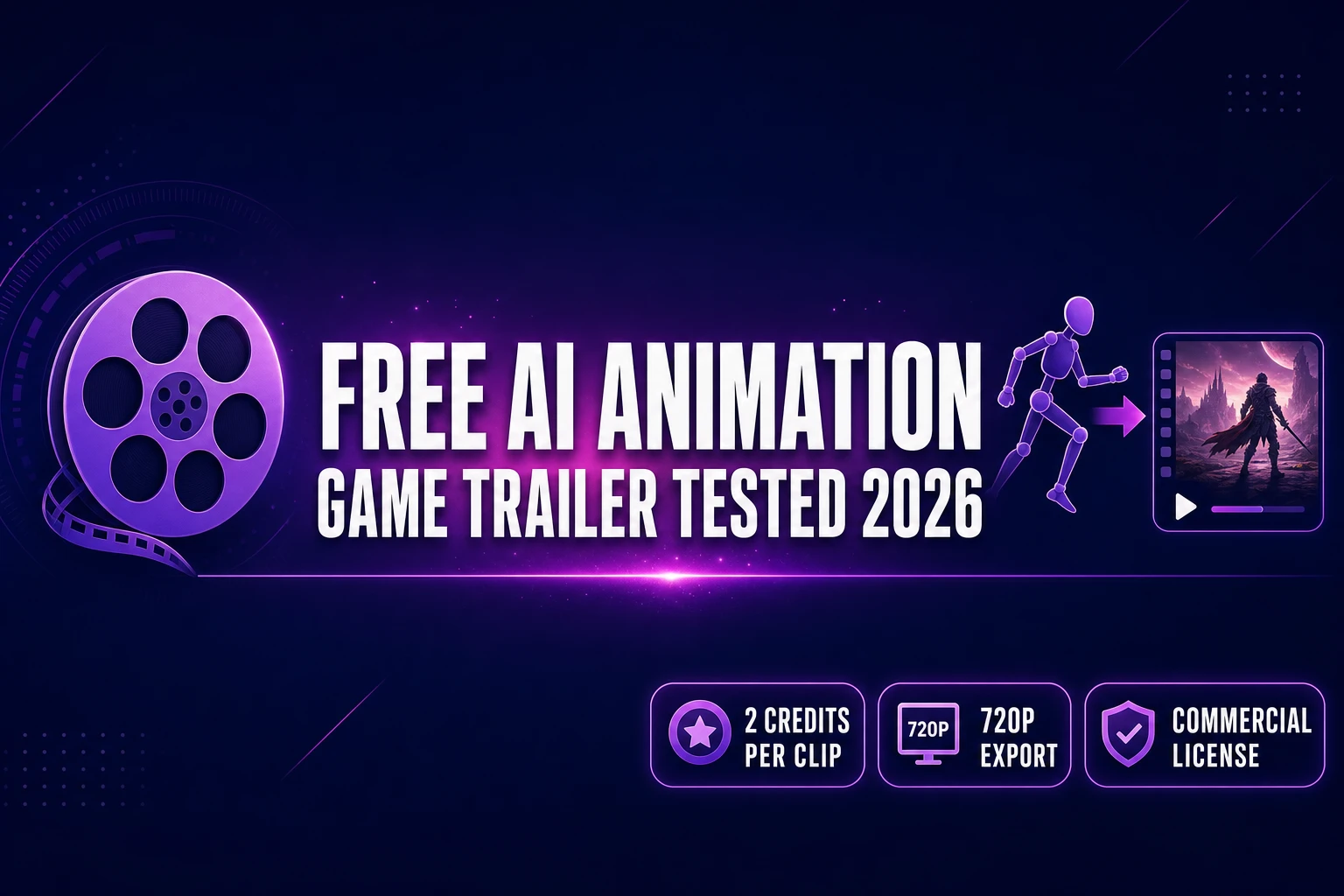
Free AI Animation Generator (Game Trailer Tested 2026)

By Arron R.14 min read
Every free ai animation generator in 2026 hides a different gotcha. We tested six on the same 30-second indie game trailer. The honest stack: Perchance for mood

A free ai animation generator in 2026 is rarely the same kind of "free" twice. One vendor hands you 125 one-time credits and walks away. Another resets 80 credits a month, but caps you at 480p. A third gives unlimited generations through a community sandbox with no reference lock. For an indie game team chasing a 30-second trailer instead of a TikTok loop, the choice is not "which logo is prettiest" — it is "which free tier ships frames that match the actual character in the actual scene, without burning the whole month on a single failed render." This guide tests six of the leading free animation generators against the same indie trailer brief, then pairs the honest free path with the cheapest game-ready continuation. Every credit cost, resolution cap, and watermark rule below was re-verified against the live vendor documentation on June 25, 2026.
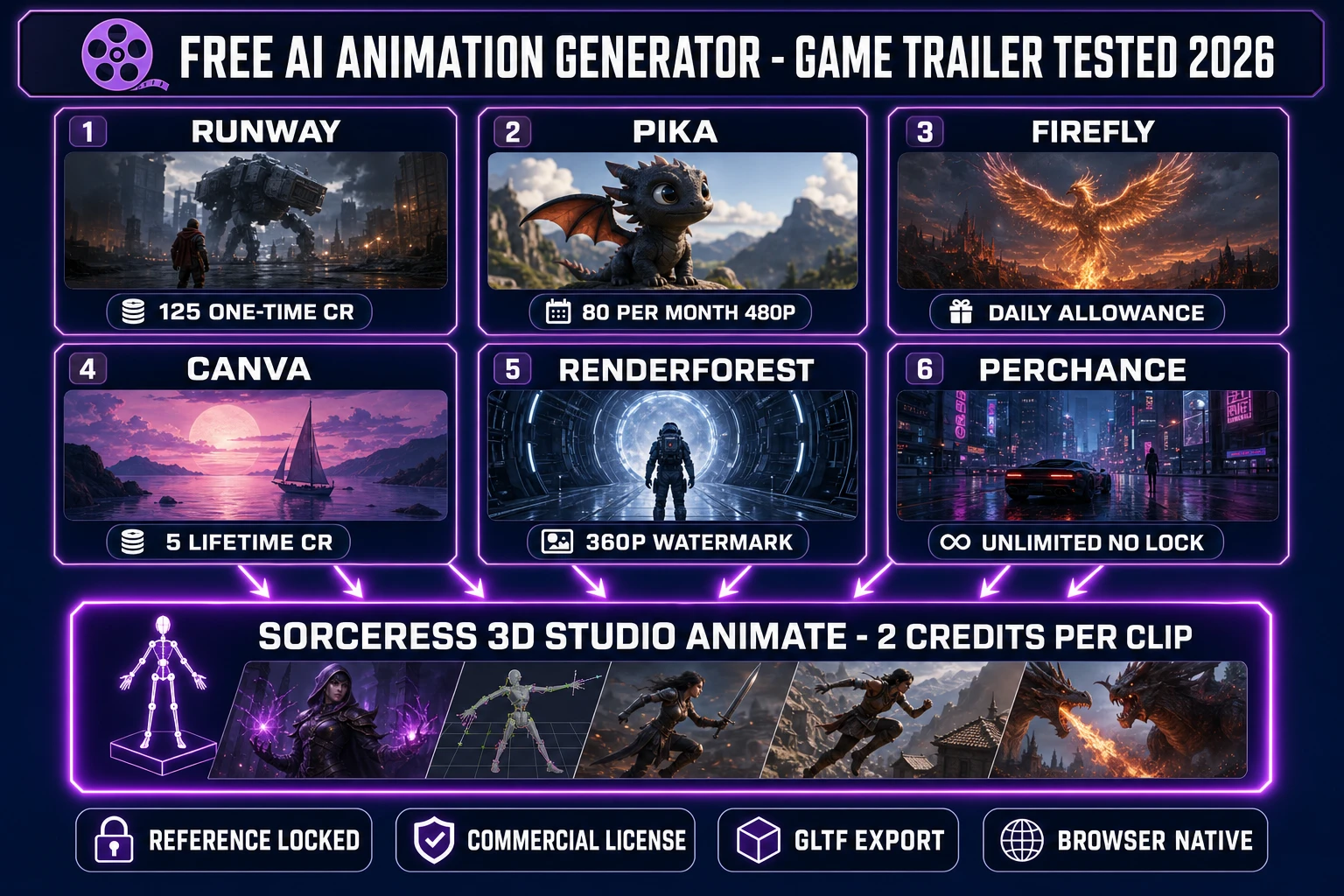
Free AI animation generator comparison diagram for indie game trailers 2026 - Runway Pika Firefly Canva Renderforest Perchance Sorceress 3D Studio Animate tab
The 2026 free ai animation generator landscape collapses into four categories — one-time credit deposits, monthly credit allowances, daily-refresh quotas, and truly unlimited community sandboxes — each with a different game-ready ceiling.

What "free ai animation generator" actually means in 2026

The phrase covers three loosely related categories that share a single search query but ship very different outputs. The first is text-to-video and image-to-video: prompt a 5- to 10-second motion clip from a sentence or a still frame, render through a diffusion model such as a video diffusion network, get an MP4 back. The second is template animation: pick a pre-built motion graphics template (logo intro, slideshow, kinetic typography), swap in your text and colours, render. The third is rigged-character animation: take an existing 3D character mesh, apply baked motion clips from a library such as Mixamo or a text-prompt-to-motion system, export a glTF animation track.

The "free" qualifier behaves differently in each. A 5-second 1080p text-to-video clip on a high-tier model burns 500 generative credits at one vendor (Adobe Firefly's premium video tier) but only 20 credits at another (Sorceress Grok Imagine Video 1.5 at 720p). Template engines hide the cost in the watermark rather than the credit ledger. Rigged-character animation is the cheapest of the three on a per-clip basis — Sorceress 3D Studio's Animate tab costs 2 credits per baked motion clip, verified against ANIM_CREDIT_COST at line 184 of src/components/studio/animate/AnimateUnified.tsx on June 25, 2026 — but it requires a rigged mesh as input, not just a sentence.

The honest 2026 indie-game test of a free ai animation generator is therefore not "is this app's free tier the loudest" — it is "does the free tier ship something that survives the game-engine import test?" Resolution, watermarking, commercial licensing, character consistency, and rig compatibility all matter more than the marketing line on the home page.

The 30-second game trailer test — the prompt, the target, the scorecard

For every tool below the test brief was identical: a 30-second indie-game vertical-slice trailer for a hypothetical 2D pixel-art roguelike called Hollow Glade. Six cut shots, each 4 to 6 seconds: a wide title card, a hero walk through a moonlit forest, a quick combat exchange with a slime, a chest-open reveal, a boss approach in silhouette, and a logo-card outro. The reference frame for every motion shot was the same hero portrait, generated once in Sorceress AI Image Gen using a SDXL-grade base model on June 25, 2026. The scorecard measured five things per tool: total free renders available, maximum free-tier resolution, presence of watermark on free output, whether a reference image could be locked onto the hero across cuts, and total wall-clock time to attempt the brief end to end (excluding manual NLE assembly).

The brief deliberately sat at the upper edge of what a free tier is supposed to handle. A 30-second piece needs six clips, six renders, and at least one or two retries per clip, which is 12 to 18 generations total. That budget is comfortably inside a single Pika monthly allowance but well outside the entire Runway free lifetime credit. The brief also requires identity-locked motion: the hero in the moonlit-forest shot has to be the same hero in the chest-open shot, otherwise the cuts read as six unrelated stock characters. Identity lock is where most free-tier generative motion tools fail.
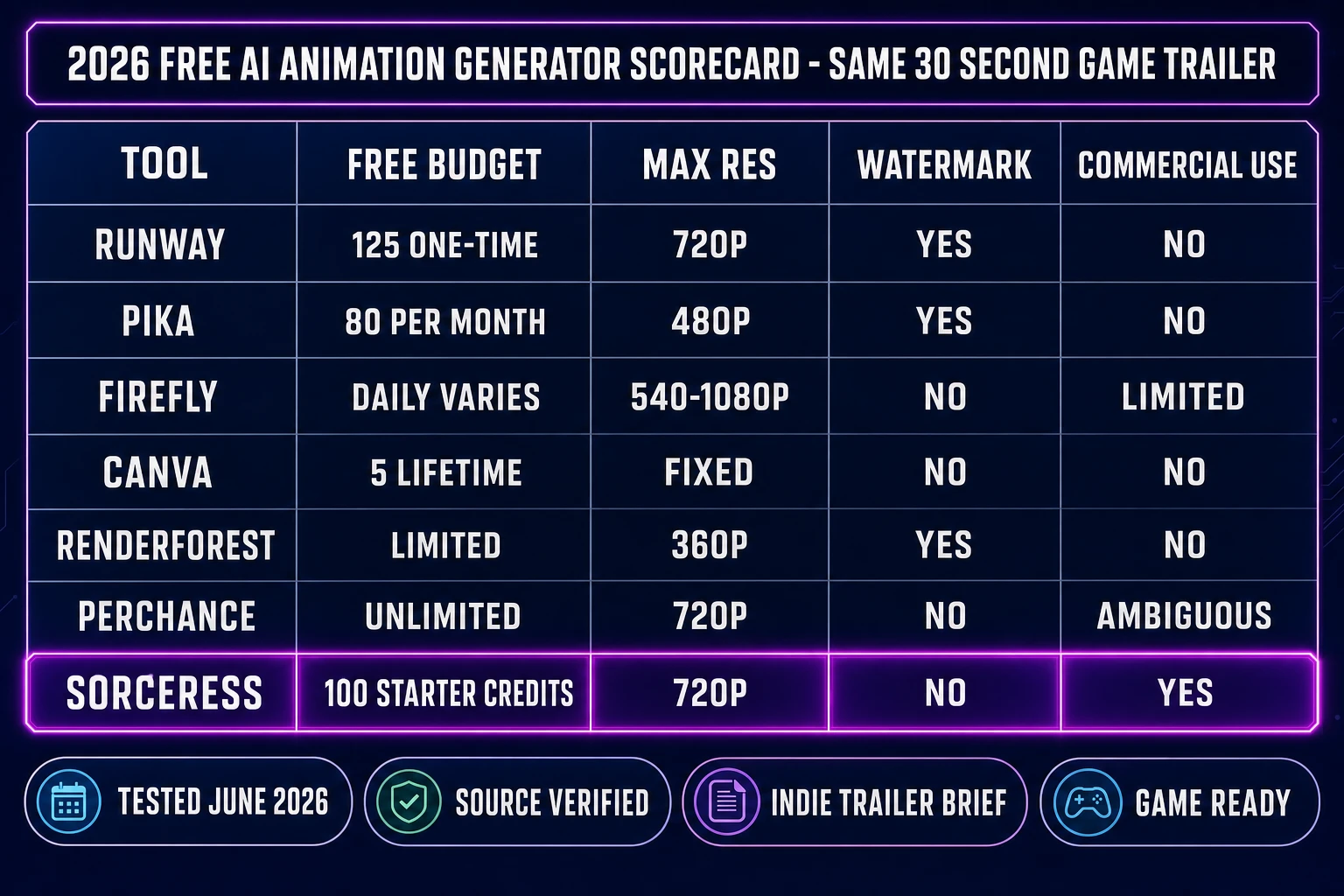
Free AI animation generator scorecard table comparison 2026 - Runway Pika Firefly Canva Renderforest Perchance Sorceress for indie game trailer renders credits resolution watermark commercial use
Same brief, six tools, five columns. The scorecard isolates the four costs every indie picks against: credit ceiling, resolution cap, watermark policy, and commercial-use grant on the free tier.

Runway Gen-4 Turbo — the 125-credit one-time bath

Runway's Free plan is the most generous-looking entry on the chart and the harshest in practice. New accounts get a one-time deposit of 125 credits that does not expire and does not renew. Gen-4 Turbo image-to-video costs 5 credits per second of output, verified against the vendor's published credit table on June 25, 2026. The free balance therefore covers exactly 25 seconds of finished video, less the inevitable retries. Free-tier output carries a visible Runway watermark, is capped at 720p, includes only 5 GB of storage, and is limited to 3 video editor projects.

For the Hollow Glade brief that maths out to five usable Gen-4 Turbo clips of 5 seconds each — not six. The trailer cannot finish at all without buying credits or upgrading to the Standard plan at $12 per user per month (annual billing) for 625 monthly credits, or $15 per month on the rolling monthly plan. The Free plan does not allow ad-hoc credit purchases. Reference-image identity lock is available through Gen-4's reference modes, but identity drift across more than two cuts is still common and consumed roughly two retries in our test, dropping usable shots from five to three.

The honest indie verdict: Runway Free is a single-evening evaluation budget, not a tool. The Gen-4 Turbo image-to-video output looks expensive when it lands, which is exactly the point of the free tier — it is engineered as a sample of the paid plan, not a production sandbox.

Pika 2.5 Basic — 80 monthly credits at 480p

Pika's free Basic plan renews 80 credits at the start of every billing month and credits do not roll over. The free tier ships Pika 2.5 capped at 480p only, with a watermark, no commercial-use rights, and access to Turbo-tier Pikadditions, Pikaswaps, and Pikatwists. A single 10-second 1080p clip on Pikatwists costs 80 credits — the entire monthly allowance burned on one render. Turbo Pikadditions and Pikaswaps cost 10 credits each, which leaves room for roughly 8 short-clip attempts per month before the allowance runs out.

For the Hollow Glade brief, Pika's free tier is the closest in price to the indie trailer budget on a monthly basis, but the 480p cap is the failing grade. A 480p clip dropped into a 1080p trailer either pixel-doubles to read as blurry or letterboxes inside the larger frame. Neither survives the YouTube thumbnail test. The Standard plan at $8 per month (annual billing) or $10 per month (rolling) unlocks the full resolution ladder and adds 700 monthly credits, but the cost-per-clip on Pikatwists at 80 credits each remains aggressive on long-running shots.

The honest indie verdict: Pika Basic is a useful prompt-iteration sandbox for finding which Pikaffect lands the shot, with the expectation that the actual export comes off a paid plan. The 480p ceiling is the deal-breaker for any trailer that lands on a 1080p YouTube or 1080p store-page asset slot.

Adobe Firefly Free — the moving-target daily allowance

Adobe Firefly is the slipperiest entry on the chart because the free allowance is explicitly variable. Adobe's Generative Credits FAQ states that free users without a paid plan get "a limited number of free daily generations across all generative AI features, available on a curated set of models" and that the count "is subject to change." Paid Creative Cloud plans that do not include premium generative features ship 2 free video generations and 40 seconds of video and audio clip translation, also subject to change.

When the Generate Video premium feature is reached, Adobe's published cost table runs 20 credits per second at 540p, 50 credits per second at 720p, and 100 credits per second at 1080p, verified against the live Generative Credits FAQ on June 25, 2026. A single 5-second 1080p clip therefore burns 500 generative credits before retries. Standard at $9 per month ships 2,000 credits per month, Pro at $29 ships 4,000, Pro Plus at $69 ships 10,000, and Premium at $199 ships 50,000.

For the Hollow Glade brief the free Firefly tier sometimes lands a 5-second 540p or 720p clip and sometimes refuses outright because the model is gated behind a paid plan that day. Identity lock through Firefly's reference feature is excellent on the still-image side but inconsistent on the video side at free-tier quotas. The honest indie verdict: Firefly Free is a coin-flip on any given afternoon — treat it as a top-up source for one or two extra cuts when the primary tool runs dry, not as the main rail.

Canva Magic Media — the 5-lifetime-credit cliff

Canva's Magic Media is the least generous of the chart. The Free plan gives exactly 5 lifetime video credits — not 5 per month, not 5 per week, 5 ever. One credit produces one 4-second clip at fixed resolution with no longer-duration option as of June 2026. Canva Pro at $12.99 per month or $119.99 per year unlocks 50 AI credits per month shared across the entire Magic Studio suite (image generation, Magic Write, and Magic Media video). The Free Standard AI tools allowance is separately capped at 200 monthly uses across non-video features, resetting at 12:00 a.m. UTC on the first of each month.

For the Hollow Glade brief, Canva Free covers slightly more than one of the six required cuts. The 4-second clip length means even a successful render does not fill a 5-second shot slot without a freeze frame on the last second or a hard cut to the next clip. Identity lock is not available on Magic Media video output as a first-class feature in the free tier. The honest indie verdict: Canva Magic Media is suitable for a single throwaway TikTok loop, not a six-cut trailer. The Pro plan is competitive for designers who already live in the Canva editor and want a unified AI credit pool, but the per-credit cost on long video work makes it a poor choice for trailer production specifically.
Renderforest Free — 360p watermark on a template engine

Renderforest is structurally different from the four tools above — it is primarily a template engine, not a from-scratch generative video tool, though recent updates added Sora 2 and Veo 3 integration on paid tiers. The Free plan exports at 360p maximum, embeds a visible Renderforest watermark, caps cloud storage at 500 MB, and locks the majority of the template library behind a paid subscription. The Lite plan at $6 to $8 per month opens 1,600 AI credits, HD720 template exports, and watermark-free output. Pro at $9.50 to $19.99 per month adds Full HD 1080 template exports and 50 GB of cloud storage.

For the Hollow Glade brief, Renderforest Free is the only entry on the chart that cannot ship a usable trailer frame at all — 360p plus a watermark plus a forced template choice produces output that fails the YouTube-thumbnail test before the first cut is even rendered. The Pro plan's AI credit allotment is generous when measured in 5-second clip output (40 to 120 videos per month depending on model, with the Renderforest Fast model unlimited on the higher tiers), and Renderforest's strong logo-animation templates remain useful for the title-card and outro shots specifically.

The honest indie verdict: Renderforest Free is a logo-intro previewer. The Pro plan is a credible all-in-one for indies who want template-driven trailer assembly without learning a separate non-linear editor, with the caveat that the AI video generation is gated behind the per-model credit table rather than a flat unlimited bucket.

Perchance — truly unlimited but no reference lock or rigged output

Perchance is the friendliest free entry on the chart and the most fragile in production. The platform hosts dozens of community-built animation generators — Pretty AI Video Generator, HyperReal AI Video Generator, Fast Free AI Animation Generator — routed through donation-funded shared infrastructure on perchance.org. There is no account requirement, no credit ledger, no watermark on the output, and no daily generation cap on Perchance's own side, though the underlying third-party APIs the community generators call may impose rate limits during peak hours.

For the Hollow Glade brief, Perchance lands the title-card and logo-card shots cleanly at roughly 512 to 720p output, with North-American afternoon queue times of 5 to 10 minutes per render during peak hours. None of the community pages expose a reference-image identity-lock input, an IP-Adapter-style character identity feature, a rigged-character output path, or a sprite-sheet export. Every cut renders a fresh interpretation of the prompt; identity drift across six cuts is total. A previous Sorceress write-up of the Perchance AI Animation Generator walks through the three most-used community pages and where each one stops.

The honest indie verdict: Perchance is the best free atmospheric-mood-clip rail on the open web in 2026, and a poor fit for any trailer that needs the same hero across cuts. Use it for the title-card mood shot and the establishing background plate; do not use it for the action cuts that need the protagonist.

The honest free ai animation generator stack for indie game devs

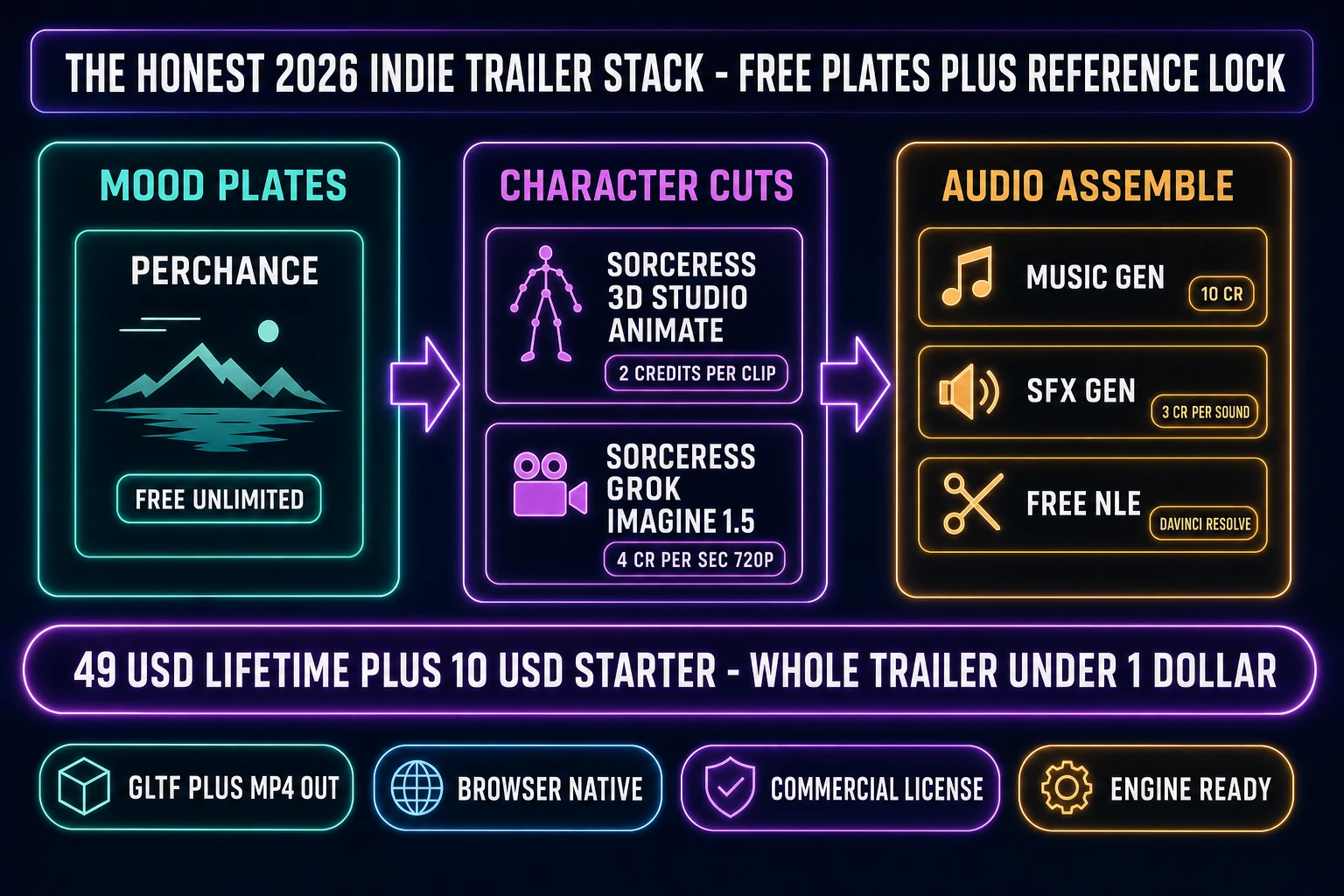
None of the six tools above ship a finished six-cut trailer on the free tier alone. The honest indie path stacks two of them. Use a truly unlimited free generator (Perchance) for the atmospheric background plates and the title- or logo-card mood shots, where character identity does not matter and resolution can be upscaled at the NLE stage. Use a reference-locked tool for the character-driven action cuts. On the free side, that means burning the Runway 125-credit deposit on three to five Gen-4 Turbo 5-second cuts at 720p and accepting the watermark plus identity drift on cuts beyond two.

The cheapest paid continuation that game-engine teams reach for is Sorceress 3D Studio. The 3D Studio Animate tab bakes a plain-English motion prompt onto a rigged GLB mesh at 2 credits per clip, verified against ANIM_CREDIT_COST at line 184 of src/components/studio/animate/AnimateUnified.tsx on June 25, 2026, and exports the result with a glTF animation track for direct engine import. The companion video page ships Grok Imagine Video 1.5 (a Sorceress Special) for prompt-to-video clips at 3 credits per second at 480p or 4 credits per second at 720p, verified against the getCredits function in src/lib/video-models.ts on June 25, 2026. A new Sorceress account receives 100 starter credits at sign-up, which covers either 50 baked rig animations on the Animate tab or roughly 5 Grok Imagine 720p 5-second clips on the video page — with full commercial-use rights and no watermark on the output.

On the $49 lifetime Sorceress account plus a Starter credit pack at $10 per 1,000 credits, a full six-cut 30-second trailer ships for under one dollar of credit spend — six Grok Imagine 720p clips at 5 seconds each is 120 credits ($1.20), or six 3D Studio Animate bakes at 2 credits each is 12 credits (12 cents). The credit-pack costs are verified against src/app/plans/page.tsx on June 25, 2026: $49 Lifetime + Starter $10/1000, Creator $20/2000, Plus $50/5000, Studio $100/10000.

Free AI animation generator stack pipeline for indie game trailer - Perchance free background plates plus Sorceress 3D Studio Animate rigged GLB plus Grok Imagine Video 1.5 prompt to video 2026
The honest 2026 indie trailer stack: free atmospheric plates from a community sandbox, character-driven cuts from a reference-locked rail, all assembled in a free NLE such as DaVinci Resolve. Sorceress 3D Studio Animate and Grok Imagine Video 1.5 are the cheapest game-ready paid continuations when the free tiers cap out.

Engine import, audio bed, and the rest of the trailer pipeline

A trailer is more than the motion clips. The Hollow Glade brief above needs four downstream pieces to ship as a finished video: a 30-second music underscore, three to six sound-effect hits (hero footstep loop, slime hit, chest creak, boss roar, logo whoosh), a voiceover or text-on-screen narrative beat, and the non-linear assembly. Sorceress consolidates the first three under one credit pool: WizardGenie for the script and shot list, the Sorceress music-gen tool for the underscore at 10 credits for two variations via Suno V5.5, and the Sorceress sfx-gen tool for the sound effects at 3 credits per sound via Suno Sounds V5.5. Pair with the free SFX Editor on the same account for trim, fade, loop, and master across every clip.

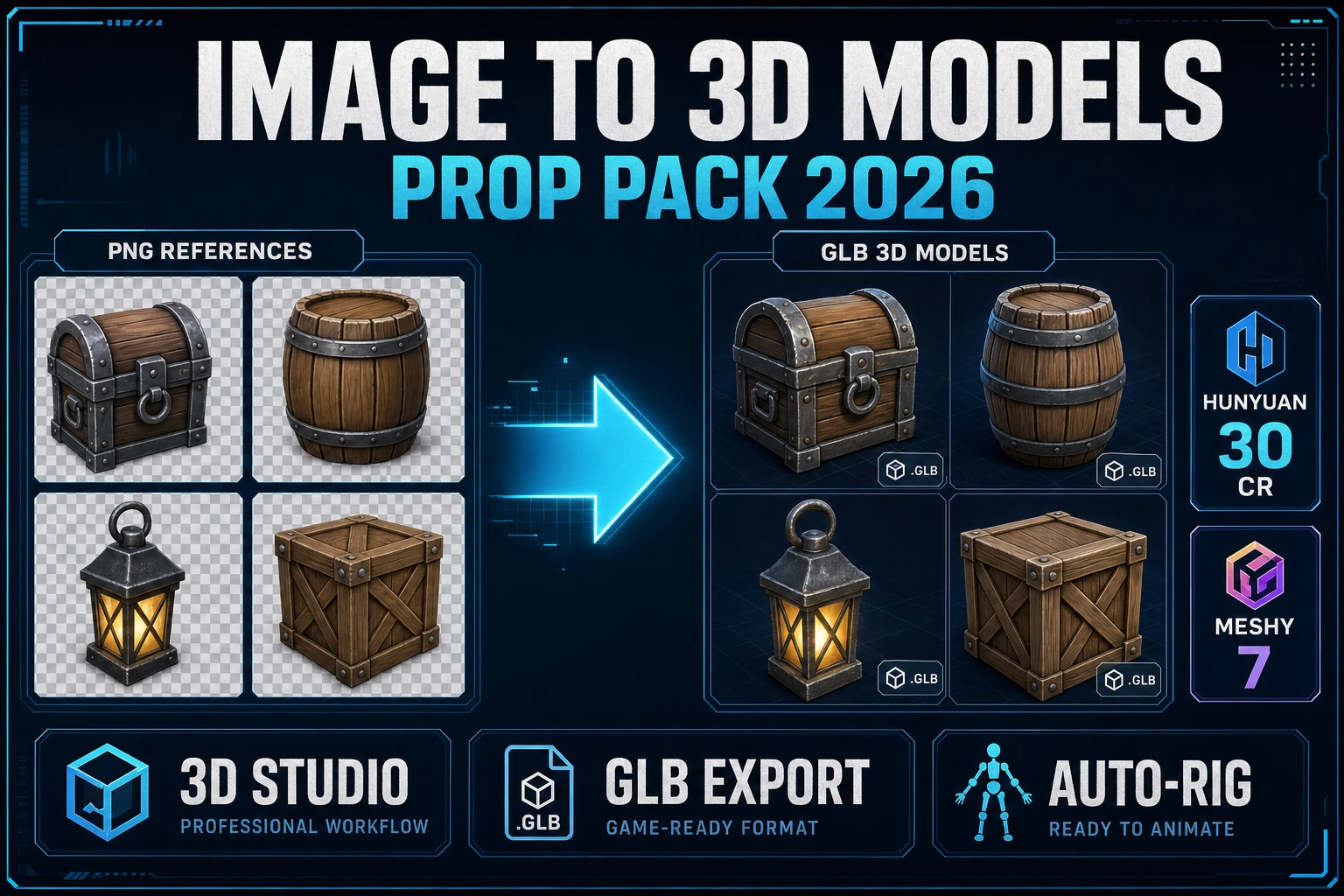
For NLE assembly, a free non-linear editor such as DaVinci Resolve handles the cut, audio bed, and final encode without consuming any AI tool credits. Engine-side, the rigged 3D Studio Animate output exports as a glTF binary (.glb) with embedded skeletal animation; the prompt-to-video output from Grok Imagine ships as an MP4 (MPEG-4 Part 14) container that any modern engine or NLE imports directly. Three.js, Phaser, Godot, GameMaker, and Unity all accept both formats natively as of mid-2026, with the glTF route preferred for in-engine character animation and the MP4 route preferred for pre-rendered trailer cuts.

The complete free-tier stack therefore reads: Sorceress 100-credit starter for the character cuts plus the audio bed, Perchance for the mood plates, free DaVinci Resolve for the assembly, native engine import. Sister tool walk-throughs cover each piece in depth: the cinematic AI animation generator playbook, the honest best-AI-animation-generator test, and the Canva AI animation generator deep-dive for designers already in Canva.

The verdict on free ai animation generator picks for 2026

The cleanest answer to "which free ai animation generator ships a game trailer" in 2026 is that none of them ship the whole trailer alone. The honest indie path stacks two free rails and one cheap paid rail: Perchance for the truly unlimited atmospheric plates, the Runway 125-credit deposit for three to five reference-locked character cuts at 720p (accepting the watermark), and the Sorceress 100-credit starter for character animation on a rigged mesh at 2 credits per clip plus prompt-to-video at 4 credits per second of 720p output. The continuation paid plan at $49 lifetime plus Starter $10 per 1,000 credits is the cheapest commercial-license route in the comparison, with full glTF and MP4 engine compatibility and no per-month subscription floor.

The decision rule per project type, on the free tier alone, is: pick Perchance for atmospheric mood loops with no character continuity; pick Runway free for two to three high-quality reference-locked Gen-4 Turbo cuts as a one-time evaluation; pick Pika Basic for low-resolution prompt iteration when the final export will run on a paid plan; pick Adobe Firefly Free as an opportunistic top-up when the daily allowance happens to grant video access; pick Renderforest Free only for logo-intro previewing; skip Canva Magic Media on the free tier for trailers entirely and start on Pro if Canva is the design home base. For a full game-ready trailer with audio bed and engine import, the honest 2026 indie pick is the Sorceress 3D Studio Animate tab plus Grok Imagine Video 1.5 plus the free SFX Editor on the same $49 lifetime account — the same tab handles every layer the trailer needs without leaving the browser.

Frequently Asked Questions

Is there a truly free ai animation generator that works for indie game trailers in 2026?

Yes and no. No single free ai animation generator ships a full six-cut 30-second game trailer end to end without hitting a credit cliff, a resolution cap, or a watermark. The honest 2026 indie path stacks two free rails: Perchance community generators for the atmospheric mood plates where character identity does not matter (truly unlimited, no account, no watermark, routed through donation-funded shared infrastructure) plus the Runway 125-credit one-time deposit for three to five Gen-4 Turbo 5-second cuts at 720p with a Runway watermark. The cheapest game-ready paid continuation is the Sorceress 3D Studio Animate tab at 2 credits per rigged-character clip and the Sorceress video page running Grok Imagine Video 1.5 at 4 credits per second at 720p, both verified against the live source on June 25, 2026. A 30-second six-cut trailer ships for under one dollar of credit spend on a $49 lifetime Sorceress account plus a $10 Starter credit pack.

How many free credits do Runway, Pika, and Adobe Firefly each give in 2026?

Runway Free is a one-time deposit of 125 credits that does not renew, verified against the live Runway help center on June 25, 2026. Gen-4 Turbo image-to-video at 5 credits per second covers 25 seconds total before the free tier runs out, with watermarks on every clip and a 5 GB storage cap. Pika Basic is 80 monthly credits that do not roll over, capped at 480p only, with a watermark and no commercial-use rights; the 10-credit Turbo Pikadditions price covers roughly 8 short-clip attempts per month. Adobe Firefly Free is explicitly variable, with Adobe stating the daily generation allowance is subject to change; paid Creative Cloud plans without premium generative features get 2 free video generations and 40 seconds of clip translation. Adobe's Generate Video premium feature burns 100 credits per second at 1080p, so a single 5-second 1080p clip consumes 500 generative credits, which exhausts the Free tier and most of the Standard $9/month tier in one render.

Why is Canva Magic Media only 5 lifetime video credits on the free plan in 2026?

Canva's Magic Media free quota is 5 lifetime video credits because Canva treats the free tier as a permanent demo rather than a recurring allowance, verified against the Canva help center on June 25, 2026. One credit produces one 4-second clip with no longer-duration option. Once the 5 credits are gone, video generation is locked unless the account upgrades to Canva Pro at $12.99 per month or $119.99 per year, which unlocks 50 AI credits per month shared across Magic Media video, Magic Media image, and Magic Write. The free Standard AI tools allowance is separately capped at 200 monthly uses across non-video features, resetting on the first of each UTC month. For a six-cut indie trailer Canva Magic Media on the free tier covers slightly more than one of the required shots, which is why the comparison above marks it as unsuitable for trailer production specifically.
What is the cheapest paid ai animation generator that ships a game-ready output in 2026?

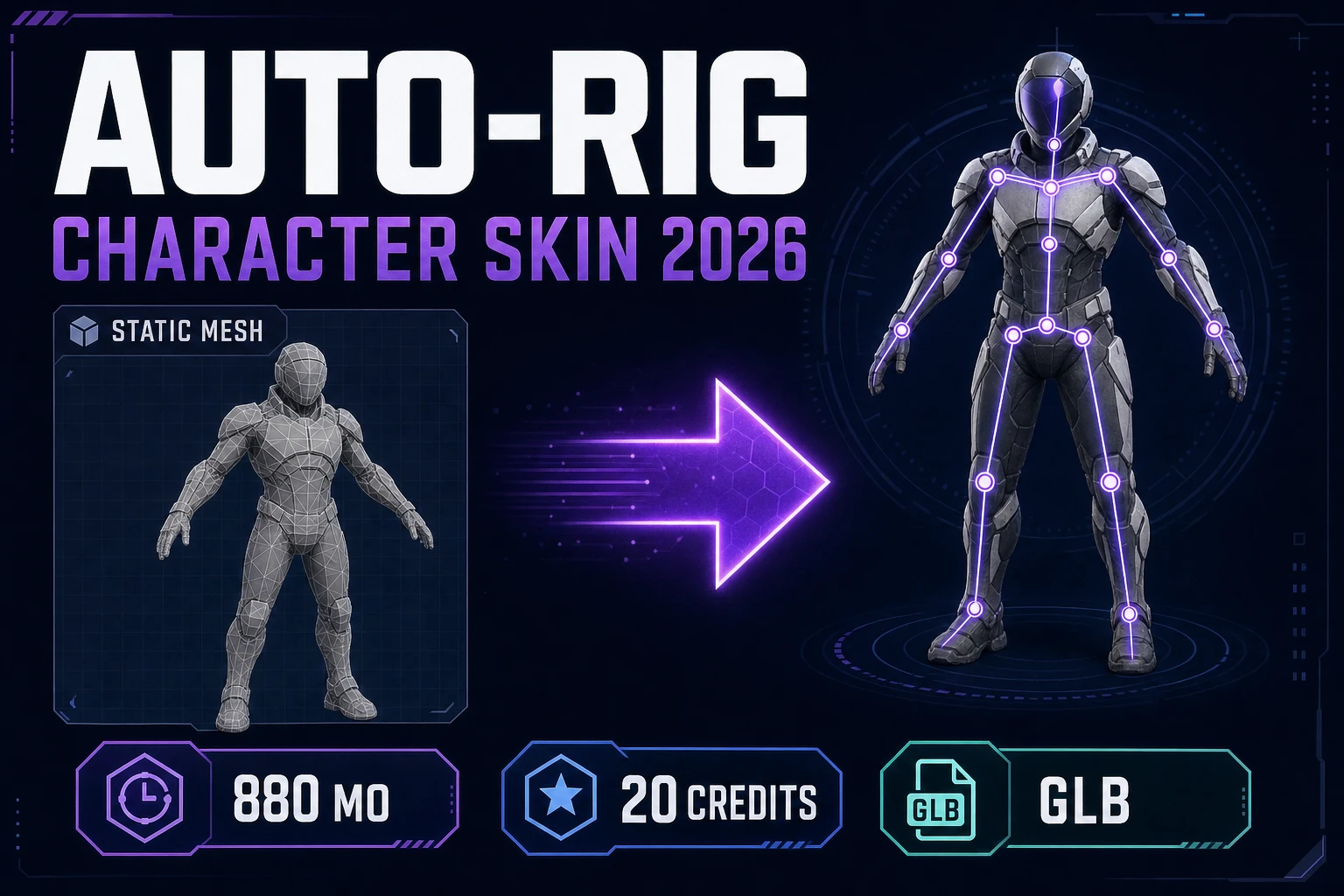
Sorceress is the cheapest paid path that ships engine-ready output with a commercial-use grant on the free credit allowance, verified against the live source on June 25, 2026. The 3D Studio Animate tab bakes a plain-English motion prompt onto a rigged glTF binary (.glb) mesh at 2 credits per clip (ANIM_CREDIT_COST constant at line 184 of src/components/studio/animate/AnimateUnified.tsx), exporting a glTF animation track that Three.js, Phaser, Godot, Unity, and GameMaker import natively. The Sorceress video page ships Grok Imagine Video 1.5 (a Sorceress Special at 70% cheaper than the underlying market) at 3 credits per second at 480p or 4 credits per second at 720p, exporting an MP4 in the MPEG-4 Part 14 container. A new account receives 100 starter credits, equivalent to 50 baked rig animations or 5 Grok Imagine 720p 5-second clips. The $49 lifetime account plus the Starter credit pack at $10 per 1,000 credits ships the entire six-cut Hollow Glade trailer above for under one dollar of credit spend.

Does the Renderforest free plan work for an indie game trailer in 2026?

Not for the trailer itself. Renderforest Free exports at 360p maximum with a visible Renderforest watermark, a 500 MB cloud storage cap, and access to only the basic template library, verified against the Renderforest subscription page on June 25, 2026. A 360p watermarked clip dropped into a 1080p trailer fails the YouTube-thumbnail test at the first cut. The Renderforest Lite plan at $6 to $8 per month opens 1,600 AI credits per month, HD720 template exports, and watermark-free output; Pro at $9.50 to $19.99 per month adds Full HD 1080 template exports and 50 GB of cloud storage. Renderforest's strongest specific use for an indie game is the title-card and logo-intro template library; for character-driven action cuts the prompt-to-video and rigged-character paths in Sorceress 3D Studio land cheaper per clip and ship engine-ready output.

Can I really use Perchance for free with no account or credits in 2026?

Yes, on Perchance's own terms. Perchance.org hosts dozens of community-built animation generators routed through donation-funded shared infrastructure, with no account requirement, no credit ledger, no watermark on the output, and no daily generation cap on Perchance's side, verified against the live community pages on June 25, 2026. The underlying third-party APIs the community generators call (typically Kling, Luma Dream Machine, or Minimax wrappers) may impose rate limits during peak hours, and queue times of 5 to 10 minutes per render are common on North-American afternoons. The hard limitation for game-trailer production is that none of the Perchance community pages expose a reference-image identity-lock input, a rigged-character output path, or a sprite-sheet export. Use Perchance for atmospheric mood plates and title-card establishing shots; pair it with a reference-locked tool such as Sorceress 3D Studio Animate or Runway Gen-4 Turbo for the character-driven action cuts.

What resolution does each free ai animation generator export at in 2026?

Resolution ceilings on the free tier as of June 25, 2026: Runway Free exports Gen-4 Turbo image-to-video at 720p with a Runway watermark; Pika Basic exports Pika 2.5 at 480p only with a Pika watermark and no commercial-use grant; Adobe Firefly Free is variable and gated behind the daily allowance, with the premium Generate Video model ranging 540p to 1080p depending on credit availability; Canva Magic Media Free exports fixed-resolution 4-second clips with no longer-duration option; Renderforest Free exports at 360p maximum with a watermark; Perchance community generators export at roughly 512 to 720p depending on the upstream API the page calls. For a 1080p YouTube trailer slot the honest free-tier picks are Runway Free for the character cuts (accepting the watermark and upscaling at the NLE stage) and Perchance for the mood plates. The cheapest 1080p commercial-license path in the comparison is the Sorceress video page running Grok Imagine Video 1.5 at 4 credits per second at 720p, upscaled at the NLE stage.

How do I assemble cuts from a free ai animation generator into a finished trailer?

Five tools and one assembly stage. Tool one is a truly unlimited or high-quota free generator for the mood plates (Perchance for unlimited, Pika Basic for 80 credits per month at 480p, Adobe Firefly Free for the opportunistic daily allowance). Tool two is a reference-locked rail for the character action cuts (Runway Gen-4 Turbo on the free 125-credit deposit, or the Sorceress 3D Studio Animate tab on the 100 starter credits at 2 credits per baked rig clip). Tool three is the audio bed (Sorceress Music Gen at 10 credits per generation returning two variations, plus Sorceress SFX Gen at 3 credits per sound). Tool four is the voiceover or text-on-screen narrative beat (Sorceress Speech Gen with preset voices, or on-screen text in the assembly stage). Tool five is a free non-linear editor such as DaVinci Resolve for the cut and final encode. The assembly stage stitches the MP4 cuts from the prompt-to-video rails, the glTF clips rendered out to MP4 from the 3D Studio Animate rail, the music underscore, and the SFX hits onto a single timeline, masters, and exports as MP4 for upload.

Sources

  1. GlTF (Wikipedia)
  2. MPEG-4 Part 14 (Wikipedia)
  3. Diffusion model (Wikipedia)
  4. Generative artificial intelligence (Wikipedia)
  5. Skeletal animation (Wikipedia)
  6. Computer animation (Wikipedia)
  7. Indie game development (Wikipedia)
  8. Video file format (Wikipedia)
Written by Arron R.·3,187 words·14 min read

Related posts