Chomp How to Make Pac-Man (Browser Dot Muncher 2026)

By Arron R.14 min read
How to make Pac-Man in 2026 as a browser dot muncher: draw the classic maze grid on paper, generate the Chomp hero and four ghost sprites in Sorceress AI Image

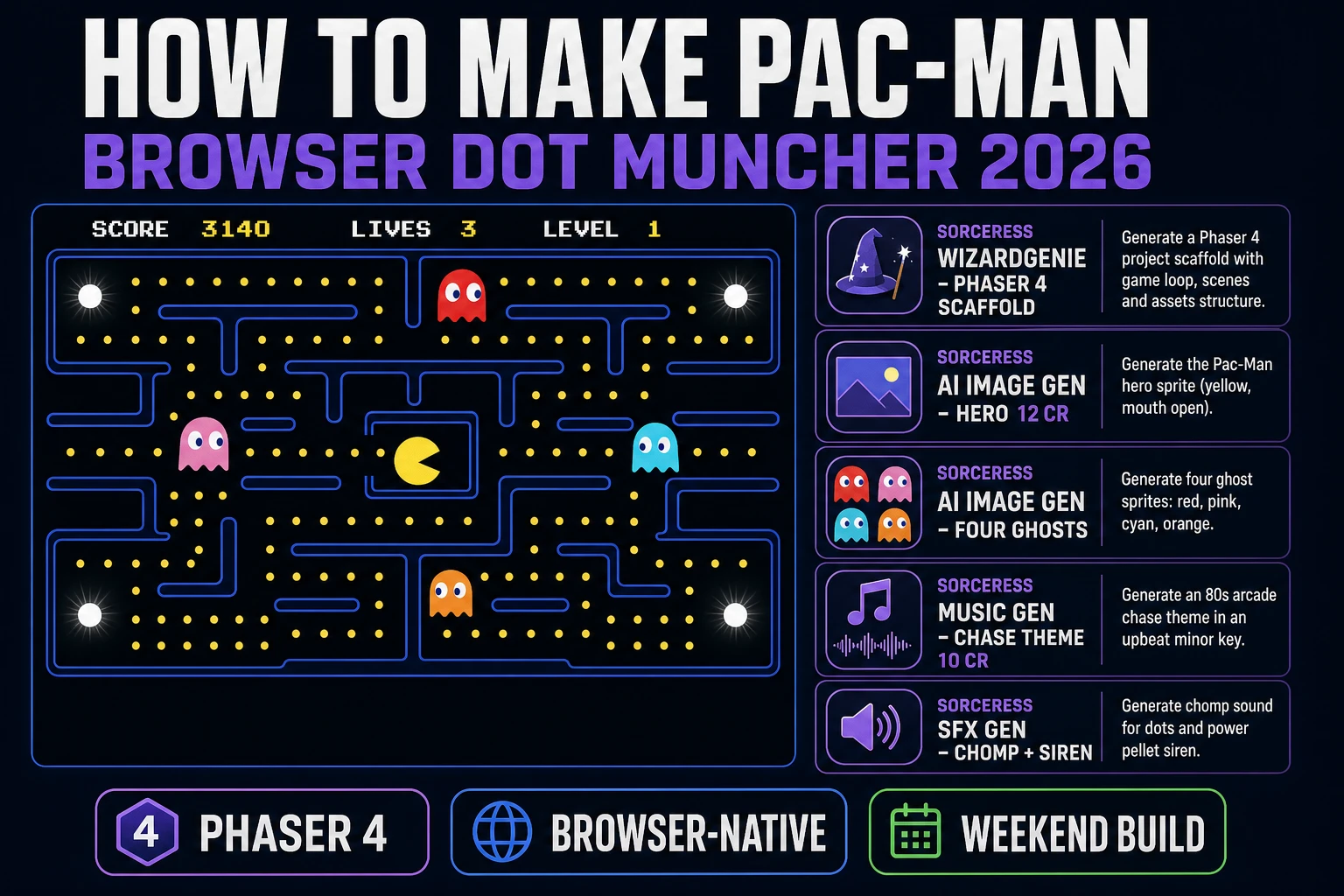
The one-line answer to how to make Pac-Man in 2026 is: a grid of tiles, a hero that moves along that grid, four ghosts with distinct target-tile functions, and a dot-eating loop that ends when every dot is gone. The one-line caveat is that Pac-Man is a Bandai Namco trademark. The mechanic (a character eating dots in an enclosed maze while dodging chasing ghosts) is fair use; the name, the yellow-wedge character, and the specific arcade maze layout are not. This guide is the honest end-to-end for a browser dot muncher clone with your own art and your own maze — the mechanic done properly, the branding left alone. The Sorceress pipeline: AI Image Gen for the hero and four ghost sprites, WizardGenie to scaffold a Phaser 4 tilemap project with grid-locked movement and four ghost personality AIs, Music Gen for the chase-theme bed, and SFX Gen for the chomp, the death chirp, and the frightened-ghost siren.
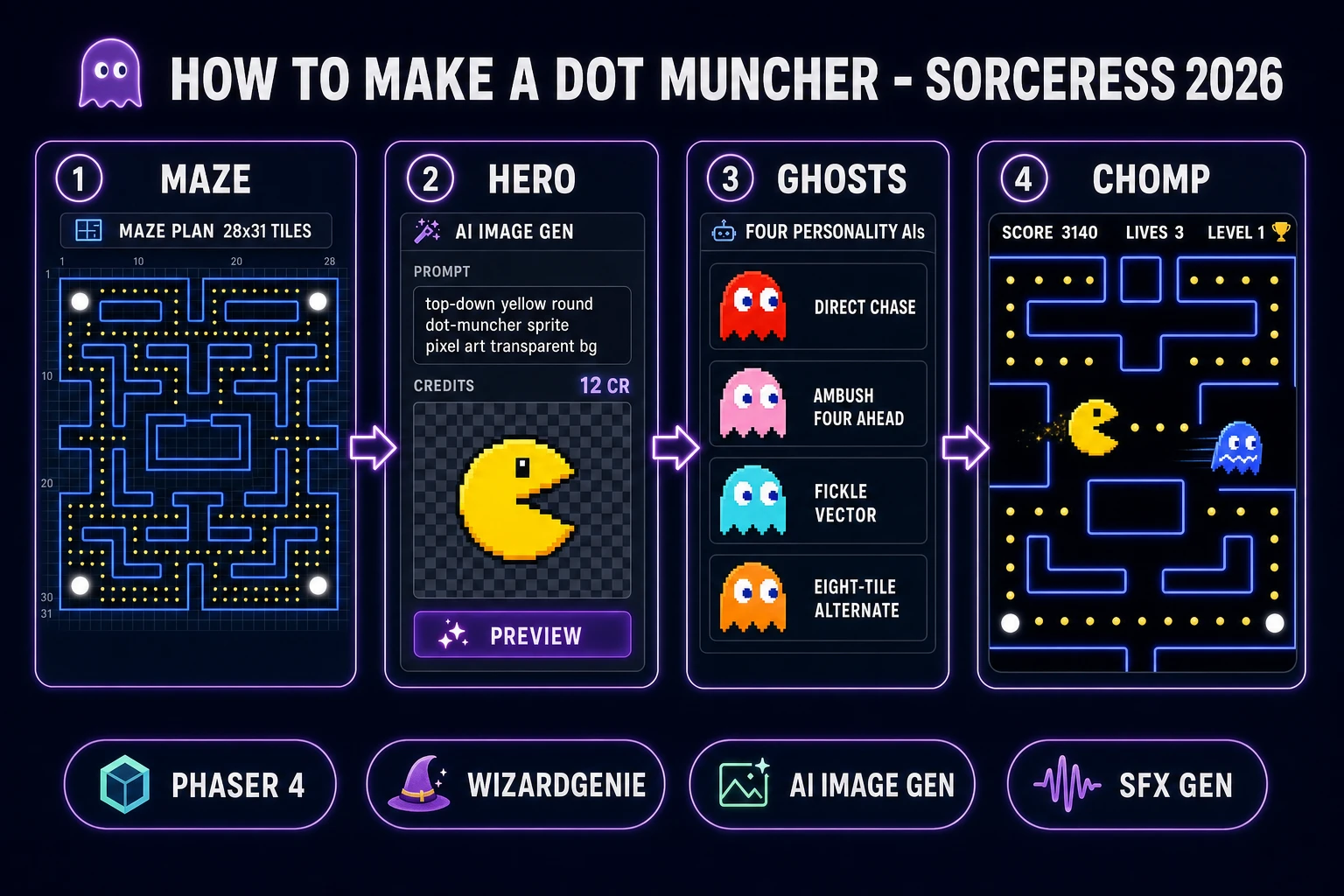
How to make Pac-Man browser dot muncher pipeline: maze grid with power pellets, round hero sprite in AI Image Gen, four ghost personality AIs, chomp scoring with WizardGenie and Sorceress toolset
The 2026 dot-muncher browser recipe: sketch the maze on paper, generate the hero and four ghost sprites in AI Image Gen, let WizardGenie scaffold a Phaser 4 tilemap project with grid-locked movement and four ghost personality AIs, and ship in a weekend.

What "how to make Pac-Man" actually means in 2026

The query "how to make Pac-Man" hides three different requests. Some searchers want a faithful arcade clone with the exact 28-tile-wide maze, the exact ghost personalities, and the original Toru Iwatani design intent. Some want a dot-muncher inspired-by build with their own maze, their own characters, and their own art style — a game that plays like Pac-Man but ships under a different name. And some want to learn the tile-grid movement pattern and the four-ghost AI because those two techniques transfer to any maze game (Bomberman, Snake, tower defence, roguelike overworlds). The honest default for a first browser project is the second: an inspired-by dot muncher. Faithful clones invite trademark takedowns; from-scratch inspired-by games ship cleanly and teach you the same underlying loop. Section seven costs the whole project out at under 1.75 USD in Sorceress credits, which is worth reading before you commit to the full arcade-accurate version.

A quick history anchor, verified against Wikipedia's Pac-Man page on 2026-08-09: the game was designed by Toru Iwatani at Namco, developed over roughly one year and five months starting in early 1979, and location-tested on 22 May 1980 in Shibuya before a July 1980 national release in Japan. Midway distributed it in North America starting late 1980. The four ghosts have distinct AI — Blinky (red) chases directly, Pinky (pink) tries to get ahead of Pac-Man, Inky (cyan) uses a more complicated strategy, and Clyde (orange) alternates between chasing and fleeing depending on distance. That AI variety is what makes the game feel alive after 45 years, and it is the single most important thing to get right in a clone. This guide walks through the exact tile-target function each ghost uses.

The Pac-Man game loop in one minute (move eat pursue power-up)

Six moving parts, one strict order per frame. First, read player input — up, down, left, right (arrow keys or WASD), and buffer the last press so the hero remembers direction changes made a few frames before an intersection. Second, advance hero movement — if the hero is at a tile centre, pick the next tile based on buffered input (or continue in the current direction if the buffered input leads into a wall); otherwise, lerp the hero's pixel position toward the next tile at a fixed speed. Third, advance each ghost — when a ghost arrives at a tile centre, run its personality function to pick a target tile, then choose the neighbour tile that minimises distance to the target, with the hard constraint that ghosts cannot reverse direction mid-tile. Fourth, check dot pickup — if the hero enters a tile that contains a dot, remove the dot and add 10 to score; if it contains a power pellet, remove it, add 50 to score, and switch all ghosts to frightened state for a timed window. Fifth, check ghost overlap — if the hero and any ghost occupy the same tile, either the hero loses a life (chase mode) or the hero eats the ghost for 200/400/800/1600 points (frightened mode, doubling per ghost eaten this pellet). Sixth, check win state — if every dot and every power pellet is gone, advance to the next level with faster ghosts and a shorter frightened window.

That is the entire game. Six steps, executed once per frame at 60 frames per second, driven by requestAnimationFrame. Everything else — the intermissions, the level-fruit bonuses, the ghost-house release timers, the warp tunnel on the sides, the kill-screen at level 256 — is polish and depth layered on top of this core loop. Keep the loop tight and the six-step order strict, and the dot-muncher feels arcade even on a mid-range phone browser. Fight the temptation to move the hero freely in pixel space; that is the single most common failure mode of first-time Pac-Man clones and it makes the corners feel wrong forever.
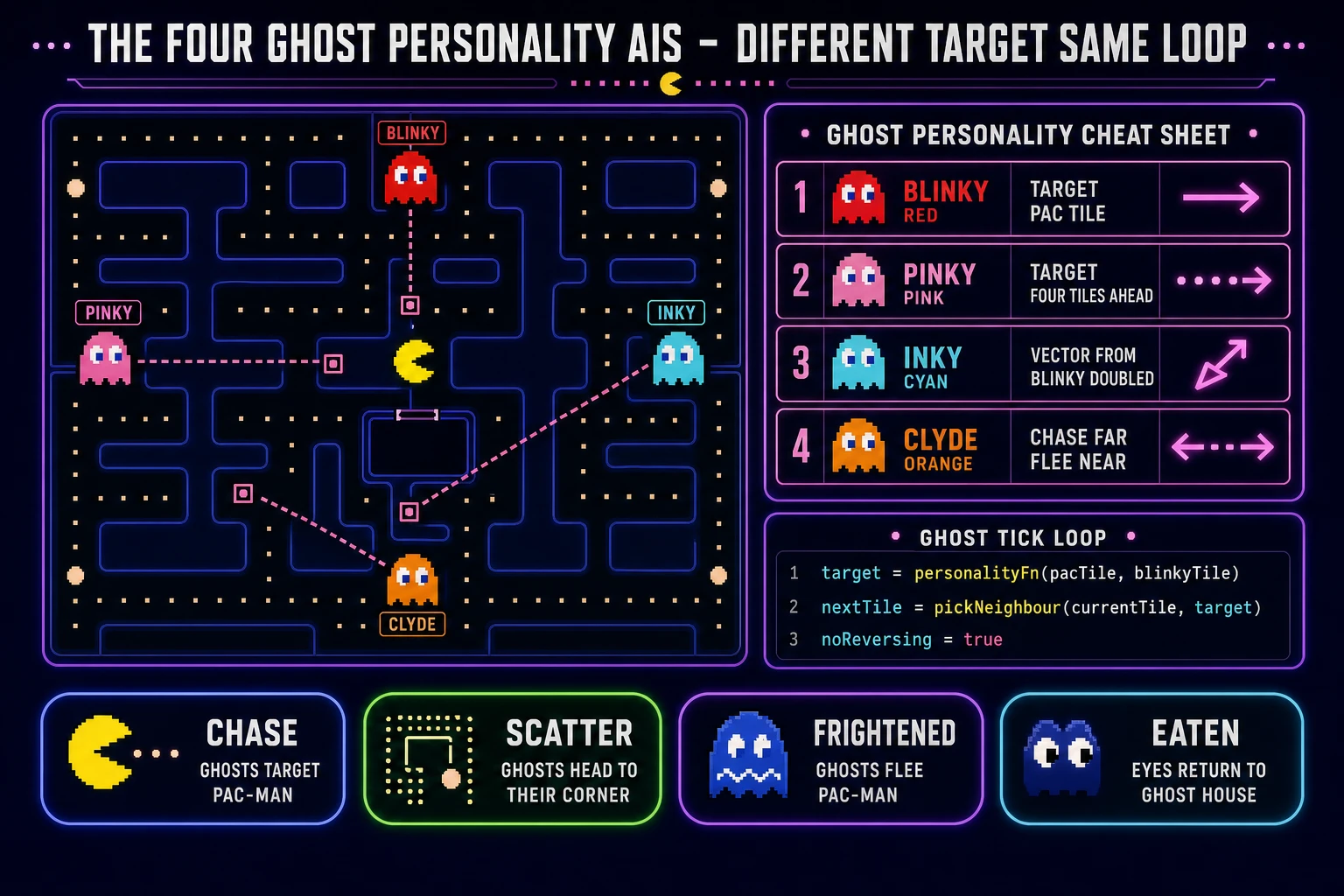
Four ghost personality AI cheat sheet: Blinky chase, Pinky ambush four tiles ahead, Inky fickle vector from Blinky, Clyde alternates at eight-tile threshold, with ghost tick loop pseudo-code
The four Pac-Man ghost personality AIs, verified against the Pac-Man Wikipedia article on 2026-08-09: Blinky targets the hero's tile, Pinky targets four tiles ahead, Inky uses a doubled vector from Blinky, and Clyde chases when far and flees when within eight tiles. Same tick loop, different target functions.

Pick your engine for how to make Pac-Man: Phaser 4, vanilla Canvas, or WizardGenie scaffold

Three good browser targets in 2026, each with a different trade-off. Phaser 4 is the honest default for a tilemap-based maze game. Phaser 4.2.1 "Giedi" was released on 9 July 2026 (verified against phaser.io/download/stable on 2026-08-09) and ships built-in tilemaps, arcade physics, animated sprites, and a scene manager — the exact primitives a Pac-Man clone needs. The maze becomes a Phaser Tilemap loaded from a JSON layout, the hero and four ghosts are Sprites with velocity, and Phaser's tile-based collision handles the "can I move into this tile" check without you writing the geometry code. Bundle is roughly 900 KB minified, which is fine for mobile browsers. This is the fastest path to a playable dot muncher and it is the pick 90% of readers should take.

Vanilla HTML5 Canvas 2D plus requestAnimationFrame is the leanest possible path. You write about 400 lines of JavaScript, produce a build under 15 KB minified, and end up with something eligible for a JS13K-style code-golf jam. The trade-off is that every primitive — tile-grid lookups, sprite animation, buffered input, ghost AI, collision, sound — has to be written by hand. Use vanilla Canvas if the exercise itself is the point; use Phaser 4 if you want the game done by Sunday night. Three.js is the wrong pick for this project because Pac-Man is a grid-locked 2D game with no camera perspective — the entire 3D scene graph is overhead you never use.

The third option: skip the engine choice and prompt WizardGenie for a scaffold in whichever framework you name. WizardGenie is the Sorceress game-native coding agent, shipping as both a Windows desktop installer (Early Access supporters and above) and a no-install web build at the same URL. Its coding-model lineup (verified 2026-08-09 in src/app/_home-v2/_data/tools.ts lines 735 to 742) covers Claude Opus 4.7, Claude Sonnet 4.6, GPT-5.5, Gemini 3.1 Pro, DeepSeek V4 Pro, Kimi K2.5, Grok 4.2, and MiniMax M2.7 — the current frontier plus the cheap-and-fast tier. For a dot-muncher clone, any frontier model scaffolds the whole project on the first prompt. Run cheap by pairing a frontier planner (Claude Opus 4.7 or GPT-5.5) with a cheap executor (DeepSeek V4 Pro or Kimi K2.5) in a Planner + Executor split — the shape of the pattern that keeps token cost around one-fifth of a solo-frontier session on the same codebase.
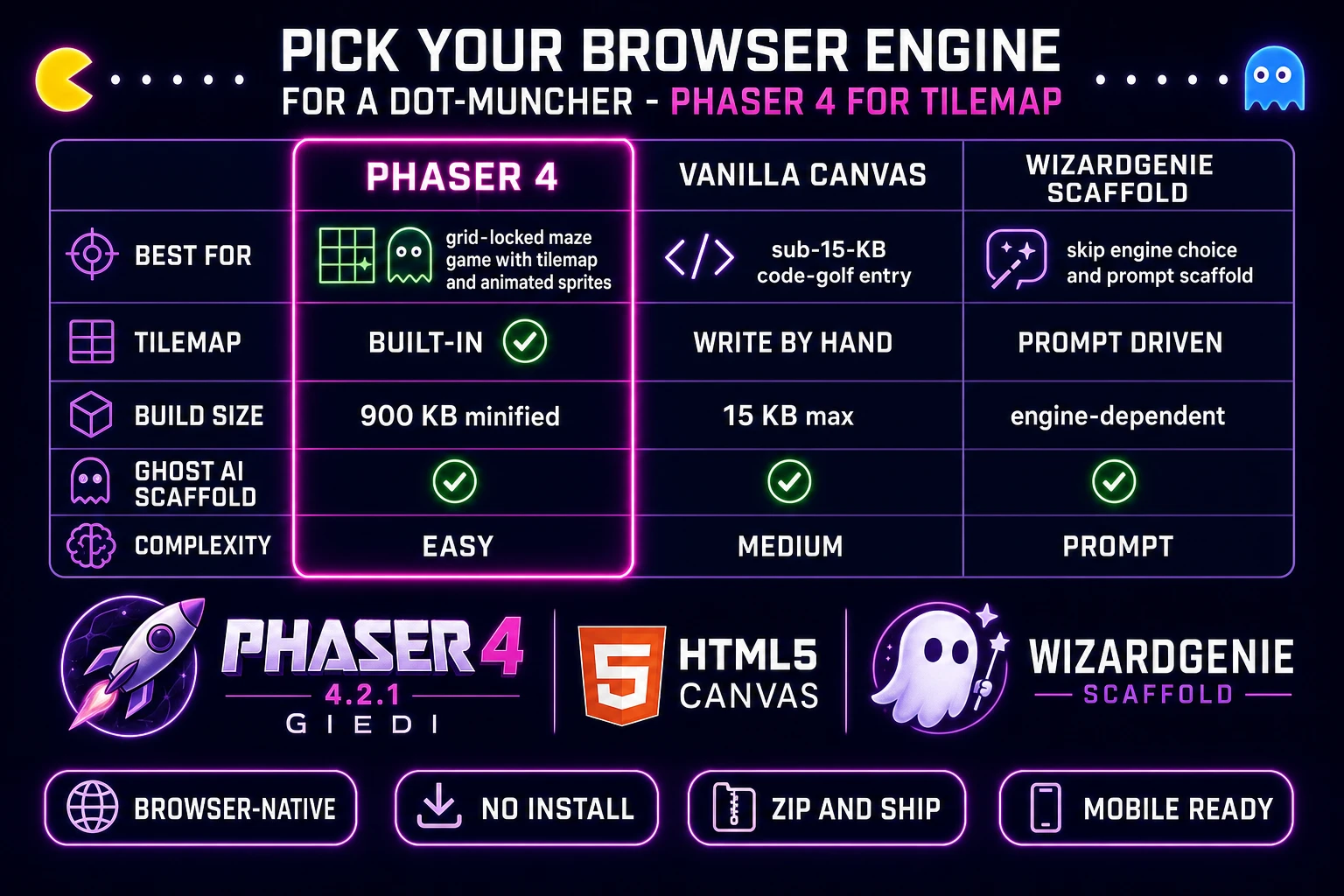
Comparison table of browser engines for a Pac-Man clone: Phaser 4 versus vanilla Canvas versus WizardGenie scaffold across best-for tilemap build-size ghost-AI-scaffold and complexity
Phaser 4 is the honest default for a browser dot muncher when the target is a tilemap-based maze with grid-locked entities. Vanilla Canvas is for the sub-15-KB code-golf entry. WizardGenie scaffolds either from a single prompt.

Step 1 — build the classic maze grid and dot placement

Skip this step and the entire project will grind at the third H2 review, guaranteed. Grab a sheet of graph paper, or open a whiteboard tool, and draw a rectangular grid roughly 20 to 28 tiles wide by 20 to 31 tiles tall. Do not replicate the arcade Pac-Man maze exactly — that specific layout is copyrighted and is the most-cited element in Bandai Namco takedown notices. Design your own maze with the same three feel-properties: corridors are one tile wide so entities pass single-file; there are no dead ends (every corridor loops back so ghosts can never trap a skilled player without options); and there are exactly four large-open corners for power pellets.

Each tile is one of four types: wall, corridor with dot, corridor with power pellet, or corridor empty (used for the ghost house, warp tunnels, and the hero spawn tile). Fill the corridors with small dots (10 points each). Place four large power pellets in the four corner regions — these are your "energizer" tiles that flip ghosts to frightened state. Add a central ghost-house rectangle where the four ghosts spawn and where eaten ghosts respawn. Optionally, add two warp-tunnel tiles on the left and right edges that teleport the hero and ghosts to the opposite side — a classic Pac-Man touch that adds strategic depth without adding code complexity. Save the maze as a JSON layout of tile-type integers; Phaser loads this directly with this.load.tilemapTiledJSON().

Two implementation shortcuts. First, draw the walls as blue rectangles in code instead of importing tile art — every version of Pac-Man from 1980 onward uses blue lines on black, and this look is a genre convention rather than a trademark. Two dozen lines of Phaser rectangle() calls and you have a full maze. Second, generate a dot-position map from the corridor tiles automatically instead of placing every dot by hand — WizardGenie will write this loop in one prompt. Total maze-build effort with these shortcuts: about 20 minutes on paper plus 5 minutes of prompting.
Step 2 — wire player movement, dot collection, and the four ghost personality AIs in WizardGenie

Open WizardGenie. The seed prompt for a dot muncher is one paragraph. "Scaffold a Phaser 4 project called dot-muncher. Tilemap loaded from maze.json (walls, dots, power pellets, ghost house, warp tunnels). Hero is a round Sprite with grid-locked movement: on tile-centre arrival, pick next tile from buffered arrow-key input or continue in current direction. Speed: 8 tiles per second. Four ghost Sprites (purple, green, yellow, aqua) with grid-locked movement matching the hero's tile-locked pattern. Each ghost has a personality target function: purple targets hero tile, green targets four tiles ahead of hero facing direction, yellow uses a doubled vector from purple through two tiles ahead of hero, aqua chases hero when more than eight tiles away and flees to its scatter corner when within eight. Ghost speed: 7 tiles per second in chase, 3.5 in frightened. Dot pickup: 10 points, removed on hero-tile entry. Power pellet pickup: 50 points, all ghosts to frightened state for 6 seconds, hero eats ghosts for 200/400/800/1600 points doubling per pellet. Death: hero hits a chase-mode ghost, lose a life, respawn at start. Win: all dots gone, advance level with 20% faster ghosts and 1 second shorter frightened window. HUD: score, lives, level." Feed that to any coding model in the lineup and you get a working scaffold in under four minutes.

Tuning happens after the scaffold. Play the build, notice that the hero feels sluggish at corners, tell WizardGenie "increase hero speed to 9 tiles per second and buffer the last two direction inputs for corner pre-selection". Play again, notice the four ghosts leave the ghost house all at once and swarm the hero on frame one, "add a per-ghost release timer: purple leaves at 0 seconds, green at 3, yellow at 6, aqua at 10, and only after 30 dots have been eaten does aqua leave regardless". Play again, notice that all four ghosts feel identical because their target functions are producing similar tile choices, "add a scatter mode that toggles every 7 to 20 seconds: in scatter, each ghost targets its own home corner (purple top-right, green top-left, yellow bottom-right, aqua bottom-left) so the personality-target variety shows up on screen". Each pass is a natural-language iteration; the agent edits the code, the browser reloads. Ten or fifteen passes and the dot muncher feels arcade.

The most important tuning pass is the ghost-house release timing and the chase-scatter toggle. Get these wrong and the ghosts are boring; get them right and the game breathes. The original 1980 arcade Pac-Man toggles between chase and scatter mode on a schedule (seven seconds of scatter, twenty of chase, seven scatter, twenty chase, then longer chase phases as levels progress). Your inspired-by version does not have to copy this schedule exactly — that would look like a takedown target — but the pattern of alternating targeting modes is fair game and it is what makes the ghosts feel like they have personalities instead of feeling like a uniform swarm.

Step 3 — hero and ghost art in AI Image Gen, chase theme in Music Gen, chomp in SFX Gen

Open Sorceress AI Image Gen. For the hero sprite, describe your own dot muncher — not a yellow wedge, which is the trademarked Pac-Man silhouette. Try "top-down cartoon round dot-muncher creature, 32-by-32 pixel art, single frame plus 4-frame mouth-open-close animation, transparent background, orange body with black eyes, cheerful mascot style". Or pick a completely different metaphor — a hungry cat, a Pac-Man-adjacent slime, a ghost-hunter kid with a net. The mechanic is what people love; the specific character is your call. AI Image Gen bills per generation based on the model and quality tier you pick; a mid-tier model at 512-square costs single-digit credits and iterates fast. Budget 25 to 45 credits total for the hero pack (0.25 to 0.45 USD at the standard 100 credits per dollar rate, confirmed in src/lib/models.ts line 69 as CREDITS_PER_DOLLAR = 100).

For the four ghost sprites, describe four visually distinct chasers — not the exact Blinky Pinky Inky Clyde palette, which is trademarked. Pick your own four-colour scheme (purple, green, yellow, aqua is a clean starting palette) and give each ghost a distinctive silhouette — one taller, one shorter, one with horns, one with a hat. Prompt: "top-down cartoon ghost sprite, 32-by-32 pixel art, purple body with white eyes, sinister but cute, transparent background, single frame plus 2-frame wobble animation". Generate four, one per ghost. Then generate a frightened variant — the same silhouettes tinted blue with wide eyes — for the power-pellet window. Budget another 25 to 45 credits.

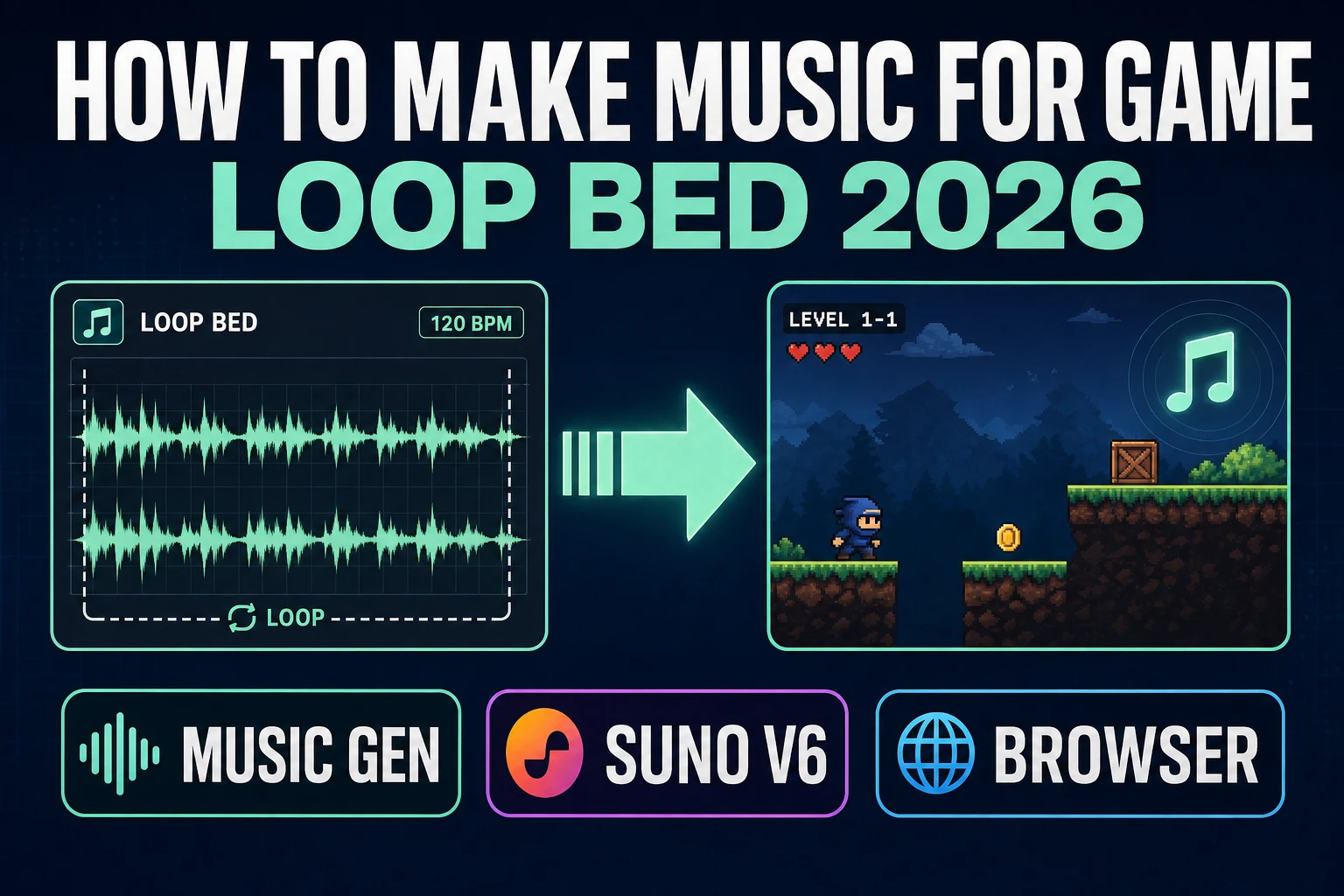
For audio, open Music Gen and prompt "chase-theme loop, 130 BPM, 20 seconds, urgent minor-key arcade energy, seamless loop, chunky bass, no drums under a small percussion top". Music Gen bills 10 credits per generation (verified 2026-08-09 in src/app/music-gen/page.tsx line 28 as MUSIC_CREDIT_COST = 10). Preview and regenerate until the tension level is right; two or three tries is typical, so budget 20 to 30 credits (0.20 to 0.30 USD). Export as MP3, or add 2 credits for WAV per line 31's WAV_CREDIT_COST = 2.

Then open SFX Gen. Sorceress SFX Gen bills 1 credit per second (verified 2026-08-09 in src/app/sfx-gen/page.tsx line 23 as SEED_AUDIO_CREDITS_PER_SECOND = 1). Generate four short clips: a chomp sound (0.15 seconds, fast "wakka" bite, fire on every dot pickup); a death chirp (1.2 seconds, descending sad-trombone melody, fire on ghost hit); a ghost eat chime (0.6 seconds, ascending sparkle, fire on ghost eaten in frightened mode); and a power-pellet siren (1 second looping wobble, play under the chase theme during the frightened window). Four clips at 0.15, 1.2, 0.6, and 1.0 seconds is about 4 credits (with minimum-1-credit-per-clip rounding). Total audio budget for the whole game is roughly 30 to 40 credits (0.30 to 0.40 USD). The 100-credit new-account grant (SIGNUP_GRANT = 100 in src/app/api/admin/credits/route.ts line 12) covers the audio pass and most of the sprite pass with headroom for a second hero colour.

What a how to make Pac-Man project costs on Sorceress in 2026

Concrete asset and generation budget for a browser dot-muncher clone from empty repo to zip-and-ship playable, all numbers verified 2026-08-09 against local Sorceress source:

  • Hero sprite pack (AI Image Gen): roughly 5 to 15 credits per generation, 2 to 3 tries typical for a keeper, so 10 to 45 credits (0.10 to 0.45 USD). Or generate one keeper and tint at runtime for a two-player split-screen mode.
  • Four ghost sprites plus frightened variants (AI Image Gen): 20 to 60 credits total (0.20 to 0.60 USD) at 5 to 15 credits per generation, 4 to 8 sprites in the final pack.
  • Maze wall tile art (AI Image Gen): optional, 5 to 15 credits (0.05 to 0.15 USD). Skip and draw the walls as blue Phaser rectangles for zero extra cost.
  • Chase-theme loop (Music Gen): 10 credits per generation, 2 to 3 tries typical, so 20 to 30 credits (0.20 to 0.30 USD). Add 2 more credits if you want WAV.
  • Chomp, death chirp, ghost eat, power-pellet siren (SFX Gen): 1 credit per second, 4 short clips at under 1.5 seconds each with minimum-1 rounding, so roughly 4 to 8 credits (0.04 to 0.08 USD).
  • WizardGenie coding time: effectively free on the Sorceress side. Model-side API cost for a 2-to-4-hour prompt session on a cheap executor like DeepSeek V4 Pro is typically under 0.60 USD.
  • Total for one complete browser dot-muncher build: 59 to 173 credits, or roughly 0.59 to 1.73 USD in Sorceress credits, plus under 0.60 USD in model API time. Under 2.35 USD end-to-end for a first inspired-by dot-muncher game.

Sorceress bills 100 credits per dollar at the standard rate (CREDITS_PER_DOLLAR = 100 in src/lib/models.ts line 69). New accounts start with 100 free credits, which covers the entire audio pass, the maze wall tile, and about half the sprite pass with headroom. The Sorceress Lifetime tier at 49 USD one-time (LIFETIME_PRICE = 49 in src/app/plans/page.tsx line 51) covers unlimited Music Gen and SFX Gen use, which matters if you plan to iterate on the audio (multiple chase-theme variants per level, per-ghost death chirps) or add a full soundtrack with intermission jingles.

For related browser-game pipelines that share this "generate the assets, prompt the coder, ship the browser build" spine, the closest reads are Weave How to Make a Maze (Browser Generator Loop 2026) for the maze-generation algorithm layer if you want procedural mazes instead of hand-designed ones, Stack How to Make Tetris (Browser Falling Blocks 2026) for another public-mechanic-with-trademark-caveat pattern, Flap How to Make Flappy Bird (Browser Loop 2026) for the same one-mechanic-plus-scoring pipeline on a different arcade classic, Mate How to Make a Chess Game (Browser AI Loop 2026) for the grid-based AI-opponent pattern, and Rally How to Make a Racing Game (Browser Kart Loop 2026) for the waypoint-AI-opponent pattern that resembles Pac-Man's ghost target functions. The Sorceress Tools Guide is the master index for every tool the guide referenced. Under two dollars fifty, one weekend, and how to make Pac-Man — the mechanic, not the branding — is a done deal.

Frequently Asked Questions

Is it legal to make my own Pac-Man clone?

The mechanic (a character eating dots in an enclosed maze while avoiding chasing ghosts) is fair use. Video-game mechanics are not copyrightable in the United States under the Atari, Inc. v. North American Philips Consumer Electronics Corp. lineage and subsequent case law. The name Pac-Man, the specific Blinky Pinky Inky Clyde ghost names, the yellow-wedge Pac-Man character shape, and the specific 28-tile-wide arcade maze layout are trademarked and copyrighted by Bandai Namco Entertainment. Ship your version under a different name (Dot Muncher, Chomp Chase, Munchy Maze) with your own maze layout, differently colored ghost characters, and a hero character that is clearly not a yellow wedge. The gameplay is fair game; the branding is not. Bandai Namco has historically been aggressive about takedown notices for clones that keep the branding intact, and passive about tolerating clones that clearly differentiate their identity.

Which browser engine should I use to build a Pac-Man clone in 2026?

Phaser 4 is the honest default for a grid-based maze game with sprite entities. Phaser 4.2.1 Giedi (released 9 July 2026, verified against phaser.io/download/stable on 2026-08-09) ships tilemaps, arcade physics, and animated sprites, which map directly to how Pac-Man is built: a Tilemap holds the maze walls and dot positions, the hero and four ghosts are Sprites with velocity, and Phaser's arcade physics handles tile-based collision. Bundle is roughly 900 KB minified, which is fine for a mobile browser. Vanilla HTML5 Canvas 2D plus requestAnimationFrame is a valid second option if you want a code-golf entry under 15 KB, but you write every collision primitive by hand. WizardGenie scaffolds either from a single prompt. Three.js is the wrong pick because Pac-Man is a grid-locked 2D game; the 3D scene graph is unused overhead.

How does Pac-Man ghost AI actually work?

Each of the four ghosts has a different target-tile function per frame, plus a shared chase-scatter-frightened state machine. Blinky the red ghost targets Pac-Man's exact tile - direct pursuit. Pinky the pink ghost targets the tile four in front of Pac-Man's facing direction - the ambush pattern. Inky the cyan ghost uses a vector from Blinky's tile to two tiles ahead of Pac-Man, doubled - the fickle pattern that depends on both Blinky's and Pac-Man's positions. Clyde the orange ghost targets Pac-Man directly when more than eight tiles away, and his own scatter corner when within eight tiles - the alternating pattern that makes him look shy. All four run the same tile-graph path search: on entering a new tile, pick the neighbour tile (up, down, left, right) that minimises Euclidean distance to the target tile, with the constraint that they cannot reverse direction. In chase mode they use these targets; in scatter mode each targets its own home corner; in frightened mode (after Pac-Man eats a power pellet) all four pick a random legal direction and are eaten for points. Full personality AI is about 80 lines of code in WizardGenie.

How do I handle grid-locked movement in Pac-Man?

Pac-Man does not move freely in pixel space; it moves along a tile grid, one tile at a time. The trick is a two-value hero state: currentTile (the tile the hero is inside) and nextTile (the tile the hero is heading to). On each frame, the hero lerps its screen position from currentTile toward nextTile at a fixed speed. When it arrives at nextTile, that becomes the new currentTile, and the game picks a new nextTile based on the last direction the player pressed (queued input). If the player is holding right and there is no wall to the right of currentTile, nextTile is the tile to the right; otherwise, the hero keeps going in its previous direction until it hits a wall. This buffered-input pattern is what makes Pac-Man feel responsive: you can press up while approaching a corner and the hero remembers the up input and takes the corner as soon as the tile alignment is right. The same nextTile logic drives the four ghosts, they just pick the tile via their personality function instead of via keyboard input.

How much does a Pac-Man clone cost to build on Sorceress in 2026?

Total build budget for a complete browser dot-muncher project is roughly 60 to 130 credits, or 0.60 to 1.30 USD in Sorceress credits, verified 2026-08-09 against local source. Breakdown: hero sprite (Chomp) plus four ghost sprites in AI Image Gen at roughly 5 to 15 credits per generation, so 25 to 75 credits total (0.25 to 0.75 USD); maze wall tile in AI Image Gen at 5 to 15 credits (or skip and draw the walls as blue rectangles); a chase-theme background loop in Music Gen at 10 credits per generation (MUSIC_CREDIT_COST = 10 in src/app/music-gen/page.tsx line 28), 2 tries typical, so 20 credits (0.20 USD); wakka-wakka chomp sound, death chirp, ghost-eat chime, and power-pellet siren in SFX Gen at 1 credit per second (SEED_AUDIO_CREDITS_PER_SECOND = 1 in src/app/sfx-gen/page.tsx line 23), 5 to 10 credits total (0.05 to 0.10 USD); and WizardGenie coding time is effectively free on the Sorceress side. New accounts get 100 free starter credits (SIGNUP_GRANT = 100 in src/app/api/admin/credits/route.ts line 12), which covers the entire audio pass and about half the sprite pass with headroom. The Sorceress Lifetime tier at 49 USD one-time (LIFETIME_PRICE = 49 in src/app/plans/page.tsx line 51) covers unlimited Music Gen and SFX Gen if you plan to iterate on the audio.

Sources

  1. Pac-Man - Wikipedia (design, ghost AI personalities, 1980 release)
  2. Phaser 4 - HTML5 Game Framework
  3. MDN - requestAnimationFrame (game loop timing)
  4. MDN - Keyboard events (arrow-key input handling)
Written by Arron R.·3,234 words·14 min read

Related posts