
Find an AI 3D Model Generator Free No Sign Up (2026)

By Arron R.11 min read
Strictly no-sign-up AI 3D model generators do exist in 2026 (research-model Hugging Face demos and browser-side photogrammetry), but every flagship platform gat

An ai 3d model generator free no sign up search reads like a small request and lands on a wall of friction. Every flagship image-to-3D tool in 2026 — Meshy, Tripo, Rodin, Hunyuan — exposes a slick anonymous preview but gates the actual GLB download behind a free account. The strictly no-sign-up browser demos that do exist are real, but they ship with hard watermarks, low polycounts, no rigging, and no engine-format export. Below is the honest 2026 map: which tools really run without an account, where each one stops, and the one path that asks for a thirty-second free signup and gives you back unlimited credit-free generation plus a 100-credit starter pack on top. Verified June 3, 2026 against the live sorceress.games source tree.
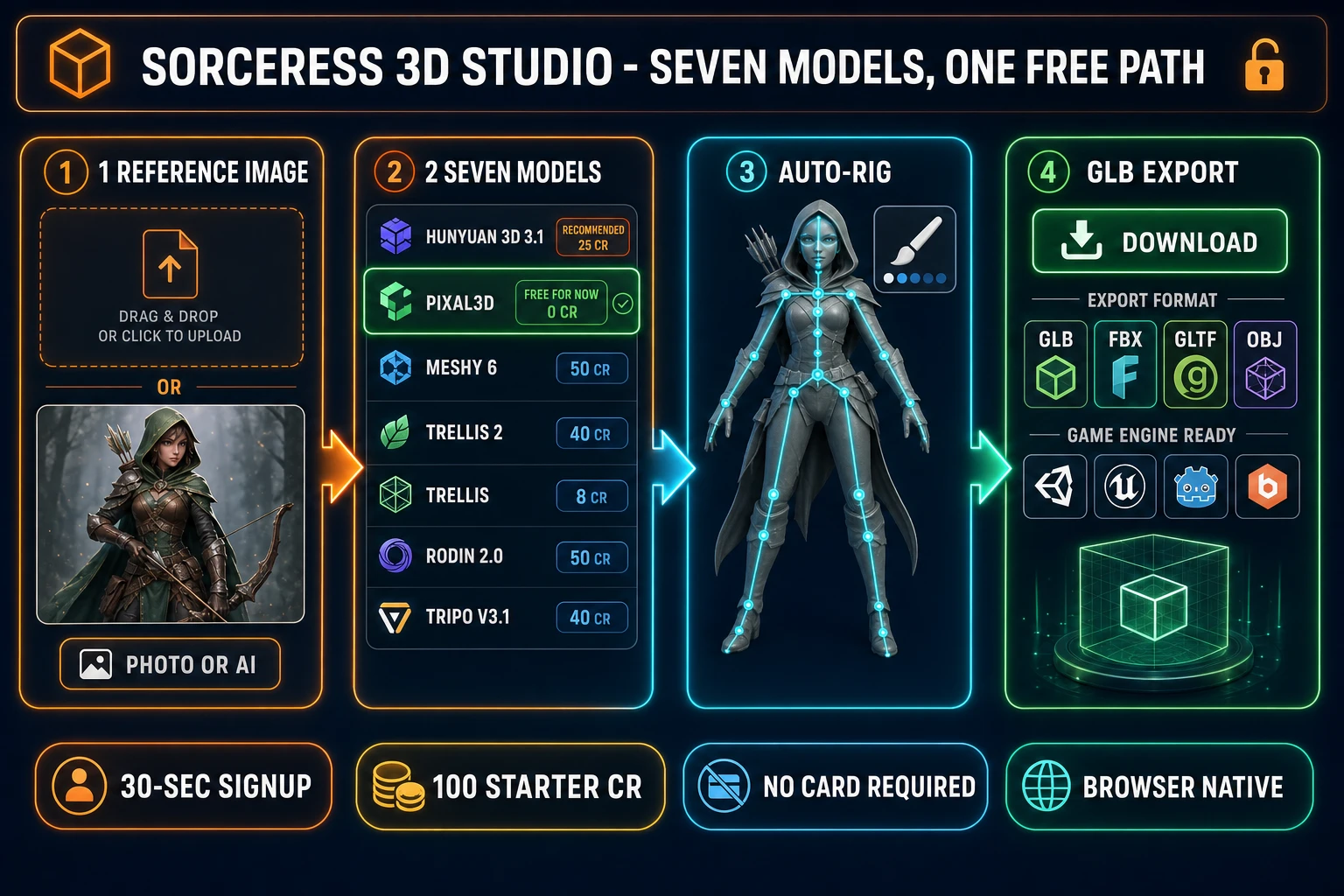
Sorceress 3D Studio pipeline diagram with four numbered panels showing a prompt or reference image input, the seven-model image-to-3D picker including Pixal3D free and Hunyuan 3D 3.1, an automatic humanoid auto-rig step with weight-paint refinement, and a final GLB or FBX engine-ready export, with orange and cyan neon accents on a dark navy background
The Sorceress 3D Studio pipeline — seven image-to-3D models, automatic rigging, text-to-animation, and engine-format export. Verified June 3, 2026 against src/lib/threed-models.ts.

What “no sign-up” actually means in 2026

The phrase covers three different kinds of friction, and the difference matters when you are scoping a tool for a pipeline. The first is the account wall: can you reach a working version of the generator at all without creating an account, supplying an email, or linking a third-party identity? The second is the payment wall: even after you sign up, does the tool require a credit card on file before you can run a single generation? The third is the export wall: can you actually download the result in a usable file format (GLB, FBX, OBJ) without an account, or is the preview-only view the entire anonymous experience?

A genuinely no-sign-up ai 3d model generator free no sign up path clears all three. Most of the named tools clear the account wall (anonymous demos are common) and the payment wall (free tier exists), but very few clear the export wall — the moment you click “Download GLB”, a modal asks you to sign in. That is the friction this article maps.

AI 3D model generator free no sign up tools that genuinely exist

Three patterns of strictly no-sign-up image-to-3D demos exist on the open web as of June 3, 2026. Each one is honest about what it gives up.

Open-source model demos hosted on Hugging Face Spaces. The Microsoft Research TRELLIS demo, the Tencent Hunyuan 3D demo, and several smaller research-model demos run as public Hugging Face Spaces. No account needed, no email captured, the page loads and you can run a generation. The cost: long queue times when traffic is high, frequent “GPU busy” failures, no usage guarantee, and the output formats are whatever the research demo exposes (often .glb but sometimes only a preview video). The polycount is typically capped low, textures are baked at low resolution, and there is no auto-rigging, no animation, and no engine-format post-processing. Useful for a one-shot prototype; not a pipeline.

Vendor anonymous preview tiers with a watermark on the preview. Several commercial vendors expose a public “try it free, no signup” surface that runs a real generation but slaps a watermark on the preview render and disables the download button. The model output exists in the vendor’s cloud, but you cannot pull the GLB out without creating an account. Effectively a marketing demo, not a working tool.

Browser-side photogrammetry apps. A small number of open-source apps run photogrammetry entirely client-side using WebGL or WebGPU. No server, no account, no payment. The catch: photogrammetry needs many input images (usually 20+ from different angles), not a single photo, and the output is a noisy point-cloud-to-mesh result that needs heavy cleanup. Not the same workflow as the modern single-image diffusion-based generators most readers are looking for.

The honest summary: strictly no-sign-up ai 3d model generator free no sign up options exist, but every one of them trades the friction of the account wall for some combination of low quality, no export, no rigging, no animation, or unreliable uptime.

Why every serious image-to-3D tool eventually needs an account

The reason is not gatekeeping for its own sake. Image-to-3D generation is GPU-expensive. A single Meshy or Rodin run consumes seconds to minutes of H100 or A100 compute time, which costs the vendor real money on every generation. With no account, there is no way to attribute usage, enforce rate limits, or stop a single visitor from running a thousand generations in an hour and burning through the vendor’s compute budget. Account creation is how the vendor turns a generation into an accountable transaction — even if no money changes hands on the free tier, the account is the unit of accountability.

That economic reality is why the pattern is so consistent across the industry: anonymous preview to demo the tool, signed-in account to actually use it, paid plan to use it at scale. The question for an indie game dev is not “can I avoid signing up?” — for any tool that delivers a game-ready rigged 3D character, the answer is no. The real question is “which account gives me the most generation for the least friction and the least money?”.
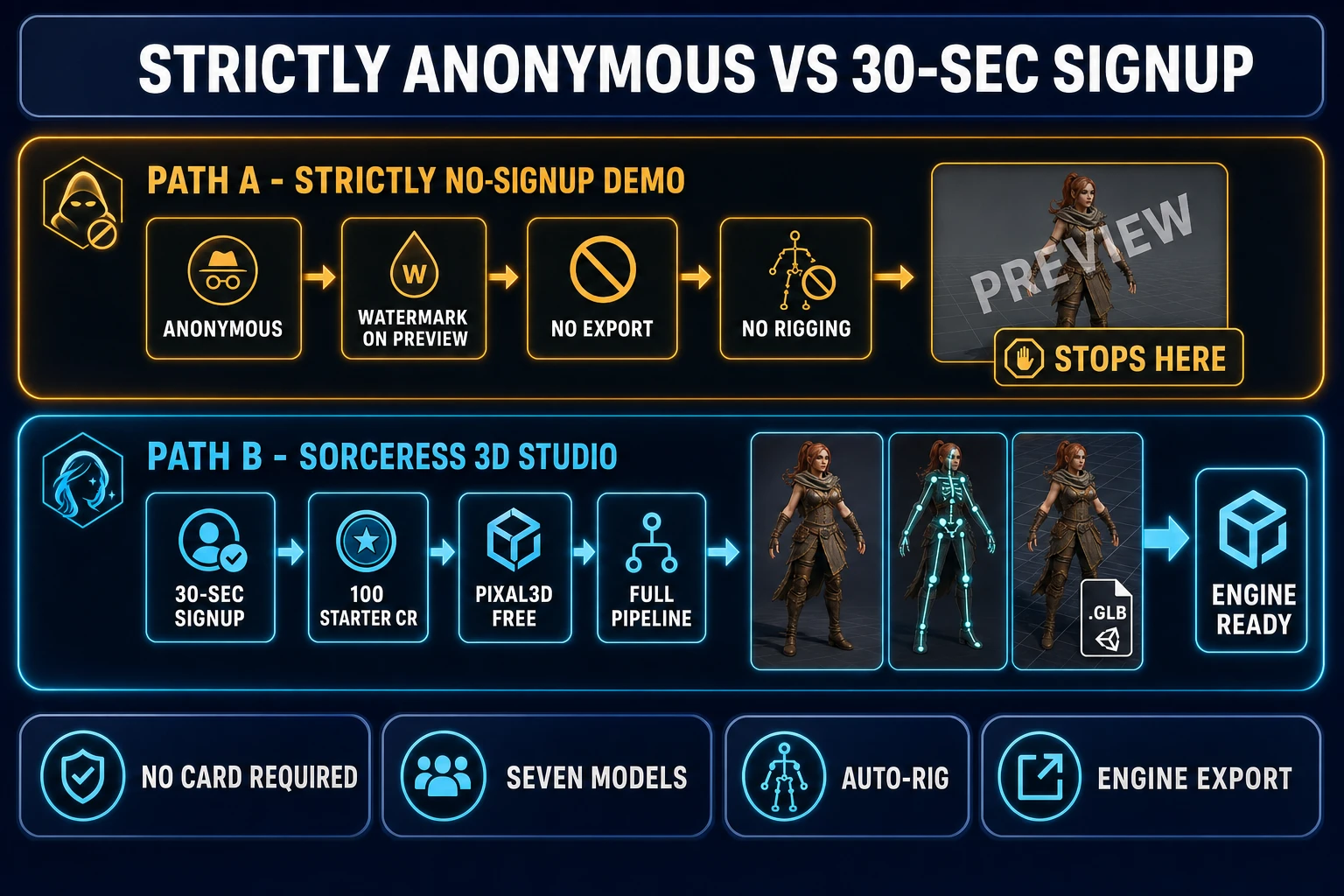
Side-by-side comparison infographic showing Path A as strictly no-sign-up browser demos with chips reading anonymous, watermark on preview, no export, no rigging, no animation, and Path B as Sorceress 3D Studio with chips reading 30-second Google signup, 100 starter credits, Pixal3D unlimited free, full pipeline, ending in a row of thumbnails showing a textured 3D character, a rigged skeleton, and an exported GLB file
The strictly no-sign-up path ends at a watermarked preview. The Sorceress path asks for a thirty-second Google signup and ends at a rigged, animated, engine-ready 3D character. Verified June 3, 2026 against src/app/_home-v2/_data/tools.ts and src/lib/threed-models.ts.

Sorceress 3D Studio — the honest free path after a 30-second signup

The Sorceress 3D Studio at /3d-studio sits one Google OAuth click away from the no-account demos, but the trade-off it offers is concrete enough that the trade is worth making. Verified June 3, 2026 against src/app/_home-v2/_data/tools.ts line 545 (badge: "AI Credits", not Pro-gated) and src/lib/threed-models.ts:

  • Signup takes about thirty seconds with Google OAuth. No credit card, no email verification step, no upgrade prompt at the door. The signup grants a 100-credit starter pack on the account immediately — confirmed by the home-page hero copy in src/app/_home-v2/_components/HomeHero.tsx line 701: “Try the tools free — get 100 starter credits on us.”
  • Pixal3D is genuinely free and unlimited. The 3D Studio model picker includes Pixal3D (Tencent’s Pixel3D / Hunyuan-family model hosted on Sorceress’s own GPU pool) with credits: 0 and the literal label “Free for Now!” in src/lib/threed-models.ts lines 215-221. New signups can run this model an unbounded number of times at no credit cost.
  • Seven image-to-3D models inside one picker. The full model order in THREED_MODEL_ORDER (lines 301-309): Hunyuan 3D 3.1 (25 cr, recommended), Pixal3D (0 cr, free), Meshy 6 (50 cr), TRELLIS 2 (35-45 cr by resolution), TRELLIS (8 cr, the cheapest paid model), Rodin 2.0 (50 cr), Tripo v3.1 (40 cr). Same source-of-truth file, same picker, no upgrade required to access any of them.
  • The 100 starter credits cover 4 full-quality runs or 12 TRELLIS runs. Hunyuan 3D 3.1 at 25 credits gives four generations on the recommended model. TRELLIS at 8 credits gives twelve generations on the cheapest paid model. Both are on top of the unlimited free Pixal3D path.
  • Engine-format export is included. Outputs in GLB, FBX, GLTF, OBJ, USDZ, and (Rodin) STL formats — all the standard rigged-character formats Unity, Unreal, and Godot read natively.

The headline number, then: a brand-new account with no payment information on file gets unlimited free ai 3d model generator free no sign up-style generation via Pixal3D, plus four flagship-tier generations on Hunyuan 3D 3.1, plus twelve cheap runs on TRELLIS, in exchange for a thirty-second Google signup with no card required. Verified June 3, 2026.
Quality tradeoff: anonymous demo vs Hunyuan 3D 3.1 in 3D Studio

A strictly no-sign-up Hugging Face demo of an open research model and the same model wrapped in a production pipeline produce visibly different outputs, even when the underlying weights are identical.

DimensionStrictly no-sign-up demo3D Studio (after 30-second signup)
Account requiredNoneGoogle OAuth, no card
Free generationsLimited by queue / GPU availabilityPixal3D unlimited + 100 starter credits
Polycount capOften 20k-50kUp to 1.5M faces (Hunyuan), 500k (TRELLIS 2), 500k (Tripo v3.1)
Texture resolution512px-1024px baked low1024px-4096px PBR maps on Meshy / Rodin / TRELLIS 2
Auto-riggingNot includedOne-click humanoid auto-rig with weight-paint refinement
Text-to-animationNot includedBuilt-in HiMotion text-to-motion
Export formatsWhatever the demo exposesGLB, FBX, GLTF, OBJ, USDZ, STL
Multi-image / multi-viewRare in demosMeshy 6 + Tripo v3.1 productized
Pricing modelFree but unreliableNo-expiry credits, $10 per 1,000
Uptime / queueShared GPU pool, frequent waitsRouted across Replicate, fal.ai, Sorceress GPU

Compute math verified June 3, 2026 against src/lib/threed-models.ts for the credit costs and parameter ranges, and against src/app/plans/page.tsx lines 45-49 for the credit-pack pricing. The cheapest paid model in the 3D Studio picker (TRELLIS at 8 credits per run) costs eight cents at the $10-per-1,000 starter rate. That number is small enough that the no-expiry credit pack on a starter account behaves like a multi-month flat fee for the kind of generation volume an indie pipeline actually runs.

The game-ready pipeline only Sorceress closes

The strictly no-sign-up path ends at a downloaded mesh, if you are lucky. The Sorceress 3D Studio path ends at a rigged, animated character in your engine of choice, because the rest of the pipeline lives on the same tab.

  1. Generate the source image with Nano Banana 2, Flux 2 Pro, or any of the eighteen rails in AI Image Gen. Or skip this step and upload a reference photo. Sorceress’s AI Image Gen panel lists the current image-model lineup in src/app/_home-v2/_data/tools.ts — the same panel that supplies the 3D Studio input. The reference-image-lock workflow from the on-model character guide keeps the character consistent across generations.
  2. Send the image to 3D Studio. One click hands off to /3d-studio. The model picker remembers the last selected model; Pixal3D is the free default. The page is the unified StudioPage, not a separate tab, so the result lands in the same gallery you generated the image in.
  3. Auto-rig the humanoid skeleton. The Rig tab inside 3D Studio runs the Sorceress Auto-Rigging step with an Unreal-style skeleton, automatic weight calculation, and a weight-paint refinement tab for the parts the auto-rigger gets wrong (typically the neck-to-shoulder seam and the finger weights).
  4. Animate with text-to-motion. The Animate tab takes the rigged character and a text prompt (“walk forward, throw a punch, wave hello”) and produces motion clips via the HiMotion text-to-animation backend.
  5. Export to GLB, FBX, or GLTF. The same character with rig and animation tracks lands in a single file the engine reads natively. Phaser and Three.js read the glTF 2.0 format directly. Unity and Unreal read FBX natively. Godot reads GLB out of the box.

That five-step pipeline is the cleanest answer to ai 3d model generator free no sign up-style queries in 2026: it asks for the one piece of friction the strictly anonymous tools cannot eliminate (a thirty-second account so the GPU bill stays accountable) and trades it for everything the strictly anonymous tools cannot deliver (a free unlimited model, four free flagship-tier generations on top, automatic rigging, text-to-motion, and engine-format export).

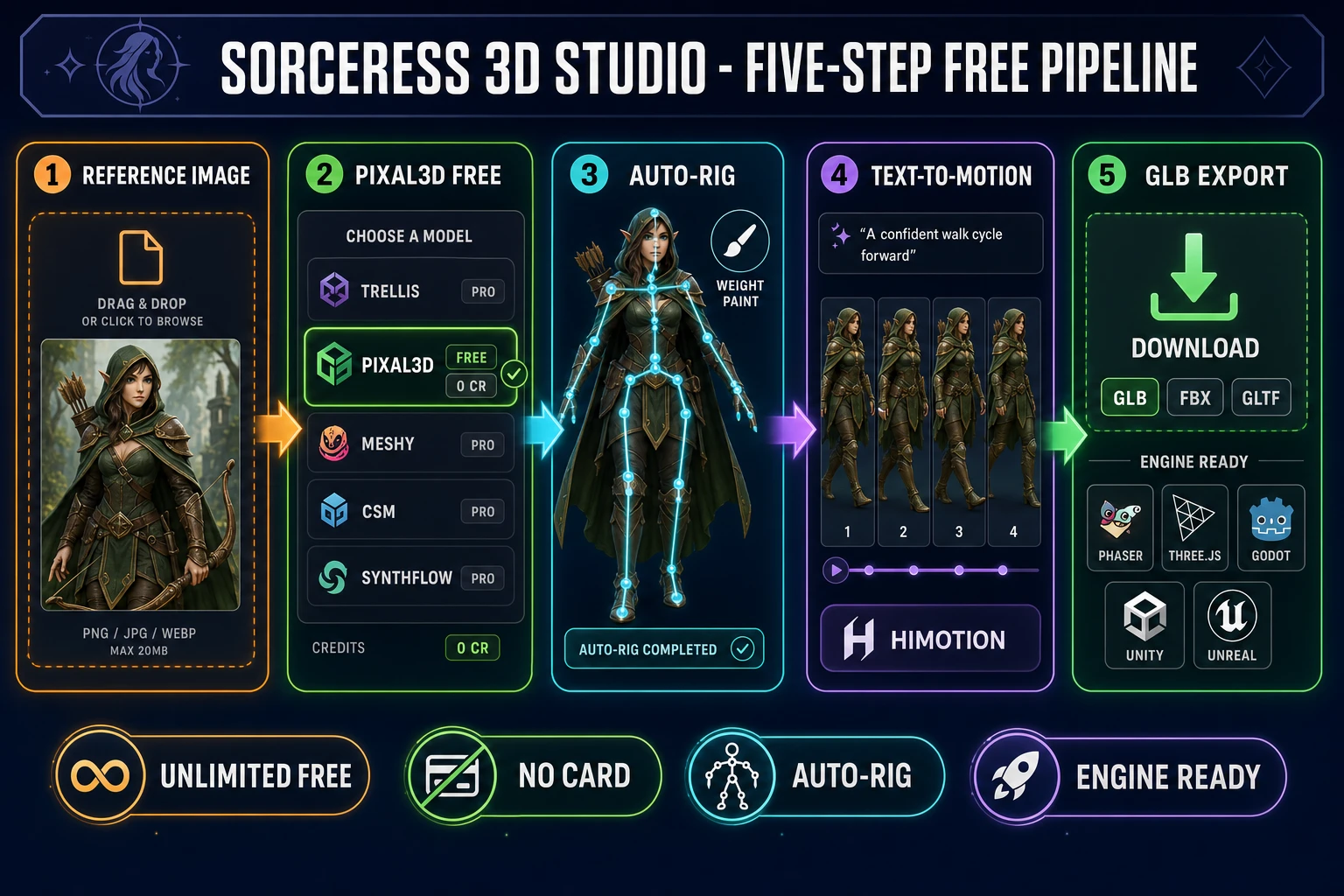
Five-step pipeline diagram showing the Sorceress 3D Studio flow from a reference image input through the seven-model image-to-3D picker with Pixal3D highlighted as free, then auto-rigging with an Unreal-style humanoid skeleton, then text-to-motion with a sample walk cycle, ending at a GLB export icon with engine logos for Phaser, Three.js, Godot, and an FBX option for Unity and Unreal
The full Sorceress 3D Studio pipeline in five clicks. Pixal3D is free, the rig and motion steps add no friction, and the export lands as a single GLB or FBX file. Verified June 3, 2026 against src/lib/threed-models.ts and src/app/3d-studio/page.tsx.

When a strictly no-sign-up tool is actually the right call

Three honest cases where the strictly no-sign-up path is the correct pick over a quick-signup pipeline.

One-shot anonymous test. If the use case is a single throwaway generation to evaluate whether image-to-3D produces a usable result on a specific reference photo, the friction of signing up may be larger than the friction of accepting whatever the anonymous demo gives you. A Hugging Face Space demo answers the “does this work at all?” question in one render.

Privacy-sensitive input. If the input image is something the user does not want associated with an account or stored on a third-party server (a personal photo, a confidential design reference), an anonymous browser demo avoids the cloud-storage attribution entirely. Treat this as a narrow case: most production work wants the input archived for re-generation later.

The reader actually just wants the geometry. Not every project needs rigging, animation, PBR maps, or engine-format export. A 3D-printable mesh for a hobby print, a quick reference model for a sculpting session, a low-poly prop for a static render — these honestly fit the strictly no-sign-up demos because the downstream pipeline ends at the mesh itself.

For every other case — rigged characters, game pipelines, multiple iterations on the same input, animation, engine-format export — the thirty-second signup trade is the cleaner pick.

How to claim your free 3D generations on Sorceress in 30 seconds

The honest end-to-end on the free path, verified June 3, 2026 against the live source.

  1. Open sorceress.games/3d-studio. The page loads without an account — you can browse the model picker and tab structure before signing in.
  2. Click the “Sign in with Google” button. Sorceress uses Google OAuth via Supabase (signInWithOAuth in src/lib/auth.ts line 54). One click, no email verification step, no password to remember. Email/password is also an option if Google OAuth is not your default.
  3. Confirm the 100 starter credits landed. The credit counter in the header shows your current balance. New accounts get 100 credits granted on first signup, with no card required.
  4. Pick Pixal3D in the model picker (or Hunyuan 3D 3.1 if you want the recommended flagship). Pixal3D shows the “Free for Now!” label and 0 cr cost in the picker. Hunyuan 3D 3.1 shows 25 cr and the “Recommended” chip.
  5. Drop a reference image and generate. The pipeline runs end-to-end. Re-run as often as you like on Pixal3D; spend down the 100 starter credits on the paid models when you want the higher-fidelity output.

That is the honest answer to ai 3d model generator free no sign up: a thirty-second Google OAuth signup in exchange for an unlimited free path on Pixal3D, four flagship runs on Hunyuan 3D 3.1, twelve cheap runs on TRELLIS, a full auto-rig and text-to-motion downstream, and engine-format export to GLB, FBX, and GLTF. The only friction the path cannot remove is the one the strictly anonymous tools cannot remove either: someone has to pay the GPU bill, and a free account is how the vendor knows it is you.

Frequently Asked Questions

Is there a genuine ai 3d model generator free no sign up option in 2026?

Yes, three patterns exist, and each one is honest about what it gives up. The first is open-source model demos hosted on Hugging Face Spaces (Microsoft TRELLIS, Tencent Hunyuan 3D, and several research-model demos) which run with no account, no email, no payment, but queue under shared GPU pools, cap polycount low, skip rigging and animation, and expose whatever format the demo chose to surface. The second is vendor anonymous preview tiers (most flagship platforms expose a 'try it free, no signup' surface) which run a real generation but watermark the preview render and disable the download button, so the GLB never leaves the vendor's cloud without an account. The third is browser-side photogrammetry apps that run entirely client-side via WebGL or WebGPU, which need 20+ input images from different angles and produce noisy point-cloud meshes that need heavy cleanup. For game-ready rigged characters with engine-format export, the strictly anonymous path does not yet exist as of June 3, 2026 — the closest practical answer is a 30-second Google sign-up to Sorceress 3D Studio for the unlimited free Pixal3D path plus 100 starter credits. Verified June 3, 2026 against src/lib/threed-models.ts.

What does the Sorceress 3D Studio give a new account for free in 2026?

A brand-new Sorceress account, created in about thirty seconds via Google OAuth with no credit card required, receives three things at signup. First, unlimited access to Pixal3D, the Tencent-family image-to-3D model hosted on Sorceress's own GPU pool, listed in src/lib/threed-models.ts lines 215-221 with credits: 0 and the literal label 'Free for Now!'. Second, a 100-credit starter pack on the account, which covers 4 full-quality runs on the recommended Hunyuan 3D 3.1 model at 25 credits per run, or 12 cheap runs on the TRELLIS model at 8 credits per run, or 2 high-resolution Meshy 6 runs at 50 credits each. Third, access to all seven image-to-3D models in the same picker (Hunyuan 3D 3.1, Pixal3D, Meshy 6, TRELLIS 2, TRELLIS, Rodin 2.0, Tripo v3.1), plus the downstream auto-rigging, text-to-motion, and engine-format export pipeline. Verified June 3, 2026 against src/lib/threed-models.ts and src/app/_home-v2/_components/HomeHero.tsx line 701.

Why does every serious image-to-3D platform require an account in 2026?

Image-to-3D generation is GPU-expensive. A single Meshy 6, Rodin 2.0, or Hunyuan 3D 3.1 generation consumes seconds to minutes of H100 or A100 compute time, which costs the vendor real money on every run. With no account, there is no way to attribute usage, enforce per-user rate limits, or stop a single anonymous visitor from running a thousand generations in an hour and burning through the vendor's compute budget. Account creation is how the vendor turns a generation into an accountable transaction, even when no money changes hands on the free tier. That is why the pattern is consistent across the industry in 2026: anonymous preview to demo the tool, signed-in account to actually use it, paid plan to use it at scale. For an indie game dev, the practical question stops being 'can I avoid signing up' and becomes 'which account gives me the most free generation for the least friction', and the Sorceress 3D Studio answer to that (Pixal3D unlimited plus 100 starter credits, 30-second Google OAuth, no card) is the cleanest 2026 trade. Verified June 3, 2026.

What formats does the Sorceress 3D Studio export the 3D model in for game engines?

The 3D Studio pipeline exports the rigged, animated character in six standard formats covering every major game engine and 3D pipeline in 2026, verified June 3, 2026 against src/lib/threed-models.ts. GLB is the universal single-file glTF 2.0 binary format that loads natively in Phaser, Three.js, Godot, Babylon.js, and the WebXR runtimes. FBX is the Autodesk format that Unreal Engine and Unity read natively, including the rigging and animation tracks. GLTF is the JSON-based glTF 2.0 format for cases where the textures need to be separately editable. OBJ is the simple geometry-only mesh format for static props. USDZ is the Apple AR Quick Look format for iOS/macOS spatial-computing previews. STL is the 3D-printing format exposed by the Rodin 2.0 model for makers who want to send the generated mesh directly to a slicer. The output formats are baked into the 3D Studio export tab and chosen per-export, not per-account.

How does the 100-credit starter pack on Sorceress compare to a typical free tier elsewhere?

The 100-credit starter pack on a new Sorceress account is enough for 4 generations on the recommended Hunyuan 3D 3.1 model at 25 credits, 12 generations on the TRELLIS model at 8 credits, or 2 generations on Meshy 6 at 50 credits, all without any payment information on file. That is on top of the unlimited free Pixal3D path, so the practical free-tier capacity is 4 flagship-tier runs plus 12 cheap runs plus unlimited Pixal3D, in exchange for a 30-second Google OAuth signup. Most strictly-anonymous demos surface only a single model at a low polycount cap, with no rigging, no animation, and no engine-format export, even though no signup is required. Most signup-required platforms surface a free tier with 5 to 20 free generations per month on a single model, then move you to a paid plan. The Sorceress trade — one signup for unlimited free Pixal3D plus 100 starter credits across seven models — is the densest free path verified June 3, 2026 against the live source tree in src/lib/threed-models.ts and src/app/plans/page.tsx.

Which Sorceress 3D Studio model should I pick for the best results on the free path?

On the unlimited free path, Pixal3D (0 credits, hosted on Sorceress's own GPU) is the only option and the right one — it is the Tencent Pixel3D / Hunyuan-family model wrapped for the in-house GPU pool, producing textured GLB meshes from a single reference image at 1024 or 1536 internal resolution. Output quality is strongest on photographic references and soft-painted character art and weakest on hard pixel-art sprites (the voxel reconstruction stays blocky regardless of sampling steps). When the 100 starter credits are spent, the recommended flagship model is Hunyuan 3D 3.1 at 25 credits per run, which appears in the picker with the 'Recommended' chip and produces meshes up to 1.5M faces with PBR materials enabled by default. For the cheapest paid model on the picker, TRELLIS at 8 credits per run handles single-image runs with two-stage sparse-structure-plus-structured-latent diffusion at 12 sampling steps per stage. For the highest-fidelity flagship run, Meshy 6 at 50-88 credits depending on remesh and texture options remains the production gold standard for multi-image-to-3D workflows. Verified June 3, 2026 against src/lib/threed-models.ts lines 33-298.

Can I rig the 3D model from the Sorceress free path and export the rig to Unity or Godot?

Yes, and the rig step is the part that separates the Sorceress 3D Studio path from every strictly-anonymous demo. After the generation step finishes (on Pixal3D for free, or on Hunyuan 3D 3.1 / TRELLIS / Meshy 6 / Rodin 2.0 / Tripo v3.1 for credits), the Rig tab inside 3D Studio runs the Sorceress Auto-Rigging step with an Unreal-style humanoid skeleton, automatic bone placement, automatic weight calculation, and a paint-style refinement tab for fixing the parts the auto-rigger gets wrong (typically the neck-to-shoulder seam, the finger weights, and the hip-to-thigh deformation on cloth meshes). The rigged character exports as a single GLB or FBX file with the skeleton and weight data embedded, so Unity reads it via the standard FBX import (Humanoid avatar mapping works out of the box on the Unreal-style skeleton), Godot reads the GLB via Import as Scene with the AnimatedSprite3D or Skeleton3D nodes, and Unreal Engine reads the FBX via Import as Skeletal Mesh with the standard Mannequin compatibility for retargeting. The full pipeline is generation, auto-rig, optional weight-paint refinement, optional text-to-motion animation, then export — all on the same tab. Verified June 3, 2026 against src/app/3d-studio/page.tsx.

Sources

  1. glTF 2.0 specification — Khronos Group
  2. 3D modeling — Wikipedia
  3. Photogrammetry — Wikipedia
  4. Diffusion model — Wikipedia
  5. Polygon mesh — Wikipedia
  6. FBX (Filmbox file format) — Wikipedia
Written by Arron R.·2,379 words·11 min read

Related posts