Expand AI Outpainting (Game Background Bleed 2026)

By Arron R.7 min read
An ai outpainting pipeline in 2026 locks a midground plate in AI Image Gen, extends it with Image Expander (5 credits), finishes bleed on Canvas, then drops the

A midground hill that looks perfect in a square render dies the moment your camera pans to 16:9 and the edges stretch into muddy blur. Searchers typing ai outpainting on July 12, 2026 want the original plate kept intact while new sky and ground fill the bleed — not a second lottery ticket that redraws the whole vista. This guide covers the 2026 browser pipeline: AI Image Gen locks the midground plate, Image Expander extends it to the camera ratio, Canvas finishes edge bleed, and Phaser 4.2 scrolls the wide PNG. Tool costs below are verified against the live Sorceress source on July 12, 2026.
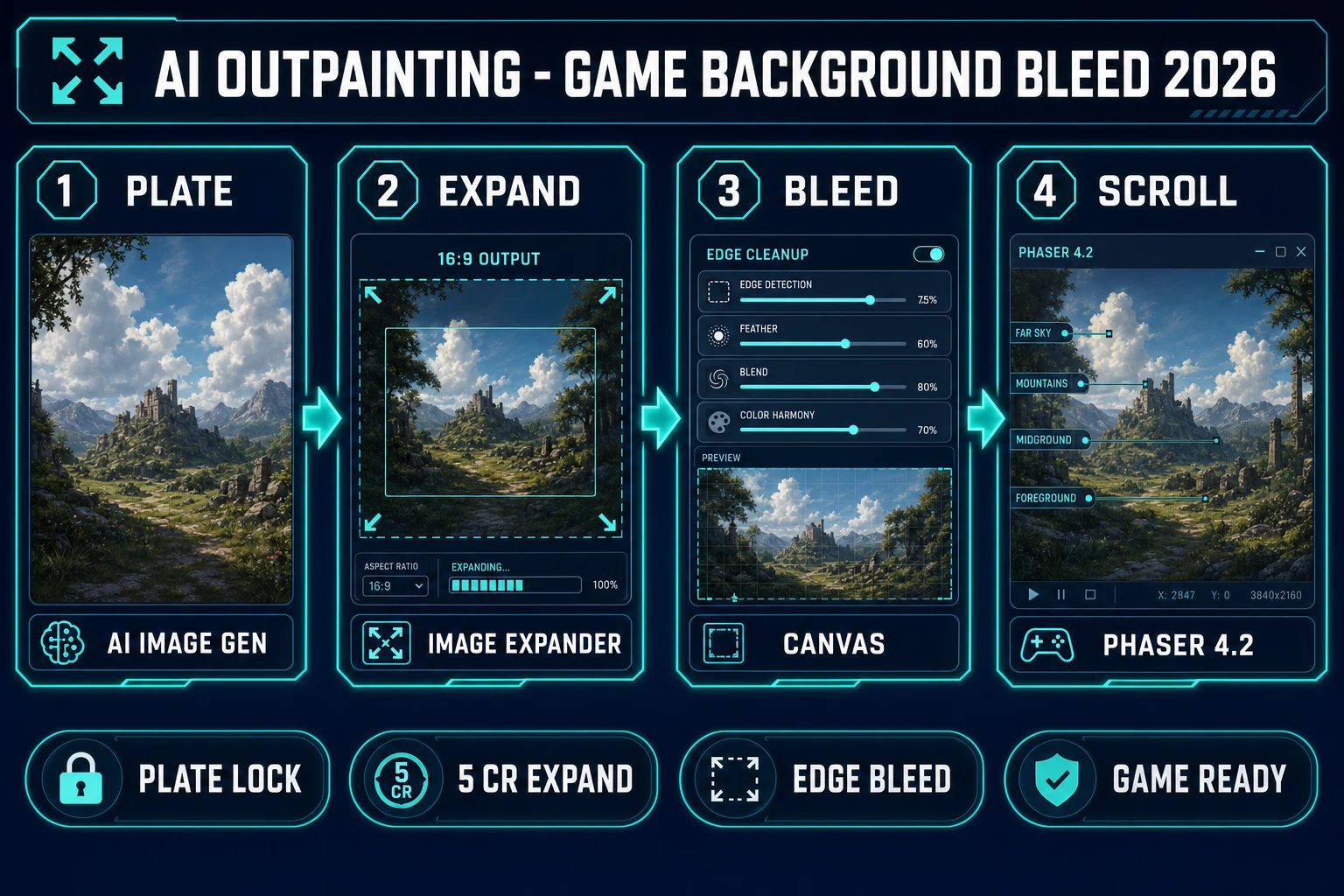
AI outpainting in 2026 — four-step browser pipeline from AI Image Gen midground plate through Image Expander and Canvas bleed to Phaser 4.2 parallax, verified July 12, 2026
An ai outpainting pipeline in 2026 means four moves: lock a midground plate in AI Image Gen, expand with Image Expander, finish bleed on Canvas, then scroll in Phaser 4.2.

What an ai outpainting pass outputs for indie game backgrounds

The phrase ai outpainting (320/mo, KD 0 per DataForSEO probe-fresh-seeds-6.md verified July 12, 2026) targets creators who already have a winning plate and need wider edges. Sibling queries confirm the cluster: outpainting ai (320/mo, KD 0), ai image outpainting (50/mo, KD 0), ai outpainting free (50/mo), and free ai outpainting (40/mo) all describe the same hunger — extend the frame without inventing a new composition.

For game developers the deliverable is production bleed: a locked center mass, seamless sky and ground extensions, and an aspect that matches the engine camera (16:9 for most browser titles, 21:9 for ultrawide title pans). Wallpaper toys that regenerate the whole vista fight your parallax layers the moment hills drift between regenerations. Pair layered biome art from the AI landscape generator post when you still need sky, midground, and foreground as separate files, and keep skybox wraps in the skybox generator pipeline when the camera is a 3D cube, not a 2D scroll.

Why crop-and-stretch stalls production backgrounds

Stable Diffusion docs describe outpainting as extending an image beyond its original dimensions while keeping the original pixels — the opposite of stretching a square PNG until the hills smear. Soft upscales invent blur; hard crops throw away the sky you already paid for. Regenerating at 16:9 from a fresh prompt often moves the hero tree, swaps the palette, and breaks every layer that was keyed to the old plate.

Authoritative Hugging Face Diffusers outpainting guidance frames the job the same way game pipelines do: place the source on a larger canvas, mask the empty bleed, and generate only into that mask. The traditional bottleneck was never Phaser’s image loader. It was keeping the locked midground mass while inventing believable edges for pans, title cards, and ultrawide store screenshots. AI Image Gen closes the plate; Image Expander closes the bleed; Canvas closes the edge cleanup.

The Sorceress ai outpainting pipeline in four steps

Every shippable background bleed ships four runtime pieces regardless of art style: locked plate, expanded canvas, edge finish, and scene wiring. In 2026 each maps to one Sorceress tool verified against the live catalog on July 12, 2026:

  • Midground plateAI Image Gen (AI Credits) with models such as Z-Image (3 credits) and Nano Banana Pro (18 credits default 1K/2K) via getModelCredits in src/lib/models.ts.
  • Aspect expandImage Expander (AI Credits badge) at EXPANDER_CREDITS = 5 per expand in src/app/expander/page.tsx, powered by bria/expand-image.
  • Edge bleed finishCanvas (Free badge) for crop, soft edge checks, and jam feedback boards.
  • Scroll wiringWizardGenie scaffolds Phaser 4.2 parallax that loads the wide PNG; your API key covers coding credits.

Pricing is a $49 lifetime unlock plus pay-as-you-go credit packs — Starter $10/1,000 credits, Creator $20/2,000, Plus $50/5,000, Studio $100/10,000 — verified against src/app/plans/page.tsx lines 46 and 51–54. New accounts ship with 100 starter credits. The Sorceress tools guide lists every tool in the catalog.
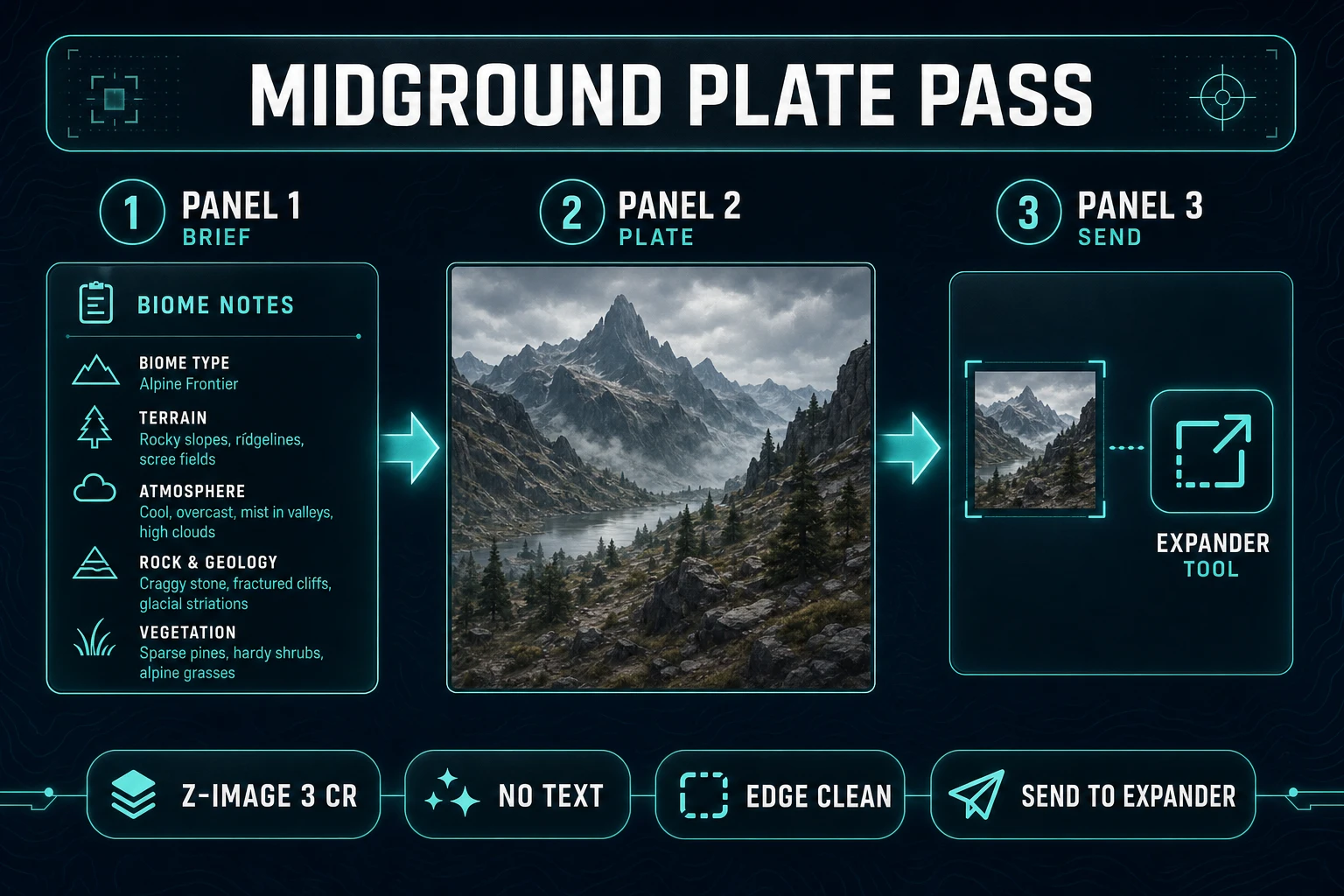
AI Image Gen midground plate pass before ai outpainting expand, verified July 12, 2026
AI Image Gen locks the midground plate first — reuse the same biome brief so ai outpainting only invents edges, not a new vista.

Step 1 — lock a midground plate in AI Image Gen

Open a plain text note and write the plate card before you touch a prompt field: biome, time of day, three palette hexes, horizon height (“horizon at 40%”), one hero landmark, and three forbidden traits (“no readable text,” “no UI chrome,” “no floating castles”). That card is the production bible. Without it, every expand invents a different hill mass.

Open AI Image Gen, pick a square 1:1 or 4:3 draft aspect, and paste the card as a reusable prefix. Example: “indie game midground plate, rolling teal hills #2A9D8F, dusk sky #1B263B, single pine landmark left-third, clean cel shading, empty edges for later expand, no text, game background.” Use Z-Image at 3 credits to explore composition; spend Nano Banana Pro (18 credits default) only when the plate is locked and you need hero marketing stills.

Save the winner as PNG. Prefer “Send to Expander” from the Image Gen lightbox when it is available so the transfer keeps the filename — or download and upload manually. Do not soft-upscale before expand; Image Expander wants crisp edges and a clear center mass.

Step 2 — expand the plate with Image Expander

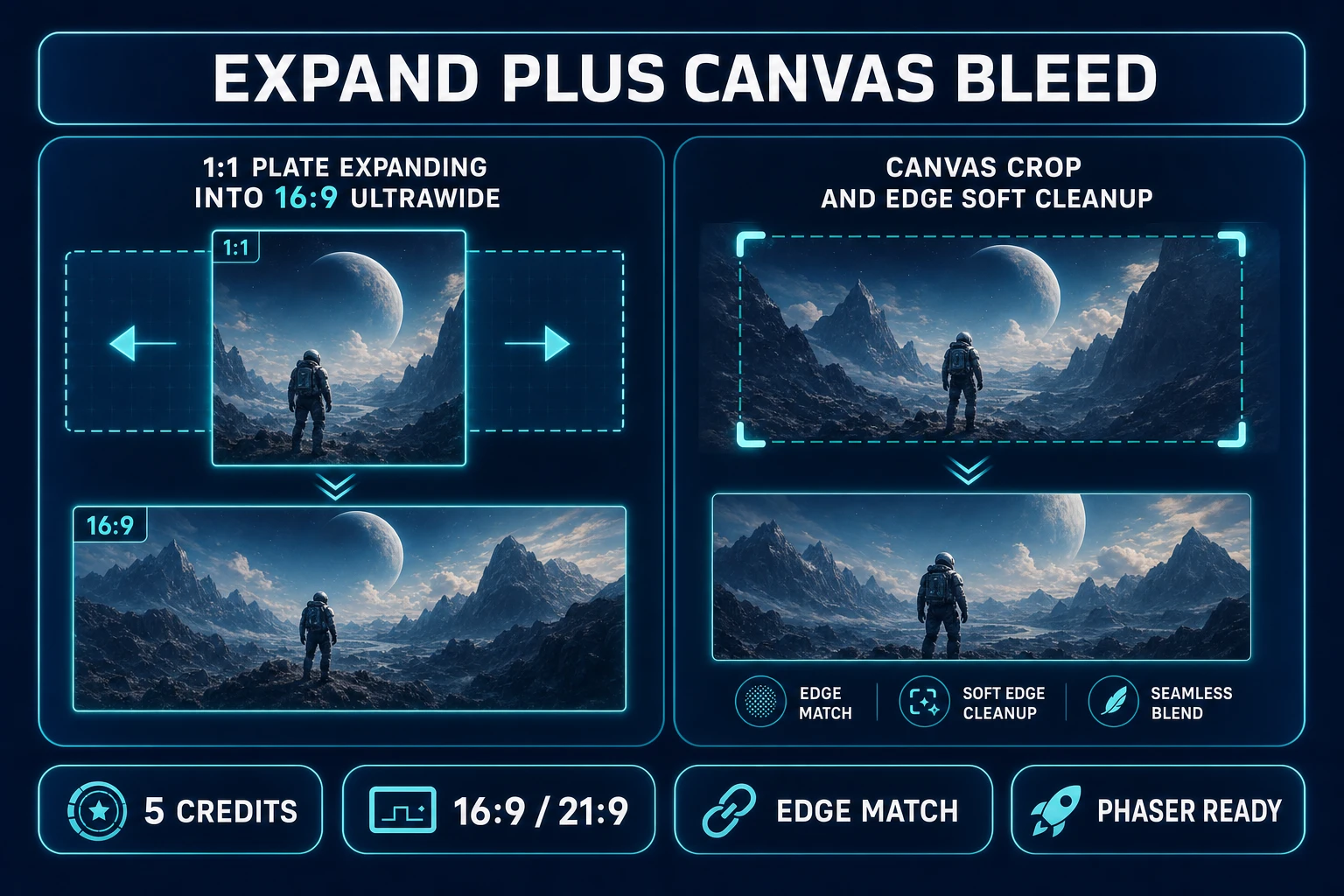
Open Image Expander. Upload the plate (max 10 MB per MAX_FILE_SIZE_MB in src/app/expander/page.tsx, verified July 12, 2026). Pick the aspect your camera actually uses — presets include 16:9 Landscape, 21:9 Ultrawide, 9:16 Portrait, 1:1 Square, 4:3, 3:4, 3:2, 2:3, 4:5, and 5:4. The tool expands outward from center and fills the extended areas; optional prompt text should describe only the bleed (“continue soft dusk sky and low fog, keep pine landmark unchanged, no new buildings”).

Each successful expand costs 5 credits (EXPANDER_CREDITS). Batch only when you need two camera ratios from the same plate (for example 16:9 gameplay plus 21:9 title pan). Reject any result that moves the pine, invents a second landmark, or paints illegible “ruins text” into the new sky. Re-run with a tighter bleed prompt rather than regenerating the whole plate in AI Image Gen — consistency beats novelty once the center is locked.

Image Expander aspect expand and Canvas edge bleed for an ai outpainting pipeline, verified July 12, 2026
Image Expander grows the plate into 16:9 or 21:9; Canvas finishes soft edge checks before Phaser import.

Step 3 — finish bleed on Canvas and wire Phaser 4.2

Open Canvas (Free badge verified in src/app/_home-v2/_data/tools.ts on July 12, 2026). Drop the expanded PNG, check left and right seams on a dark navy board, and crop only if a seam halo survived. Export the final wide background into a folder named after the plate card (dusk_hills_mid/). Keep the original square plate for marketing stills, but mark the expanded file as the source of truth for in-game scroll.

Phaser 4.2.0 “Giedi” shipped June 19, 2026 (verified against phaser.io/news/2026/06/phaser-v4-2-0-released and phaser.io/download/phaser4 on July 12, 2026). Open WizardGenie and prompt: “Add Phaser 4.2 ParallaxBackground: load dusk_hills_mid.png as a wide midground TileSprite or Image, scrollFactor 0.4, nearest-neighbor optional off for painted art, expose setScrollX stub.” Prefer Claude Opus 4.7 or Gemini 3.1 Pro for the first scaffold; iterate placement with DeepSeek V4 Pro or Kimi K2.5 as the executor. Pass the exact filename so WizardGenie does not invent placeholder art names.

If you also need a walkable ground strip under the painted hills, keep tiling in Tileset Forge as a separate pass — painted bleed and tileable ground are different jobs. Cross-link seamless ground work in the seamless texture generator post when the floor must repeat under the character.

What an ai outpainting session costs on Sorceress in 2026

Cost math verified July 12, 2026. Base unlock: $49 lifetime. Image Expander: 5 credits per expand. A minimal bleed pass typically burns 8–20 Sorceress credits ($0.08–$0.20 at Starter tier rates) covering one Z-Image plate at 3 credits plus one or two Expander runs, with Canvas free and WizardGenie coding on your own API key. Compare that to commissioning a freelance environment artist to hand-extend every jam background — the ai outpainting SERP reader is usually a solo dev optimizing for one shippable browser pan.

Start with the 100 free credits, lock one plate, expand once to 16:9, check seams on Canvas, then spend a second expand only if playtest proves you need 21:9 title art. The pricing page shows live credit tiers; the plans page mirrors the same $49 lifetime figure from source.

The verdict on ai outpainting workflows in 2026

An ai outpainting workflow in 2026 is no longer a weekend stretching square PNGs until the hills smear. AI Image Gen locks the midground plate, Image Expander invents only the bleed, Canvas finishes the edges, and WizardGenie writes the Phaser bindings. The technical spine is plate discipline; the art pass is what players remember when the camera pans and the world still feels intentional.

Pick one biome — dusk hills, flooded crypt, neon alley — lock the plate, expand to the real camera ratio, and prompt the ParallaxBackground until the center landmark stays put. Background bleed rewards calm constraints over infinite regenerations. AI generation now handles the slice that used to stall every solo dev between “I love this square vista” and “the pan is in the build.”

Frequently Asked Questions

What is ai outpainting used for in game development?

Ai outpainting extends an existing image beyond its original borders so you can fill wider aspect ratios without regenerating the whole scene. In the Sorceress pipeline (verified July 12, 2026) that means locking a midground plate in AI Image Gen, expanding with Image Expander at 5 credits per expand (EXPANDER_CREDITS in src/app/expander/page.tsx), finishing bleed on Canvas (Free), and loading the wide PNG into Phaser 4.2 parallax.

Is ai outpainting free on Sorceress?

Canvas is Free-badge. Image Expander spends 5 AI Credits per expand. AI Image Gen spends model credits via getModelCredits in src/lib/models.ts (Z-Image is 3 credits). New accounts ship with 100 starter credits; the $49 lifetime unlock covers Pro tools (verified against src/app/plans/page.tsx LIFETIME_PRICE = 49 on July 12, 2026).

How is ai outpainting different from regenerating a wider landscape?

Regenerating from scratch invents a new composition every time — hills move, palette drifts, and your locked hero plate no longer matches. Ai outpainting keeps the original pixels centered and only invents the bleed outside the frame, which is what parallax pans and ultrawide title screens need.

Which aspect ratios does Image Expander support?

Verified July 12, 2026 against ASPECT_RATIO_PRESETS in src/app/expander/page.tsx: 16:9, 9:16, 1:1, 4:3, 3:4, 3:2, 2:3, 4:5, 5:4, and 21:9 ultrawide. Pick the ratio your engine camera actually uses before you spend credits.

What does an ai outpainting session cost on Sorceress in 2026?

Verified July 12, 2026 against src/app/plans/page.tsx. Base unlock is $49 one-time. A minimal bleed pass typically burns 8–20 Sorceress credits (one Z-Image plate at 3 credits plus one or two Image Expander runs at 5 credits each) — often under $0.20 of Starter-tier credits on top of lifetime if you stay plate-first.

Sources

  1. Stable Diffusion — Wikipedia (inpainting and outpainting)
  2. Outpainting — Hugging Face Diffusers docs
  3. Parallax scrolling — Wikipedia
  4. Phaser v4.2.0 release notes
Written by Arron R.·1,508 words·7 min read

Related posts



