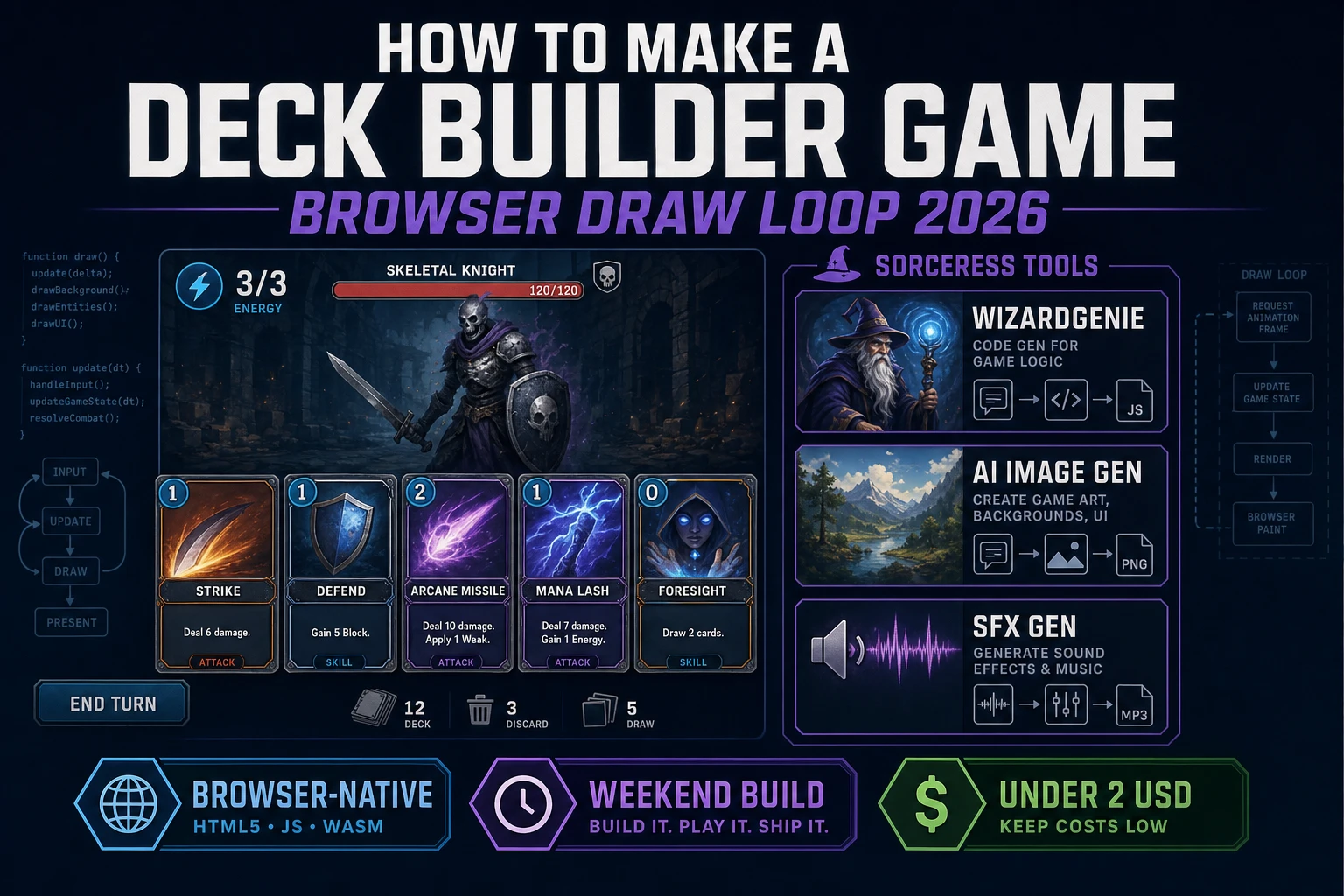
Deck How to Make a Deck Builder Game (Browser Draw Loop 2026)

By Arron R.10 min read
How to make a deck builder game in 2026: model draw, hand, and discard piles with simple card effects, wire a turn combat loop in WizardGenie, add AI Image Gen

Most beginners who search “how to make a deck builder game” want a combat screen where you draw five cards, spend energy to play Strikes and Defends, discard your hand, and watch an enemy telegraph its next hit. A full roguelike map with relic shops, ascension tiers, and fifty-card pools is a studio product. A browser draw loop is different. A coding agent scaffolds draw, hand, and discard piles plus a three-energy turn from one prompt, and AI generation covers card faces and draw snaps. On desktop or web, that means WizardGenie for the draw-play-discard combat loop, AI Image Gen for card art and enemy portraits, SFX Gen for draw and hit audio, and optional Music Gen for a battle bed. This guide is the honest end-to-end for how to make a deck builder game in 2026, as a weekend build you can finish once.
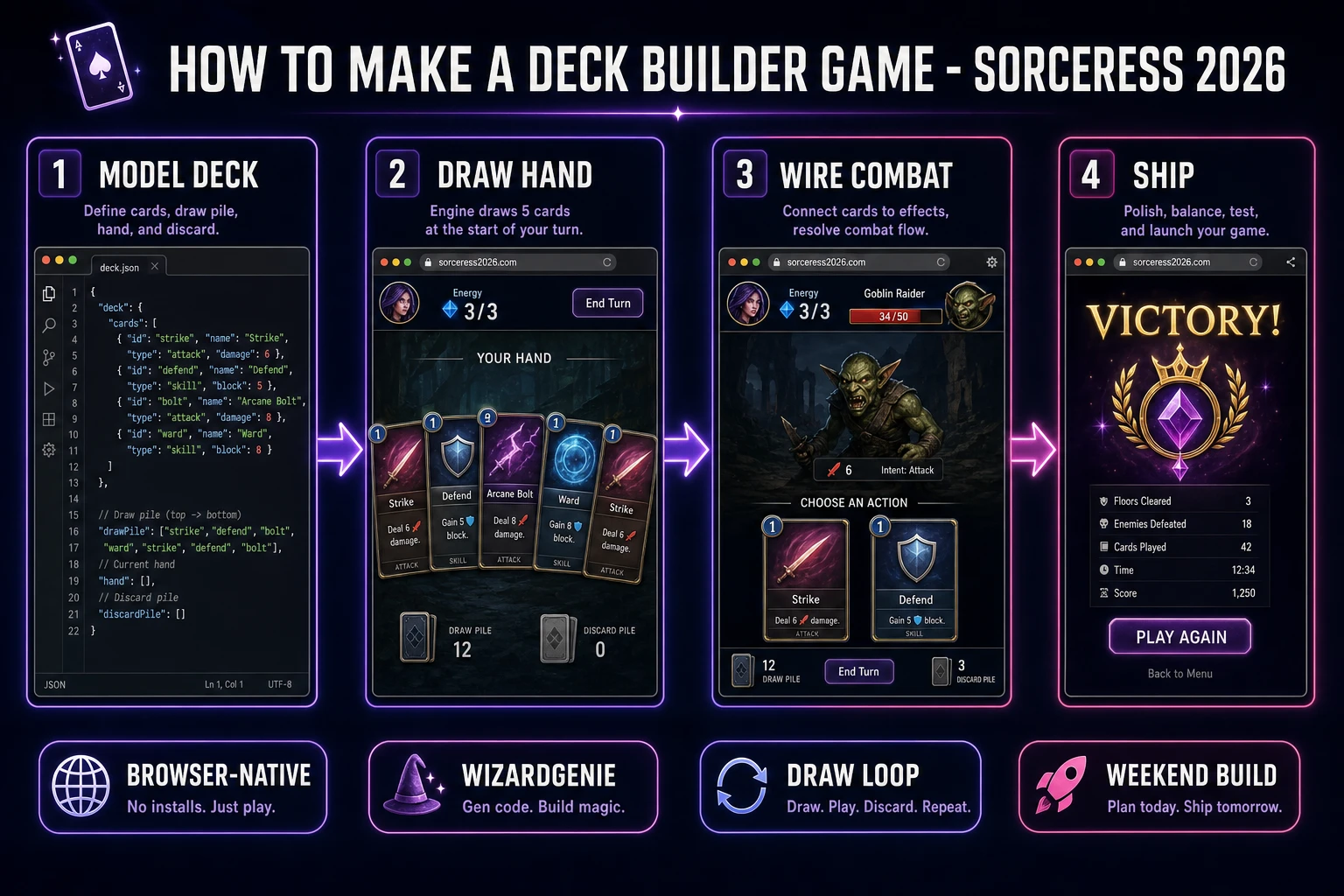
How to make a deck builder game browser pipeline: model draw hand and discard piles, wire turn combat in WizardGenie, and ship a browser draw loop
The 2026 how to make a deck builder game recipe: model draw, hand, and discard piles with simple card effects, wire a turn combat loop in WizardGenie, then add AI Image Gen card faces and SFX Gen draw snaps.

What how to make a deck builder game actually means in 2026

The query “how to make a deck builder game” hides three intents. Some searchers want tabletop deck-building board-game rules — Dominion-style buy piles and victory points — which is a different genre from digital combat deck builders. A second intent is a full roguelike with branching maps, relic synergies, and daily ascension seeds — a multi-year product. The third intent, and the one this guide targets, is a browser deck builder: one starter deck, draw five each turn, three energy, play damage and block cards, end turn, enemy acts, repeat until someone’s HP hits zero. That is a weekend build, it demos the Sorceress toolset, and it is the format most deck builder tutorial and javascript card deck searchers actually want when they type “slay the spire clone browser.”

The presentation contract is small and strict. A title screen shows the game name, Start Run, and maybe a one-line rules blurb. The combat screen shows the enemy portrait and HP bar, the player HP and block shield, an energy meter, a horizontal hand of clickable cards with cost and effect text, and an End Turn button. On card play, subtract energy, apply damage or block, move the card to discard, refresh the hand UI. On End Turn, discard any unplayed cards, run the enemy script once, reset energy, draw back to five, and check win or lose. The deck-building game overview on Wikipedia (verified 2026-08-26) separates tabletop deck construction from digital combat deck builders cleanly — cite it when you write your itch.io blurb so players know which promise you kept. If you already shipped a simpler card table, the sibling guide on how to make a card game covers shared deck UX; this post owns draw-discard reshuffle and energy pacing instead. For map nodes and run meta after combat feels fair, see the roguelike run meta guide.

The deck builder loop in one minute (draw, play, discard, enemy act)

Five moving parts, repeated until HP hits zero. First, draw — at player turn start, move cards from drawPile into hand until hand length is five or drawPile is empty; if drawPile empties mid-draw, shuffle discardPile into a fresh drawPile and continue. Second, play — click a card if energy ≥ cost; subtract energy, apply damage to enemy HP or block to player shield, push card to discardPile. Third, end turn — move every remaining hand card to discard, reset energy to three, pass phase to enemy. Fourth, enemy act — run a fixed script: deal N damage minus player block, maybe set intent text for next turn. Fifth, check win — if enemy HP ≤ 0, Victory; if player HP ≤ 0, Defeat; else back to draw. That is the entire browser deck builder loop. Relic shops, card rewards, and map nodes are polish layered after one honest fight resolves without reshuffle bugs.
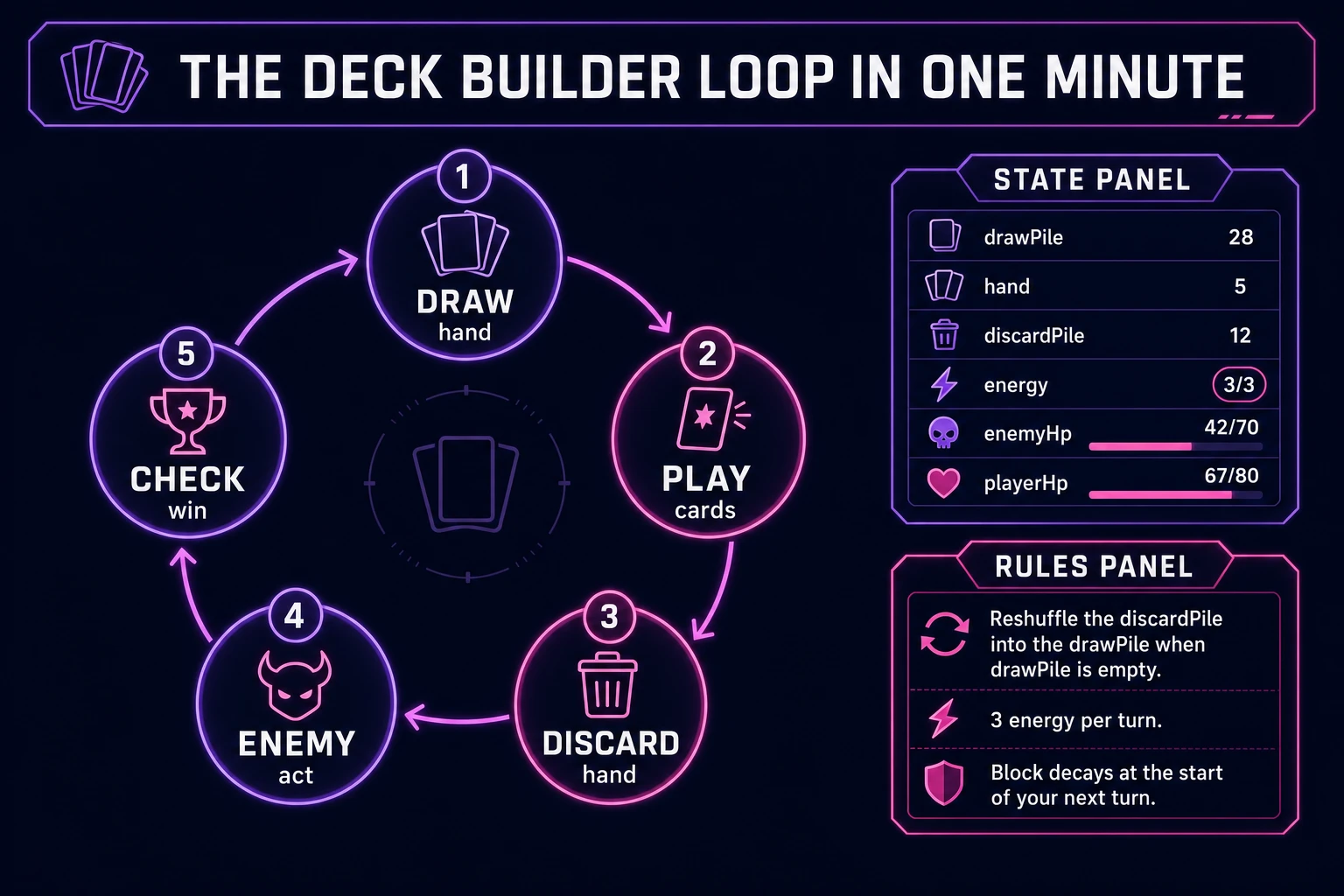
Deck builder loop state machine diagram showing draw hand, play cards, discard hand, enemy act, and check win
The deck builder loop: draw five cards, spend energy to play Strikes and Defends, discard the hand, let the enemy act, then check Victory or Defeat.

Pick your engine for how to make a deck builder game: DOM, canvas, or WizardGenie

Three good targets in 2026, each with a different trade-off. Vanilla JavaScript on DOM buttons is the honest default and the pick this guide recommends for a first build. Render each card as a <button> with cost, name, and effect text; wire click handlers that call playCard(id); keep energy and HP in a status bar. Total code footprint for a working html5 deck builder combat screen is under 450 lines including shuffle, reshuffle, and enemy script. No engine to install, ships as a static HTML file, deploys anywhere. The MDN Math.random() docs cover shuffle seeds (pair with crypto.getRandomValues for production fairness), and Pointer events cover mouse and touch on the same card buttons.

Canvas with drag-to-target becomes the right pick if cards need fan layouts, hover lift, or drag arcs onto the enemy sprite. You trade free accessibility and button focus for visuals — fine for a showcase jam, heavier once you reimplement hit-testing and mobile taps yourself.

Phaser 4.1.0 (verified 2026-08-26 on the official Phaser API documentation page) becomes the right pick if you want Scene lifecycle for title-combat-settle, tweens when cards slide from hand to discard, or particle bursts on big hits. Phaser does not invent your draw-discard rules — you still need the same pile helpers and energy checks. Use Phaser when motion polish is the product; use DOM when the product is a deck builder tutorial people can tap on a phone.

WizardGenie is not a separate rendering engine — it scaffolds whichever of the three you pick from a single natural-language prompt. WizardGenie ships as both a desktop app (Windows installer with auto-update, available to Early Access supporters and above) and a no-install web build. Its coding-model lineup covers Claude Opus 4.7, GPT-5.5, Gemini 3.1 Pro, DeepSeek V4 Pro, Kimi K2.5, Grok 4.2, and MiniMax M2.7 (verified 2026-08-26 in src/app/_home-v2/_data/tools.ts). For deck builders, any frontier model scaffolds draw, hand, discard, and three-energy turns in one prompt. Pair a frontier planner with a budget executor like DeepSeek V4 Pro or Kimi K2.5 for the typing pass — the Dual-agent pattern lands most projects at roughly one-fifth the single-frontier cost.

Step 1 — model draw pile, hand, discard, and card effects

Nothing else in the pipeline matters if cards duplicate across piles or reshuffle never fires when drawPile empties. Start with a small, testable model:

const STARTER = [
  { id: 'strike', name: 'Strike', cost: 1, damage: 6, block: 0 },
  { id: 'strike', name: 'Strike', cost: 1, damage: 6, block: 0 },
  { id: 'strike', name: 'Strike', cost: 1, damage: 6, block: 0 },
  { id: 'strike', name: 'Strike', cost: 1, damage: 6, block: 0 },
  { id: 'strike', name: 'Strike', cost: 1, damage: 6, block: 0 },
  { id: 'defend', name: 'Defend', cost: 1, damage: 0, block: 5 },
  { id: 'defend', name: 'Defend', cost: 1, damage: 0, block: 5 },
  { id: 'defend', name: 'Defend', cost: 1, damage: 0, block: 5 },
  { id: 'defend', name: 'Defend', cost: 1, damage: 0, block: 5 },
  { id: 'bash', name: 'Bash', cost: 2, damage: 10, block: 0 },
];

function shuffle(arr) {
  const a = arr.slice();
  for (let i = a.length - 1; i > 0; i--) {
    const buf = new Uint32Array(1);
    crypto.getRandomValues(buf);
    const j = buf[0] % (i + 1);
    [a[i], a[j]] = [a[j], a[i]];
  }
  return a;
}

function drawCards(state, n) {
  while (state.hand.length < n) {
    if (state.drawPile.length === 0) {
      if (state.discardPile.length === 0) break;
      state.drawPile = shuffle(state.discardPile);
      state.discardPile = [];
    }
    state.hand.push(state.drawPile.pop());
  }
}

function playCard(state, handIndex) {
  const card = state.hand[handIndex];
  if (!card || state.energy < card.cost || state.phase !== 'player') return false;
  state.energy -= card.cost;
  state.enemyHp -= card.damage;
  state.block += card.block;
  state.discardPile.push(card);
  state.hand.splice(handIndex, 1);
  return true;
}

function endPlayerTurn(state) {
  state.discardPile.push(...state.hand);
  state.hand = [];
  state.phase = 'enemy';
  const incoming = 8;
  const taken = Math.max(0, incoming - state.block);
  state.playerHp -= taken;
  state.block = 0;
  if (state.enemyHp <= 0) return 'win';
  if (state.playerHp <= 0) return 'lose';
  state.phase = 'player';
  state.energy = 3;
  drawCards(state, 5);
  return 'continue';
}

function newRun() {
  return {
    drawPile: shuffle(STARTER.map(c => ({ ...c }))),
    hand: [],
    discardPile: [],
    energy: 3,
    block: 0,
    playerHp: 40,
    enemyHp: 48,
    phase: 'player',
  };
}

Game state is { drawPile, hand, discardPile, energy, block, playerHp, enemyHp, phase } where phase is player | enemy | settle. Unit-test four asserts before you paint UI: playing every card in a ten-card starter never leaves duplicate ids across piles; drawCards with an empty drawPile and full discard reshuffles exactly ten cards back; energy cannot go negative; enemy damage respects block then zeroes block next turn. Those asserts are the difference between a draw discard loop people trust and one that silently duplicates Strikes or skips reshuffle. Keep relics, potions, and between-fight card rewards out of v1 — they are systems on top of the same pile helpers.

Step 2 — wire draw, play, and end turn in WizardGenie

With the model solid, open WizardGenie. Drop in a bare index.html with enemy HP bar, player HP and block labels, energy meter, a hand row, and End Turn. Give the agent one paragraph: Build a single-fight deck builder. Starter deck of ten Strike/Defend/Bash cards. Shuffle into drawPile. Each player turn: draw to five, grant 3 energy, let player click cards if cost allows, apply damage to enemy and block to player. End Turn discards hand, enemy deals 8 damage minus block, reset block, check win. Reshuffle discard into draw when draw empties. DOM card buttons and pointer events. No map or shop. Feed that to any coding model and the scaffold lands in under five minutes.

The remaining afternoon is polish via follow-ups. Keep handlers thin:

function onCardClick(game, index) {
  if (!playCard(game, index)) return;
  playSfx('play');
  render(game);
  if (game.enemyHp <= 0) return finishRun(game, 'win');
}

function onEndTurn(game) {
  if (game.phase !== 'player') return;
  playSfx('end');
  const result = endPlayerTurn(game);
  if (result === 'win') return finishRun(game, 'win');
  if (result === 'lose') return finishRun(game, 'lose');
  playSfx('draw');
  render(game);
}

function finishRun(game, outcome) {
  game.phase = 'settle';
  playSfx(outcome === 'win' ? 'win' : 'lose');
  render(game);
}

Unit-test Victory and Defeat before you animate card slides. Disable card clicks outside player phase. Gray out buttons when energy < cost. Show enemy intent (“Attacking for 8”) before End Turn so players learn the cadence. Persist nothing in v1 — a roguelike deck game with save slots is a second milestone. For a later card-reward screen after victory, reuse drawPile push with three offered cards — only after one fight already feels fair.

Step 3 — AI Image Gen card art, SFX Gen draw snaps, Music Gen battle bed

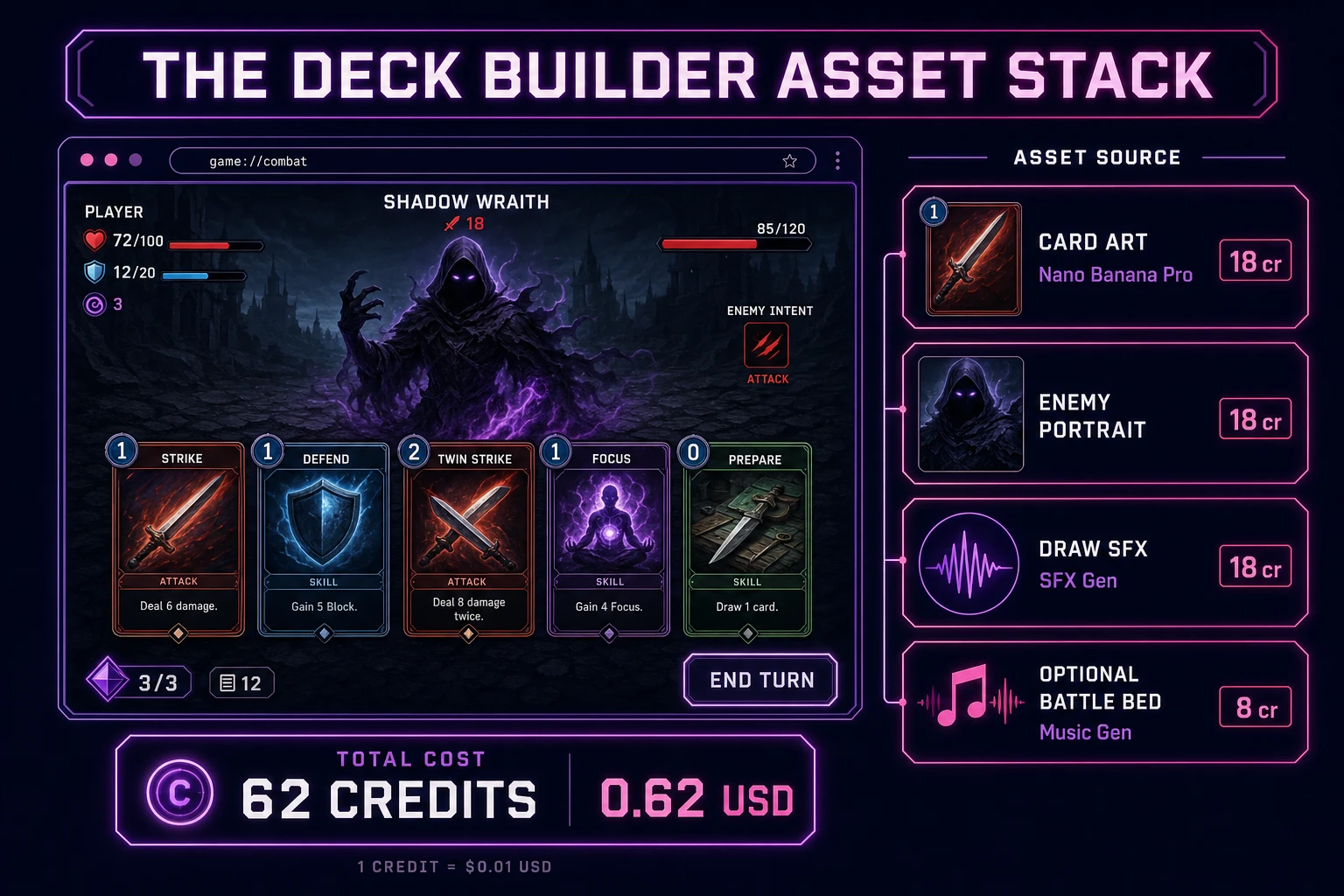
Gray buttons with Arial text prove the loop. Art and audio make the combat screen feel intentional. Open AI Image Gen and run Nano Banana Pro at 18 credits per pass (verified 2026-08-26 in src/lib/models.ts). Prompt two assets: a cohesive card frame sheet with Strike, Defend, and Bash icons on readable backgrounds, and an optional enemy portrait — “snarling slime creature, front-facing, game UI portrait, dark fantasy.” Keep card names standard so players who know the genre feel at home. Drop art as CSS backgrounds on each card button or as inline images from the generated sheet.

Open SFX Gen (1 credit per second of audio, verified 2026-08-26 in src/app/sfx-gen/page.tsx) and generate four short clips: a draw whoosh (~0.8s), a card play thud, an enemy hit impact, and a short victory sting. Trigger draw at turn start, play on card click, hit on enemy act, and win/lose on settle. Keep volumes low so a ten-turn fight does not fatigue.

Optional but nice: open Music Gen (10 credits per generation, verified 2026-08-26 in src/app/music-gen/page.tsx) and prompt a tense battle bed — “orchestral combat loop, no vocals, steady tempo for turn-based card game.” One or two tries is enough. Mute music by default so players who want silence stay in flow. Browse the rest of the stack from the tools guide if you later add Speech Gen for enemy taunts. The asset stack for a weekend how to make a deck builder game project stays well under a dollar of credits; see the cost section below for the line-item math.

Deck builder asset stack diagram showing AI Image Gen card art, SFX Gen draw and hit snaps, optional Music Gen battle bed, and total credit cost under one dollar
The deck builder asset stack: AI Image Gen for card frames and enemy portrait, SFX Gen for draw and combat cues, optional Music Gen battle bed — roughly 62 credits on the 2026 Sorceress rate card.

What a how to make a deck builder game project costs on Sorceress in 2026

Here is an honest first-project budget against the live Sorceress rate card (verified 2026-08-26 against local source). One Nano Banana Pro card sheet at 18 credits ($0.18). Optional enemy portrait at 18 credits ($0.18). Four SFX clips totaling about 6 billable seconds at 1 credit/sec = 6 credits ($0.06). Optional Music Gen battle bed with a retry at 10 credits each = 20 credits ($0.20). Coding-model API time for the WizardGenie scaffold and polish pass is typically under $0.40 when you pair a frontier planner with DeepSeek V4 Pro or Kimi K2.5 as executor. Grand total: roughly 62 credits ($0.62) plus sub-dollar agent time. The free 100-credit signup grant covers the entire art and audio stack on day one. Credit packs and supporter tiers live on Plans if you outgrow the grant.

That is the whole pipeline for how to make a deck builder game in 2026: a shuffled starter deck, draw-five reshuffle logic, three-energy Strikes and Defends, one enemy script, DOM card buttons, and a thin Sorceress asset layer so the combat screen looks finished. Ship the static build, play three runs without forgiving pile bugs, then decide whether map nodes or card rewards are worth another afternoon — only after the first forced Defeat already feels fair.

Frequently Asked Questions

Which deck builder rules should a beginner implement first?

Start with a starter deck of ten cards, draw five each turn, play cards that deal damage or block until you run out of energy, then discard your hand and pass to the enemy. One enemy with HP and one player with HP is enough for v1. Skip map nodes, relic shops, and deck editing between fights until one honest combat resolves without draw-pile bugs. That is what most how to make a deck builder game and deck builder tutorial searchers expect from a weekend build.

How do draw, hand, and discard piles work in javascript card deck code?

Keep three arrays: drawPile, hand, and discardPile. At turn start, move cards from drawPile into hand until hand length is five or drawPile is empty. If drawPile empties, shuffle discardPile back into drawPile. When a card is played, push it to discardPile and apply its effect. Unit-test that playing the last card in hand leaves discardPile with the correct count, that reshuffle fires when drawPile is empty mid-draw, and that duplicate card ids never appear in two piles at once.

DOM buttons or canvas for a browser deck builder?

Prefer DOM card buttons and a vertical hand row for a first html5 deck builder build — energy cost, damage numbers, and block totals render as plain text without sprite atlases. Canvas becomes the right pick when cards need fan layouts, drag-to-target arcs, or particle bursts on big hits. Phaser 4.1.0 (verified 2026-08-26 on the official Phaser API documentation page) adds tweened card slides and Scene lifecycle if you plan five or more enemy types. Pick Phaser when motion polish is the product; pick raw DOM when the product is a roguelike deck game walkthrough people can fork in one file.

How should energy and card effects work on turn one?

Give the player three energy at the start of each player turn. Each card carries a cost, damage, and optional block field. Playing a card subtracts cost from energy, applies damage to the enemy HP or block to a player shield that decays next turn, then moves the card to discard. End Turn passes to the enemy, who runs a simple script: deal fixed damage, maybe apply a weak debuff. When either HP hits zero, show Victory or Defeat with Play Again. Keep card text to Strike, Defend, and Bash variants before you invent ten keywords.

How much does it cost to build a deck builder on Sorceress?

A first-project browser draw loop with art and audio budgets like this against the 2026 Sorceress rate card (verified 2026-08-26 against local source). One AI Image Gen card-face sheet at Nano Banana Pro 18 credits = 18 credits or 0.18 USD (src/lib/models.ts). Optional enemy portrait: one more pass = 18 credits. Four SFX clips at 1 credit per second (src/app/sfx-gen/page.tsx) — draw whoosh, card play thud, enemy hit, victory sting — roughly 6 credits or 0.06 USD. Optional Music Gen battle bed: two tries at 10 credits each (src/app/music-gen/page.tsx) = 20 credits or 0.20 USD. Total roughly 62 credits or 0.62 USD plus under 0.40 USD in coding-model API time. The free 100-credit signup grant (src/app/api/admin/credits/route.ts) covers the full art and audio stack outright.

Sources

  1. Deck-building game - Wikipedia
  2. MDN - Array.prototype.shuffle() pattern with Fisher-Yates
  3. MDN - Pointer events
  4. Phaser 4.1.0 API Documentation
Written by Arron R.·2,333 words·10 min read

Related posts


