Deal How to Make a Card Game (Browser AI 2026)

By Arron R.12 min read
How to make a card game in 2026: sketch the deck, generate every card face with AI Image Gen, wire the turn logic with WizardGenie's dual-agent Planner plus Exe

How to make a card game in 2026 splits into two very different projects depending on which shape you pick. A single-player solitaire variant or a Slay-the-Spire-style deck battle is a weekend project in the browser today. A full trading card game with hundreds of unique cards and live PvP multiplayer is a several-month project even with AI help. This walk-through takes the middle-difficulty case (a two-player battle card game with a 30-card deck per side and generated card art), because that is the shape the SERP for how to make a card game is actually asking about and the shape that fits inside one WizardGenie browser session. Every Sorceress claim in this article was verified against the source code in this repository on July 3, 2026; every credit cost, every model version, every framework detail was pulled from a live file, not memory.
How to make a card game five-step AI pipeline - rules, card art, deck logic, sound, and shipping panels with playing card icons and a purple accent color
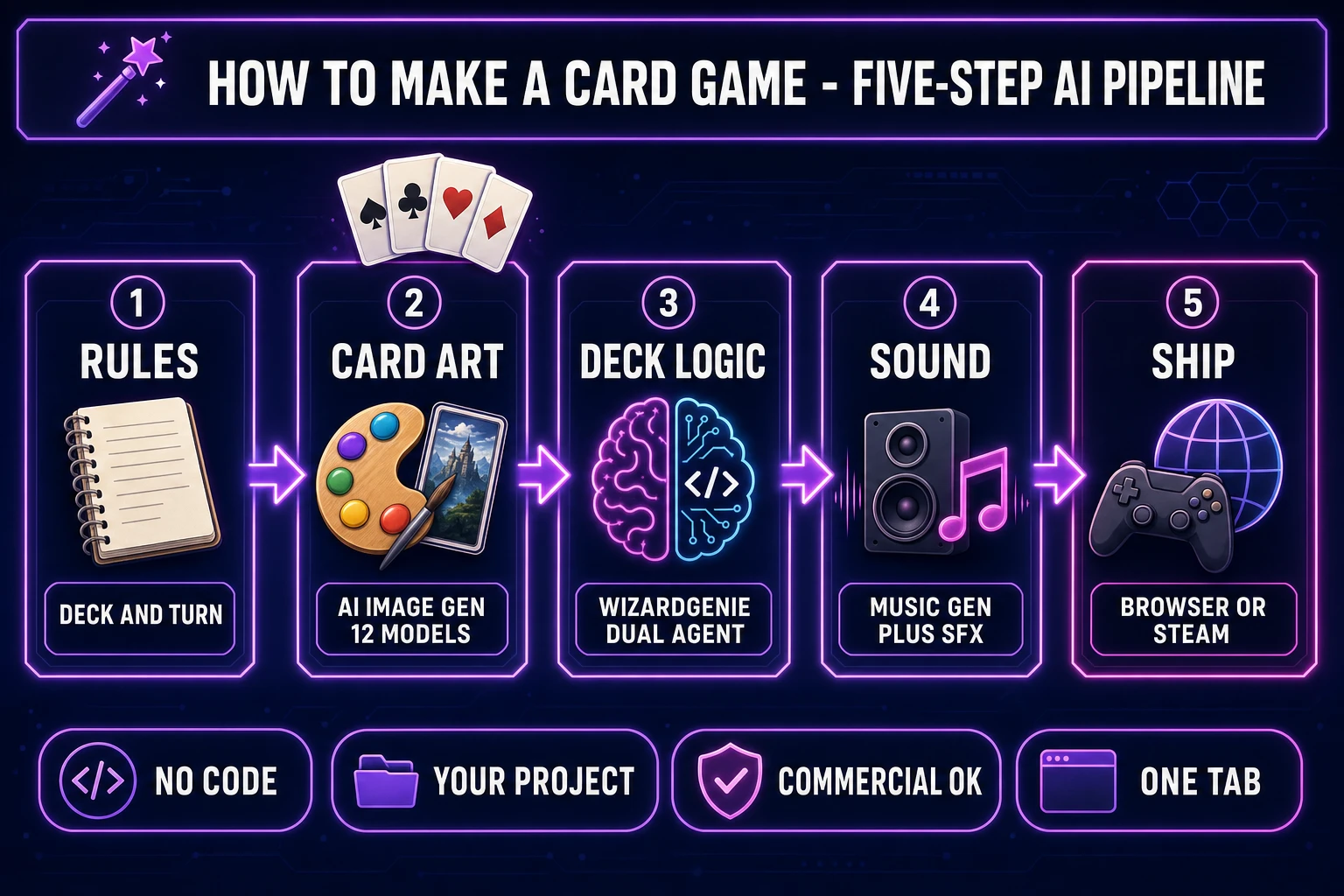
The five-step AI pipeline for how to make a card game in the browser in 2026: sketch the rules, generate every card face, wire the deck and turn logic, score with music and SFX, and ship. Every step happens inside one Sorceress tab, with the WizardGenie dual-agent Planner and Executor running the code side while the asset stack fires generations in parallel.

What kind of card game are you making?

The Wikipedia entry for card game catalogues at least eight distinct sub-genres, and the answer to “how do I make one” changes completely depending on which one you mean. Solitaire and its close cousins (Klondike, FreeCell, Spider, Pyramid) use a standard 52-card deck and famous rules; a first-time build here is roughly an evening. Battle card games with a fixed 30-card deck per side and a mana or energy resource (the shape most modern digital card games take) are a weekend build once the card list is written. Deck-building games in the Slay-the-Spire or Roguebook lineage add run-based meta-progression on top of that and land in a two- to three-weekend range. Collectible card games (TCGs) with hundreds of unique cards, live PvP, and a card economy are a several-month project and should not be attempted as a first card game.

The rest of this article assumes the middle case: a two-player single-device battle card game with a 30-card starting deck per side, three-mana-per-turn resource, and a card-back-plus-card-face art pass generated on AI Image Gen. Scaling up (adding a run system, unlocking cards, PvP over the network) is a second-session job once the core loop feels right.

The stack you need to make a card game in the browser

The 2026 stack for how to make a card game in a browser without touching Unity, Godot, or Unreal is genuinely small. You need one AI coding agent that can write real project files (not just chat with you about them), one AI image model that can generate a coherent card-face style, one asset-processing pipeline that turns generated art into game-ready sprites, one music generator for menu and battle loops, and one sound-effect generator for card flips, mana clicks, and damage hits.

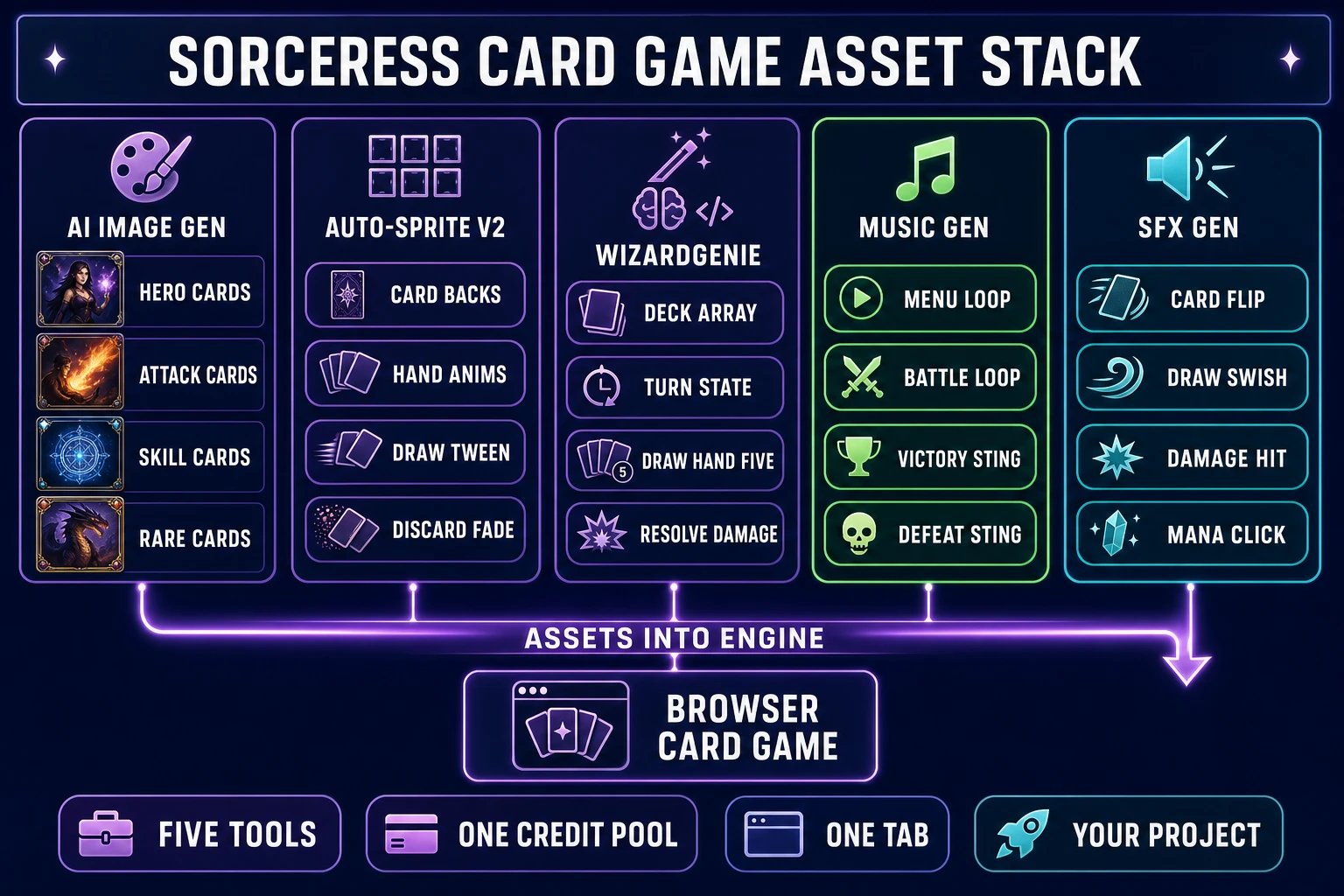
Every piece of that lives inside Sorceress on July 3, 2026. WizardGenie is the browser AI game engine and the dual-agent code writer; the Planner runs on a top-tier reasoner (Claude Opus 4.7, GPT-5.5, Gemini 3.1 Pro, or Grok 4.2) and the Executor runs on a cheap fast typer (DeepSeek V4 Pro, Kimi K2.5, or MiniMax M2.7). This split is verified against the CODING_MODELS lineup in src/app/_home-v2/_data/tools.ts lines 734 to 742. AI Image Gen ships 12 flagship image models per src/lib/models.ts; the workhorse picks for card art are Nano Banana at 6 credits, Seedream 4.5 at 6 credits, and Flux 2 Pro at 6 credits. Auto-Sprite v2 turns those generated card faces into consistent sprite-sheet frames with card-back templates. Music Gen runs Suno V5.5 at 10 credits per generation (MUSIC_CREDIT_COST at src/app/music-gen/page.tsx line 26). SFX Gen and Sound Studio handle the audio hits (SEED_AUDIO_CREDITS_PER_SECOND = 1 in src/app/sfx-gen/page.tsx line 24; SOUND_CREDIT_COST = 1 per sound in src/app/sound-creator/page.tsx line 28). Everything shares one credit pool.

How to make a card game in five steps

The full workflow for how to make a card game with AI in the browser breaks into five steps that map directly to five WizardGenie sub-prompts. Each step is small enough to hand to the Planner as one design brief, and each step ends with a testable milestone (a real thing running in the browser tab). The five steps: sketch the rules and the card list; generate every card face with AI Image Gen; wire the deck and turn logic with WizardGenie; score the game with Music Gen, SFX Gen, and Sound Studio; ship the finished browser build to your own hosting or an itch.io HTML5 page. The rest of this article walks each step with the exact prompts, tools, and verified costs.

Step 1: Sketch the rules and the card list

Before you type a single WizardGenie prompt, write a one-page rules document. This is the design brief the Planner will read on every subsequent step, so precision here pays off across the whole session. Cover the resource curve (starting hand size, mana per turn, hand size limit), the win condition (target health, turn limit, deck-out rule), the card types (attack, defence, skill, power, mana ramp), and the card cost curve (how many one-cost, two-cost, three-cost cards exist across the 30-card deck). For a first battle card game with three-mana-per-turn, a working curve is roughly 10 one-cost cards, 10 two-cost cards, 8 three-cost cards, and 2 rare five-cost bombs.

Write the card list next. For a first pass, thirty cards divided across four categories works: fifteen basic attacks with variable damage numbers (Strike +6, Heavy +8, Slam +12), five defence cards with block values (Guard +5, Bulwark +8), five skill cards with situational effects (Draw two, Deal two damage twice, Shuffle a rare into deck), and five “rare” specials with two-line rules (Deal five damage; if the opponent has no cards in hand, deal ten instead). Do not try to be clever with keyword mechanics on the first pass. Keyword systems like “Vulnerable”, “Weak”, or “Frail” can be added in a second WizardGenie session once the core loop is real. The playing card Wikipedia entry is a solid reference for classical suits and card structure if the game shape wants to use standard 52-card art rather than custom fantasy art.

Step 2: Generate every card face with AI Image Gen

Card art is the single asset category that most defines how professional a card game looks, and it is also the most expensive slice of the first-card-game budget if you generate carelessly. The correct approach on AI Image Gen is to pick one model, one style prompt, and one aspect ratio, then iterate a small batch of five cards on that model before committing to the full run. Model-hop between the twelve options only if the first small batch does not land the style.

The workhorse defaults for card art in the browser today are Nano Banana at 6 credits per card, Seedream 4.5 at 6 credits, and Flux 2 Pro at 6 credits (per src/lib/models.ts lines 71 through 415). All three handle stylised fantasy card art cleanly, with Nano Banana leaning cleaner-line and Flux 2 Pro leaning more painterly. Portrait aspect ratio (2:3) matches the classic playing-card shape; use 2:3 for card faces and reserve 3:2 landscape for the shared background art behind the battlefield. Prompt every card with the same style anchor phrase (something like “fantasy card face, dark parchment border, centre illustration, painterly digital art, no text, no card frame, portrait aspect”) plus one sentence describing the specific card content. Add a reference image once the first card lands the style and use it as a consistency anchor on every subsequent generation.

For a 30-card first deck at 6 credits per generation on Nano Banana or Seedream 4.5, the raw art cost lands at 180 credits, roughly $1.80 at the Sorceress Starter tier ($10 for 1,000 credits per CREDIT_TIERS in src/app/plans/page.tsx line 49). Add another 18 credits for three background tiles and 6 credits for a card back template, totaling ~204 credits or roughly $2.04 in raw generation cost for the full card game art pack. Auto-Sprite v2 then packs those faces into sprite-sheet strips that the game engine can address by index, and adds a subtle card-back-to-card-face flip animation as a bonus.
Sorceress card game asset stack infographic - five columns showing AI Image Gen for card faces, Auto-Sprite v2 for animations, WizardGenie for deck logic, Music Gen for loops, SFX Gen for hits
The full Sorceress asset stack for how to make a card game in one browser tab. AI Image Gen produces every card face, Auto-Sprite v2 handles card backs and hand animations, WizardGenie writes the deck and turn logic, Music Gen scores the menu and battle loops, and SFX Gen ships the flip and click hits. One credit pool, one editor, one shipped project folder.

Step 3: Wire the deck and turn logic with WizardGenie

This is the step where the WizardGenie dual-agent architecture earns its keep. Open a new project in the browser build at wizard-genie/app, pick Phaser as the framework for a 2D card game (or Three.js if the design calls for 3D cards on a table), and hand the Planner this specific prompt: “Two-player battle card game, 30-card decks, three mana per turn starting turn one, five-card hand, twenty health per side, standard turn order (start turn, draw one, take actions, end turn), win condition is opponent hits zero health, use the thirty card sprites in the asset folder for card faces, add a card-flip animation from card-back to face on draw. Use the shared design document at /docs/design.md for the card list and numbers.”

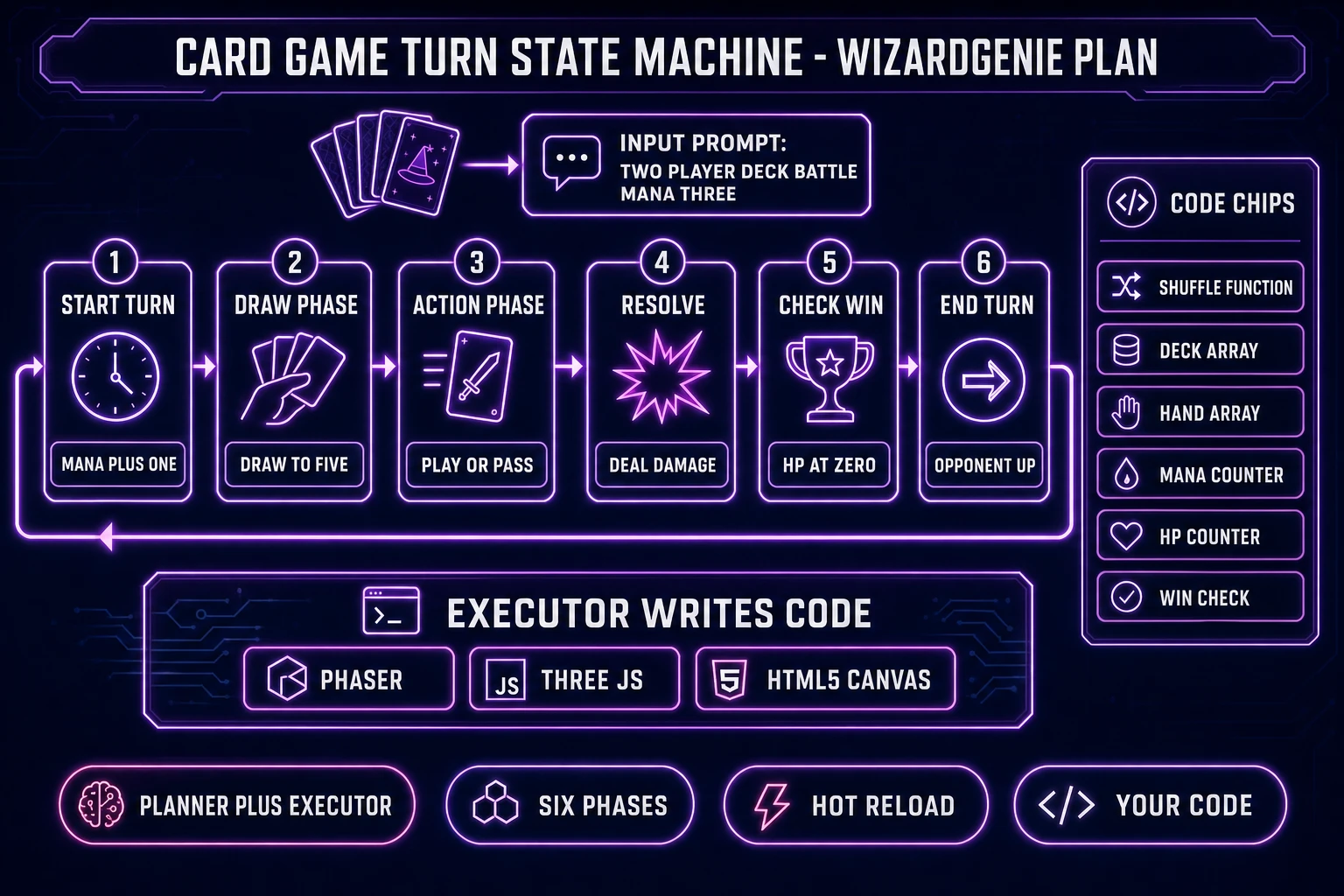
The Planner reads that (Claude Opus 4.7 is the default reasoner for a design-heavy first pass) and breaks it into concrete implementation steps: initialise Phaser scene, create deck array from the 30-card list, write shuffle function using Fisher-Yates, draw hand of five, render hand cards to on-screen positions with hover-lift interaction, wire turn state machine (StartTurn to DrawPhase to ActionPhase to EndTurn), implement mana counter with per-turn refresh, implement HP counter, wire card-play handler that spends mana and applies damage, add win-condition check after each damage, add card-flip tween animation. The Executor (DeepSeek V4 Pro is the workhorse pick at $0.27 input / $1.10 output per Mtok) then writes each step in real Phaser code. The whole implementation is roughly 800 to 1,500 lines of TypeScript across five or six files, and the running game hot-reloads in the browser preview pane as each step completes.

The switch models freely trick becomes useful mid-session. If the Executor produces buggy card-hover interaction on Kimi K2.5, swap to DeepSeek V4 Pro for the retry. If the Planner is stuck on how to handle simultaneous damage resolution, swap to GPT-5.5 for a different reasoner take. Cost math per src/app/wizard-genie/page.tsx line 297: “A smart Planner thinks; a cheap Executor codes.” The full turn-logic build session lands at roughly $0.15 to $0.60 in raw token cost when the Executor is a cheap model, versus $3.00 to $4.00 running Sonnet 4.6 as the sole coder. That savings compounds across the whole card-game project.

Card game turn state machine diagram - six-phase loop from start turn through draw, action, resolve, check win, end turn - with WizardGenie Planner and Executor split shown at the bottom
The card game turn state machine the WizardGenie Planner sketches out and the Executor writes in Phaser: start turn (mana plus one), draw phase (draw to five), action phase (play or pass), resolve (deal damage), check win (HP at zero), end turn (opponent up). The Planner keeps the shared design document; the Executor writes the code; the browser preview hot-reloads on every step.

Step 4: Score the card game with Music Gen and SFX

Card games live or die on audio feedback. The card flip, the mana click, the damage impact, the deck shuffle whoosh, the win sting, and the loop under the battle screen are the difference between a project that feels like a game and a project that feels like a spreadsheet with pictures. Music Gen ships Suno V5.5 at 10 credits per two-track generation (MUSIC_CREDIT_COST verified in src/app/music-gen/page.tsx line 26); one generation gives two variations per prompt. Two Music Gen generations produce a menu loop and a battle loop plus a spare victory-sting variation for 20 credits total ($0.20). Prompt tips: name the genre and instrumentation explicitly (“dark fantasy chamber orchestra, low strings, minimal percussion, seamless 60-second loop, no vocals”) and pick the loopable option.

SFX Gen runs BytePlus Seed Audio 1.0 at 1 credit per second of generated audio. Card-game SFX are all sub-second (card flip is 0.2s, mana click is 0.15s, damage hit is 0.4s), so a ten-effect SFX pack lands at roughly 10 to 15 credits total. The alternative for pure code-synthesised sound is Sound Studio, which writes Web Audio API code that generates the sound client-side at 1 credit per sound and ships zero audio files with the game (the code generates the sound at runtime, which keeps the game bundle tiny). For a card game deploying to the browser, Sound Studio is often the honest pick because it removes ten HTTP audio-file requests from the initial page load.

Step 5: Ship your card game to the browser

The final WizardGenie prompt in the session is “Build production bundle, add itch.io HTML5 wrapper structure, add basic score persistence via localStorage, and generate a README with deploy notes.” The Executor produces a dist/ folder containing an index.html, a bundled JavaScript file, the card-face sprite sheet, the audio files (or Web Audio synthesis code inline), and the itch.io zip-ready structure. Every card game generated in WizardGenie ships as real Phaser or Three.js source files that you own from generation one; there is no vendor commercial-rights gate on the project files themselves.

Deployment options for a first card game: upload the dist/ zip to itch.io as an HTML5 web build (zero wrapping needed and the file-size limit is 1 GB on the free tier, which is roughly 100x what a browser card game needs); host the same bundle on your own web server for free-tier Netlify, Vercel, or Cloudflare Pages; wrap for Steam via Electron or Neutralino if the card game is a paid single-player product. Mobile stores via Capacitor or Cordova wrappers are the mobile path if the design calls for it. The one-time Sorceress Lifetime unlock at $49 (LIFETIME_PRICE verified in src/app/plans/page.tsx line 45) covers the full asset-tools pipeline; the Early Access Supporter pledge at $50 minimum (WIZARDGENIE_PLEDGE_TIERS line 56) covers lifetime WizardGenie access to the browser and desktop AI game engine. AI generation credits are separately billed from the standard Sorceress credit pool.

The verdict on how to make a card game with AI in 2026

How to make a card game with AI in the browser in 2026 is genuinely a one-tab project when the scope is right. A single-player battle card game with 30 unique cards, a three-mana curve, and a card-flip animation is a weekend project inside WizardGenie, with card art from AI Image Gen, music from Music Gen, sound effects from SFX Gen or Sound Studio, and a real Phaser or Three.js project folder as the output. The total credit cost for a first deck of thirty generated card faces plus music plus SFX lands at roughly $2.35 to $3.00 in Sorceress credits, and the WizardGenie dual-agent coding session runs another $0.15 to $0.60 in raw token cost when the Executor is a cheap model like DeepSeek V4 Pro or Kimi K2.5.

The single decision that separates a card game shipping in a weekend from a card game stuck in prototype forever is scope. Solitaire, single-player battle card, and small deck-builder shapes ship; a full multiplayer TCG with a card economy and live PvP does not ship on a weekend. Start with the shape the SERP for how to make a card game actually asks for (a playable two-player deck battle), get that to a real hot-reloading browser preview, then let the scope grow across follow-up sessions once the core loop feels right. Every next feature (unlocks, run system, boss encounters, character classes, PvP) is a new WizardGenie sub-prompt against the same project files, not a fresh start. The Sorceress tools guide lists every asset tool the follow-up sessions can call on, and the AI game maker matrix maps how WizardGenie fits against the other tools in the same product category.

Frequently Asked Questions

What is the easiest card game to make with AI in a browser in 2026?

The easiest card game to ship as a first project is a single-player 52-card solitaire variant (Klondike, FreeCell, or Spider). The rules are famous, the SERP is packed with Wikipedia-grade rule references you can hand to the WizardGenie Planner as a design brief, and the game needs only one deck of cards plus a foundation and tableau layout. Second-easiest is a two-player battle card game with a fixed 30-card deck per side (roughly the shape of a Slay the Spire relic-lite draft or a Hearthstone one-off match), because turn structure, mana/energy resource, and win condition are one-sentence rules each. Hardest as a first project is a full trading card game (TCG) with hundreds of unique cards and interactions, or a live multiplayer deck-building game, because both require content pipelines and network state syncing that a first WizardGenie session should not try to build in one shot. The default recommendation from the WizardGenie template gallery is: start with a 60-card single-player battle game with three enemy archetypes, ship it in a weekend, then expand card count and add a run-based meta-progression system in a second session.

How much does it cost to make a card game with AI in 2026?

The Sorceress cost breakdown for a first card game with roughly 30 card faces, 3 background tiles, a music loop, and 10 sound effects, verified against source constants on July 3, 2026: card art via AI Image Gen at 6 credits per generation on Nano Banana or Seedream 4.5 (30 cards times 6 = 180 credits, roughly $1.80 at $0.01 per credit); backgrounds via AI Image Gen at 6 credits each (3 tiles = 18 credits, $0.18); one music loop via Music Gen at 10 credits ($0.10, per MUSIC_CREDIT_COST in src/app/music-gen/page.tsx line 26); ten sound effects via SFX Gen at 1 credit per second (10 shorts at 1-second average = 10 credits, $0.10, per SEED_AUDIO_CREDITS_PER_SECOND in src/app/sfx-gen/page.tsx line 24) OR Sound Studio at 1 credit each (10 credits, $0.10, per SOUND_CREDIT_COST in src/app/sound-creator/page.tsx line 28); WizardGenie dual-agent coding session tokens split roughly $0.15 to $0.60 for a full first-card-game build depending on which Planner and Executor models are picked. Grand total: roughly $2.35 to $3.00 in Sorceress credits plus a $10 Starter credit pack (1,000 credits) or $50 Early Access Supporter pledge for lifetime WizardGenie access, verified against WIZARDGENIE_PLEDGE_TIERS at src/app/plans/page.tsx line 56. That is the honest floor. Bigger card games with 100 unique cards and multiple music tracks scale linearly.

Can I make a trading card game (TCG) or a deck-building game with WizardGenie?

Yes to both, with an important scope note. A deck-building game like Slay the Spire or Roguebook fits the WizardGenie sweet spot: a single-player run with 60 to 200 unique cards, deterministic combat resolution, a run-based meta-progression, and a card acquisition loop between fights. This maps cleanly to one WizardGenie session for the core loop plus a second session for card content expansion. A full trading card game (TCG) with live PvP multiplayer, 300+ unique cards, complex interaction stacking rules, and card packs plus economy is a genuinely larger scope than one session can ship well. The honest path for a TCG is to start with the single-player draft mode (roughly Hearthstone Arena shape), get the combat engine and 60 seed cards right, then add PvP and card economy in later sessions. WizardGenie's dual-agent Planner keeps a shared design document across sessions so cards added in session 3 respect keywords defined in session 1. The Wikipedia deck-building game entry is a helpful design reference to hand to the Planner as prior art.

Do I need to know how to code to make a card game with WizardGenie?

No. WizardGenie is designed for the prompt-first workflow where you describe a game feature and the dual-agent Planner plus Executor writes the actual code. A first card-game session looks like: type 'Two-player card battle, 30-card decks, three mana per turn, win at zero opponent health, use classic playing cards for now, add a nice card-flip animation.' The Planner reads that, breaks it into concrete implementation steps (create scene, create deck array, shuffle function, draw hand of 5 cards, turn state machine, mana ticker, card play handler, damage resolver, win-condition check, card-flip tween). The Executor writes each step in the target framework (Phaser for 2D, Three.js for 3D cards on a table). You never see a code editor unless you want to. That said, being able to read the code the Executor wrote helps a lot in later sessions when you say 'the mana ticker should reset at end of turn, not start of turn' and the agent needs a reference to the current implementation. Free-tier browser code editors and VS Code both open the generated project directly.

Can I sell a card game made with AI on Steam or itch.io?

Yes. WizardGenie generates real project files (Phaser or Three.js scaffolding depending on the card game shape) that are yours from generation one; there is no vendor commercial-rights gate on the project files, verified against the Sorceress terms and the WizardGenie source code on July 3, 2026. The distribution path for a browser-first card game is: itch.io as an HTML5 web build (no wrapping needed), Steam via an Electron or Neutralino wrapper around the Phaser or Three.js build, mobile app stores via a Capacitor or Cordova wrap for iOS and Android. Sorceress-generated card art from AI Image Gen carries the standard commercial-use license for images generated on paid credits (verified against the Sorceress terms). Sorceress-generated Music Gen tracks and SFX Gen sounds carry a commercial-use license for royalty-free game use. The only asset category that requires care is voice acting via Speech Gen: default library voices ship commercial-use rights, but custom cloned voices require the source-voice owner's written consent to distribute commercially. For a first card game, using library voices only is the safe default. Card art licensing note: do not generate Pokemon, Magic: The Gathering, or Yu-Gi-Oh named characters — those are third-party IP and cannot be sold.

How many cards do I need for a first card game and how long does it take?

A minimum viable card game ships with 30 to 60 unique cards. Solitaire needs one 52-card standard deck (no unique art per card required — you can reuse a single deck design). A single-player battle game like a Slay the Spire clone needs roughly 60 cards for a first playable run to feel non-repetitive (roughly 20 basic strikes and defends, 20 skill and power cards, 20 rare event cards). A deck-building game with three enemy archetypes needs roughly 90 cards (60 player-facing plus 30 enemy attack patterns as cards). A TCG in a demoable state needs roughly 100 unique cards across 5 to 8 keyword mechanics. Timing on a WizardGenie session with the default Planner-Executor pair (Claude Opus 4.7 planning, DeepSeek V4 Pro executing) is roughly 30 minutes for solitaire, 2 to 4 hours for a solid single-player battle card game with generated art and audio, and 8 to 20 hours for a demoable deck-building or TCG shape. AI art generation runs in parallel with the code work, so the real bottleneck is design decisions (which cards to include, what the numbers should be, what makes each rare feel special), not code or asset time.

Sources

  1. Card game (Wikipedia)
  2. Deck-building game (Wikipedia)
  3. Collectible card game (Wikipedia)
  4. Playing card (Wikipedia)
  5. Phaser (game framework) (Wikipedia)
  6. Web Storage API (MDN)
Written by Arron R.·2,699 words·12 min read

Related posts