Wrap How to Make an HTML5 Game (Browser Loop 2026)

By Arron R.11 min read
How to make an HTML5 game in 2026: scaffold a canvas host page and web manifest, wire the rAF update-draw loop in WizardGenie, add AI sprites and audio, then zi

HTML5 first appeared in public form on 22 January 2008 and reached W3C Recommendation status in October 2014 (verified against en.wikipedia.org/wiki/HTML5 on 2026-08-17). Twelve years later, every serious answer to how to make an HTML5 game still rests on the same four files: an index.html host page, a JavaScript module that owns the loop, a folder of sprites and audio, and a static zip a player can open in any modern tab. The difference in 2026 is everything above those primitives. A coding agent scaffolds the canvas loop in one prompt, AI generation covers the atlas and soundtrack, and hosts like itch.io, GitHub Pages, and Netlify still take a drag-and-drop HTML zip for free. That means WizardGenie to wire the update-and-draw loop, Sorceress AI Image Gen (or Quick Sprites) for the hero and props, Music Gen for the loopable bed, and SFX Gen for the jump, coin, and hit stingers. This guide is the honest end-to-end for how to make an HTML5 game in 2026: host page, canvas, web manifest, assets, and a zip you can ship in a weekend.
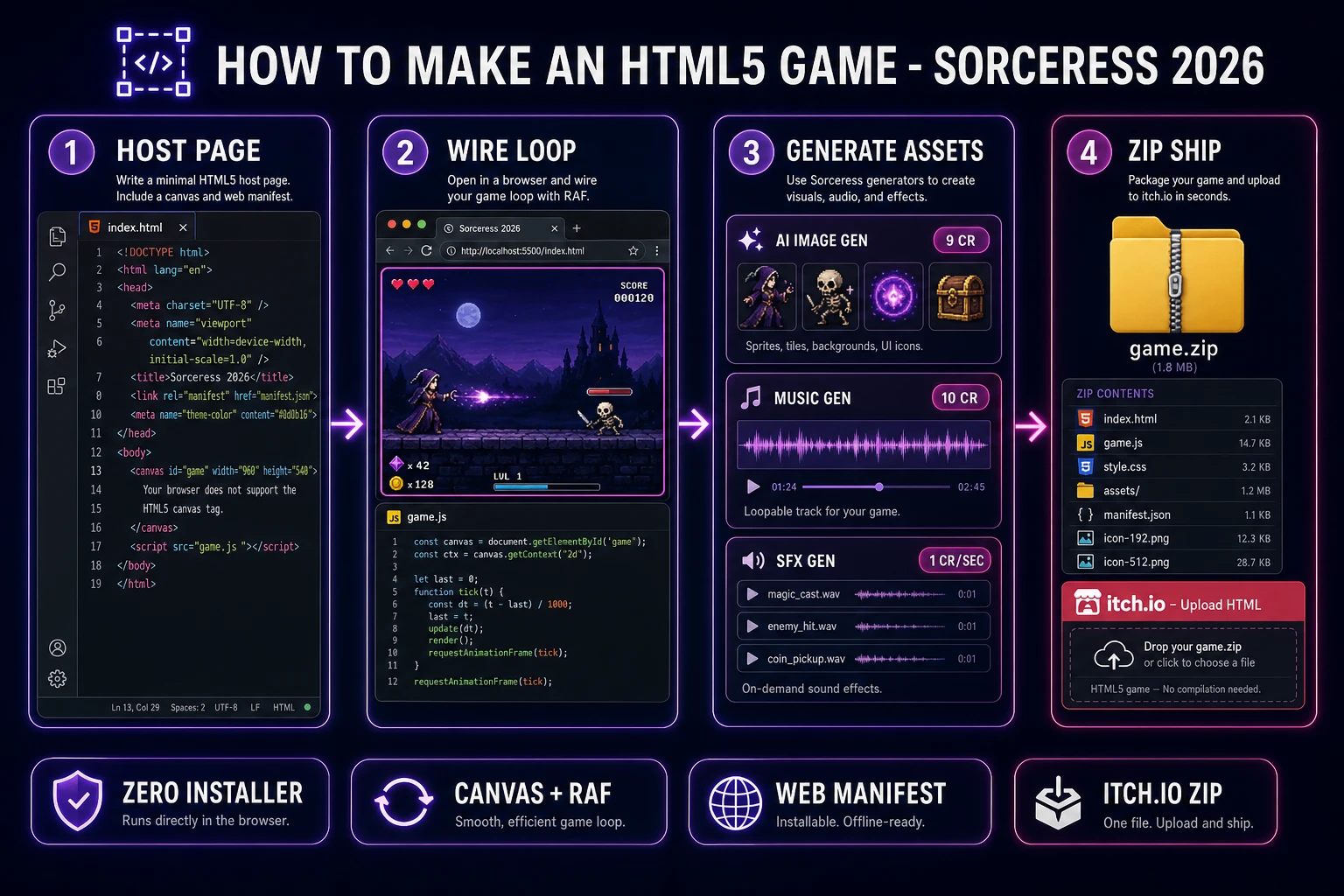
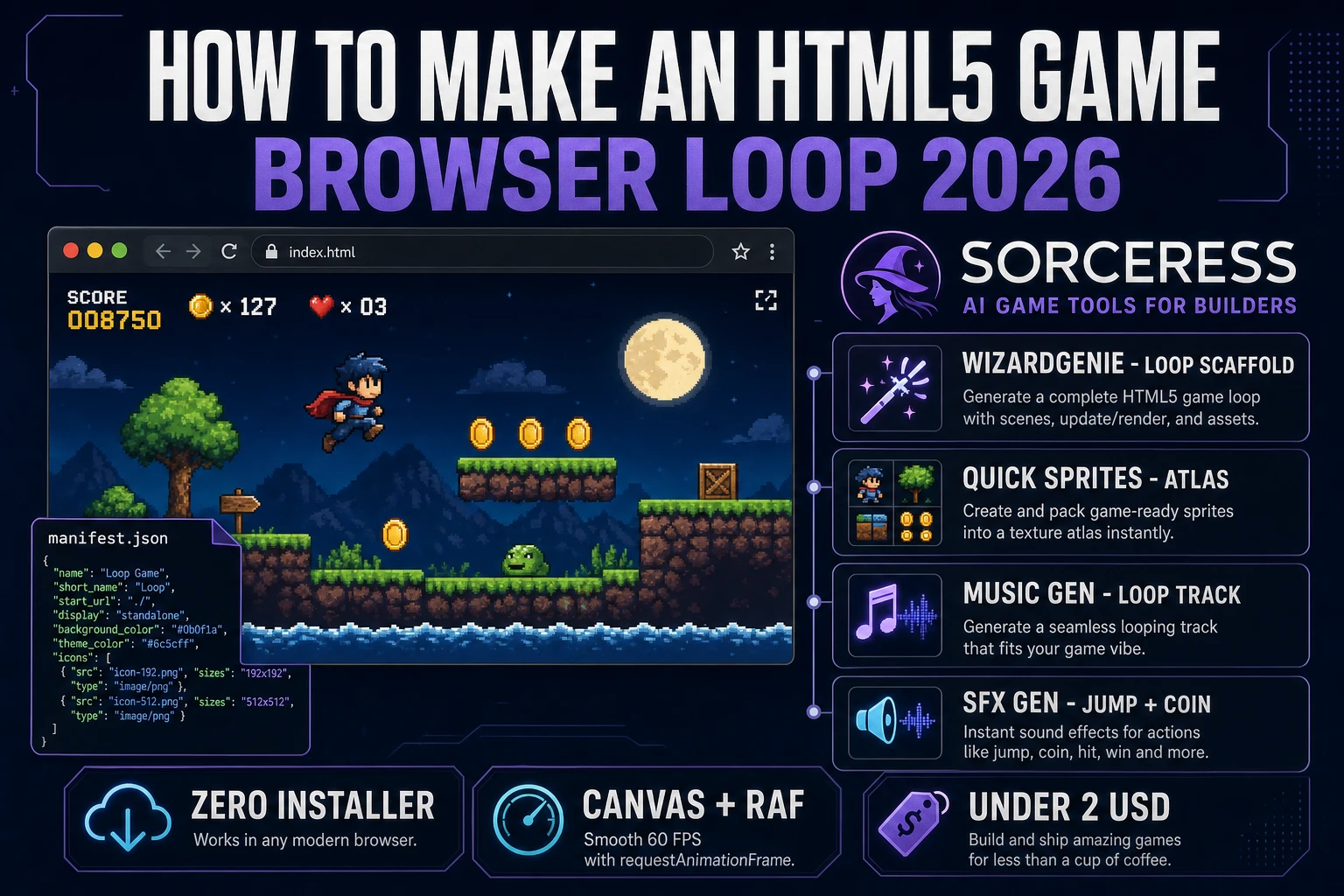
How to make an HTML5 game pipeline: host page with canvas and manifest, WizardGenie loop, AI assets, and itch.io zip ship
The 2026 how to make an HTML5 game recipe: scaffold a canvas host page and optional web manifest, wire the requestAnimationFrame loop in WizardGenie, generate sprites and audio on Sorceress, then zip with index.html at the archive root for itch.io or any static host.

What “how to make an html5 game” actually means in 2026

The query “how to make an html5 game” hides three related intents. Some searchers want a plugin-free canvas arcade — a self-contained HTML, CSS, and JavaScript bundle that draws to a <canvas>, runs entirely client-side, and ships as a static folder. That is the shape this guide targets. Some searchers want a mobile HTML5 game — the same bundle plus a viewport meta tag and a web app manifest so Chromium can offer an Install App prompt. And some searchers want an itch.io HTML5 export — a zip whose root contains index.html, ready for itch’s “HTML” project kind. All three share the same core: the HTML canvas element (Baseline widely available since July 2015, verified against MDN canvas docs on 2026-08-17), a requestAnimationFrame tick, relative asset paths, and zero installer.

Four facts still make how to make an HTML5 game the best first-game answer in 2026. First, distribution is a URL or a zip: no App Store review, no signing certificate, no native installer. Second, the platform is Baseline: canvas, Web Audio, localStorage, and the Web Application Manifest are stable across Chromium, Firefox, and Safari. Third, hosts are free: itch.io’s HTML player, GitHub Pages, and Netlify all serve static folders at no cost. Fourth, assets are generative: the sprite atlas, music loop, and SFX kit that used to take weeks now take under two hours and under two dollars on Sorceress. If you came here from a “browser game” or “JavaScript game” search, the packaging contract is the differentiator — this guide is about the HTML5 deliverable you zip and ship, not a generic genre walkthrough.

The HTML5 game loop in one minute (canvas + rAF + audio)

Every HTML5 game is the same three-step skeleton on top of the browser’s requestAnimationFrame API (Baseline widely available since July 2015, verified 2026-08-17 on MDN). Read input — drain a keys object that keydown and keyup listeners have been updating since page load (and mirror touch or pointer events for mobile). Update — advance every game object by velocity times dt (seconds since the previous frame), apply gravity, and resolve collisions. Draw — clear the canvas with ctx.clearRect(0, 0, W, H) and call ctx.drawImage once per sprite. Start audio on the first user gesture so autoplay policy stays happy. That is the whole loop, and in modern JavaScript it fits in about thirty lines with zero dependencies.

The discipline that keeps an HTML5 game honest is simple: the draw function never mutates state and the update function never touches the DOM. Keep a plain state object (hero position and velocity, arrays of coins and enemies, score, lives), a keys map, and a ctx reference to the 2D context. Update reads keys and mutates state. Draw reads state and paints. Persistence via localStorage, pause menus, and scene switches layer on top — they are not the loop. Size the canvas with the width and height attributes (or JS), not CSS alone, so the bitmap does not stretch and smear (MDN’s canvas sizing guidance, verified 2026-08-17).
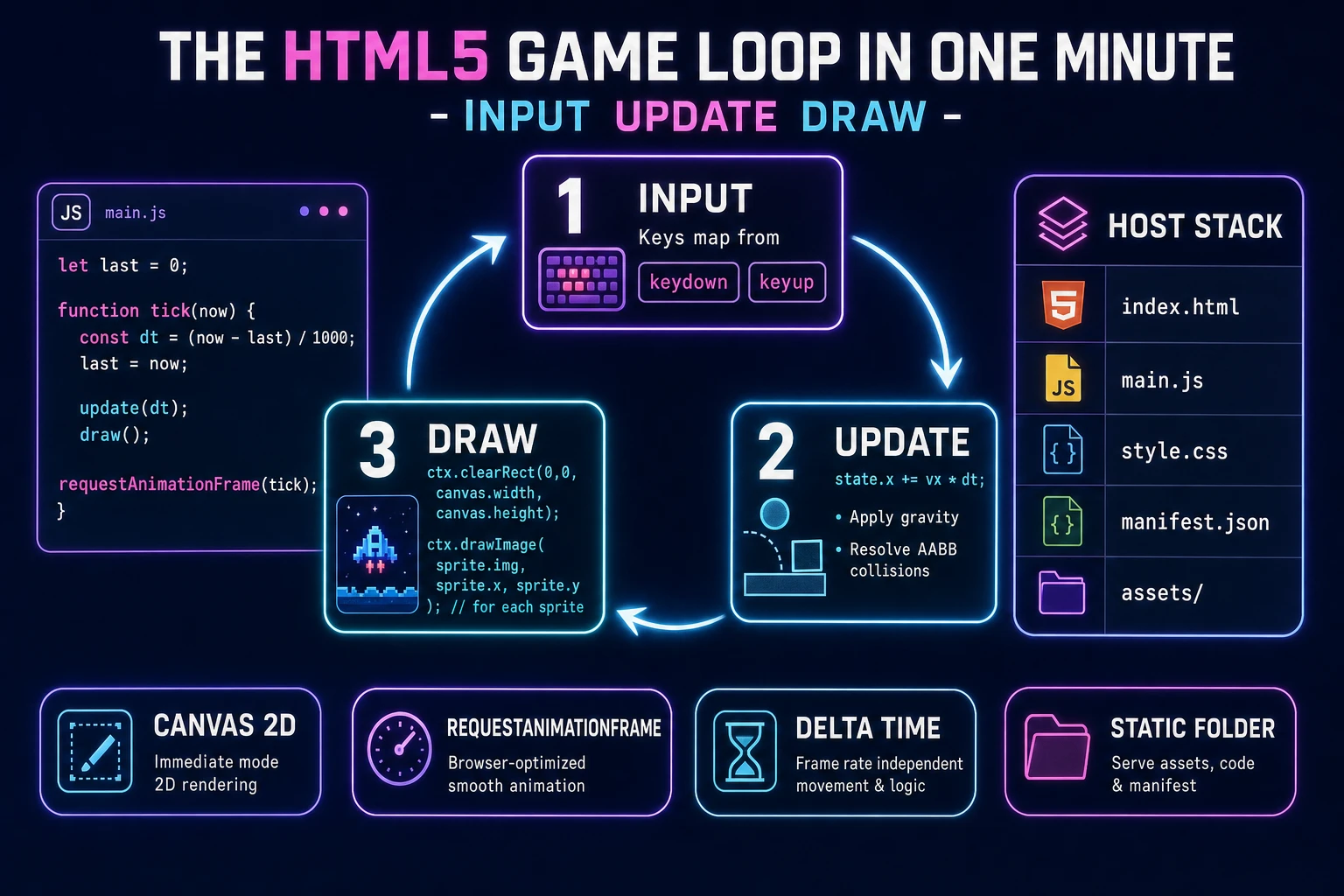
HTML5 game loop diagram: input keys map, update with delta time, draw with clearRect and drawImage inside requestAnimationFrame
The three-step HTML5 game loop that survives any modern tab. Read input, update every object by velocity times dt, then clear and draw the canvas — all inside one requestAnimationFrame callback.

Pick your engine for how to make an html5 game: vanilla Canvas, Phaser 4, or WizardGenie

Three good targets in 2026, each with a different trade-off. Vanilla HTML plus a single JavaScript module on a plain <canvas> is the right pick when the game is small: one scene, one mechanic, under 500 lines of gameplay code. You get zero build step, zero framework to learn, a bundle under 20 KB before art, and a debugger session that reads exactly like the source. This is the honest default for a jam entry, a mechanic prototype, or a js13kGames submission. Everything the game needs is in the browser standard: the Canvas API, input listeners, and the Audio constructor.

Phaser 4.2.1 “Giedi” (released 9 July 2026, verified against phaser.io/download/stable on 2026-08-17) is the right pick when the game grows past a single scene. Phaser gives you a scene manager, an asset loader with a progress bar, Arcade or Matter physics, sprite animation frames, keyboard and gamepad input, tweens, and an audio manager — all in one library. Include it from jsDelivr with https://cdn.jsdelivr.net/npm/phaser@4.2.1/dist/phaser.min.js and skip the bundler. A Phaser game config is one object: type, width, height, physics, and a scene with preload, create, and update. That is still an HTML5 game — Phaser is a JavaScript library you include, not an installer you run.

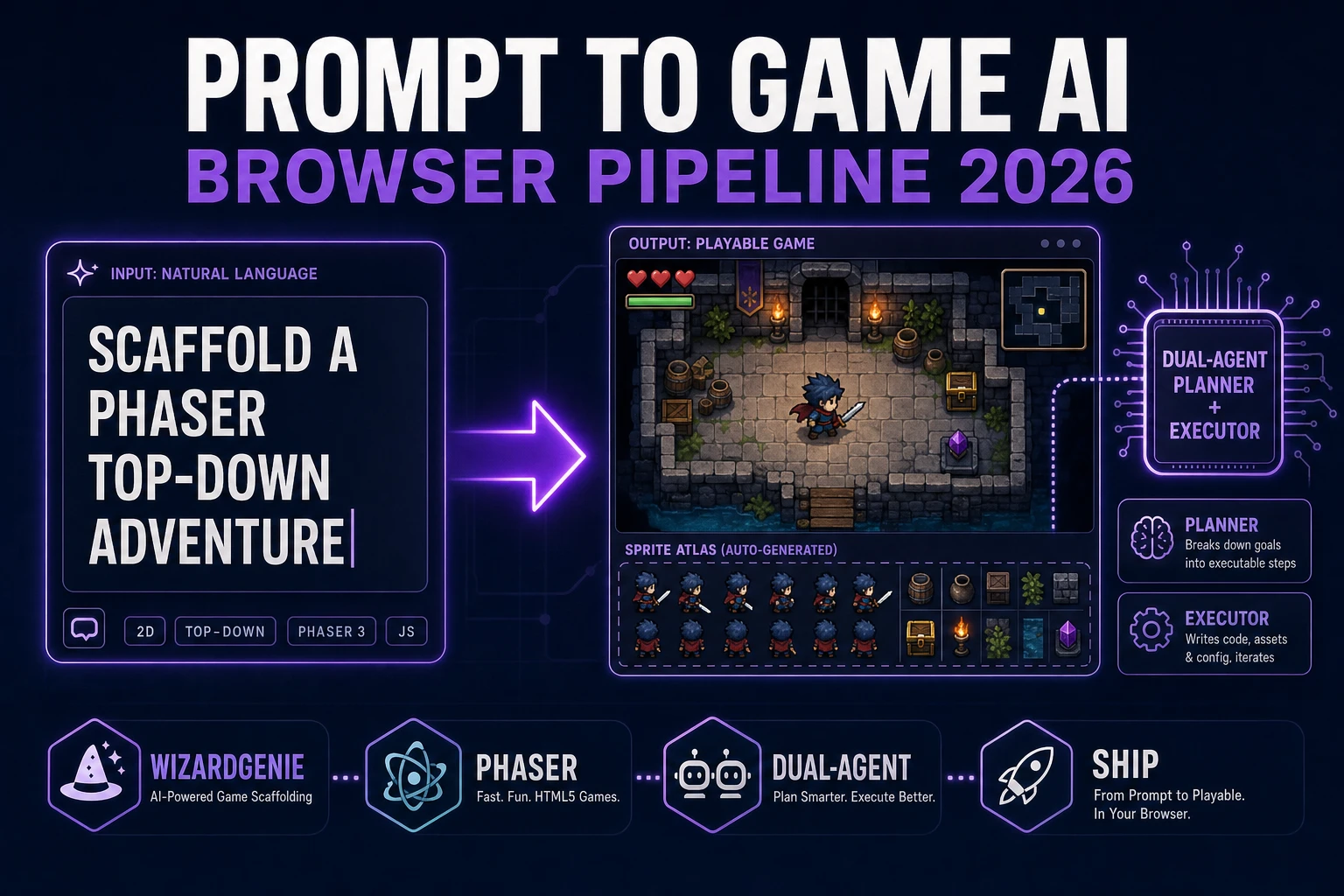
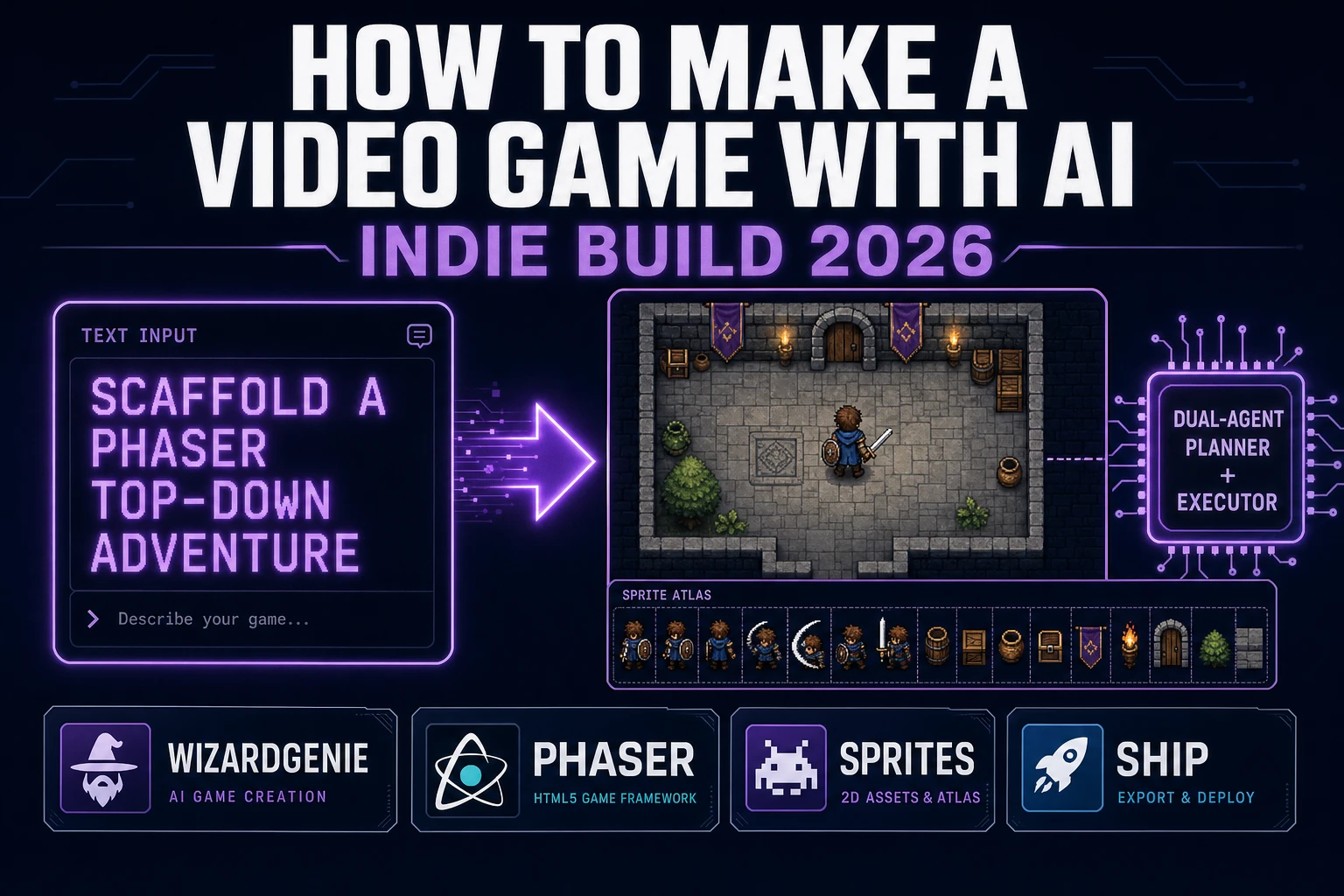
WizardGenie is not a third engine — it scaffolds whichever of the two above you pick from a single natural-language prompt. WizardGenie is the Sorceress game-native coding agent, and it ships as both a Windows desktop app (installer with auto-update, available to Early Access supporters and above) and a no-install web build at the same URL. Its coding-model lineup (verified 2026-08-17 in src/app/_home-v2/_data/tools.ts lines 767 through 774) covers Claude Opus 4.7, Claude Sonnet 4.6, GPT-5.5, Gemini 3.1 Pro, DeepSeek V4 Pro, Kimi K2.5, Grok 4.2, and MiniMax M2.7. For a first HTML5 game, any model in the lineup writes the host page and loop in under two minutes. If you want to run cheap on a longer session, pair a frontier planner (Claude Opus 4.7 or GPT-5.5) with a budget executor (DeepSeek V4 Pro or Kimi K2.5) — the planner designs scenes and mechanics, the executor types the code. That pairing lands near one-fifth the cost of a single-frontier session.
Step 1 — scaffold the HTML5 host page, canvas, and manifest

Every HTML5 game starts with the same four-file layout. Create index.html, main.js, style.css, and an assets/ folder. The host page is the entry point — doctype, charset, title, a single <canvas id="game" width="960" height="540"> with fallback text inside for accessibility, and a script tag for main.js. If you pick Phaser, add the CDN script before your module. Two CSS rules cover the common case: center the canvas on a dark page, and set image-rendering: pixelated when the art is pixel art so browsers do not bilinear-filter the sprites.

Add a viewport meta for mobile HTML5: <meta name="viewport" content="width=device-width, initial-scale=1, user-scalable=no">. Optional but high-value: a web application manifest (MDN, verified 2026-08-17). A minimal manifest.json needs name, short_name, start_url, display: "standalone", and two PNG icons (192 and 512). Link it with <link rel="manifest" href="manifest.json">. That five-minute step is what turns a tab game into an installable PWA on mobile Chromium without writing a service worker on day one.

Keep asset paths relative and lowercase-kebab-case (assets/hero-run.png, assets/coin-pickup.wav). Absolute file:// paths and nested zip roots are the two bugs that break itch.io HTML uploads most often. Before you generate art, confirm the empty canvas clears to a solid color and the tick logs dt — prove the host page boots before you spend credits on sprites.

Step 2 — wire the update-and-draw loop with WizardGenie

Open WizardGenie. Drop in the host page and an empty main.js. For vanilla canvas, give the agent one paragraph: Wire an HTML5 game on a 960×540 canvas as one ES module. Boot grabs the 2D context, adds keydown/keyup listeners that flip a keys map, initializes state with a hero, twenty coins, five enemies, score, and lives, then starts requestAnimationFrame. update(dt) reads keys, applies gravity 900 px/s², integrates velocity, resolves ground at y=500, and runs AABB for coins and enemies. draw() clears, paints background and sprites, and draws an HUD. Persist best score to localStorage. Any coding model in the lineup scaffolds that in under three minutes.

For Phaser, the prompt shifts to lifecycle methods: preload the spritesheet and audio, create Arcade physics bodies and groups, update velocity from cursors, and overlap for pickups. The tick itself is invisible — Phaser owns rAF while you fill preload, create, and update. Either path targets 60 frames per second on a 60 Hz display and stays smooth on higher refresh rates because dt normalizes frame duration. Follow-up prompts add pause, a title scene, touch controls, and a game-over screen — each is a short agent turn, not a rewrite.

Step 3 — AI Image Gen sprites, Music Gen loop, SFX Gen stingers

A canvas of colored rectangles proves the loop. An HTML5 game with a hero sprite, a music loop, and punchy stingers feels like a different medium. Sorceress covers all three in under an hour.

Sprites first. Open Sorceress AI Image Gen for hero, enemy, coin, and background, or open Quick Sprites for a batched atlas. Quick Sprites bills 9 credits per generation (verified 2026-08-17 in src/app/quick-sprites/page.tsx line 21 as CREDITS_PER_GEN = 9), so four generations are 36 credits (0.36 USD at CREDITS_PER_DOLLAR = 100 in src/lib/models.ts line 69). Download PNGs into assets/ and load them from Phaser’s preload() or with new Image() in vanilla. Prefer power-of-two frame sizes (32×32 or 64×64) and transparent PNGs so the canvas compositor handles alpha.

Music second. Open Music Gen. One calm gameplay loop is enough for a first HTML5 game; add a tension bed later if you add a boss. Music Gen bills 10 credits per generation (verified 2026-08-17 in src/app/music-gen/page.tsx line 28 as MUSIC_CREDIT_COST = 10). One track with two tries is 20 credits (0.20 USD). Add 2 credits per WAV export if you want lossless; MP3 is fine for browser delivery. Start playback on the first click with audio.loop = true.

SFX third. Open SFX Gen. SFX Gen bills 1 credit per second on the seed-audio tier (verified 2026-08-17 in src/app/sfx-gen/page.tsx line 23 as SEED_AUDIO_CREDITS_PER_SECOND = 1). Five short stingers at about two seconds each is roughly 10 credits (0.10 USD): jump, coin, hit, death, and menu click. Trigger each with new Audio(path).play() on the event that owns it.

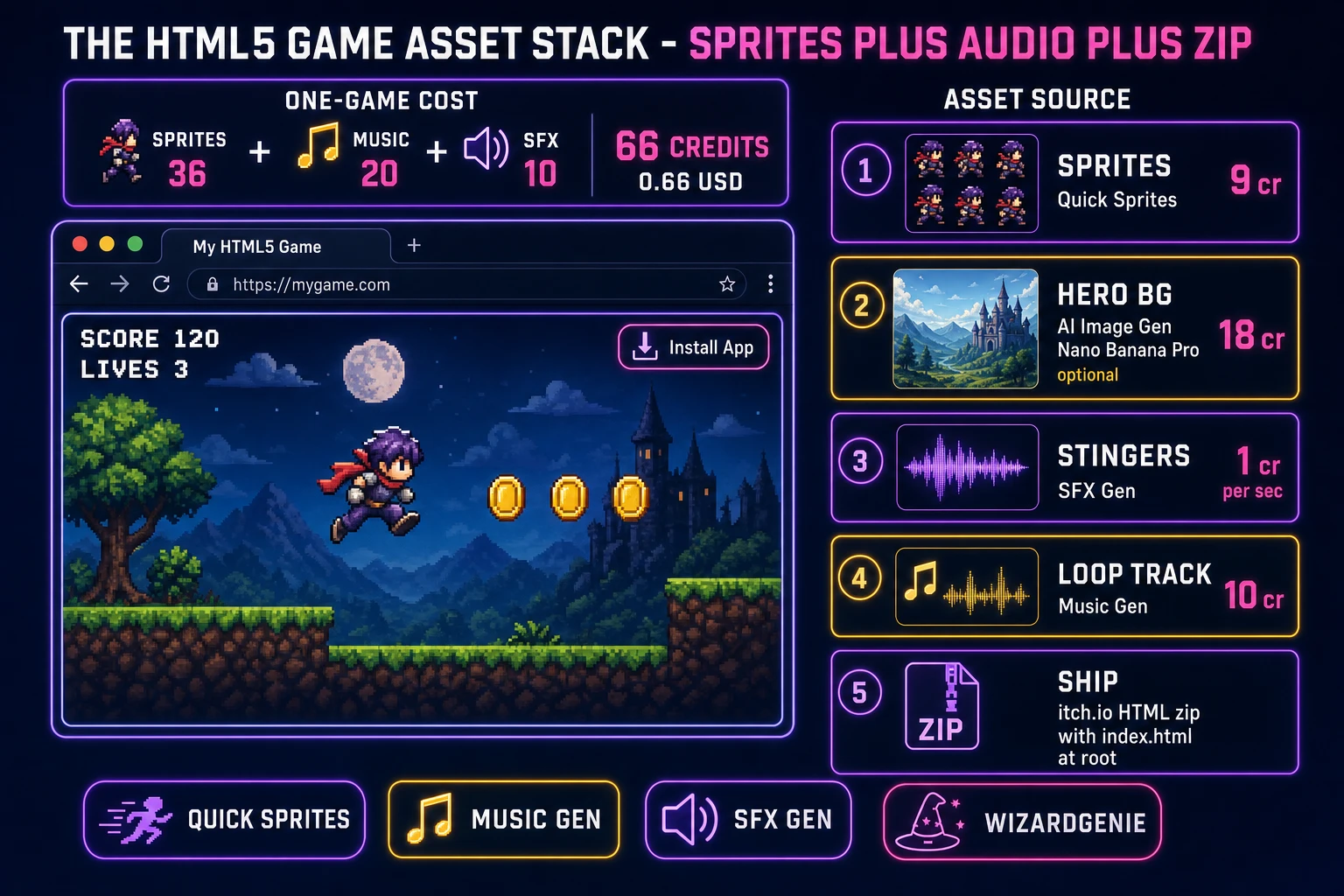
HTML5 game asset stack: Quick Sprites atlas, Music Gen loop, SFX Gen stingers, and itch.io HTML zip with index.html at root
The HTML5 game asset stack: a sprite atlas from Quick Sprites, a loop from Music Gen, stingers from SFX Gen, and a zip with index.html at the root for itch.io’s HTML player — the whole visual and audio set for a first build is under one dollar in Sorceress credits.

What a how to make an html5 game project costs on Sorceress in 2026

Concrete asset and generation budget for a first HTML5 game with a four-sprite atlas, one music loop, a five-stinger SFX kit, a canvas or Phaser loop, and a zip-ready host page — from empty folder to playable upload — all numbers verified 2026-08-17 against local Sorceress source:

  • Sprites (Quick Sprites): 9 credits per generation × 4 (hero, coin, enemy, background) = 36 credits (0.36 USD).
  • Music (Music Gen): 10 credits per generation, 1 track with 2 tries = 20 credits (0.20 USD). Add 2 credits per WAV export if needed.
  • SFX (SFX Gen, seed-audio tier): 1 credit per second, ~10 seconds across 5 stingers = 10 credits (0.10 USD).
  • Optional hero polish (AI Image Gen / Nano Banana Pro): 18 credits per generation if you want a painted title card beyond the atlas (credits: 18 in src/lib/models.ts line 303).
  • WizardGenie coding time: effectively free on the Sorceress side. Model-side API cost for a 1-to-2-hour prompt session on a cheap executor like DeepSeek V4 Pro is typically under 0.60 USD.
  • Hosting: 0 USD on itch.io HTML, GitHub Pages, or Netlify for a static HTML5 bundle.
  • Total for one complete how to make an HTML5 game build: 66 credits core pack, or roughly 0.66 USD in Sorceress credits, plus under 0.60 USD in model API time. Under 2 USD end-to-end for a first playable HTML5 game with atlas, loop, stingers, and a zip-ready host page.

New Sorceress accounts start with 100 free credits (SIGNUP_GRANT = 100 in src/app/api/admin/credits/route.ts line 12), which covers the whole core pack plus headroom for a second sprite pass. The Sorceress Lifetime tier at 49 USD one-time (LIFETIME_PRICE = 49 in src/app/plans/page.tsx line 51) covers unlimited Quick Sprites, Music Gen, and SFX Gen use — useful if the HTML5 game is the first entry in a monthly jam pipeline.

For related pipelines that share this canvas-and-zip spine, the closest reads are Serve How to Make a Browser Game (Phaser Path 2026) for the broader browser-game framing, Code How to Make a Game in JavaScript (Browser Loop 2026) for the pure-vanilla JS counterpart, Host How to Make a Web Game (Browser AI 2026) for more hosting detail, and Wire a Browser Game Engine (Phaser AI Loop 2026) for deeper Phaser architecture. The Sorceress Tools Guide is the master index for every tool this guide referenced. Under two dollars in credits, one weekend of scaffolding and generating assets, and how to make an HTML5 game is a done deal on Sorceress in 2026.

Frequently Asked Questions

Is an HTML5 game the same as a browser game?

Almost, with a packaging difference that matters for searchers. A browser game is any game that runs in a tab. An HTML5 game is the concrete deliverable: a static folder of HTML, CSS, JavaScript, and assets that uses the HTML canvas element (Baseline widely available since July 2015) and ships without a plugin. In 2026 the phrases overlap because Flash is gone, but tutors who say how to make an HTML5 game usually want the zip-ready host page, the canvas loop, and an itch.io or GitHub Pages export—not a Unity WebGL wrapper or a server-rendered app.

Do I need Phaser to make an HTML5 game?

No. Vanilla canvas plus requestAnimationFrame is enough for a single-scene arcade jam, a puzzle grid, or a js13k-style tiny build. Phaser 4.2.1 Giedi (released 9 July 2026) becomes worth the CDN script when you need scenes, an asset loader, Arcade or Matter physics, tweens, and an audio manager in one file. WizardGenie scaffolds either path from one prompt, so pick the engine after you know whether the game is one scene or many.

How do I upload an HTML5 game to itch.io?

Zip the project so index.html sits at the root of the archive (not inside a nested folder). On itch.io create a new project, set Kind of project to HTML, upload the zip, and enable This file will be played in the browser. Keep relative asset paths (assets/hero.png, not absolute file:// paths). Test locally with a static server before upload so CORS and path bugs show up on your machine first. The same zip also deploys to GitHub Pages or Netlify without changes.

Should every HTML5 game include a web app manifest?

Not required for a first jam, but a five-field manifest.json (name, short_name, start_url, display, icons) plus a link rel=manifest tag turns the build into an installable PWA on mobile Chromium. That is the cleanest path when searchers want a mobile HTML5 game that opens fullscreen from the home screen. MDN documents the members; browsers generate splash screens from theme_color and icons. Skip service workers on day one—manifest alone covers the install prompt most indie HTML5 games need.

How much does it cost to build an HTML5 game on Sorceress?

A first HTML5 game with a four-sprite atlas, one music loop, and five SFX stingers budgets about 66 credits on the 2026 Sorceress rate card (verified 2026-08-17): Quick Sprites at 9 credits per generation times four is 36 credits, Music Gen at 10 credits per generation with two tries is 20 credits, and SFX Gen at 1 credit per second for roughly ten seconds of stingers is 10 credits. At 100 credits per dollar that is about 0.66 USD, plus under 0.60 USD in coding-model API time. The free 100-credit signup grant covers the whole pack with headroom for a second sprite pass.

Sources

  1. HTML5 - Wikipedia
  2. MDN - HTML canvas element
  3. MDN - Web application manifest
  4. MDN - requestAnimationFrame
  5. Phaser 4.2.1 Giedi - Stable Download
Written by Arron R.·2,374 words·11 min read

Related posts