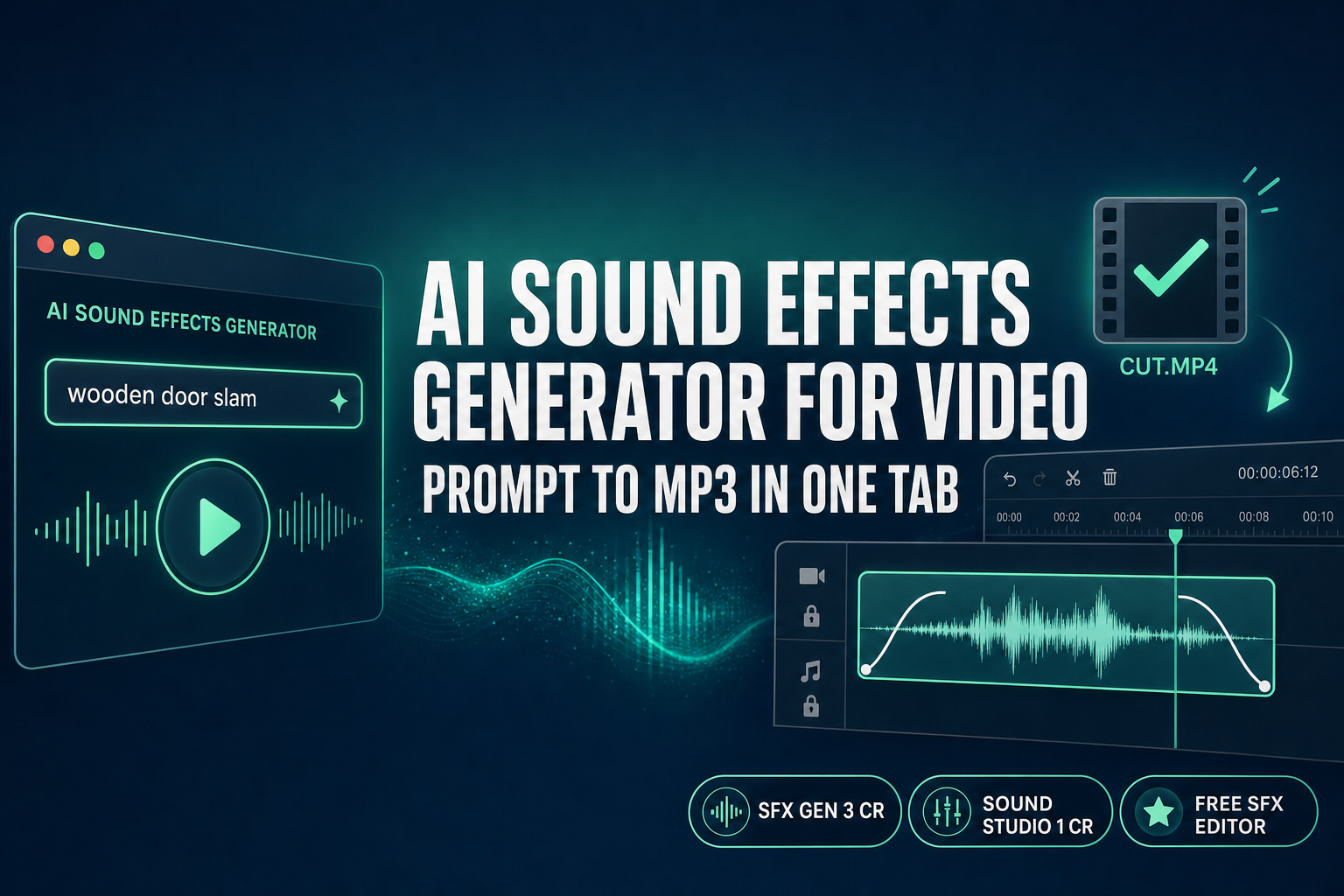
Compose AI Sound Effects Generator for Video (Browser)

By Arron R.11 min read
An AI sound effects generator for video turns a prompt into a usable MP3 in under a minute. Sorceress runs the full pipeline in one browser tab — SFX Gen at 3 c

An AI sound effects generator for video in 2026 is no longer a clever toy — it is the practical answer when the SFX you need does not exist as a stock clip and you cannot wait for a Foley session. Most browser-native generators stop at a 30-second WAV, hand you a download link, and leave the trim, sync, fade, and loop work to whatever audio editor you happen to own. The honest pipeline needs the generation step and the edit step on the same tab. Sorceress runs both: SFX Gen at 3 credits per generation routes Suno V5.5 in-browser, the free SFX Editor handles trim, fade, loop, and EQ with zero credits, and 100 starter credits arrive at sign-up. This guide walks the full prompt-to-cut workflow and ranks the 2026 free landscape with verified numbers from May 31, 2026.
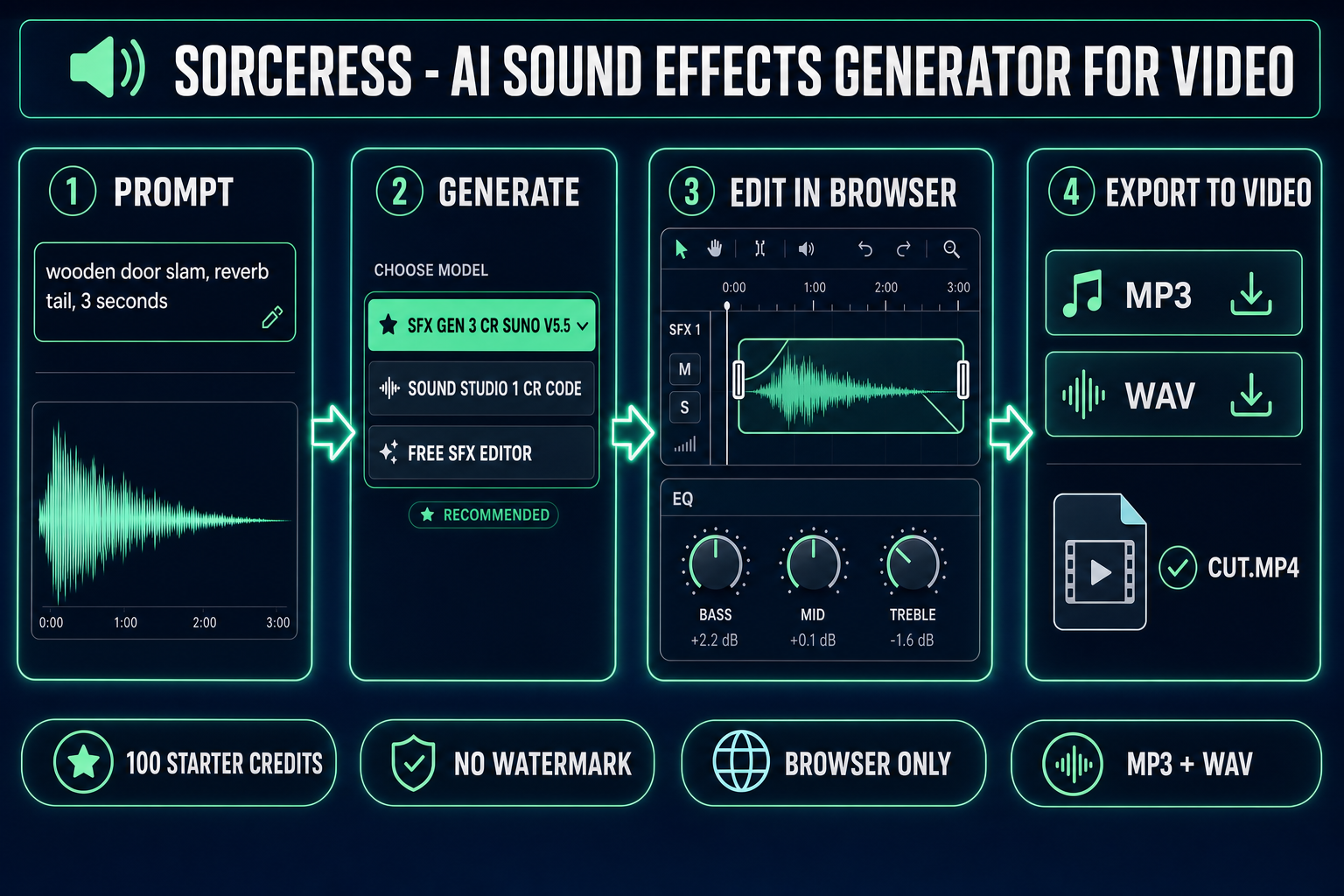
AI sound effects generator for video pipeline diagram - prompt SFX Gen Suno V5.5 SFX Editor trim fade loop export MP3 WAV to video cut
The honest AI sound effects generator for video pipeline runs four steps in one Sorceress tab — prompt, generate, edit, export — with verified credit costs from src/app/sfx-gen/page.tsx on May 31, 2026.

What “AI sound effects generator for video” actually means in 2026

The category covers any tool that takes a text prompt (and sometimes a reference audio clip or a video) and synthesises a non-musical audio clip suitable for layering against video. The technical primitive sits at the intersection of two well-defined Wikipedia-grade concepts: a sound effect is any artificially created sound that emphasises an artistic or other content of films, television, video games, or other live or recorded media, and Foley is the post-production reproduction of everyday sounds added to film and video to enhance audio quality. The AI sound effects generator for video category targets both: stylised impacts, weapon hits, ambient room tones, UI confirmations, creature voices, and footstep variations.

The browser-native shape (which Sorceress lives in) bypasses two costly steps the Foley tradition cannot avoid. There is no microphone setup, no acoustically treated room, no library of physical props. The text prompt becomes an MP3 in under a minute. The Web Audio API handles the in-browser edit step, so the generated clip is trimmed, faded, looped, and exported without ever leaving the page.

The 2026 free AI sound effects for video landscape — four honest shapes

Free is a slippery word in this category. Every contender below has a different shape of free, and the right pick depends on whether your video is monetised, whether you need exact-length sync, and whether you need a separate edit step.

  • ElevenLabs Sound Effects. 10,000 free credits per month on the free tier, 40 credits per second when duration is specified, 30-second cap per generation, MP3 + WAV at 48 kHz output (verified against the official ElevenLabs sound effects documentation on May 31, 2026). The catch: the free tier does NOT grant a commercial-use licence. Any monetised YouTube upload, paid client deliverable, or shipped game requires the paid Starter tier or higher.
  • Adobe Firefly Sound Effect Generator. Limited free credits, WAV downloads for audio-only files, MP4 downloads for audio-over-video, with a Mic Acting feature that lets you record your own performance and re-skin it to a different timbre (verified against the Firefly product page on May 31, 2026). The commercial-release output is royalty-free and trained on licensed and public domain content. The catch: limited free credits run out fast on real production work, and the editor lives inside Premiere Pro for the full workflow.
  • OptimizerAI. A free tier with up to 60-second clips, 44.1 kHz stereo output, royalty-free for creators, and a built-in video-timing matching feature that aligns the generated SFX to a reference video clip. The catch: the editor side is thinner than the dedicated tools above, and prompt control over advanced parameters is limited.
  • Sorceress SFX Gen. 3 credits per generation through the in-browser SFX Gen route, which routes Suno V5.5 (verified against src/app/api/sfx-gen/route.ts on May 31, 2026). 100 starter credits at sign-up, which is 33 generations from the starter pool. Outputs drop directly into the free SFX Editor for trim, sync, and loop. Suno’s upstream commercial-use terms apply — review the current Suno terms of service before commercial release.

The Sorceress pick is the only one that bundles the AI sound effects generator for video step and the editor step on the same browser tab without forcing a switch to Premiere or a desktop DAW. The earlier browser SFX pack walkthrough covers the multi-clip generation pattern; this guide covers the video-specific sync and trim steps that only apply when the SFX is destined for a cut.
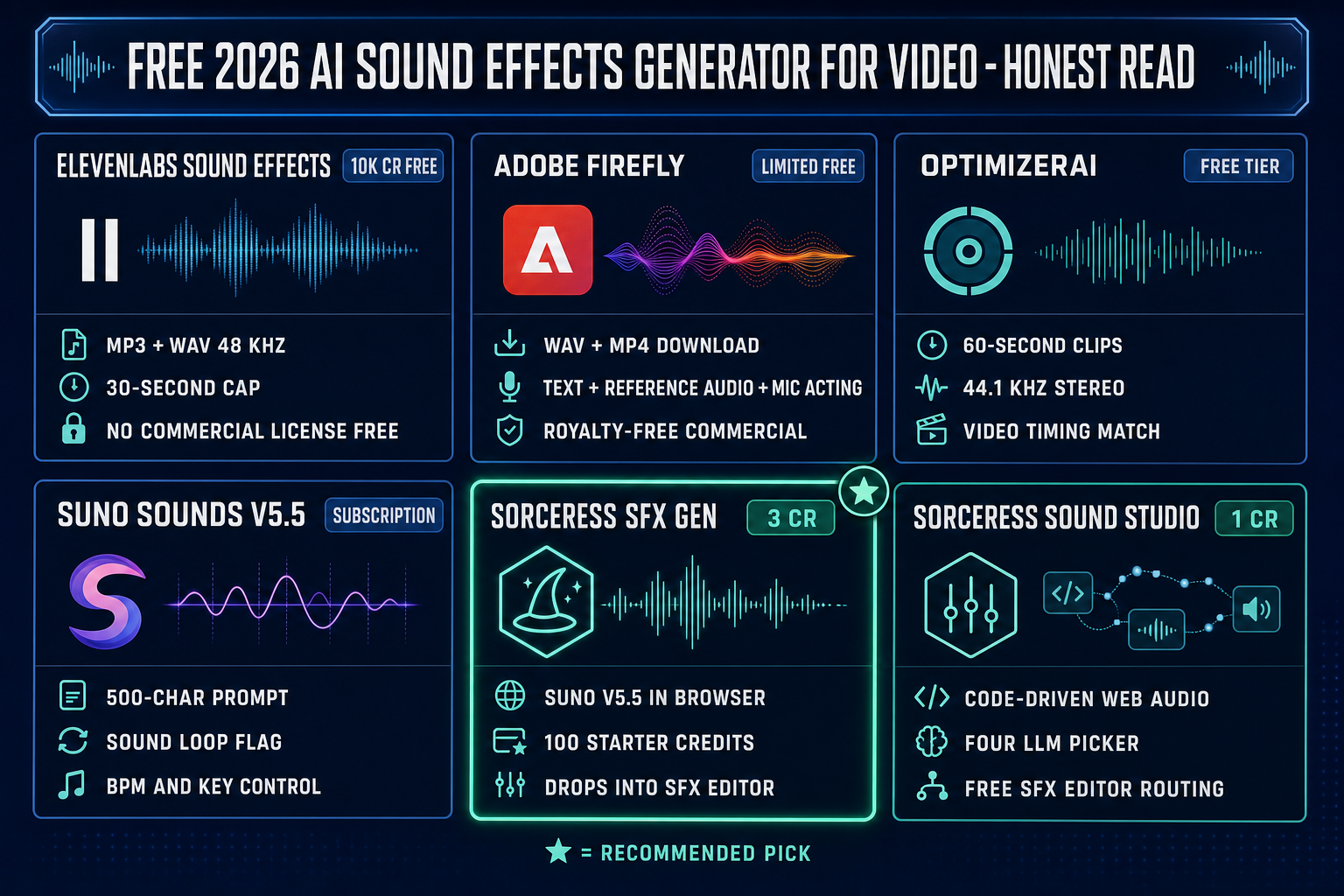
Free 2026 AI sound effects generator for video comparison - ElevenLabs Adobe Firefly OptimizerAI Suno V5.5 Sorceress SFX Gen Sound Studio credits limits commercial license
The free 2026 AI sound effects generator for video comparison ranks six options on credit cost, output format, and commercial-licence status. Sorceress SFX Gen and Sound Studio are the only two that route a generation step into a free in-browser editor.

Why the SFX-for-video pipeline is more than generation

The most common mistake when people search for an AI sound effects generator for video is treating the generation step as the whole job. It is half. The other half is sync, trim, fade, loop, and the export format your video editor wants. Skip those steps and the generated clip lands on the timeline with audible click artifacts at the cut points, the wrong duration, the wrong volume, and possibly the wrong format.

The pipeline has five distinct steps:

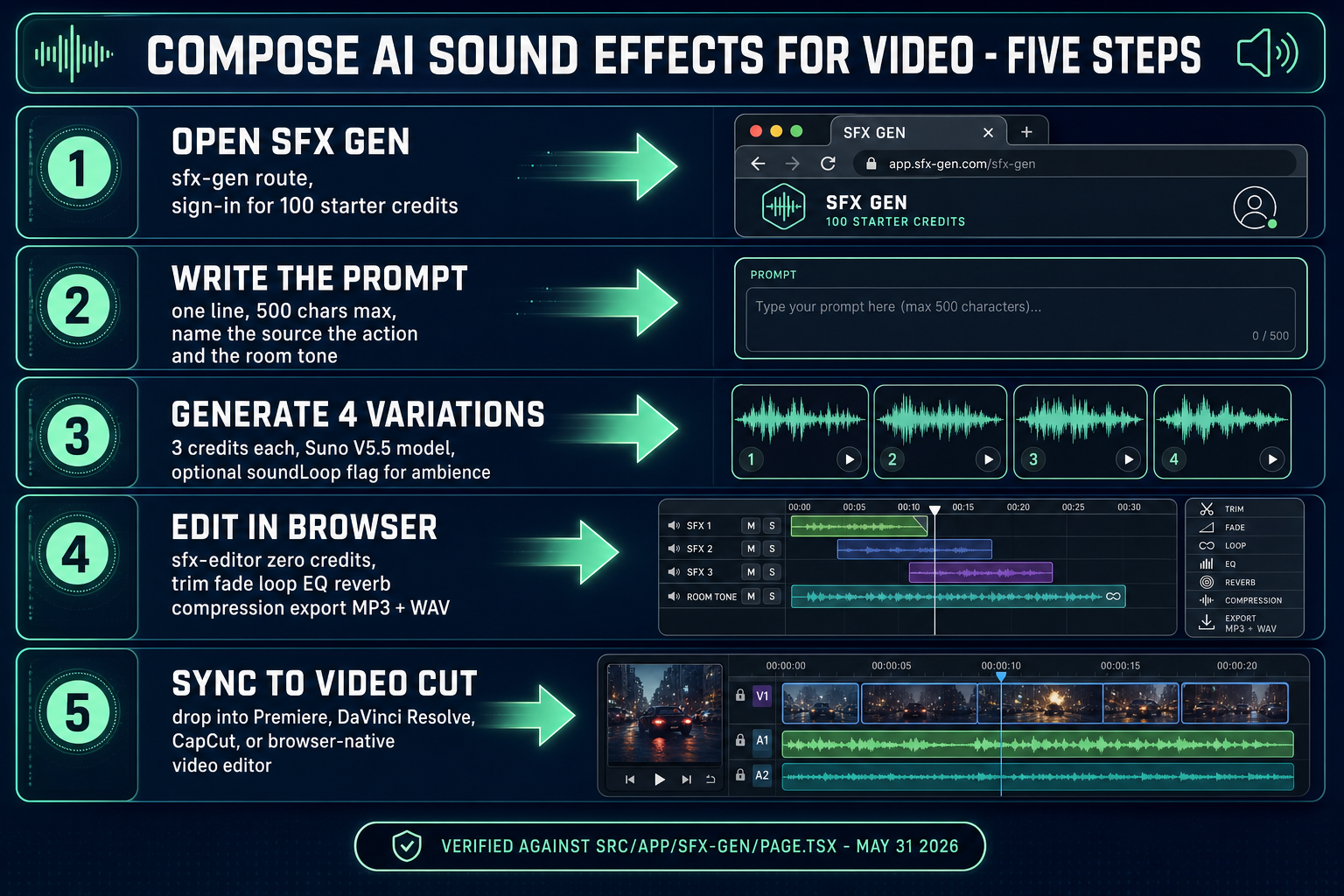
  1. Prompt. One line, up to 500 characters in SFX Gen (verified against the Suno V5.5 docs at kie.ai on May 31, 2026), naming the source, the action, and the room tone. “Wooden door slam, brief reverb tail, indoor hallway acoustic, 3 seconds” is more useful to the model than “door sound.”
  2. Generate. SFX Gen produces 4 variations per submission for 3 credits (verified against src/app/sfx-gen/page.tsx line SFX_CREDIT_COST = 3). Pick the variation closest to the visual; discard the other three.
  3. Trim. Generate slightly longer than the visual cut (8 seconds for a 6-second cut), then trim the head and tail in the SFX Editor to the exact frames. The trim step is zero credits and runs entirely in the Web Audio API.
  4. Fade and EQ. A 50–100 millisecond fade-in and fade-out removes audible click artifacts at the cut points. The SFX Editor exposes 5-band EQ, reverb, delay, and compression for tonal shaping — useful when the generated clip is too bright or lacks low-end weight.
  5. Export. MP3 by default for size, WAV when the downstream video editor will re-encode. The SFX Editor uses @breezystack/lamejs for the MP3 encoder, verified against the package on May 31, 2026.

An AI sound effects generator for video that stops at step 2 leaves the four steps after generation as homework for whatever audio tool you happen to own. The Sorceress workflow runs the whole pipeline in the same tab.
Compose your first SFX-for-video prompt — the five-line pattern

The Suno V5.5 prompt window accepts up to 500 characters, but the best generations come from focused prompts under 200 characters that follow a specific pattern. The five-line prompt pattern, verified to produce sync-ready clips on May 31, 2026:

  1. Source. Name the physical thing making the sound. Wooden door, glass cup, metal sword, plastic bottle. Specific materials beat generic categories.
  2. Action. Name the verb. Slam, drop, scrape, swing, ignite. Avoid abstract verbs (“trigger,” “activate”) — they confuse the model.
  3. Room tone. Indoor hallway, outdoor field, small bathroom, large warehouse. Reverb and tail length come from this line.
  4. Duration. Three seconds, one second, brief, sustained. Suno responds to numeric duration cues better than to qualitative ones.
  5. Style or genre tag. Realistic, cinematic, retro game, sci-fi, horror. Optional but strongly steers tonal balance.

Worked example for a sword slash on a 4-second video cut: “Steel sword horizontal swing through the air, brief whoosh tail, outdoor open field, 1.5 seconds, cinematic action film style.” SFX Gen will return four variations — pick the one whose attack peak aligns closest to the visual swing peak.

Worked example for a UI confirmation chime on a 1-second cut: “Soft glass bell ding with subtle synth pad layer, no reverb, 0.8 seconds, modern app UI style.” Short prompts with specific genre tags produce remarkably consistent results across the four variations.

Worked example for ambient room tone on a 30-second background layer: “Empty office room tone with distant HVAC hum and faint computer fan, no transients, 8 seconds, realistic.” Pair this with the SFX Gen soundLoop flag (verified against src/app/api/sfx-gen/route.ts) so the generated clip has no perceptible start or end and tiles cleanly under the visual.

Sync, trim, and loop in the SFX Editor (browser, free)

The free SFX Editor route handles the post-generation steps that turn a raw AI sound effect into a sync-ready video asset. Zero credits, runs entirely on the Web Audio API, no install. The feature surface verified against src/app/sfx-editor/page.tsx on May 31, 2026:

  • Trim. Drag handles on the head and tail of the waveform. Snap-to-zero-crossing eliminates click artifacts at the trim points.
  • Speed. 0.5x to 2x playback rate without pitch correction (chipmunk effect), or with pitch correction enabled for tempo-matching to a video cut.
  • Loop. Loop and loop-gap controls preview seamless playback. Critical for ambient room tones, machine hums, and engine sounds that need to tile under a longer visual.
  • Fade. Fade-in and fade-out curves with adjustable length. The 50–100 millisecond rule covers most cuts; longer fades suit ambient transitions.
  • Filter and EQ. 5-band parametric EQ with high-pass and low-pass filters for tonal shaping.
  • Reverb, delay, distortion. Three classic studio effects for adding space, echo, and saturation. Useful when the generated clip is too dry for the on-screen environment.
  • Pan and stereo width. Position the SFX in the stereo field. Critical when multiple SFX layers stack in a single cut.
  • Compression. Threshold, ratio, attack, release. Tames the dynamic range so the SFX sits well under the dialogue and music tracks.
  • Export. MP3 at 320 kbps via @breezystack/lamejs for size, WAV at native sample rate for lossless. WAV is the right pick when your video editor will re-encode the audio downstream.

The honest rule: trim and fade in the SFX Editor before exporting, never after dropping the clip into your video editor. In-browser zero-cross trimming is faster and more accurate than handling the same cleanup inside Premiere or DaVinci Resolve.

Five-step AI sound effects generator for video pipeline - open SFX Gen write prompt generate four variations edit in SFX Editor sync to video cut
The five-step AI sound effects generator for video pipeline runs prompt to sync-ready clip in one Sorceress tab. Steps 4 and 5 are zero-credit and zero-install — the only paid step is generation.

SFX Gen vs Sound Studio — when to pick which

Sorceress exposes two AI sound effects routes, and the right pick depends on the kind of sound you need. The split is verified against the source on May 31, 2026:

  • SFX Gen at 3 credits. Suno V5.5 model, prompt-to-MP3 generation, four variations per submission. The right pick when you need a realistic Foley-style sound — impacts, footsteps, ambient room tones, organic textures. The model was trained on real-world audio and produces convincing acoustic results.
  • Sound Studio at 1 credit. Code-driven Web Audio API synthesis with a four-LLM picker (GPT-5 Nano, Gemini 2.5 Flash Lite, Claude Opus 4.5, and DeepSeek-V3.2) that writes JavaScript synthesis code on demand. The right pick when you need a stylised synthetic sound — retro game UI bleeps, sci-fi laser zaps, abstract electronic textures. Verified against src/app/sound-creator/page.tsx with SOUND_CREDIT_COST = 1.

For an AI sound effects generator for video workflow, the realistic vs synthetic split usually maps to the visual style. Live-action footage and photoreal CGI shots need realistic SFX; route through SFX Gen. Stylised game UI overlays, retro pixel-art motion graphics, and abstract title sequences need synthetic SFX; route through Sound Studio. Both routes feed the same free SFX Editor for the trim and sync step. The pricing math: 100 starter credits buy 33 SFX Gen generations or 100 Sound Studio generations — mix and match without burning a separate budget per tool.

License and royalty-free questions for video creators

Commercial-use licensing is the single most overlooked question in the AI sound effects generator for video category, and it is the question that decides whether your monetised YouTube upload, paid client cut, or shipped game can legally use the generated SFX.

The 2026 state of play, verified against vendor pages on May 31, 2026:

  • ElevenLabs Sound Effects free tier. NOT licensed for commercial use. Free tier outputs require attribution to ElevenLabs and are limited to non-commercial sharing. Commercial rights start at the paid Starter plan.
  • Adobe Firefly Sound Effect Generator. Royalty-free on the commercial-release version, trained on licensed and public domain content per Adobe’s product page. Suitable for monetised work.
  • OptimizerAI. Marketed as royalty-free for creators on the project’s own pages.
  • Suno Sounds (and Sorceress SFX Gen, which routes Suno V5.5). Outputs are subject to Suno’s upstream terms of service. Review the current Suno terms before any commercial release.

The cleanest path for any monetised work: use a platform with explicit royalty-free terms for the tier you are on. The cleanest path for personal projects, learning exercises, and unpublished prototypes: any of the four shapes above is fine on the free tier. The honest read — do not assume free means royalty-free in this category. Read the terms of service of every tool before shipping.

Pitfalls and pro moves

Five short rules that separate a polished AI sound effects generator for video workflow from a budget-burn loop:

  1. Never iterate shape on the long-duration setting. Generate at 2–3 seconds first to lock the prompt, then re-generate at the final length once the prompt converges. A 10-second generation at 3 credits is the same cost as a 2-second one, but the iteration loop is slower.
  2. Trim before exporting, not after. The in-browser SFX Editor handles zero-cross trimming faster and more accurately than Premiere or DaVinci Resolve.
  3. Use the loop flag for ambience. SFX Gen exposes a soundLoop flag that produces seamlessly tileable output. Far better than crossfading a non-looping clip in your video editor.
  4. EQ before reverb. Fix the tonal balance first, then add space. Adding reverb to a muddy SFX makes it muddier; adding reverb to a clean SFX makes it sit in the mix.
  5. Layer realistic and synthetic. A glass-shatter SFX from SFX Gen layered with a high-pitched synth shimmer from Sound Studio reads more cinematic than either alone. Use both routes on the same cut when the visual deserves it.

For longer-form video work that mixes SFX with original score and dialogue, pair this guide with the cinematic trailer workflow for the visual side and the SFX pack from prompts walkthrough for batch generation patterns.

Closing — the honest pitch

The phrase AI sound effects generator for video covers two distinct jobs: generation and edit. Most contenders in the 2026 free landscape solve the generation half and outsource the edit half to whatever audio tool you happen to own. Sorceress runs both halves on the same browser tab — SFX Gen at 3 credits via Suno V5.5, free SFX Editor for trim and sync, and 100 starter credits at sign-up so the first 33 generations are effectively free. The verified date on every credit cost and feature in this article is May 31, 2026, against the live source files in src/app/sfx-gen/page.tsx, src/app/api/sfx-gen/route.ts, src/app/sound-creator/page.tsx, and src/app/sfx-editor/page.tsx. Sign in for the starter credits, route a wooden door slam through the five-line prompt pattern above, trim it to your video cut in the SFX Editor, and ship it inside an hour.

Frequently Asked Questions

What is the best AI sound effects generator for video in 2026?

There is no single best AI sound effects generator for video — the right pick depends on whether you need commercial rights, whether you need to sync to a specific cut length, and whether you need a separate edit step after generation. The 2026 free landscape splits across four shapes: ElevenLabs Sound Effects (10,000 free credits per month, 40 credits per second when duration is specified, 30-second cap, MP3 + WAV output, NO commercial license on free tier per the ElevenLabs pricing page), Adobe Firefly Sound Effect Generator (limited free credits, WAV download for audio, MP4 download for audio over video, royalty-free on the commercial release per the Adobe Firefly product page), OptimizerAI (free tier with 60-second clips, 44.1 kHz stereo, royalty-free, video-timing matching feature per optimizerai.xyz), and Suno Sounds via subscription (V5.5 model, prompt up to 500 characters per the kie.ai docs). Sorceress SFX Gen routes Suno V5.5 in-browser at 3 credits per generation with 100 starter credits granted at sign-up — the same backend, no separate Suno subscription, and the output drops directly into the SFX Editor for trim and sync without leaving the page.

Are AI sound effects for video royalty-free in 2026?

It depends on the platform and the tier. ElevenLabs Sound Effects on the free plan are NOT licensed for commercial use and require attribution to ElevenLabs in any non-commercial sharing per the ElevenLabs licensing guide; commercial rights start at the Starter plan. Adobe Firefly Sound Effect Generator outputs are royalty-free on the commercial release version and trained only on licensed and public domain content per Adobe product page. OptimizerAI clips are described as royalty-free for creators on the project own marketing pages. Suno Sounds outputs are subject to Suno own terms of service — review the current license before commercial use. Sorceress SFX Gen routes Suno V5.5 with the same upstream license terms; the credit model means you pay per generation rather than per month, but the underlying commercial-use question is the same one you would answer if you went directly to Suno. The cleanest path for any monetized YouTube video, client deliverable, or paid app is to use a platform with explicit royalty-free terms for the tier you are on.

How do I sync AI sound effects to video frames?

The AI sound effects generator for video step is only half the workflow — sync is the other half. Three concrete moves cover the common cases. First, generate to a slightly longer duration than the visual cut (8 seconds for a 6-second cut), then trim the head and tail to the exact frames in the SFX Editor. Second, set the trim handles in the SFX Editor by ear against a video reference loaded into your video editor on a second monitor, scrubbing back and forth until the impact aligns with the visual peak. Third, use the SFX Editor fade-in and fade-out to soften any abrupt edges; a 50 to 100 millisecond fade on each end removes audible click artifacts at the cut points. For repeating ambient layers (room tone, wind, machine hum), enable the loop flag in SFX Gen at generation time so Suno V5.5 produces a sound effect with no perceptible start or end point — the SFX Editor loop and loop-gap controls then preview the seamless playback before export.

What audio format does the AI sound effects generator for video export?

Sorceress SFX Gen exports MP3 by default per src/app/sfx-gen/page.tsx, suitable for most video editors and YouTube uploads. The SFX Editor adds WAV export via @breezystack/lamejs Mp3Encoder for the MP3 path and the browser native Web Audio API for the WAV path; WAV is the right pick when you need lossless audio for a video editor that re-encodes downstream. ElevenLabs Sound Effects exports MP3 for all effects and WAV at 48 kHz for non-looping effects per the ElevenLabs sound effects docs. Adobe Firefly downloads WAV for audio-only files and MP4 for video files with audio per the Firefly product page. OptimizerAI exports stereo 44.1 kHz audio per their own marketing pages. The honest rule for video work: if your editor accepts both, prefer WAV for the master and let the editor compress on final export; if your editor is web-first or storage-constrained, MP3 at 320 kbps is indistinguishable from WAV for most ears.

Can I generate AI sound effects without a login?

A no-login path exists for trying a one-shot generation, but every commercial-grade AI sound effects generator for video tracks usage against an account so credits and royalty-free licensing can be attached. ElevenLabs requires an account for the free tier (10,000 credits per month). Adobe Firefly requires an Adobe ID. OptimizerAI offers a Make a Sound for free button on the homepage that runs without a login but the pricing tiers require sign-up. Sorceress SFX Gen requires sign-in to claim the 100 starter credits and to generate, because the credit balance follows the user account. The trade-off is real: a no-login flow protects privacy but eliminates the credit grant that makes the free tier viable, and it usually limits commercial licensing. The cleaner path for any creator working on more than one video is to sign up once for an account that grants credits, then never burn the credit pool on shape exploration — generate at low duration first, then re-generate at the final length once the prompt converges.

How does the AI sound effects generator for video pipeline compare to a free SFX library?

Free SFX libraries (Freesound, Mixkit, Pixabay Sound Effects, Zapsplat) are databases of pre-recorded clips, often Creative Commons licensed, browsed by tag and downloaded one at a time. They are the right pick when the sound you need already exists — a stock door slam, generic crowd ambience, a standard explosion. The AI sound effects generator for video pipeline is the right pick when the sound you need does NOT exist as a stock clip — a specific creature roar, a stylized weapon impact, a custom UI confirmation tone, or any sound that needs to be exact-length matched to a specific cut. The two approaches are complementary, not competitive: most professional video edits use stock SFX for 70 percent of the layers and AI-generated SFX for the 30 percent that needs to be specific. The Sorceress workflow lets you treat SFX Gen as the prompt-to-clip step and the SFX Editor as the trim-to-fit step regardless of whether the source is generated or downloaded.

Sources

  1. Sound effect (Wikipedia)
  2. Foley (filmmaking) (Wikipedia)
  3. MP3 (Wikipedia)
  4. WAV (Wikipedia)
  5. Web Audio API specification (W3C)
  6. Web Audio API (Wikipedia)
  7. @breezystack/lamejs (npm)
Written by Arron R.·2,552 words·11 min read

Related posts