Compare the Best AI for Unity Coding (Honest 2026 Pick)

By Arron R.15 min read
The best AI for Unity coding in 2026 is not one tool. Unity AI Beta is $10/mo for in-editor agent work, the CoplayDev MCP bridge wires GitHub Copilot or Cursor

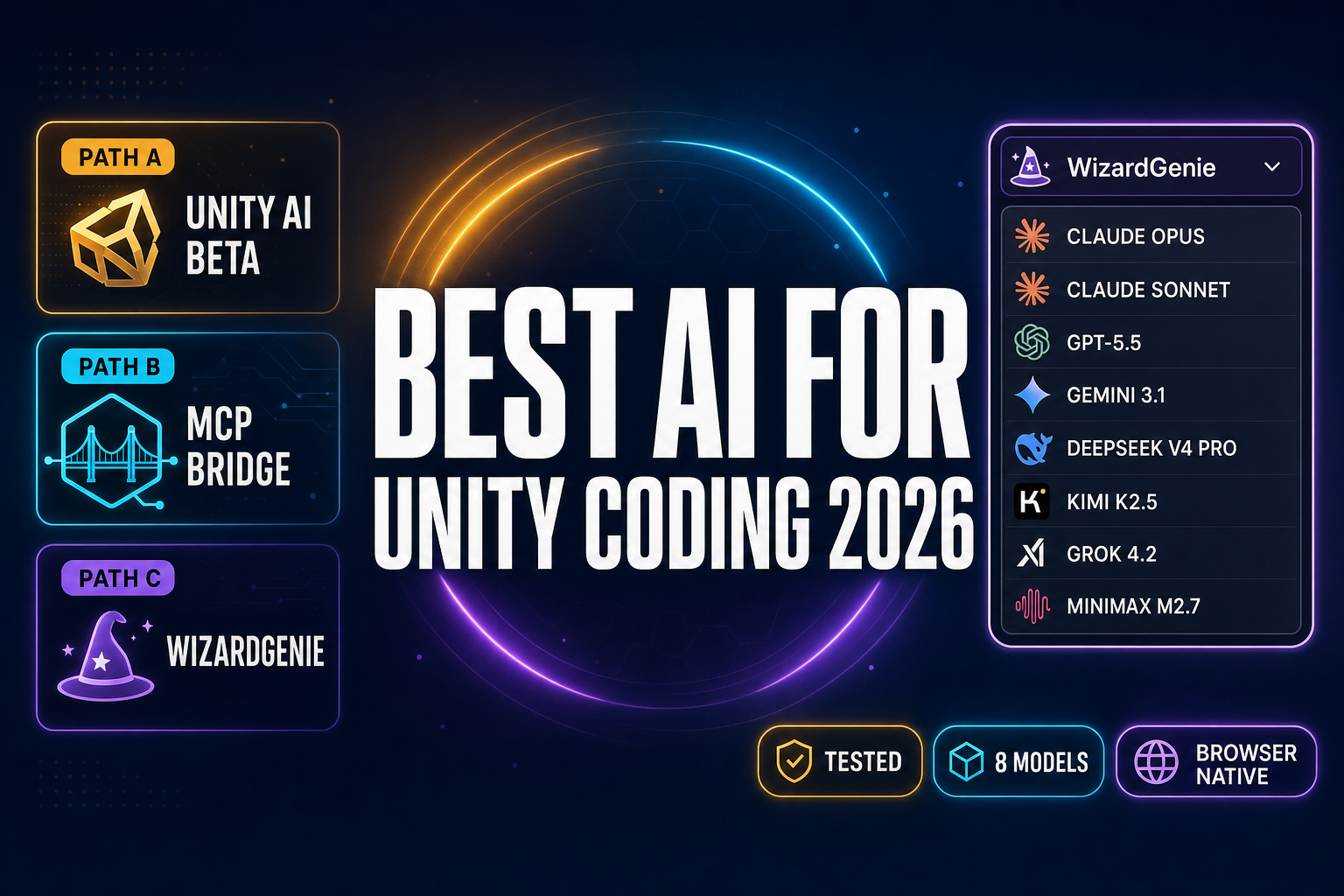
The honest answer to what is the best AI for Unity coding in 2026 is that there is no single answer — the field split three ways the moment Unity shipped its own in-editor agent in beta and the community shipped a Model Context Protocol bridge for every other agent on the market. The first path is Unity AI Beta, the in-editor assistant Unity launched for the Unity 6 line. The second path is the CoplayDev MCP for Unity bridge, which wires GitHub Copilot, Cursor, Claude Code, or any other MCP client into the editor over localhost:8080 for free. The third path is an external coding agent like WizardGenie with its eight-model picker, paired with the Sorceress Code editor for browser-native script work. Below is what each path actually does in 2026, where it stops, and which one earns the title of best AI for Unity coding for the project you are about to start. Verified May 27, 2026 against the live unity.com pricing and AI feature pages, the github.com/CoplayDev/unity-mcp repository at v9.7.0 (released May 22, 2026), and the Sorceress source at src/app/_home-v2/_data/tools.ts.
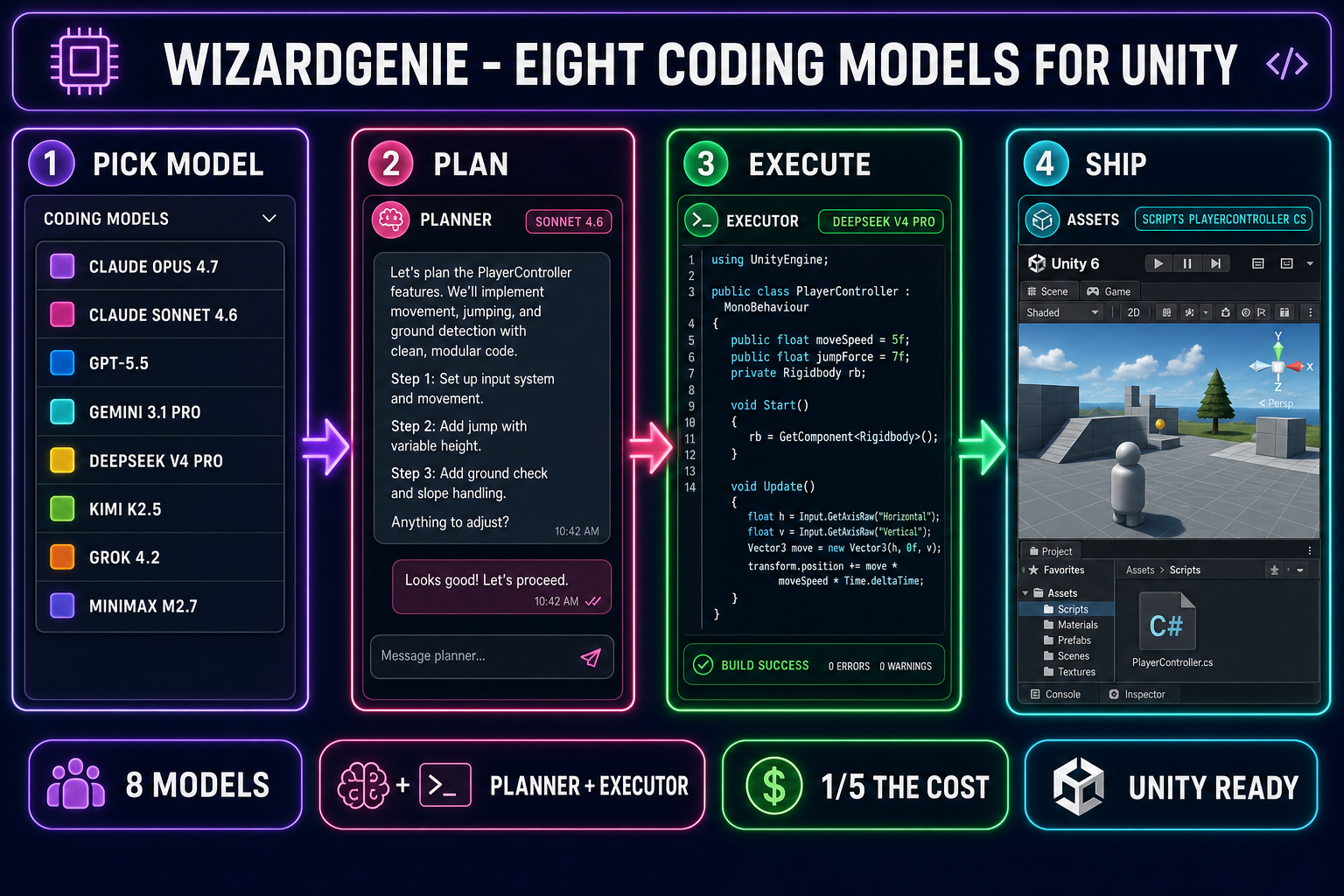
WizardGenie planner-executor pipeline for Unity coding - pick from eight coding models, plan the refactor with a frontier reasoner, execute the C# edits with a cheap fast typer, ship into the Unity Editor - on a dark navy background with purple, fuchsia, emerald, and cyan accents
The WizardGenie path to the best AI for Unity coding: pick from eight coding models, run a planner-executor pair, and ship C# edits straight into the Unity 6 editor. Verified May 27, 2026.

The three honest paths to the best AI for Unity coding

Treat the question what is the best AI for Unity coding like a routing decision, not a model choice. The three viable paths in 2026 differ on where the agent runs, what it sees, and what it costs:

  • Path A — Unity AI Beta: the agent lives inside the Unity Editor with full project context (scene graph, hierarchy, asset metadata), uses Unity’s own credit billing, and is the only path that ships an official Unity-supported Agentic Assistant. Verified May 27, 2026: $10/mo on Unity Personal after a 14-day trial, included in Pro/Enterprise/Industry.
  • Path B — MCP bridge: the agent lives in your IDE (VS Code Copilot, GitHub Copilot CLI, Cursor, Claude Code, Windsurf, Claude Desktop), and the CoplayDev MCP for Unity bridge gives it tools to drive the editor over an HTTP MCP server on localhost:8080. The bridge is MIT-licensed and free; the agent subscription is whatever you already pay.
  • Path C — WizardGenie + Sorceress Code: the agent runs outside Unity in the browser (or on the WizardGenie desktop build), picks from eight coding models, and edits the C# source files directly with a planner-executor pair. Trades in-editor scene-graph context for the multi-model picker, the planner-executor cost ratio, and zero recurring subscription floor.

All three paths are usable today. The question is not which one is the single best AI for Unity coding — it is which combination of paths fits your project, your model preferences, and your budget. The rest of this post is what each path actually delivers in 2026, with no marketing language and no missing prices.

Path A — Unity AI Beta as the best AI for Unity coding inside the editor

Unity AI Beta is the in-editor assistant Unity shipped for the Unity 6 line, replacing the older experimental Muse packages (which Unity has now sunset). Verified May 27, 2026 against unity.com/features/ai and unity.com/onboardingsuccess/unity-ai:

  • What it ships: an Agentic Assistant integrated into the editor, asset generators (2D images, 3D models, textures, sounds, cubemaps), an AI Gateway for connecting verified third-party agents, and an MCP Server so external IDEs can drive the editor.
  • What it requires: Unity 6 or later. Older Unity versions cannot install the AI Assistant package.
  • How to install: click the AI button in the editor, or open Window > Package Manager and add the package by name (com.unity.ai.assistant). The project must be linked to a Unity Cloud project.
  • Project context the agent sees: the scene graph, hierarchy, assets, and the platform target. This is the differentiator vs an external IDE — an agent that knows which prefab references which script is meaningfully smarter on Unity-specific refactors than one that only sees the C# files.

Pricing verified May 27, 2026 against unity.com/products. The tier ladder for AI Beta:

  • Unity Personal: free Unity license, 14-day Unity AI trial with 1,000 credits, then $10/mo for a recurring 1,000-credit monthly allowance.
  • Unity Pro: from EUR 1,964/yr for the engine subscription. AI Beta is bundled with 2,000 credits per month, plus three concurrent MCP connections.
  • Unity Enterprise: custom pricing. 3,000 credits per month, five concurrent MCP connections.
  • Unity Industry: custom pricing. 3,000 credits per month, five concurrent MCP connections.
  • Credit consumption: Unity does not publish a per-task credit table; tasks of different complexity consume different amounts, and the public docs describe it as “based on project complexity, specific types, and user behavior.” A multi-file refactor that touches several scripts and references can consume hundreds of credits.

The honest verdict on Path A: if your project is locked to Unity 6 and you are already paying for a Unity subscription (or you are a hobbyist comfortable with a $10/mo line item), the in-editor context advantage is real and the credits are reasonably priced for the work they unlock. The watch-outs are the credit ceiling (a heavy refactor week can blow through the 1,000-credit Personal allowance) and the model opacity — Unity does not publicly commit to which underlying LLM serves which task.
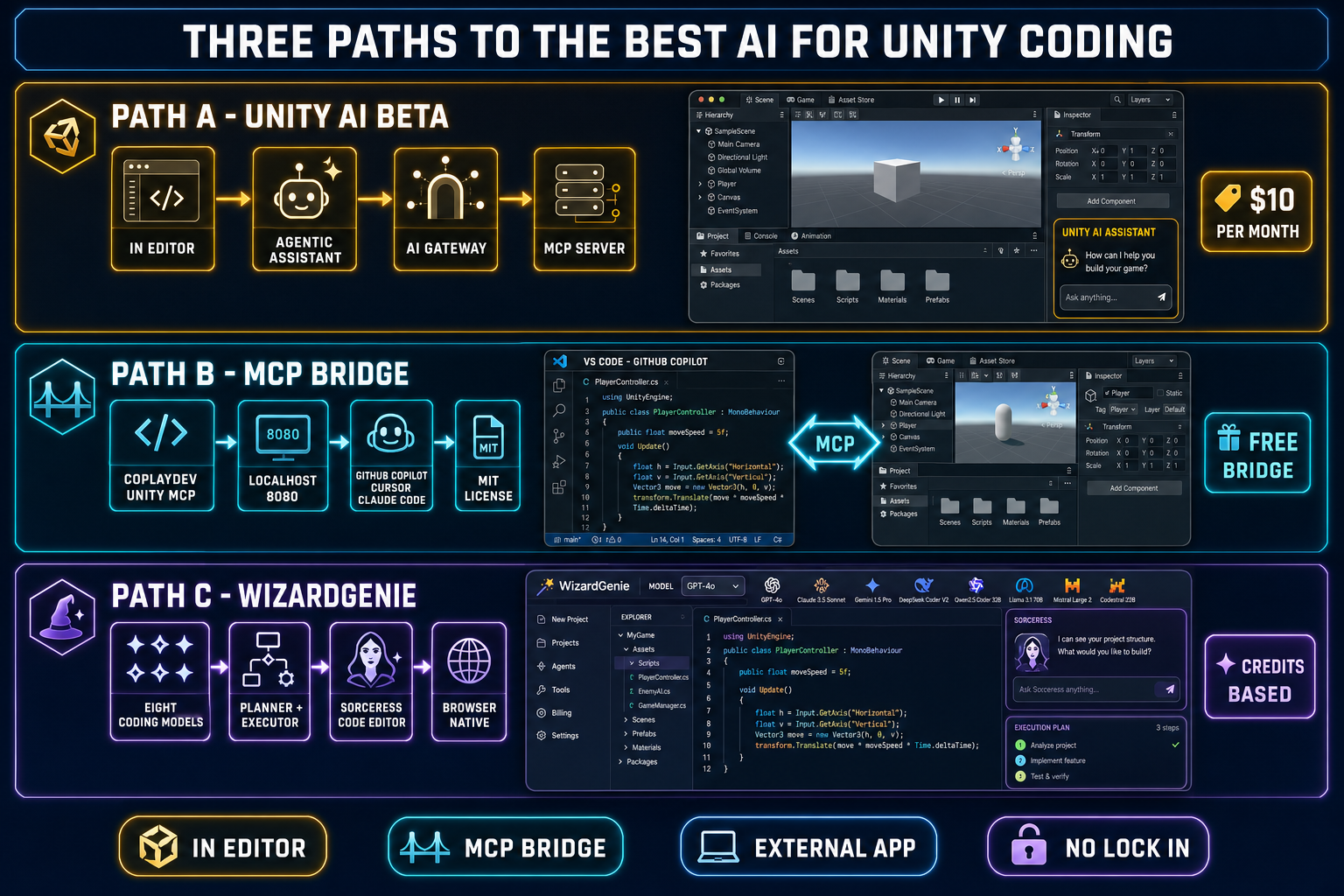
Three-lane comparison diagram of the three paths to the best AI for Unity coding - Path A Unity AI Beta inside the editor at 10 dollars per month, Path B MCP bridge via CoplayDev wiring GitHub Copilot or Cursor or Claude Code into Unity for free, Path C WizardGenie with eight coding models running browser-native - all three labelled with their distinct strengths
Three honest paths to the best AI for Unity coding in 2026 — the in-editor agent, the MCP bridge, and the external multi-model agent. They coexist and most studios end up using two of the three.

Path B — the MCP bridge as the best AI for Unity coding from your IDE

The second path uses the Model Context Protocol — the open standard that lets any compatible client (an IDE-based coding agent, a desktop chat client, a CLI tool) call tools on a remote server. The CoplayDev MCP for Unity bridge is the dominant community implementation. Verified May 27, 2026 against github.com/CoplayDev/unity-mcp:

  • Version: v9.7.0, released May 22, 2026.
  • License: MIT. Free to install, free to fork.
  • Footprint: ~9,900 GitHub stars, 60+ contributors, written in C# (70.8%) and Python (28.6%).
  • Requirements: Unity 2021.3 LTS or newer (so it works on the entire modern Unity lineage, not just Unity 6), Python 3.10+, and the uv package manager.
  • Install: add the package via Unity Package Manager using the git URL https://github.com/CoplayDev/unity-mcp.git?path=/MCPForUnity#main.
  • Start: Window > MCP for Unity, click Start Server. The bridge launches an HTTP MCP server on localhost:8080. Select your MCP client from the dropdown, click Configure, and look for the green “Connected” indicator.

The tool surface the bridge exposes to your agent is the part that matters for actual Unity work. The advertised tools include:

  • apply_text_edits, script_apply_edits, create_script, validate_script — C# script-level edits.
  • manage_scene, manage_prefabs, manage_physics — scene-graph and prefab work.
  • manage_probuilder, manage_shader, manage_texture, manage_ui, manage_vfx — specialised asset workflows.
  • read_console, run_tests, build — observability and CI-style commands.
  • unity_docs, unity_reflect — documentation and runtime reflection.

The supported MCP clients verified May 27, 2026: VS Code Copilot, GitHub Copilot CLI, Cursor, Claude Code, Claude Desktop, Windsurf, Cline, and the various CLI-based agents. The configuration block for VS Code is a four-line JSON snippet:

{
  "servers": {
    "unityMCP": {
      "type": "http",
      "url": "http://localhost:8080/mcp"
    }
  }
}

Some clients (Cursor, Windsurf, OpenClaw) require enabling an MCP toggle in their own settings. Claude Desktop, Claude Code, VS Code, and the CLI clients auto-connect after configuration.

The honest verdict on Path B: this is the cheapest path to wiring a real coding agent into Unity. You bring whatever IDE-based agent subscription you already pay for, install the bridge once, and the same agent that writes your TypeScript also drives the Unity editor. The trade-off is that the agent sees the C# files and the tool surface the bridge exposes — it does not have the deep scene-graph grounding of an in-editor agent. For pure script work and basic prefab edits, the gap rarely matters. For complex scene-graph refactors, Path A’s project-aware Unity AI Beta has the edge.

Path C — WizardGenie as the best AI for Unity coding from the browser

The third path moves the agent entirely out of the editor and into WizardGenie, the browser-native (and desktop) coding agent that ships as part of the Sorceress stack. Verified May 27, 2026 against src/app/_home-v2/_data/tools.ts lines 690-699, the WizardGenie CODING_MODELS list ships eight coding models out of the box:

ModelProviderSlotNotes
Claude Opus 4.7AnthropicTop tierAcceptable planner. 1M context. $5/$25 per Mtok verified May 27, 2026 against the Anthropic pricing docs.
Claude Sonnet 4.6AnthropicBalanced defaultAcceptable planner. 1M context. $3/$15 per Mtok verified May 27, 2026.
GPT-5.5OpenAIFrontierAcceptable planner.
Gemini 3.1 ProGoogle1M contextAcceptable planner for long-context Unity projects.
DeepSeek V4 ProDeepSeekBudget executor$0.435 input / $0.87 output per Mtok — the 75% discount was made permanent on 2026-05-22 and becomes the official rate on 2026-05-31. 1M context.
Kimi K2.5MoonshotBudget executor256K coding context, agent-optimised.
Grok 4.2xAI2M contextLong-context planner.
MiniMax M2.7MiniMaxAgent-ready executorCheap fast typer for the executor slot.

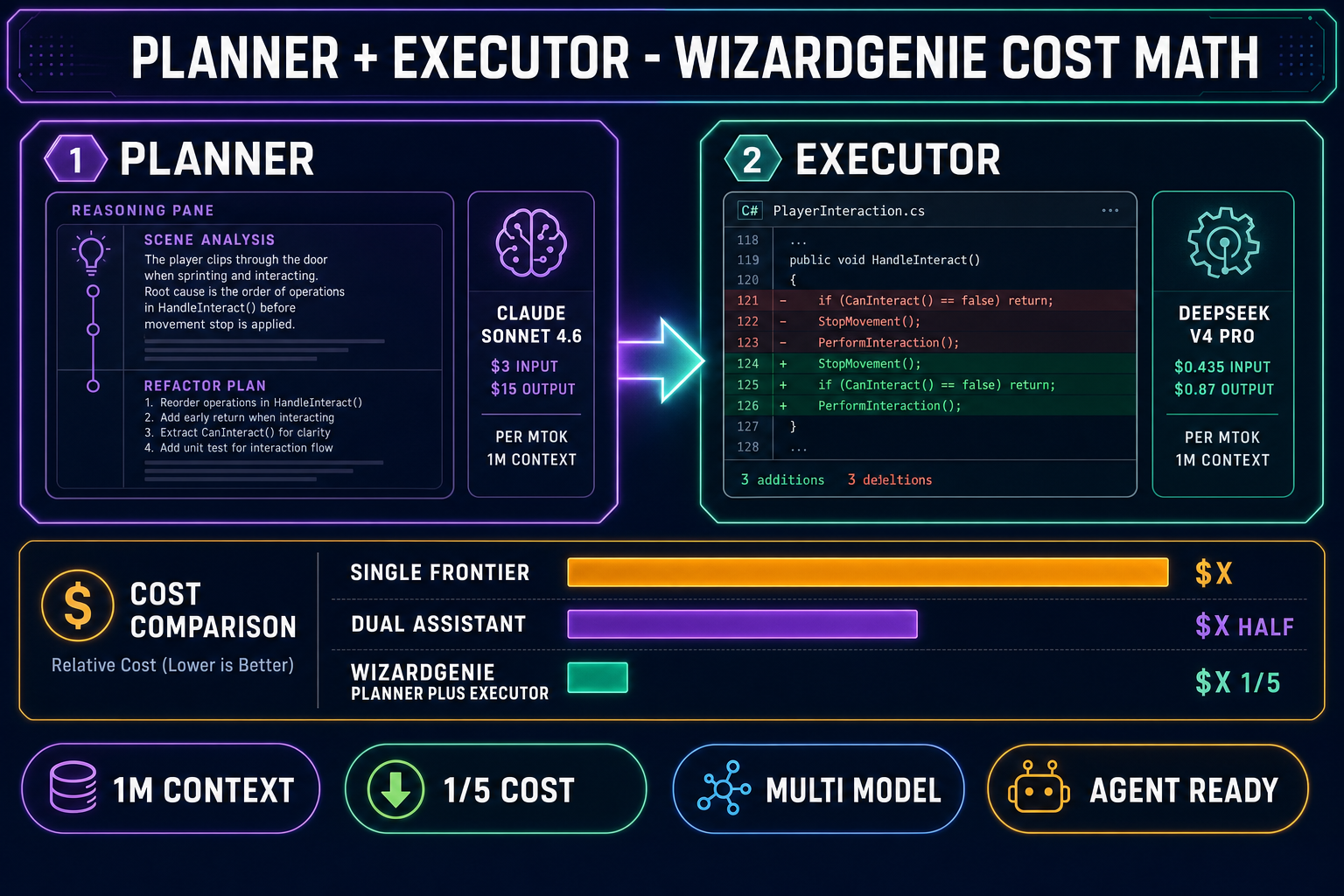
The WizardGenie picker is the surface; the value is the paired-agent pattern the picker enables. The right configuration for serious Unity refactor work is a planner-executor pair: an expensive reasoner on the planning side (Claude Opus 4.7, Claude Sonnet 4.6, GPT-5.5, or Gemini 3.1 Pro) and a genuinely cheap fast typer on the executor side (DeepSeek V4 Pro, Kimi K2.5, or MiniMax M2.7). The planner reads the project, plans the refactor, and emits a structured edit plan; the executor applies the diffs at roughly one-fifth the cost of letting the planner write every line itself. Pairing two frontier-priced models defeats the entire purpose — Sonnet 4.6 as both planner and executor is roughly four times the cost of Sonnet 4.6 plus DeepSeek V4 Pro for equivalent output quality.

Inside the Sorceress stack, the same WizardGenie agent also drives the Sorceress Code editor — a browser-based Monaco editor with project file tree, multi-file editing, image attachment, voice input, checkpointing, and direct file-system access (on the WizardGenie desktop build). For Unity script work the typical workflow is: drop the entire Assets/Scripts folder into a WizardGenie session, let the planner read it (1M-context Sonnet 4.6 swallows a medium Unity project in a single message), then let the executor (DeepSeek V4 Pro) apply the diffs. The output is plain .cs files you can drop back into the Unity project, or pull via git if your Unity project is git-tracked.

The honest verdict on Path C: this is the cheapest path for high-volume script work and the only path that gives you a real eight-model picker. The trade-off is the same one as Path B — the agent does not have the in-editor scene-graph context Unity AI Beta provides. For projects where the work is mostly script-level (gameplay loops, state machines, ECS components, controller refactors, save/load systems), Path C is faster and cheaper. For projects where the work is mostly scene-graph-level, Path A’s project-aware grounding earns its credits.

The pricing math for the best AI for Unity coding in 2026

Three concrete scenarios, with verified May 27, 2026 prices.

Scenario 1: a hobbyist on Unity Personal, writing roughly 20 hours of Unity script work per month. Unity AI Beta on the Personal plan is $10/mo for 1,000 credits. A typical multi-file edit consumes between 50 and 200 credits depending on context size; 1,000 credits roughly covers 5–20 such edits in a month. For a hobbyist doing one-to-two heavy edits per week, the allowance is tight but workable. The CoplayDev MCP bridge is free, so a hobbyist who already pays for a GitHub Copilot Individual seat at $10/mo lands at the same monthly cost as Unity AI Beta but with the agent they already know. WizardGenie at credit-based Sorceress pricing routes to whichever coding model you pick; running the same workload through DeepSeek V4 Pro at $0.435/$0.87 per Mtok is roughly a tenth of a cent per refactor in raw API cost. The cheapest viable Unity coding workflow in 2026 is WizardGenie with DeepSeek V4 Pro as the executor, if you do not need scene-graph context.

Scenario 2: a small studio on Unity Pro, running multi-developer scene-graph refactors. Unity Pro is from EUR 1,964/yr for the engine subscription regardless of AI usage, and the bundled 2,000 credits/mo of Unity AI Beta cover most of the scene-graph-level work a small team does in a month. Path A is the strongest fit here because the scene-graph grounding directly reduces the rework loop on multi-prefab refactors. Path C (WizardGenie) is still useful for the pure-script work happening alongside — pairing the two paths is the dominant pattern in 2026.

Scenario 3: a solo dev shipping across Unity, Godot, and Phaser 4 in the same year. The portable answer is Path C. WizardGenie’s eight coding models handle C# for Unity, GDScript for Godot, JavaScript for Phaser 4, and TypeScript for the web tooling with comparable competence — the same Sonnet 4.6 planner that refactors a Unity controller refactors a Godot CharacterBody2D state machine and a Phaser 4 scene. Buying Unity AI Beta for the Unity work plus separately paying for an engine-specific assistant for each other engine multiplies the recurring cost. WizardGenie is one app, one credit pool, every engine.

Planner-executor cost math diagram for WizardGenie - the planner is Claude Sonnet 4.6 at 3 dollars input and 15 dollars output per million tokens with 1M context, the executor is DeepSeek V4 Pro at 0.435 dollars input and 0.87 dollars output per million tokens with 1M context, total cost is roughly one-fifth the cost of running a single frontier model end to end - on a dark navy background with purple, amber, and emerald accents
The WizardGenie planner-executor math: pair an expensive reasoner with a cheap fast typer and the total Unity refactor cost lands at roughly one-fifth of running a single frontier model end-to-end.

Which is the best AI for Unity coding? Three honest picks

One line per scenario, no hedging.

  • If you live in the Unity Editor every day: Path A — Unity AI Beta — is the best AI for Unity coding for you. The scene-graph context is real, the $10/mo Personal tier is reasonable, and the AI Gateway plus MCP Server bundled at every tier means you can layer a Path B agent on top later without paying twice.
  • If you live in VS Code, Cursor, or Claude Code already: Path B — the CoplayDev MCP for Unity bridge — is the best AI for Unity coding for you. It is free, MIT-licensed, supports Unity 2021.3 LTS+ (not just Unity 6), and lets the agent you already pay for drive the editor.
  • If you want a multi-model picker, planner-executor cost economics, and no subscription floor: Path C — WizardGenie paired with Sorceress Code — is the best AI for Unity coding for you. Eight coding models in one app, browser-native (or desktop), Sorceress credit pricing, and the planner-executor pattern lands at roughly one-fifth the cost of running a single frontier model.

The right answer for most teams is two of the three. Pair Path A with Path C for the “in-editor for scene-graph, external for heavy script refactor” split, or pair Path B with Path C for the “IDE for daily work, WizardGenie for cheap multi-file passes” split. Locking yourself to a single agent for every job in 2026 leaves money and quality on the table.

The fastest way to try Path C in five minutes

  1. Open WizardGenie. Go to /wizard-genie/app in any modern browser, or download the desktop build for Windows with the auto-updater. A 100-credit starter pack is included with a new Sorceress account.
  2. Open the project. Drag your Unity Assets/Scripts folder into the WizardGenie Explorer, or for a desktop session point the file picker at the Unity project root. The agent reads the C# files into context.
  3. Pick the planner. Open the model picker and select Claude Sonnet 4.6 (the balanced 1M-context default) or Claude Opus 4.7 if the refactor is complex enough to need the top-tier reasoner.
  4. Pick the executor. Switch the executor slot to DeepSeek V4 Pro at $0.435/$0.87 per Mtok. The picker confirms the cost ratio in the inline tooltip.
  5. Ship the diff. Tell the agent what you want changed (“extract the input handling out of PlayerController into a separate InputManager script and add unit tests”), let it run, review the diff in the Sorceress Code editor view, and apply. Pull the changes back into your Unity project via the file system or git.

For the broader vibe-coding landscape, see the best vibe-coding tools for building games. For the Godot-specific equivalent of this question, see the best AI for Godot game dev scorecard. For the head-term comparison of coding models in WizardGenie’s picker, see the all-eight-models tested writeup. For the broader Unity-adjacent question of which AI tools fit anywhere in the game-dev stack, see the 2026 AI tools for game development field guide.

What about Unity AI Gateway and the third-party agent question?

One detail worth pulling out separately: Unity AI Gateway is the Unity-side mechanism for letting verified third-party agents talk to the editor over a secure channel. Verified May 27, 2026 against unity.com/onboardingsuccess/unity-ai, the AI Gateway is included on every Unity tier (Personal, Pro, Enterprise, Industry) and is positioned as the officially-supported way to plug a third-party agent into Unity with context-aware tools that extract scene, hierarchy, asset, and platform-target data. The Gateway is distinct from the bundled Unity MCP Server — the MCP Server is the protocol-level bridge, the AI Gateway is the auth-and-context layer that sits on top.

The community read in 2026 is that the AI Gateway will primarily certify a small set of partner agents over time, while the open-source MCP route (Path B above) remains the broader-compatibility option for the long tail of IDE-based agents. Both paths coexist. For now, the practical advice for someone weighing the “official” vs “community” tradeoff: if your studio is already on Unity Pro and wants a Unity-supported bridge, the AI Gateway is the path; if you are running on Unity Personal and want maximum agent choice today, the CoplayDev MCP bridge is the path.

The watch-outs nobody mentions in the marketing copy

  • Unity 6 lock for Path A. Unity AI Beta is Unity 6+ only. A project locked to Unity 2022 LTS for stability reasons cannot use Path A at all — Path B (which supports Unity 2021.3 LTS+) is the only option until the project upgrades.
  • Credit opacity for Path A. Unity does not publish a per-task credit table. Heavy weeks can drain the 1,000-credit Personal allowance in days; the official answer is to buy additional credit bundles. Budget accordingly.
  • Self-hosted Python dependency for Path B. The CoplayDev bridge requires Python 3.10+ and the uv package manager on the host machine. On a clean Windows install this is a 10-minute setup; on a corporate machine with locked-down Python policy it can be a multi-day request.
  • Scene-graph context for Path C. WizardGenie reads what you drop into its file tree. It cannot read the in-memory state of the Unity Editor — if your refactor depends on knowing which scene references which prefab without that information being explicit in the .unity file metadata, you have to feed the metadata into the agent context manually.
  • Model rotation for all three paths. The coding model lineup is rotating faster than the Unity release cadence. The WizardGenie picker that today ships DeepSeek V4 Pro and Claude Sonnet 4.6 will ship a different set in six months; the Unity AI Beta underlying models will rotate too. The cost math you do today is a snapshot, not a forever-truth.

The verdict on the best AI for Unity coding

The best AI for Unity coding in 2026 is not a single tool — it is a routing decision. Unity AI Beta wins for in-editor scene-graph work on Unity 6 projects at $10/mo. The CoplayDev MCP for Unity bridge wins for the “use the agent I already pay for” case across every Unity version back to 2021.3 LTS, with zero recurring cost beyond the existing agent subscription. WizardGenie wins for multi-model script work, planner-executor cost economics, cross-engine portability, and the credit-based no-subscription-floor budget profile. Most working teams in 2026 use two of the three. Pick the combination that matches the work in front of you and skip the marketing claim that one tool is the answer to everything — that claim has not been true since Unity AI Beta exited closed alpha and the MCP ecosystem hit critical mass earlier this year.

Frequently Asked Questions

What is the best AI for Unity coding in 2026?

There is no single best AI for Unity coding in 2026 - the right answer depends on where you want the agent to run. Inside the editor with full project context, Unity AI Beta is the official path ($10/mo for Personal, included in Pro/Enterprise/Industry plans, verified May 27, 2026 against the live unity.com pricing). For an external IDE that drives Unity via the Model Context Protocol, the CoplayDev MCP for Unity bridge (v9.7.0, May 22, 2026, MIT licensed, ~9,900 GitHub stars) wires GitHub Copilot CLI, VS Code Copilot, Cursor, or Claude Code into the Unity Editor over localhost:8080. For a multi-model planner-executor workflow that runs alongside Unity in the browser, Sorceress WizardGenie offers eight coding models (Claude Opus 4.7, Sonnet 4.6, GPT-5.5, Gemini 3.1 Pro, DeepSeek V4 Pro, Kimi K2.5, Grok 4.2, MiniMax M2.7) and a Sorceress Code editor with a built-in agent. All three options coexist; teams routinely pair Unity AI Beta for scene-graph work with WizardGenie for the heavier C# refactor passes.

How much does Unity AI Beta cost as a coding assistant?

Unity AI Beta pricing was verified May 27, 2026 against unity.com/features/ai and unity.com/products. Free Unity Personal users get a 14-day trial with 1,000 credits, then pay $10/mo for a recurring 1,000-credit allowance. Unity Pro (from EUR 1,964/yr) includes 2,000 credits per month plus three concurrent MCP connections. Unity Enterprise and Unity Industry each include 3,000 credits per month plus five concurrent MCP connections. Credits are consumed per task and a single complex multi-file edit can burn through several hundred. The MCP Server and AI Gateway are bundled with every plan so the bridge to a third-party model is included even at the $10/mo tier - you only pay extra when you let the in-editor Agentic Assistant draft the code.

Can I use GitHub Copilot in Unity without paying for Unity AI Beta?

Yes. The CoplayDev MCP for Unity bridge (verified May 27, 2026 at github.com/CoplayDev/unity-mcp, v9.7.0 released May 22, 2026, MIT license, 9,892 stars) installs as a Unity Package Manager git URL, exposes an HTTP MCP server on localhost:8080, and configures GitHub Copilot CLI, VS Code Copilot, Cursor, Claude Code, Claude Desktop, or Windsurf to drive the editor with tools like apply_text_edits, create_script, manage_scene, manage_prefabs, run_tests, and unity_reflect. The bridge itself is free; you bring your own coding-agent subscription. The cost ceiling drops to whatever you already pay for the agent (a GitHub Copilot Individual seat at $10/mo, a Cursor seat, etc.). The trade-off is in-editor context: an external IDE sees the C# files but does not have the project-aware grounding that Unity AI Beta builds from the scene graph, hierarchy, and asset metadata.

Why does Sorceress WizardGenie offer eight coding models instead of one?

The eight-model picker reflects how serious agent work actually runs in 2026 - no single frontier model wins on every axis. Verified May 27, 2026 against src/app/_home-v2/_data/tools.ts lines 690-699: the WizardGenie CODING_MODELS list ships Claude Opus 4.7 ($5/$25 per Mtok, top-tier reasoning, 1M context), Claude Sonnet 4.6 ($3/$15 per Mtok, balanced default, 1M context), GPT-5.5 (frontier reasoning), Gemini 3.1 Pro (1M context), DeepSeek V4 Pro ($0.435/$0.87 per Mtok with the 75% discount made permanent on 2026-05-22, 1M context, budget executor), Kimi K2.5 (256K coding context), Grok 4.2 (2M context), and MiniMax M2.7 (agent-ready). The planner-executor pattern that drives the heavy refactor cost down to roughly one-fifth of a single-frontier-model bill pairs an expensive reasoner (Opus, Sonnet, GPT-5.5) on the planning side with a cheap fast typer (DeepSeek V4 Pro, Kimi K2.5, MiniMax M2.7) on the executor side. One static model cannot do both jobs well.

Does the best AI for Unity coding actually need to live inside the Unity Editor?

Not for the C# layer. The Unity Editor itself does the scene-graph, hierarchy, and asset-import work that humans care about; the C# scripts that drive gameplay are plain text files inside Assets/Scripts. An external agent that reads those files, runs tests against a headless Unity build, and writes diffs back is functionally equivalent to an in-editor agent for code work. The advantage of in-editor (Unity AI Beta or an MCP-bridged agent) is access to project context - the agent knows which prefab references the script and which scene instances exist. The advantage of external (WizardGenie / Sorceress Code, or any IDE-based agent) is model choice and cost: WizardGenie's eight-model picker lets you swap the planner mid-session, and the credit-based Sorceress account avoids the recurring subscription floor.

What is the cost gap between Unity AI Beta credits and the DeepSeek V4 Pro API?

Verified May 27, 2026 against unity.com/products and the DeepSeek pricing page (the 75% discount was made permanent on 2026-05-22 and the discounted rate becomes the official rate on 2026-05-31). Unity AI Beta on Personal costs $10/mo for 1,000 credits, which translates to roughly $0.01 per credit. A single complex multi-file edit consumes hundreds of credits depending on context size. DeepSeek V4 Pro at $0.435 per Mtok input and $0.87 per Mtok output (after the permanent cut) prices a typical 30K-token Unity refactor at roughly $0.013 input plus $0.026 output - well under a cent for a single edit. Running the same workflow through DeepSeek V4 Pro inside WizardGenie's Sorceress Code agent is roughly 10x cheaper per equivalent-quality edit than Unity AI Beta credits, with the caveat that you trade in-editor context for the multi-model picker. For a hobbyist on a budget, the math favors DeepSeek; for a studio that wants project-aware grounding, the Unity credits earn their price.

Can the best AI for Unity coding write GDScript or Godot code too?

WizardGenie and Sorceress Code can, because the underlying coding models (Claude, GPT, DeepSeek, Kimi, Gemini, Grok, MiniMax) are general-purpose code models - they handle C# for Unity, GDScript for Godot, JavaScript for Phaser 4, Lua, Python, and TypeScript with comparable competence. The CoplayDev MCP for Unity bridge is Unity-specific by design (its tools like manage_scene and manage_prefabs only make sense inside the Unity Editor). Unity AI Beta is Unity-only. For a studio that ships across multiple engines, the external-agent path (WizardGenie or any MCP-based IDE) is the more portable choice because the same agent subscription covers every engine. For an all-in Unity shop, the in-editor path earns its keep through tighter project context.

Sources

  1. C Sharp (programming language) - Wikipedia
  2. Model Context Protocol - Wikipedia
  3. Game engine - Wikipedia
  4. Integrated development environment - Wikipedia
  5. Pair programming - Wikipedia
Written by Arron R.·3,378 words·15 min read

Related posts


