Cast a DnD NPC Generator (Indie RPG Browser AI 2026)

By Arron R.10 min read
A modern dnd npc generator does more than roll a name: WizardGenie reads your campaign, AI Image Gen renders a portrait, Speech Gen gives the NPC a real voice,

A dnd npc generator is the tool every dungeon master and every indie-RPG dev quietly builds a workaround for. The classic static-table generators — donjon.bin.sh, kassoon.com, hand-crafted Notion binders — roll a random name, a race, a class, and a one-line quirk in a second, and then the DM sits there and has to invent everything that actually makes the NPC memorable: the voice, the backstory that ties to the campaign, the specific way this character reacts when the party lies to them. The 2026 answer to that gap is not a bigger static table. It is a conversational AI dnd npc generator that reads the DM’s actual campaign notes, generates the whole character with a real portrait and a real speaking voice, and iterates on tone until the NPC actually fits. Sorceress WizardGenie plus AI Image Gen plus Speech Gen is exactly that pipeline, verified against the repository source on July 4, 2026.
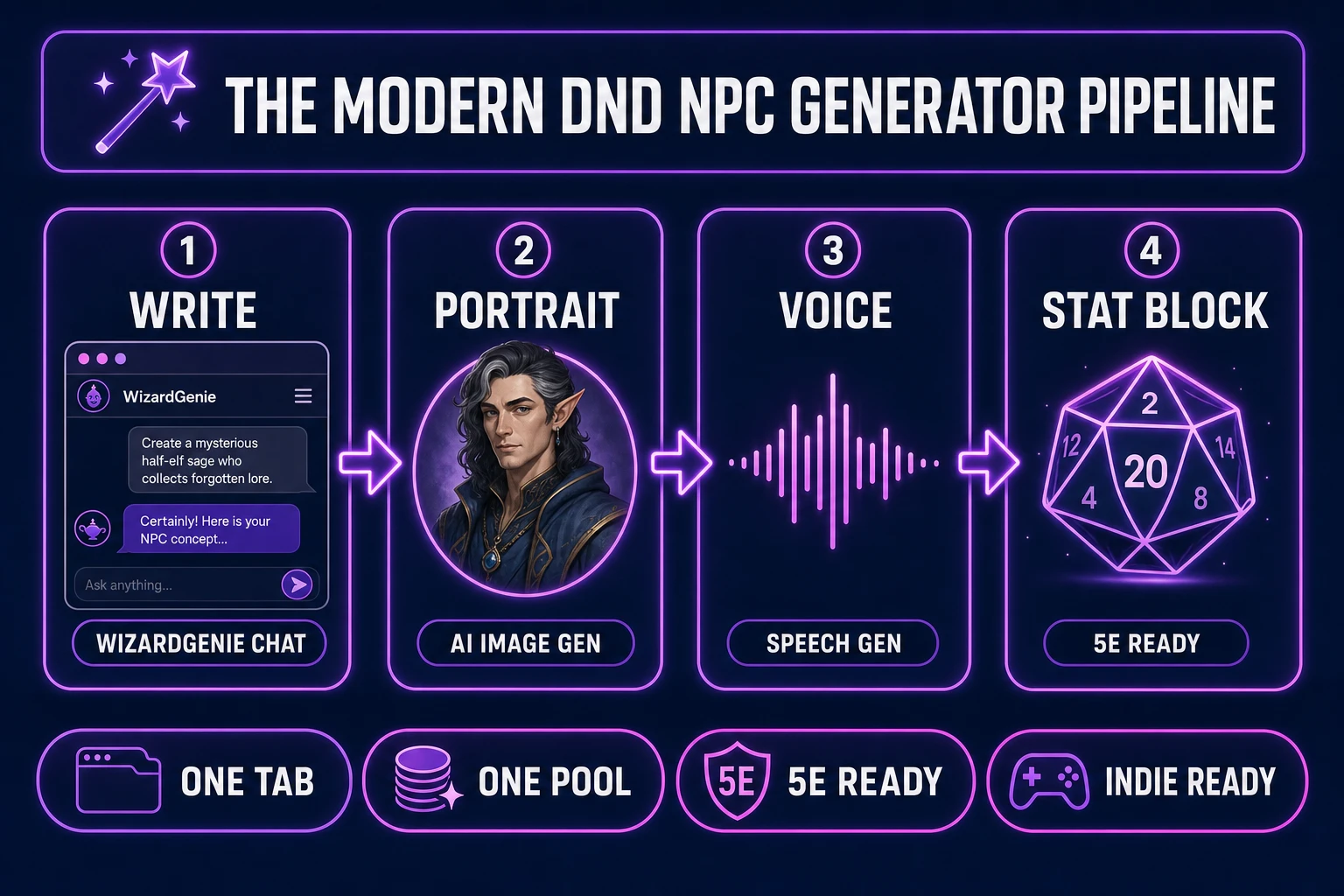
Modern dnd npc generator pipeline diagram - four numbered panels for name plus backstory, portrait, voice, and stat block, powered by WizardGenie plus AI Image Gen plus Speech Gen
The 2026 conversational dnd npc generator pattern: one browser tab produces a fully-realised NPC — name, backstory, personality, portrait, voice, and 5e stat block — iterating with the DM’s actual campaign context instead of rolling on a static table.

What a DnD NPC Generator has to do (and where static roll-tables fall short)

A useful dnd npc generator has to produce more than a coin-toss name. The searcher who types dnd npc generator into Google is almost always a DM or an indie RPG dev with a live session on the calendar, and they need a character the party can actually interact with by tomorrow night. That means seven pieces, not one: a name that sounds like it belongs in the world, a race and class combination that reads coherent, a backstory that has a real hook (a debt owed, a secret kept, a grudge earned), a personality with at least two internal contradictions so the character can be surprising, one or two lines of actual dialogue in the character’s voice, a portrait the DM can flash on the table screen, and a 5e-compatible stat block if the NPC might roll initiative. Miss any of the seven and the NPC either does not feel real at the table or does not survive first contact with the players.

Static roll-table generators solve the first two pieces cheaply and stop there. Donjon rolls a name and stats in a second, and the DM improvises the other five layers on the drive to game night. Kassoon covers a few more fields (personality quirks, alignment tendencies, a physical description) but still tops out at descriptive fragments, not a portrait or a voice. Neither can read the DM’s campaign notes and produce an NPC that fits this specific hex map or this specific antagonist faction. That is the shape of the gap: a static dnd npc generator gives the DM a starter kit; a modern conversational one gives the DM a finished character.

Why the modern DnD NPC Generator lives in the browser now

Three shifts made the browser the honest home for a dnd npc generator in 2026. Frontier chat models can now hold a whole campaign document in context (Gemini 3.1 Pro at 1M tokens, Grok 4.2 at 2M tokens, Kimi K2.5 at 256K tokens for the coding path, all verified against src/app/_home-v2/_data/tools.ts lines 735-742 on July 4, 2026). That means the AI can read the DM’s entire session-notes folder and generate an NPC that knows what happened in session 12 and reacts accordingly. Image models can now render photoreal or painterly character portraits from a two-sentence description (GPT Image 2, Nano Banana Pro, Grok Imagine, Seedream 5, Flux 2 Pro, Z-Image Turbo, all verified in the same file line 225 and src/lib/models.ts line 70+). And browser speech synthesis can now generate a distinct human-sounding voice on the fly with a short reference sample.

Those three capabilities used to live on three separate desktop tools running on three separate GPUs. Now they run in one browser tab. That collapse is why an integrated conversational dnd npc generator makes sense today in a way it did not two years ago. The DM does not need to download a 4 GB model, run a local Stable Diffusion install, and license a voice-clone SDK — the whole pipeline is one URL away, and every asset lands in the DM’s browser as a downloadable file that can be dropped straight into Foundry VTT, Roll20, or a folder of session notes.

Prompting WizardGenie: your new DnD NPC Generator co-writer

WizardGenie is the conversational core of the modern dnd npc generator pipeline. Verified against src/app/wizard-genie/page.tsx on July 4, 2026, WizardGenie is described in the source as the “AI-native game engine at the heart of Sorceress” that “drives every leading AI coding model,” and it accepts your own API keys so the token cost stays yours. For NPC generation, the DM opens WizardGenie in the browser, pastes in the relevant campaign notes (or drags in a session-log folder), and asks for a character. The models available for the reasoning side of that request are the same CODING_MODELS lineup used for game code: Claude Opus 4.7, Claude Sonnet 4.6, GPT-5.5, Gemini 3.1 Pro, DeepSeek V4 Pro, Kimi K2.5, Grok 4.2, and MiniMax M2.7.

A good NPC prompt is not “give me a random NPC.” It is targeted. Try something like: “Generate a level-7 human ranger who runs a small ferry across the Marrow River in my campaign. Their late brother was killed by the same bandit clan the party is currently hunting, so they have leverage to offer but also a grudge that could go bad. Give me a name, a two-paragraph backstory that ties to the river and the brother, three personality contradictions, four sample lines of dialogue in their voice (grief-tempered, dry), and a 5e-appropriate stat block.” A prompt that specific is the whole difference between a dnd npc generator that gives you a table roll and one that gives you a character. Iterate freely: ask WizardGenie to make the ranger colder, to swap the brother for a sister, to shift the stat block toward melee, to add a physical scar. Each turn refines the NPC without starting over.

Portraits: turning a DnD NPC description into a visual reference

A dnd npc description without a portrait leaves the DM alone at the table screen. AI Image Gen at Sorceress AI Image Gen closes that gap. Verified against src/lib/models.ts line 70+ on July 4, 2026, AI Image Gen ships a lineup of image models designed for exactly this kind of prompt-to-portrait work: Nano Banana Pro (Google, photoreal top-tier), GPT Image 2 (OpenAI, photoreal), Grok Imagine (xAI, creative fast), Seedream 5 Lite (6 credits), Flux 2 Pro (6 credits base plus 3 per reference image), and Z-Image (3 credits, browser-native fast). Each model has aspect-ratio presets (1:1 works for a bust portrait, 3:4 for a full-body render, 16:9 for a cinematic NPC-standing-in-scene shot).
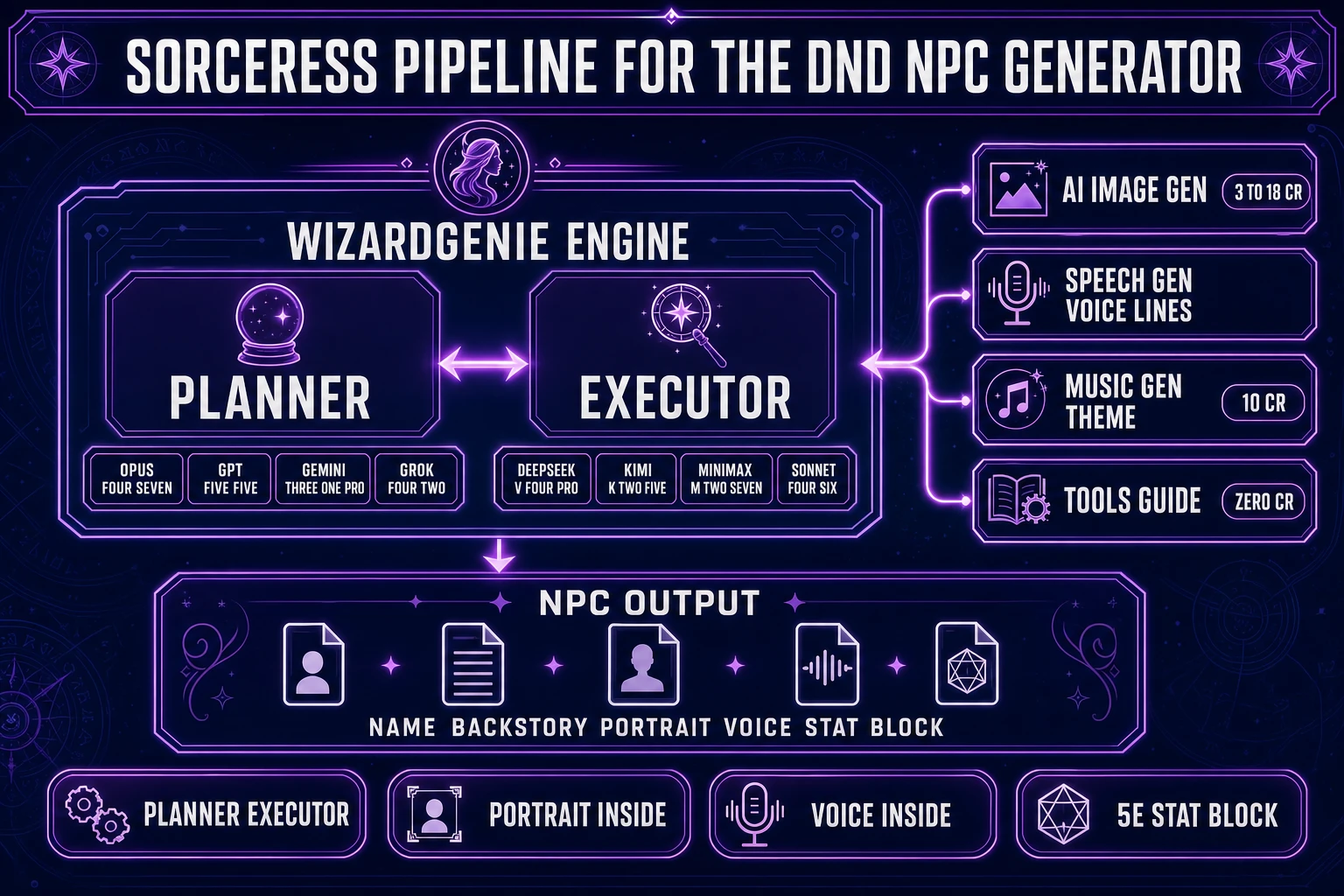
Sorceress asset pipeline for a dnd npc generator - central WizardGenie box with Planner and Executor, connected to AI Image Gen for portraits, Speech Gen for voices, and Music Gen for theme tracks
The Sorceress asset pipeline behind a browser-native dnd npc generator. WizardGenie handles the conversational NPC writing; AI Image Gen renders the portrait from the character description; Speech Gen turns the dialogue lines into audio; every asset flows into the same project folder without a copy-paste round trip.

The prompt structure that works well for RPG portraits mirrors the classic character-design brief: a subject line (“middle-aged human ranger, weather-worn face, dark hair streaked grey, scarred left brow”), a wardrobe line (“boiled-leather armour over a river-stained wool cloak, iron torc at the neck”), a lighting line (“overcast afternoon light, moody but readable”), and a style line (“semi-realist digital painting, muted colour palette, oil-paint texture”). Copy the character description straight out of the WizardGenie chat window and paste it into the AI Image Gen prompt field; add the style line at the end. Generate two or three, keep the best one, and let AI Image Gen’s reference-image support (up to 14 per model on Seedream 5 Lite, up to 10 on GPT Image 2, up to 4 on GPT Image 1.5) lock the look for follow-up portraits so the character stays visually consistent across sessions.
Voices: giving your indie-RPG NPC a real speaking presence

An NPC that speaks in the DM’s default voice for every character is fine when the party is chasing a plot, and forgettable the moment they try to name three merchants they met last month. Speech Gen at Sorceress Sound Studio gives every NPC a distinct voice without asking the DM to voice-act at the table. Speech Gen accepts a text input (the NPC’s dialogue lines) and a voice selection (either a preset from the library or a short custom reference sample), and returns a rendered audio clip the DM can play from the tablet during the session.

The workflow that pairs well with a conversational dnd npc generator is: generate three or four sample lines in WizardGenie in the character’s voice, paste those into Speech Gen with a matching voice preset, render the audio, and drop the clips into a Foundry VTT or Roll20 sound-effect folder tagged with the NPC’s name. For recurring NPCs (the tavern keeper, the party’s informant, the quest patron), a small library of pre-rendered voice lines makes even a text-heavy session feel like the NPCs are physically present. For one-off NPCs, generate a single characteristic greeting and use it at the moment of first meeting — that alone is enough to fix the NPC in the players’ memory.

Stat blocks and 5e-friendly formatting: making the NPC drop-in ready

A memorable NPC does the party no good if they cannot survive first contact with the initiative order. The stat block matters. WizardGenie can render D&D 5th Edition stat blocks in the standard Monster Manual format (AC, HP, speed, ability scores with modifiers, saving throws, skills, senses, languages, challenge rating, then traits and actions). The prompt that works is explicit: ask WizardGenie to render the stat block “in 5e Monster Manual format, using the format from the SRD, at challenge rating 3” and it will emit clean Markdown you can paste straight into Foundry, Roll20, or a homebrew document.

Two habits keep the stat blocks useful. First, always ask WizardGenie to justify the challenge rating with a one-sentence encounter-balance note (“CR 3 because the ranger has a longbow and Hunter’s Mark but low HP and no legendary actions, so a party of four level-5 characters will find them a mid-tier fight”). That justification catches accidentally overpowered NPCs before they hit the table. Second, ask WizardGenie to output the stat block as a JSON blob as well as the human-readable Markdown; the JSON pastes cleanly into VTT tools that ingest structured data. A dnd npc generator that only produces prose descriptions leaves the DM to convert everything by hand at 2 a.m. before the session. Structured output is what makes the pipeline actually save time.

What a DnD NPC Generator pipeline costs on the Sorceress stack in 2026

Cost math verified July 4, 2026 against src/app/plans/page.tsx line 46 (LIFETIME_PRICE = 49) and line 50 (CREDIT_TIERS constant). The Sorceress base unlock is $49 one-time and covers the full non-AI asset pipeline for lifetime use with no monthly subscription. AI generation credits are pay-as-you-go from the standard Sorceress credit pool: Starter $10 buys 1,000 credits ($0.01 per credit), Creator $20 buys 2,000, Plus $50 buys 5,000, and Studio $100 buys 10,000. A typical single-NPC generation session runs about 15 to 40 credits total: WizardGenie chat token cost varies with the model choice (your own API key on the Planner side, cheap Executor model bulk), plus 6 to 18 credits for one to three portrait renders (Z-Image at 3, Flux 2 Pro at 6 base, Nano Banana Pro at 18), plus 5 to 10 credits for a batch of Speech Gen voice lines.

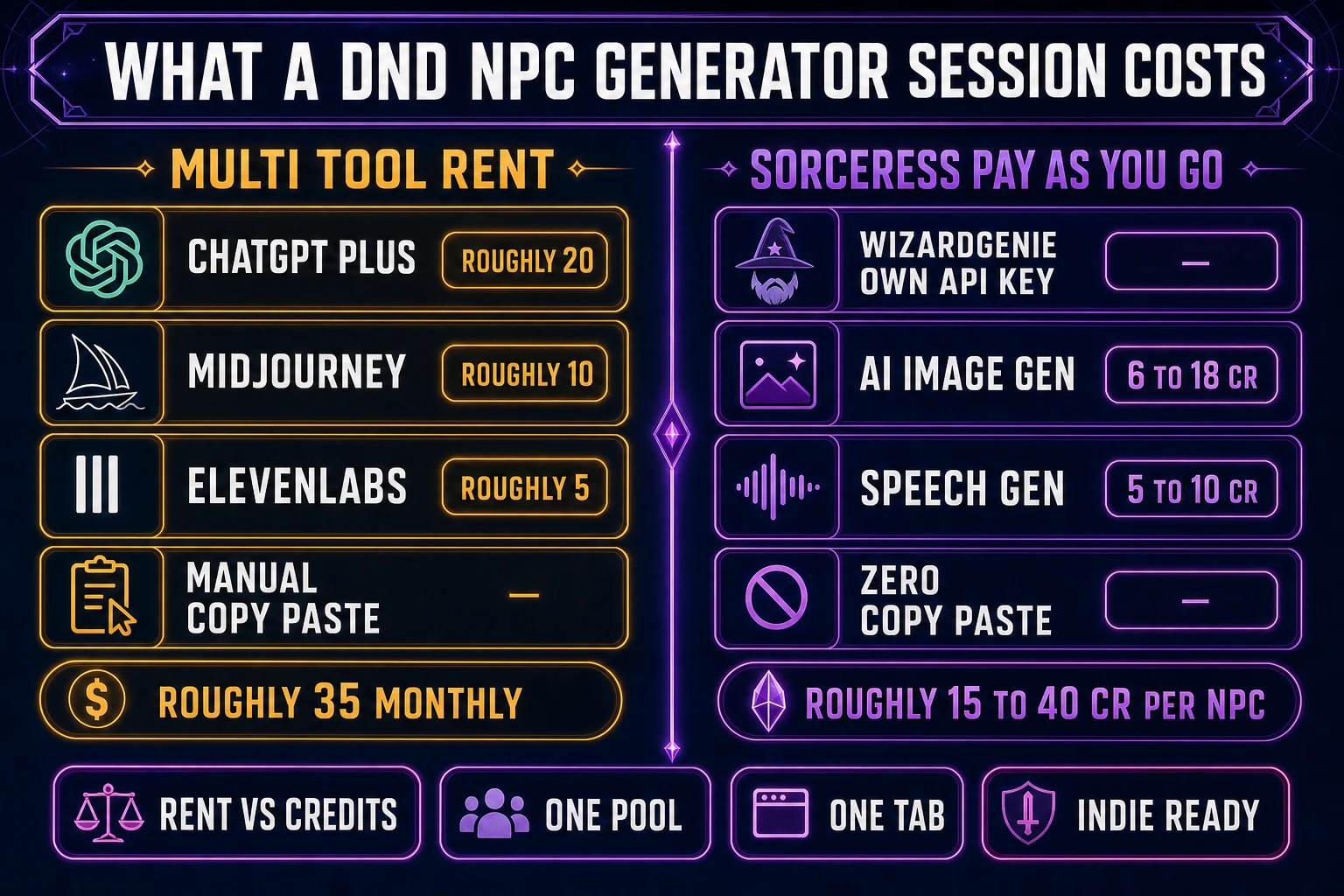
Compared against the multi-tool baseline for the same output — ChatGPT Plus at roughly $20/month for the writing, Midjourney at roughly $10/month for the portrait, ElevenLabs at roughly $5/month starter for the voice, plus manual copy-paste between three tabs — the Sorceress-native pipeline costs roughly $2 to $6 per NPC on pay-as-you-go credits versus roughly $35/month rent for the multi-tool stack. For a DM running a weekly campaign with two or three new NPCs per session, that is a straightforward cost win: $10 to $30/month on credits, no rental subscriptions, everything shared across the same account the DM already uses for the campaign’s battle maps and session soundtracks via Music Gen. Full plans breakdown at Sorceress plans.

For indie RPG devs building an actual game rather than running a tabletop session, the same pipeline scales identically: generate 40 NPCs for a small dungeon crawler over a weekend, run the whole batch on Starter credits, and the total spend is a lunch. The pipeline that started as a dnd npc generator for a Friday-night session is the same pipeline that populates an indie RPG’s villages and taverns. See how to make an RPG game and AI character rigging for the follow-on steps that turn a generated NPC into a rigged 3D character for a real indie RPG shipping in the browser.

Dnd npc generator credit-cost breakdown - single NPC session showing chat token cost plus portrait renders at 3 to 18 credits plus Speech Gen at 5 to 10 credits, versus multi-tool subscription baseline of 35 dollars per month
The credit math for a single-NPC session on the Sorceress stack in 2026: 15 to 40 credits total, roughly $2 to $6 per fully-realised NPC (name plus backstory plus portrait plus voice plus stat block), versus roughly $35/month for the equivalent multi-tool subscription stack.

The category the modern conversational dnd npc generator occupies is not a competitor to donjon or kassoon. It is a different product entirely: a co-writing partner that reads the DM’s campaign, renders a portrait, gives the NPC a voice, and emits a 5e stat block in the same tab. The classic static generators still have their place for a quick one-off roll. But when the DM wants a character the players will actually remember six sessions from now, an integrated browser pipeline is the honest 2026 answer.

Frequently Asked Questions

What makes a modern dnd npc generator different from donjon or kassoon random-table generators?

Static random-table generators like donjon.bin.sh and kassoon.com are fast at the first two layers of an NPC - a random name plus a race/class combo, sometimes with a personality quirk or an alignment tendency. They stop there. A modern conversational dnd npc generator reads the DM's actual campaign notes (recent frontier context windows verified against src/app/_home-v2/_data/tools.ts lines 735-742 on July 4, 2026: Gemini 3.1 Pro at 1M tokens, Grok 4.2 at 2M tokens, Kimi K2.5 at 256K tokens for the coding path) and generates the whole character with context. That means the NPC's backstory ties to your existing hex map and your existing antagonist factions, the personality has real internal contradictions rather than a random-table quirk, the dialogue lines sound like the character rather than generic filler, and a portrait plus voice come out in the same session. The classic static generators are still useful for a genuine random one-off (a random peasant in a random village). The modern conversational pipeline is what you want when the NPC needs to survive first contact with the players and stay memorable across six sessions.

How much does the WizardGenie plus AI Image Gen plus Speech Gen dnd npc generator pipeline cost per NPC in 2026?

Cost math verified July 4, 2026 against src/app/plans/page.tsx line 46 (LIFETIME_PRICE = 49) and line 50 (CREDIT_TIERS). The Sorceress base unlock is $49 one-time (lifetime, no monthly rent) covering the non-AI asset pipeline. AI generation runs on pay-as-you-go credits: Starter $10 buys 1,000 credits ($0.01 per credit), Creator $20 buys 2,000, Plus $50 buys 5,000, Studio $100 buys 10,000. A typical single-NPC session consumes about 15 to 40 credits total: WizardGenie chat token cost (your own API key on the Planner side, cheap Executor model bulk) plus 6 to 18 credits for one to three portrait renders via AI Image Gen (Z-Image at 3, Flux 2 Pro at 6 base, Nano Banana Pro at 18 per src/lib/models.ts line 70+) plus 5 to 10 credits for a batch of Speech Gen voice lines. Per-NPC cost lands at roughly $2 to $6. For a DM running weekly with two or three new NPCs per session that is $10 to $30 monthly in credits. The comparable multi-tool subscription baseline (ChatGPT Plus roughly $20/mo, Midjourney roughly $10/mo, ElevenLabs Starter roughly $5/mo, plus manual copy-paste between three tabs) runs roughly $35 monthly in rent regardless of NPC volume.

Can a conversational dnd npc generator produce a valid 5e stat block or do I still have to hand-craft the numbers?

Yes, WizardGenie can render 5e-compatible stat blocks in the standard Monster Manual format (AC, HP, speed, ability scores with modifiers, saving throws, skills, senses, languages, challenge rating, then traits and actions), verified against the 5e SRD which is the open-license baseline for 5e-compatible content. The prompt that works reliably is explicit: ask for the stat block 'in 5e Monster Manual format, using the format from the SRD, at challenge rating X.' Two habits keep the output actually usable at the table. First, always ask WizardGenie to justify the challenge rating with a one-sentence encounter-balance note (this catches accidentally overpowered NPCs before they hit the table). Second, ask for the stat block as a JSON blob in addition to the human-readable Markdown - JSON pastes cleanly into Foundry VTT and Roll20 modules that ingest structured data, so the DM does not spend session-prep hours converting text into VTT tokens by hand. A dnd npc generator that only emits prose costs the DM the exact hours the pipeline is supposed to save.

Which WizardGenie coding model should the DM pick as the Planner for a dnd npc generator session?

Verified against src/app/_home-v2/_data/tools.ts lines 735-742 on July 4, 2026. WizardGenie ships eight CODING_MODELS the user can pick from with an own-API-key setup: Claude Opus 4.7 (Anthropic, top-tier reasoning), Claude Sonnet 4.6 (Anthropic, fast plus smart), GPT-5.5 (OpenAI, frontier), Gemini 3.1 Pro (Google, 1M context), DeepSeek V4 Pro (DeepSeek, budget), Kimi K2.5 (Moonshot, 256K coding), Grok 4.2 (xAI, 2M context), MiniMax M2.7 (MiniMax, agent-ready). For NPC generation specifically, the pattern that works well is Planner = Opus 4.7 or Gemini 3.1 Pro (both deep reasoners; Gemini 3.1 Pro if you need to load a whole campaign-notes folder into context; Opus 4.7 if the NPC's psychology is complex enough that the reasoning depth matters more than the context length). Executor = DeepSeek V4 Pro or Kimi K2.5, both cheap fast models handling the token bulk of writing the actual NPC description. The dual-agent Planner plus Executor pattern is not just a code-writing pattern - it works identically for NPC generation where the Planner picks the character's shape and the Executor writes the paragraphs.

Does the dnd npc generator pipeline work for indie RPG game devs too, not just tabletop dungeon masters?

Yes, and the pipeline scales identically. The same WizardGenie plus AI Image Gen plus Speech Gen flow that produces a single NPC for tomorrow night's D&D session also produces the 40 NPCs an indie RPG needs to populate its starting village. The credit math scales linearly: 40 NPCs at 15 to 40 credits each is 600 to 1600 credits total, which fits inside the Creator tier ($20 for 2,000 credits) with room to spare. For a shipping indie RPG the pipeline extends further: pipe the AI Image Gen character portrait into Auto-Sprite v2 to generate an animated sprite sheet for a 2D game, or pipe the same portrait into 3D Studio's image-to-3D flow for a rigged character in a browser 3D RPG. Cross-linked follow-on posts cover those extensions: how to make an RPG game (WizardGenie workflow), AI character rigging (13-marker guided humanoid rig, zero credit cost), and the how-to-make-an-rpg-in-godot game-engine port. The pipeline that starts as a dnd npc generator for a Friday session is the same pipeline that populates a real shipping indie RPG.

Sources

  1. Non-player character (Wikipedia)
  2. Dungeons & Dragons 5th edition (Wikipedia)
  3. Multi-agent system (Wikipedia)
  4. Character (arts) (Wikipedia)
  5. Speech synthesis (Wikipedia)
Written by Arron R.·2,304 words·10 min read

Related posts