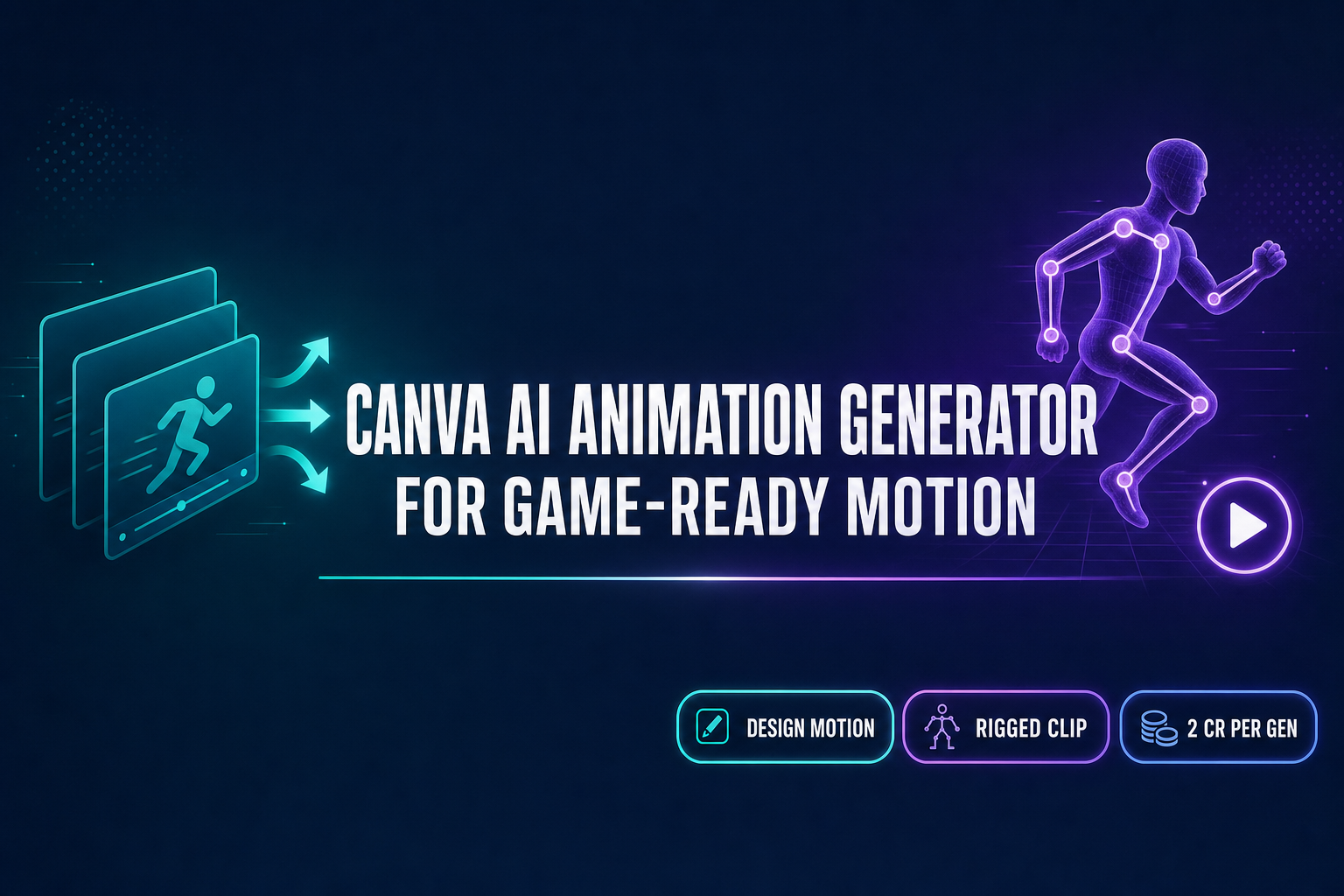
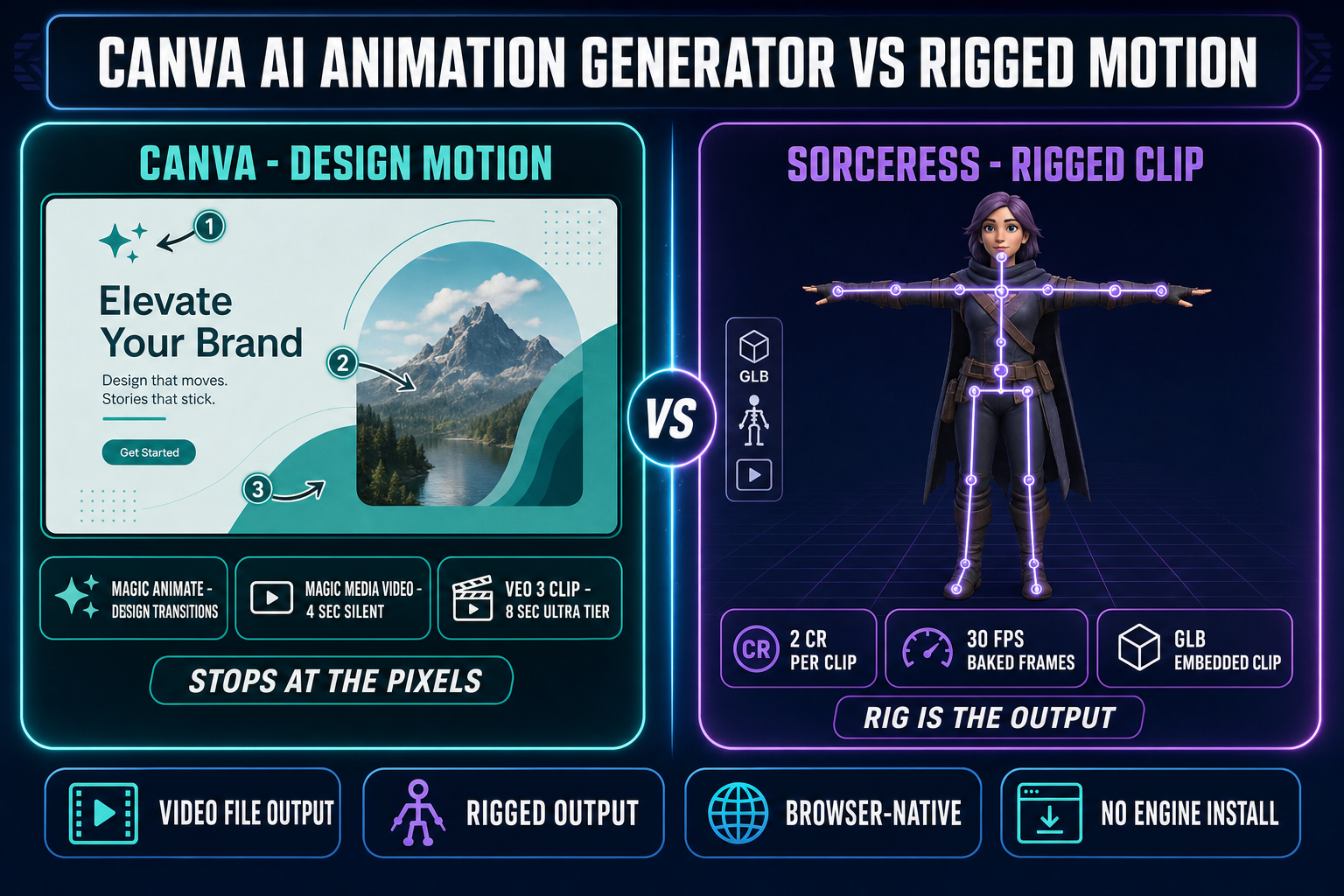
Search for “Canva AI animation generator” in May 2026 and the Canva landing pages return three different motion features dressed up as one product. Magic Animate is the one-click slide-side animation feature that picks an eye-catching transition for an entire design. Create a Video Clip with Canva AI is the new Ultra-tier text-to-video generator powered by Google Veo 3, capped at 8 seconds with synchronised audio. Magic Media video is the older 4-second silent text-to-video feature still living in the editor. All three are real, all three render their output as either a Canva file or an MP4, and all three stop at the pixels — none of them know what a humanoid skeleton is, none of them export a GLB with embedded clips, and none of them produce a sprite-sheet walk cycle a game engine reads at runtime. Verified against canva.com pricing, the Canva Help Center AI-access page, and the live AnimateUnified.tsx source on May 31, 2026.
What the Canva AI animation generator actually ships in 2026
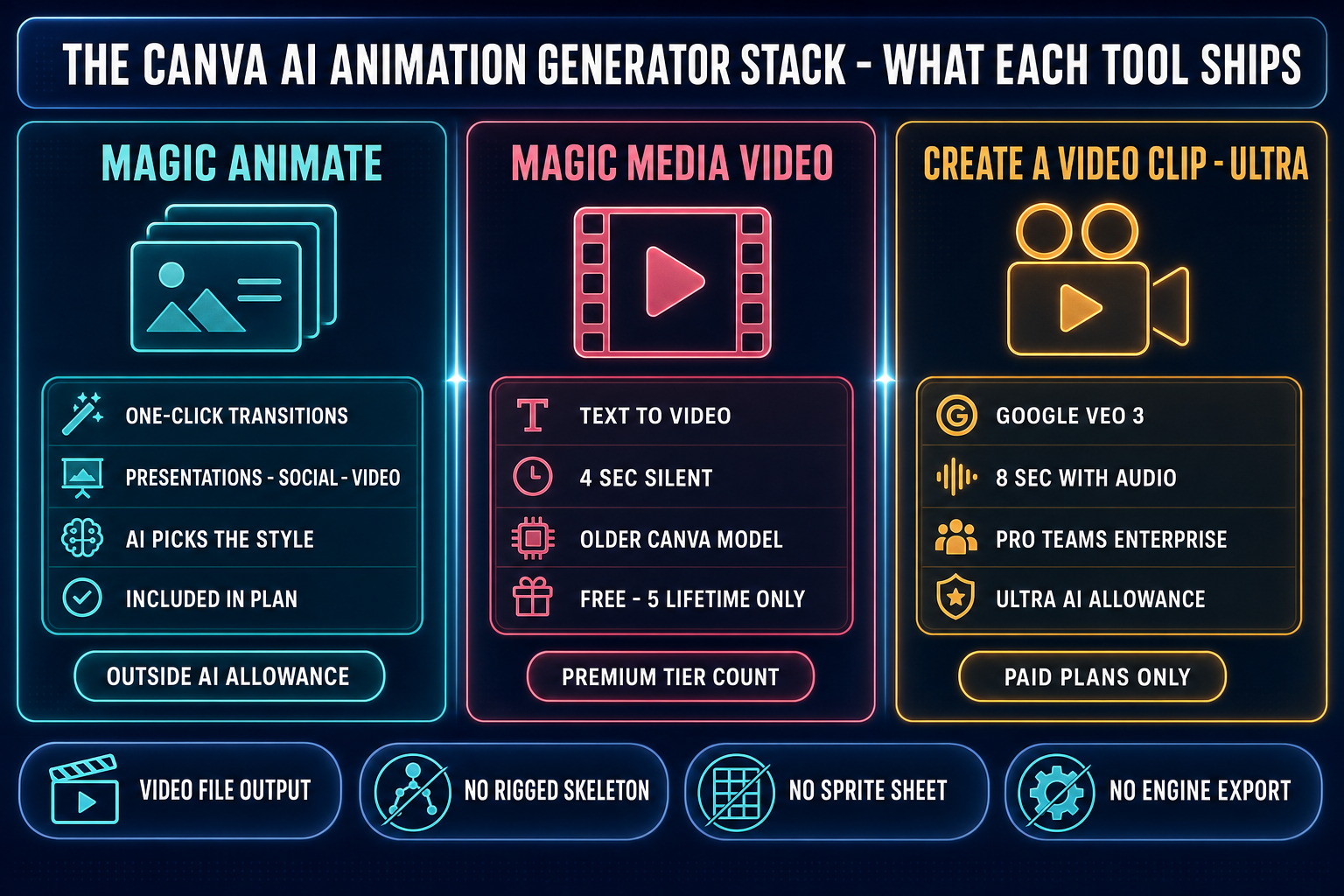
The Canva AI animation generator is not a single tool — it is the slice of Canva AI 2.0 that adds motion to a design, surfaced through three separate features inside the editor. Magic Animate is the one-click design-side animation tool. The Canva Help Center documents the flow precisely: open a presentation, social-media post, or video design template, click Animate on the floating toolbar, pick Magic Animate, and the AI selects a transition style and applies it to every element in one step. The output is the Canva design with timed entrances, exits, and emphasis effects baked in — you export the design as a video or as a presentation, and the motion travels with it.
Create a Video Clip with Canva AI is the second leg, and the most genuinely capable of the three. It is the Ultra-tier text-to-video generator inside the editor, and Canva’s pricing page documents that it runs on Google Veo 3 — the same Veo 3 model that emits 8-second clips with synchronised audio (or 6 seconds without). The clip is generated as a video file inside the design, not as a Canva-design animation. The third leg is Magic Media video, the older text-to-video feature that emits 4-second silent clips on a separate undisclosed Canva model. All three live under the Canva AI usage allowance in different tiers: Magic Animate falls under the Photo and Video Animations bucket that is included in every plan outside the shared AI allowance, Magic Media video sits in the Premium bucket, and Create a Video Clip with Veo 3 is gated to the Ultra bucket on paid plans only.
Where Canva wins (the design side, not the rig side)
For everything that lives inside a Canva design, the Canva AI animation generator is the right tool. A presentation slide deck with eye-catching transitions, a social-media reveal post with timed entrances, a vertical short-form video for TikTok or Instagram Reels, an investor pitch deck with timed builds, a Steam-page hero loop, a banner-ad sequence with motion, a Kickstarter update video, a press-kit reel that stitches uploaded clips with templated motion. Canva is purpose-built for that round trip — the editor handles the layout, the brand kit handles the typography, the export targets cover every social platform plus print, and Magic Animate handles the motion at one click instead of one keyframe at a time.
The Veo 3 video clip generator earns its Ultra-tier status. An 8-second clip with synchronised dialogue, sound effects, and music, produced inside the same tab where the design lives, is a useful artifact for marketing video. Canva’s quality tier page notes that Ultra is the only tier that supports synchronised audio for video, and that paid plans are the only ones with Ultra access at all. For a trailer cut, a B-roll segment of an environment shot, an attract-mode loop on a kiosk, or a teaser for the Steam page, the Veo 3 path is a single prompt away. Pretending the Canva AI animation generator is bad at the design-side jobs would be dishonest. The honest framing is narrower: it is great at making motion that goes into a Canva design or out as an MP4 file, and that is where it stops.
What it costs in May 2026 - the Ultra tier and the allowance
Canva moved to a unified shared AI allowance in 2026. The pricing page documents the per-plan ranges, and the Help Center confirms each AI tool’s tier classification. As of May 31, 2026, the allowance pool reads: Free at up to 200 Standard or 20 Premium uses per month with no Ultra access at all; Pro at $15 per month or $120 per year with up to 2,000 Standard or 200 Premium or 20 Ultra uses per month; Business at up to 4,000 Standard or 400 Premium or 40 Ultra; and Enterprise at the same 4,000/400/40 ceiling on a custom contract. Once a paid user crosses the allowance, the allowance does not lock the editor — Canva inserts short pauses between subsequent generations, and the AI Pass add-on on top of Pro or Business raises the ceiling for heavy users.
Magic Animate sits outside the allowance because it is classified as a Photo and Video Animations baseline feature, subject to fair-use limits. Magic Media video on the Free plan is a hard 5 lifetime credits — not a monthly refill — which makes it functionally a trial of the older video model. The Ultra Veo 3 generator is the most capable but also the most allowance-hungry slot in the stack: Pro’s 20 Ultra uses per month maps to roughly 20 video clips per month, less if a user iterates on prompts or runs the higher-quality output options. For an indie game studio shipping marketing video, that is plenty. For an indie game studio building a per-character animation pipeline, it is the wrong unit of work entirely.
Where the Canva AI animation generator stops
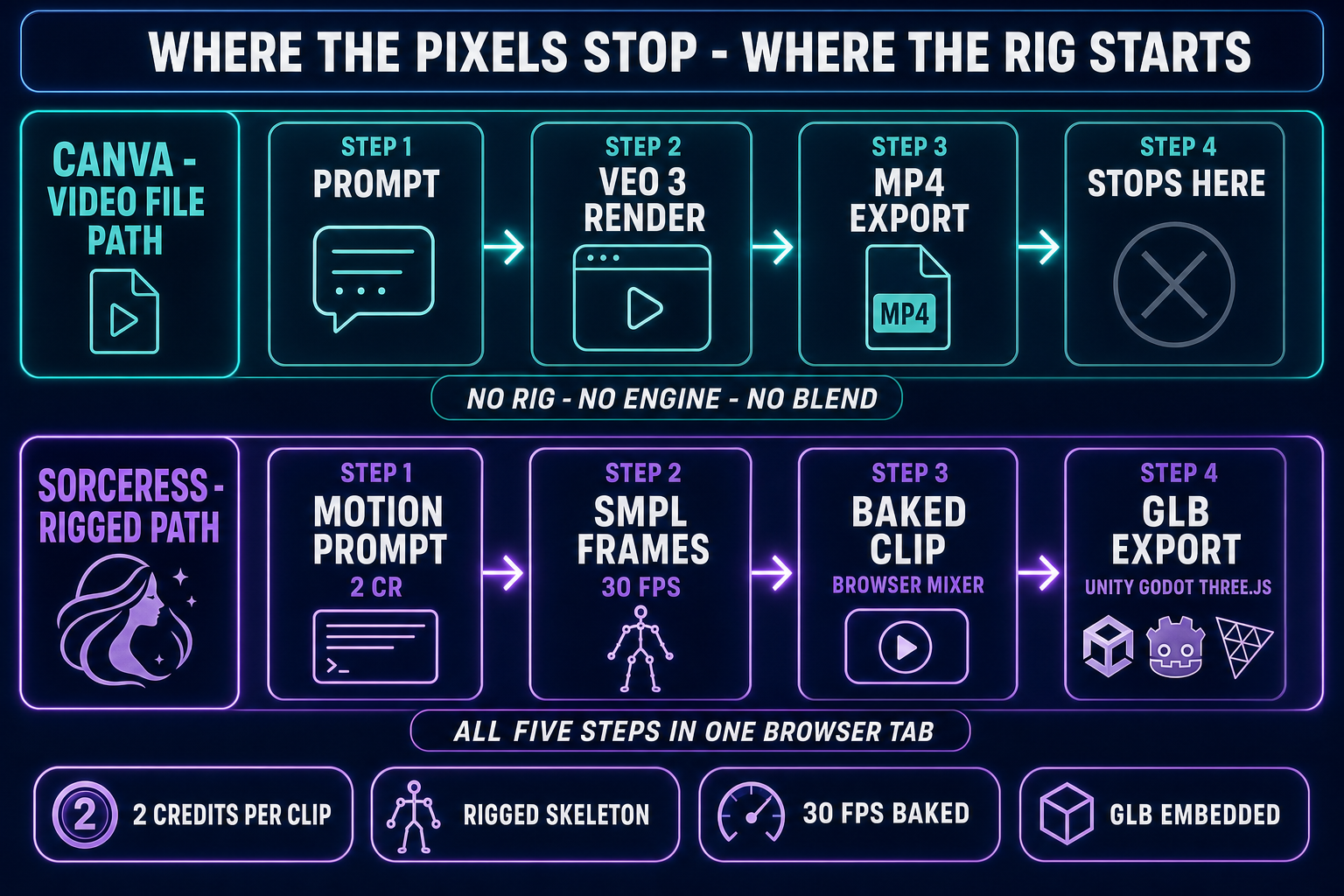
A game character is not a video file. It is a rigged skeleton with a clip array (idle, walk, run, jump, attack) bound to the same bone graph, blended by the engine’s animator at 30-60 fps. Magic Animate picks a transition for the elements of a Canva design and bakes it onto the design’s timeline; the output is a Canva file that exports as MP4 if the design is a video template. Create a Video Clip with Canva AI emits an MP4 from a text prompt; the output is 6-8 seconds of pre-rendered pixels. Magic Media video emits a 4-second silent MP4. None of the three know what an inverse-kinematics rig is, none of them expose a bone graph, and none of them export glTF 2.0 with embedded animation tracks.
That is the wall. The four steps the Canva AI animation generator does not run, in order: step one is the rig (humanoid skeleton bound to a textured 3D mesh with weight painting); step two is the motion clip (text-to-motion that emits a frame array along that skeleton); step three is the engine import (GLB or FBX with embedded clips that Three.js, Babylon.js, Bevy, Godot, Unity, and Unreal Engine read at runtime); step four is the sprite-sheet path for 2D games (multi-frame walk cycle on a fixed pixel grid with transparent background). Without those four steps, a Canva animation is a marketing artifact, not a gameplay artifact. The artifact you can hand a designer for a Steam capsule and the artifact you can hand a programmer for the engine’s animator are not the same artifact, and Canva is purpose-built to ship the first one.