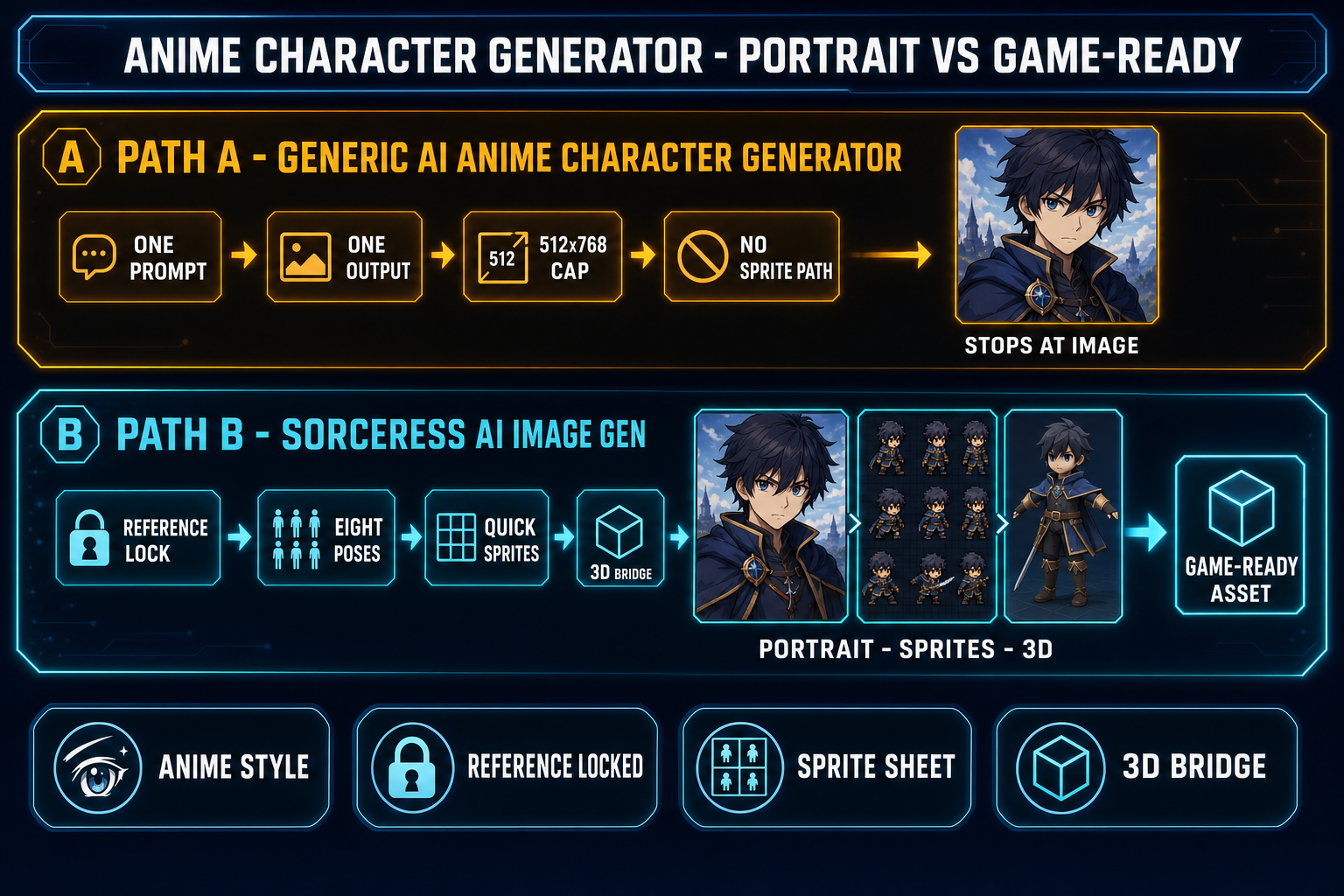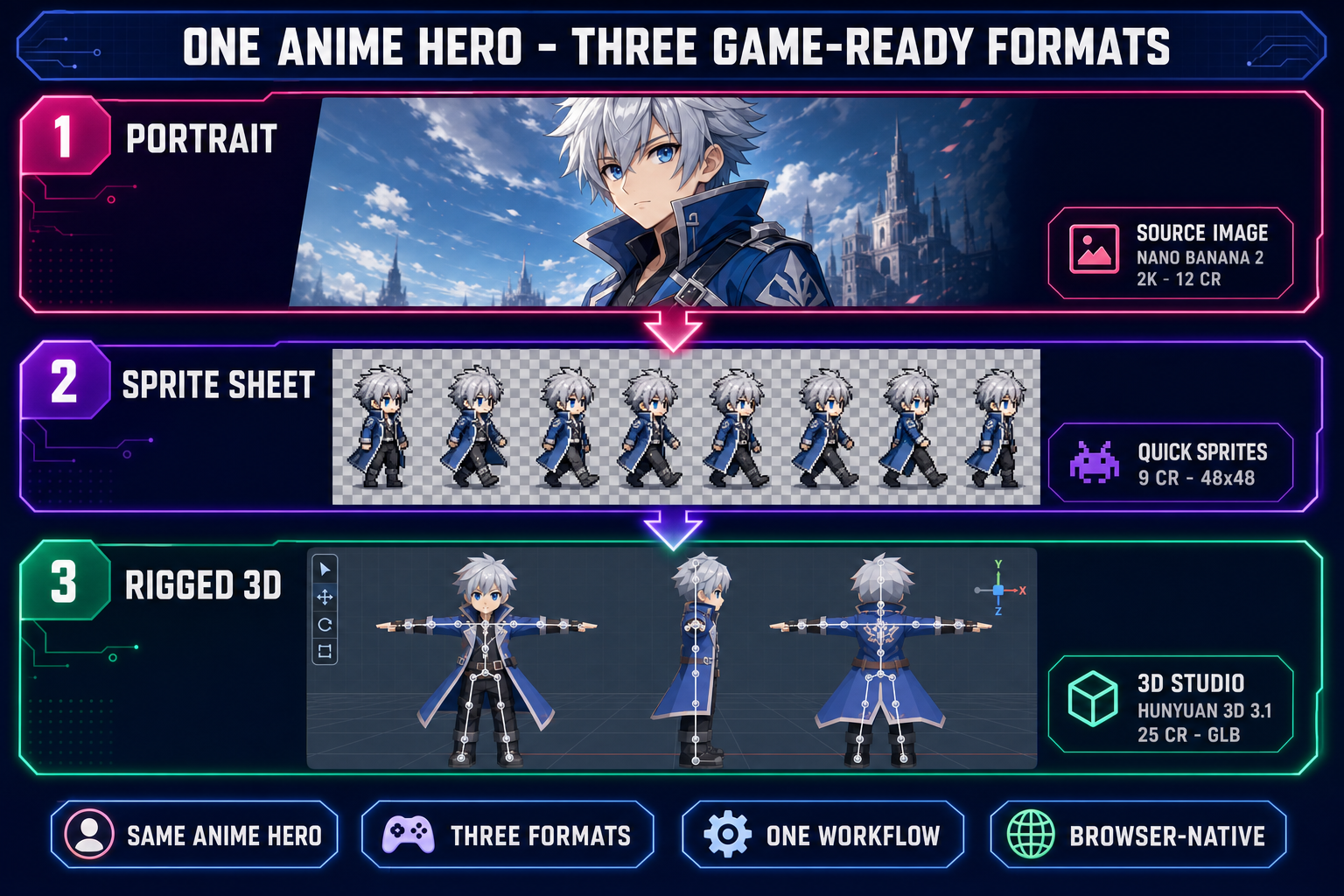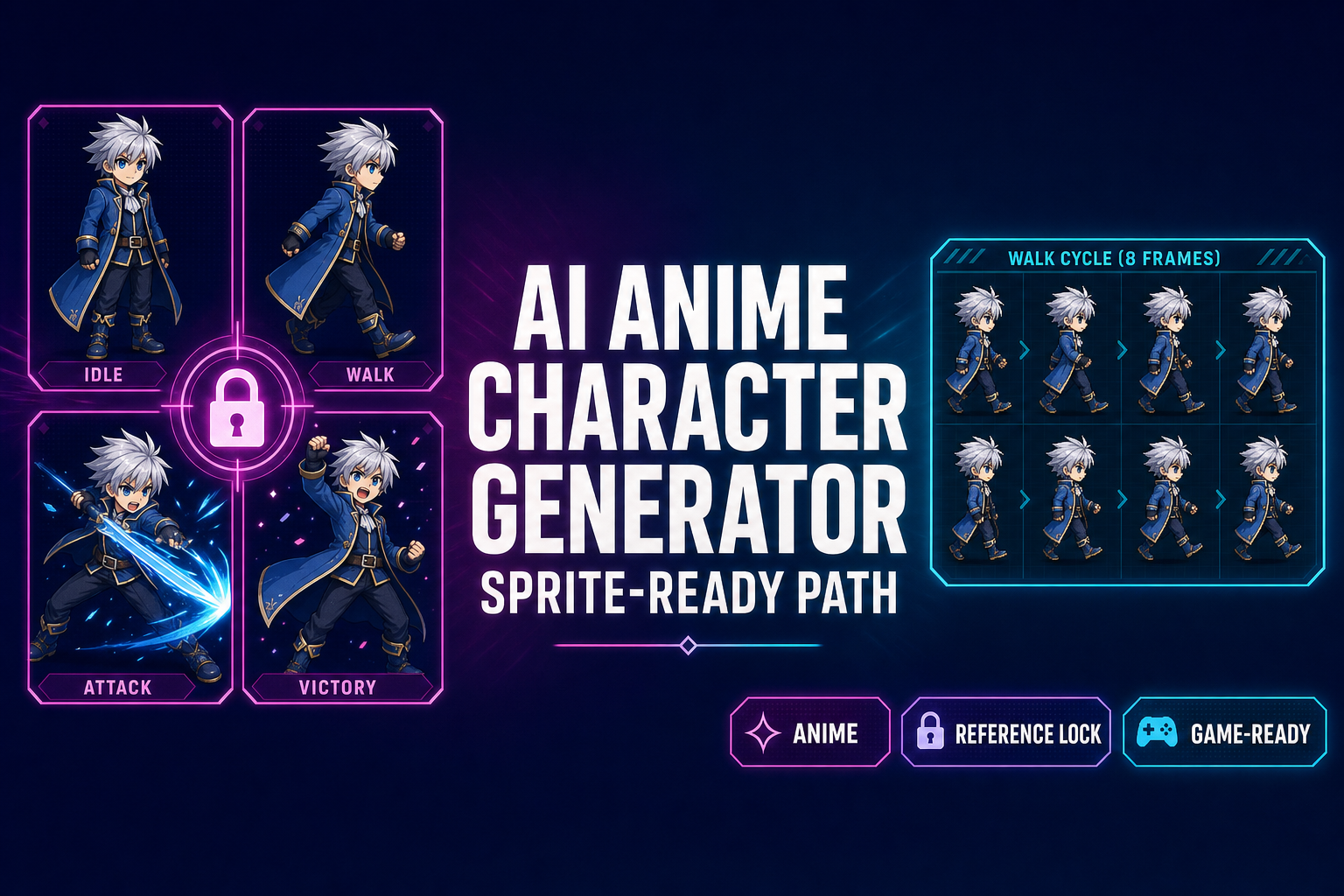
Every AI anime character generator in 2026 — NovelAI for paid anime work, Tensor.Art for free anime checkpoints, Perchance for unlimited zero-friction anime portraits, PixAI and Waifu Labs for anime-only platforms — makes the same trade-off. The portrait step is solid. The workflow then ends at a single PNG. Anime art is its own diffusion-model vertical (the same Stable Diffusion checkpoint that ships a photoreal portrait at a generic prompt produces a flat, off-model muddle on an anime prompt unless it is steered with anime-specific tags, LoRAs, or reference images), which is why these tools exist as a separate category from the general AI image generators. For a hobby illustration project that is fine. For a game project — visual novel, JRPG, anime fighter, dating sim — the project does not actually need a portrait. It needs eight reference-locked poses laid out in a sprite atlas, plus a 3D version of the same hero for any 3D scene the game wants to cut to. The reference-locked AI anime character generator workflow below builds that path inside Sorceress AI Image Gen, hands the outputs to Quick Sprites for the atlas, and forwards the same anime hero into 3D Studio for the mesh — one browser tab, no swapping between platforms. Verified May 19, 2026 against the Sorceress IMAGE_MODELS array in src/app/_home-v2/_data/tools.ts, the refImages caps in src/lib/models.ts, the Quick Sprites constants in src/app/quick-sprites/page.tsx, and the THREED_MODEL_ORDER lineup in src/lib/threed-models.ts.
What an AI anime character generator actually does in 2026
An AI anime character generator is a diffusion image model steered toward the recognizable Japanese-animation idiom: large eyes, soft cel-shaded lighting, exaggerated hair, simplified facial topology, distinct line work. Under the hood the steering happens one of three ways. Some platforms (NovelAI, PixAI) fine-tune a base model on a curated anime image set and ship the fine-tune as the default. Some platforms (Tensor.Art) host thousands of community-trained Stable Diffusion checkpoints and let the user pick an anime-specific one. Some platforms (Perchance, plus general image generators like the Sorceress rail) lean on prompt engineering plus Danbooru-style tag pools and reference images to push a general-purpose model into anime territory.
The functional surface of an AI anime character generator in 2026 looks like this:
- Prompt input — a free-text field or a guided form. Guided forms expose pickers for gender, age, hair color, hair style, eye color, outfit, expression, pose, background.
- Reference image — an optional upload that anchors character identity across follow-up generations. Not every AI anime character generator exposes this; Perchance has limited reference support, NovelAI exposes it explicitly, the Sorceress rail accepts between three and fourteen reference images depending on the model (verified May 19, 2026 against
src/lib/models.ts). - Model picker — on multi-model platforms, the user picks which checkpoint or model family runs the prompt.
- Output — a single PNG (sometimes batch of 2–12 PNGs) at a fixed resolution. Output ceilings vary: Perchance caps at 512×768, the Sorceress rail’s Nano Banana Pro hits 4K (33 credits at 4K), and the Sorceress Nano Banana 2 ships 1K / 2K / 4K resolution tiers (9 / 12 / 17 credits respectively, verified against
src/lib/models.tslines 229–256).
That is the entire spec sheet of a generic AI anime character generator. The user pays per generation in credits or in a monthly subscription, and the deliverable is one image. For a single piece of fan art, this is sufficient. For a game, this is the first ten percent of the asset pipeline.
Why most AI anime character generators stop at the portrait
The platforms above are creative tools, not game-asset pipelines. Their target user is a hobbyist illustrator who wants a single shareable anime image, not a developer who needs the same character to appear in eight matching frames of a walk cycle plus a 3D model in a cutscene. The gap shows up in three concrete places.
No sprite-sheet packer. A sprite sheet is a single PNG laid out as a uniform grid (most commonly 4×2 for an eight-frame walk cycle, or 4×4 for a sixteen-frame loop). Each cell is exactly the same pixel size. The background is transparent. The engine reads the sheet with one function call and reads frame indices from the grid. None of the standalone AI anime character generators ship this. The Imagineart, Canva, Perchance, NovelAI, and PixAI character generators output one image per generation; aligning eight outputs into a grid is the user’s problem.
No frame-to-frame identity lock by default. Even with a reference-image input pinned, the standalone tools tend to let small details drift across generations: eye color shifts by one shade, hair length grows or shrinks by ten percent, jacket color brightens. For a single illustration this is invisible; for a sprite sheet where eight frames play at twelve frames per second, the eye reads the drift as a glitch. Reference-image input is the steering mechanism, but it has to be pinned and the prompt has to stay identical across the pose set, and the model has to stay locked for the whole pack. Almost every standalone AI anime character generator workflow violates at least one of those rules.
No 3D bridge. If the game ever cuts to a 3D scene — a JRPG world map, a 3D dungeon, an anime fighter on a 3D stage — the same anime hero who appeared on the menu portrait has to render as a 3D mesh. Bridging from one anime portrait to a textured rigged 3D mesh requires an image-to-3D model (Hunyuan 3D, Meshy, TRELLIS, Rodin, Tripo), an auto-rigging pass, and an export to glTF 2.0 binary. Standalone anime tools ship none of those steps.
The free + browser-based AI anime character generator field in 2026
An honest snapshot of the standalone landscape, verified May 19, 2026 against each vendor’s live documentation. Listed in plain text only:
- Perchance. Free, no login, unlimited generations. Browser-based with client-side processing. Batch of up to twelve images per call, 5–10 second turnaround, 60-plus art styles including a dedicated anime tag pool with Danbooru-style descriptors. Runs on Stable Diffusion (SDXL plus SD 1.5 with community LoRAs). Resolution caps at 512×768. No inpainting, no editing tools, no reference-image input on the basic anime page, no commercial-output restrictions documented for personal use. The lowest-friction AI anime character generator on the open web.
- NovelAI. Paid platform starting at $10/month. Includes 30-generation free trial. Ships a curated anime-specialist model trained on a permission-vetted anime image set. Exposes dedicated reference-image input, advanced sampler controls, and a guided form for character traits. Highest-fidelity standalone AI anime character generator at the $10 tier, with explicit commercial-use rights on the paid plan.
- Tensor.Art. 100 free credits per day that reset at midnight UTC. Hosts 10,000-plus community-trained Stable Diffusion checkpoints, with the OC Creator and Anime Lab features tuned for anime character work. Paid tiers from $5 to $92/month. Browser-based, no GPU required.
- PixAI.art. Anime-focused platform with prompt-based customization and a free generation quota; the paid tier expands the daily cap. Visual customization sliders for hair, eyes, outfit are exposed in the guided form.
- Waifu Labs. Anime-only generator with visual customization controls. Smaller catalog than the platforms above; specializes in one-shot character portraits.
The pattern across all five is the same: strong portraits, no game-asset bridge. The next sections walk through the alternative that closes the bridge inside one tab.
Build the reference-locked AI anime character generator workflow with Sorceress AI Image Gen
The Sorceress AI Image Gen rail (verified May 19, 2026 against src/app/_home-v2/_data/tools.ts lines 669–676) ships seven image models on the homepage picker. For an anime hero the sweet-spot pick is Nano Banana 2 at 2K resolution — high enough fidelity to read as crisp anime art, low enough credit cost (12 credits at 2K) that an eight-pose pack lands inside the 100-credit starter pack a new account ships with. The full per-model lineup with the credit costs and reference-image caps that matter for anime work:
| Model | Provider | Max ref images | Credits (default) | Best for anime work |
|---|---|---|---|---|
| Nano Banana 2 | 14 | 9 (1K) / 12 (2K) / 17 (4K) | Workhorse for eight-pose packs — cheap and ref-friendly | |
| Nano Banana Pro | 8 | 18 (2K) / 33 (4K) | Hero portrait at 4K for menu / key art | |
| GPT Image 2 | OpenAI | 10 | 3 (low) / 7 (medium) / 17 (high) | Stylized anime with crisp line work |
| Seedream 5 Lite | ByteDance | 14 | 6 (2K) / 8 (3K) | Mature / horror anime genres (uncensored) |
| Flux 2 Pro | Black Forest Labs | 8 (+3 cr per ref) | ~9 + 3 per ref | Painterly anime, cel-shaded illustration |
| Z-Image Turbo | Tongyi-Mai | 5 | ~2 | Ultra-fast iteration during prompt design |
| Grok Imagine | xAI | 5 | ~6 | Looser creative-style anime variants |
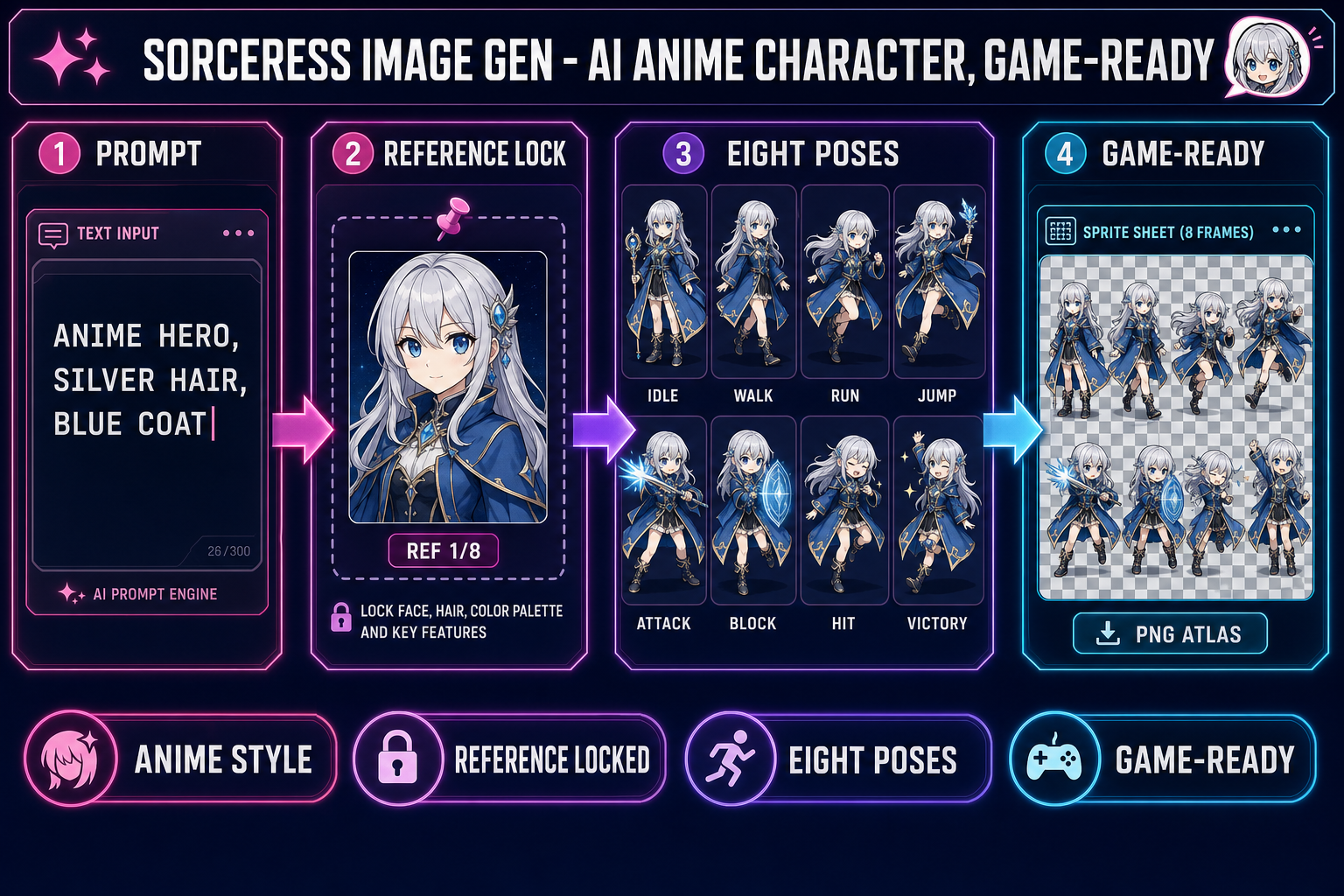
The four-step workflow that turns this rail into a reference-locked AI anime character generator:
- Generate one canonical anime hero at high fidelity. Open Sorceress AI Image Gen, pick Nano Banana Pro at 2K resolution (18 credits), and write a tight anime-specific prompt: “a young anime hero, late teens, soft cel-shaded style with crisp line work, chin-length silver hair with an asymmetric fringe, large bright blue eyes, fitted dark blue coat with brass buttons and high collar, standing front-facing, neutral expression, transparent background”. The detail density is doing the work — each adjective narrows the cloud of possible characters until the output is the specific hero you want. Save the result to your local downloads as the canonical reference.
- Pin the canonical reference into every follow-up generation. In the same panel, drop the saved hero portrait into the reference-image slot. Switch the model to Nano Banana 2 at 2K (12 credits) — same Google family, lower cost per pose. Nano Banana 2 accepts up to fourteen reference images per call (verified against
src/lib/models.tsline 235), and the anime hero anchor occupies the first slot for every generation in the pose set. - Run seven follow-up prompts at 2K with the reference pinned. Keep the prompt prefix identical, change only the pose clause: “same anime hero, walking to the right, side view, transparent background”, “same anime hero, running to the right, transparent background”, “same anime hero, mid-air jump, transparent background”, “same anime hero, attacking with a sword swing, transparent background”, “same anime hero, blocking with raised arm, transparent background”, “same anime hero, reacting to being hit, transparent background”, “same anime hero, victory celebration with both arms raised, transparent background”. Eight reference-locked outputs, each anchored to the canonical portrait. Total cost: 18 + (7 × 12) = 102 credits, which is two credits over the starter pack but only fifteen cents in the top-up store.
- Pack the eight outputs into a sprite sheet. Hand the pack to Quick Sprites for transparent-background cleanup and grid alignment, or to Canvas for manual frame arrangement. The deliverable is one PNG atlas the engine reads with one function call.
The full eight-pose anime hero pack lives in roughly 102 credits and runs in about ten minutes end-to-end inside the browser. The hero stays on-model because every generation after the first is anchored to the same reference image — the same capability that the standalone AI anime character generator tools above expose but never close the loop on.