Brew AI Game Music Generator (Indie Track Pipeline)

By Arron R.14 min read
An ai game music generator in 2026 has three rails: prompt-to-track via Suno V5.5 (Music Gen, 10 credits, two variations per call), derivative tracks via extend

An ai game music generator in 2026 is the difference between an indie build that ships with the four royalty-free loops everyone has already heard and a build with a custom underscore on every level, menu, and cutscene. The category collapsed three historical bottlenecks at once — the royalty-free library trawl, the composer freelance brief, and the digital audio workstation editing session — into a single browser tab. The honest 2026 pipeline runs three rails: a prompt-to-track generation rail, a derivative-track rail (extend, mashup, cover), and a procedural code-driven rail for the synthetic textures prompts cannot land. Sorceress ships all three under one credit pool: Music Gen at 10 credits per generation via Suno V5.5, Sound Studio at 1 credit per code-driven sound, and SFX Gen at 3 credits per sound effect. This guide brews the three rails into a complete indie game music pipeline, with every credit cost and model name verified against the live source on June 25, 2026.
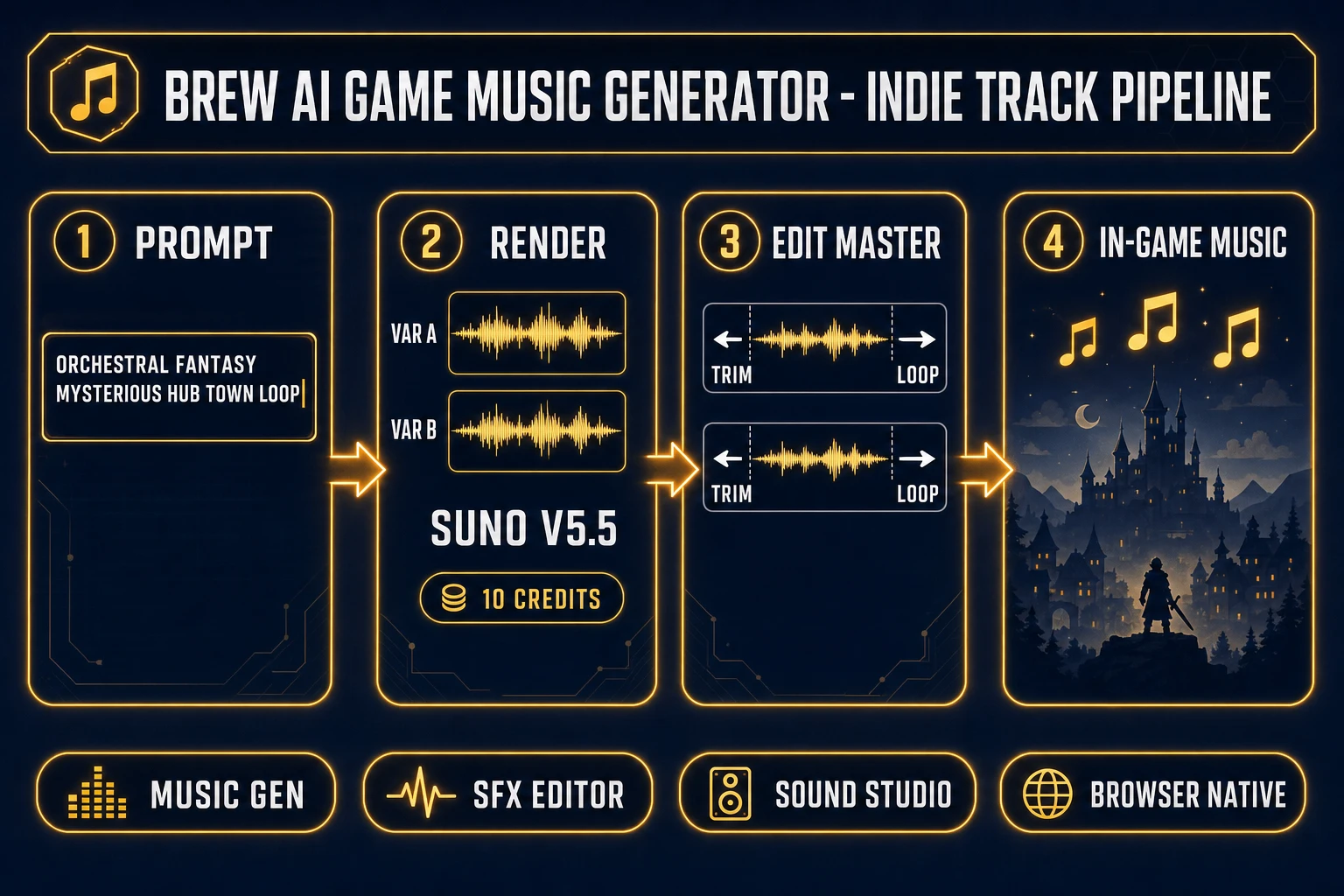
AI game music generator pipeline diagram for indie games - prompt Music Gen Suno V5.5 two variations Sound Studio procedural Speech Gen voice layer SFX Editor master output
The 2026 ai game music generator pipeline runs four steps in one Sorceress tab — prompt the cue, render two variations, edit and master, drop into the engine — with credit costs verified against src/app/api/music-gen/route.ts on June 25, 2026.

What an ai game music generator actually delivers in 2026

The category covers any tool that takes a short English prompt and renders a non-vocal or vocal musical track suitable for in-game playback — a menu loop, a boss-fight underscore, a victory sting, a town ambience, a credits ballad. The technical primitive sits on top of generative artificial intelligence trained on licensed and public-domain musical recordings. A modern music-and-artificial-intelligence rail renders structured audio (intro, verse, chorus, outro) rather than the formless texture a sound effect generator returns. The output is video game music in the operational sense: it loops cleanly, sits under dialogue without fighting it, and matches a moment in the game.

For an indie team, the practical impact is brutal arithmetic. A 12-cue music bed — the rough minimum for a small RPG or platformer build — previously meant either a $2,000 to $8,000 commission to a freelance composer, three to five days of royalty-free library search and licensing, or three months of self-taught DAW work. The same 12-cue bed through Sorceress Music Gen costs 120 credits (about $1.20 on the Starter pack), renders in under ninety minutes of prompt iteration including listening passes, and produces tracks that are custom to the game rather than recycled across every other indie shipping that month.

The three production-ready output formats from the Sorceress rail: MP3 as the default streaming and shipping format, WAV via the on-demand conversion step (lossless, ideal for in-engine intermediate work that will be re-encoded by the engine's audio middleware), and code-driven JavaScript blueprints from Sound Studio for the synthetic chiptune-style sounds Suno cannot land.

The three music layers every indie game ships

Before picking an ai game music generator path, decide what kind of music the game actually needs. The indie audio stack splits cleanly into three musical layers, and each one wants a different prompt shape and a different rail:

  • Underscore layer. Looping background music that plays under gameplay for ten to thirty minutes at a stretch — menu, hub town, exploration, dungeon, combat, boss. These are long (60 to 180 seconds tile point, looped indefinitely in engine), instrumental, and have to be unobtrusive enough that the player does not notice the loop seam. Pick: Music Gen with the instrumental flag on, prompts that name genre, instrumentation, tempo, and mood.
  • Sting layer. Cutscene impacts, level-complete jingles, defeat fanfares, NPC introduction stabs, achievement unlocks. These are short (2 to 12 seconds), high-impact, often vocal-free, often re-pitched live in engine for tonal variation. Pick: Music Gen at default settings, then trim to the sting length in SFX Editor.
  • Title or credits layer. Title-screen cue, end-of-game credits roll, optional theme song with vocals. These are the loudest single statement of musical identity in the build, are heard before any other audio, and benefit from custom-mode control over style, vocals, and lyrics. Pick: Music Gen custom mode with a written style block, optionally AI-assisted lyrics via the lyrics action at 2 credits per call.

The Sorceress credit pool means you can mix layers from all three rails on the same project without juggling separate accounts. A 12-cue indie bed might be 8 underscore renders (80 credits), 3 stings (30 credits), and 1 title song (10 credits + 2 for lyrics) — a total of 122 credits, well under the 100-credit starter allowance plus a single $10 Starter top-up.

Pick the right ai game music generator path for indie game work

The 2026 ai game music generator landscape has three distinct shapes of tool, and a small indie team should know which shape it is picking before paying for a subscription. The three shapes:

  • Consumer track-generation tools. Built for a single user to render finished songs for personal listening or social posting. Charge per-render with a generous free tier. Output is a single MP3 with no separate stems, no in-tool slicing, and a per-platform license that may or may not allow commercial game shipping. The 2026 consumer category includes Suno (the model underneath most of the rails in this space, including the one Sorceress wires up), Udio, and Riffusion. The catch for game devs: no stems, no procedural fallback, no integration with the rest of the game audio pipeline.
  • Pro DAW plug-ins. Built for a working composer to accelerate their existing DAW workflow. Charge $20 to $40 per month, integrate with Logic, Ableton, or Reaper, render stems, and require an actual DAW skill set to operate. The 2026 plug-in category includes Aiva, Soundful, and several inside-DAW generators. The catch for indie devs: requires a paid DAW seat and a working knowledge of mixing.
  • Browser-native game-dev rails. Built for a one-person indie team to render the full audio stack of a small game from a single tab. Charge per-credit, integrate with the rest of the game-asset toolchain (sprites, tilesets, 3D models), and never require a DAW seat. Sorceress is in this category, and the credit pool spans Music Gen, SFX Gen, Sound Studio, Speech Gen, and the in-browser SFX Editor.

For a one-person indie shipping a small game in 2026, the third path is the only one that does not require either external composer commissions or DAW expertise. The other two paths produce excellent audio, but only the browser-native game-dev rail handles the “I need a music bed, twelve SFX, and three NPC voice lines, all by tomorrow morning” case that defines indie reality.
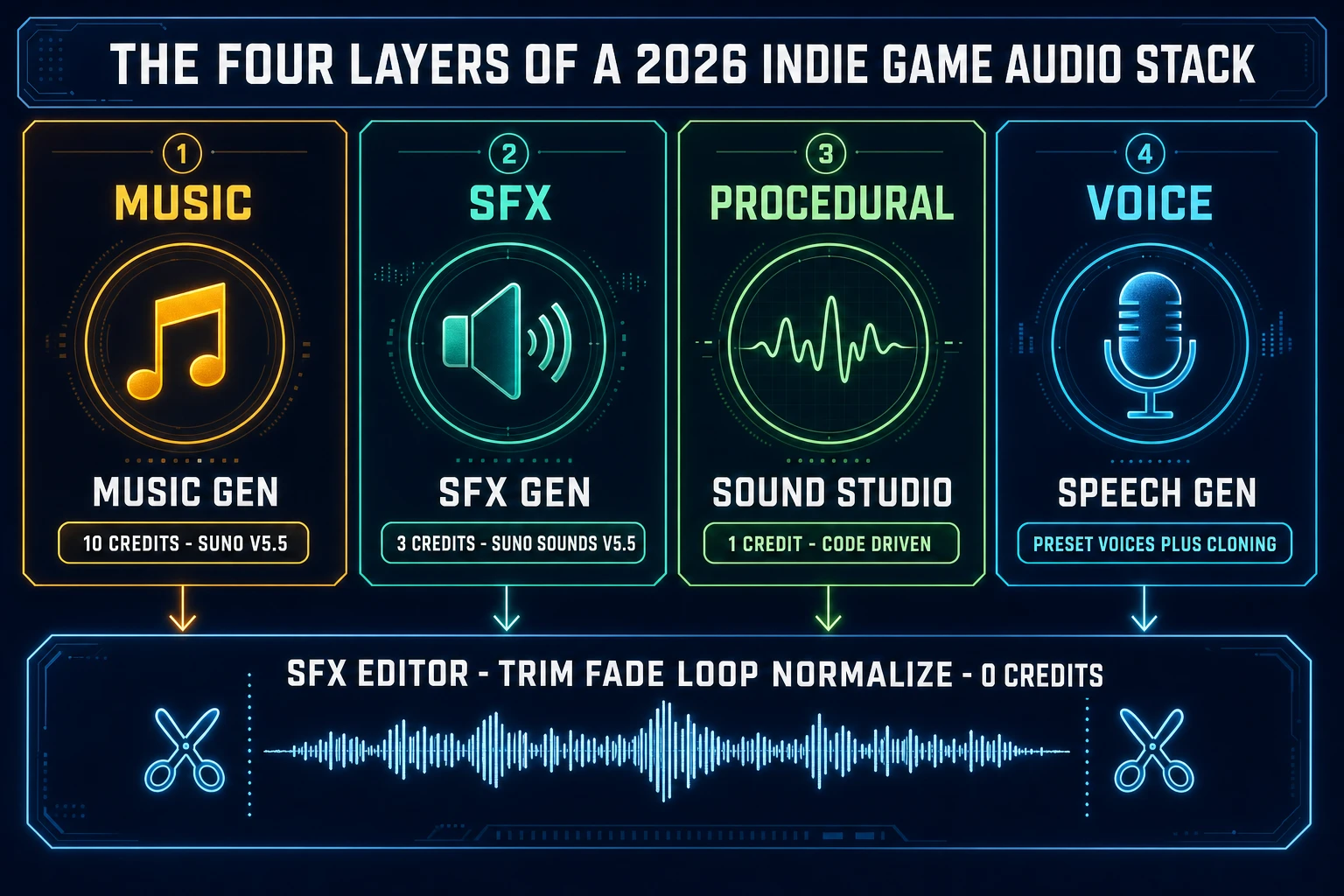
Four layers of a 2026 indie game audio stack - Music Gen 10 credits underscore Suno V5.5, SFX Gen 3 credits Suno Sounds V5.5, Sound Studio 1 credit procedural code, Speech Gen voice and dialogue with SFX Editor zero credits master pass
The complete 2026 indie game audio stack runs four rails on one Sorceress credit pool — Music Gen for the underscore, SFX Gen for the sound effects layer, Sound Studio for procedural code-driven sounds, and Speech Gen for the voice layer — all routed through the free SFX Editor for the master pass.

Brew the Sorceress Music Gen pipeline — prompt to track in one tab

The core generation rail of an ai game music generator is the prompt-to-track step, and Sorceress Music Gen handles it with a single API call. The verified spec on June 25, 2026 against src/app/api/music-gen/route.ts and src/app/music-gen/page.tsx: model V5_5 by default (Suno V5.5 via the Kie audio provider), with V5, V4.5+, V4.5, and V4 selectable in the model picker for backward-compatible reruns; flat 10 credits per generation; each generation returns two musical variations of the same prompt; loop, custom, instrumental, and vocal-gender flags supported.

The five-line prompt pattern that produces shippable game underscore consistently:

  1. Genre tag. Name the musical style with one or two specific words: chiptune, orchestral fantasy, dark synthwave, lo-fi hip-hop, retro arcade, ambient piano. Specific tags beat generic ones — “orchestral fantasy with woodwinds” lands better than “background music.”
  2. Mood word. Triumphant, melancholic, tense, peaceful, mysterious, joyful, ominous, contemplative. Pick the single strongest emotion the cue carries.
  3. Instrumentation hint. Acoustic guitar, full strings, 8-bit lead with snare drums, soft piano with pad, synth bass with arpeggio. The model leans heavily on instrumentation cues to set timbre.
  4. Tempo or energy cue. Slow, medium, driving, frantic, ninety beats per minute, half-time. Numeric BPM cues work but qualitative cues land more reliably for in-game music.
  5. Use cue. Menu loop, exploration underscore, boss fight, town ambience, credits roll. Telling the model what the music is for nudges the structure (looping vs through-composed) appropriately.

Worked prompts that produce shippable game music in production:

  • “Orchestral fantasy, mysterious mood, soft strings and harp with light percussion, slow tempo, hub town exploration loop.”
  • “8-bit chiptune, triumphant mood, square-wave lead with snare drums and bass arpeggio, driving tempo, retro platformer boss fight.”
  • “Dark synthwave, tense mood, analog synth bass with arpeggiated lead and gated drums, medium tempo, cyberpunk dungeon loop.”
  • “Lo-fi hip-hop, peaceful mood, jazzy piano with vinyl crackle and soft drums, slow tempo, menu screen background loop.”
  • “Acoustic folk, melancholic mood, fingerpicked guitar with light strings, slow tempo, post-defeat credits roll.”
  • “Ambient piano, contemplative mood, sustained reverbed piano with subtle pad, very slow tempo, save-room ambience.”

Prompts that fail consistently in production: abstract (“a sad song,” “a happy track”), genre-only (“background music,” “video game music”), or any prompt that asks for a specific copyrighted song (“like the Zelda theme” — the model declines or returns a degraded approximation). The two returned variations from a single render are usually different enough to give a real A-vs-B choice; keep the one that loops cleanest at the target tile point and discard or extend the other.
Custom mode in Music Gen — style, vocals, instrumental, vocal gender

The default Music Gen call routes a single prompt through Suno V5.5 and returns two instrumental variations. Custom mode (verified against src/app/music-gen/page.tsx on June 25, 2026) unlocks a richer parameter set for the title or credits layer where the cue needs vocal identity. The custom-mode flags:

  • style. A free-text style block that the model treats as a hard constraint on genre, instrumentation, and tonal balance. Use this for cues where the default prompt-only flow drifts away from the target sound.
  • title. A free-text track title that the model uses both as a metadata tag on the returned MP3 and as a steering input for the cue's overall character.
  • negativeTags. Comma-separated genre or instrument tags the model should avoid (“dubstep, heavy distortion”) to keep a fantasy cue from drifting into electronic textures.
  • vocalGender. Either m or f when the cue needs a vocal lead. Leaving this unset lets the model pick.
  • weirdnessConstraint. A 0-to-1 slider that controls how far the model strays from the most-likely interpretation of the prompt. Lower values produce safer, more predictable output; higher values produce more experimental takes that are useful for sting-layer cues that need to surprise.
  • styleWeight. A 0-to-1 slider that controls how strongly the style block influences the output versus the prompt itself. The default of 0.5 balances both. Push toward 1.0 when the style block carries the cue identity; push toward 0 when the prompt does.

For an indie game, custom mode is overkill on most cues and exactly right on the title or credits piece. The default flow handles the underscore and sting layers in seconds without thinking about style weights; reserve custom mode for the one or two cues that carry the game's musical brand. Lyrics generation through the separate lyrics action costs 2 credits per call and returns structured lyric output (verse, chorus, bridge) that drops into the custom-mode prompt field for the title-track render.

Pair Music Gen with SFX Gen, Sound Studio, and Speech Gen

A complete indie game audio stack ships four layers, and an ai game music generator owns one of them. The other three layers all live in the same Sorceress credit pool:

  • Music layer. Looping background underscore and sting cues. Sorceress Music Gen at 10 credits per generation returns two variations of an instrumental or vocal cue from a text prompt. Eight to twelve generations cover the full music bed of a small indie game; 80 to 120 credits.
  • SFX layer. Every fired in-engine event — footsteps, weapon hits, UI chimes, environmental ambience. Sorceress SFX Gen at 3 credits per generation for foley and acoustic textures via Suno Sounds V5.5. A 60-clip indie SFX pack costs 180 credits.
  • Procedural layer. Synthetic chiptune blips, retro lasers, FM synth bleeps, pure tones, parameterised whooshes. Sorceress Sound Studio at 1 credit per sound, code-driven through the Web Audio API for re-renderable parametric output.
  • Voice layer. NPC dialogue, narration, optional voice-cloned protagonist. Sorceress Speech Gen for short-utterance generation, with voice cloning available at 400 credits per identity. The cost-per-line is far below the SFX and music layers.

The complete four-layer stack for a small indie game (10 music cues, 60 SFX clips, 15 procedural sounds, 50 short voice lines) costs about 360 credits — 100 for Music Gen, 180 for SFX Gen, 15 for Sound Studio, 65 for Speech Gen — plus zero credits for every post pass in the editor. That fits inside a single $10 Starter credit pack (1,000 credits) with the 100-credit signup allowance and leaves over 700 credits for iteration. The $49 Lifetime tier verified against src/app/plans/page.tsx on June 25, 2026 unlocks the same flat credit-purchase rate forever without a recurring subscription. Two sibling pipelines worth pairing with this guide: the video game music walkthrough covers loop-trim and tile-point setup end-to-end, and the sound effects AI generator pipeline covers SFX Gen for the in-world event layer.

Extend, mashup, and cover — the three derivative-track moves

The default Music Gen flow returns finished tracks, but the three derivative actions extend the rail into the workflows indie games actually need. All three are exposed in the tool's mode tabs (Create, Extend, Mashup, Cover) and verified against the source on June 25, 2026:

  • Extend. Takes a finished Music Gen track plus a continue-at timestamp in seconds and returns a continuation of the same musical idea past that timestamp. Useful for stretching a 90-second exploration loop into a 180-second variation, or for adding a build-up section before a known beat drop. The flag defaultParamFlag controls whether the extension re-uses the original prompt and parameters or accepts a fresh set. Charged at the same 10 credits per call as a fresh generation.
  • Mashup. Takes two uploaded audio files and renders a track that combines the musical ideas of both. Useful for layering a chiptune lead over an orchestral underscore, or for generating a hybrid level-transition cue that bridges two adjacent stage themes. Custom-mode flags apply (style, title, vocalGender, negativeTags, instrumental). Charged at 10 credits per call.
  • Upload-Cover. Takes one uploaded audio file and re-records it in a different style. Useful for “the same melody but in 8-bit” or for retro-style covers of a hummed reference recording. The flag customMode with a style block produces the most consistent cover output. Charged at 10 credits per call.

For an indie game, the practical use of all three derivative actions is consolidation: build one strong musical idea, then derive every related cue from it via extend, mashup, and cover passes. A title-screen theme renders once at 10 credits; extending it into a 180-second credits roll costs another 10; covering it in 8-bit style for the game-over screen costs another 10. Three connected cues for 30 credits, all carrying the same melodic DNA. This is how a small indie team builds a coherent musical identity without composer-grade music theory.

The 2026 ai game music generator landscape — honest read

Free is a slippery word in this category, and the three contenders most indie teams compare have three different shapes of free, each with a different catch:

  • Consumer music-generation tools (Suno, Udio). Generous free tiers in song counts per month, MP3 output, full streaming-quality renders. The catch: free-tier output requires attribution and lacks clear commercial usage rights for game shipping in most jurisdictions, and the free tier rate-limits aggressively when used for back-to-back renders during real production. Read the platform terms on the day of publish and store the license confirmation alongside the asset folder.
  • DAW-integrated plug-ins (Aiva, Soundful). Free trial credits, full commercial licensing on paid tiers ($11 to $33 per month depending on the tier), stem-level output for in-DAW mixing, format export to MIDI for full re-arrangement. The catch: the free trial credits exhaust within a single session of real production work, and the editor flow assumes the user already has a working DAW environment with the plug-in installed.
  • Sorceress Music Gen. 100 starter credits at sign-up (about 10 Music Gen renders, equivalent to 20 musical variations), 10 credits per generation thereafter, full commercial license on the starter allowance and on every paid tier, output drops directly into the free in-browser SFX Editor for trim, loop, fade, and master alongside SFX and voice clips. Verified against MUSIC_CREDIT_COST = 10 at line 5 of src/app/api/music-gen/route.ts and src/app/plans/page.tsx on June 25, 2026. The 100 starter credits plus a single $10 Starter top-up (1,000 additional credits) ships the full 12-cue indie music bed with budget to spare.

The cleanest path for any commercial indie game ship: start at the Sorceress 100-credit allowance to render the first batch of cues, top up at $10 per 1,000 credits as needed, mix and master every cue in the free editor, fall back to Sound Studio for the synthetic chiptune sounds Suno cannot land, then layer in SFX Gen and Speech Gen on the same credit pool for the rest of the audio stack. Two related Sorceress walkthroughs cover sibling slices of this workflow: the rhythm-game music walkthrough covers BPM-locked underscore for beat-driven gameplay, and the video-cut sync workflow covers timing-locked audio for cutscenes and trailers.

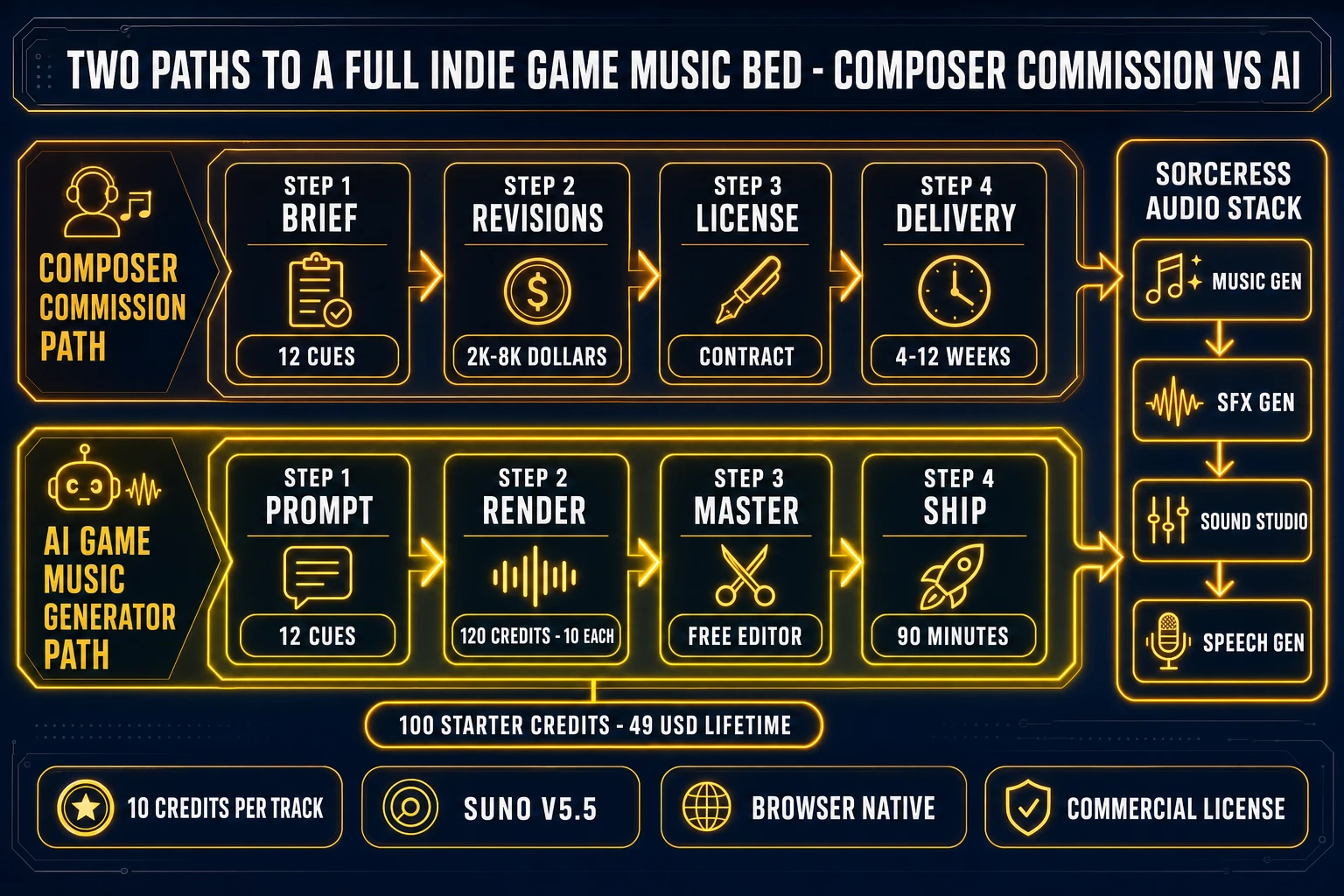
Two paths to a complete indie game music bed - composer commission path with brief revisions licensing delivery versus ai game music generator path with prompt render variation pick mix master ship to engine
Two paths to a complete indie game music bed — the composer-commission path costs $2,000 to $8,000 and ships in four to twelve weeks, while the ai game music generator path costs 120 credits (about $1.20) and ships in ninety minutes.

The verdict on an ai game music generator in 2026

The decision tree for a 2026 indie game ship is short. Pick a browser-native ai game music generator if the team has one person, no composer budget, a deadline measured in days, and a game that needs ten to twenty musical cues across menu, exploration, combat, and credits layers. Pick Sorceress specifically if the same project also needs SFX, procedural sounds, and NPC voice lines — the unified credit pool means the total audio bill stays under $20 for most small indie ships. Pick a consumer tool (Suno, Udio) if the project is a single track for a game jam where attribution is acceptable and commercial release is not on the roadmap. Pick a DAW-integrated plug-in only if the team already has a DAW seat and a working mixing engineer.

The structural rule for any ai game music generator pipeline in 2026: prompts should name genre, mood, instrumentation, tempo, and use case in that order; default to instrumental for the underscore layer; reserve custom mode for the title and credits cues; extend a single strong idea into derivative cues rather than generating each from scratch; and always run every shipping cue through the free editor for the trim, fade, normalize, and loop-trim pass before drop-in. A custom score for an indie game in 2026 takes ninety minutes and costs less than a sandwich — the only reason not to ship one is not knowing the rail exists. The Sorceress tools guide shows where Music Gen sits in the full pipeline, and the Sorceress home page wires the entire audio stack into one tab.

Frequently Asked Questions

What does an ai game music generator actually do for an indie game?

An ai game music generator is a text-to-audio engine that takes a short English description (orchestral fantasy mysterious hub town exploration loop, 8-bit chiptune triumphant boss fight, lo-fi hip-hop peaceful menu screen) and renders one or more MP3 or WAV tracks suitable for in-engine playback. For indie game work the engine collapses three historical bottlenecks at once: the freelance composer commission, the royalty-free library trawl, and the digital audio workstation editing session. Sorceress Music Gen runs on the Suno V5.5 model verified against src/app/api/music-gen/route.ts on June 25, 2026, charges 10 credits per generation, returns two musical variations per call, and supports extend, mashup, and upload-cover modes for derivative track work.

How many credits does Sorceress Music Gen charge per track in 2026?

Sorceress Music Gen charges 10 credits per generation, verified against the MUSIC_CREDIT_COST constant at line 5 of src/app/api/music-gen/route.ts on June 25, 2026. Each generation returns two musical variations of the same prompt, so the effective per-variation cost is 5 credits. The lyrics-generation action charges 2 credits per call. At the Starter credit pack rate verified against src/app/plans/page.tsx (10 dollars for 1,000 credits, no expiry), one rendered Music Gen call costs 10 cents. A 12-cue indie music bed rendered end-to-end costs 120 credits, equivalent to about 1 dollar 20 cents on the Starter pack. New accounts receive 100 starter credits at sign-up, enough to render the first 10 music generations (20 variations) without spending a paid credit.

What is the difference between Sorceress Music Gen and Sound Studio in 2026?

Sorceress Music Gen at /music-gen is the prompt-to-track music rail: type a description, get a finished MP3 musical cue from Suno V5.5 at 10 credits per generation with two variations returned. Sorceress Sound Studio at /sound-creator is a code-driven procedural rail at 1 credit per sound: a frontier coding model writes a Web Audio API or DSP script that generates the sound from primitives (oscillators, noise gens, envelopes, filters). The split matters because the two rails handle different audio classes well. Music Gen handles structured musical cues (underscores, stings, title themes, vocal songs); Sound Studio handles synthetic and procedural sounds (8-bit chiptune blips, retro UI bleeps, FM synth, parameterised whooshes that have to land at exact durations). For a complete game audio pack ship both rails: render music through Music Gen, generate the procedural layer through Sound Studio, edit both alongside SFX in the free SFX Editor.

Is there a free ai game music generator that works for commercial indie game projects?

The 2026 free-tier landscape splits into three categories. Consumer tools with attribution-only free tier: Suno and Udio both offer generous free renders per month but the free outputs require attribution and the commercial-use grant on those tiers is ambiguous for game shipping in most jurisdictions. DAW plug-ins with free trial credits: Aiva and Soundful both ship a free trial that exhausts within a single production session, with full commercial licensing on paid tiers from 11 to 33 dollars per month. Free trial credits with commercial license: Sorceress hands new accounts 100 starter credits, equivalent to roughly 10 Music Gen renders (20 musical variations), with full commercial use rights and no attribution requirement, then charges 10 cents per call thereafter on the Starter pack. The honest free path for a commercial indie game in 2026 starts at the Sorceress 100-credit allowance and tops up at 10 dollars per 1,000 additional credits.

How do I pair an ai game music generator with the rest of my game audio stack?

A complete indie game audio stack ships four layers and an ai game music generator owns one of them. Layer 1 is the music (looping underscore and stings), handled by Music Gen at 10 credits per generation for two variations. Layer 2 is the SFX (every fired event in the game), handled by SFX Gen at 3 credits per sound. Layer 3 is the procedural and synthesised layer (8-bit chiptune blips, retro UI bleeps, parameterised whooshes), handled by Sound Studio at 1 credit per sound. Layer 4 is the voice (NPC dialogue, narration, voice-cloned protagonist), handled by Speech Gen with voice cloning at 400 credits per identity. All four tools share one Sorceress credit pool and the free SFX Editor handles per-clip trim, fade, loop, and master across every clip from every rail.

What prompt patterns produce usable game music from Suno V5.5 in 2026?

Suno V5.5 (the model under Sorceress Music Gen) responds best to prompts that specify five things in order: a genre tag (chiptune, orchestral fantasy, dark synthwave, lo-fi hip-hop), a mood word (triumphant, melancholic, tense, peaceful), an instrumentation hint (acoustic guitar, full strings, 8-bit lead with snare drums, soft piano with pad), a tempo or energy cue (slow, driving, ninety beats per minute, half-time), and a use cue (menu loop, exploration underscore, boss fight, town ambience, credits roll). Prompts that work in production: orchestral fantasy mysterious soft strings and harp with light percussion slow tempo hub town exploration loop; 8-bit chiptune triumphant square-wave lead with snare drums and bass arpeggio driving tempo retro platformer boss fight; lo-fi hip-hop peaceful jazzy piano with vinyl crackle and soft drums slow tempo menu screen background loop. Prompts that fail in production are abstract (a sad song, a happy track), genre-only (background music, video game music), or any prompt that asks for a specific copyrighted song (like the Zelda theme) per the V5.5 content policy verified June 25, 2026.

How do I extend, mashup, or cover a track in Sorceress Music Gen in 2026?

Sorceress Music Gen ships three derivative-track actions exposed in the tool mode tabs at /music-gen, verified against src/app/music-gen/page.tsx on June 25, 2026. Extend takes a finished Music Gen track plus a continue-at timestamp in seconds and returns a continuation past that timestamp at 10 credits per call, with defaultParamFlag controlling whether the original prompt and parameters carry forward. Mashup takes two uploaded audio files and renders a track combining the musical ideas of both, at 10 credits per call with custom-mode flags (style, title, vocalGender, negativeTags, instrumental) applicable. Upload-Cover takes one uploaded audio file and re-records it in a different style, at 10 credits per call, with customMode plus a style block producing the most consistent cover output. The practical indie use of all three is consolidation: build one strong musical idea, then derive every related cue from it for 10 credits per derivative rather than generating each from scratch.

Are AI-generated music tracks legal to ship in a commercial indie game in 2026?

Commercial use rights depend on the platform terms of the specific ai game music generator. Sorceress Music Gen output is commercially licensable on every paid credit pack and on the 100-credit starter allowance, no attribution required, per the platform terms verified June 25, 2026. Suno and Udio free-tier outputs require attribution and lack clear commercial-use rights for game shipping in most jurisdictions; their commercial tiers (8 to 30 dollars per month range as of mid-2026) grant the commercial license but require recurring subscription. Aiva and Soundful both grant full commercial license on paid plans, and Aiva additionally allows MIDI export for full re-arrangement in a DAW. The 2026 indie-game rule of thumb: read the platform terms on the day you publish the game build, store the platform license confirmation alongside the asset folder, and track which cues came from which rail. The legal posture in most jurisdictions treats AI-generated audio output as commercially licensable so long as the underlying training data was licensed (the Sorceress, Suno, and Aiva positions) and so long as the platform terms grant commercial rights to the user.

Sources

  1. Video game music (Wikipedia)
  2. Music and artificial intelligence (Wikipedia)
  3. Generative artificial intelligence (Wikipedia)
  4. MP3 (Wikipedia)
  5. WAV (Wikipedia)
  6. Web Audio API (MDN)
  7. Indie game development (Wikipedia)
  8. Loop (music) (Wikipedia)
Written by Arron R.·3,239 words·14 min read

Related posts