An image to 3D model generator in 2026 should not be one model. It should be a picker. The eight production-grade neural mesh generators that ship inside one tab in Sorceress 3D Studio — Hunyuan 3D 3.1, Tripo v3.1 (H3.1), Tripo P1 Smart Mesh, Meshy 6, Hunyuan 3D 2.1, Pixal3D, TRELLIS 2, and Rodin Gen-2 — each win a different sub-job on the same source image. The honest 2026 workflow for any indie team is to upload one reference, route it through every image to 3D model generator on a single credit balance, and pick by job. This bench walks the eight picks worth running, the trade-offs that separate them, and the rigging plus engine handoff that turns a generated GLB into a shipped asset. Every fact verified against src/lib/threed-models.ts, src/app/_home-v2/_data/tools.ts, and the vendor changelogs on June 30, 2026.
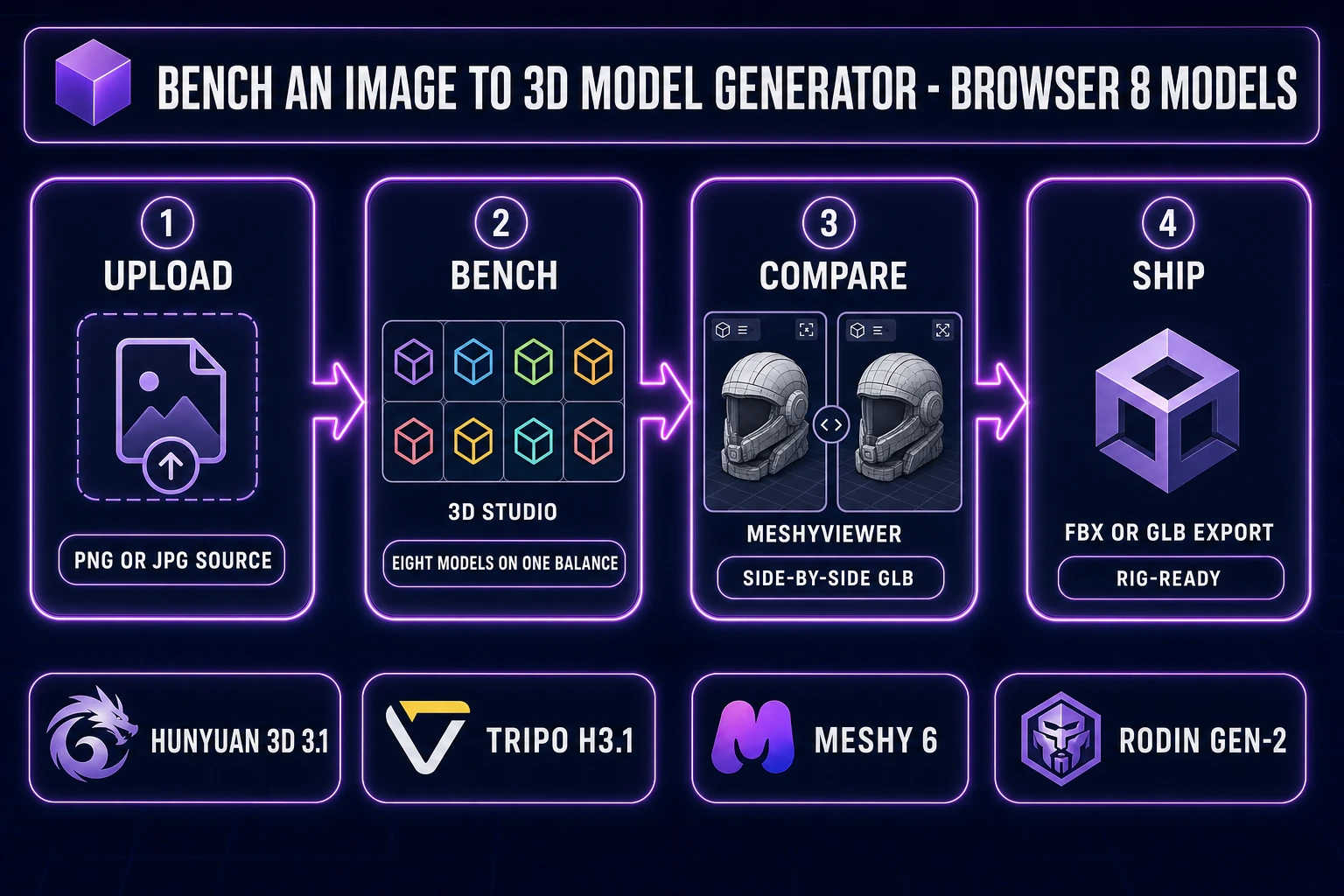
src/lib/threed-models.ts on June 30, 2026.What an image to 3D model generator actually has to do in 2026
The category covers any tool that takes a single 2D image — a photograph, a piece of concept art, or a frame from AI Image Gen — and returns a textured 3D mesh that drops into a game engine, a 3D printer slicer, or a browser viewport. The technical primitive sits at the intersection of three jobs: single-view 3D reconstruction (recovering depth and back-side geometry from one camera), neural texture generation (painting an albedo plus optional physically based rendering maps onto the recovered surface), and mesh post-processing (decimating to a target polycount or retopologising to clean quads).
The 2026 generation of image to 3D model generators runs on diffusion-transformer architectures trained on millions of paired image-to-mesh examples. The diffusion model primitive is identical to the image-generation one — a denoising network learning to reverse a noise process — but the output is a structured latent that decodes to a polygon mesh with a UV unwrap and a baked texture atlas. The reason a single photo of a knight from the front recovers a back side and a base mesh that survive being rotated in a viewport is not magic; it is that the network has seen a million knight references and learnt the prior that constrains the inversion.
For an indie or solo developer, an image to 3D model generator in 2026 is the difference between buying a stock asset, hiring a 3D artist, or running one prompt. The honest baseline today is that no single model wins every category — and the picker UX is the single biggest reason to use a multi-model studio instead of locking into one vendor subscription. The eight Sorceress 3D Studio picks are listed in the THREED_MODEL_ORDER array at src/lib/threed-models.ts lines 346–355, with the default recommendation surfaced via RECOMMENDED_MODELS on line 371. Verified June 30, 2026.
The honest limits — where every image to 3D model generator still hallucinates
Before the picker, the honest limits. Every image to 3D model generator in 2026 still hallucinates the back of the subject when given a single front-facing view. The front is grounded in real pixels; the back is whatever the diffusion prior decided was most plausible for a subject of that silhouette and class. For generic props seen from any angle that does not require fidelity to a specific design, the invented rear is acceptable. For a hero character whose back will be on camera in a third-person game, the invented rear is a problem. The honest answer is the multi-view pipeline — the four-view fusion path documents the workflow.
The second honest limit is small geometric detail. The 2026 generation handles silhouettes, large forms, and surface textures well, but small features under roughly one centimetre at character scale — buttons on a coat, gem facets on a sword pommel, eye eyelashes — are softened or smoothed away. Models that ship a high-polycount option (Tripo v3.1 at 2,000,000 polygons ultra, Rodin Gen-2 at 500,000 raw) preserve more of the small detail than models targeted at clean low-poly topology (Tripo P1, Pixal3D). The picker move is to bench both classes on the same source and pick by what the asset has to do downstream.
The third honest limit is the inside of the subject. Every neural mesh generator in 2026 returns the outer shell; the interior is empty unless explicitly modelled (a mouth cavity behind teeth, an inside of a hollow vase, a hole through a donut). For most game assets this is fine — the engine renders the visible faces and never raycasts the interior. For 3D printing, the slicer fills the interior at print time via infill. For destruction sims that need a true volumetric model, the picker is the wrong tool and a procedural voxel pipeline (Voxel Studio) is the right one.
The eight image to 3D model generator picks worth benching
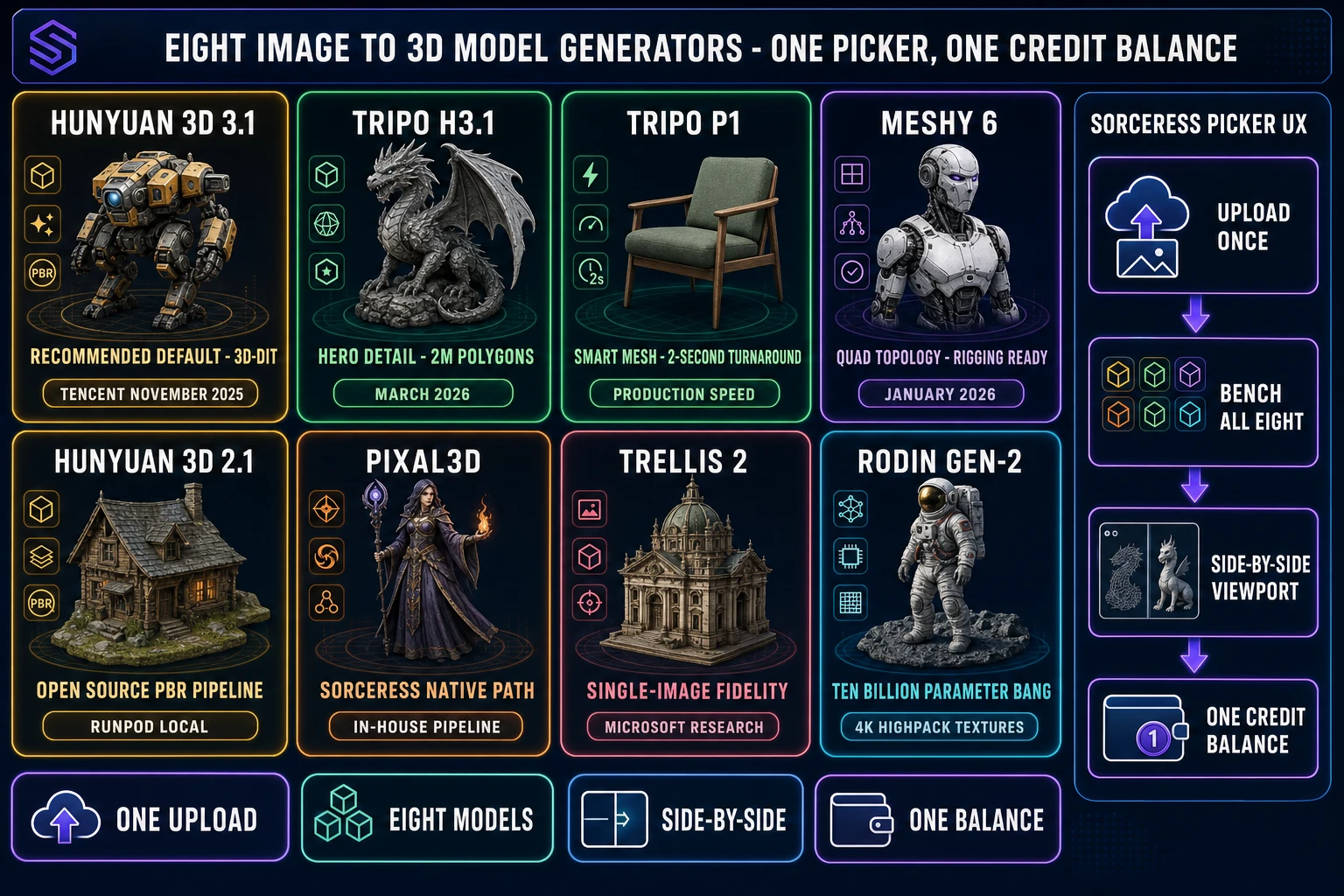
The eight production models in the Sorceress 3D Studio picker are listed in THREED_MODEL_ORDER at src/lib/threed-models.ts lines 346–355, in the order they appear in the UI. Each entry has a verified release date, a per-mode credit cost (per the getCredits helper on each model), and a distinct strength worth benching on the same source. Verified June 30, 2026.
- Hunyuan 3D 3.1. The Sorceress default per
RECOMMENDED_MODELS. Released globally November 25–26, 2025. 3D-DiT diffusion-transformer architecture. Outputs GLB and OBJ; optional PBR (base color, roughness, metallic); 40,000–1,500,000 triangle range; asynchronous generation typically 1–2 minutes. - Tripo v3.1 (H3.1). Released March 11, 2026. Up to 1,500,000 polygons at standard geometry, up to 2,000,000 polygons at ultra geometry. Three texture quality tiers (none, standard, HD), optional PBR, optional Quad Mesh, image plus text plus multi-image input modes.
- Tripo P1 Smart Mesh. Released March 11, 2026. Roughly two-second mesh generation, clean low-poly topology by design, 20,000-face cap range (48 to 20,000), PBR enabled by default. Built for production speed rather than maximum visual fidelity.
- Meshy 6. Released January 18, 2026. Triangle or quad topology, configurable polycount 100–300,000, optional remesh pass, optional 2K PBR maps, Pose Mode lock to A-Pose or T-Pose for clean auto-rig handoff.
- Hunyuan 3D 2.1. Open-source line from June 2025 (the predecessor to 3.1). Runs locally on a consumer GPU under an open license. Requires 16 GB or more of VRAM and a Python environment for the local install; surfaces in Sorceress when the RunPod gate is set.
- Pixal3D. The Sorceress in-house pipeline path. Optimised for the multi-step workflow inside 3D Studio rather than as a standalone vendor model. Tight integration with the downstream Auto-Rigging and Material Forge tools.
- TRELLIS 2. Microsoft Research single-image-to-3D. Strong on stylised, cartoony, and concept-art-style subjects where the picker needs a model trained on a different prior than the realistic-photo class.
- Rodin Gen-2. Released August 5, 2025, upgraded November 20, 2025. 10-billion-parameter BANG architecture, roughly 90-second generation, 2K Base Pack or 4K HighPack textures, four mesh density tiers (High 500,000 for Raw / 50,000 for Quad, Medium, Low, Extra Low), up to 5 images per request with concat and fuse multi-view modes.
The eight-model picker spans the full polygon and texture range a 2026 indie pipeline needs, from the ~2,000-poly stylised prop to the 2,000,000-poly hero asset, from the no-texture sketch bake to the 4K HighPack PBR pass. The same uploaded reference produces measurably different outputs across the eight models, which is the entire reason to bench rather than to pick one.
src/lib/threed-models.ts on June 30, 2026.Hunyuan 3D 3.1 — the default recommendation right now
Hunyuan 3D 3.1 is the Sorceress default per the RECOMMENDED_MODELS set in src/lib/threed-models.ts, and the right starting point for almost any first bake. The model was released globally on November 25–26, 2025 with a 3D-DiT (diffusion transformer) architecture that fuses single-image reconstruction with a learned 3D prior over millions of training meshes. Output options include GLB or OBJ, an adjustable triangle range from 40,000 to 1,500,000, and an optional PBR pass that bakes base color plus roughness plus metallic maps onto the recovered surface. Generation is asynchronous and typically returns in one to two minutes; commercial use is supported.
The model wins on general subjects — characters with organic shapes, props with rounded forms, environment pieces with mixed materials. The recovered silhouette is clean, the texture sampling from the source image is faithful, and the base mesh decimates well to engine-ready polycounts. For a first pass on an unknown subject, Hunyuan 3D 3.1 is the right pick because its strengths cover the broadest band of asset classes; the picker move is to start here, decide whether the output is good enough, and only fall back to another model if a specific weakness shows up. Asset weaknesses to watch: small mechanical detail on hard-surface props (a Tripo v3.1 ultra pass usually recovers more), and clean low-poly topology for tight realtime budgets (Tripo P1 or Pixal3D are the picks there).
The credit cost for Hunyuan 3D 3.1 is set in the credits field on its entry in src/lib/threed-models.ts, with the PBR toggle and the polycount target as the two knobs that move the line. For a typical first bake (default polycount, optional PBR on, GLB output), the cost sits in the same range as the Tripo v3.1 standard texture pass — well below the 100-credit signup grant for two evaluation runs on the same source.
Tripo v3.1 (H3.1) and Tripo P1 — hero detail vs production speed
The Tripo line shipped two releases on March 11, 2026 (per the docs.tripo3d.ai changelog 1.9.5 entry, verified June 30, 2026): Tripo v3.1, the hero-detail model, and Tripo P1 Smart Mesh, the production-speed model. The two share a vendor lineage but solve different jobs, and the picker moves are different.
Tripo v3.1 (also surfaced as "H3.1" in some product copy) targets maximum visual fidelity. The standard geometry quality reaches up to 1,500,000 polygons and the ultra geometry quality reaches up to 2,000,000 polygons — by far the highest polycount in the eight-model picker. The texture pipeline exposes three tiers (no texture for fast silhouette tests, standard for quick PBR-light bakes, HD for the final hero pass), with an optional PBR toggle and an optional Quad Mesh flag for projects whose downstream pipeline expects FBX with quads. The texture-alignment knob (prioritise source-image fidelity or geometry fidelity) is the one most worth tuning when the source image has a distinctive material the bake needs to preserve. Pick Tripo v3.1 when the asset is a hero character or prop that will be on camera in a cinematic, and the polycount budget is large enough to absorb the high-detail bake.
Tripo P1 Smart Mesh targets production speed. The mesh generation runs in roughly two seconds — fast enough to bench three or four variants on the same source while the operator is still looking at the picker. The face limit caps at 20,000 (range 48 to 20,000 per the source), and PBR is enabled by default. The clean low-poly topology by design makes P1 the right pick for game assets that need clean edges and a tight polycount budget without a manual retopo pass: weapons, hero props, vehicles, environment kits. The picker move is to run P1 first as a fast iteration loop, then commit to a v3.1 ultra pass on the variant that earned the bake.