Barrage How to Make a Bullet Hell (Browser Dodge Loop 2026)

By Arron R.11 min read
How to make a bullet hell in 2026: model a tiny player hitbox, ring and spiral pattern tables, and graze scoring in WizardGenie, then add Quick Sprites ships an

Most beginners who search “how to make a bullet hell” want a tiny ship, readable curtains of bullets, and a score that rises when they thread the gaps — not a Touhou-density boss bible on day one. A full arcade danmaku with scripted spell cards, rank systems, and frame-perfect replays is a specialist craft. A browser dodge loop is different. A coding agent scaffolds hitboxes, pattern emitters, and graze scoring from one prompt, and AI generation covers ships, arena art, and dodge audio. On desktop or web, that means WizardGenie for the move-emit-dodge interpreter, Quick Sprites for ship and enemy sheets, SFX Gen for shot and graze clips, and optional Music Gen for a combat bed. This guide is the honest end-to-end for how to make a bullet hell in 2026, as a weekend build you can finish once.
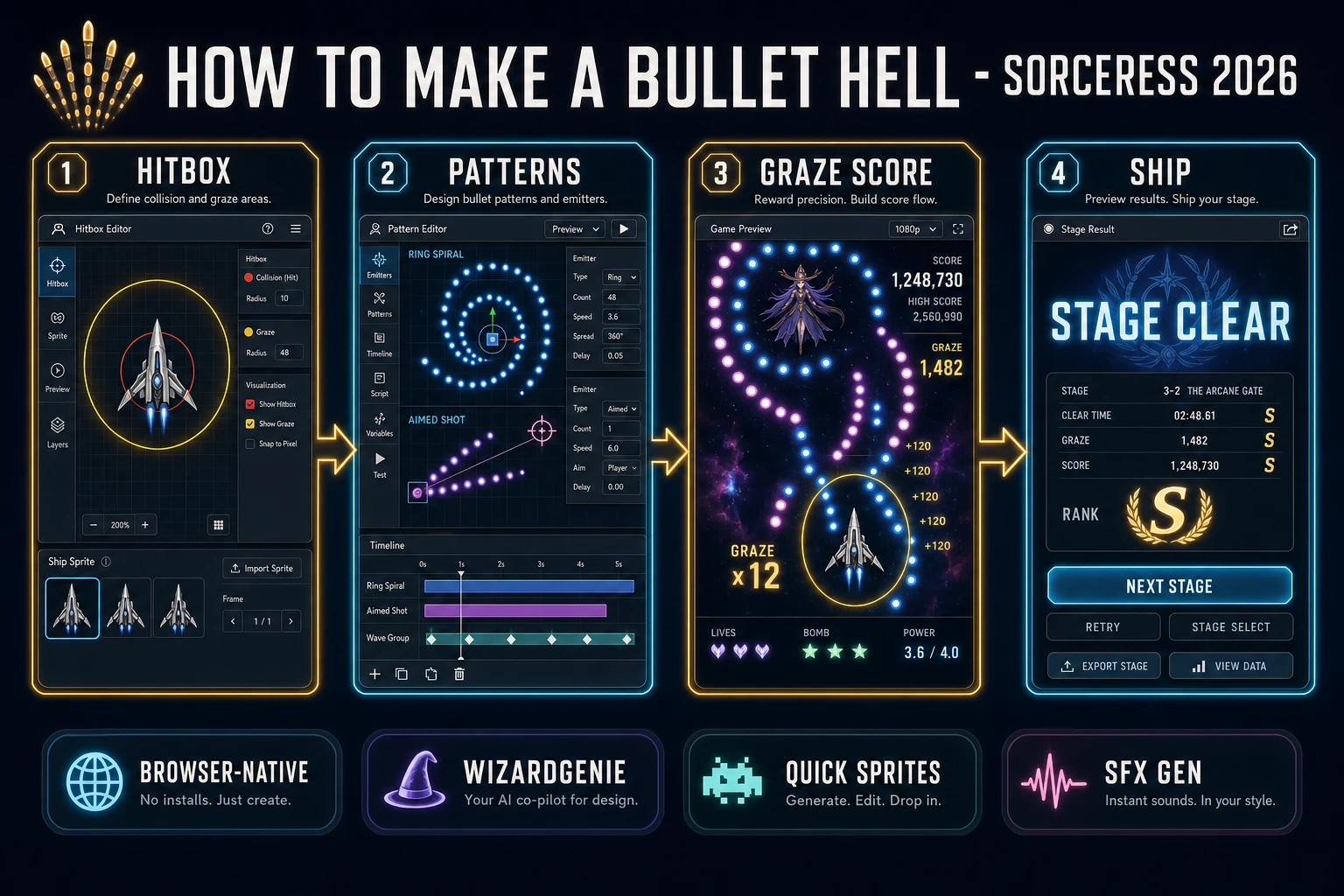
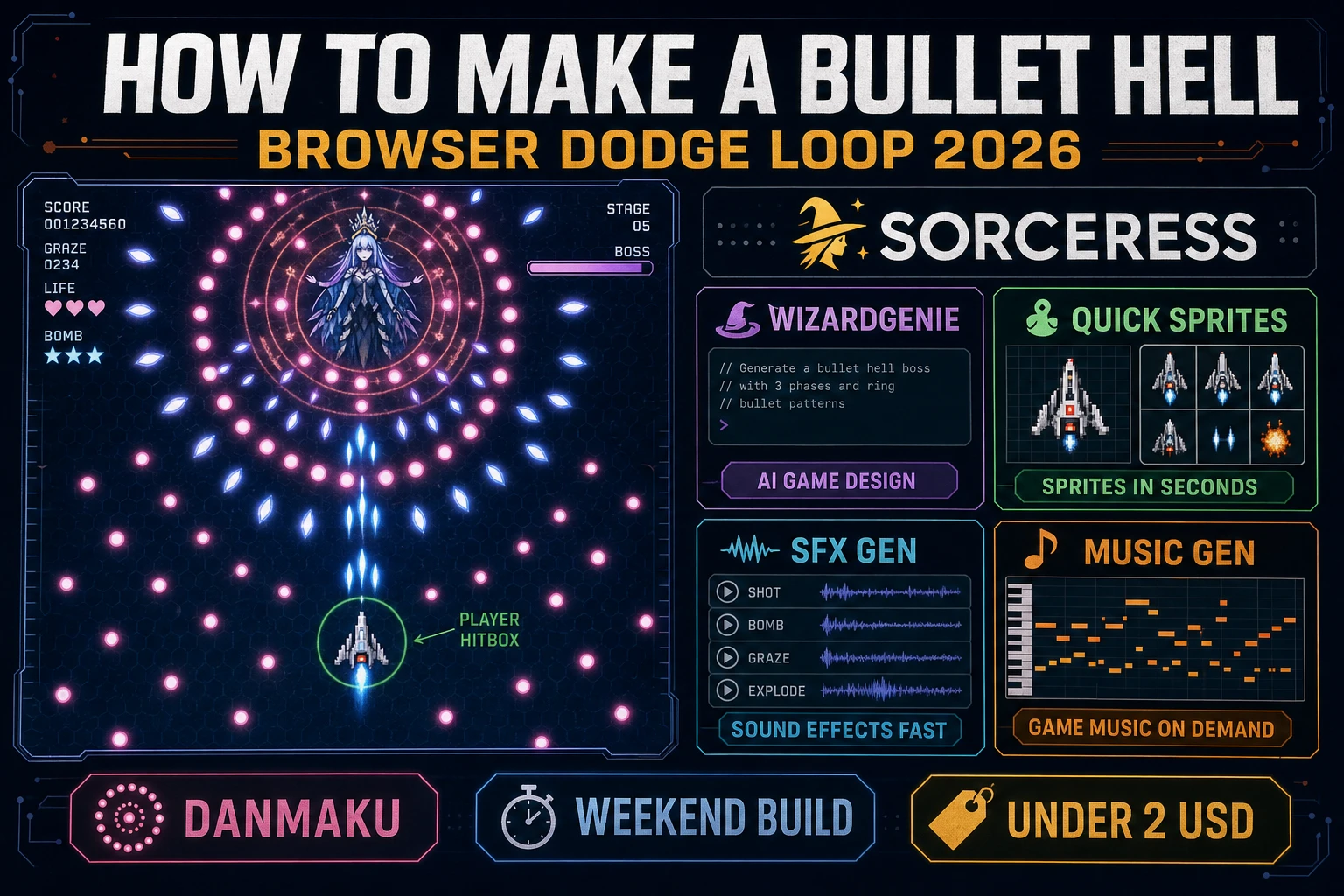
How to make a bullet hell browser pipeline: wire tiny hitbox, pattern emitters, and graze scoring in WizardGenie, then ship a browser dodge loop
The 2026 how to make a bullet hell recipe: generate ship and enemy sheets, model hitbox-pattern-graze logic in WizardGenie, then add SFX Gen dodge cues and Music Gen combat bed.

What how to make a bullet hell actually means in 2026

The query “how to make a bullet hell” hides three intents. Some searchers want a Unity asset pack with Cave-style bosses and fifty prefab spell cards — that is engine shopping, not a minimal playable loop. A second intent is a twin-stick arena where aiming and clearing enemies matter more than reading curtains — that is a shooter tutorial, and the sibling guide on how to make a shooter game already owns that loop. The third intent, and the one this guide targets, is a browser dodge loop: a player ship with a collision radius smaller than the sprite, three pattern emitters (aimed, ring, spiral), graze scoring for near-misses, and a ninety-second stage clear. That is a weekend build, it demos the Sorceress toolset, and it is the format most bullet hell tutorial and javascript bullet hell searchers actually want.

The presentation contract is small and strict. A title screen shows the stage name, control hints (move with WASD or arrows, hold fire, survive the curtain), and Play. The play screen shows the ship, a dense but readable bullet field, score and graze counters top-left, lives top-right, and optional mute toggle. When a bullet passes inside the graze ring without touching the hitbox, bump graze and play a soft tick. When a bullet hits the hitbox, lose a life or end the run. The bullet hell overview on Wikipedia (verified 2026-08-28) traces the genre from Batsugun (1993) through Cave and Touhou, and documents the fairness trick that still defines the form: only a small part of the ship collides. Cite that page when you write your itch.io blurb so players know you shipped a danmaku dodge loop, not a twin-stick arena with denser bullets bolted on.

The bullet hell dodge loop in one minute (move, emit, dodge, graze, clear)

Five moving parts, repeated until the player dies or clears the stage. First, move — read a keys Set each frame and update ship position with clamped bounds. Second, emit — pattern tables spawn bullets into an object pool on timers or enemy fire events. Third, dodge — advance every active bullet by velocity times delta time and cull off-screen entries. Fourth, graze — if distance to player is between hit radius and graze radius, award points once per bullet. Fifth, clear — when the stage timer ends or the boss HP hits zero, show STAGE CLEAR and a graze bonus. Homing missiles, spell-card phases, and rank systems are polish layered after one honest ring pattern is readable at sixty frames per second.
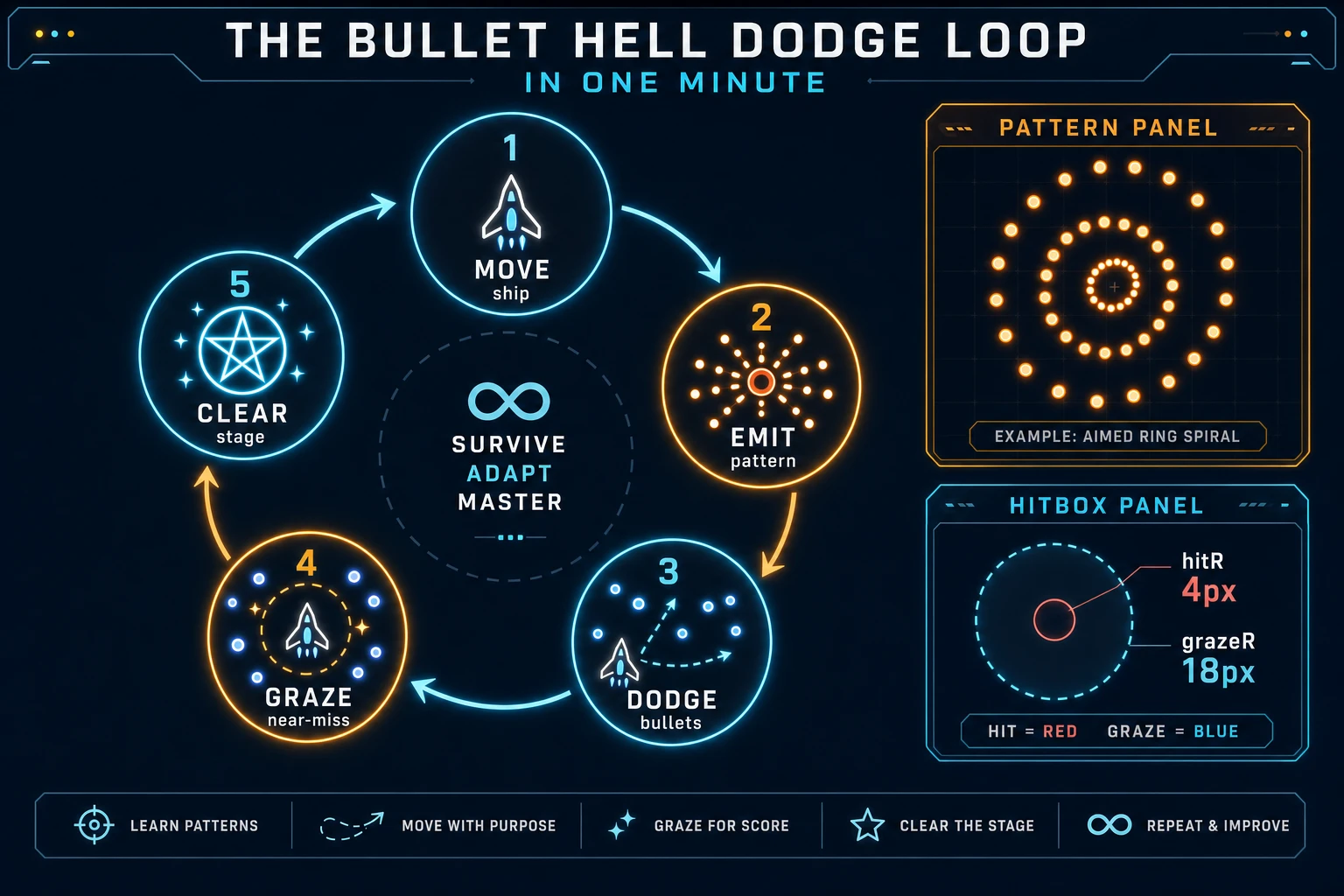
Bullet hell game loop state machine diagram showing move, emit patterns, dodge bullets, graze near-miss, and clear stage
The bullet hell dodge loop: move the ship, emit pattern tables, advance and cull bullets, score graze near-misses, then clear the stage.

Pick your engine for how to make a bullet hell: canvas, Phaser, or WizardGenie

Three good targets in 2026, each with a different trade-off. Vanilla JavaScript with canvas is the honest default and the pick this guide recommends for a first build. One <canvas> draws the arena, ship, and bullets. Track input with a keys Set, run the loop with requestAnimationFrame, and resolve hits with circle distance checks. Total code footprint for a working browser danmaku game is under 500 lines including pool reuse, three emitters, graze scoring, and save for high score. The MDN Canvas API docs cover drawing, and the requestAnimationFrame guide covers smooth delta-time ticks.

Object pools versus push-and-splice arrays stay readable for jam scope: preallocate a fixed array of bullet objects with an active flag, recycle the first inactive slot on spawn, and skip inactive entries in the update pass. Splicing mid-frame under a dense curtain will hitch on mid-range phones — pool reuse is the single performance habit that separates a playable html5 bullet hell from a slideshow.

Phaser v4.2.1 “Giedi” (released 9 July 2026, verified 2026-08-28 on the official Phaser stable download page) becomes the right pick if you want Arcade Physics overlap callbacks, particle trails on bullets, or a Scene stack for title-stage-results with tweened pattern transitions. Phaser does not invent your pattern math — you still need the same aimed, ring, and spiral emitters. Use Phaser when particle trails and multi-phase bosses are the product; use raw canvas when the product is a danmaku pattern tutorial people can read in one sitting.

WizardGenie is not a separate rendering engine — it scaffolds whichever of the two you pick from a single natural-language prompt. WizardGenie ships as both a desktop app (Windows installer with auto-update, available to Early Access supporters and above) and a no-install web build. Its coding-model lineup covers Claude Opus 4.7, Claude Sonnet 4.6, GPT-5.5, Gemini 3.1 Pro, DeepSeek V4 Pro, Kimi K2.5, Grok 4.2, and MiniMax M2.7 (verified 2026-08-28 in src/app/_home-v2/_data/tools.ts). For bullet hell loops, any frontier model scaffolds hitbox radii, pattern tables, and graze handlers in one prompt. Pair a frontier planner with a budget executor like DeepSeek V4 Pro or Kimi K2.5 for the typing pass — the Dual-agent pattern lands most projects at roughly one-fifth the single-frontier cost.
Step 1 — model hitbox, bullet pool, and pattern tables

Nothing else in the pipeline matters if the ship dies to its own sprite bounds or bullets allocate every frame. Start with a small, testable model:

const HIT_R = 4;
const GRAZE_R = 18;
const POOL = Array.from({ length: 800 }, () => ({
  active: false, x: 0, y: 0, vx: 0, vy: 0, grazed: false,
}));

const player = { x: 200, y: 520, lives: 3 };

function spawnBullet(x, y, angle, speed) {
  const b = POOL.find((p) => !p.active);
  if (!b) return;
  b.active = true;
  b.x = x; b.y = y;
  b.vx = Math.cos(angle) * speed;
  b.vy = Math.sin(angle) * speed;
  b.grazed = false;
}

function emitRing(x, y, count, speed) {
  for (let i = 0; i < count; i++) {
    spawnBullet(x, y, (Math.PI * 2 * i) / count, speed);
  }
}

function emitSpiral(x, y, startAngle, speed) {
  spawnBullet(x, y, startAngle, speed);
}

function emitAimed(x, y, speed) {
  const angle = Math.atan2(player.y - y, player.x - x);
  spawnBullet(x, y, angle, speed);
}

function updateBullets(dt, onGraze, onHit) {
  for (const b of POOL) {
    if (!b.active) continue;
    b.x += b.vx * dt;
    b.y += b.vy * dt;
    if (b.x < -20 || b.x > 420 || b.y < -20 || b.y > 640) {
      b.active = false;
      continue;
    }
    const dx = b.x - player.x;
    const dy = b.y - player.y;
    const d2 = dx * dx + dy * dy;
    if (d2 < HIT_R * HIT_R) {
      b.active = false;
      onHit();
    } else if (!b.grazed && d2 < GRAZE_R * GRAZE_R) {
      b.grazed = true;
      onGraze();
    }
  }
}

Unit-test three cases before you generate art: a bullet inside HIT_R triggers hit; a bullet between HIT_R and GRAZE_R awards graze once; and a full pool of 800 active bullets still updates under 8 ms on a mid-range laptop. Those three tests catch ninety percent of javascript bullet hell bugs. Keep the first ring at 12 bullets and spiral speed modest so playtesters can read gaps within ten seconds.

Step 2 — wire pattern timeline and graze HUD in WizardGenie

With pool helpers drafted, open WizardGenie. Drop in a bare index.html shell with a 400×600 canvas and placeholder HUD labels for score, graze, and lives. Give the agent one paragraph: Build a browser bullet hell. Player ship moves with WASD, clamped to the canvas. Hit radius 4 px, graze radius 18 px. Bullet pool of 800. Stage timeline: every 1.2s emit a 12-bullet ring from a mid-screen enemy; every 0.35s emit one spiral bullet with angle += 0.28; every 2s emit three aimed shots toward the player. Score +100 on enemy kill, +10 per graze. Three lives. Show STAGE CLEAR at 90 seconds. Autosave high score to localStorage. Feed that to any coding model in the lineup and the interpreter scaffolds in under five minutes.

The remaining hour is polish via follow-up prompts. Add a focus slow mode — hold Shift to halve move speed and draw the hitbox as a bright dot — eight lines. Add a bomb clear — one bomb per life that deactivates nearby bullets and awards half graze — twelve lines. Add a pattern telegraph — flash the enemy red 200 ms before a ring — six lines. Add a results screen — graze count, max combo, retry — ten lines. Each item is a follow-up prompt, and the whole shmup dodge loop comes together over a Saturday afternoon.

Optional sibling: if your jam needs twin-stick aim and wave tables instead of curtain reading, borrow the arena loop from how to make a shooter game — same canvas shell, different win condition. For a lighter vertical scroll without dense patterns, the related post on how to make Space Invaders covers formation shoots and barriers.

Step 3 — Quick Sprites ships, SFX Gen dodge cues, Music Gen combat bed

Flat colored triangles read as a tech demo even when the pattern math is perfect. Four asset passes cover the whole browser danmaku game experience:

  • Player ship sheet — one 48×48 four-direction or idle sheet from Quick Sprites. Prompt for “top-down tiny fighter ship, neon cyan outline, transparent background, shmup sprite, 48x48”. Quick Sprites costs 9 credits per generation (CREDITS_PER_GEN in src/app/quick-sprites/page.tsx).
  • Enemy sheets — two mid-boss or grunt silhouettes from Quick Sprites at 9 credits each (18 credits total).
  • Bullet and explosion VFX — one Quick Sprites pass for small orb bullets and a short burst frame (9 credits).
  • Arena backdrop — one starfield or neon corridor from AI Image Gen. Prompt for “vertical shmup stage background, dark navy starfield, subtle parallax layers, 400x600, game backdrop, no characters”. Nano Banana Pro costs 18 credits per generation per src/lib/models.ts.

Open SFX Gen, describe each clip in plain language (“short laser peep, UI shot”, “soft graze tick, glass chime”, “player hit thud”, “death crackle”, “ring pattern sting”), and export WAV into your assets/audio/ folder. Billing is 1 credit per second of generated audio per src/app/sfx-gen/page.tsx — five short clips land around 6 credits total.

For the background loop, open Music Gen and prompt for “fast synth shmup combat loop, driving drums, no vocals, seamless loop, 30 seconds”. Music Gen costs 10 credits per generation (MUSIC_CREDIT_COST in src/app/music-gen/page.tsx). Mute by default with a toggle — mobile browsers often block autoplay until the first click anyway.

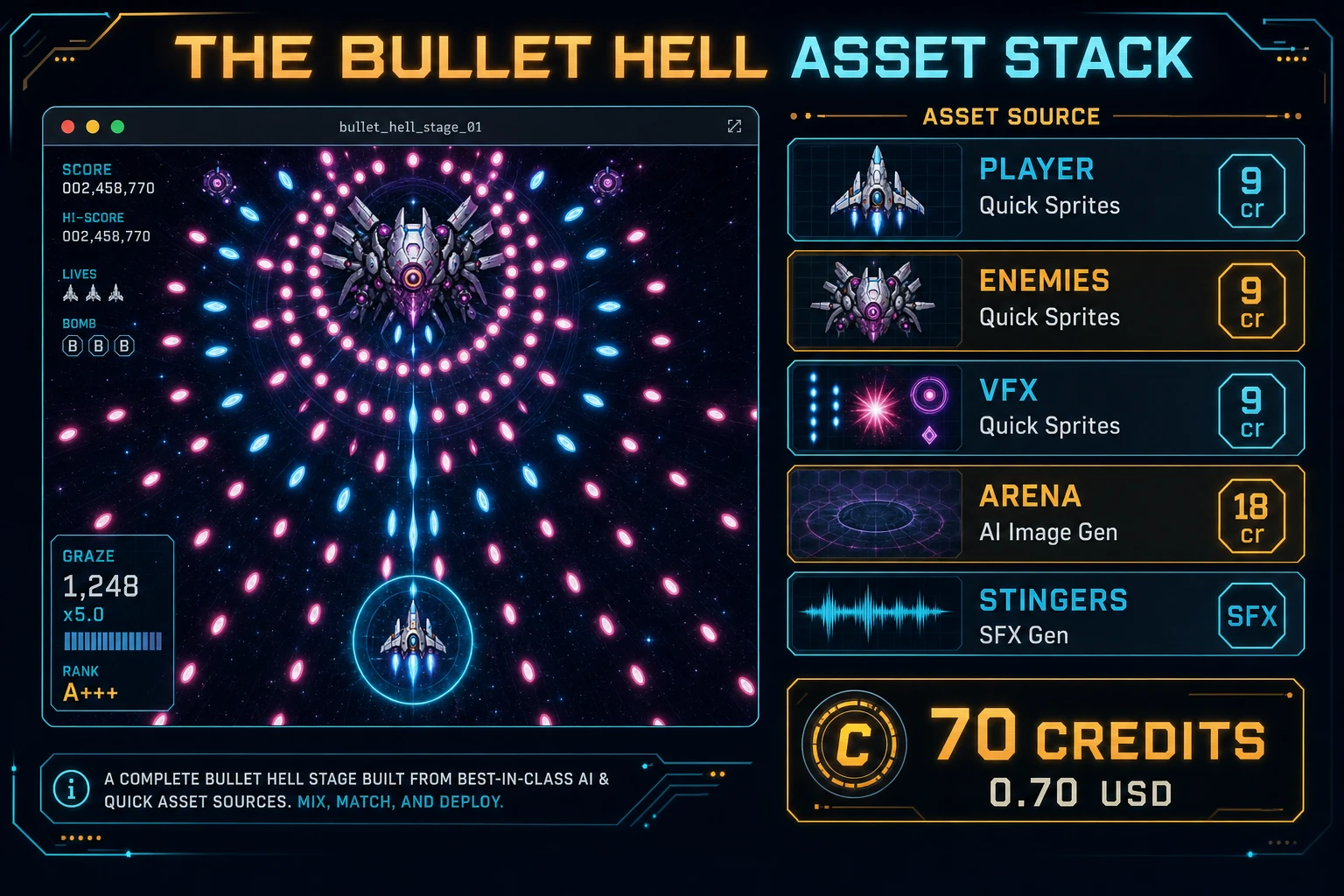
Bullet hell asset stack diagram showing Quick Sprites ships and VFX, AI Image Gen arena, SFX Gen dodge cues, and Music Gen combat bed with 70 credit total
The bullet hell asset stack: Quick Sprites for ships and VFX, AI Image Gen for the arena, SFX Gen for dodge cues, Music Gen for optional combat bed — roughly 70 credits total.

Step 4 — playtest the browser dodge loop like a jam judge

Before you share the build, run a five-minute checklist borrowed from game-jam judging:

  1. Hitbox is fair — focus mode shows the 4 px core; deaths feel earned, not sprite-wide.
  2. Patterns are readable — first ring leaves visible gaps; spiral is slow enough to weave; aimed shots telegraph.
  3. Graze works once — near-miss awards +10 once per bullet; no double-count when lingering.
  4. Pool stays calm — dense curtains never hitch; off-screen bullets recycle; no unbounded array growth.
  5. Clear feels earned — ninety-second STAGE CLEAR shows graze bonus; high score persists across refresh.

Log issues as WizardGenie follow-ups, not rewrites. “Slow spiral by 20 percent and flash the enemy before each ring” is one prompt. “Add a second mid-stage enemy that only fires aimed triples” is another. The Sorceress tools guide lists every asset tool if you want to swap Music Gen for Sound Studio on a longer loop.

What how to make a bullet hell costs on Sorceress in 2026

A honest budget for the stack above against the 2026 Sorceress rate card (verified 2026-08-28 against local source):

  • Player ship Quick Sprites sheet: 9 credits (0.09 USD)
  • Two enemy Quick Sprites sheets: 18 credits (0.18 USD)
  • Bullet and explosion VFX Quick Sprites: 9 credits (0.09 USD)
  • One AI Image Gen arena backdrop: 18 credits (0.18 USD)
  • Five SFX Gen clips (~6 seconds total): ~6 credits (0.06 USD)
  • One Music Gen combat bed: 10 credits (0.10 USD)
  • Coding-model API time for WizardGenie scaffolding: under 0.40 USD with a planner plus budget executor pair

Total art and audio: roughly 70 credits or 0.70 USD. The free 100-credit signup grant (src/app/api/admin/credits/route.ts) covers the full stack outright with room for a second Music Gen take. If you already built a shooter game or Space Invaders clone in the same jam week, reuse the SFX Gen shot peep for player fire — short laser peeps generalize well across shmup dodge loop builds.

Frequently Asked Questions

What separates bullet hell from a normal shooter?

A twin-stick or top-down shooter focuses on aiming and clearing enemies. A bullet hell (danmaku) focuses on reading patterned curtains of projectiles and threading a tiny hitbox through gaps. Wikipedia’s bullet hell page (verified 2026-08-28) traces the form to Batsugun (1993) and notes the genre’s core fairness trick: only a small part of the ship collides, not the whole sprite. Sibling guide how to make a shooter game covers arena waves and twin-stick aim; this post owns pattern tables, hitbox radius, and graze scoring.

Which patterns should a beginner implement first?

Ship three emitters before anything fancy: aimed shots toward the player, a ring burst (N bullets evenly spaced in 360 degrees), and a spiral (angle increments each spawn). Those three teach pool reuse, angle math, and readable gaps. Skip homing missiles, scripted boss phases, and Touhou-density layers until one pattern is readable at 60 fps and the player can clear a 90-second stage. That is what most how to make a bullet hell and bullet hell tutorial searchers expect from a weekend build.

Canvas or Phaser for a browser danmaku game?

Canvas with a bullet object pool is the honest default for a first html5 bullet hell — under 500 lines including move, fire, pattern spawn, circle collision, and graze. Phaser v4.2.1 Giedi (released 9 July 2026, verified 2026-08-28 on phaser.io/download/stable) adds Arcade Physics overlap, particle trails, and Scene stacks if you plan multi-phase bosses with tweened pattern transitions. Pick Phaser when particle trails and boss scenes are the product; pick raw canvas when the product is a danmaku pattern tutorial people can fork in one file.

How does graze scoring work in javascript bullet hell code?

Keep two radii on the player: hitR (for example 4 px) and grazeR (for example 18 px). Each frame, for every active bullet, if distance to player is less than hitR, kill the player; else if distance is less than grazeR and that bullet has not yet been marked grazed, add graze points and flag it. Never count the same bullet twice. Unit-test three cases: a bullet inside hitR ends the run, a bullet between hitR and grazeR awards graze once, and a bullet outside grazeR does nothing.

How much does it cost to build a bullet hell on Sorceress?

A first-project browser dodge loop budgets like this against the 2026 Sorceress rate card (verified 2026-08-28 against local source). Player ship plus two enemy sheets plus one bullet/explosion VFX from Quick Sprites at 9 credits each = 36 credits. One arena backdrop from AI Image Gen at Nano Banana Pro 18 credits = 18 credits. Five SFX clips at 1 credit per second (src/app/sfx-gen/page.tsx) — player shot, graze tick, hit, death, pattern sting — roughly 6 credits. One Music Gen combat bed at 10 credits (MUSIC_CREDIT_COST in src/app/music-gen/page.tsx). Total roughly 70 credits or 0.70 USD plus under 0.40 USD in coding-model API time. The free 100-credit signup grant (src/app/api/admin/credits/route.ts) covers the full stack outright.

Sources

  1. Bullet hell - Wikipedia
  2. MDN - Canvas API
  3. MDN - Window: requestAnimationFrame()
  4. Phaser v4.2.1 Giedi download
Written by Arron R.·2,479 words·11 min read

Related posts