Bake Generative AI for Game Development (2026 Stack)

By Arron R.12 min read
The 2026 stack for generative AI for game development is six tools wired together: Quick Sprites for 2D, 3D Studio for meshes, Sound Studio for audio, WizardGen

The phrase "generative ai for game development" gets searched a few hundred times a month in 2026, but the answer behind that query has changed every quarter for two years. The 2024 version was "use one tool per asset type and stitch the results in Photoshop." The 2025 version was "the model picker is too crowded; stop and pick three." The 2026 version is something else: a small stack of browser tools that interoperate cleanly enough that a single developer can take a prompt to a playable build in an afternoon. This piece walks the honest 2026 stack for generative AI for game development — six tools that each solve one slice of the pipeline — with credit costs, model versions, and export formats verified against the live source on May 26, 2026.
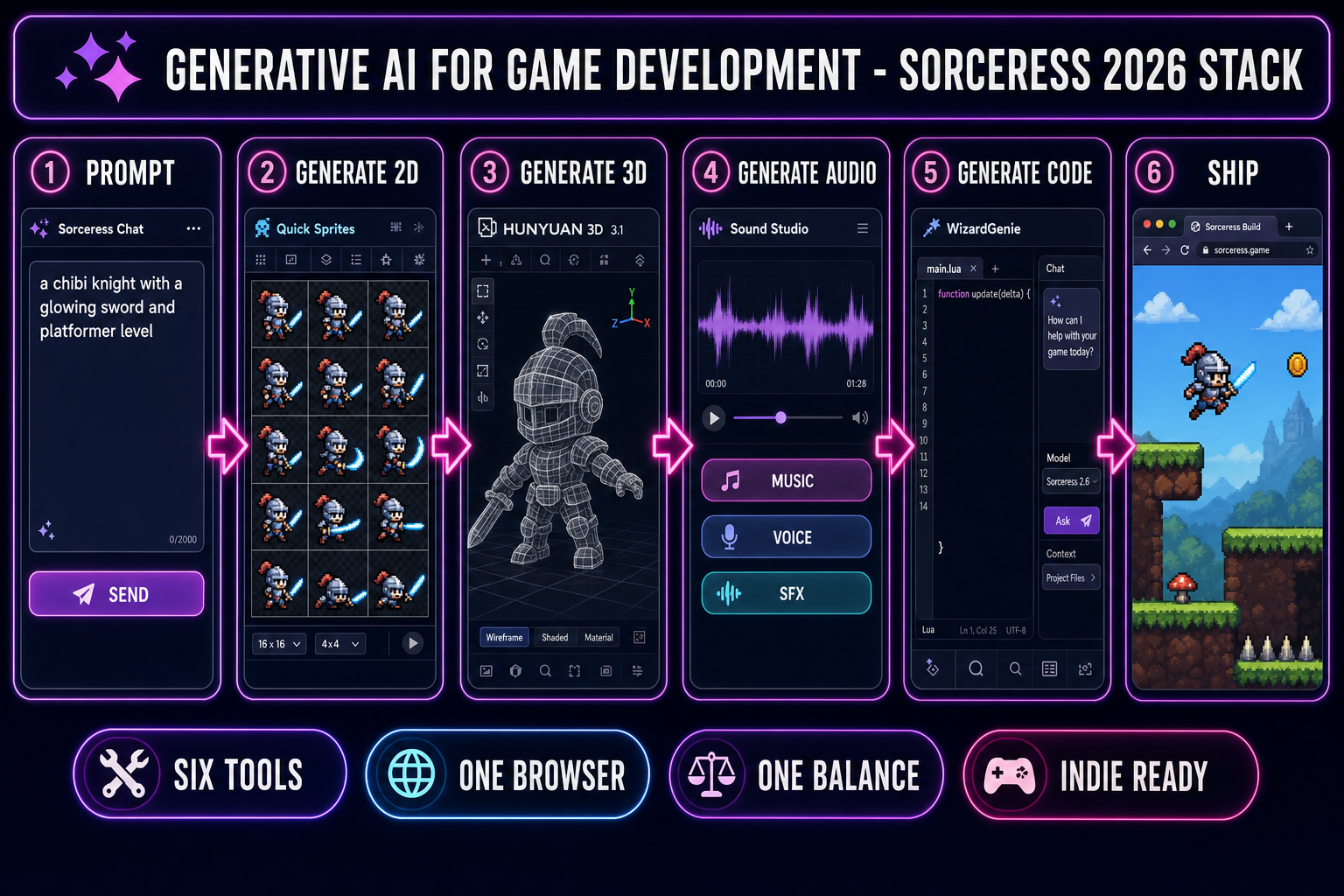
Six-panel pipeline diagram for generative ai for game development — prompt to 2D sprite to 3D mesh to audio to code to shipped browser game
The 2026 stack for generative AI for game development, in six panels — prompt to playable browser game without an engine install. Hero image generated with GPT Image 2. Source: Generative artificial intelligence on Wikipedia.

What generative ai for game development actually means in 2026

Generative AI for game development in 2026 is the practice of using neural-network models trained on game art, audio, and code to produce the assets and scripts a real game needs to ship. The shift from earlier eras is not the existence of the models — image diffusion has been usable since 2022, music models since 2023, frontier coding models since late 2024 — but the fact that the tools have started to interoperate. A 2D sprite generated in one browser tab now imports cleanly into a Three.js scene running in another. A 3D mesh exported from a generator now lands in Phaser without a re-export through Blender. The pipeline that used to cost a week of glue work now costs an afternoon.

The Sorceress Game Creation Suite is one expression of that interoperability story. Six tools, all browser-native, all sharing a single credit balance — Quick Sprites for 2D sprite sheets, AI Image Gen for static art, 3D Studio for image-to-3D meshing and rigging, Sound Studio for music, voice, and SFX, Tileset Forge for level tilesets, and WizardGenie for the gameplay code. The piece below walks each tool, what it generates, what it costs, and how the export feeds the next step.

The framing matters because "generative ai for game development" gets used loosely. It is not the same as procedural generation (which uses hand-written algorithms; see Procedural generation on Wikipedia). It is not the same as full-game generation (which does not exist; the runtime still runs on a game engine). It is the asset-and-code production layer, not the design layer. Reading the rest of this piece with that distinction in mind keeps the expectations honest.

Generate the 2D art — sprites, images, and tilesets

The 2D path is the most mature of the 2026 generative AI for game development branches because still-image diffusion is the most mature class of generative models. The Sorceress 2D path runs through three tools and produces every 2D asset a typical indie game needs: characters, props, backgrounds, sprite sheets, and tilesets.

Quick Sprites generates animated sprite sheets directly. The tool runs the Retro Diffusion retro-diffusion/rd-animation model at 9 credits per generation, verified against the live source at src/app/quick-sprites/page.tsx on May 26, 2026. Three style presets ship in the picker: Four Angle Walking (48×48 four-direction four-frame walk cycles), Small Sprites (32×32 with six rows for walk, arms, look, surprise, and lay-down), and VFX Effects (24-to-96 pixel square animations for fire, explosions, and lightning). Each output is a PNG sprite sheet that imports directly into Phaser, Godot, Unity, or any other 2D engine. The default workflow: prompt a character, generate, accept or re-roll, drop the PNG into the asset folder.

AI Image Gen is the still-image generator behind every static piece of 2D art the project needs — character portraits, item icons, background plates, UI illustrations. The picker ships ten image models in 2026, verified against src/lib/models.ts on May 26, 2026: Z-Image at 2 credits, Flux 2 Pro at 6 base credits plus 3 per reference image, Seedream 4.5 at 6 credits, Seedream 5 Lite at 6 to 8 credits, GPT Image 1.5 at 3 to 17 credits by quality, GPT Image 2 at 3 to 17 credits by quality, Nano Banana at 6 credits, Nano Banana Pro at 18 credits 2K or 33 credits 4K, Nano Banana 2 at 9 to 17 credits by resolution, and Grok Imagine at 6 credits. Reference image support is the differentiator for game work — Flux 2 Pro accepts up to 8 references, Nano Banana Pro 8, Nano Banana 2 14, GPT Image 2 10, Seedream 5 Lite 14 — because keeping a character on-model across a hundred generations is the actual production constraint, not initial generation quality.

Tileset Forge sits at the boundary between generative AI and procedural generation. The tool generates tile artwork from a prompt (grass, stone, water, dungeon walls, etc.) and outputs a tilesheet PNG plus a JSON map describing tile indices and adjacency rules. A procedural world-builder like Wave Function Collapse or a hand-rolled cellular-automata level generator then arranges the tiles into rooms. The combination is the right one for indie scope: AI handles the art, an algorithm handles the layout, and the developer keeps full control of the level rules.
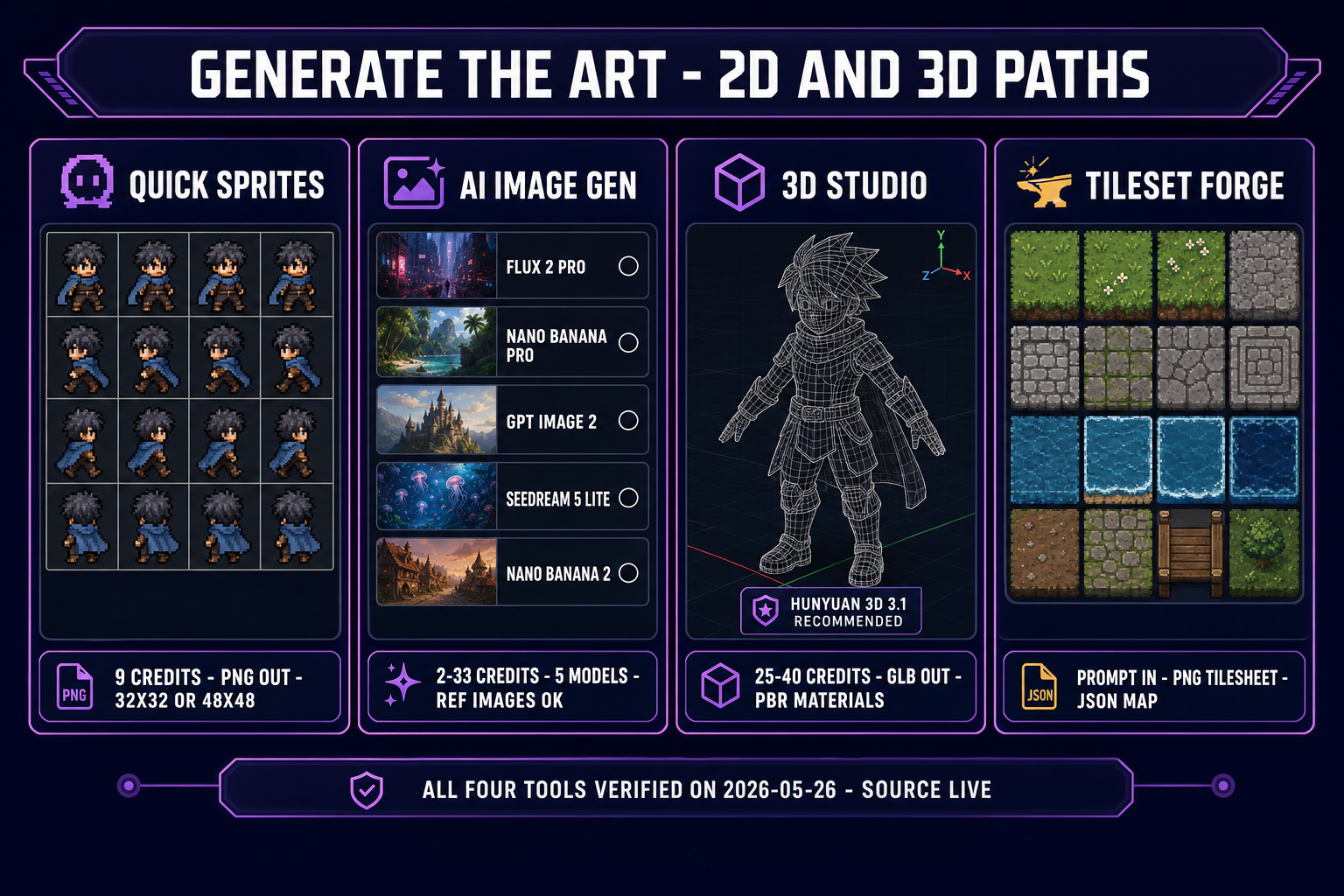
Four-panel diagram of the 2D and 3D asset tools in the generative ai for game development pipeline — Quick Sprites, AI Image Gen, 3D Studio, Tileset Forge with credits and output formats labeled
The four art-generation tools in the Sorceress generative-AI stack, with credit costs and output formats verified against the live source on May 26, 2026. Diagram generated with GPT Image 2.

Generate the 3D art — image-to-3D, rigging, animation

The 3D branch of generative AI for game development moved from "interesting demo" to "production usable" between mid-2025 and early 2026, because three things happened in parallel: image-to-3D models started outputting clean topology instead of melted blobs, automatic rigging matured to the point where a humanoid mesh could be skeleton-attached without manual marker placement, and the GLB format (the industry-standard glTF 2.0 spec from the Khronos Group) became the universal target every engine reads.

3D Studio handles all three steps in one tool. The model picker ships six image-to-3D options, verified against src/lib/threed-models.ts lines 198-221 on May 26, 2026: Hunyuan 3D 3.1 (the recommended default at 25 credits per generation, with PBR materials, configurable face count from 40K to 1.5M, and text-to-3D plus image-to-3D modes), Meshy 6, TRELLIS 2 (Microsoft Research, 4B parameters, the highest-quality option at 40 credits per generation at 1024-cubed resolution), TRELLIS v1 (the budget option), Hyper3D Rodin, and Tripo v3.1. The default rail order surfaces Hunyuan first because it lands the cleanest topology-plus-texture combination at the lowest cost for typical character work; TRELLIS 2 is the upgrade path when the project needs the highest geometry detail.

The rigging step inside 3D Studio uses a marker-driven workflow that places skeleton joints on the mesh based on a small number of user-clicked anatomical points (head, shoulders, hips, knees), then runs auto-weighting to bind the mesh to the skeleton. The output is a fully rigged GLB with a humanoid skeleton ready for animation. The animation step then either applies pre-built motion clips (idle, walk, run, jump) or generates novel animations from text prompts via an AI animation backend. The whole pipeline — image to mesh to rig to animated GLB — runs in the same browser tab without an export-import cycle.

The reason this matters for generative AI for game development specifically: a 2026 indie 3D project no longer needs a Blender seat, an Adobe ID, or a Maya license to ship a rigged hero character. The whole pipeline runs in the browser. The exported GLB drops directly into a Three.js scene, a Godot 4.x scene, a Phaser 3D scene, or any external engine that reads glTF — which is every major engine in 2026. The integration overhead is one file copy.

Generate the audio — music, voice, SFX

Audio is the slice of generative AI for game development that surprises new pipeline users the most. The expectation walking in is that audio generation is the weakest link; the reality in 2026 is that the audio tools produce ship-quality output for indie scope on the first or second roll. The Sorceress audio path runs through Sound Studio, which packages three model families behind one UI: a music generator, a voice synthesizer, and an SFX generator.

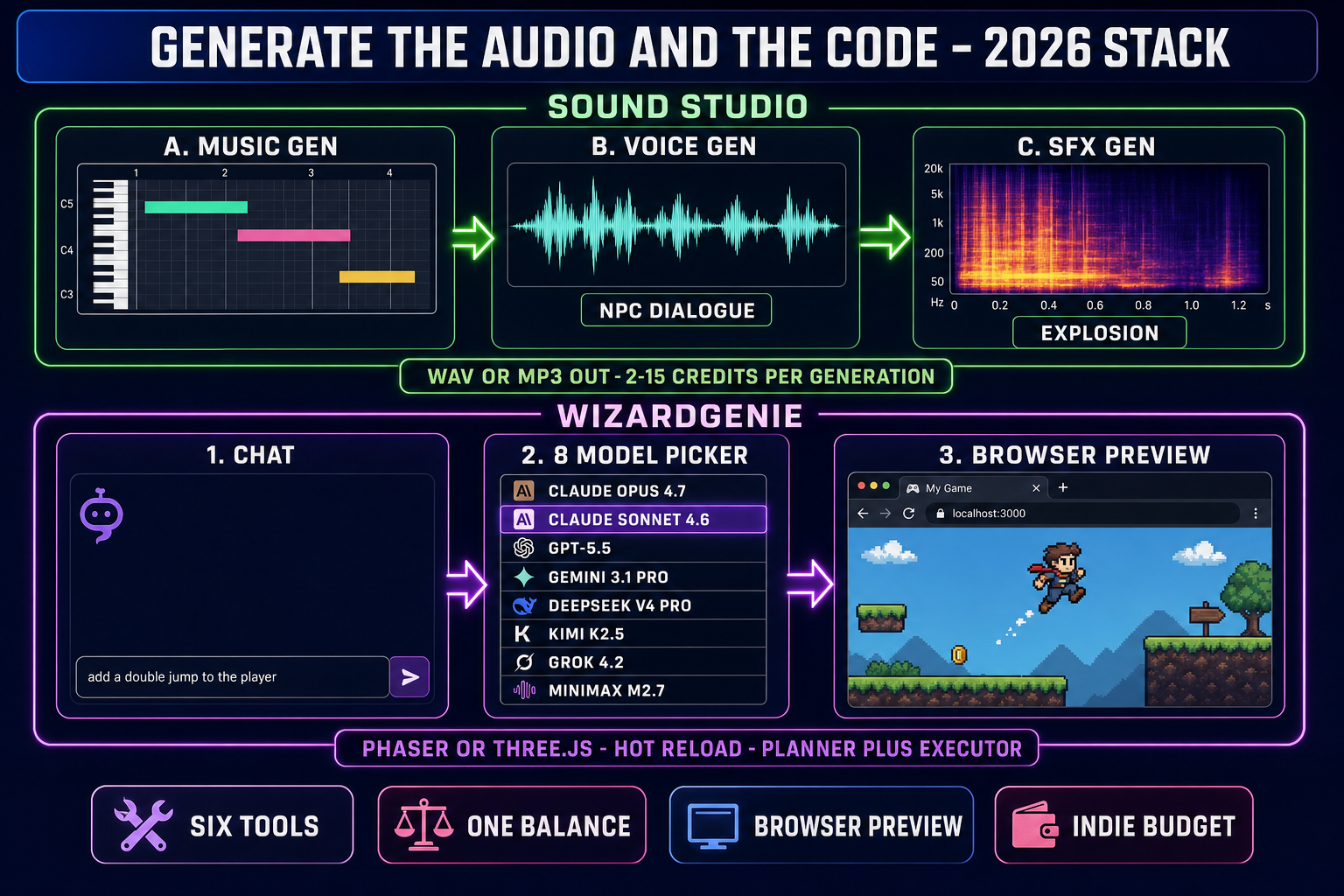
The music generator produces full-length tracks from a natural-language prompt. A typical game-music prompt looks like "8-bit chiptune boss battle theme, 140 BPM, looping, 60 seconds" and the output is a 60-second WAV or MP3 with clean loop points. The voice synthesizer produces NPC dialogue from a script plus a voice reference (or a preset library voice for projects that do not need a custom character voice). The SFX generator produces individual sound effects — footsteps, sword hits, explosions, UI clicks, ambient loops — from short prompts. All three subsystems output standard audio formats that every game engine plays natively.

The legal and ethical considerations are sharper for audio than for art. Voice synthesis specifically has the strictest consent requirements in the 2026 generative-AI legal landscape; cloning a real human voice without explicit recorded consent is the line that every reputable provider polices and that every indie pipeline should respect. The Sound Studio preset voice library is built on licensed source material to avoid that question entirely, and the recommended pattern for original character voices is to record a small consensual reference clip rather than scrape a celebrity sample.

Two-row diagram of the audio and code generation tools in the generative ai for game development pipeline — Sound Studio with music voice SFX panels on top, WizardGenie with chat model picker and browser preview on bottom
The audio-and-code half of the Sorceress generative-AI stack — Sound Studio for WAV and MP3, WizardGenie for Phaser and Three.js code with an eight-model picker. Diagram generated with GPT Image 2.

Generate the code — WizardGenie + Sorceress Code

The final slice of generative AI for game development is the code that wires the assets together into an actual playing game. WizardGenie is the browser-first option: an eight-model coding picker (Claude Opus 4.7, Claude Sonnet 4.6, GPT-5.5, Gemini 3.1 Pro, DeepSeek V4 Pro, Kimi K2.5, Grok 4.2, MiniMax M2.7) wrapped around a hot-reloading Phaser or Three.js preview that updates as the agent types. The reader prompts the agent in plain English ("add a double jump to the player", "give the boss a charge attack with a 2-second wind-up"), the agent edits the gameplay code, and the preview reflects the change in under a second.

The eight-model picker matters for generative AI for game development because different models earn their slots for different jobs. Claude Sonnet 4.6 at $3 input / $15 output per million tokens with a 1M-token context window is the default single-model pick — cheapest frontier-class model with adequate context for a fifty-file project. DeepSeek V4 Pro at $0.435 / $0.87 per million tokens (75-percent discount made permanent on May 25, 2026 per the DeepSeek pricing page) is the executor pick for the Planner+Executor pattern, where Claude Opus 4.7 plans the diff and DeepSeek V4 Pro types it, landing the effective cost near one-fifth the single-frontier equivalent. Verified pricing details against vendor documentation on May 26, 2026 per Hard Rule #16.

The complement to WizardGenie is Sorceress Code, the bring-your-own-key local-disk IDE. The picker is tighter — Claude Opus 4.6, DeepSeek Reasoner, GPT-5 Nano, GPT-5.2 Codex, and Kimi K2.5 via NVIDIA NIM — because every model in it has a direct first-party API the user plugs their own key into. The choice between the two tools for generative AI for game development is browser-preview-first or local-disk-first; both cover the same realistic Phaser, Three.js, JavaScript, and TypeScript work that a 2026 indie web build needs.

For the deeper model-by-model breakdown of the eight-model WizardGenie picker, see our eight-model coding comparison. For Godot-specific coding picks, see the Godot game-dev scorecard. The Sorceress framing is consistent across both: the AI writes the code, the developer keeps the steering wheel, and the eight-model picker exists so the right model runs the right job.

The honest gaps — what generative ai for game development cannot do yet

The pipeline above ships real games on real timelines, but a piece on generative AI for game development that does not list the gaps is dishonest. Three categories still need a human in 2026.

Gameplay design. The AI writes the gameplay code, but it does not design the gameplay loop. The decision about whether the player is making a platformer or a deck-builder is the developer's call. A model handed an empty prompt produces a generic platformer or a generic top-down shooter; the design taste lives in the prompts. The Sorceress stack reflects this: every step is human-in-the-loop, with explicit accept-and-iterate rather than auto-publish.

Performance optimization. Generative AI for game development is fast at producing assets and code, but the assets it produces are not always optimized for the target platform. A 1.5M-face Hunyuan 3D mesh is gorgeous in 3D Studio's preview and runs at 12 fps on a Steam Deck. The optimization step — mesh decimation, texture compression, draw-call batching — is still mostly a hand-tuned pass. Tools to automate the optimization slice are improving in 2026 but have not closed the gap.

Long-horizon coherence. The current generation of coding models, even the 1M-context Claude Sonnet 4.6 and the 2M-context Grok 4.2, lose coherence on agent loops longer than about an hour of continuous typing. The Planner+Executor pairing extends the practical session length, but the discipline of checkpointing and human review still earns its keep. A reader who expects to walk away for the afternoon and come back to a finished game will be disappointed; a reader who expects to direct a fast typist for two hours and ship a working prototype is on the right side of the math.

The next step — your generative ai for game development checklist

The honest next step for a reader new to generative AI for game development in 2026 is a small concrete project, not a manifesto. The recommended first build is a single-screen prototype — one character, one obstacle, one win condition — routed through the full Sorceress stack to surface the integration questions early. The checklist:

  • Open AI Image Gen. Generate the hero character at 1024×1024 in Flux 2 Pro with a single reference style image. Save the PNG.
  • Open Quick Sprites. Drop the hero PNG in as the input image, pick Four Angle Walking, generate. Save the sprite sheet PNG.
  • Open 3D Studio if the project is going 3D. Drop the hero PNG in, pick Hunyuan 3D 3.1, generate. Run the rig step. Save the GLB.
  • Open Sound Studio. Generate one music track, two SFX (footstep + jump), and one voice line. Save the WAV files.
  • Open Tileset Forge. Generate one tilesheet for the level. Save the PNG plus the JSON map.
  • Open WizardGenie. Pick Claude Sonnet 4.6 as the default model. Prompt the agent: "Build a one-screen Phaser platformer using these assets: hero sprite at /hero.png, tileset at /tiles.png, jump SFX at /jump.wav, background music at /music.mp3. The hero can move left, right, and jump. Place three platforms. Place a goal flag. When the hero touches the goal, show a YOU WIN screen." Watch the preview update.

That sequence runs end-to-end in roughly two hours on a moderate budget, lands a working browser-playable prototype, and surfaces every integration question the reader will face on a real project. For the deeper how-to on each step, see how to make a 2D game with AI and the vibe-coding tools comparison. The full Sorceress tools guide indexes every tool in the suite with credit costs and direct links. The 2026 answer to "how do I get started with generative AI for game development" is therefore not "read more articles" — it is "open these six tabs and ship a one-screen prototype." Everything else follows from that first build.

Frequently Asked Questions

What is generative ai for game development in 2026, in one paragraph?

Generative AI for game development in 2026 is a stack of model-driven tools that turn natural-language prompts into the assets and code a game needs to ship — 2D sprite sheets, 3D meshes with rigs and animations, music tracks, voice lines, sound effects, and the gameplay scripts that wire it all together. The shift from 2024-era one-off generators to a 2026 stack is that the tools now interoperate inside a single browser session: a sprite generated in one tab imports cleanly into a Godot or Phaser project written in another. The Sorceress stack is one of the cleanest expressions of this pattern — six tools that each solve one slice of the pipeline, share a credit balance, and route their outputs through formats every game engine reads. Verified against the live source code on May 26, 2026.

How does generative ai for game development differ from procedural generation?

Generative AI for game development uses neural network models trained on large corpora of game art, audio, and code to produce novel outputs that match a natural-language prompt. Procedural generation uses hand-written algorithms — Perlin noise, L-systems, wave-function-collapse, cellular automata — to produce outputs that match parameter ranges. The two are complementary, not competitive. A 2026 indie pipeline often runs procedural generation for level layouts (deterministic, fast, controllable seed-by-seed) and generative AI for the art that fills the procedural levels (sprites, textures, music). The Sorceress Tileset Forge tool sits exactly on this boundary, generating the tile artwork that a procedural world-builder then arranges into rooms.

Which parts of game development still need a human even with generative ai?

The parts of game development that still need a human in 2026 are gameplay design, narrative cohesion, balance tuning, performance optimization on the target platform, and the taste-driven judgment calls about which generated assets ship and which get re-rolled. Generative AI for game development handles the production side — the typing, the sprite-pushing, the chord-sequencing — but it does not yet make the design decisions about what game the player should be playing. The Sorceress stack reflects this: every generation step ends with a human review (regenerate, accept, edit) rather than auto-publishing. The honest framing is that the AI accelerates the producer, not the designer.

Is generative ai for game development legal — what about training data and asset rights?

Generative AI for game development carries the same training-data and asset-rights questions every generative AI tool carries in 2026, and the answer depends on the specific model and the specific use. The major foundation-model vendors generally license outputs for commercial use under their terms of service. The honest practice for indie game developers is to read the license on every model used in the pipeline, keep records of which assets were generated by which model with which prompt, and avoid prompting on copyrighted character names. Sorceress’s stack runs on commercial models with documented commercial-use licensing; the user is still responsible for prompt content. For sensitive projects, the Sound Studio voice-synthesis path is the area to verify most carefully because voice cloning has the strictest consent requirements.

Can I build a game entirely with generative ai for game development, or do I still need an engine?

Generative AI for game development in 2026 produces the assets and the code, but the runtime still runs on a game engine — and that is the right architecture. WizardGenie inside the Sorceress stack writes the gameplay code against Phaser (a 2D web engine) or Three.js (a 3D web library) and the resulting game ships as a static web build. For desktop or console targets, the same generated assets export to formats every major engine reads directly: PNG sprite sheets, GLB meshes, WAV or MP3 audio, and the gameplay code can port across engines because it is just JavaScript or TypeScript. The 2026 indie answer is therefore generative AI plus a web-first engine for prototyping, with selective porting to a desktop engine when the project commits to a non-web target.

How does generative ai for game development integrate into an existing indie project?

Generative AI for game development integrates into an existing indie project the same way any asset pipeline integrates: each tool exports the format the engine reads, and the developer drops the export into the project’s asset folder. Quick Sprites exports PNG sprite sheets that any 2D engine reads. 3D Studio exports GLB meshes with bones and animations baked in, which Three.js, Phaser, Godot, Unity, and Unreal all import. Sound Studio exports WAV and MP3. Tileset Forge exports tilesheet PNGs plus a JSON map describing the tile indices. The Sorceress stack does not require the project to live inside Sorceress — it can act as a generative-AI asset farm feeding any external engine the developer prefers. The integration overhead is zero beyond the file copy.

What does generative ai for game development cost on an indie budget?

Generative AI for game development on an indie budget in 2026 lands around $20 to $80 per month for a single developer running a moderate production cadence. The cost driver is image and 3D model generation; coding model usage is comparable to a single API key on a frontier model. The Sorceress stack uses a unified credit balance across all six tools — Quick Sprites at 9 credits per sprite generation, Hunyuan 3D 3.1 at 25 credits per 3D model, Flux 2 Pro at 6 base credits per image plus 3 per reference image, all verified against the live source on May 26, 2026 — so the developer pays once and routes the credits to whichever tool the current task needs. The credit-per-dollar conversion lands near 100 credits per dollar at standard tiers.

Sources

  1. Procedural generation — Wikipedia
  2. Generative artificial intelligence — Wikipedia
  3. glTF 2.0 specification — Khronos Group
  4. Three.js — official site (r184, April 2026)
  5. Sprite (computer graphics) — Wikipedia
  6. Phaser — official documentation
Written by Arron R.·2,656 words·12 min read

Related posts


