Auto-Rig Pro Free Download (The Honest 2026 Path)

By Arron R.18 min read
The Auto-Rig Pro free download you searched for is not an official freebie in 2026. The 25-dollar Lite and 50-dollar Full Superhive prices are real, the only Lu

There is a specific shape to the search query Auto-Rig Pro free download that tells you exactly who is typing it: a Blender hobbyist or indie game dev who has read about Auto-Rig Pro on YouTube, watched the auto-rigging demo, and decided the addon looks like the right answer for getting a humanoid character animation-ready. The next click is Google, and the next phrase typed is some variant of free, free download, free version, or download. The honest answer is short: Auto-Rig Pro is a paid Blender addon sold on Superhive (formerly Blender Market) at 25 dollars for the Lite tier and 50 dollars for the Full tier (verified June 6, 2026), and Lucky3D, the developer, does not ship a free version of the addon itself. What they do ship for free is one carefully rigged demo character named Mike. Below is the full honest picture: the real 2026 pricing, what the GPL license actually permits, what you lose when you pirate the addon from a mirror, and three genuinely free paths to a humanoid rig that work without paying anyone, including the Sorceress Auto-Rigging browser-native flow that hands you a game-engine-ready FBX or GLB without a Blender install.
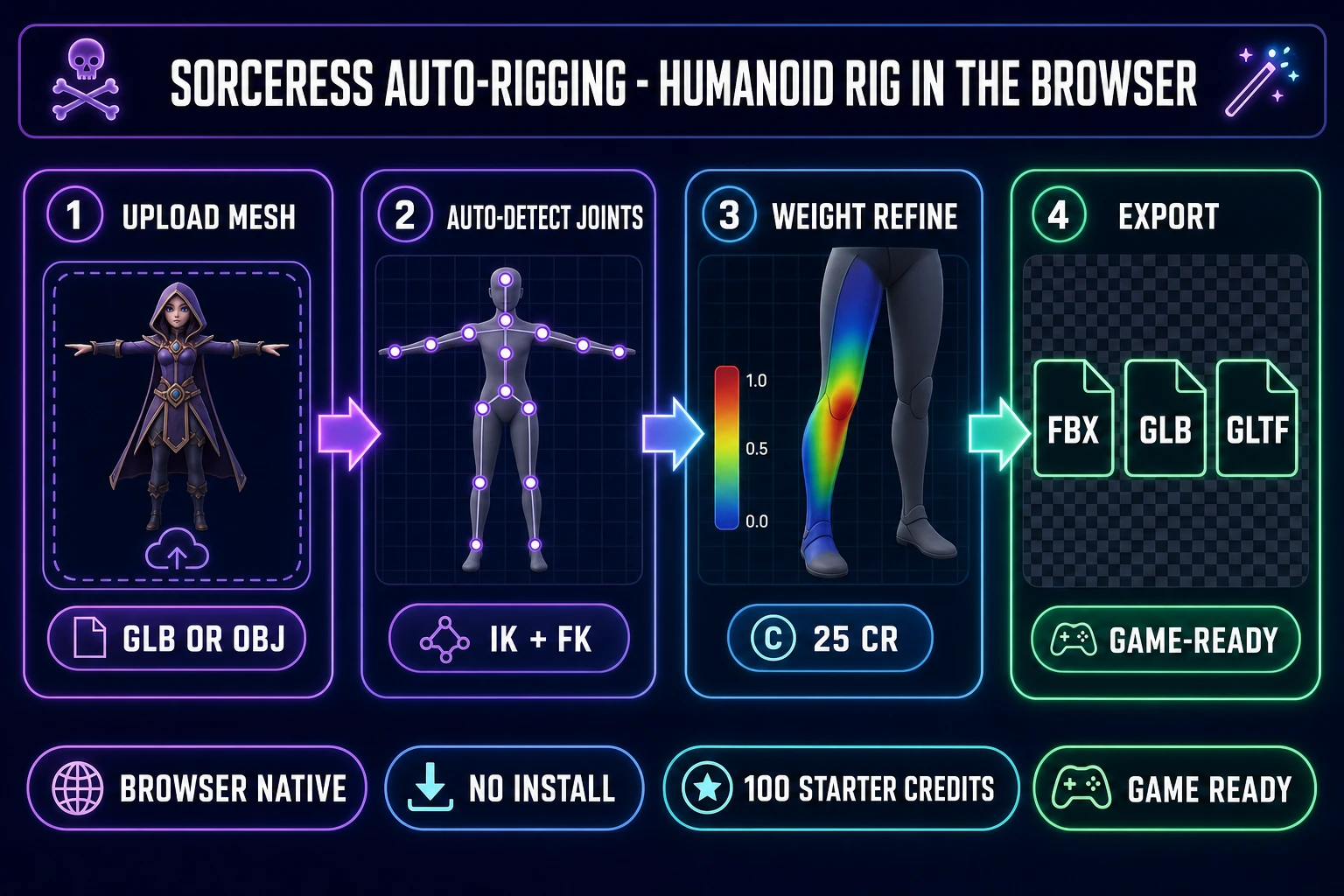
Sorceress Auto-Rigging four-panel pipeline diagram with upload mesh, auto-detect joints, weight refine, and engine-ready FBX or GLB or glTF export panels on a dark navy background with purple and emerald accents
The browser-native alternative to the paid Auto-Rig Pro Blender addon: upload a humanoid mesh, let the joints auto-detect, refine weights, and export to FBX, GLB, or glTF for any engine. Verified June 6, 2026 against src/app/_home-v2/_data/tools.ts.

Is there an Auto-Rig Pro free download in 2026?

The literal answer is no, with one technical asterisk worth understanding. The Auto-Rig Pro addon itself, the Python code that adds the Auto-Rig Pro menu, the Smart skeleton-placement operator, the IK and FK switching, the bone-layer presets, and the Unity, Unreal, and Godot FBX export rails, is sold on Superhive at the Lite 25 dollar tier or the Full 50 dollar bundle. There is no time-limited trial, there is no feature-limited free tier, and there is no promotional free download on the Lucky3D site. The only free download that comes from the Auto-Rig Pro project is Mike, a pre-rigged demo character published as a .blend file from the official Auto-Rig Pro documentation pages. Mike exists to show you how a finished Auto-Rig Pro armature looks once the addon has done its work; he is a teaching aid, not a backdoor to the addon code. If you open the Mike .blend file in a Blender install that does not have Auto-Rig Pro purchased and enabled, the armature is still riggable as a normal Blender armature, but the Auto-Rig Pro side panel will not appear and the one-click Smart placement, the Remap retargeting, and the engine-export presets will all be missing.

The technical asterisk: Auto-Rig Pro is licensed under the GNU General Public License, the same license every Blender addon that touches Blender Python APIs is required to ship under. GPL is permissive about redistribution: it allows anyone who legally obtained a GPL-covered binary to share it with anyone else. That technical right is what makes Auto-Rig Pro free downloads exist in circulation on torrent sites, on warez mirrors, and on the various blender-extension-piracy aggregators that crawl Superhive new releases. The downloads are not, strictly speaking, GPL violations on the licensing axis. What they are on the practical axis is a different question, covered in the next two sections.

What Auto-Rig Pro actually costs in 2026 (Lite, Full, Quick Rig, team seats)

Verified June 6, 2026 against the live Superhive Auto-Rig Pro product page (formerly Blender Market) and the Lucky3D documentation. There are four standard tiers plus one optional extension.

  • Auto-Rig Pro Lite, 25 dollars. The core Auto-Rig Pro rigging system: armature reference setup, fingers and facial bones, IK and FK switching, the custom shape picker, the bone-layer organisation. Free updates with email notification and support messages. License GPL. Blender 2.93 through 5.1.
  • Auto-Rig Pro Full, 50 dollars. Everything in Lite, plus the Smart tool (one-click biped body recognition that places the skeleton on a T-pose mesh automatically), the Remap tool (retarget animation from one rig to another, including motion-capture libraries and the Mixamo or Unreal Mannequin standard skeletons), and the FBX or glTF export presets that let you push the rigged character straight into Unity, Unreal, or Godot without a manual export-settings pass.
  • Full 10 Seats, 162 dollars. Multi-seat license for a small studio. Same Full features.
  • Full 20 Seats, 227 dollars. Multi-seat license for a larger team.
  • Quick Rig extension, 12.50 dollars. A separate add-on that converts an existing skeleton plus mesh into an Auto-Rig Pro control rig with weights preserved, IK and FK generated, and built-in mapping presets for Real Illusion Character Creator, DAZ, Human Generator, Mixamo, and the Unreal Mannequin. Quick Rig REQUIRES Auto-Rig Pro to be purchased and installed first; it is an extension, not a standalone product.

Two practical reads of those numbers. The first: the Full 50 dollar bundle is the right purchase for the indie dev who is already committed to a Blender pipeline and wants the engine-export presets out of the box. The Lite tier saves you 25 dollars but you will end up writing custom FBX export scripts the first time you ship a character to Unity, and your time-to-export will exceed the cost difference within an afternoon. The second read: the multi-seat tiers price out at roughly 16 dollars (10 seats) or 11 dollars (20 seats) per seat, which is the right shape for a small studio committing to a Blender pipeline. For a one-person indie project shipping one character a month, the Lite or Full single license is the only tier that makes economic sense.

Because Auto-Rig Pro ships under the GPL (a hard requirement for every addon that imports the Blender Python API), the binary itself is freely redistributable. Anyone who buys the Lite or Full version on Superhive can technically share their downloaded ZIP archive with anyone else, and the recipient can install and use it in Blender without breaking the license. That is what the Free Software Foundation calls the "free as in freedom" axis of GPL, distinct from "free as in beer." The license protects the user, not the developer.

That distinction is why the warez and torrent ecosystems consistently carry the latest Auto-Rig Pro version about a week after release. The downloads are not copyright violations in the way a cracked Adobe Photoshop or a pirated Unity Pro license would be. They are GPL-compliant redistributions of GPL-licensed code. The same applies to Quick Rig, to the Mixamo add-on, to Rigify, and to every other Blender addon under the GPL umbrella.

This is the loophole that explains why a Google search for "Auto-Rig Pro free download" returns dozens of results that are not, in the strict legal sense, piracy. What the search does not show you, and what nobody who hosts those mirrors has any incentive to disclose, is what you actually lose when you install a copy from a torrent or a warez aggregator instead of buying it directly from Lucky3D on Superhive.

What you lose when you grab a pirated Auto-Rig Pro download

Four concrete things, in order of how painful they get over time.

One: version updates. The single biggest practical loss. Auto-Rig Pro ships an update every few weeks (bug fixes, Blender compatibility patches as new Blender LTS versions land, new export-preset additions for engine SDK changes). The official Superhive purchase entitles you to those updates by email notification for the lifetime of the product. A pirated copy is a snapshot frozen at the release date of the mirror, which can be months or years behind. Six months out, your pirated 3.74.12 install will start throwing Python errors when Blender 5.2 ships, and you have no path to a current build without redownloading from a possibly different mirror with possibly different malware.

Two: Quick Rig and other extensions. Quick Rig at 12.50 dollars is the most useful Auto-Rig Pro extension for indie devs because it converts a non-Auto-Rig-Pro skeleton (a Mixamo download, a Character Creator export, an Unreal Mannequin) into an Auto-Rig Pro control rig in one operation. Quick Rig is a separate Superhive product, sold separately, and the version-check Python in Quick Rig refuses to load against an Auto-Rig Pro install older than 3.66.25. Pirated Quick Rig copies are far less common than pirated Auto-Rig Pro core copies, and they break the moment Lucky3D pushes a version-API change.

Three: support thread access. Superhive runs a per-product support thread where the developer and the community answer rigging-pipeline questions. Auto-Rig Pro has roughly 9,300 sales and 31 ratings on the Quick Rig extension alone and a much larger main-product thread. A pirated copy is invisible to that ecosystem; you have no order ID, no Superhive account tied to the product, and no path to the troubleshooting threads where the same export-corruption bug you just hit has probably been answered five times already.

Four: malware risk. The crucial one. Blender addons are Python files, and Python files can execute arbitrary code at install time. Mirrors that bundle Auto-Rig Pro with a "free crack" frequently ship a modified __init__.py that runs a payload (cryptominer, credential stealer, persistent backdoor) the first time you enable the addon in Blender. The legal-redistribution-under-GPL framing is technically accurate, but the practical 2026 reality is that an unknown-source GPL binary is a security risk in a way that an official Superhive download is not. Lucky3D signs nothing; you cannot verify a pirated ZIP without an unmodified reference, and the unmodified reference costs 25 dollars on Superhive.

The Mike rig - what Lucky3D actually does give you free

Mike is the one official free download in the Auto-Rig Pro ecosystem. He is a fully rigged humanoid character distributed as a .blend file from the Lucky3D Auto-Rig Pro documentation site. The rig demonstrates the full Auto-Rig Pro output: a complete bone hierarchy from root through pelvis through spine through shoulders down to finger phalanges, IK and FK chains on the limbs, foot-roll and toe-bend controls, and a facial setup that mixes shape keys and bones (eye direction, jaw, eyebrow lift, mouth corners). Open Mike in Blender and you can pose him, animate him, and export him to FBX or glTF; the rig works because the bones and the weights are baked into the .blend file, not because you have the Auto-Rig Pro addon installed.

The honest framing of Mike: he is a reference, not a replacement. He shows you what good looks like (so you know what to aim for when you build your own rig, or when you compare Auto-Rig Pro output against a free alternative like Rigify or Mixamo), and he gives you a working pose-and-export sandbox to learn from. He does not rig your custom characters; the rigging logic that does that lives in the paid addon.
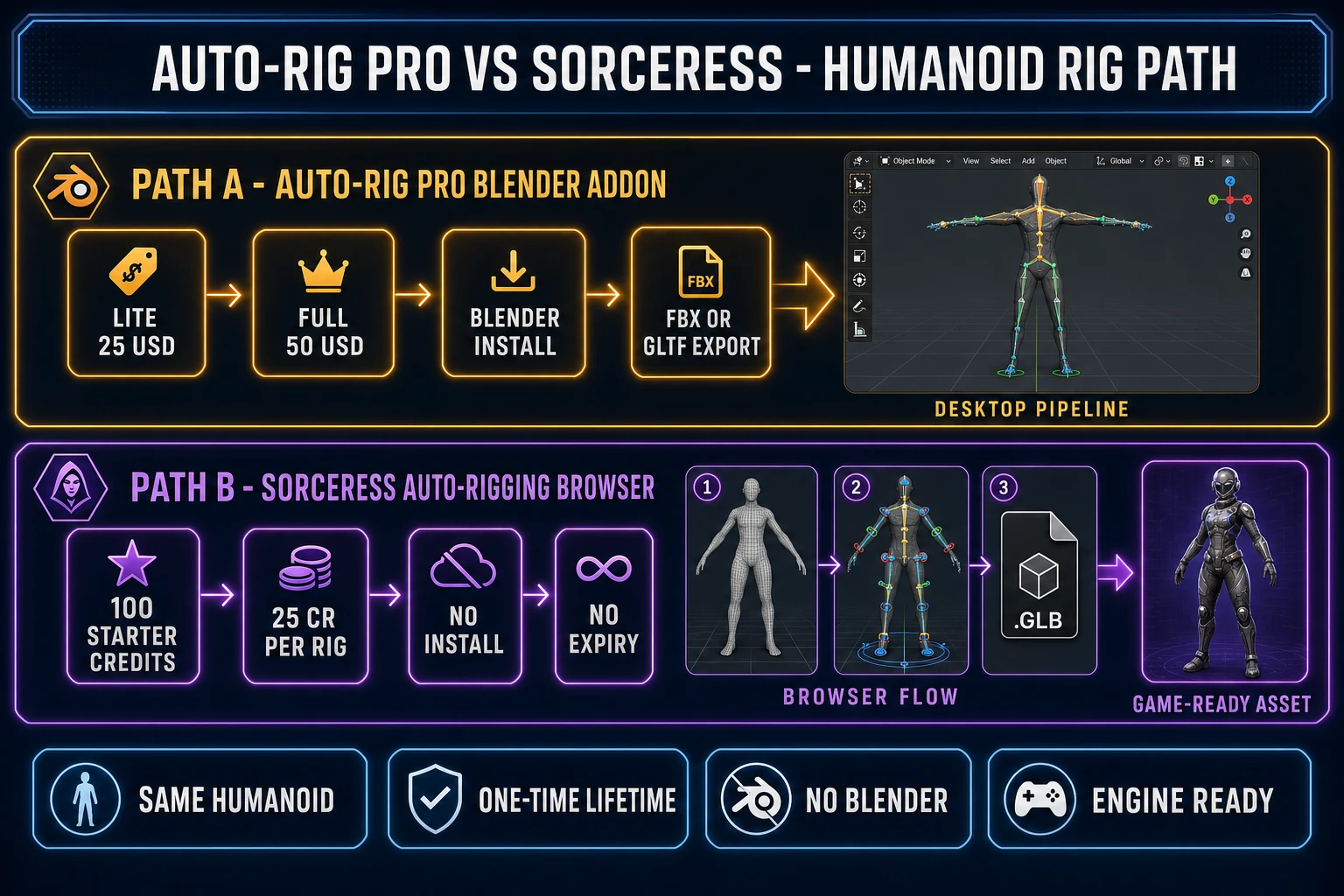
Side-by-side infographic comparing the Auto-Rig Pro Blender addon path (Lite 25 USD, Full 50 USD, Blender install, FBX or glTF export) on the top lane and the Sorceress Auto-Rigging browser path (100 starter credits, 25 credits per rig, no install, no expiry) on the bottom lane with thumbnails of a humanoid mesh, rigged armature, and GLB export icon
Two paths to the same humanoid rig. Auto-Rig Pro is the Blender-native, install-once-then-own answer. Sorceress Auto-Rigging is the browser-native, no-install, no-expiry-credit answer that does not require a Blender seat or a Python addon to manage.

Three free rigging paths that actually work (Rigify, Mixamo, Sorceress)

The reason "Auto-Rig Pro free download" searches so often end in a pirated mirror is that most readers do not know there are three legitimate free paths to a humanoid rig in 2026. Each has a different shape; one of them probably matches your project.

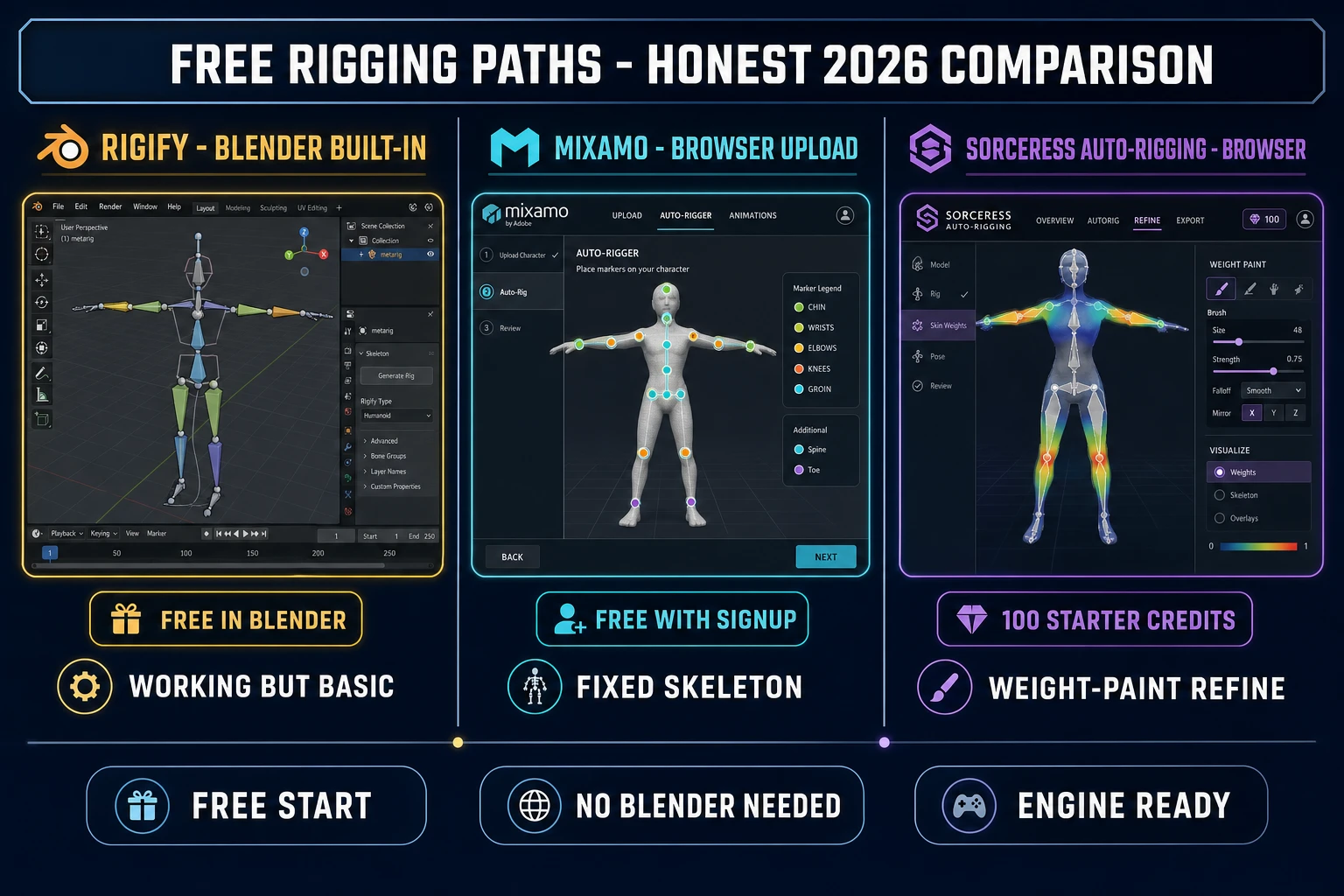
Rigify (built into Blender, free, official). Rigify ships with every Blender install, under the same GPL umbrella that covers Auto-Rig Pro. Open Blender, switch to Edit Mode, drop in the Human (Meta-Rig) preset under Add > Armature, fit the bones to your character mesh, click "Generate Rig" in the Rigify panel, and Blender outputs a working humanoid armature with IK and FK controls, finger curls, and basic facial bones. The strengths: free, official, no install step beyond enabling the addon, supported across every Blender LTS release. The weaknesses: the polish floor is meaningfully lower than Auto-Rig Pro out of the box (the IK setup is less elegant, the Picker is less developed, the FBX export to Unity needs a cleanup pass because Rigify uses a slightly non-standard bone-naming convention). For a hobbyist project, Rigify is more than enough. For a production indie title, Rigify is the path that requires the most manual cleanup before the rig is engine-ready.

Mixamo (Adobe-owned, free, browser-based). Mixamo at mixamo.com is the most well-known free auto-rigging service for game devs. Sign up, upload your character mesh in FBX or OBJ format, place six joint markers on the canonical body points (chin, wrists, elbows, knees, groin), wait roughly thirty seconds, and Mixamo returns a fully rigged humanoid plus access to a library of around 2,500 free motion-capture animations you can attach to the rig with a single click. The strengths: zero install, very fast turnaround, a large free animation library, an FBX download path that drops cleanly into Unity and Unreal. The weaknesses: the rig is fixed to the Mixamo skeleton (different bone count and naming convention from Auto-Rig Pro or Rigify, which complicates pipeline standardisation if your studio uses a custom skeleton), the upload mesh limit is 75 megabytes, and Adobe has hinted at future changes to Mixamo for several years (the service is technically still free but the long-term roadmap is unclear).

Sorceress Auto-Rigging (browser-native, 100 starter credits free on signup). The Sorceress Auto-Rigging tool at /rigging runs in any modern browser tab and produces a humanoid rig with weight-paint refinement, IK and FK controls, and engine-ready FBX, GLB, and glTF export. The flow: drag a humanoid mesh into the browser, let the joint auto-detection place the skeleton, optionally hand-tweak the weight painting on individual limbs, and export. New accounts receive 100 starter credits at signup (verified June 6, 2026 against the live Sorceress home hero); each auto-rig consumes 25 credits, which means the free starter tier covers four rigs before you need to top up. After that, a 10-dollar Starter pack at 1,000 credits gets you forty more rigs with no expiry, no subscription, no auto-renewal. The strengths: no install, no Blender required, no Mixamo upload-size ceiling, weight-paint refinement (which Rigify and Mixamo skip entirely), and tight integration with Sorceress 3D Studio for the full image-to-mesh-to-rig-to-animation flow. The weakness: humanoid only; for multi-legged creatures, the Procedural Walk tool handles the four-legged, six-legged, and many-legged cases with inverse kinematics and real-time foot-plant on uneven terrain.

The Sorceress Auto-Rigging path: browser-native, no install, 100 starter credits

Of the three free paths above, the Sorceress Auto-Rigging tool is the only one that combines a no-install browser surface with proper weight-paint refinement and a true engine-ready export pipeline. It is the path designed for the indie game dev who does not want to install Blender, does not want to learn the Rigify metarig conventions, and does not want to gamble on the long-term future of Mixamo. The flow takes about three minutes from upload to download.

Step one: open /rigging in your browser. Step two: upload your humanoid mesh (GLB, GLTF, or OBJ format). The tool reads the mesh, detects the canonical body landmarks (head, shoulders, elbows, wrists, hips, knees, ankles), and overlays a humanoid skeleton template on the model. Step three: optionally drag the auto-detected joint markers to better match your custom proportions (longer legs, broader shoulders, taller torso). Step four: trigger the rig, which spends roughly 25 credits and runs the weight-painting refinement pass that determines how each vertex follows each bone (the part Rigify leaves you to clean up manually). Step five: preview the rig in the browser viewport, scrub the test animation to check the deformation looks clean, then export to FBX, GLB, or glTF. The exported file drops straight into Unity, Unreal, Godot, or any other engine that supports glTF 2.0 or FBX import (which is effectively every engine in production today). The full skeletal-animation primitive that engines have used for thirty years is what you get back; the AI part is the joint detection and the weight-paint refinement.

For the indie dev who needs more than just a rig, Sorceress 3D Studio chains the whole pipeline: AI image generation of a character concept, single-image to textured 3D mesh, the same auto-rigging step that runs at /rigging, and AI text-to-animation that produces idle, walk, run, attack, and reaction loops on the rigged character. The full chain runs in a single browser tab, ends at an FBX or GLB ready for any engine, and costs roughly 75 to 130 credits depending on which 3D model rail you pick (Meshy 6, Hunyuan 3D 3.1, Tripo v3.1, or Rodin 2.0).

Three-column comparison infographic showing Rigify (Blender built-in), Mixamo (browser upload, fixed Mixamo skeleton), and Sorceress Auto-Rigging (browser-native, 100 starter credits, weight-paint refinement) on a dark navy background with amber, cyan, and purple accents
Three genuinely free auto-rigging paths for a humanoid character in 2026. Rigify is the in-Blender default; Mixamo is the canonical browser-upload service; Sorceress Auto-Rigging adds weight-paint refinement and ships 100 starter credits at signup. All three avoid the GPL-pirated Auto-Rig Pro mirror entirely.

ARP 50-dollar Full path vs Sorceress browser path: side-by-side for a game-ready character

The most honest way to think about the choice between the paid Auto-Rig Pro path and the free Sorceress browser path is to give both the same brief and grade the output. Here is the brief and the result, verified June 6, 2026.

Brief. A T-pose humanoid mesh (low-poly stylised character, 8,500 triangles, GLB format, single 1024 by 1024 albedo texture). Goal: an IK-and-FK rigged humanoid ready to drop into a Unity Universal Render Pipeline scene or a Godot 4 humanoid skeleton, with an idle and a walk-cycle animation already attached. Total deliverable: an FBX or GLB file under 5 megabytes, opening cleanly in the target engine without manual cleanup.

Auto-Rig Pro path (50 dollars one-time on Superhive). Open Blender 4.6, install the Auto-Rig Pro Full addon ZIP under Edit > Preferences > Add-ons > Install, enable it, switch to the Auto-Rig Pro tab in the 3D viewport sidebar, load the humanoid mesh as a reference, click Smart in the Smart panel, let the biped recognition place the skeleton, fit any markers that drifted, click Match to Rig, switch to the FBX or glTF export tab, pick the Unity preset (or the Unreal preset, or the Godot preset), set the export folder, click Export. Estimated time: about 15 minutes the first time you do it (mostly learning the panel layout), about three minutes once you have the workflow muscle-memorised. Total cost: 50 dollars one-time plus the time to install and learn Blender if you do not already use it. The rigged FBX drops straight into Unity with the correct humanoid avatar mapping and the animation slots intact.

Sorceress Auto-Rigging browser path. Open /rigging in your browser, drag the same humanoid GLB into the upload zone, wait for the joint auto-detection (a few seconds), drag the auto-detected markers if any drifted on your custom proportions, click Generate Rig (25 credits), preview the rigged character in the browser viewport, click Export, pick FBX or GLB, download. Estimated time: about three minutes end-to-end, no install step at all. Total cost on the free 100-credit starter tier: zero dollars for the first four rigs. After that, a 10-dollar Starter pack covers another forty rigs. The exported FBX drops into Unity with the same humanoid mapping, and the GLB drops into Godot 4 with the same humanoid skeleton attached.

The functional difference is the surface and the cost shape. Auto-Rig Pro is a one-time 50-dollar Blender-native pipeline with deep customisation (you can edit every bone on the metarig, you can tweak weight painting interactively, you can run Remap to retarget animation libraries across multiple custom rigs). Sorceress Auto-Rigging is a no-install browser pipeline with a credit-based cost and a tighter feature scope (humanoid-only, automatic weight-paint refinement, no manual armature editing). For an indie dev shipping one or two characters a month who does not want a Blender install, the Sorceress path is cheaper and faster. For a small studio shipping a dozen characters with a custom skeleton and a motion-capture library to retarget, the Auto-Rig Pro Full bundle pays for itself within the first month.

When the 50-dollar Auto-Rig Pro license is the right call (and when free is enough)

The honest decision tree comes down to three triggers. Pay for Auto-Rig Pro when any of them apply; pick a free path when none of them do.

Trigger one: you already live in Blender and your pipeline is Blender-native. If your studio has a Blender install on every workstation, a custom shader library running in Blender Cycles or Eevee, and an existing FBX export script for a target engine, then the 50 dollars for the Full Auto-Rig Pro bundle slots into a pipeline you already maintain. The deep customisation of the armature template (specific finger phalanges, custom bone groups, multi-leg variations, facial shape-key drivers) is genuinely better than what the free alternatives ship. Buy it.

Trigger two: you need to retarget animation libraries. The Auto-Rig Pro Remap tool is the most useful single feature of the Full bundle for indie devs who already own or rent a motion-capture library (Rokoko, Move.ai, Plask), a character-creator export library, or a third-party Unreal Mannequin animation pack. Remap retargets animation from one rig to another with controllable IK-snap behavior, blend modes for finger curls, and constraint-aware bone mapping that the Mixamo retarget flow does not match. The Sorceress browser path does not currently have a direct equivalent for the retarget-between-custom-rigs use case. If your project depends on animation retargeting, buy Auto-Rig Pro.

Trigger three: you ship multiple characters per week and need armature-level customisation. A small studio with a daily character pipeline benefits from the depth of Auto-Rig Pro: the bone-layer organisation, the custom shape picker, the per-character armature editing. The free paths converge on a "humanoid template, output a rig" model that is genuinely fine for one character at a time, but the studio-scale workflow rewards the deeper tooling.

When free is enough. For everyone else, the free paths cover indie game shipping cleanly. Rigify for in-Blender hobbyist work where you already have Blender open. Mixamo for one-off humanoid rigs where speed and the free animation library matter more than custom-skeleton control. Sorceress Auto-Rigging at /rigging for the browser-native path where you want a humanoid rig plus engine-ready export without leaving the browser and without installing Blender or signing up for an Adobe account. The 100 free starter credits on the Sorceress side cover four rigs at no cost; the optional credit packs at 10 dollars for 1,000 credits never expire and cover roughly forty additional rigs per top-up. That is a meaningfully cheaper path than 50 dollars one-time for the indie dev who needs one or two humanoid rigs and not a full Blender pipeline.

The verdict on "Auto-Rig Pro free download" in 2026

There is no official Auto-Rig Pro free download from Lucky3D. The 25-dollar Lite, the 50-dollar Full, and the 12.50-dollar Quick Rig extension are the real Superhive prices, verified June 6, 2026. GPL technically permits redistribution of the addon binary, which is why pirated copies circulate, but the practical cost of installing a copy from an unknown-source mirror (no updates, no support, no Quick Rig, real malware risk) is high enough that buying the Lite tier directly is the right move for any project you take seriously. The one official freebie from Lucky3D is the Mike demo rig, a teaching aid rather than the addon itself.

For the indie game dev who does not want to spend 25 or 50 dollars and does not want to gamble on a torrent mirror, three free paths actually work: Blender built-in Rigify, Adobe Mixamo, and the Sorceress Auto-Rigging tool. The Sorceress path is the no-install browser flow with 100 starter credits, weight-paint refinement, and FBX or GLB export ready for any engine. For the full image-to-mesh-to-rig-to-animation pipeline, Sorceress 3D Studio chains every step into a single browser session. For multi-legged creatures (spiders, dragons, drakes, four-legged beasts), Procedural Walk handles the auto-rig and real-time IK foot-plant on uneven terrain. The Sorceress stack starts free at sorceress.games with the same 100 starter credits that cover the first few auto-rig jobs.

Frequently Asked Questions

Is there an Auto-Rig Pro free download in 2026?

Not an official freebie. The Auto-Rig Pro addon itself is a paid Blender plug-in sold on Superhive (formerly Blender Market) at 25 dollars for the Lite version and 50 dollars for the Full Auto-Rig Pro plus Smart plus Remap plus FBX or glTF Export bundle, with multi-seat licenses at 162 dollars (10 seats) and 227 dollars (20 seats). Quick Rig, the skeleton-conversion extension, is a separate 12.50 dollar add-on that requires the core Auto-Rig Pro purchase first. Lucky3D, the developer, does publish one thing for free: the Mike character rig, a pre-rigged demo character you can download from the Auto-Rig Pro documentation page to inspect how the weights and bones are organised. Mike is a learning aid, not the addon itself. Verified June 6, 2026 against the Superhive Auto-Rig Pro product page and lucky3d.fr documentation.

What does the Auto-Rig Pro Lite version actually include for 25 dollars?

Auto-Rig Pro Lite at 25 dollars on Superhive includes the core Auto-Rig Pro rigging system: armature reference setup, fingers and facial bones, IK and FK switching, the custom shape picker, and the bone-layer organisation that downstream animators expect. The Lite tier does NOT include the Smart biped body recognition (one-click skeleton placement), the Remap retargeting tool (for transferring animation between different rigs), or the FBX or glTF export presets for Unity, Unreal, and Godot. Most indie game devs end up wanting at least the FBX export workflow, which means upgrading to the Full 50 dollar bundle. Free updates and email-notification support are included on both tiers. License is GPL, Blender version 2.93 through 5.1. Verified June 6, 2026 against the Superhive Auto-Rig Pro product page.

Why do I see Auto-Rig Pro free download links on torrent and warez sites?

Auto-Rig Pro ships under the GNU General Public License (GPL), which Blender requires for every addon that touches the Blender API. Under GPL, redistributing the source code or the compiled addon is legally permitted, so a free download circulating on a torrent or warez site is not, by itself, a copyright violation. What you give up is real: no automatic version updates from Lucky3D (which means stale compatibility against current Blender releases, missing bug fixes, and no Quick Rig extension), no email-notification support, no help thread on Superhive, and a meaningful malware risk on the unofficial mirrors that bundle the addon with cryptominers or modified Python payloads. The honest move for a 25-dollar Lite tier on a project you take seriously is to buy directly. The honest move for a casual one-off project is to use a different free tool entirely rather than gamble on a sketchy mirror; the Sorceress browser-native auto-rigging path is one such option.

What is the Mike rig and how does it differ from the Auto-Rig Pro addon?

Mike is a free pre-rigged character that Lucky3D distributes from the Auto-Rig Pro documentation site as a reference for how a finished Auto-Rig Pro armature should look: bone hierarchy, weight distribution, finger curls, facial controls (a mix of shape keys and bones), IK and FK setup. Mike is a .blend file you open in Blender to inspect; he is not the addon and he does not rig your own characters. If you download Mike thinking you have downloaded a free version of Auto-Rig Pro, the addon panel will not appear in Blender because the Python code that adds the menu, the operators, and the armature template is the paid product. Use Mike to learn the topology that Auto-Rig Pro outputs, then either buy the addon to generate the same topology on your own characters, or use a free alternative (Mixamo for one-off humanoids, Rigify for in-Blender free auto-rigging, or Sorceress Auto-Rigging for the browser-native path).

What are the genuinely free alternatives to Auto-Rig Pro for game-ready rigging?

Three options that actually work without paying. First, Rigify: it ships inside Blender (free, official, included under Blender GPL) and produces a working humanoid armature with IK and FK controls. The downside is the polish floor: Rigify rigs work but feel less production-ready than Auto-Rig Pro out of the box, and the FBX export to Unity or Unreal needs extra cleanup. Second, Mixamo: Adobe-owned, free, browser-based, drag your character mesh in, place a handful of joint markers, get back a fully rigged humanoid with a library of free motion-capture animations attached. The downside is the rig is fixed to the Mixamo skeleton (good for prototyping, less flexible for custom skeletons), and Adobe has hinted at future changes to the service for years. Third, Sorceress Auto-Rigging: browser-native, no install, free 100 starter credits on signup, humanoid auto-rig with weight-paint refinement, GLB and FBX export ready for Unity, Unreal, Godot, and any other engine.

How does Sorceress Auto-Rigging compare to the Auto-Rig Pro 50-dollar Full bundle?

Both produce a humanoid rig with IK and FK controls and game-engine-ready export. The functional split is the surface and the cost shape. Auto-Rig Pro Full at 50 dollars on Superhive runs as a Blender addon: install once, use forever on as many local projects as you like, lifetime free updates from Lucky3D, deep customisation of the armature template, advanced facial rigging, Remap for retargeting third-party animations, FBX and glTF presets for Unity and Unreal and Godot. The flow assumes you live inside Blender. Sorceress Auto-Rigging at the rigging page runs in any browser tab: no Blender install, no plug-in to manage, no version compatibility check. The credit cost is 25 credits per humanoid auto-rig on the current pricing rail (a 10-dollar Starter pack at 1,000 credits gets you forty rigs, no expiry, no subscription). Sorceress 3D Studio at the 3d-studio page chains image generation, single-image to textured 3D mesh, auto-rigging, and AI text-to-animation into one continuous browser flow that ends at an FBX or GLB ready for any engine. Verified June 6, 2026 against src/app/_home-v2/_data/tools.ts.

When does it actually make sense to pay for Auto-Rig Pro instead of using a free path?

Three real triggers. First, you live in Blender and you have an existing pipeline that depends on Blender-native exports, custom shaders, and specific FBX export presets the Auto-Rig Pro Full bundle gives you out of the box (50 dollars buys you years of pipeline savings). Second, you need the Remap tool to retarget animation libraries (motion-capture, character-creator, Unreal Mannequin) onto your own custom rig. The Remap workflow is genuinely well-engineered and the Sorceress browser path does not have a direct equivalent on the retargeting axis. Third, you ship multiple characters per week and the deeper armature customisation (specific finger phalanges, custom bone groups, multi-leg variations, facial shape-key drivers) matters for your art direction. For everything else, the free-or-low-cost path covers indie game shipping cleanly: Mixamo for one-off humanoids, Rigify for in-Blender freelancing, and the Sorceress Auto-Rigging path for browser-native indie pipelines that need a humanoid rig plus engine-ready export without leaving the browser.

Sources

  1. Skeletal animation - Wikipedia
  2. Inverse kinematics - Wikipedia
  3. GNU General Public License - Wikipedia
  4. Blender (software) - Wikipedia
  5. FBX - Wikipedia
  6. glTF 2.0 specification - Khronos
  7. Polygon mesh - Wikipedia
Written by Arron R.·3,997 words·18 min read

Related posts