Fire an AI Sound Effects Generator (Game Pack)

By Arron R.7 min read
An ai sound effects generator ships a game pack when you lock a feel card, render short one-shots in SFX Gen (Seed Audio 1.0, 1 credit/sec), trim in SFX Editor,

Silent prototypes feel unfinished even when the jump numbers are perfect. Players read impact through audio as much as through animation. A practical ai sound effects generator workflow does not start with a hundred random renders. It starts with a short feel card, a handful of one-shot cues, and a rule that sound follows state—not button spam. This guide shows how to build that pack in the browser with SFX Gen, SFX Editor, and Sound Studio. Model and credit facts below were verified against the Sorceress SFX Gen source on July 21, 2026.
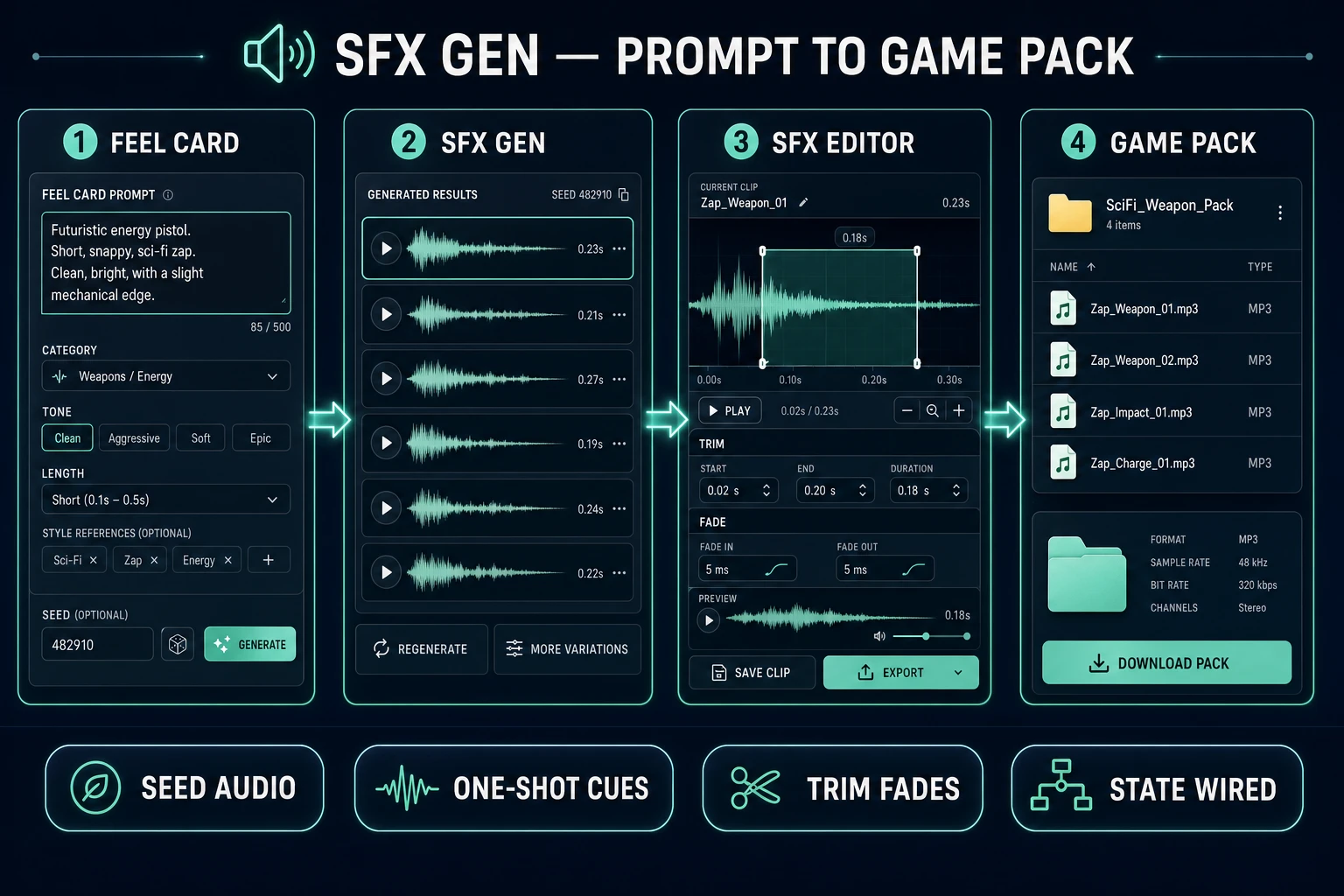
Ai sound effects generator pipeline from feel card through SFX Gen to a named game pack
A shippable game SFX pack is a feel card, short Seed Audio renders, trim passes, then state-wired filenames—not a folder of unedited two-second whooshes.

What an ai sound effects generator must lock for games

The primary query ai sound effects generator has 2,400 monthly searches and KD 33 in the DataForSEO-backed research-supplement.md, verified July 21, 2026. Close siblings such as ai sound effects generator free (260/mo), sound effects ai generator (110/mo), and sound effects generator ai (110/mo) sit in the same transactional band. Readers typing those phrases want clips they can drop on jump, hit, confirm, and footstep events—not a music stem and not a full radio drama.

A sound effect is artificially created or enhanced sound used to emphasize action, mood, or feedback. In games that means the cue must answer three questions in under a second: what happened, how hard it was, and whether the player should change behavior. Long cinematic beds can wait. First lock a feel card with six fields:

  • Event list: the ten sounds the vertical slice actually needs (jump, land, hurt, confirm, cancel, pickup, footstep soft, footstep hard, UI error, ambient bed optional).
  • Max length: one-shot caps (for example UI ≤300 ms, combat hit ≤800 ms, door ≤1.5 s).
  • Dryness: reverb policy—usually dry in-game, wet only for special rooms.
  • Material words: wood, metal, cloth, stone, magic—picked once so the pack matches.
  • Loudness roles: which cues must poke through music, which stay under dialogue.
  • Naming scheme: sfx_jump_01, sfx_land_01, never final_final2.

If you cannot fill that card, keep designing. An ai sound effects generator without a card will invent a different sonic world on every credit spend.

Also decide what is not an SFX job. Music beds belong in Music Gen. Spoken NPC lines belong in Speech Gen. Trailer whooshes that only play once in a montage can be longer, but they should live in a separate trailer/ folder so they never leak into the gameplay mixer. Keeping those buckets separate is how an ai sound effects generator stays fast instead of becoming a junk drawer.

Write a feel card before you generate

Translate each event into a one-line prompt skeleton before you open the tool. Good skeletons name material, action, distance, and length. Example jump cue: “soft cloth whoosh rising tick, close mic, dry, under 400 ms, no music.” Example hurt cue: “sharp wood thud with short click, dry, under 500 ms, no scream.” Example UI confirm: “tiny glass tap, very short, centered, dry.”

Ban vague adjectives that fight game readability—“epic,” “cinematic,” “massive boom”—unless the event is a boss finisher. Ban lyrics and speech in SFX prompts; voice lines belong in Speech Gen. Keep one material family per biome so footsteps do not teleport from marble to mud inside a single room.

A useful sibling workflow for library organization lives at sound effects generator AI in the browser. This article focuses on the head query and on packing cues that survive playtests. The Sorceress tools guide lists the rest of the audio suite when you later add music or voice.
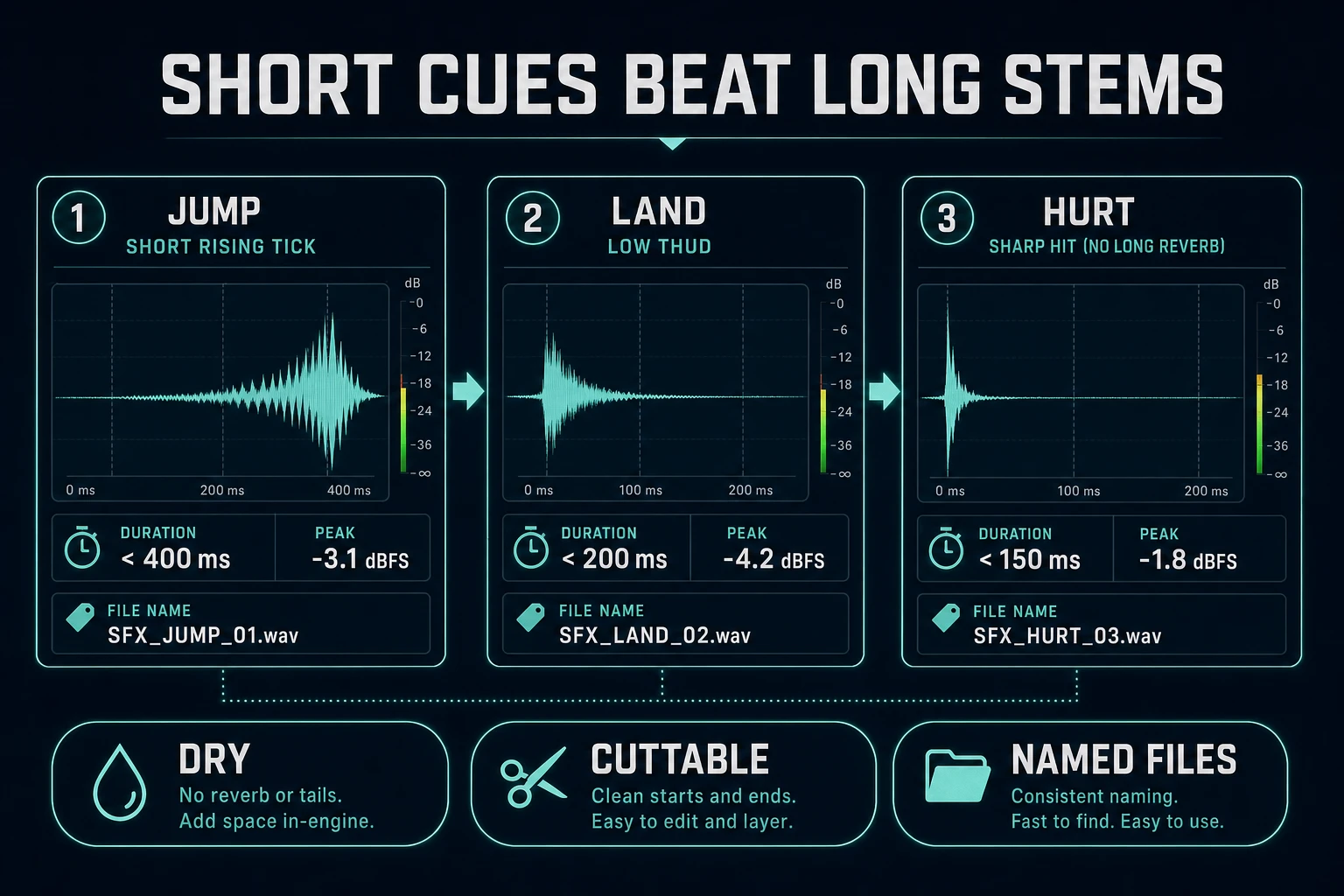
Short jump land and hurt one-shot waveforms for an ai sound effects generator game pack
Short, dry one-shots beat long stems for gameplay. Generate the length you can cut, not the length a trailer wants.

Generate short one-shot cues in SFX Gen

Open SFX Gen. As of July 21, 2026, the live default model is BytePlus Seed Audio 1.0 (byteplus-seed-audio / seed-audio-1.0), verified in src/app/sfx-gen/page.tsx. Prompts accept up to 1,800 characters. Set targetDuration intentionally—default is 3 seconds, range is 1–120. For gameplay one-shots, prefer 1–3 seconds of generation budget, then trim harder in the editor. Do not ask the model for a 30-second “full scene” when you only need a door click.

Credit math, verified the same day against the page constants: 1 credit per second of finished audio, minimum 1 credit, maximum 120 seconds, charged only on success. A clean 3-second jump attempt costs about 3 credits; a failed render does not. Generate two variants per critical event, keep the clearer one, and delete the rest so the pack does not bloat.

Prompt pattern that works:

Single game sound effect only. Soft rising jump tick, cloth and air, close microphone, completely dry, no reverb tail, no music, no voice, under half a second of useful energy, silence padded ok.

Repeat for land, hurt, confirm, and pickup with the same dryness and mic distance language. Consistency in the prompt stack matters more than poetic wording.
Trim and normalize in SFX Editor

Raw generations almost always carry lead-in silence or a soft tail. Open SFX Editor and treat every keeper like a foley edit. The editor exposes trim start/end handles, fade in, fade out, volume, speed, EQ, compression, filters, and other sculpting controls—verified in src/app/sfx-editor/page.tsx on July 21, 2026. For one-shots:

  • Trim to the first useful transient.
  • Add a 5–30 ms fade in only if the attack clicks harshly.
  • Add a short fade out so the cue dies cleanly when another voice starts.
  • Keep reverb off for HUD and combat unless the level fiction demands a wet space.
  • Export with the feel-card filename immediately.

When you need sample-accurate playback later in an engine, browser games typically route through the Web Audio API. MDN’s guide to using the Web Audio API covers decoding buffers and scheduling playback—the same primitives Phaser’s sound manager wraps for scene code.

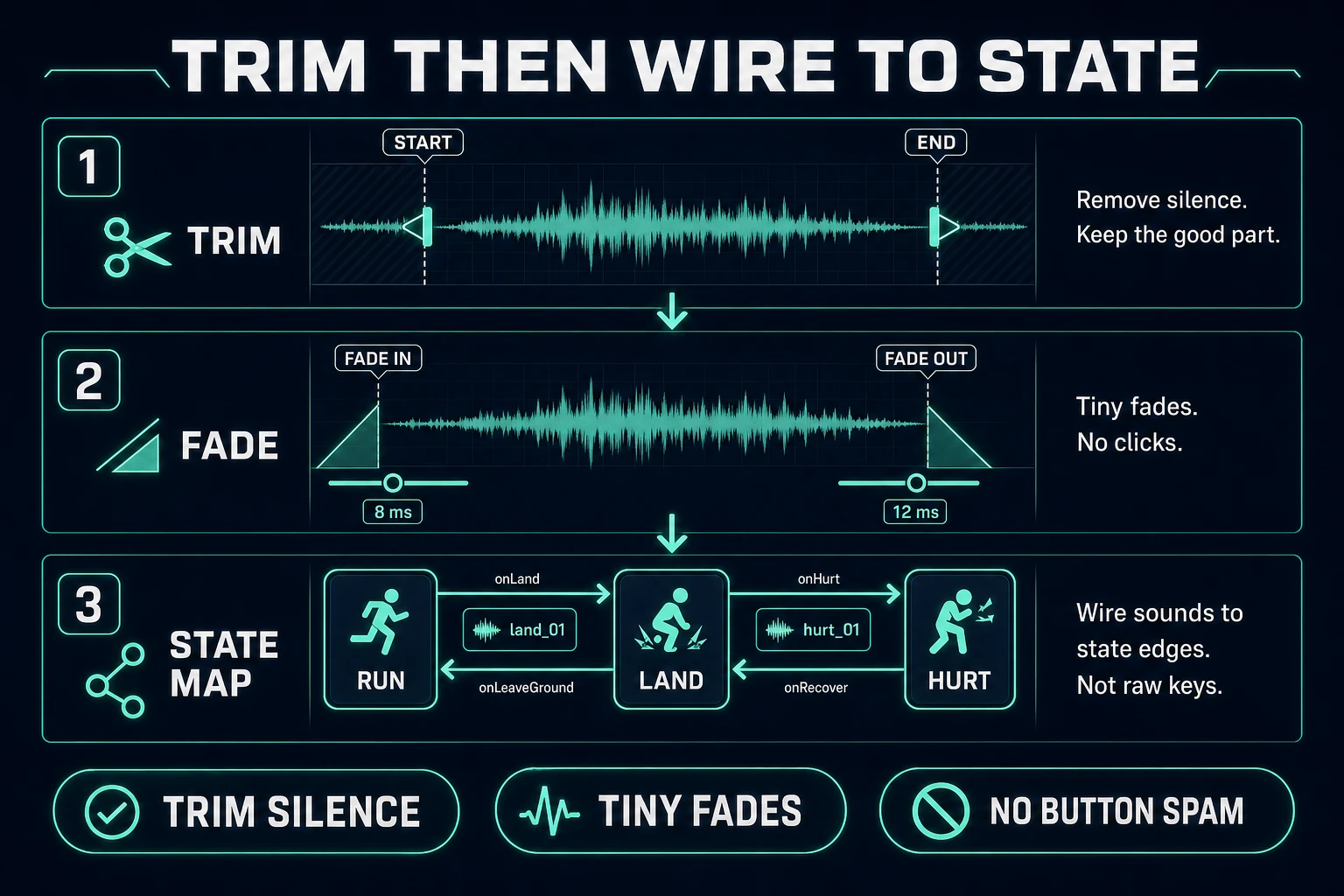
SFX Editor trim and fade workflow then wiring cues to game state edges
Trim silence, add tiny fades, then attach each file to a state edge so mashed inputs cannot stack five jumps.

Build a named pack that survives playtests

Ship a folder, not a mood board. A first playable pack for a platformer slice might be twelve files:

  • sfx_jump_01, sfx_land_01, sfx_hurt_01
  • sfx_ui_confirm_01, sfx_ui_cancel_01, sfx_ui_error_01
  • sfx_pickup_coin_01, sfx_foot_soft_01, sfx_foot_hard_01
  • sfx_door_open_01, optional amb_room_soft_01 if you truly need a bed

Play the whole set back-to-back at the volumes you will use in-game. If two cues share the same mid-click, rewrite the weaker prompt with a different material word and regenerate once. Do not “fix” bad clips with heavy distortion in the editor—distortion hides identity problems that reappear the moment music is present.

For synthetic UI beeps that must land on exact frame lengths, switch rails to Sound Studio and generate procedural tones, then finish them in SFX Editor the same way. Mixed packs are normal: Seed Audio for foley-shaped hits, procedural for parameter-tight HUD ticks.

Store a one-line note next to each filename: event, max length, material, and whether it may overlap. That note is what future-you reads when a jam partner asks why sfx_land_01 is quieter than sfx_hurt_01. Without it, loudness fights restart every session.

Wire cues to state, not button spam

The most common integration failure is binding jump audio to the keydown event. Players mash. Five overlapping whooshes later, the mix is unreadable. Wire instead to authoritative state transitions:

  • Jump: play when the impulse is applied (grounded true→jumping).
  • Land: play on grounded false→true after vertical speed was downward.
  • Hurt: play once when damage lockout begins; ignore further collisions until unlock.
  • UI: play on successful action commit, not on every hover unless hover is intentionally soft and ducked.

If you use Phaser, schedule through the sound manager rather than inventing a second audio graph—see the Phaser audio concepts docs for add/play patterns and the autoplay unlock rule on first tap. Cap concurrent voices per category (for example max two footsteps) so a sprint across stone does not become a machine gun.

Cost math and revision loops for an ai sound effects generator

Budget the pack like ammo. At 1 credit per finished second, a twelve-cue pack with average 2-second renders and one discarded variant each costs on the order of 12 × 2 × 2 = 48 credits before music exists—still cheap compared with a wasted art pass. Spend the second variant only on events players hear constantly (jump, UI confirm). One-off doors can ship on the first clean take.

Revision loop that stays honest:

  1. Play the vertical slice muted, then with SFX only, then with music ducked under SFX.
  2. Mark any cue players cannot hear at combat volume; regenerate louder/drier rather than raising master gain forever.
  3. Mark any cue that steals attention from the wrong event; shorten it in SFX Editor before regenerating.
  4. Freeze filenames when the feel card passes. New ideas get _02 suffixes, never silent overwrites.

That is the complete path for an ai sound effects generator aimed at games: lock the card, render short Seed Audio one-shots in SFX Gen, trim in SFX Editor, name the pack, and wire cues to state edges. Everything else is trailer polish.

Common issues when using an ai sound effects generator

  • Cues feel late: trim lead-in silence; schedule playback on the state edge, not after the animation ends.
  • Everything sounds wet: your prompts asked for hall reverb. Rewrite with “completely dry, no tail.”
  • Jump stacks on mash: you bound audio to keydown. Bind to the impulse transition and debounce.
  • Credits vanish on long clips: you left targetDuration at cinematic lengths. Cap generation near the usable one-shot length.
  • Pack has no identity: material words drifted. Freeze wood/metal/cloth language across the feel card and regenerate outliers.

Frequently Asked Questions

What is an ai sound effects generator for games?

An ai sound effects generator turns a short text description into a non-musical audio clip you can attach to gameplay events—jumps, hits, UI confirms, footsteps. On Sorceress, SFX Gen at /sfx-gen runs BytePlus Seed Audio 1.0 (verified in src/app/sfx-gen/page.tsx on July 21, 2026), accepts prompts up to 1,800 characters, and targets durations from 1–120 seconds.

How much does Sorceress SFX Gen cost in 2026?

SFX Gen bills 1 credit per second of finished audio, minimum 1 credit, capped at 120 seconds—charged only on success. A typical 3-second jump cue costs about 3 credits; a 10-second ambience bed costs about 10. Verify the constants SEED_AUDIO_CREDITS_PER_SECOND and SEED_AUDIO_MAX_SECONDS in src/app/sfx-gen/page.tsx if you are budgeting a full pack.

Should game SFX be long cinematic clips?

Usually no. Gameplay one-shots should be short, dry, and cuttable—often under 500 ms for UI and under 1–2 seconds for combat hits. Long cinematic beds belong in trailers or cutscenes. Generate short targets first, then trim silence and add tiny fades in SFX Editor so loops and overlaps stay clean.

How do I stop SFX from stacking when the player mashes a button?

Wire audio to state transitions, not raw input. Play jump on the impulse edge, land on grounded false→true after a fall, and hurt once when a damage lockout begins. Cap concurrent voices per category and debounce rapid retriggers so the mix stays readable.

When should I use Sound Studio instead of SFX Gen?

Use SFX Gen for recording-shaped foley and natural hits. Use Sound Studio at /sound-creator when you need procedural, parameter-tight blips—exact 8-bit confirms, lasers with fixed length, or tones you will retune in code. Many packs mix both rails, then finish edits in SFX Editor.

Sources

  1. Sound effect — Wikipedia
  2. Web Audio API — MDN Web Docs
  3. Using the Web Audio API — MDN Web Docs
  4. Audio — Phaser Concepts
Written by Arron R.·1,609 words·7 min read

Related posts