Adobe Express AI Video Background Remover (Cutscenes)

By Arron R.14 min read
The Adobe Express AI video background remover is Premium ($9.99/mo), built for social-media clips, not game cutscenes. Sorceress Auto-Sprite v2 chains frame ext

A game cutscene is a video clip with a problem: the engine wants a transparent sprite sheet, the source delivers an MP4 with a background, and almost every browser tool that promises an “AI video background remover” was built for Instagram reels, not for a Phaser or Godot scene. The Adobe Express AI video background remover is the most-searched answer to that gap in 2026 and one of the few tools that genuinely works on AI-generated cutscene footage — verified live against Adobe’s own help page on June 5, 2026, it runs neural matting on uploaded MP4s and exports a transparent video at up to 4K. The honest catch is that a transparent video file is not a game asset, the tool sits behind a $9.99-per-month Premium subscription, and a real cutscene pipeline still needs a frame-extraction step. This walkthrough covers exactly what Adobe Express does, where its output stops short of a game-ready sprite, and how Sorceress Auto-Sprite v2 closes the loop with a four-step browser pipeline (upload, extract frames, remove background, export packed sprite sheet). Verified June 5, 2026 against src/app/autosprite-v2/page.tsx, src/app/corridor-chroma/page.tsx, src/lib/video-models.ts, and Adobe’s public Premium documentation.
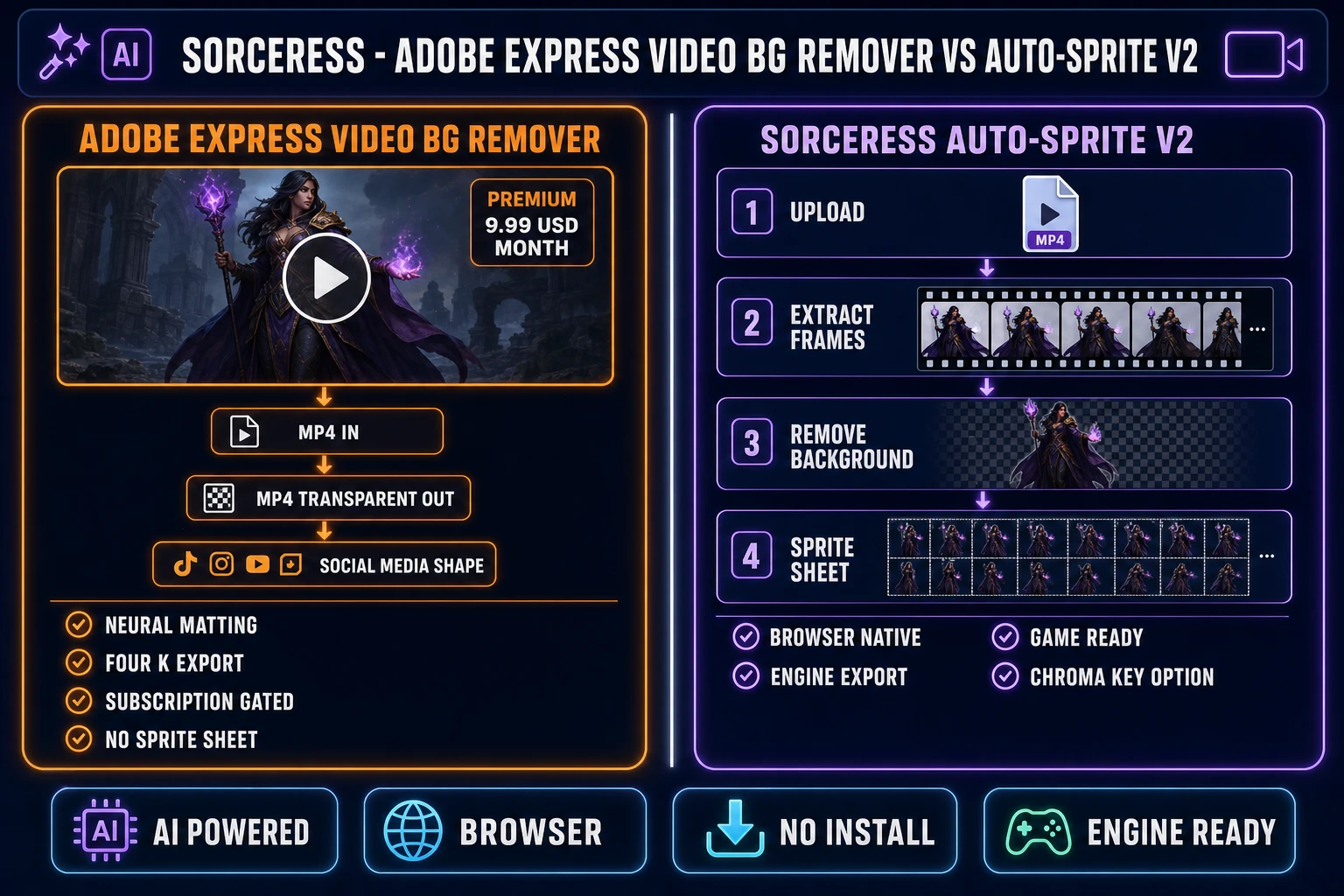
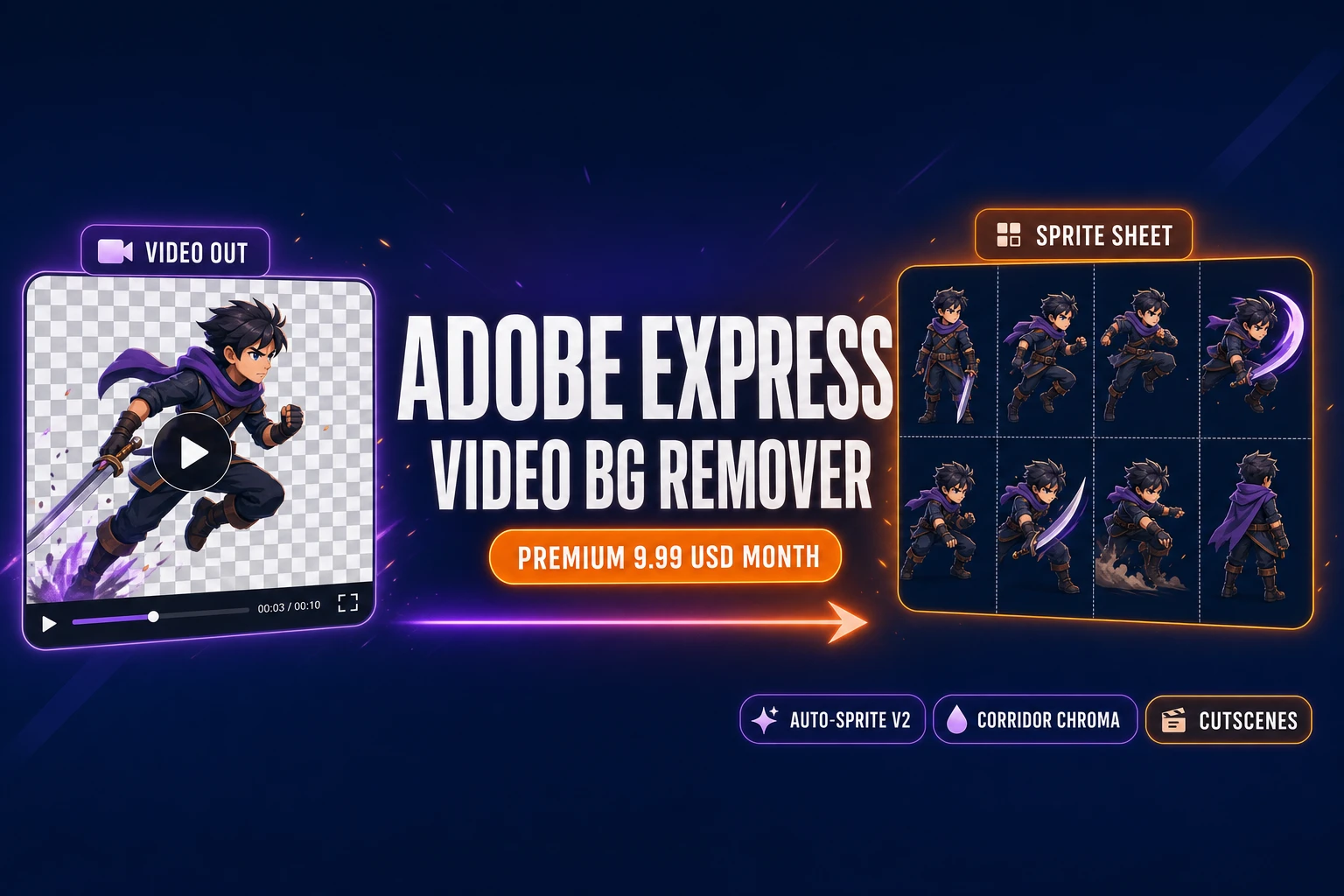
Adobe Express AI video background remover versus Sorceress Auto-Sprite v2 product diagram, left lane shows Adobe Express Premium with subscription gating and MP4 transparent video output, right lane shows Auto-Sprite v2 four step pipeline of upload extract frames remove background and sprite sheet on dark navy background with orange and purple accents
The Adobe Express AI video background remover outputs a transparent video. Sorceress Auto-Sprite v2 outputs the packed sprite sheet a game engine actually consumes. Verified June 5, 2026.

What the Adobe Express AI video background remover actually does in 2026

The Adobe Express AI video background remover is a Premium-tier feature inside Adobe Express, the company’s browser-based content creation suite. Verified June 5, 2026 against Adobe’s official Remove Background from Video feature page and the Adobe Express Premium documentation, the tool accepts MP4, MOV, M4V, and WebM video uploads up to roughly one gigabyte per file, runs a neural-matting model on every frame to separate the foreground subject from the background, and exports an MP4 with the background either replaced (Adobe Stock asset, solid color, gradient) or rendered transparent for compositing into another timeline. Output resolution is capped at 4K. The matting model handles soft edges, motion blur, and translucent subjects through Adobe’s in-house segmentation pipeline; it does not require a green screen or a specific backdrop color, which is the single most important difference from a traditional chroma-key keyer.

The pricing structure matters for any pipeline that produces more than a one-off clip. The Free tier of Adobe Express ships the still-image background remover and the GIF background remover but explicitly excludes Remove Video Background, which is reserved for the Premium plan at $9.99 per month or $99.99 per year. Premium also unlocks the 250-generative-credit allowance, the 200 million-asset Adobe Stock library, the one-click resize feature, and the 30,000-plus Adobe Fonts collection. A 30-day free trial of Premium covers the cost of a full evaluation. The Teams plan layers brand management and per-seat licensing on top of Premium at $19.99 per user per month. For comparison, the Sorceress Lifetime tier is forty-nine dollars one-time and unlocks every Sorceress tool including Auto-Sprite v2, Corridor Chroma, BG Remover, AI Video Gen, and the credit-funded pipeline that produces source clips in the first place — all verified live against the pricing page on June 5, 2026.

Why a game cutscene needs more than a social-media video background remover

A social-media clip and a game cutscene have completely different downstream consumers, and that single fact explains why the Adobe Express AI video background remover stops one step short of a game-ready asset. A social-media clip lands inside another video editor — another Adobe Express timeline, an InShot project, a CapCut sequence — where the transparent MP4 stacks over a new background and exports as another MP4. The pipeline ends in a video container. A game cutscene lands inside a game engine: Phaser’s scene.add.sprite reads from a packed PNG sprite sheet, Godot’s AnimatedSprite2D reads from a SpriteFrames resource, GameMaker’s sprite editor wants individual frame images, Construct’s animation editor wants a sprite atlas. None of those engines plays an MP4 as a runtime sprite. The transparent video the Adobe Express AI video background remover produces is two steps away from what the game project actually needs: a frame-extraction pass and a sprite-sheet packing pass.

Three other gaps separate a social-media BG remover from a cutscene workflow. First, the frame-rate requirement is different — a social-media clip targets 30 or 60 FPS for playback smoothness, but a sprite sheet usually picks eight to sixteen frames out of the source for a clean game animation (a full 30-FPS extraction produces redundant frames that bloat the atlas without adding visible motion). Second, the dimensions are different — a social-media clip ships at 1080p or 4K to look sharp on a phone, but a game sprite is usually 64 to 256 pixels along the longest edge, which means the source has to be downscaled with a method that preserves the alpha channel cleanly. Third, the cleanup defaults are different — a social-media composite hides minor edge halos under a new background; a sprite sheet on a transparent atlas has nowhere to hide a fringy edge. The Adobe Express AI video background remover handles the first half of step three through neural matting, but the engine-ready sprite still needs the frame-extraction, downscale, and atlas-pack steps that no social-media tool covers.

Sorceress Auto-Sprite v2 runs the full cutscene-to-sprite-sheet pipeline

Sorceress Auto-Sprite v2 at /autosprite-v2 is the closest direct alternative to the Adobe Express AI video background remover for a game cutscene specifically, because it covers every step the engine needs in a single browser tool. Verified against src/app/autosprite-v2/page.tsx on June 5, 2026, the tool advertises its workflow in four labelled steps directly on the page header — Upload, Extract frames, Remove background, Sprite sheet. Each step maps to a specific UI surface in the live app, not a marketing diagram. Upload accepts an image or a video; extract frames produces a filmstrip of every frame in the source with checkboxes to pick which ones make the final sheet; remove background runs a multi-pass alpha cleanup that includes a chroma-key picker with adjustable tolerance plus the Auto Edge Chroma multi-pass refinement; sprite sheet packs the selected cleaned frames into a transparent-background PNG atlas at the user’s chosen frame size and column count.

The architectural difference from the Adobe Express AI video background remover is the export shape. Auto-Sprite v2’s output is a packed transparent-background PNG that imports directly into Phaser’s this.load.spritesheet call, Godot’s AtlasTexture resource, GameMaker’s sprite editor, Construct’s animation editor, RPG Maker MV’s character sheet folder, or any custom 2D engine’s atlas loader. The same workflow optionally exports per-frame PNGs for engines that prefer one file per frame. Both exports skip the intermediate transparent-video container that Adobe Express produces, which means the game project never has to open a separate frame-extraction tool, never has to negotiate codec compatibility, and never has to manage a video file as a build artifact. The packed PNG is the asset the game ships. Verified against the live /autosprite-v2 page source on June 5, 2026, the workflow runs entirely client-side in the browser after the initial page load — the frame extraction, the multi-pass background removal, and the atlas pack all happen in the browser tab without a round-trip to a server, which keeps the conversion cost at zero credits per processed video once an account exists.
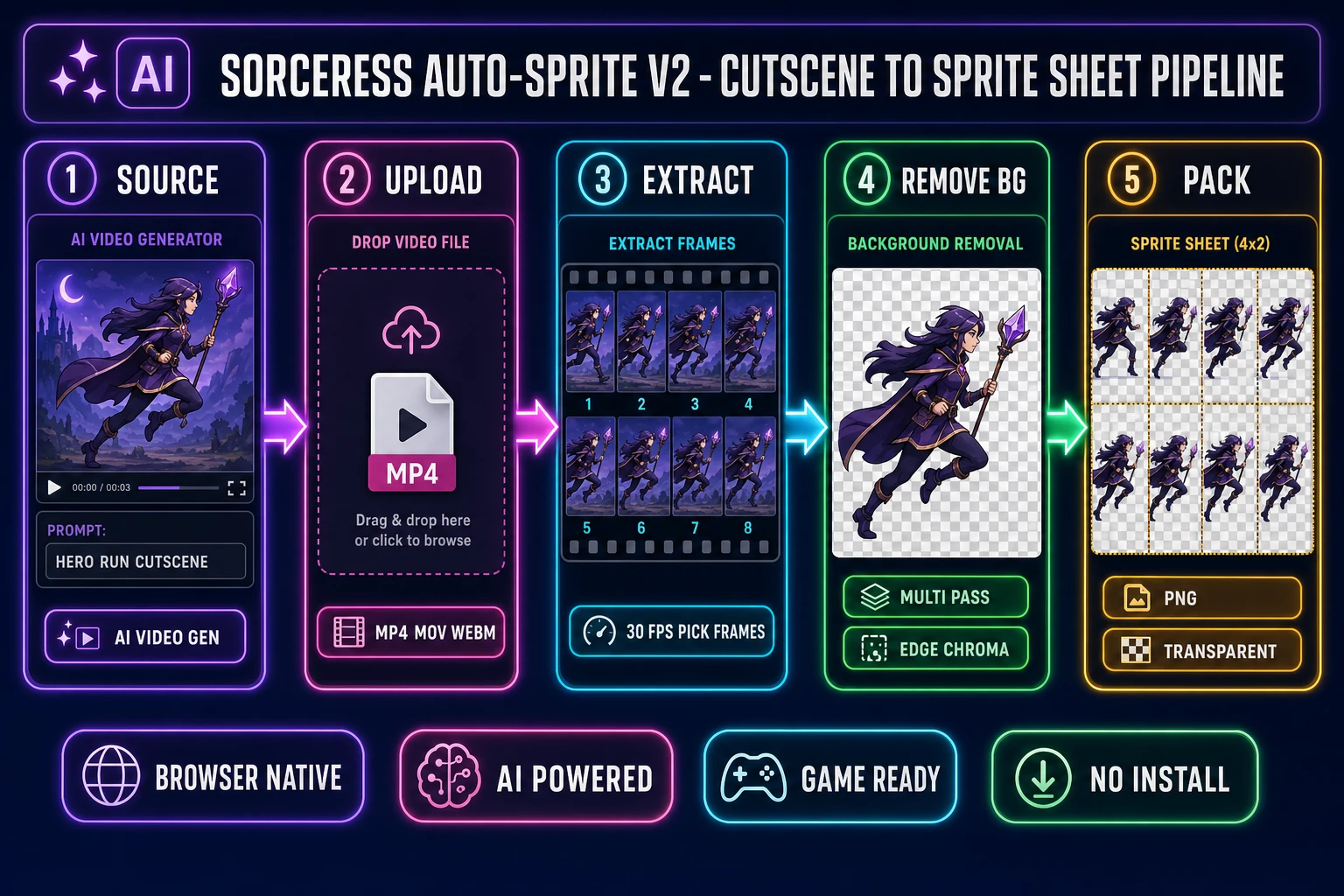
Sorceress Auto-Sprite v2 cutscene to sprite sheet pipeline diagram showing five numbered steps of AI source generation, MP4 upload, frame extraction at 30 FPS, multi-pass background removal with edge chroma cleanup, and packed transparent PNG sprite sheet export, on dark navy background with purple fuchsia cyan emerald and amber accents
Auto-Sprite v2’s five-step browser pipeline: AI Video Gen source, MP4 upload, frame extraction, multi-pass BG removal, packed PNG export. Verified June 5, 2026.

Corridor Chroma for hair-grade green-screen cutscenes

When the cutscene source was recorded against a real green-screen backdrop — a live-action actor, a 3D render with a green clear color, an in-engine playthrough with a green skybox — the Sorceress matched-purpose tool is Corridor Chroma at /corridor-chroma, not Auto-Sprite v2. Verified against src/app/corridor-chroma/page.tsx on June 5, 2026, Corridor Chroma is a neural green-screen keyer with a default key color of #00b140 (the standard digital green chroma color, adjustable through the eye-dropper picker and the tolerance slider with a default tolerance of 80) and a fixed cost of three credits per processed image. The model is trained specifically on green-key inputs, which lets it lean on a strong color prior and produce a sharper edge than a general-purpose neural matting model can produce on the same shot. Hair, motion blur, and translucent subjects (fabric, glass, smoke) all preserve cleanly — the tool brands this as “hair-grade” keying in the tools catalog because the standard neural-matting failure mode (a fringy halo around fine detail) does not appear at the same density on a known-green input.

The constraint is real and stated on the page: green only, blue not supported. A blue-screen recorded cutscene needs a different tool path — either a traditional chroma keyer or the general-purpose Auto-Sprite v2 multi-pass BG removal. The combination of Corridor Chroma and Auto-Sprite v2 covers most of the cutscene-source surface area. For a green-screen recorded actor in a fantasy game intro, the path is Corridor Chroma on each frame, then Auto-Sprite v2 to pack the cleaned frames into a sheet. For an AI-generated cutscene from Wan 2.7 or Seedance 2.0 with a busy painted background, the path is Auto-Sprite v2 end-to-end. The Adobe Express AI video background remover sits between the two: it handles the busy-background case through neural matting, but it does not have the green-key specialization Corridor Chroma offers and it does not have the sprite-sheet output Auto-Sprite v2 offers.
AI Video Gen as the upstream cutscene source

The other half of the cutscene pipeline is the source clip itself. Verified against src/lib/video-models.ts on June 5, 2026, Sorceress AI Video Gen at /video exposes eight current text-to-video and image-to-video models in a single unified panel: Grok Imagine Video, Wan 2.7 (uncensored), Wan 2.2 Fast, Seedance 2.0, Seedance 2.0 Fast, Seedance 1.5 Pro, Kling 3.0, Kling 3.0 Motion Control, and Kling 2.5 Turbo Pro. Each model supports an image-to-video mode (animate a start frame) and a text-to-video mode (generate from prompt), with several supporting end-frame control (animate between two key poses). The default selection on page load is Kling 2.5 Turbo Pro at the cheap tier; Wan 2.2 Fast is the budget pick for rapid iteration; Wan 2.7 is the uncensored option when the cutscene needs mature content the censored models will refuse.

The natural pairing for a game cutscene is straightforward: generate a four-to-six-second clip in AI Video Gen with the character on the desired action (run, attack, cast, jump), drop the clip into Auto-Sprite v2 for frame extraction and background removal, pack into a sprite sheet. Verified against the live tools catalog on June 5, 2026, this is the canonical Sorceress workflow that the Auto-Sprite v2 product page advertises directly: generate a character with AI image gen, animate it with AI video, then let Auto-Sprite turn that clip into a clean, game-ready sprite sheet. The Adobe Express AI video background remover does not generate the source clip — that step lives in a separate Adobe Express AI video generator, which is itself a Premium-gated feature with its own credit cost from the 250-per-month allowance.

Step-by-step: Adobe Express vs Sorceress for the same cutscene clip

The fairest comparison runs the same source — a four-second AI-generated character cutscene against a busy painted background — through both pipelines and tallies the steps, the cost, and the final asset shape.

  1. Generate the source clip. Both paths need a starting MP4. On the Adobe Express side, this happens in the Adobe Express AI video generator (or any external AI video tool the user already pays for) and the generated clip lands in the project library. On the Sorceress side, open /video, pick Wan 2.2 Fast at the budget tier (or Kling 2.5 Turbo Pro for higher quality), prompt for the cutscene action, and the clip lands in the Collections panel. Cost: roughly comparable AI credits on both sides at the entry-tier model.
  2. Upload to the background remover. Adobe Express: open the Remove Background from Video tool, drop in the MP4, wait for the neural matting pass to render every frame, export as a transparent MP4 at the chosen resolution. Sorceress: open /autosprite-v2, drop in the same MP4, the tool displays a filmstrip of every frame across the bottom of the workspace immediately.
  3. Pick the frames. Adobe Express does not have a frame-selection step — every frame at the source FPS makes it into the output transparent video. Sorceress: click the frames to include in the final sprite sheet (eight to sixteen frames is the sweet spot for a clean walk or attack loop; the filmstrip lets the user skip redundant frames). This is the step the social-media-first tool simply does not have.
  4. Run the background removal. Adobe Express: the neural matting pass already ran on every frame during the export step. Sorceress: use the chroma-key picker for fast batch removal on clean backgrounds, then enable the Auto Edge Chroma multi-pass cleanup at full source resolution for hair-grade edge refinement. The multi-pass cleanup runs on every selected frame in a batch.
  5. Export the asset. Adobe Express: the output is a transparent MP4 at up to 4K. The user then has to open a separate frame-extraction tool (FFmpeg from the command line, an online MP4-to-PNG-sequence converter, a video editor with image-sequence export), extract every frame to PNG, and pack them by hand or with another tool into a sprite sheet. Sorceress: click the export panel, set the frame width and height and the column count, click pack. The output is a transparent-background PNG sprite sheet plus optional per-frame PNGs, ready for engine import.

The step count tells the story. The Adobe Express AI video background remover path is five tool surfaces (AI Video Gen, Remove Background from Video, frame extractor, sprite-sheet packer, engine importer). The Sorceress path is two tool surfaces (AI Video Gen, Auto-Sprite v2) feeding directly into the engine importer. Both paths produce a usable sprite sheet at the end, but the Sorceress pipeline removes three intermediate tools and the file-format negotiation those tools introduce. For a single cutscene the extra steps are tolerable; for a game with ten cutscenes or fifty NPC reaction loops, the compounding tool-switching overhead is the practical reason indie studios consolidate the pipeline.

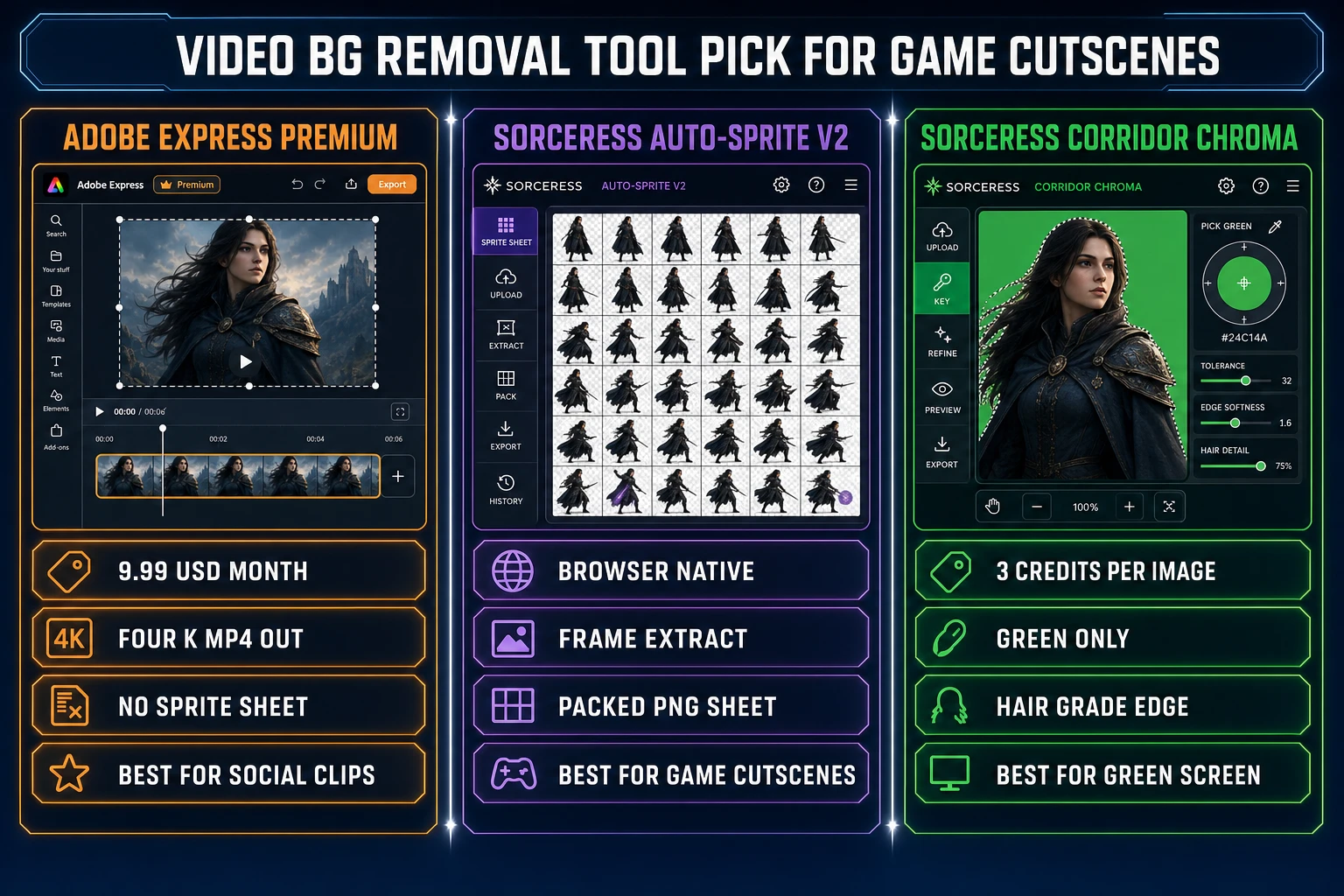
Video background removal tool pick for game cutscenes three lane comparison showing Adobe Express Premium at 9.99 dollars per month with MP4 output best for social clips on the left, Sorceress Auto-Sprite v2 with frame extract and packed PNG sheet best for game cutscenes in the center, Sorceress Corridor Chroma at 3 credits per image with green only hair grade edge best for green screen on the right, on dark navy background with orange purple and emerald accents
Which tool for which cutscene job. Adobe Express for social-clip output, Auto-Sprite v2 for game-engine sprite sheets, Corridor Chroma for green-screen specifics. Verified June 5, 2026.

Common failure modes when removing background from cutscene video

Five classes of failure account for almost every “the video background remover ruined my cutscene” complaint in 2026. Each has a specific fix that does not require switching tools or buying another subscription.

  • The matting picks up the wrong subject. Cause: the AI-generated cutscene has multiple foreground candidates (a hero plus a sidekick, a character with a held object that reads as a separate subject, a stylized background element with high contrast). Fix on the Sorceress path: drop the clip into Auto-Sprite v2, use the chroma-key picker on the dominant background color, then enable the Auto Edge Chroma multi-pass cleanup so the algorithm has a color prior to lean on. Adobe Express does not expose this control — the matting decision is opaque and uncorrectable.
  • The character has a fringy halo on every frame. Cause: the source video has soft anti-aliased edges from the AI generator’s denoising step, and the matting model mapped each blurred edge pixel to a partially-transparent alpha value. Fix: run Auto-Sprite v2’s edge cleanup pass at full source resolution before the downscale to sprite size; the cleanup forces a one-pixel hard subject boundary that the atlas pack can consume cleanly.
  • The output transparent video looks fine in a video player but the sprite sheet still has artifacts. Cause: the transparent MP4 from Adobe Express compresses the alpha channel with the video codec, which introduces sub-pixel noise that becomes visible when the frames are extracted and viewed at sprite scale. Fix: skip the transparent-video intermediate entirely by running Auto-Sprite v2 directly on the original RGB cutscene; the tool extracts frames from the source MP4 (no alpha compression) and runs the matting on each frame at full quality before the atlas pack.
  • The sprite sheet animation flickers between frames. Cause: each frame ran through the matting model independently and the model made slightly different alpha decisions on subtle parts of the subject (a wisp of hair, a translucent cloak edge). Fix: in Auto-Sprite v2, enable the chroma-key path with a fixed key color and tolerance so every frame gets the same removal decision instead of an independent neural-matting call. The deterministic chroma path costs a small amount of edge quality for a large amount of inter-frame stability.
  • The exported sprite is too small to read at gameplay scale. Cause: the cutscene rendered at a wide cinematic aspect ratio (1920 by 1080) but the sprite needs to be 128 by 128, and the downscale produced an unreadable mess. Fix: re-render the cutscene at a more square aspect (1024 by 1024 or 1280 by 1280) in AI Video Gen, then drop into Auto-Sprite v2; the square framing gives the matting model and the downscale step a tighter subject crop to work with, and the final sprite reads cleanly at engine scale.

The verdict on the Adobe Express AI video background remover for games

Three concrete recommendations based on the actual project shape, all verified live on June 5, 2026:

  • Pick the Adobe Express AI video background remover when the deliverable is a transparent video clip for a marketing trailer, a Steam announcement post, or a social-media campaign. The Premium-tier neural matting is genuinely strong, the 4K export holds up on a YouTube thumbnail, and the Adobe Stock asset library is the right shape for a one-off ad. The $9.99-per-month subscription is reasonable for a marketing-focused use case where the output stays as a video.
  • Pick Sorceress Auto-Sprite v2 when the deliverable is a game-engine sprite sheet. The four-step browser pipeline (upload, extract frames, remove background, sprite sheet) collapses what would otherwise be five separate tools into one tab, the export is the packed transparent PNG the engine consumes directly, and the Lifetime tier at forty-nine dollars one-time covers every Sorceress tool with no monthly subscription. For an indie game producing more than one cutscene a month, the pipeline consolidation is the larger savings.
  • Pick Sorceress Corridor Chroma when the cutscene was recorded against a real green screen. The neural green-key model produces a sharper edge than a general-purpose matter on the same shot because the green-color prior is a strong constraint; combine with Auto-Sprite v2 for the sprite-sheet pack step on the cleaned frames. The combination is the dedicated path for live-action or 3D-rendered green-screen cutscenes that the Adobe Express tool was never optimized for.

The Adobe Express AI video background remover is a strong piece of software for what it was built to do — produce a transparent video clip for a content-creation workflow — and the post is honest about that. The game-cutscene job is just one step further down the pipeline, and the tool stops at the transparent-video container while the engine wants the packed PNG sheet. Sorceress Auto-Sprite v2, Corridor Chroma, AI Video Gen, and BG Remover together cover the full cutscene-to-sprite pipeline in the same browser tab. Pair the Auto-Sprite v2 walkthrough with the single-image background-remover guide, the Canva AI background remover sprite-pack test, the Photoroom AI background remover game-sprite test, the Adobe Express AI background remover still-image comparison, and the cinematic AI animation generator walkthrough for the full cutscene toolkit on Sorceress.

Frequently Asked Questions

How much does the Adobe Express AI video background remover cost in 2026?

Verified against Adobe’s official help page on June 5, 2026, the Adobe Express AI video background remover sits inside the Premium plan, priced at $9.99 per month or $99.99 per year. The Free tier of Adobe Express includes the still-image background remover, the GIF background remover, and a quota of 25 generative AI credits per month, but the Remove Video Background tool is gated to Premium. Premium also unlocks the 250-generative-credit allowance, the 200 million-asset Adobe Stock library, and the one-click resize feature. A 30-day free trial of Premium gives a full test of the video remover before the first billing cycle. For a single cutscene this is fine; for a game pipeline that produces dozens of clips, the monthly cost compounds against per-credit alternatives like Sorceress where the Lifetime tier is forty-nine dollars one-time, verified against the live pricing page on June 5, 2026.

What is the best Adobe Express AI video background remover alternative for game cutscenes?

For a game cutscene specifically, the closest direct alternative is Sorceress <a href="/autosprite-v2?ref=blog">Auto-Sprite v2</a>, which is purpose-built for the video-to-game-asset pipeline. Auto-Sprite extracts frames from any uploaded MP4, runs multi-pass background removal at full source resolution, exposes a chroma-key picker for hair-grade edges, and packs the resulting frames into a transparent-background PNG sprite sheet sized for Phaser, Godot, GameMaker, Construct, or RPG Maker. Verified against <code>src/app/autosprite-v2/page.tsx</code> on June 5, 2026, the workflow is four labelled steps &mdash; Upload, Extract frames, Remove background, Sprite sheet. The Adobe Express AI video background remover outputs a single transparent video file; Auto-Sprite v2 outputs the asset the game engine actually consumes. For a hair-grade green-screen keyed input where a real green backdrop was used, <a href="/corridor-chroma?ref=blog">Corridor Chroma</a> is the matched-purpose tool with neural chroma key that preserves motion blur and translucency.

Can the Adobe Express AI video background remover output a sprite sheet?

No. Verified against Adobe&rsquo;s official Remove Background from Video feature page on June 5, 2026, the output of the Adobe Express AI video background remover is a video file with the background replaced or made transparent &mdash; the same clip in a video container, not a sprite sheet. For a game cutscene that has to play inside the engine as an animated sprite, the clip then has to be opened in a separate tool, exported frame by frame, and packed by hand. The Sorceress alternative collapses those three steps into one tool: drop the cutscene MP4 into <a href="/autosprite-v2?ref=blog">Auto-Sprite v2</a>, pick the frames, and the packed sheet is the export. The honest sprite-sheet output is the single biggest reason the Adobe Express path adds steps for a real game pipeline, even when the BG-removal quality on the still video is strong.

How does the Adobe Express AI video background remover compare to Sorceress Corridor Chroma?

Different jobs, different math. The Adobe Express AI video background remover is a neural-matting model trained to separate a foreground subject from any background &mdash; it works on photographs, painted backdrops, screen captures, or AI-generated video without needing a specific color behind the subject. <a href="/corridor-chroma?ref=blog">Corridor Chroma</a> is a neural green-screen keyer trained specifically on the standard green chroma key color (#00b140 by default, verified against <code>src/app/corridor-chroma/page.tsx</code> on June 5, 2026, with adjustable tolerance), purpose-built to preserve hair edges, motion blur, and translucency in shots that used a real green backdrop. For an AI-generated cutscene on a busy background, the Adobe Express tool is the right shape. For a recorded actor or a 3D render on a green screen, Corridor Chroma produces a sharper edge because it can lean on the green-key prior. Sorceress runs Corridor Chroma at three credits per image; the green-only constraint is documented in the tool UI.

Is there a free Adobe Express AI video background remover alternative for game devs?

Free in the strict no-credit sense, no &mdash; every browser tool that removes background from video at usable quality eats compute and the providers price that compute somewhere. The honest comparison is what the credits buy. The Adobe Express AI video background remover sits inside the Premium plan at $9.99 per month, which also unlocks 250 generative AI credits and the Adobe Stock library. Sorceress <a href="/autosprite-v2?ref=blog">Auto-Sprite v2</a>&rsquo;s video frame extraction and the multi-pass background removal run client-side in the browser at zero credits per conversion once an account exists, with the input video processed locally; only the upstream AI Video Gen step (if used to source the clip) costs credits, and Wan 2.7 Fast at the cheap tier runs at the low end of the credit catalog (verified against <code>src/lib/video-models.ts</code> on June 5, 2026). For a game pipeline that already has cutscene MP4s, Auto-Sprite v2 is the cheapest honest path. Verified against Sorceress pricing on June 5, 2026.

Can the Adobe Express AI video background remover handle AI-generated cutscenes from text-to-video models?

Yes, in the same way it handles any other video input &mdash; the tool does not care whether the source was recorded by a camera or generated by Wan 2.7, Seedance 2.0, Kling 3.0, or Grok Imagine Video. The match between an AI-generated cutscene and a video background remover is actually strong because AI text-to-video models in 2026 still bias toward clean backdrops and centered subjects, which gives the matting model a clean signal. The friction is the export shape: the AI-generated cutscene plus the Adobe Express AI video background remover produces a transparent video, and the game still needs a sprite sheet. Sorceress closes that loop in one tool by feeding the AI Video Gen output (<a href="/video?ref=blog">/video</a>) directly into <a href="/autosprite-v2?ref=blog">Auto-Sprite v2</a>, which extracts frames, removes background, and packs the sheet without the intermediate transparent-video export step.

What file formats does the Adobe Express AI video background remover accept and export?

Verified on June 5, 2026 against Adobe&rsquo;s official documentation, Adobe Express accepts MP4, MOV, M4V, and WebM video uploads up to roughly one gigabyte per file on the Premium plan. The Remove Video Background output renders to MP4 at up to 4K resolution with a transparent or replaced background. For a game cutscene workflow, the relevant downstream step is then converting that MP4 to a sprite sheet, which Adobe Express does not do natively &mdash; the user has to open a separate frame-extraction tool. Sorceress <a href="/autosprite-v2?ref=blog">Auto-Sprite v2</a> accepts the same MP4 plus MOV and WebM, extracts frames at the user&rsquo;s chosen FPS, and exports a packed transparent-background PNG sprite sheet plus per-frame PNGs. The export shape is the single largest game-pipeline gap between the two paths.

Sources

  1. Chroma key - Wikipedia
  2. Image matting - Wikipedia
  3. Alpha compositing - Wikipedia
  4. Sprite (computer graphics) - Wikipedia
  5. MP4 file format - Wikipedia
  6. Cutscene - Wikipedia
  7. Portable Network Graphics - Wikipedia
Written by Arron R.·3,260 words·14 min read

Related posts