Adobe Express AI Background Remover (Game-Sprite Compared)

By Arron R.11 min read
The Adobe Express AI background remover is free, fast, and tuned for one-off product photos. Sorceress BG Remover is tuned for game sprites — multi-file batch,

If the goal is a single product photo on a transparent background, the Adobe Express AI background remover is one of the cleanest free tools on the open web — drag, wait two seconds, download a transparent PNG. The friction shows up only when the next step is “now do it eight more times for the walk cycle” or “now load this into Phaser as a sprite atlas”. Game sprites have two requirements product photos do not: batch processing (because every character ships with eight to twenty frames) and hard-alpha edges (because soft halos render as visible glow against tile backgrounds in the engine viewport). Below is what the Adobe Express AI background remover actually does in 2026, where it stops, and where the Sorceress BG Remover picks up the rope. Verified May 18, 2026 against the live Adobe Express feature pages and the Sorceress source at src/app/bg-remover/page.tsx.
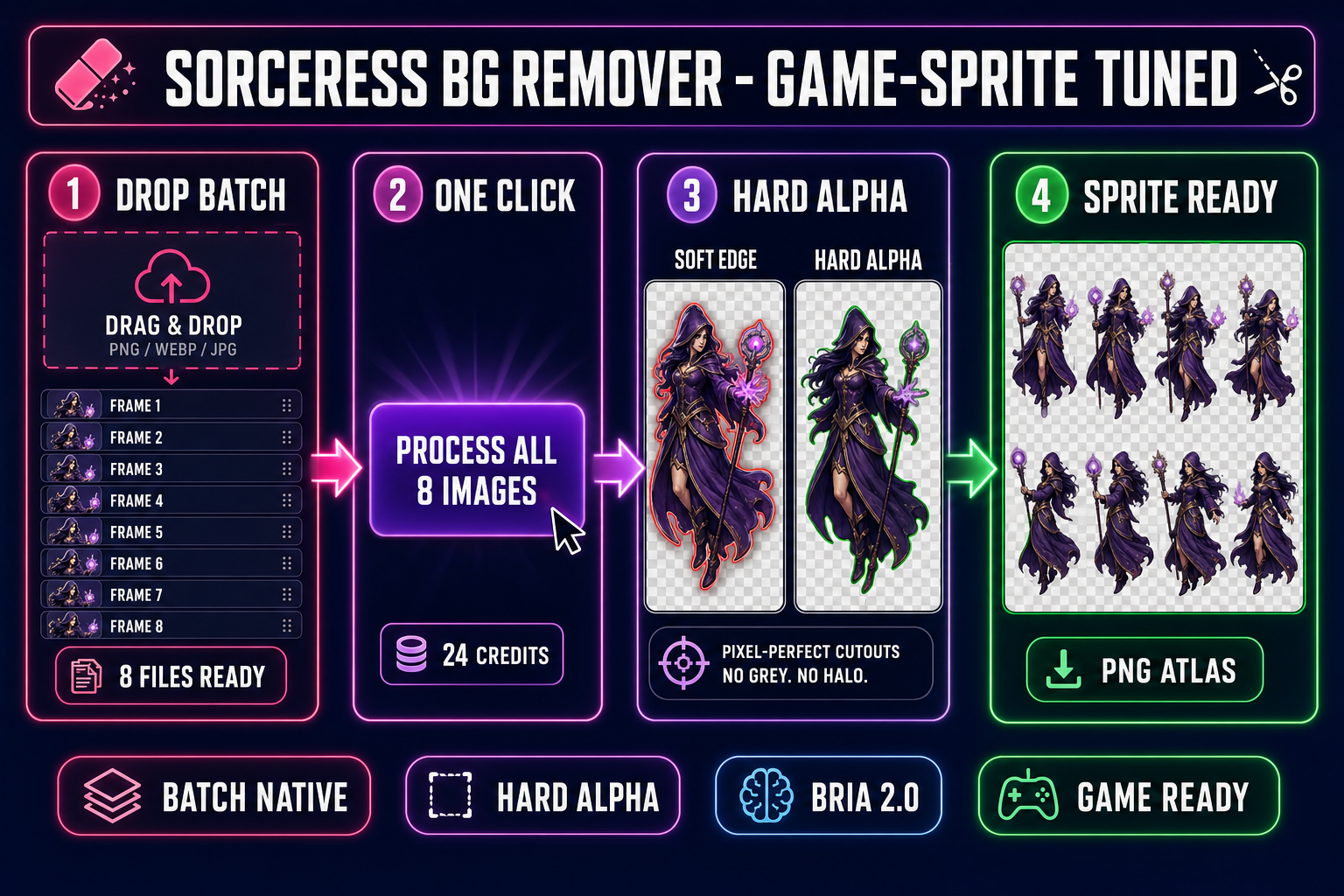
Sprite-sheet pipeline inside Sorceress BG Remover - drop a batch of eight frames, click process all, get hard-alpha cutouts, export as a sprite-ready PNG atlas - on a dark navy background with magenta and purple accents
The game-sprite-tuned alternative to the Adobe Express AI background remover: multi-file batch input, hard-alpha output, and a one-click hand-off into a sprite atlas. Verified May 18, 2026.

What the Adobe Express AI background remover actually does in 2026

The Adobe Express AI background remover is the cutout endpoint inside Adobe’s browser-based design tool, Adobe Express. It accepts a single image, runs a server-side image-segmentation model against the subject, and returns a transparent PNG with the background masked out. Verified May 18, 2026 against the live adobe.com/express/feature/image/remove-background page, the technical envelope is:

  • File formats: JPEG, JPG, PNG, WebP, and HEIC inputs.
  • File size cap: 40 MB per upload.
  • Output: a transparent PNG at the original resolution, no downscaling, no watermark on the free tier.
  • Speed: the cutout completes in roughly two seconds for a typical product photo.
  • Refinement tools: erase and restore brushes inside the Express editor for manual edge cleanup.
  • Account: a free Adobe ID is required for the broader editor; the cutout itself does not need a paid Express plan.

The model behind the cutout is part of Adobe’s Firefly family, tuned for the dominant Express use case — product photos, headshots, and stock-style portraits going onto a marketing canvas. For that job it is genuinely excellent. The friction starts showing up in two specific places: batch processing and hard-alpha edges.

Where the Adobe Express AI background remover wins

The honest cases where Express is the right pick:

  • One-shot product photo for a Steam page hero. A single render of your game’s hardware-themed mascot on a Discord banner, a Kickstarter graphic, a press-kit thumbnail. The Express editor opens a canvas around the cutout the moment the background drops, so the next step (drop a logo, add some text, schedule the post) lives in the same tab.
  • Headshots and team photos for an “about the studio” page. Express was designed for exactly this workflow. The soft-edge silhouette that sometimes hurts game sprites helps a portrait blend onto a marketing canvas.
  • One image at a time, no recurring pipeline. If the project is “remove the background from this one screenshot” and you do not need to do it again next Tuesday, the Adobe Express AI background remover gets you to a usable PNG faster than any tool that requires a sign-up.
  • You are already inside the Adobe ecosystem. The cutout flows directly into Photoshop, Illustrator, and the rest of Creative Cloud through the cloud-document handoff. For a studio whose marketing artists already pay for Creative Cloud, that integration is genuinely valuable.

None of those wins are in dispute. The Adobe Express AI background remover is one of the best free product-photo cutout tools available in 2026. The argument is about a different job.

The verdict at a glance — Adobe Express vs Sorceress BG Remover for game sprites

Comparison verified May 18, 2026 against the live Adobe Express feature pages and against src/app/bg-remover/page.tsx in the Sorceress source.

DimensionAdobe Express AI background removerSorceress BG Remover
CostFree on Adobe ID3 credits per image (100-credit starter)
Max file size40 MB5 MB
Input formatsJPG, PNG, WebP, HEICPNG, JPG, WebP
Batch processingNone — one file at a timeNative multi-file queue
Edge styleSoft (portrait-tuned)Hard (silhouette-tuned via Bria 2.0 RMBG)
Sprite-sheet hand-offManual download & re-importDirect drag into Quick Sprites / Canvas / WizardGenie
3D bridgeNoneCutout flows into 3D Studio for image-to-mesh
Best atSingle product photos, headshots, marketingSprite-sheet frames, NPC portraits, image-to-3D source

The verdict in one line: Express wins for one-shot marketing renders; Sorceress wins for game-asset packs. The two tools are complementary and the right pick depends entirely on what comes after the cutout.
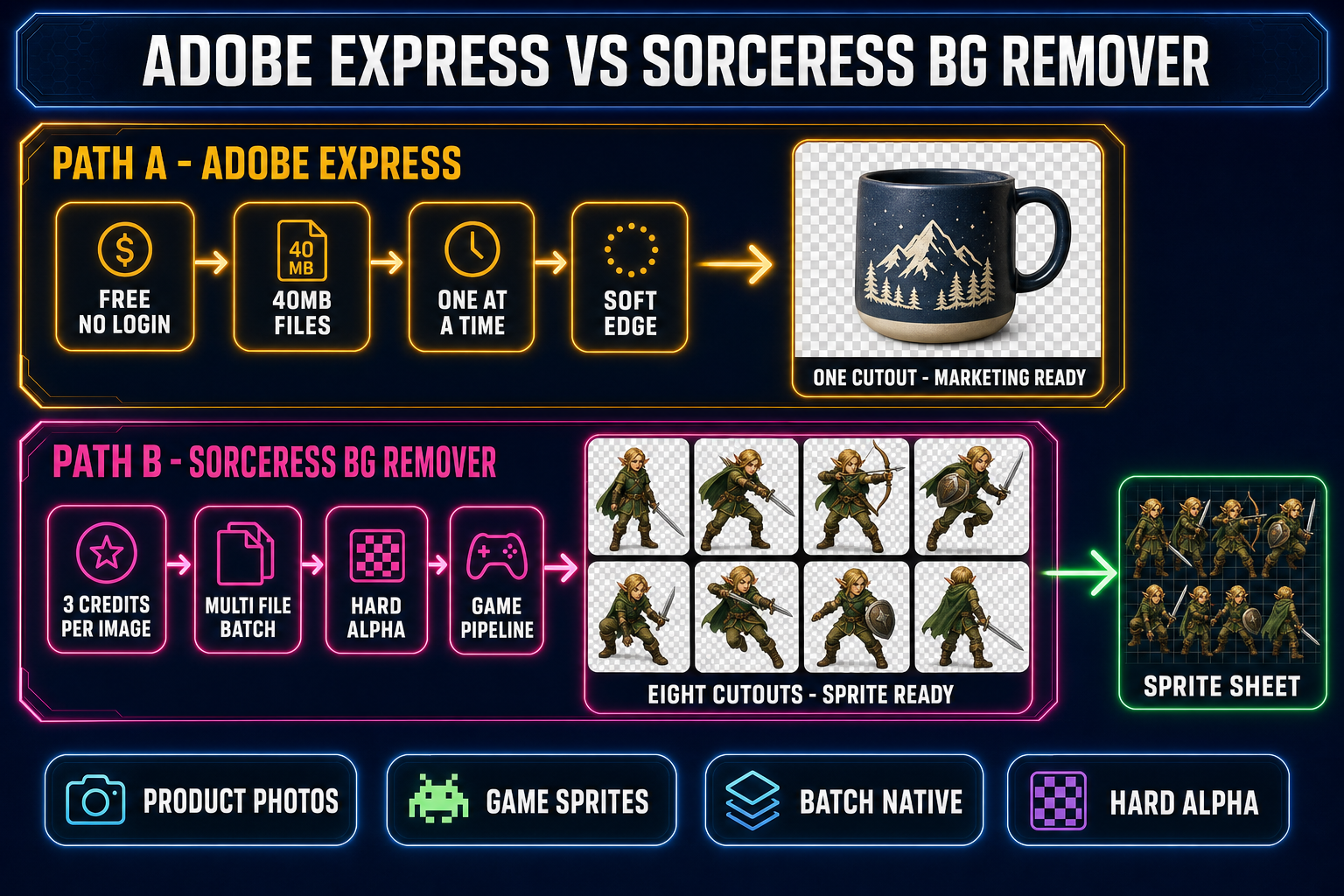
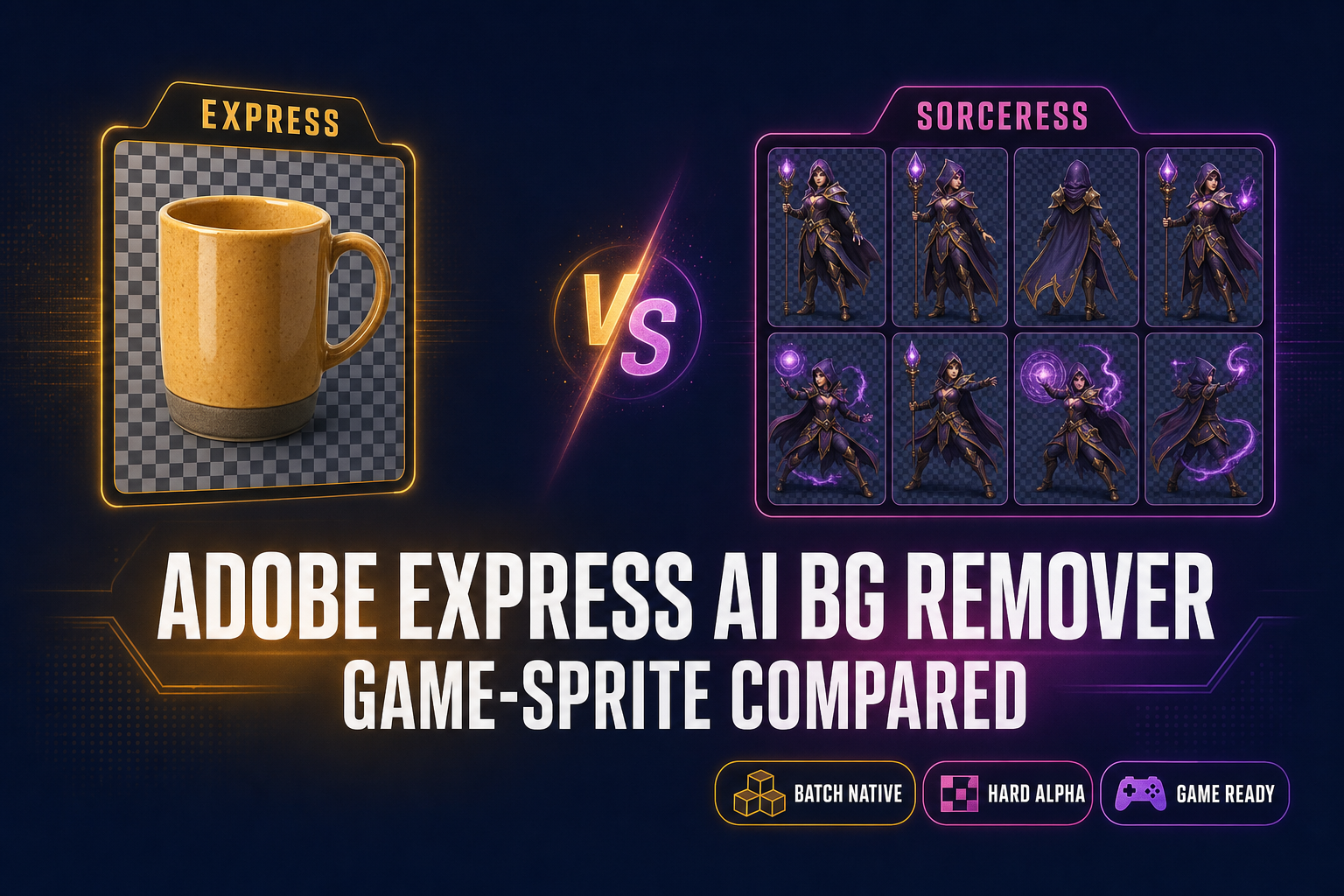
Side-by-side comparison diagram of Adobe Express versus Sorceress BG Remover - top lane shows Express with a single product mug cutout for marketing - bottom lane shows Sorceress with eight character cutouts arranged into a sprite sheet - both lanes labelled with their distinct strengths
One image at a time vs eight images at a time. The Adobe Express AI background remover is tuned for marketing renders; the Sorceress BG Remover is tuned for the game-asset pack that lives downstream.

Where the Sorceress BG Remover wins for game sprites

Three honest places the Sorceress side pulls ahead, all rooted in game-sprite economics rather than image quality on a single render.

1. Native multi-file batch. Verified May 18, 2026 against src/app/bg-remover/page.tsx (the handleProcessAll handler, pendingFiles queue, and batchProgress state): drop eight frames into the upload zone, click Process All, and the queue runs in parallel with a progress bar. The Adobe Express AI background remover does not have this endpoint — verified May 18, 2026 via the official Adobe Community thread on Adobe Express background remover batch process, where Adobe staff confirmed there is no batch feature and the workaround is the desktop Photoshop Remove Background action (a separate paid product). For an eight-frame walk cycle, Sorceress is one click; Express is eight uploads, eight downloads, and eight filename collisions to clean up by hand.

2. Hard-alpha edges from Bria 2.0 RMBG. The Sorceress BG Remover routes every removal through the bria/remove-background endpoint on Replicate — the production version of Bria’s RMBG model, tuned for object silhouettes rather than portrait edges. The result is a clean alpha channel where each pixel is either fully opaque or fully transparent. That matters because of how engines handle alpha compositing: a sprite with a soft halo of half-transparent pixels gets rendered with the halo composited over whatever tile is behind it, producing a faint glow against the level background. The Adobe Express AI background remover uses a portrait-tuned soft edge that looks great on a marketing canvas and looks like a glitch in a game viewport.

3. Direct hand-off into the asset pipeline. The cutout output is stored on your Sorceress account as a B2 URL (verified against the uploadToStorage helper inside src/app/bg-remover/page.tsx), which means the next step is a drag, not a re-upload. Inside WizardGenie you drag the cutout straight into an agent session for code-side integration. Inside the broader Sorceress UI you drag it into Canvas for manual sprite-sheet layout, or into Quick Sprites for an animated walk cycle. Express stops at the local download.
Why hard-alpha matters more for sprites than for product photos

A product photo is rendered exactly once at the resolution it was shot. A game sprite is rendered every frame inside the engine, scaled by the camera, blended over a tile background, and re-composited dozens of times per second. The technical primitive that determines how the silhouette shows up against the level is the PNG alpha channel: the per-pixel opacity value the engine reads alongside the RGB color.

If the cutout has hard alpha — every pixel either 255 or 0, with anti-aliasing handled by the engine’s sub-pixel rasterizer — the silhouette stays crisp at every camera distance. If the cutout has soft alpha — a one-to-three-pixel ring of half-transparent pixels — that ring shows up as a faint glow against any tile darker than the original photo background, and as a subtle cyan or magenta fringe against any tile lighter than the original. The same artifact that haunted late-90s pre-rendered sprites is the artifact a portrait-tuned cutout introduces today.

The fix that production game-asset tools converged on is to bias the alpha mask hard: any pixel under roughly 50% transparency snaps to 0, any pixel over snaps to 255, and the engine handles smoothing at render time. The Sorceress BG Remover bakes that bias into the bria/remove-background output. The Adobe Express AI background remover does not, because for marketing renders the soft edge is the right answer.

The full game-sprite workflow with the Sorceress BG Remover

Six concrete steps, end-to-end, from raw character art to a sprite-sheet drop into Phaser. Verified May 18, 2026 against the source at src/app/bg-remover/page.tsx, src/app/quick-sprites/page.tsx, and src/lib/threed-models.ts.

  1. Generate eight character poses. In Sorceress AI Image Gen, lock a reference image of your hero into Nano Banana 2 and generate eight poses (idle, walk, run, jump, attack, cast, hit, victory) at 9 credits each. Pose selection covered in the reference-image character workflow.
  2. Drop the eight frames into the BG Remover queue. Open /bg-remover, drag the eight PNGs into the upload zone (or drop them in from the WizardGenie Explorer for a desktop session). The queue accepts up to 5 MB per file; resize with the img-v2 proxy first if the source images exceed that.
  3. Click Process All 8 Images. The queue runs against the bria/remove-background endpoint in parallel. The progress bar (batchProgress state) shows current / total. Each cutout costs 3 credits, so the eight-frame pack is 24 credits — well inside the 100-credit starter pack.
  4. Verify the alpha edge. The lightbox view renders each cutout against a transparent checker pattern (linear-gradient tile in the source). Zoom in on the silhouette; the edge should be a hard line, not a soft ring. If a frame still has a halo (rare but possible on hair detail), use the Erase brush in Canvas to clean it up before the sprite-sheet step.
  5. Lay the eight cutouts into a sprite sheet. Drop the cutouts into Quick Sprites for an automated walk-cycle layout (verified against src/app/quick-sprites/page.tsxMODEL_ID = 'retro-diffusion/rd-animation', CREDITS_PER_GEN = 9, animation styles include four_angle_walking at 48×48 px and small_sprites at 32×32 px). Or drop them into Canvas for manual grid arrangement and pixel-perfect alignment.
  6. Load the sprite sheet in Phaser. The output is a single PNG texture atlas the engine reads in one call:
// Phaser 4 - load and play the sprite sheet
this.load.spritesheet('hero', '/assets/hero_walk.png', {
  frameWidth: 48,
  frameHeight: 48,
});

this.anims.create({
  key: 'hero-walk-right',
  frames: this.anims.generateFrameNumbers('hero', { start: 0, end: 7 }),
  frameRate: 12,
  repeat: -1,
});

const hero = this.physics.add.sprite(100, 100, 'hero');
hero.play('hero-walk-right');

The whole path lands in roughly four minutes inside a single browser tab. For a deeper sprite-sheet walkthrough, see the sprite-sheet how-to; for the head-term comparison against other cutout tools, see the one-click BG remover write-up.

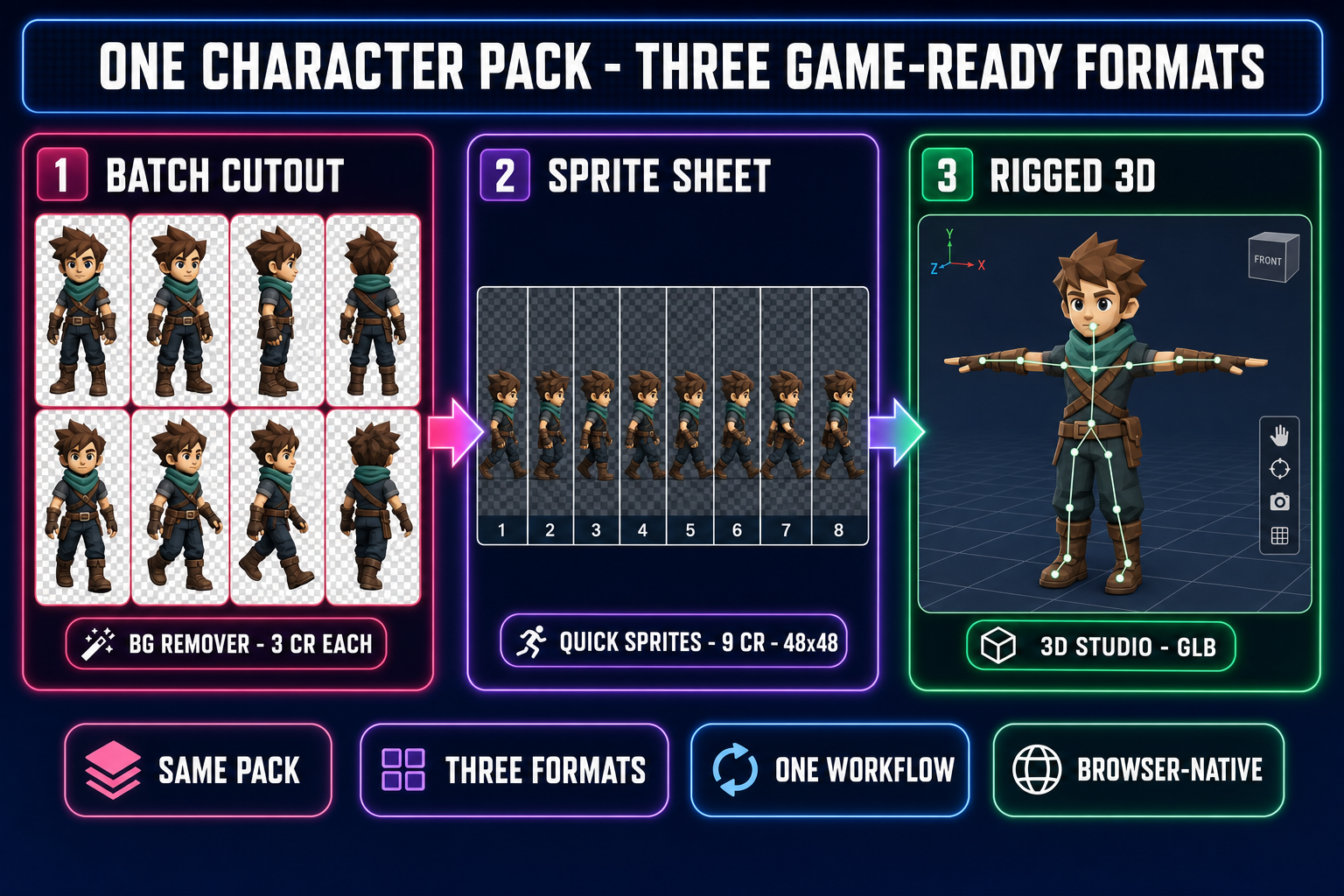
Diagram showing one character pack transformed into three game-ready formats - eight cutout frames from BG Remover at 3 credits each, an 8-frame walk cycle sprite sheet from Quick Sprites at 9 credits and 48 by 48 pixels, and a rigged 3D model in T-pose from 3D Studio - on a dark navy background with magenta, purple, and emerald accents
One eight-frame character pack, three game-ready outputs. The cutout step feeds the sprite sheet and the 3D model alike, which is what makes batch-native background removal worth the credits.

The math — credits vs minutes-of-clicking

Free tools are not actually free if the workflow is wrong for the job. For a full character pack, the relevant ratio is credits spent against minutes of human clicking saved. A representative project: one hero, eight poses for the walk cycle, four NPCs at four poses each. That is twenty-four cutouts.

On the Adobe Express AI background remover, twenty-four cutouts is twenty-four uploads (drag, wait, click Download, rename, repeat). At roughly 25 seconds of human attention per frame — the upload, the wait, the click, the rename — the pack costs about ten minutes of focused clicking that you cannot leave unattended. On Sorceress BG Remover, twenty-four cutouts is one drag-and-drop, one click on Process All, and a 30-second wait while the parallel batch resolves. Cost: 72 credits (well inside the 100-credit starter), and roughly forty seconds of human attention.

The choice is not credits-vs-free. It is “ten minutes of unbreakable focus today, again next Tuesday for the next character” against “forty seconds and a credit deduction”. For a one-off marketing image the math runs the other way and Adobe Express is the right answer; for a recurring sprite pipeline the math runs hard toward batch-native.

Pick the Adobe Express AI background remover if…

  • The job is a single product photo, marketing render, or studio headshot.
  • The next step lives inside the Adobe Express editor (text, layers, social-post scheduling) or inside Creative Cloud.
  • You need a 40 MB input cap because the source is a high-resolution photo straight off a DSLR.
  • You do not have a recurring cutout job — this is a one-off and you will not need the pipeline again next month.
  • The output is going onto a marketing canvas where a soft, photo-friendly silhouette edge is correct.

Pick the Sorceress BG Remover if…

  • The job is eight or more cutouts at a time — sprite frames, NPC portraits, item icons.
  • The output feeds a sprite-sheet, a tile atlas, or a 3D mesh, not a Discord banner.
  • You need hard-alpha edges for clean compositing inside an engine viewport.
  • The next step is also a Sorceress step (Quick Sprites, Canvas, 3D Studio, WizardGenie agent session).
  • You want the cutouts stored on your account as URLs so the asset board persists between sessions.

What both tools still miss

Three honest gaps that neither side has solved yet, worth knowing before you commit a project.

Per-pixel mask correction at the cutout step. Adobe Express ships erase / restore brushes inside the Express editor. Sorceress does not ship a brush at the cutout step — the fix-up path is to open the result in Canvas and use the eraser there. Neither workflow yet automates “detect and restore the silhouette pixels the model misclassified as background”.

Anti-aliased silhouette preservation on extreme edges. Both models occasionally over-bias the alpha mask on hair, antennae, glass, and motion-blur trails. On a typical character render the failure rate is below 5% of frames; the manual cleanup case above is the same fix.

Per-frame sprite alignment. Cutting out the background does not align eight frames to the same pixel grid. The Sorceress workflow handles alignment in Quick Sprites or Canvas; Express has no equivalent. A standalone cutout tool, even a great one, only solves the first half of “sprite ready”.

Use the Adobe Express AI background remover when the goal is a marketing render and the tool that comes next is Adobe Express itself. Use the Sorceress BG Remover when the goal is a game-asset pack and the tool that comes next is a sprite sheet, a 3D mesh, or an agent session. The two tools live at the opposite ends of the cutout-quality spectrum on purpose — the right pick is the one tuned for the job downstream.

Frequently Asked Questions

Is the Adobe Express AI background remover really free?

Yes, for the basic remove-background flow. Verified May 18, 2026 against the live adobe.com/express/feature/image/remove-background page: the tool runs in any modern browser, accepts JPG, PNG, WebP, and HEIC up to 40 MB, exports a transparent PNG at full resolution, and applies no watermark on the free tier. A free Adobe ID unlocks the broader Express editor (text, layers, scheduling) but the cutout itself does not require a paid plan. The catch for game devs is that the free tier has no batch endpoint — you upload one file, you download one file. For an eight-frame sprite sheet that is eight separate uploads.

Does the Adobe Express AI background remover support batch processing?

No. Verified May 18, 2026 via the official Adobe Community thread on this exact question (community.adobe.com/t5/adobe-express-discussions/adobe-express-background-remover-batch-process): a user asked how to process 150 images in one pass and Adobe staff confirmed there is no batch endpoint in Express. The recommended workaround is the desktop Photoshop Remove Background action, which is a separate paid product. For a game project that needs eight to twenty cutouts per character pack, this is the breakpoint where a tool with native batch support saves real time. The Sorceress BG Remover queues a multi-file drop and processes the whole pack in one click — verified against src/app/bg-remover/page.tsx (handleProcessAll, batchProgress).

How much does the Sorceress BG Remover cost per image?

Three credits per image. Verified May 18, 2026 against src/app/bg-remover/page.tsx (BG_REMOVER_CREDITS = 3). A new Sorceress account ships with a 100-credit starter pack — that covers 33 cutouts before any top-up, enough for four characters worth of eight-frame walk cycles. Each generation calls the bria/remove-background model on Replicate, returns a PNG with a clean alpha channel, uploads it to Backblaze B2, and stores the URL on your account so you can re-download or drag it into another Sorceress tool later. The Adobe Express AI background remover does not deduct credits but also does not store your files on a project board you can reopen tomorrow.

Why does alpha-channel quality matter more for game sprites than for product photos?

A product photo is rendered once at the resolution it was shot. A game sprite is rendered every frame inside the engine, scaled, blended, and composited over a tile background. If the cutout has a soft halo of half-transparent pixels around the silhouette, those pixels show up as a visible glow against the tile in the engine viewport — the same artifact that haunted late-90s pre-rendered sprites. The fix is a hard alpha edge: every pixel is either fully opaque or fully transparent, with anti-aliasing handled by the engine at render time. The Bria 2.0 RMBG model the Sorceress BG Remover uses is tuned for that hard edge on object silhouettes, which is why it is the recommended path for game-asset work. The Adobe Express AI background remover targets product-photo and portrait silhouettes, where a softer edge actually helps the photo blend onto a marketing canvas.

Can I send the cutout straight into a sprite sheet without re-uploading?

Inside Sorceress, yes. The BG Remover output is stored on your account as a URL; from there you can either drag it into the WizardGenie Explorer for an agent session, drop it into Canvas for manual sprite-sheet layout, or kick it into Quick Sprites for an animated walk cycle (verified against src/app/quick-sprites/page.tsx — MODEL_ID = retro-diffusion/rd-animation, CREDITS_PER_GEN = 9, animation styles include four_angle_walking at 48 by 48 pixels). The Adobe Express AI background remover exports a PNG to your local filesystem and stops there — every downstream step (sprite-sheet layout, walk-cycle animation, 3D conversion) is a separate tool you bring yourself.

Which tool should I pick for a one-off marketing render?

Adobe Express, every time. The Adobe Express AI background remover is fast, free, browser-based, and the rest of the Express editor lets you drop the cutout straight onto a Discord banner, a Steam page hero, or a press kit thumbnail without leaving the tab. For a single marketing image it is the cleaner workflow. The Sorceress BG Remover only earns its credits when the next step is also a game-asset step — eight frames of a walk cycle, a roster of NPC portraits, or a 3D mesh built from the cutout. Different tools, different jobs; the comparison only matters when the downstream pipeline pulls one way or the other.

Sources

  1. Alpha compositing — Wikipedia
  2. Image segmentation — Wikipedia
  3. Texture atlas (sprite sheet) — Wikipedia
  4. Sprite (computer graphics) — Wikipedia
  5. Portable Network Graphics — Wikipedia
Written by Arron R.·2,447 words·11 min read

Related posts