Wire AI Character Image Generator (Sprite Pack 2026)

By Arron R.10 min read
The fastest AI character image generator workflow for indie games in 2026 is Sorceress AI Image Gen paired with Quick Sprites, True Pixel, and Background Remove

Search AI character image generator in September 2026 and every result is a different single-model tool - one for stylized portraits, one for photoreal, one for anime, one for painterly fantasy - each with its own account, its own credit ledger, and its own sprite-export blind spot. Sorceress AI Image Gen is the panel that routes a single character prompt through Nano Banana Pro, GPT Image 2, Grok Imagine, Seedream 5, Flux 2 Pro, and Z-Image Turbo in one prompt field, then hands the reference off to Quick Sprites, True Pixel, and the Background Remover for a game-ready sprite pack. This how-to prints the exact 2026 workflow - portrait, consistent-character lock, frame pack, pixel-perfect downscale, transparent PNG - with the verified credit math and prompt patterns. Every model name, tool path, and credit rate below was checked 2026-09-13 against src/app/_home-v2/_data/tools.ts, src/lib/models.ts, the W3C PNG specification, and the Phaser v4.2.1 Giedi release notes.
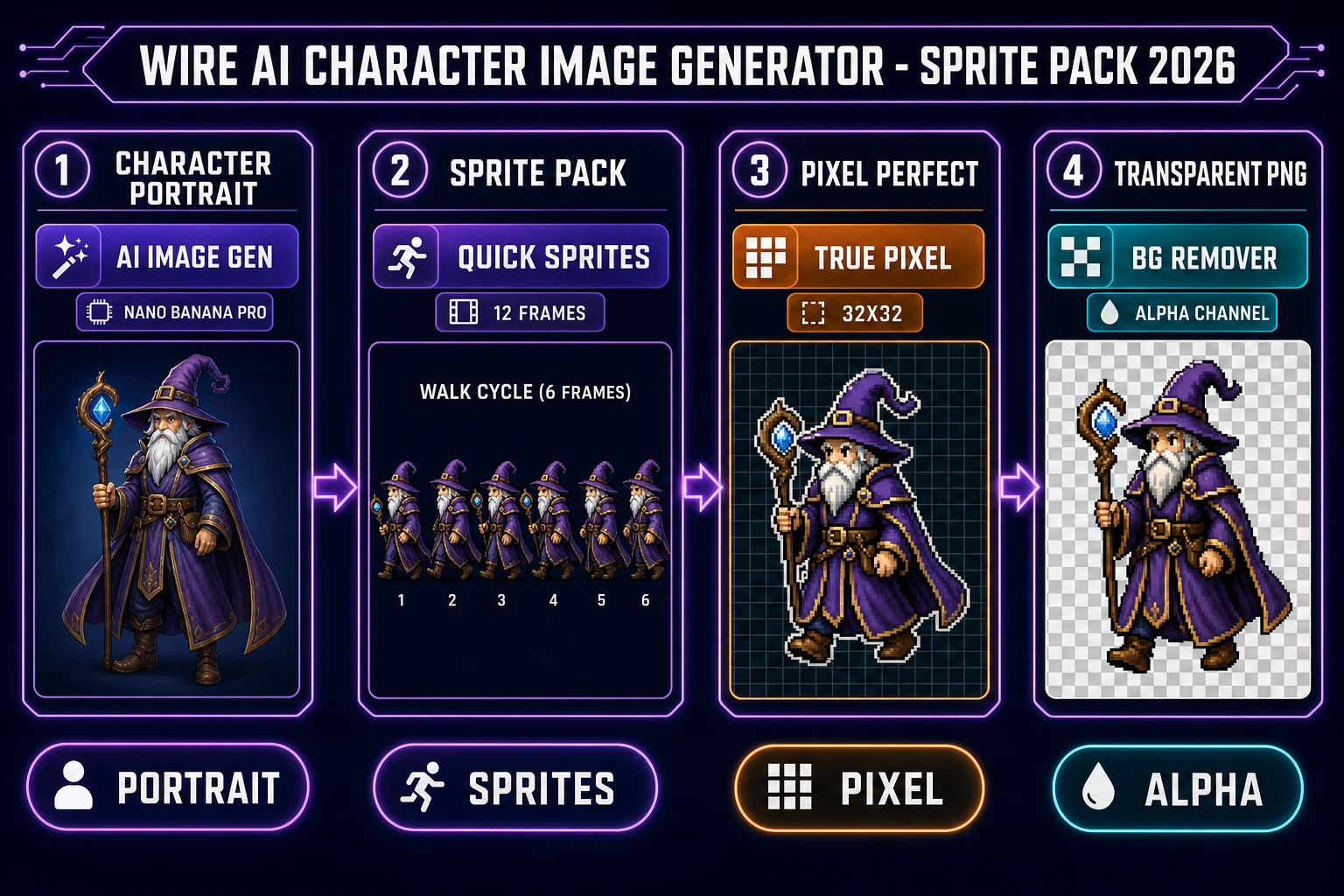
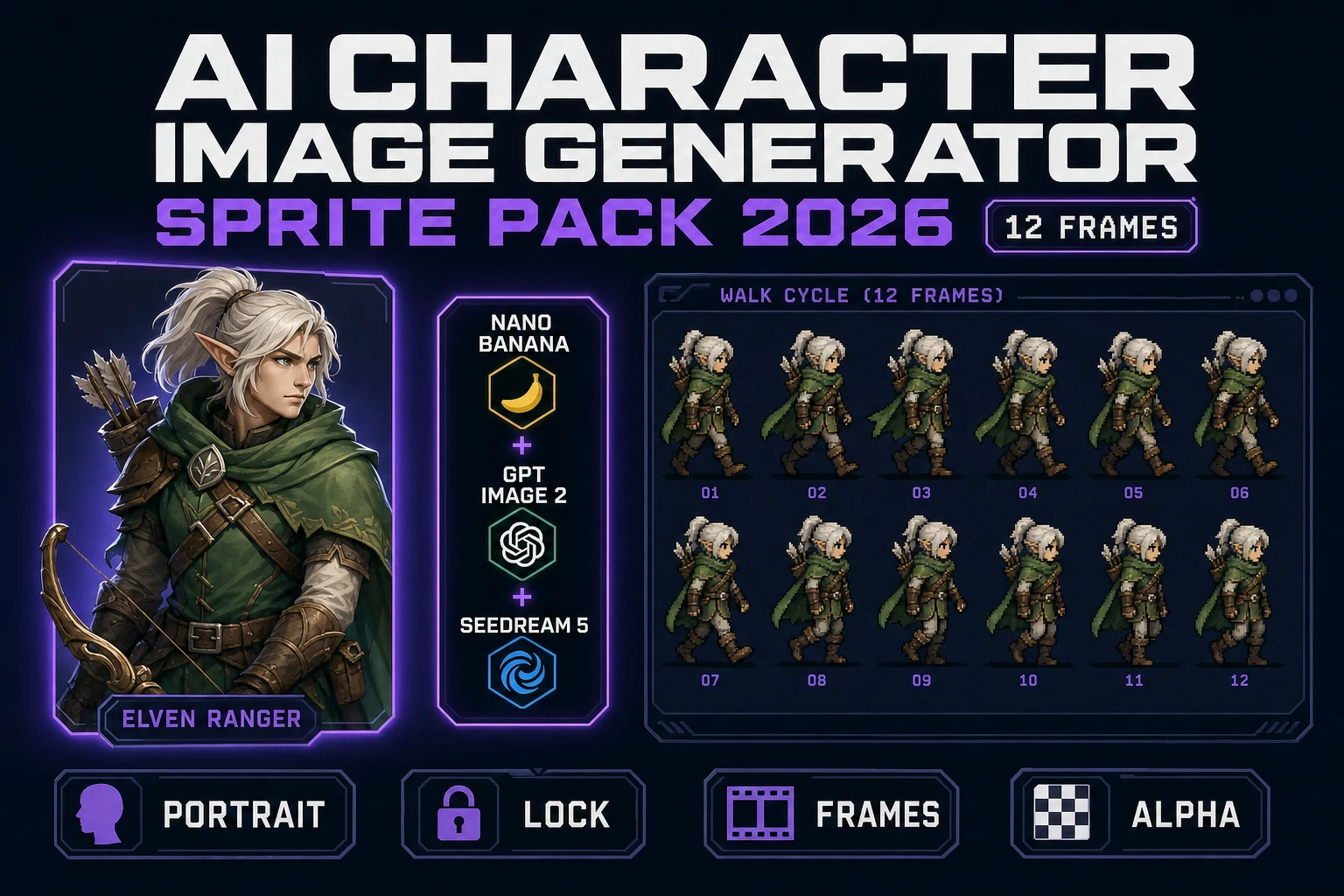
Wire AI character image generator sprite pack 2026 pipeline chart with Sorceress AI Image Gen Nano Banana Pro Quick Sprites True Pixel and Background Remover
The 2026-09-13 AI character image generator sprite-pack loop through Sorceress - portrait, sprites, pixel-perfect, transparent PNG in one continuous panel.

What an AI character image generator actually needs to do for games

The phrase AI character image generator describes a class of text-to-image diffusion systems tuned for character portraits, full-body poses, and reference sheets - a specialization of the broader text-to-image model family (see the general definition on the Wikipedia entry for text-to-image models). For general marketing art a single portrait is enough, but for a game the definition is stricter. A game-ready AI character image generator has to land four surfaces at once: a consistent face and outfit across dozens of poses, a plain background that the sprite-cutter can key out, a full-body composition with clean silhouettes at the mesh edges, and a resolution that survives a downscale to 32x32 or 64x64 pixel-art without dissolving into mush. Miss any one of those and the sprite pack falls apart at the first walk-cycle frame.

The 2026 stable roster of AI character image generators that clears all four gates is short, and Sorceress bundles the entire set into one panel. Verified 2026-09-13 in src/app/_home-v2/_data/tools.ts line 254, Sorceress AI Image Gen exposes Nano Banana Pro, GPT Image 2, Grok Imagine, Seedream 5 (uncensored), Flux 2 Pro, Z-Image Turbo, and more - every top AI image model in one panel, driven from a single unified prompt field. Every model in that lineup accepts a reference image, honours a seed, and ships a full-resolution PNG that the downstream sprite tools can consume without a file-format handoff.

The Sorceress AI Image Gen roster for AI character image generator work

AI Image Gen is the anchor tool for the character loop. Verified 2026-09-13 in src/app/_home-v2/_data/tools.ts line 250 through 265, the panel wires every top image model into one prompt field with one credit ledger and one gallery. The character-appropriate picks and their honest strengths break down like this.

Model Best for Reference lock Standout
Nano Banana ProStylized heroes, anime-adjacent artNative reference image inputFastest draft-quality character pass in the roster
GPT Image 2Photoreal portraits, dense in-image text (UI overlays, name plates)Native reference image inputOnly model that reliably renders legible text inside the character sheet
Grok ImaginePlayful stylized art, bold outlines, saturated paletteReference lock via seed and promptHighest-contrast silhouettes for sprite export
Seedream 5 (uncensored)Mature fantasy characters, edge casesNative reference image inputHandles subject matter the safety-tuned models refuse
Flux 2 ProPainterly fantasy heroes, oil-brush texturesReference lock via seed and promptBest texture rendering for cover-art and box-shot passes
Z-Image TurboBatch volume, background NPCs, throwaway draftsSeed-only lockLowest credit cost per image in the roster

Every model above ships a PNG or a WebP at the panel-selected resolution, and every export lands in the same gallery under the same account. At the Sorceress CREDITS_PER_DOLLAR = 100 rate (verified 2026-09-13 in src/lib/models.ts line 69), a Nano Banana Pro portrait at 10 to 15 credits is $0.10 to $0.15 of underlying provider spend, a GPT Image 2 portrait at 20 to 30 credits is $0.20 to $0.30, and a Z-Image Turbo batch pass at 5 credits per image is $0.05 - all inside the same wallet as the sprite tools downstream.
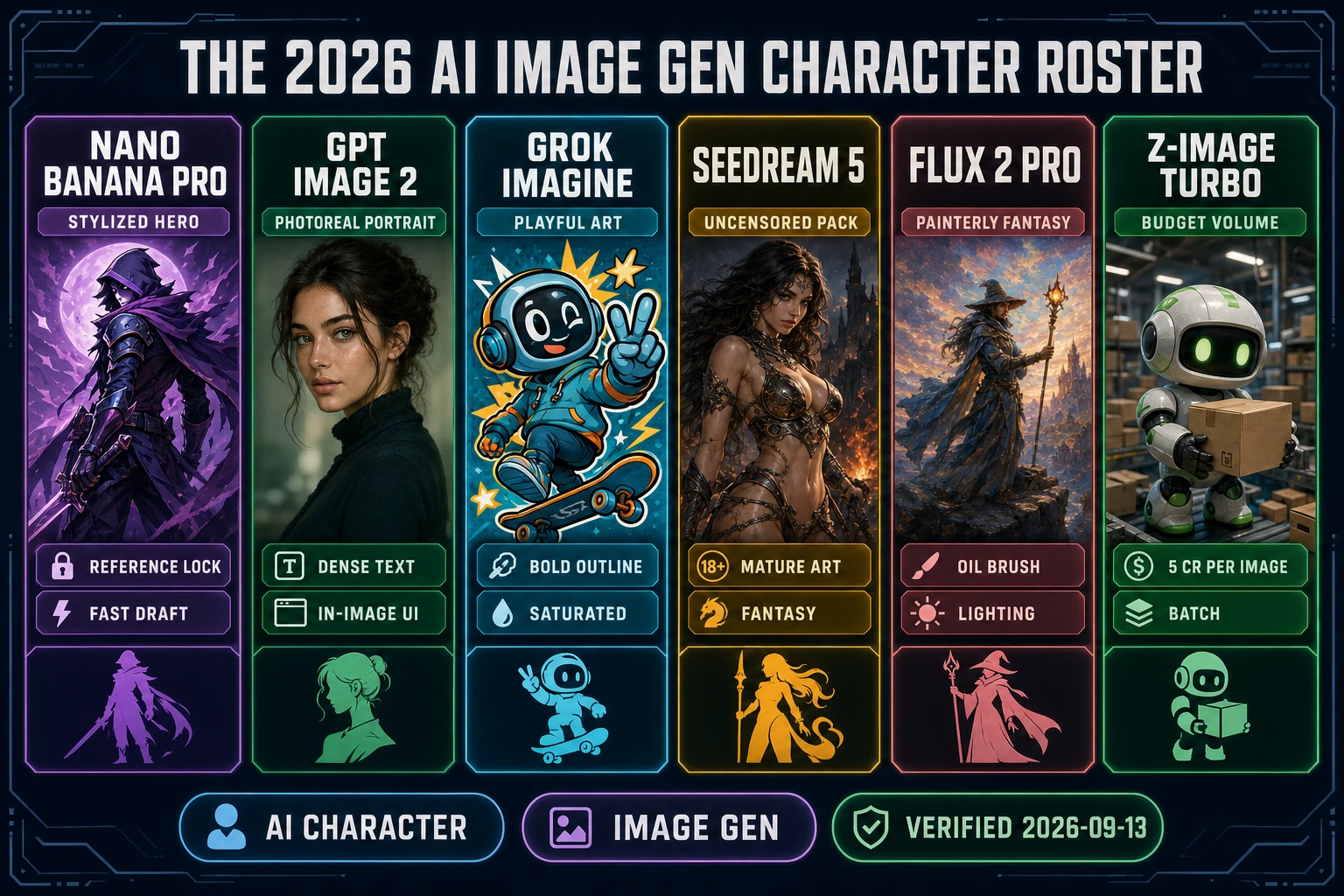
2026 AI Image Gen character roster comparison chart with Nano Banana Pro GPT Image 2 Grok Imagine Seedream 5 Flux 2 Pro and Z-Image Turbo AI character image generator cards
The 2026-09-13 AI character image generator roster inside Sorceress AI Image Gen - every top image model, every character strength, one panel.

Consistent-character prompting inside an AI character image generator

The hard part of any AI character image generator is not the first portrait. It is the twentieth pose that still looks like the same character. The 2026-09-13 workflow inside Sorceress AI Image Gen is a reference-locked seed pattern - generate the first portrait, drop the resulting image into the reference panel, pin the seed, then vary only the pose and camera clause of the prompt. Nano Banana Pro and GPT Image 2 both accept reference images natively, which means the underlying diffusion latent latches onto the reference face, hair color, and outfit palette without any explicit fine-tune step.

The prompt template that survives 12 frames without character drift is deterministic. Lock the fixed clauses (species, hair color, eye color, outfit description with color words, prop list, art style) in the first three sentences of the prompt. Then vary only the pose clause (A-pose facing camera, running three-quarter view, jumping side view, idle animation frame 3) at the end. Ask for a plain white or plain neutral background on every pose - not a scene - because the sprite-cutter needs a clean chroma-key target downstream. Keep the resolution at 1024x1024 or 1536x1024 so the True Pixel downscale has enough source detail to preserve the silhouette at 32x32.

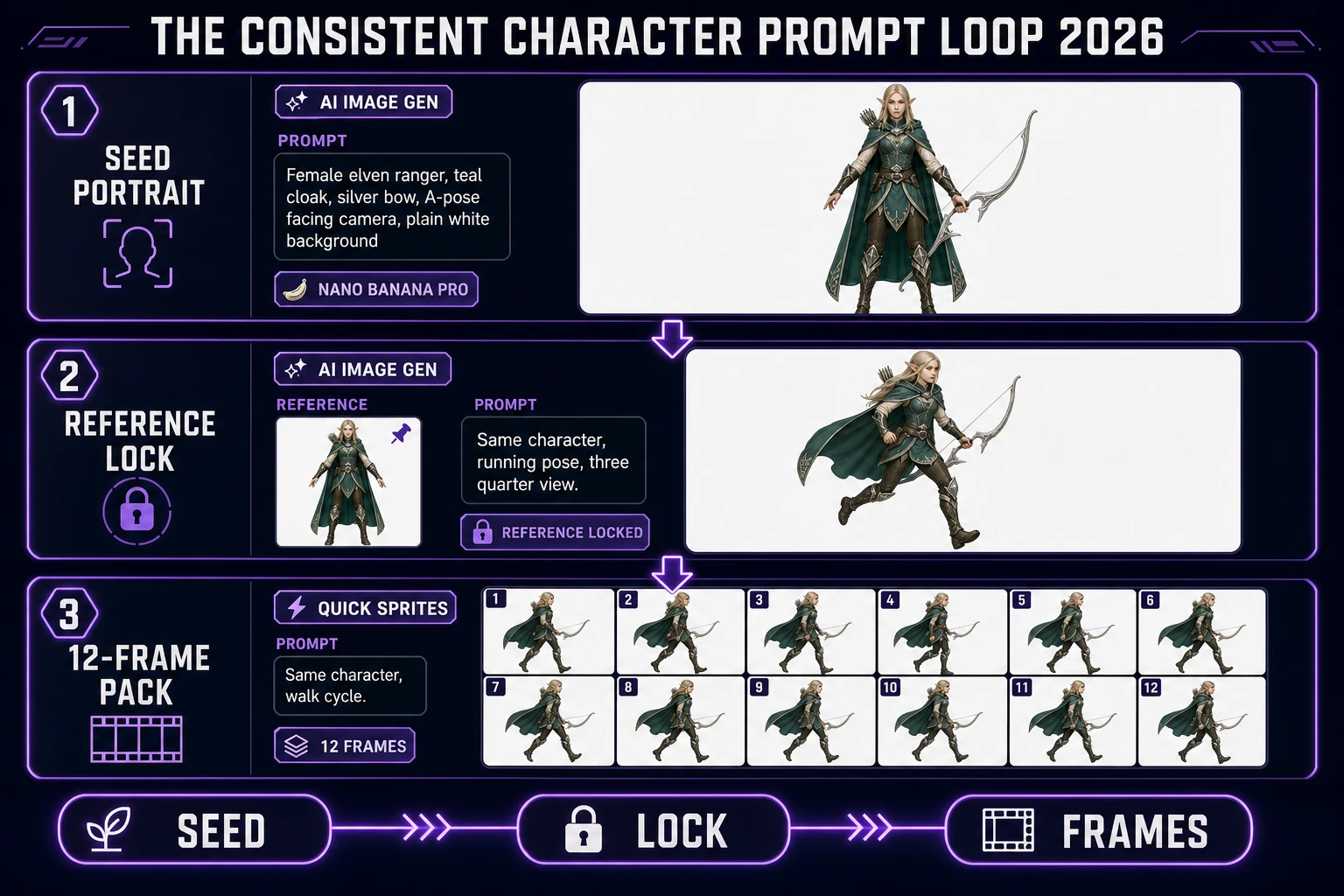
The specific prompt pattern that ships a rig-ready consistent character reads: "Female elven ranger, silver hair, green eyes, teal cloak with silver embroidery, elven longbow slung across back, leather boots, plain white background, single subject, no shadow, full body visible, A-pose facing camera, high detail, character sheet style". Generate the seed portrait, pin the image and the seed inside the reference panel, then swap only the final clause for each new pose. That is the entire consistent-character trick - no fine-tuning, no LoRA, no external tool.
Character image to Quick Sprites frame pack

Once the seed portrait is locked, the next step is a 12-frame or 24-frame sprite pack. Verified 2026-09-13 in src/app/_home-v2/_data/tools.ts line 535, Sorceress Quick Sprites is the paired tool: AI-generated animated pixel sprite sheets from a single character image plus a pose list. The tool consumes the AI Image Gen portrait, generates each pose frame while preserving the character's palette and silhouette, and writes the result out as a standard sprite sheet that Phaser 4.2.1 (verified 2026-09-13 against the phaserjs/phaser Giedi release notes on GitHub), Godot 4 Sprite2D, and Unity SpriteRenderer can consume without an external atlas step.

The Quick Sprites input pattern is a single reference image plus a pose specification. Drop the seed portrait into the character slot, pick the frame count (8 for a short walk cycle, 12 for a standard cycle, 24 for a smooth run), specify the action (walk, run, idle, attack, jump), and let the tool ship the sheet. The output is an AI-generated animated pixel sprite sheet - a horizontal or grid-layout PNG with one row per animation clip - already trimmed for engine import. The Phaser sprite sheet loader (documented at docs.phaser.io/api-documentation/class/textures-spritesheet) reads that exact format, as does the Godot 4 Sprite2D class (documented at docs.godotengine.org/en/stable/classes/class_sprite2d.html).

Consistent character prompt loop 2026 diagram showing seed portrait reference lock and 12-frame sprite pack stages inside Sorceress AI Image Gen and Quick Sprites
The 2026-09-13 consistent-character prompt loop - AI Image Gen ships the seed portrait, the reference panel locks the character, Quick Sprites ships the 12-frame pack.

True Pixel downscale for retro-styled games

Not every game runs at portrait resolution. For a retro platformer, a bullet-hell shooter, or a pixel-art RPG the character has to land at 32x32, 48x48, or 64x64 pixel-perfect frames with a limited palette - the technical constraint that defines pixel art as a distinct digital art form (see the Wikipedia entry on pixel art for the palette-and-grid definition). Verified 2026-09-13 in src/app/_home-v2/_data/tools.ts line 184 through 197, Sorceress True Pixel is the downscale tool: convert any image or video into pixel-art sprites and sprite sheets, with chroma keying, clean outlines, edge cleanup, and batch processing all built in.

The True Pixel input pattern is a single character portrait or a full sprite sheet plus a target grid size. Drop the AI Image Gen portrait or the Quick Sprites frame pack into the panel, pick the output grid (32x32 for classic 16-bit-era games, 48x48 for late-16-bit, 64x64 for modern retro-styled indies, 128x128 for high-def pixel art), enable Chroma Key if the source has a green or plain background, and let the tool run the batch. The output is a set of pixel-perfect frames with clean outlines and a palette limited to the target grid - ready for import into Godot 4, Phaser 4.2.1, Unity, or any other 2D engine.

The trick that makes True Pixel work where a generic downscale fails is the edge-cleanup pass. A naive bicubic downscale from 1024x1024 to 32x32 produces a blurry mush with fringed silhouettes. True Pixel runs a palette-quantize pass first, then a hard-edge silhouette pass, then the grid snap - the same order the pixel-art community documents for hand-drawn workflows, automated across the whole batch. The result reads as pixel art at 32x32 instead of as a smeared thumbnail.

Background Remover for transparent PNG sprite export

The final surface a game sprite needs is a clean transparent PNG. The W3C PNG specification (see the w3.org/TR/PNG reference) defines an alpha channel that game engines use to composite the sprite over any background at render time - without it, the sprite renders on top of a rectangle of white pixels that breaks every parallax layer and every foreground overlay. Verified 2026-09-13 in src/app/_home-v2/_data/tools.ts line 452 through 460, Sorceress Background Remover is the alpha-channel pass: AI background removal for a clean transparent PNG, exposed at /bg-remover with the AI Credits badge.

The Background Remover input pattern is a single character image or a batch of sprite frames. Drop the True Pixel output (or the AI Image Gen portrait directly, if the game runs at portrait resolution) into the panel, hit Remove Background, and download the resulting PNG with a full alpha channel. The tool handles anti-aliased character edges without the halo artifacts that plague naive chroma-key tools, which matters most on stylized characters where the silhouette has soft hair edges or translucent fabric. For a full sprite pack, drop the whole Quick Sprites output as a batch and let the tool run every frame in parallel.

The full character-to-transparent-sprite loop, therefore, is four tools and one browser tab. AI Image Gen ships the seed portrait and the reference-locked pose set. Quick Sprites ships the animated sprite sheet. True Pixel downscales the pack to the game's grid resolution. Background Remover writes the alpha channel. Every step lives under one Sorceress account and one credit ledger - no external tool, no export-import shuffle, no manual retopo of the silhouette.

The verdict on AI character image generators for indie games

The honest 2026-09-13 answer for AI character image generator work in indie game production is a four-tool stack that lives on one browser tab: AI Image Gen for the portrait, Quick Sprites for the frame pack, True Pixel for the pixel-perfect downscale, and Background Remover for the transparent PNG. All four share the same credit ledger, the same gallery, and the same reference-image handoff - which means a 12-frame character sprite pack lands in one continuous session instead of a five-tab, four-vendor migration.

The mistake to avoid is picking a single-model AI character image generator as the whole answer. A Nano Banana Pro portrait is beautiful in isolation but sprite-cutter-hostile at 32x32 without a True Pixel pass. A GPT Image 2 portrait renders dense in-image text but ships with a soft background that a naive chroma-key tool halos on. Flux 2 Pro paints stunning fantasy heroes but is 4x the credit cost of Nano Banana Pro for a background-NPC pass. The winning move is to keep all six models one click away in the same panel and route each character brief to the model that fits the silhouette, not the model that fits the vendor's marketing page. That is exactly what Sorceress AI Image Gen ships - and the sprite tools downstream keep the whole loop honest.

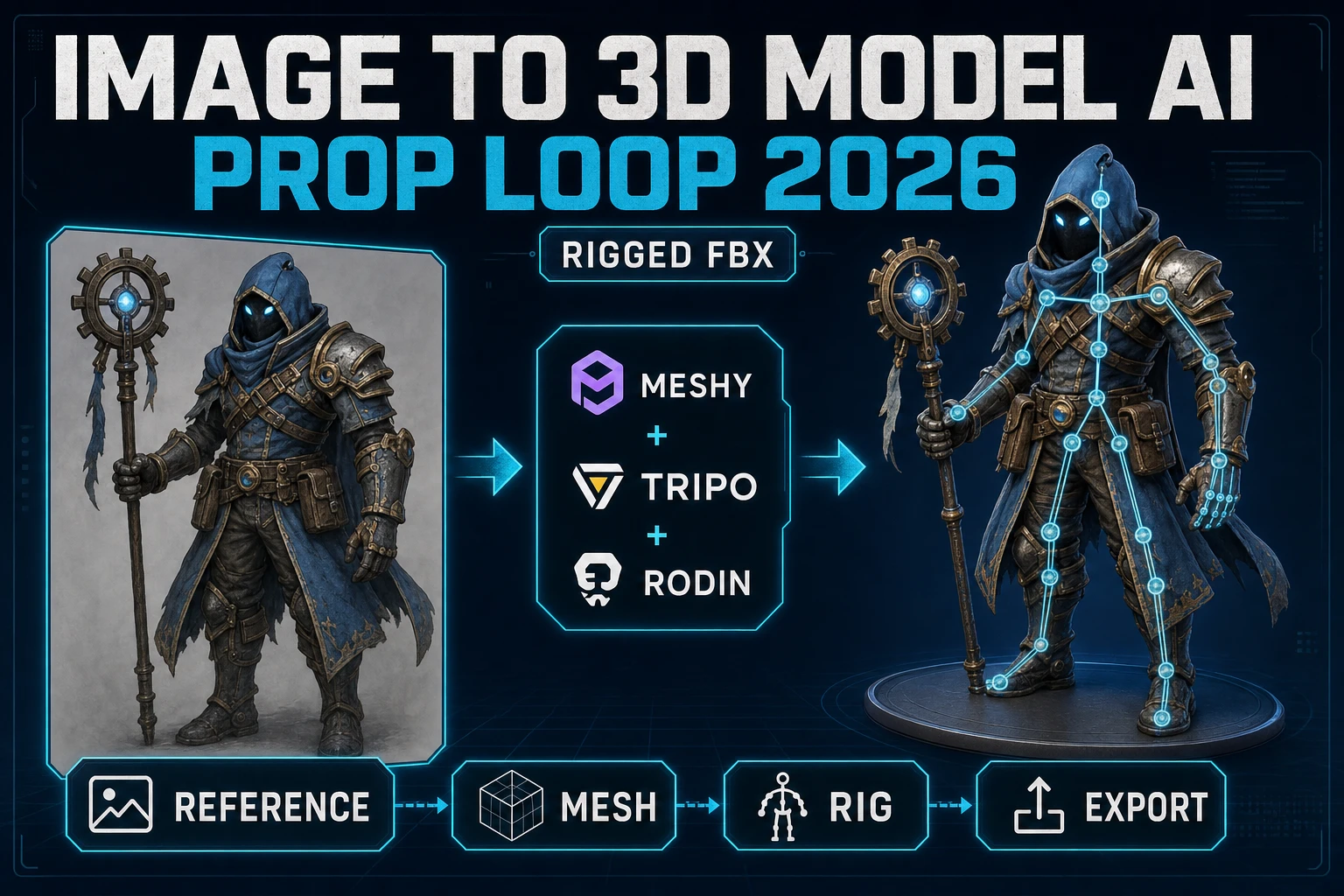
For related deep-dives, see the sibling piece What Is an AI Consistent Character Generator (2026) for the reference-lock deep-dive, the sprite-pack workflow at Craft an AI Game Sprite Generator Ready Sheet (2026), and the recent slate mate Snap Image to 3D Model AI (Prop Loop 2026) for the character-to-3D handoff. The full Sorceress panel is documented at the Sorceress Tools Guide. Ready to wire the first character - open AI Image Gen and drop the seed prompt on the panel.

Frequently Asked Questions

What is an AI character image generator in 2026?

An AI character image generator is a text-to-image diffusion system tuned for consistent character portraits, full-body poses, and reference sheets. The 2026 stable roster inside Sorceress AI Image Gen (verified 2026-09-13 in src/app/_home-v2/_data/tools.ts line 254) is Nano Banana Pro for stylized characters, GPT Image 2 for photoreal characters and dense in-image text, Grok Imagine for playful stylized art, Seedream 5 (uncensored) for edge cases, Flux 2 Pro for painterly fantasy heroes, and Z-Image Turbo for high-volume budget passes. Every model shares one prompt field, one credit ledger, and one gallery, so switching models between drafts is a single click instead of a full tool migration.

How do I keep the same character consistent across an AI character image generator?

The 2026-09-13 workflow inside Sorceress AI Image Gen at /generate is a reference-locked prompt. Generate the first portrait, drop the resulting PNG into the reference panel, then reuse the same seed and the same tightly scoped prompt for every subsequent pose. Nano Banana Pro and GPT Image 2 both accept reference images natively - the underlying diffusion latent latches onto the reference face, hair color, and outfit palette. Keep the prompt deterministic (same clothing description, same eye color, same accessory list) and vary only the pose or camera angle. That is how a single AI character image generator ships a full 12-frame walk cycle from one seed.

Can an AI character image generator produce game-ready sprites?

Yes, with two post-processing passes. Verified 2026-09-13 in src/app/_home-v2/_data/tools.ts line 535 and line 184: Sorceress Quick Sprites at /quick-sprites converts a character image plus a pose list into an AI-generated animated pixel sprite sheet, and True Pixel at /pixel-art downscales any character image into pixel-perfect sprite frames with chroma keying, clean outlines, edge cleanup, and batch processing. The full loop is AI Image Gen (character portrait) then Quick Sprites (frame pack) then True Pixel (pixel-perfect downscale) then BG Remover (transparent PNG), all in one browser tab and under one credit ledger.

How much does an AI character image generator cost per sprite pack in 2026?

Verified 2026-09-13 against src/lib/models.ts line 69 CREDITS_PER_DOLLAR = 100: an AI character image generator pass inside Sorceress AI Image Gen typically lands at 10 to 30 credits per portrait depending on the model. Nano Banana Pro at 10 to 15 credits per image, GPT Image 2 at 20 to 30 credits per image (higher because of the dense-text rendering), Seedream 5 at 15 credits, Flux 2 Pro at 20 credits, Z-Image Turbo at 5 credits. A full 12-frame character sprite pack through Quick Sprites at /quick-sprites lands at roughly 30 to 60 credits total. At Sorceress CREDITS_PER_DOLLAR = 100 that is $0.30 to $0.60 per full character sprite pack, which beats a stock-asset marketplace by an order of magnitude.

How is Sorceress AI Image Gen different from a standalone AI character image generator?

A standalone AI character image generator ships one model, one style, one credit ledger, and one output tab. Verified 2026-09-13 in src/app/_home-v2/_data/tools.ts line 250 through 265: Sorceress AI Image Gen exposes every top image model in one panel - Nano Banana Pro, GPT Image 2, Grok Imagine, Seedream 5 uncensored, Flux 2 Pro, Z-Image Turbo, and more - all through one prompt, one credit ledger, and one gallery. The character then flows into Quick Sprites, True Pixel, and BG Remover under the same account, so the entire character-to-sprite-pack pipeline lives in one browser tab. That is the qualitative difference an indie game studio actually cares about.

Sources

  1. PNG Specification (Second Edition) - W3C
  2. Phaser v4.2.1 Giedi Release (9 July 2026)
  3. Phaser Sprite Sheet API Documentation
  4. Canvas API - MDN Web Docs
  5. Godot 4 Sprite2D Class Reference
  6. Pixel Art (Digital Art Form) - Wikipedia
  7. Text-to-Image Model - Wikipedia
Written by Arron R.·2,139 words·10 min read

Related posts