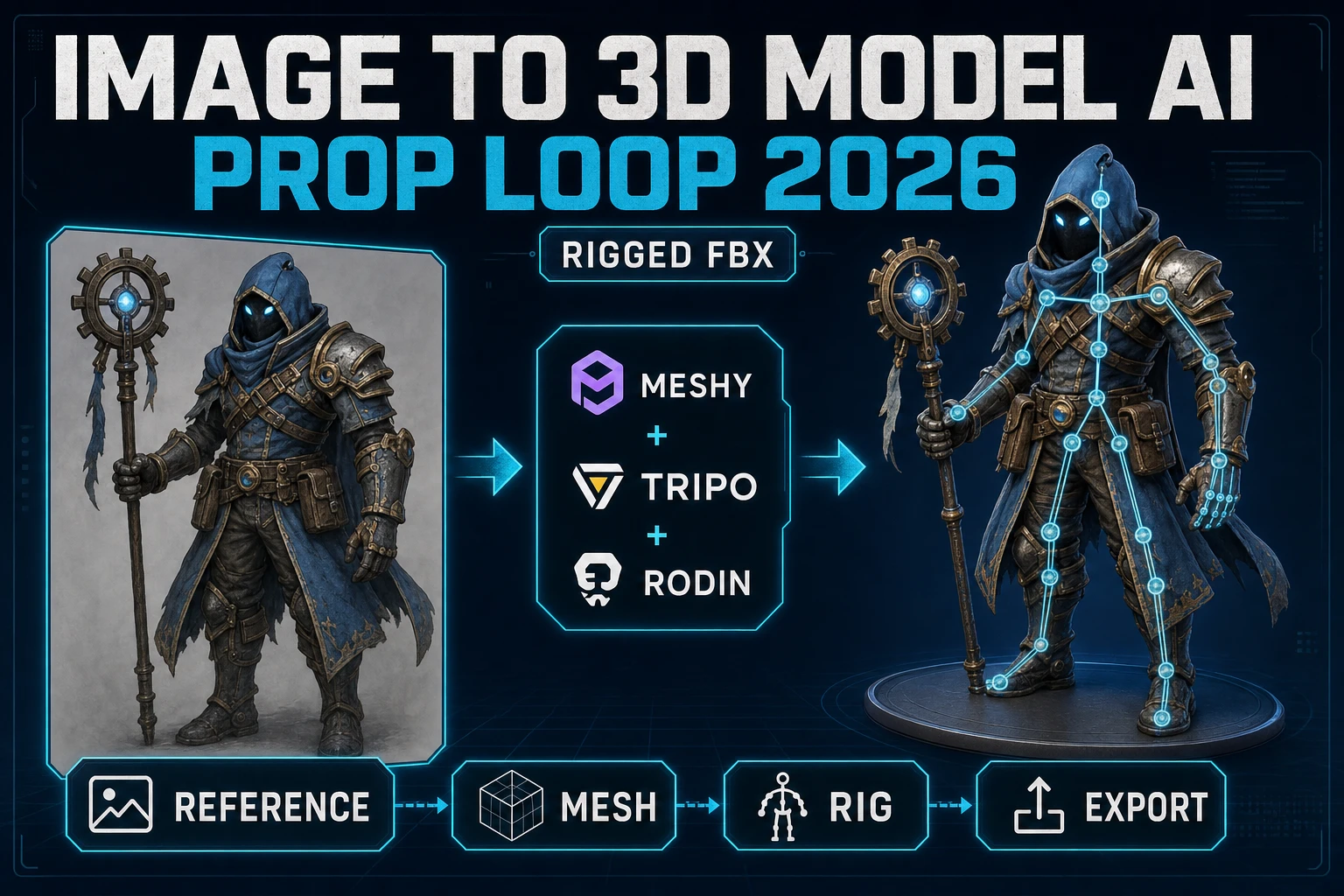
Snap Image to 3D Model AI (Prop Loop 2026)

By Arron R.10 min read
The fastest image to 3D model AI workflow in 2026 is Sorceress 3D Studio - one panel routes a reference image through Meshy 7, Tripo v3.1, Tripo P2 Smart Mesh,

Search image to 3D model AI in September 2026 and every top result is a different vendor - Meshy, Tripo, Rodin, TRELLIS, Hunyuan 3D - each with a different credit sheet, a different mesh style, and a different pose bias for humanoid characters. Sorceress 3D Studio is the panel that routes a single reference image through every one of them, then hands the textured mesh to Humanoid Auto-Rigging for a rig-ready FBX in one continuous prop loop. This how-to prints the exact 2026 workflow - reference image, mesh, rig, export - with the verified credit math for each model. Every price and feature below was checked 2026-09-13 against docs.meshy.ai/api/pricing, platform.tripo3d.ai/docs/model, github.com/Tencent-Hunyuan/Hunyuan3D-2.1, github.com/microsoft/TRELLIS, and the Sorceress source in src/lib/threed-models.ts.
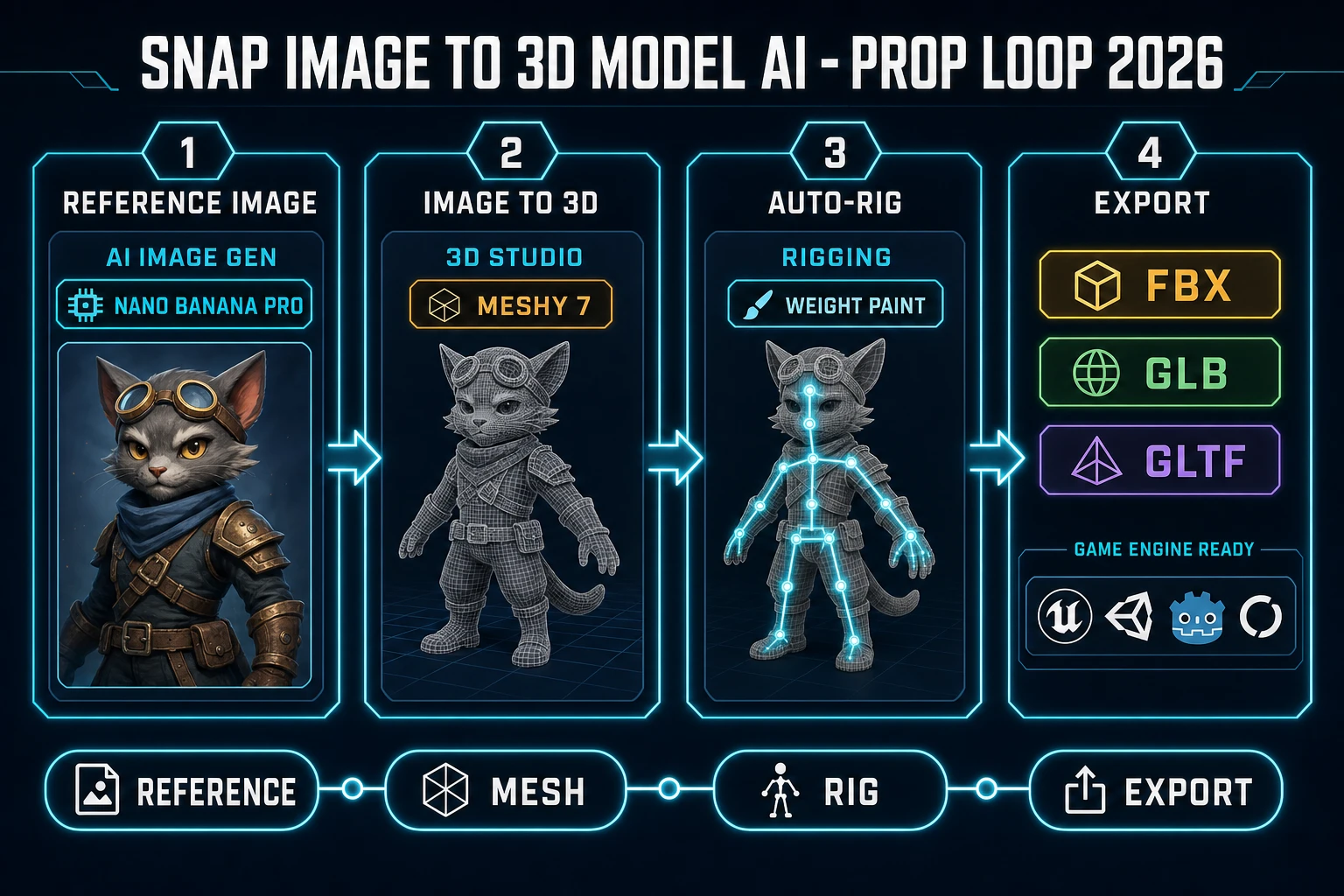
Snap image to 3D model AI prop loop 2026 pipeline chart showing reference image mesh rig and export stages with Sorceress 3D Studio Meshy 7 and auto-rigging
The 2026-09-13 image to 3D model AI prop loop through Sorceress 3D Studio - reference image, mesh, auto-rig, and FBX export in one continuous panel.

What image to 3D model AI actually needs to do for games

The phrase image to 3D model AI describes a class of generative systems that reconstruct a textured 3D mesh from a single 2D reference image, typically using a diffusion-based geometry latent plus a texture bake pass. For game work the definition is stricter than the general SERP definition, because a mesh that renders in a marketing hero shot rarely survives the game-engine import. A game-ready image to 3D model AI has to land four surfaces at once - a polycount inside the engine budget, a topology that survives skinning, a UV layout that bakes into 2K or 4K albedo without seams across the silhouette, and a pose that snaps to A-Pose or T-Pose for downstream humanoid rigging. Miss any one of those and the mesh gets remeshed by hand, which erases the time savings the AI promised.

The 2026 stable roster of image to 3D model AI systems that clears all four gates is short: Meshy 7 and Meshy 6, Tripo v3.1 and Tripo P2 Smart Mesh, Tripo P1 Smart Mesh, Rodin 2.0 by Hyper3D, TRELLIS and TRELLIS 2 from Microsoft Research, and Hunyuan 3D 3.1 and Hunyuan 3D 2.1 from Tencent. TRELLIS 2 is the CVPR 25 Spotlight version of Structured 3D Latents for Scalable and Versatile 3D Generation (verified 2026-09-13 on github.com/microsoft/TRELLIS, 13,628 stars). Hunyuan 3D 2.1 ships with production-ready PBR material bakes and is described in the repo README as From Images to High-Fidelity 3D Assets with Production-Ready PBR Material (verified 2026-09-13 on github.com/Tencent-Hunyuan/Hunyuan3D-2.1, 4,017 stars). All of them are exposed in a single picker inside Sorceress 3D Studio.

The Sorceress 3D Studio pipeline for image to 3D model AI

Sorceress 3D Studio is the anchor tool for this workflow. Verified 2026-09-13 in src/app/_home-v2/_data/tools.ts line 97, 3D Studio chains every step of the pipeline in one panel: AI image generation, single-image to textured 3D, automatic humanoid auto-rigging with weight-paint refinement, AI-powered text-to-animation, all exported to FBX, GLB, or GLTF for any engine. The model picker sits at src/lib/threed-models.ts line 530 and lists Meshy 7, Meshy 6, Tripo P2, Tripo v3.1, Tripo Smart Mesh P1, Hunyuan 3D 3.1, Pixal3D (VIP-only, free unlimited), TRELLIS 2, Rodin 2.0, and the hidden Hunyuan 3D 2.1 fallback that stays registered for legacy jobs. Every one of those models accepts an image as input for image to 3D model AI reconstruction.

Model Base credits Standout Best use
Meshy 750 (with texture)Ultra Mode +10 cr for finer geometry, 8K texture +10 cr, Pose Mode A/T-PoseHumanoid characters that will be auto-rigged next
Meshy 650 (with texture)Standard or Low Poly mesh type, Remesh clamp 100 to 300k polycountStylized characters and low-poly props
Tripo v3.140Face Limit knob, quad mesh option, PBR toggleGame-ready props at 8k to 20k triangles
Tripo P2125Smart Mesh preview - highest-fidelity Tripo benchHero props and box art
Tripo P1 Smart Mesh65Low-poly output preset (statusNote Low-poly)Mobile and web games with strict poly budgets
Rodin 2.050Hyper3D geometry with PBR passCharacter concept meshes and stylized props
TRELLIS 240Microsoft Research CVPR 25 Spotlight, single-image onlyConcept meshes for previz and mood boards
Hunyuan 3D 3.130Best budget tier, tight open-source lineageBulk prop generation on a wallet

Every credit number above was verified 2026-09-13 against src/lib/threed-models.ts. The Meshy 7 base of 35 credits climbs to 50 when Generate Texture is on by default and Ultra Mode is off, per the getCredits function on line 158. The Meshy 7 texture toggle adds 15 credits, the 8K texture surcharge adds another 10, and Ultra Mode adds 10 for image-to-3D and text-to-3D (Ultra is not available for multi-view). At Sorceress CREDITS_PER_DOLLAR = 100 (verified 2026-09-13 in src/lib/models.ts) a 50-credit Meshy 7 pass is exactly $0.50 of underlying provider spend.
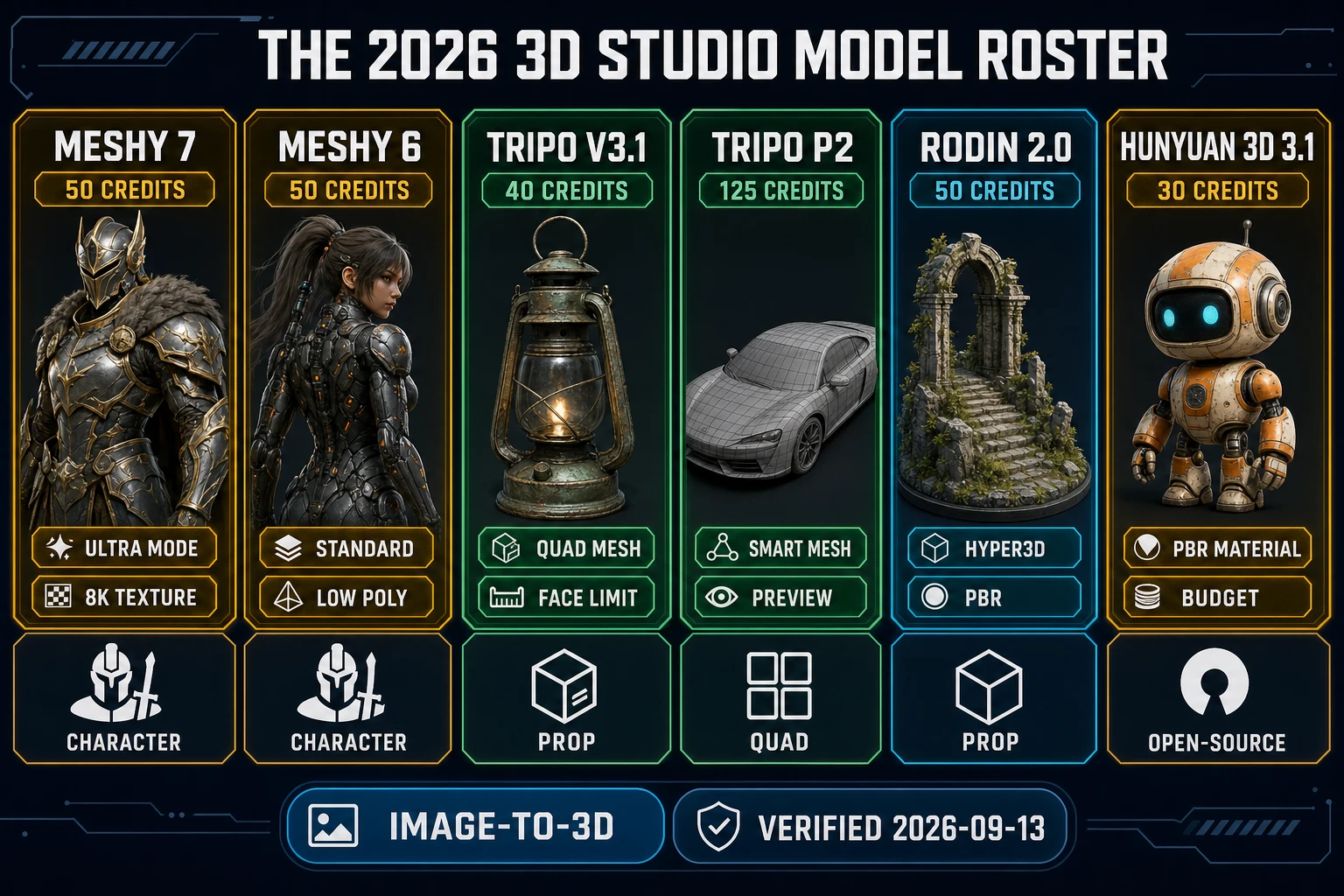
2026 3D Studio model roster comparison chart with Meshy 7 Meshy 6 Tripo v3.1 Tripo P2 Rodin 2.0 and Hunyuan 3D 3.1 image to 3D model AI cards
The 2026-09-13 image to 3D model AI roster inside Sorceress 3D Studio - every vendor, every base credit price, and the primary strength of each model.

Prompt to image to 3D - starting from a text prompt

If the reference image is not yet drawn, the honest 2026 loop begins in Sorceress AI Image Gen. Verified 2026-09-13 in src/app/_home-v2/_data/tools.ts line 254, AI Image Gen exposes every top image model in one panel - Nano Banana Pro, GPT Image 2, Grok Imagine, Seedream 5 (uncensored), Flux 2 Pro, Z-Image Turbo, and more. The picks that survive the image to 3D handoff are the ones with clean edge silhouettes and a plain background: Nano Banana Pro for stylized characters, GPT Image 2 for photoreal props, Flux 2 Pro for painterly fantasy assets, and Z-Image Turbo when the wallet matters.

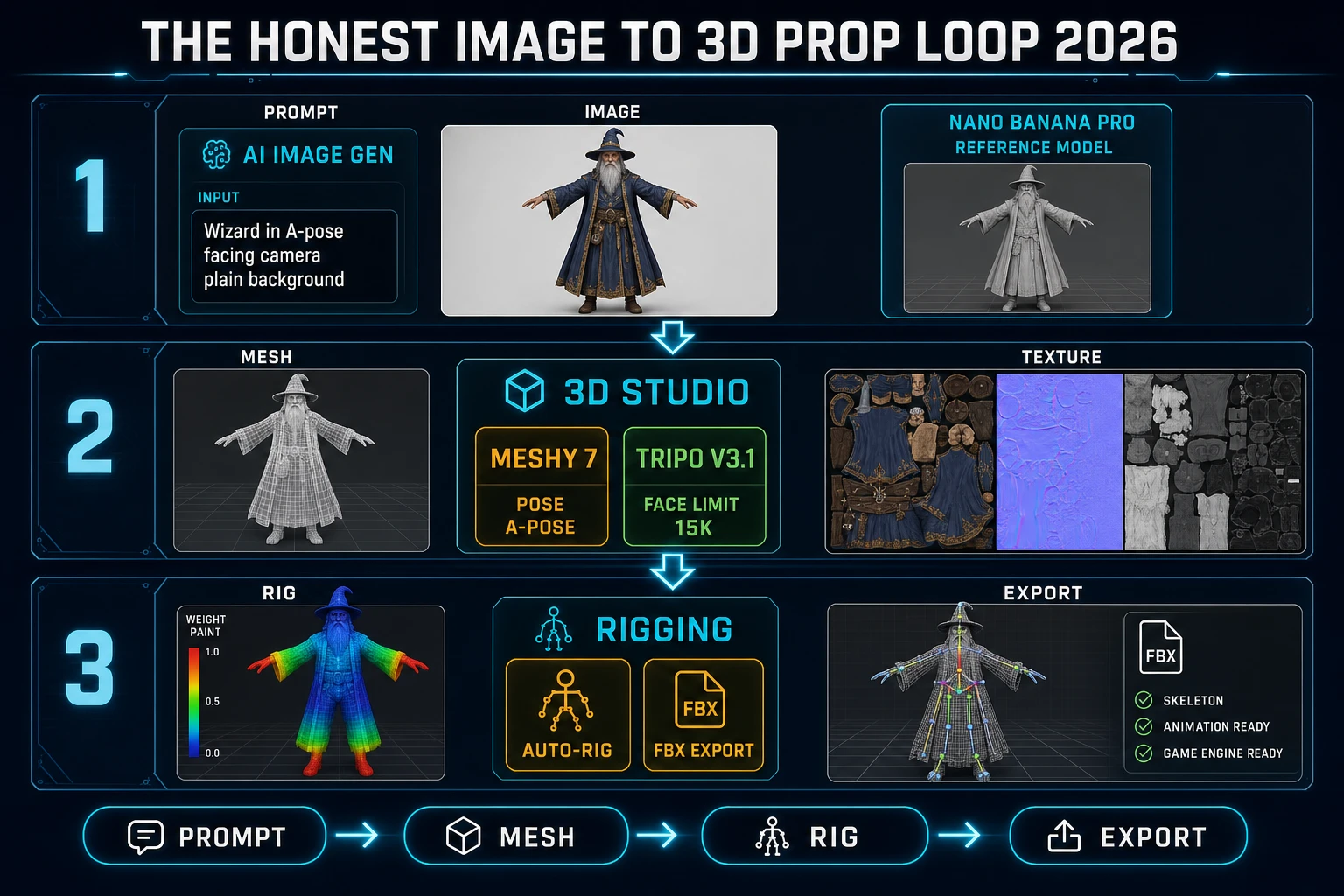
The prompt template that ships a rig-ready character is deterministic. Ask for A-pose facing camera, plain white background, full body visible, single subject, no shadow. Then paste the generated image into 3D Studio, pick Meshy 7, set Pose Mode to a-pose, leave Symmetry on Auto, and let Generate Texture stay on at 2K resolution to keep the pass at 50 credits. The image to 3D model AI does the rest. For a mount, a vehicle, or a static prop skip Pose Mode entirely and set Symmetry to auto - Meshy 7 detects mirrored props like swords and shields on its own.
Reference image to 3D - snapping from a photo or an existing sprite

The other honest entry into image to 3D model AI is a real photograph or an existing sprite. 3D Studio accepts any PNG or JPG dropped onto the Image to 3D lane. For a real-world reference photo the recommended pass is Tripo v3.1 with Face Limit set to 15,000 - a mesh that lands directly in Unity or Unreal without a manual retopo. For a hand-drawn sprite the recommended pass is Hunyuan 3D 3.1 at 30 credits, because Hunyuan 3D holds sprite-style silhouettes cleaner than Meshy at the same price point. For a photograph with a busy background, enable Meshy 7 Image Enhancement (default on, verified 2026-09-13 in src/lib/threed-models.ts line 108) to strip the noisy pixels before geometry reconstruction.

Two more knobs decide whether the resulting mesh survives the game engine. First, Symmetry Mode - set to on for anything bilaterally symmetric (characters, swords, chairs, cars), set to off for asymmetric props (guitars, keys, terrain rocks). Second, Remove Lighting on multi-view Meshy 7 - on by default for multi-view input, ignored for single-image input. The wrong Symmetry pick shows up as a lopsided mesh two minutes into the render, which is expensive to redo at 50 credits a pass. Set both knobs before hitting Generate.

The rig-ready loop - image to 3D model AI plus Auto-Rigging

The image to 3D handoff is only half the job for a character prop. The other half is skinning that mesh onto a humanoid skeleton so it can animate. Verified 2026-09-13 in src/app/_home-v2/_data/tools.ts line 582, Sorceress Auto-Rigging is the paired tool: it auto-rigs humanoid 3D models plus weight-paint refinement, all through the same account and the same credit ledger. The full loop is four steps.

  1. Reference image. Open AI Image Gen, generate the A-pose character with Nano Banana Pro or GPT Image 2, download the PNG.
  2. Image to 3D. Open 3D Studio, drop the PNG into the Image to 3D lane, pick Meshy 7 with Pose Mode set to a-pose, Generate Texture on, PBR Maps optional, hit Generate. The pass lands in 60 to 120 seconds at 50 credits.
  3. Auto-rig. Send the resulting GLB into Humanoid Auto-Rigging. The tool detects the humanoid skeleton, drops bones onto the mesh, and exposes weight-paint refinement for problem joints like the shoulder and the hip.
  4. Export FBX. Toggle the export format to FBX for Unity and Unreal, GLB for Three.js and Babylon.js, GLTF for Godot HTML5, then download. The whole loop lives on /3d-studio, /generate, and /rigging - no external tool required.

The rig-ready loop is why 3D Studio wins over standalone image to 3D model AI vendors. Meshy on its own ships a beautiful mesh but hands off to Mixamo for rigging - a five-tab dance that Mixamo often refuses on stylized silhouettes. Tripo ships a rig-ready mesh but the rigging endpoint is separate from the mesh endpoint. Sorceress collapses both under one credit ledger and one browser tab.

Honest image to 3D prop loop 2026 diagram showing prompt AI Image Gen mesh 3D Studio and rig plus FBX export stages
The 2026-09-13 honest image to 3D prop loop - AI Image Gen ships the reference, 3D Studio ships the mesh, Auto-Rigging ships the FBX.

Credit math for a full prop

The honest credit sheet for a full rig-ready character prop through image to 3D model AI, verified 2026-09-13 against src/lib/threed-models.ts, breaks into three lines: the concept image, the mesh, and the rig. The concept image on Nano Banana Pro or GPT Image 2 typically lands at 10 to 30 credits depending on model choice and resolution. The mesh pass ranges from 30 credits on Hunyuan 3D 3.1 (best budget) to 125 credits on Tripo P2 Smart Mesh preview, with the median at 50 credits on Meshy 7 or Rodin 2.0. The rig pass on Auto-Rigging sits at 5 credits for the humanoid detection plus weight-paint refinement.

Prop tier Image gen Image to 3D Auto-rig Total credits USD equivalent
Budget humanoidNano Banana Pro 10 crHunyuan 3D 3.1 30 crAuto-Rigging 5 cr45 cr$0.45
Standard humanoidNano Banana Pro 15 crMeshy 7 A-Pose 50 crAuto-Rigging 5 cr70 cr$0.70
Hero humanoidGPT Image 2 30 crTripo P2 Smart Mesh 125 crAuto-Rigging 5 cr160 cr$1.60
Static prop, no rigFlux 2 Pro 20 crTripo v3.1 Face Limit 15k 40 crskip60 cr$0.60
Photo-scan propskip (own photo)Rodin 2.0 50 crskip50 cr$0.50

At Sorceress CREDITS_PER_DOLLAR = 100, the entire prop budget for a small indie game with 30 humanoid characters and 100 static props lands at roughly $21 in credit spend for the standard humanoid tier plus $60 for the static props - $81 total for a full character-and-prop pack. That is dramatically less than the equivalent asset-store spend, and it ships with editable prompts so revisions cost the same as originals.

For the free lane, Hunyuan 3D 2.1 and TRELLIS are both open-source under permissive licenses (Tencent public license and MIT respectively, verified 2026-09-13). Running Hunyuan 3D 2.1 on a personal 24 GB GPU costs nothing per mesh but takes 3 to 8 minutes per pass; running TRELLIS at 1024 resolution takes 2 to 4 minutes. The Sorceress-managed cloud passes trade credits for wall-clock time - Meshy 7 hits 60 to 120 seconds, Tripo v3.1 hits 90 seconds, Rodin 2.0 hits 60 seconds.

The verdict on image to 3D model AI for indie games

The honest 2026-09-13 answer for image to 3D model AI in indie game work is a three-tool stack: AI Image Gen for the reference, 3D Studio for the mesh, and Auto-Rigging for the FBX. All three live on the same Sorceress account, share the same credit ledger, and export directly to Unity, Unreal, Godot, Three.js, Babylon.js, and Phaser 4.2.1 (Giedi release, verified 2026-09-13 against the phaserjs/phaser GitHub tag). The 8-model 3D Studio picker inside that stack means the same prop pipeline covers a stylized humanoid (Meshy 7), a game-ready static prop (Tripo v3.1), a hero prop (Tripo P2), a budget prop (Hunyuan 3D 3.1), and a photo-scan prop (Rodin 2.0) without leaving the browser.

The mistake to avoid is picking one image to 3D model AI as the single answer. Meshy has the cleanest humanoid characters, but it is not the cheapest and Tripo v3.1 beats it on prop topology. Tripo has the best game-ready mesh, but Rodin has better silhouettes on hand-drawn art. Hunyuan 3D is the budget king, but Meshy Ultra Mode wins on hero shots. The winning move is to keep all of them a click away in the picker and route each brief to the model that fits the mesh, not the model that fits the vendor. That is exactly what Sorceress 3D Studio ships.

For related deep-dives, see the sibling piece Best Free AI 3D Model Generator (Game Prop Bench 2026) for the open-source lane, and the character-pack how-to at Sculpt an AI 3D Character Generator (Game Model Pack 2026) for the humanoid-rigging deep-dive. The full 3D Studio picker and pricing are documented at the Sorceress Tools Guide. Ready to snap the first prop - open 3D Studio and drop the reference image on the panel.

Frequently Asked Questions

What is image to 3D model AI in 2026?

Image to 3D model AI is a class of generative models that reconstructs a textured 3D mesh from a single 2D reference image, using diffusion-based latent geometry plus a texture bake pass. The 2026 stable roster is Meshy 7 (verified 2026-09-13 against docs.meshy.ai/api/pricing), Tripo v3.1 with the Smart Mesh P2 preview (verified 2026-09-13 on platform.tripo3d.ai), Rodin 2.0 by Hyper3D, TRELLIS and TRELLIS 2 from Microsoft Research (CVPR 25 Spotlight, verified 2026-09-13 on github.com/microsoft/TRELLIS at 13,628 stars), Hunyuan 3D 3.1 and Hunyuan 3D 2.1 from Tencent (verified 2026-09-13 at github.com/Tencent-Hunyuan/Hunyuan3D-2.1 at 4,017 stars, described in the repo README as From Images to High-Fidelity 3D Assets with Production-Ready PBR Material), Pixal3D, and Seed3D 2.0. Sorceress 3D Studio at /3d-studio exposes all of them in a single picker and normalizes the output to FBX, GLB, or GLTF for direct import into any game engine.

How do I get a rigged FBX from a single image?

Open Sorceress 3D Studio at /3d-studio, drop the reference image into the Image to 3D lane, pick a humanoid-capable model like Meshy 7 with Pose Mode set to A-Pose or T-Pose, hit Generate, wait for the textured mesh, then send the result through Humanoid Auto-Rigging at /rigging and export FBX. Verified 2026-09-13 in src/app/_home-v2/_data/tools.ts line 97 and line 582, 3D Studio ships this as one continuous pipeline: generate concept image, single-image to textured 3D, automatic humanoid auto-rigging with weight-paint refinement, AI text-to-animation, all exported to FBX, GLB, or GLTF for any engine.

Which image to 3D model AI has the best free tier?

For a genuinely free image to 3D model AI workflow the honest 2026-09-13 pick is Sorceress 3D Studio on the free Sorceress plan combined with the open-source Hunyuan 3D 2.1 checkpoint on a personal GPU. Hunyuan 3D 2.1 is released under Tencent public license and the checkpoints are downloadable from github.com/Tencent-Hunyuan/Hunyuan3D-2.1 (verified 2026-09-13); the model needs roughly 12 to 24 GB of VRAM depending on the resolution. TRELLIS from Microsoft Research is also open-source under an MIT license (github.com/microsoft/TRELLIS, verified 2026-09-13). At the Sorceress CREDITS_PER_DOLLAR = 100 rate a 30-credit Hunyuan 3D 3.1 pass maps to about $0.30 per mesh.

Can image to 3D model AI produce game-ready meshes?

Yes, with the right model and the right post-process. Tripo v3.1 with the Face Limit clamp set to 8,000 to 20,000 triangles produces a mesh that drops directly into Unity or Unreal without a manual remesh. Tripo P1 Smart Mesh is scoped for low-poly game output (verified 2026-09-13 in src/lib/threed-models.ts with statusNote Low-poly). Meshy 6 with Remesh on and Target Polycount at 20,000 to 50,000 hits the same range - the src/lib/threed-models.ts polycount clamp runs 100 to 300,000. Hunyuan 3D 2.1 ships PBR materials (albedo, roughness, metallic, normal) baked into the export, so no separate texture pass is needed. For a rigged character, add the /rigging step to the loop and export FBX with weight paints intact.

How much does image to 3D model AI cost per prop in 2026?

Verified 2026-09-13 against docs.meshy.ai/api/pricing and the src/lib/threed-models.ts credits table: a full textured prop through Sorceress 3D Studio lands in a predictable range. Meshy 6 or Meshy 7 base at 50 credits with texture on by default, Tripo v3.1 at 40 credits base, Rodin 2.0 at 50 credits, Tripo Smart Mesh P1 at 65 credits, Tripo P2 preview at 125 credits, Hunyuan 3D 3.1 at 30 credits, TRELLIS 2 at 40 credits. At Sorceress CREDITS_PER_DOLLAR = 100, the median textured prop is roughly $0.30 to $0.50 for the mesh pass, plus the /rigging pass and $0.03 to $0.30 for text-to-animation. A full rigged animated prop lands under $1 in credit spend for most projects.

Sources

  1. Meshy API Pricing
  2. Tencent Hunyuan3D 2.1 - From Images to High-Fidelity 3D Assets with Production-Ready PBR
  3. Microsoft TRELLIS - Structured 3D Latents for Scalable and Versatile 3D Generation (CVPR 25 Spotlight)
  4. Tripo AI Platform Documentation
  5. Phaser v4.2.1 Giedi Release
  6. glTF 2.0 Specification - Khronos Group
  7. FBX File Format - Autodesk Developer Network
Written by Arron R.·2,228 words·10 min read

Related posts