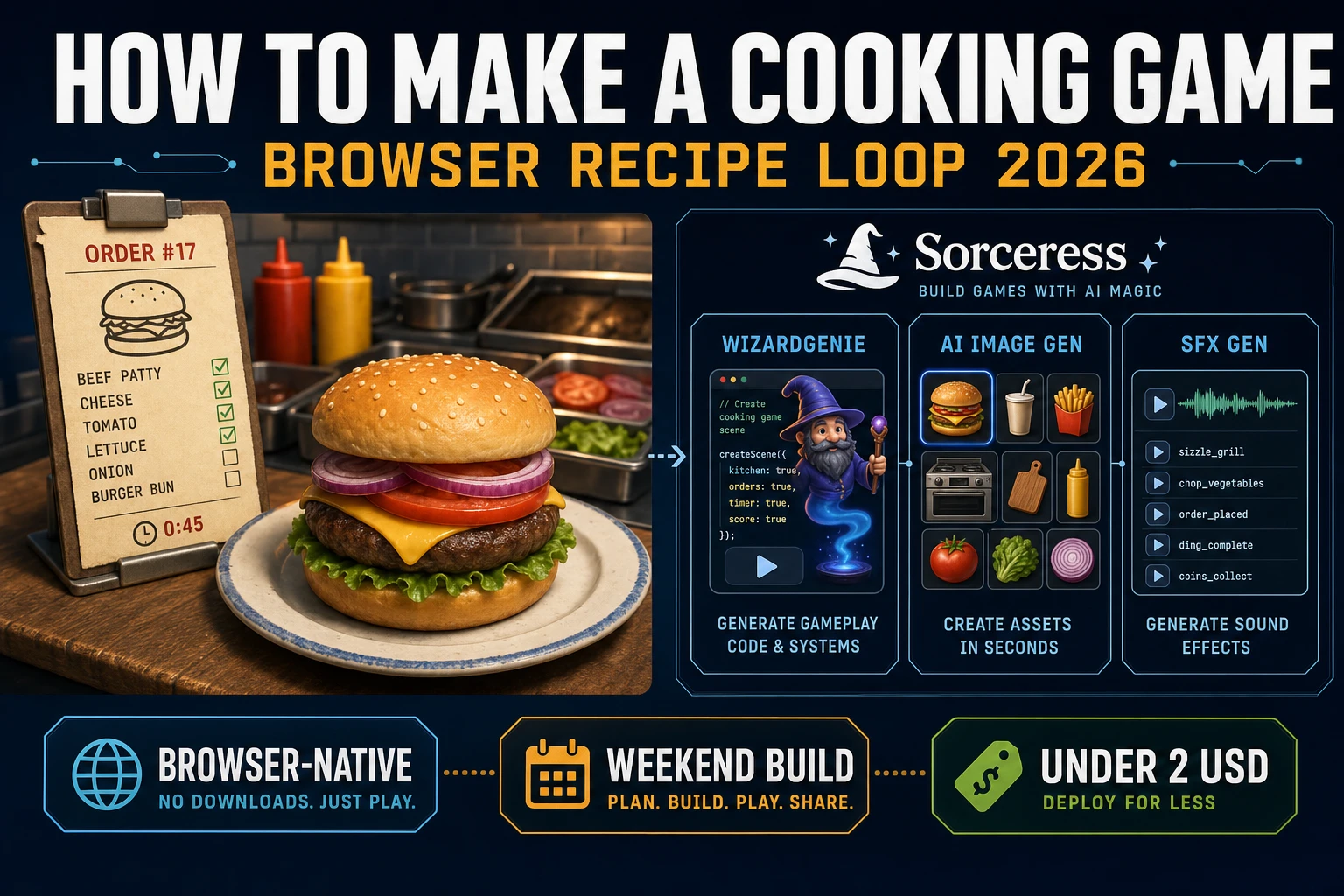
Simmer How to Make a Cooking Game (Browser Recipe Loop 2026)

By Arron R.11 min read
How to make a cooking game in 2026: model order tickets with ingredient lists, prep slots, and a grill timer in WizardGenie, then add AI Image Gen food icons an

Most beginners who search “how to make a cooking game” want an order ticket on screen, a counter with ingredient buttons, a grill that counts down, and a Serve button that scores when the plated stack matches the recipe. A full restaurant sim with staff hiring, supply chains, and licensed franchise branding is a product team. A browser recipe loop is different. A coding agent scaffolds ticket parsing, prep clicks, and grill timers from one prompt, and AI generation covers food icons, kitchen backdrop, and sizzle audio. On desktop or web, that means WizardGenie for the order-prep-serve interpreter, AI Image Gen for ingredient and counter art, SFX Gen for sizzle and order-ding clips, and optional Music Gen for a kitchen ambience bed. This guide is the honest end-to-end for how to make a cooking game in 2026, as a weekend build you can finish once.
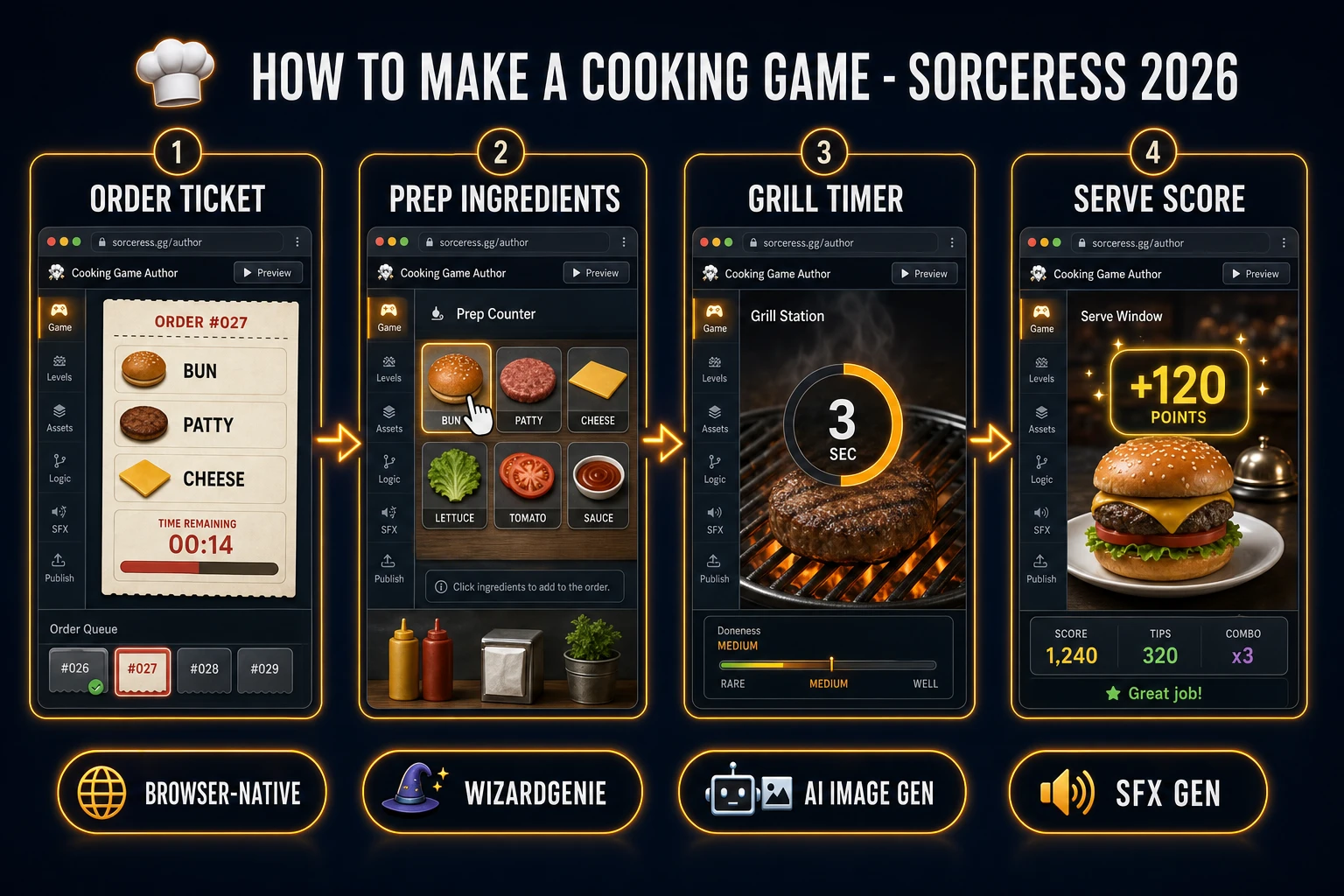
How to make a cooking game browser pipeline: wire order tickets, ingredient prep, and grill timers in WizardGenie, then ship a browser recipe loop
The 2026 how to make a cooking game recipe: generate food icons and kitchen art, model order-prep-serve logic in WizardGenie, then add SFX Gen sizzle audio and Music Gen kitchen bed.

What how to make a cooking game actually means in 2026

The query “how to make a cooking game” hides three intents. Some searchers want a Unity asset pack with rigged chefs, particle steam, and fifty prefab kitchens — that is engine shopping, not a minimal playable loop. A second intent is a broadcast-style restaurant tycoon with supply deliveries, staff shifts, and franchise expansion — a studio roadmap, not a solo jam. The third intent, and the one this guide targets, is a browser recipe loop: one order ticket listing two or three ingredients, clickable prep stations, one grill slot with a short cook timer, and a Serve button that compares the plated stack to the ticket before awarding points. That is a weekend build, it demos the Sorceress toolset, and it is the format most cooking game tutorial and javascript cooking game searchers actually want.

The presentation contract is small and strict. A title screen shows the kitchen name, control hints (click ingredients, click grill to start timer, Serve when done), and Play. The play screen shows the order ticket top-left with a patience countdown, ingredient icons along the counter, a grill zone center-right, a plate stack area, score top-center, and optional mute toggle. On correct serve, play a short chime, increment score with a speed bonus, slide the ticket off-screen, and push the next recipe. On wrong serve or expired patience, flash red and let the player clear the plate to retry. The cooking video game overview on Wikipedia (verified 2026-08-27) traces the genre from Diner Dash through modern time-management hits — cite it when you write your itch.io blurb so players know you shipped an arcade kitchen, not a full franchise sim. If you already shipped another management loop, the sibling guide on how to make a farming game covers harvest timers and crop slots; this post owns ticket matching, grill countdown, and plated ingredient order instead.

The cooking recipe loop in one minute (ticket, prep, cook, plate, serve)

Five moving parts, repeated until the session timer hits zero or the player quits. First, read ticket — display the active order as an ordered list of ingredient ids (for example bun, patty, cheese) plus a 30-second patience bar. Second, prep — when the player clicks an ingredient icon, push that id into a prep buffer or directly onto the plate if no cooking step is required. Third, cook — raw items like patty must sit on the grill slot; clicking Start Grill runs a three-second countdown before the item becomes “cooked” and draggable to the plate. Fourth, plate — maintain a stack array representing bottom-to-top order on the dish; only cooked and prepped items may enter. Fifth, serve — on Serve click, shallow-compare the stack to the ticket array; on match, award base score plus speed bonus from remaining patience, then queue the next ticket. Combo chains, dishwashing minigames, and multi-floor restaurants are polish layered after one honest order resolves with points.
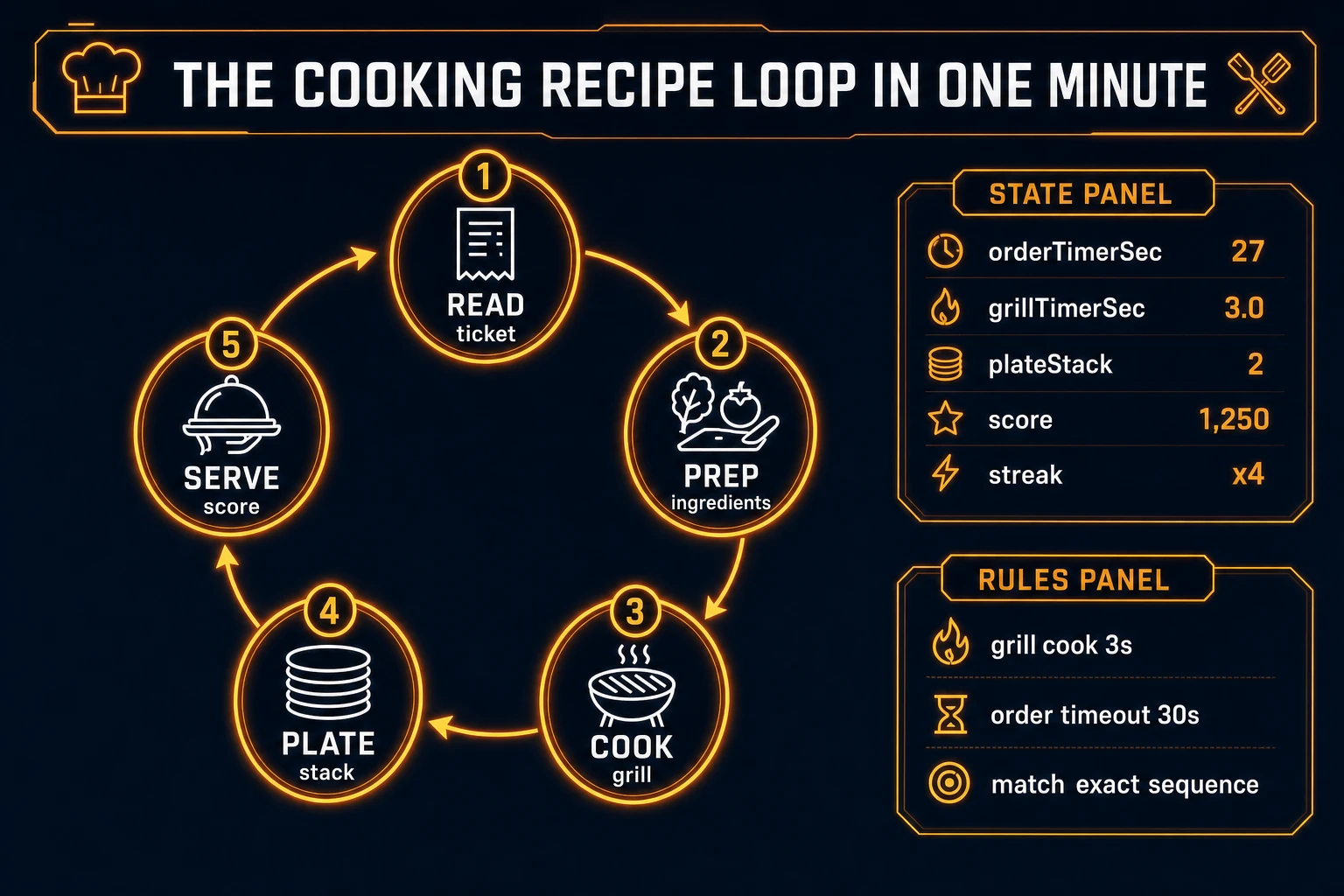
Cooking game loop state machine diagram showing read ticket, prep ingredients, grill cook timer, plate stack, and serve score
The cooking recipe loop: read the ticket, prep and cook each ingredient, stack them on the plate in order, then serve when the sequence matches.

Pick your engine for how to make a cooking game: canvas, Phaser, or WizardGenie

Three good targets in 2026, each with a different trade-off. Vanilla JavaScript with canvas is the honest default and the pick this guide recommends for a first build. One <canvas> or DOM layout draws the ticket panel, ingredient buttons, grill rectangle, and plate area. Track click targets with simple bounding boxes, run grill countdown with requestAnimationFrame or setInterval, and compare arrays on Serve. Total code footprint for a working browser recipe game is under 380 lines including order queue, prep clicks, and score persistence. The MDN Canvas API docs cover drawing, and the Drag and Drop API covers optional drag-from-prep-to-plate if you prefer pointer events over click-to-add.

Click-to-add versus drag-and-drop stays readable for jam scope: click an ingredient to append it to the plate if rules allow; click the grill to move a raw patty there; click Start to begin the timer. Drag-and-drop feels nicer on desktop but adds hit-test complexity — ship clicks first, upgrade to drag in v2.

Phaser 4.1.0 (verified 2026-08-27 on the official Phaser API documentation page) becomes the right pick if you want draggable GameObjects, tweened ticket slides from the right edge, or TimerEvent hooks tied to grill sprites. Phaser does not invent your recipe matching — you still need the same stack comparison and patience decay. Use Phaser when animated ingredient sprites and panned kitchen cameras are the product; use raw canvas when the product is an html5 cooking game walkthrough people can read in one sitting.

WizardGenie is not a separate rendering engine — it scaffolds whichever of the two you pick from a single natural-language prompt. WizardGenie ships as both a desktop app (Windows installer with auto-update, available to Early Access supporters and above) and a no-install web build. Its coding-model lineup covers Claude Opus 4.7, GPT-5.5, Gemini 3.1 Pro, DeepSeek V4 Pro, Kimi K2.5, Grok 4.2, and MiniMax M2.7 (verified 2026-08-27 in src/app/_home-v2/_data/tools.ts). For cooking loops, any frontier model scaffolds ticket parsing, prep handlers, and grill timers in one prompt. Pair a frontier planner with a budget executor like DeepSeek V4 Pro or Kimi K2.5 for the typing pass — the Dual-agent pattern lands most projects at roughly one-fifth the single-frontier cost.
Step 1 — model order tickets, prep slots, and grill timers

Nothing else in the pipeline matters if Serve accepts a cheese-before-bun stack or the grill never blocks raw patties. Start with a small, testable model:

const RECIPES = [
  { id: 'burger', items: ['bun', 'patty', 'cheese'] },
  { id: 'salad', items: ['lettuce', 'tomato', 'dressing'] },
  { id: 'toast', items: ['bread', 'butter'] },
];

const NEEDS_GRILL = new Set(['patty', 'bread']);

let orderIndex = 0;
let orderTimerSec = 30;
let grillTimerSec = 0;
let grillItem = null;
let plateStack = [];
let score = 0;

function activeOrder() {
  return RECIPES[orderIndex % RECIPES.length];
}

function addToPlate(ingredientId) {
  if (NEEDS_GRILL.has(ingredientId) && grillItem !== ingredientId + '_cooked') return;
  plateStack.push(ingredientId);
}

function startGrill(rawId) {
  if (grillTimerSec > 0 || grillItem) return;
  grillItem = rawId;
  grillTimerSec = 3;
}

function tickGrill(dt) {
  if (grillTimerSec <= 0) return;
  grillTimerSec -= dt;
  if (grillTimerSec <= 0) grillItem = grillItem + '_cooked';
}

function tryServe() {
  const wanted = activeOrder().items;
  const match = wanted.length === plateStack.length
    && wanted.every((id, i) => id === plateStack[i]);
  if (!match) return { ok: false };
  const bonus = Math.floor(orderTimerSec * 2);
  score += 100 + bonus;
  plateStack = [];
  orderIndex += 1;
  orderTimerSec = 30;
  return { ok: true, bonus };
}

Unit-test three cases before you generate art: a perfect burger order with cooked patty scores once; a serve with bun-patty but missing cheese rejects; and a raw patty added directly to the plate never passes the grill gate. Those three tests catch ninety percent of javascript cooking game bugs. Keep patience at 30 seconds for the first build so playtesters can read the ticket without stress.

Step 2 — wire order queue and serve scoring in WizardGenie

With ticket and grill helpers drafted, open WizardGenie. Drop in a bare index.html shell with placeholder rectangles for ticket, counter, grill, and plate. Give the agent one paragraph: Build a browser cooking game. Three recipes in rotation: burger (bun, patty, cheese), salad (lettuce, tomato, dressing), toast (bread, butter). Click ingredients to add to plate; patty and bread must grill 3 seconds first. Order patience 30 seconds. Serve compares plate stack to ticket order. Score 100 plus 2 points per remaining patience second. On success show plus popup and next ticket. Session ends at 5 minutes or player quit. Autosave high score to localStorage. Feed that to any coding model in the lineup and the interpreter scaffolds in under five minutes.

The remaining hour is polish via follow-up prompts. Add a patience bar — red-to-green gradient beside the ticket — six lines. Add a grill sizzle particles — three orange dots while timer runs — eight lines. Add a wrong-serve shake — translate plate 4px for 200ms — four lines. Add a streak multiplier — 1.1x score after three perfect serves in a row — ten lines. Each item is a follow-up prompt, and the whole time management cooking experience comes together over a Saturday afternoon.

Optional sibling: if your jam needs passive income between orders instead of ticket pressure, borrow the tick loop from how to make an idle game — same UI shell, different score source.

Step 3 — AI Image Gen food icons, SFX Gen sizzle, Music Gen kitchen bed

Flat colored rectangles read as a tech demo even when recipe matching is perfect. Four asset passes cover the whole browser recipe game experience:

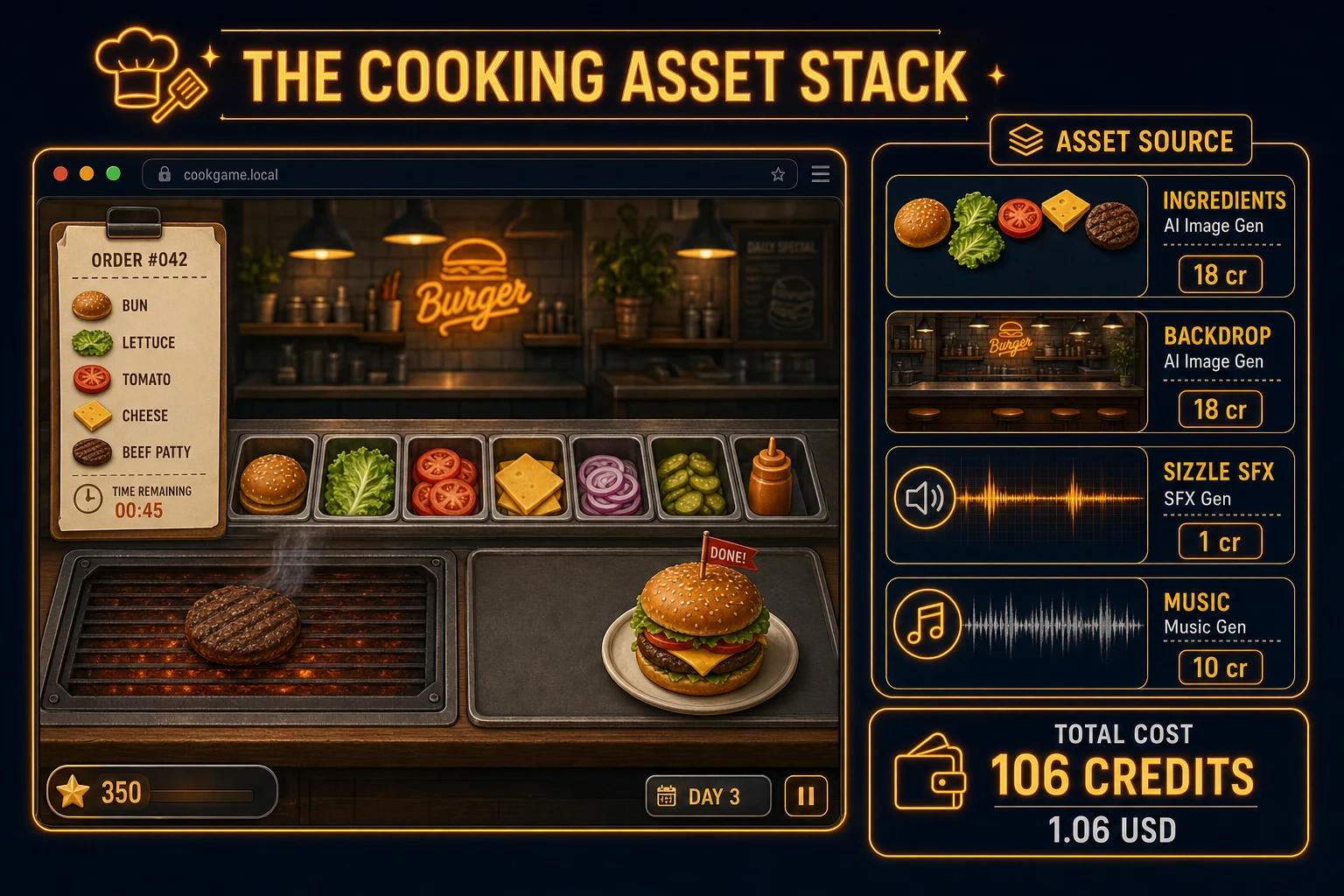
  • Ingredient icons — four 64×64 food sprites from AI Image Gen. Prompt for “game UI icon, [bun/patty/cheese/lettuce], flat cartoon style, transparent background, cooking game asset, 64x64”. Nano Banana Pro costs 18 credits per generation per src/lib/models.ts. Four icons is 72 credits.
  • Kitchen backdrop — one counter and tile wall from AI Image Gen. Prompt for “top-down kitchen counter background, stainless prep surface, warm lighting, 800x600, game UI backdrop, no characters”. One pass at 18 credits.
  • Sizzle loop — continuous grill hiss under 2 seconds, loop-friendly.
  • Order ding — bright bell under 0.4 seconds when a new ticket appears.
  • Serve chime — positive chime under 0.5 seconds on correct plate.
  • Timer buzz — soft buzz under 0.6 seconds when patience hits zero.

Open SFX Gen, describe each clip in plain language (“cast iron sizzle, short loop, kitchen grill”), and export WAV into your assets/audio/ folder. Billing is 1 credit per second of generated audio per src/app/sfx-gen/page.tsx — four short clips land around 6 credits total.

For the background loop, open Music Gen and prompt for “cozy kitchen ambience loop, light percussion, no vocals, seamless loop, 30 seconds”. Music Gen costs 10 credits per generation (MUSIC_CREDIT_COST in src/app/music-gen/page.tsx). Mute by default with a toggle — mobile browsers often block autoplay until the first click anyway.

Cooking game asset stack diagram showing AI Image Gen food icons and kitchen backdrop, SFX Gen sizzle audio, and Music Gen kitchen bed with 106 credit total
The cooking asset stack: AI Image Gen for ingredient icons and kitchen backdrop, SFX Gen for sizzle and order clips, Music Gen for optional ambience — roughly 106 credits total.

Step 4 — playtest the browser recipe loop like a jam judge

Before you share the build, run a five-minute checklist borrowed from game-jam judging:

  1. Ticket reads at a glance — ingredient names or icons match the prep buttons without scrolling.
  2. Grill gate is obvious — raw patty cannot reach the plate; cooked state shows a color shift or checkmark.
  3. Order matters — bun-patty-cheese scores; patty-bun-cheese does not, and the UI says why.
  4. Patience creates pressure — bar drains smoothly; zero triggers buzz and order fail without soft-locking the run.
  5. Three orders in a row work — queue advances, score accumulates, high score persists after refresh.

Log issues as WizardGenie follow-ups, not rewrites. “Highlight the next required ingredient on the ticket” is one prompt. “Add a trash button to clear the plate after wrong serve” is another. The Sorceress tools guide lists every asset tool if you want to swap Music Gen for Sound Studio on a longer loop.

What how to make a cooking game costs on Sorceress in 2026

A honest budget for the stack above against the 2026 Sorceress rate card (verified 2026-08-27 against local source):

  • Four AI Image Gen ingredient icons at Nano Banana Pro: 72 credits (0.72 USD)
  • One AI Image Gen kitchen backdrop: 18 credits (0.18 USD)
  • Four SFX Gen clips (~6 seconds total): ~6 credits (0.06 USD)
  • One Music Gen kitchen bed: 10 credits (0.10 USD)
  • Coding-model API time for WizardGenie scaffolding: under 0.40 USD with a planner plus budget executor pair

Total art and audio: roughly 106 credits or 1.06 USD. The free 100-credit signup grant (src/app/api/admin/credits/route.ts) nearly covers the full stack outright — skip the Music Gen bed or one icon variant if you need to stay inside the grant on day one. If you already built a quiz game or clicker game in the same jam week, reuse the SFX Gen chime clip for correct-serve feedback — positive UI audio generalizes well.

Frequently Asked Questions

Which cooking game mechanics should a beginner implement first?

Start with one order ticket that lists two or three ingredients, three clickable prep stations, one grill slot with a three-second timer, and a Serve button that compares the plated stack to the ticket. Score when every ingredient matches in order. Skip multi-station kitchens, customer patience meters, and combo chains until one honest order resolves with points and a next ticket. That is what most how to make a cooking game and cooking game tutorial searchers expect from a weekend build.

How does a recipe loop work in javascript cooking game code?

Store recipes as arrays of ingredient ids such as bun, patty, cheese. When Serve fires, compare the plate stack to the active order array with a shallow equality check. On match, add base score plus a speed bonus from remaining order timer. On mismatch, flash red and let the player clear the plate. Unit-test three cases: a perfect burger order scores once, a missing ingredient rejects serve, and an expired grill timer blocks plating until the player restarts cook.

Canvas or Phaser for a browser recipe game?

Canvas with click handlers and simple rectangle hit tests is the honest default for a first html5 cooking build — under 380 lines including order queue, prep clicks, and grill countdown. Phaser 4.1.0 (verified 2026-08-27 on the official Phaser API documentation page) adds draggable GameObjects, tweened ticket slides, and TimerEvent hooks if you plan five or more kitchen layouts. Pick Phaser when animated ingredient sprites and camera pan across stations are the product; pick raw canvas when the product is a time management cooking walkthrough people can fork in one file.

How should order timers and grill states behave?

Give each ticket a 30-second patience bar displayed beside the recipe list. Start the grill timer only after the player drops a raw patty on the grill slot; flip at halfway for bonus points if you want extra depth. Block Serve while any required ingredient is still raw or missing from the plate stack. On successful serve, tween the ticket off-screen, push the next recipe from a shuffled queue, and increment streak multiplier. Persist high score in localStorage. Most restaurant game browser searchers forgive binary pass or fail if the ticket and stations read clearly.

How much does it cost to build a cooking game on Sorceress?

A first-project browser recipe loop with art and audio budgets like this against the 2026 Sorceress rate card (verified 2026-08-27 against local source). Four ingredient icons from AI Image Gen at Nano Banana Pro 18 credits each = 72 credits. One kitchen backdrop at 18 credits = 18 credits. Four SFX clips at 1 credit per second (src/app/sfx-gen/page.tsx) — sizzle loop, order ding, serve chime, timer buzz — roughly 6 credits. One Music Gen kitchen bed at 10 credits (MUSIC_CREDIT_COST in src/app/music-gen/page.tsx). Total roughly 106 credits or 1.06 USD plus under 0.40 USD in coding-model API time. The free 100-credit signup grant (src/app/api/admin/credits/route.ts) nearly covers the full stack outright.

Sources

  1. Cooking video game - Wikipedia
  2. MDN - Canvas API
  3. MDN - Drag and Drop API
  4. Phaser 4.1.0 API Documentation
Written by Arron R.·2,440 words·11 min read

Related posts


