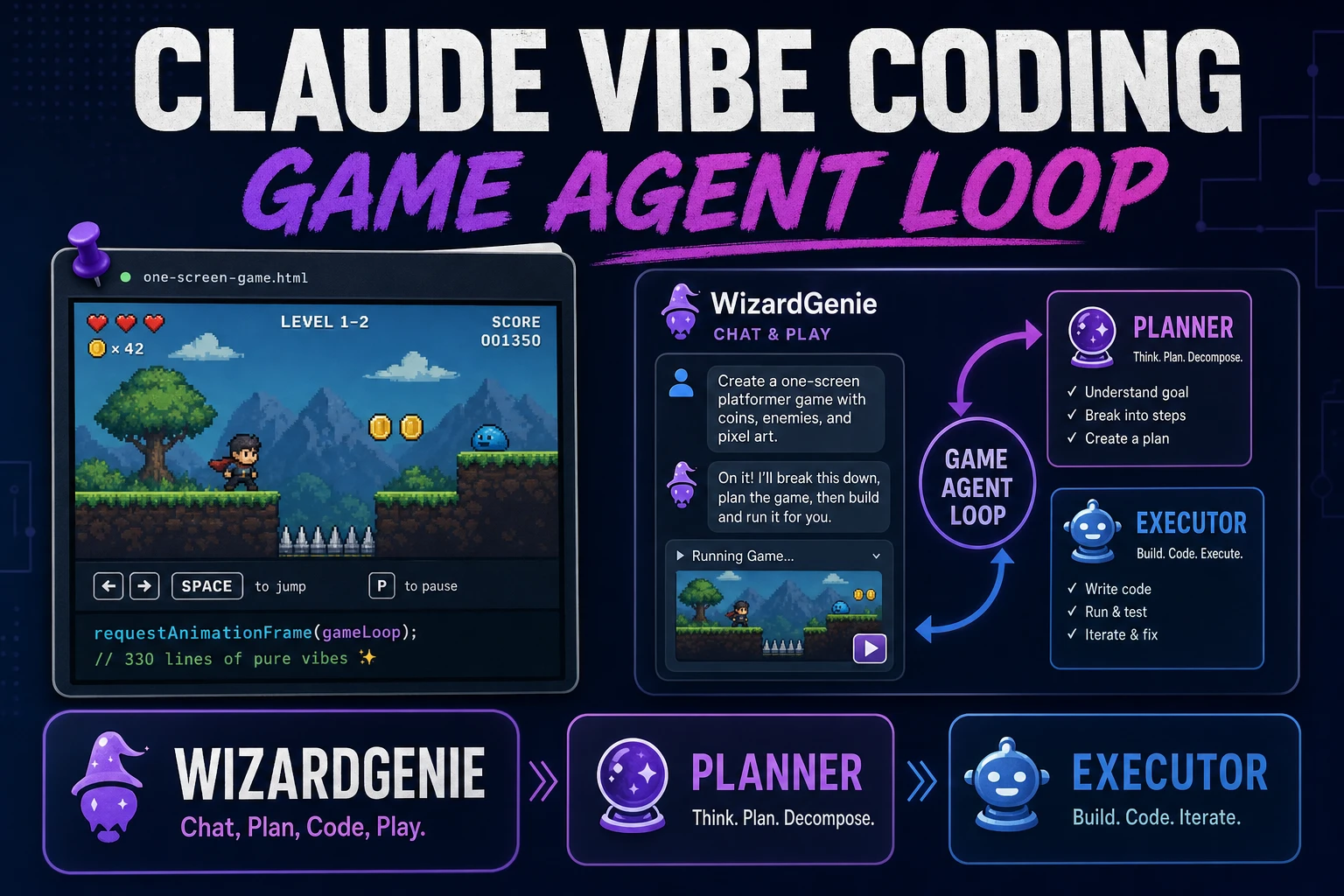
Pin Claude Vibe Coding (Game Agent Loop)

By Arron R.7 min read
Claude vibe coding works for games when you pin one playable screen, keep a Planner+Executor split in WizardGenie, and turn failing playtests into the next prom

Searchers typing claude vibe coding usually want a working agent loop, not a glossary entry. The practice Wikipedia attributes to Andrej Karpathy in February 2025—describe, run, paste the error, accept the next patch—only pays off for games when you pin one playable screen and keep constants sacred. This guide shows how to run that loop in WizardGenie with a Planner+Executor split, then pull art from AI Image Gen without rewriting systems. Model names match CODING_MODELS in src/app/_home-v2/_data/tools.ts, verified July 24, 2026.
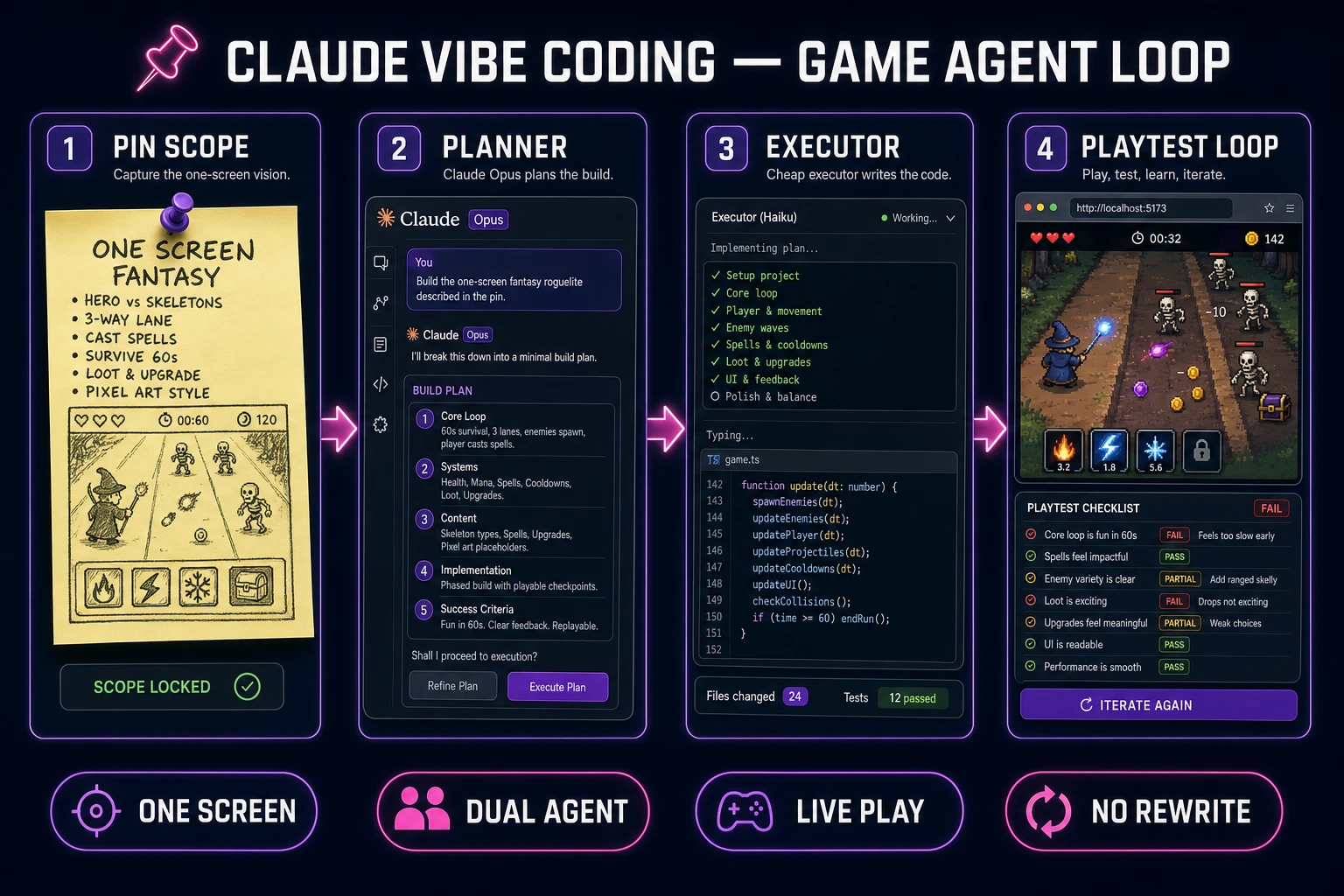
Claude vibe coding game agent loop from pinned scope through planner executor to playtest
Pin the scope first: one screen, dual-agent cost split, live play, no silent rewrites.

What claude vibe coding means for a game jam

DataForSEO lists claude vibe coding at 720 monthly searches with KD 12 in research-supplement.md, verified July 24, 2026. Sibling phrases vibe coding with claude (390/mo, KD 3) and vibe coding claude (260/mo, KD 3) share the same intent: people want Claude-class reasoning inside a vibe-coding workflow, not a desktop IDE tour.

Wikipedia’s vibe coding page (live-checked July 24, 2026) defines the practice as AI-assisted development where you describe a task in natural language and an LLM generates code, often with heavy reliance on results and follow-up prompts. Karpathy coined the term in February 2025; Collins named it Word of the Year for 2025. Martin Fowler’s note stresses the hard edge: forgetting that the code exists is useful for disposable software and dangerous for long-lived systems.

For a jam, translate that into three constraints:

  • One fantasy. One camera, one win condition, one death rule.
  • Named constants. Move speed, gravity, and enemy speed live in a file the agent may not edit unless you request a feel pass.
  • Live play. The next prompt comes from a failing sixty-second playtest, not from a feature wishlist.

If you need a broader tool-selection scorecard, see how to choose a vibe coding tool. This article stays on the Claude-shaped agent loop itself.

Scope one playable screen first

Do not open with “build my RPG.” Open with a slice you can play in under a minute. MDN’s web game introduction still centers on a running loop, input, and assets—exactly what a first prompt must prove.

Build a one-screen browser action prototype with Phaser v4.2.1. Side view. Player can move and jump. Collect three pickups to raise score. Touching an enemy restarts the run. Use colored rectangles only. No inventory, no dialogue, no menu beyond restart. Expose MOVE_SPEED, JUMP_VELOCITY, and ENEMY_SPEED as named constants in a config file. Do not change those constants unless I ask for a feel pass.

Phaser v4.2.1 “Giedi” (released July 9, 2026) was live-verified on the official GitHub release notes on July 24, 2026. Naming the version in the prompt reduces silent API drift between sessions.

Write the win and fail rules on a sticky note before you chat. If the sticky note needs more than one sentence, the slice is too big for claude vibe coding on day one.
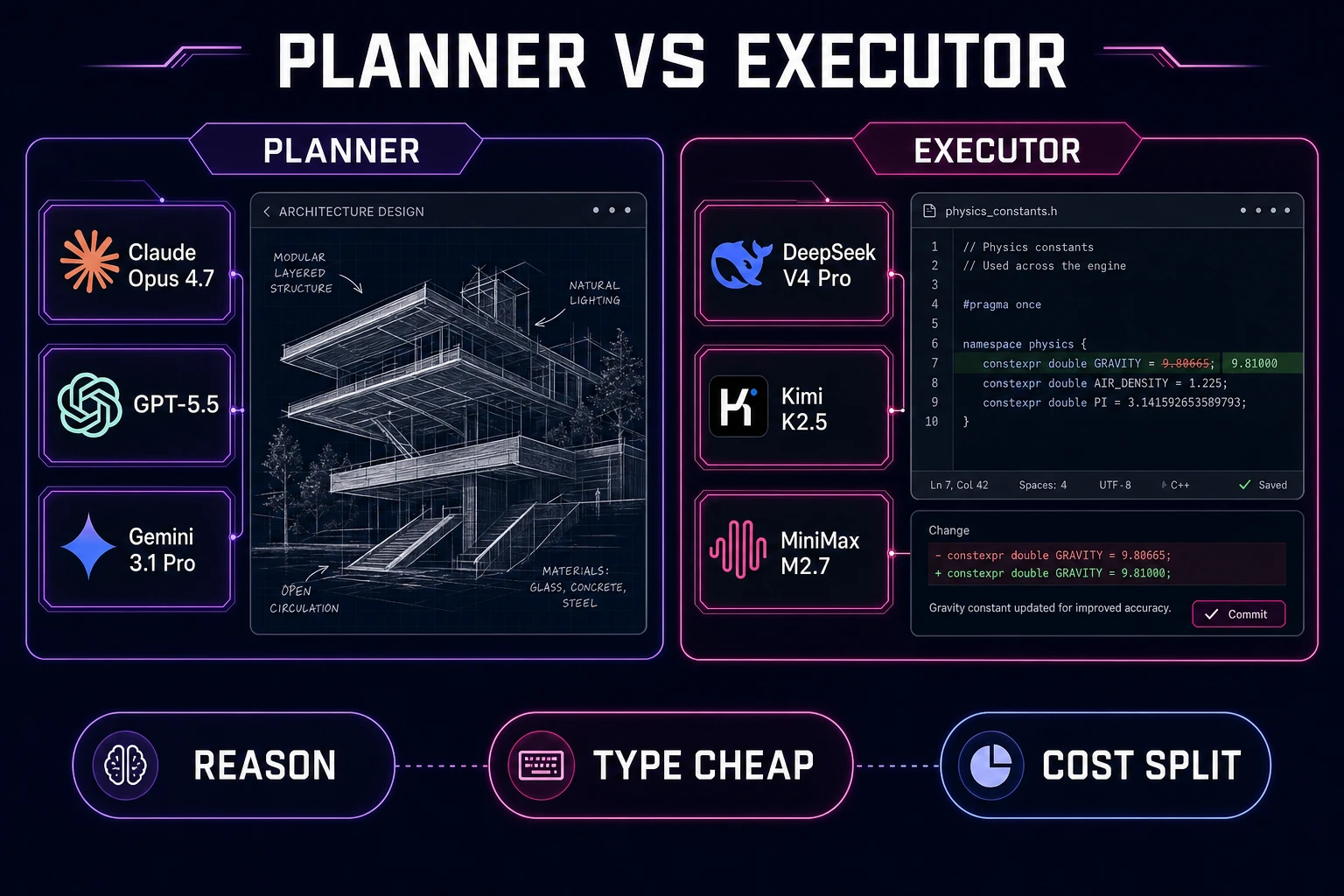
Planner versus executor model split for Claude vibe coding in WizardGenie
Planner models reason; cheap executors type. Mixing those jobs burns the budget that makes dual-agent work worth it.

Pick planner vs executor models

The economic logic of Planner+Executor is “expensive reasoner thinks, cheap fast typer executes.” Pairing two frontier-priced models defeats the pattern.

WizardGenie’s current coding catalog (verified July 24, 2026 against CODING_MODELS):

  • Acceptable Planners: Claude Opus 4.7, GPT-5.5, Gemini 3.1 Pro, Grok 4.2.
  • Acceptable Executors: DeepSeek V4 Pro, Kimi K2.5, MiniMax M2.7. Keep Claude Sonnet 4.6 for mid-weight reasoning—not for twenty micro-fixes.

Claude vibe coding searchers often default Claude onto every keystroke. For games, that is the wrong default. Use Opus or Sonnet when the scaffold is wrong, the collision model is confused, or the scene graph needs a rethink. Use a budget executor when you only need “lower ENEMY_SPEED from 90 to 70 and leave everything else alone.”

A practical cost ratio to aim for is roughly one-fifth of single-frontier cost when the executor is a true cheap model. If your logs show Sonnet typing every gravity tweak, you are not running dual-agent—you are running expensive autocomplete.
Scaffold the loop in WizardGenie

Open WizardGenie on web for a no-install start, or the Windows desktop build when you want native filesystem access and longer agent runs. Both paths support the same coding models; pick based on whether you need a real project folder on day one.

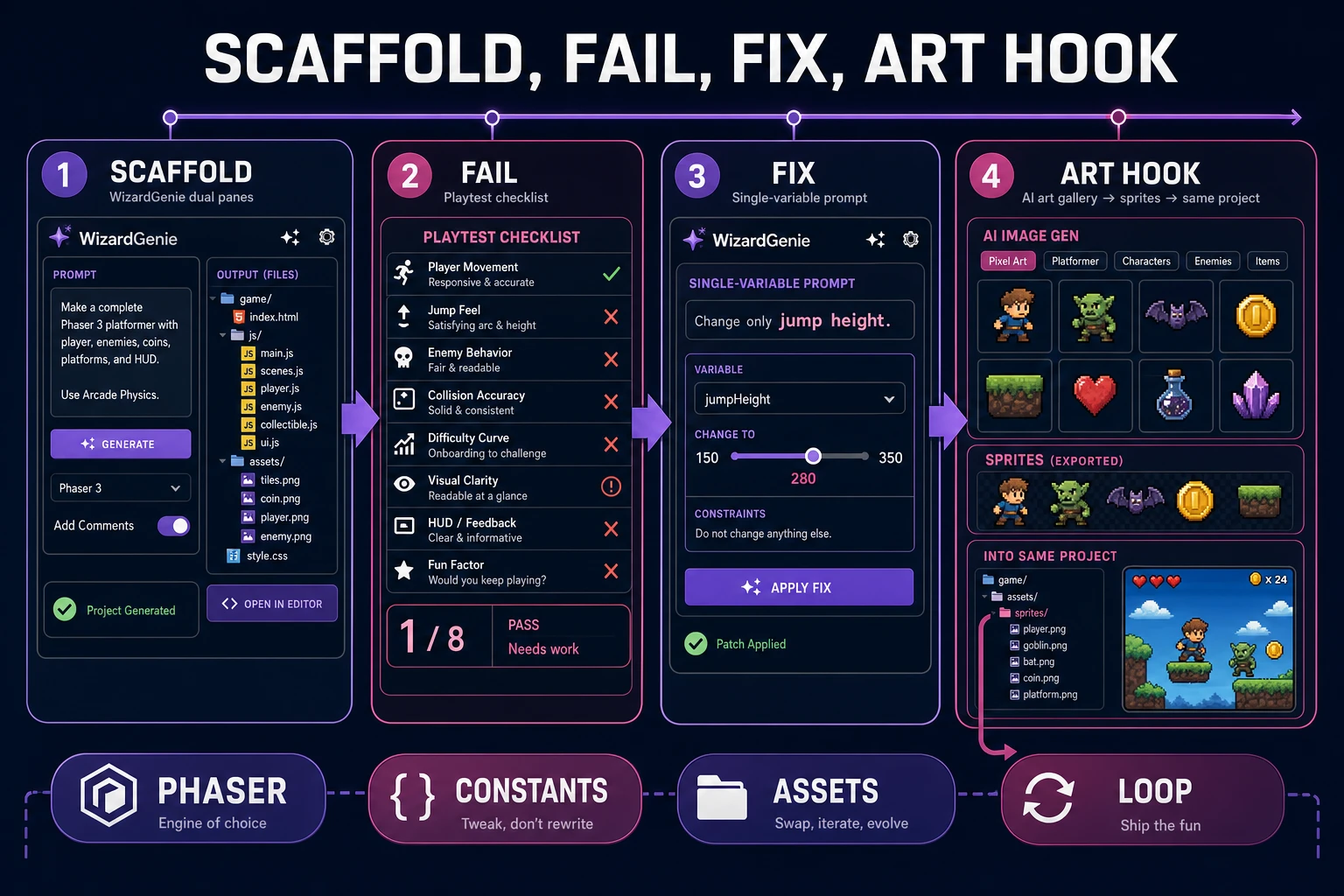
Scaffold sequence:

  1. Paste the one-screen prompt with Phaser v4.2.1 pinned.
  2. Run the preview. Confirm move, jump, score, and restart before adding art.
  3. Save a one-page movement contract in the repo root listing the sacred constants.
  4. Switch the next messages to an executor model for single-variable edits.

WizardGenie is not a chat that forgets files between turns when you keep a project. That continuity is the difference between claude vibe coding that ships a jam slice and claude vibe coding that regenerates the same platformer five times. For an earlier narrative on Claude-shaped vibe loops, see vibe coding with Claude; this page focuses on pinning the agent loop for a playable screen.

Feed failing playtests back as prompts

After the slice runs, play for sixty seconds and write three failing observations. Good prompts are measurements:

  • “Enemy speed 90 feels unfair on the first screen; set ENEMY_SPEED to 70; do not touch MOVE_SPEED.”
  • “Jump apex clears the platform by two tiles; reduce JUMP_VELOCITY by 12%.”
  • “Restart leaves score on screen; clear score on death.”

Bad prompts are vibes: “make it feel better,” “add juice,” “polish combat.” Those invite silent rewrites of systems you already verified.

When the agent breaks a constant without permission, revert and restate the contract at the top of the next message. Agents forget; files remember. Keep the contract next to the chat so a model rotation inherits your rules instead of inventing a new genre.

Claude vibe coding scaffold fail fix and art hook pipeline in Sorceress
Scaffold, fail, fix, then hook art—never regenerate the whole scene to swap a sprite.

Keep a short failure log in the repo: date, symptom, constant touched, model used. After a dozen rows you will see whether Opus is actually earning its keep or whether you have been burning planner tokens on executor work. That log is also how you brief a teammate who joins on day two—they read measurements, not vibes.

When collision or scene-graph bugs resist three executor passes, escalate once: paste the minimal repro, the sacred constant list, and the exact failing playtest into a Planner turn. One strong rethink beats five random rewrites. Then drop back to a cheap executor for the cleanup commits.

Hook art without rewriting systems

Games are not code-only products. Once the graybox loop is stable, generate character or prop concepts in AI Image Gen, name files like code (player_idle.png, enemy_slime.png), and ask WizardGenie to swap texture paths only.

Rules that keep art from destroying the agent loop:

  • One asset class per prompt (“replace player rectangle with player_idle.png at 32×32”).
  • No simultaneous feel pass and art pass.
  • Play for sixty seconds after each import before asking for new systems.

Browse the wider catalog in the tools guide when you later need SFX, music, or sprite sheets. Day-one claude vibe coding should stay narrow: code loop first, art hooks second, audio third.

Also decide where the project lives before the second hour. Web entry is enough to prove the slice; desktop is better when you want the agent to keep working while you playtest on a second monitor, or when you need to drop dozens of PNG frames into a real assets folder. Switching mid-jam is fine—just export the same movement contract so the new session inherits gravity numbers instead of inventing a new jump language.

If a sibling post already covered tool shopping, treat this page as the execution manual: you already picked a vibe coding path; now you are pinning Claude-class planning inside a game-aware loop. The catalog at /tools-guide lists the surrounding asset tools when you are ready to widen the stack.

Name folders the way engines expect: assets/sprites, assets/sfx, src/scenes. Predictable paths reduce hallucinated imports. After art lands, ask the agent to print the load paths it will use before it edits scene code—catching a wrong filename is cheaper than debugging a black rectangle at runtime.

HTML5 browser builds remain a honest jam target. Wikipedia’s HTML5 overview (live-checked July 24, 2026) is enough citation for “ship a linkable demo”; you do not need a store page on day one. Prove the loop, then decide distribution.

Cost math and when to stop vibing

Stop vibing—and start specifying—when any of these appear:

  • The agent rewrites jump height to “fix” an unrelated bug.
  • You cannot explain the win condition in one sentence anymore.
  • Frontier planner tokens are burning on typo-level edits.
  • You need console targets, deep engine packages, or a C# team workflow that a browser slice cannot honestly carry.

Retest the four-step loop after every major model rotation: playable slice, single-variable fix, asset add without rewrite, and reopen continuity. The July 24, 2026 catalog will not be the December catalog. Keep the written movement contract beside the chat so the new planner inherits your rules instead of inventing a new genre mid-jam.

Until then, pin the screen, split Planner and Executor, and treat playtest failures as the only backlog. That is claude vibe coding that finishes a jam vertical slice instead of a transcript.

Frequently Asked Questions

What is Claude vibe coding for a game jam?

It means describing playable systems in natural language and iterating from live play results, using a Claude-class planner when the scaffold is hard, then a cheap executor for micro-fixes. On Sorceress that loop runs in WizardGenie on desktop or web—not as a chat that forgets your scene graph.

Should Claude Sonnet be the executor for every tiny fix?

No. Keep frontier Claude models on the Planner side for architecture and hard bugs. For twenty gravity tweaks, use DeepSeek V4 Pro, Kimi K2.5, or MiniMax M2.7 as Executor so you do not erase the cost advantage of dual-agent work.

Which WizardGenie coding models are available?

Verified against src/app/_home-v2/_data/tools.ts CODING_MODELS on July 24, 2026: Claude Opus 4.7, Claude Sonnet 4.6, GPT-5.5, Gemini 3.1 Pro, DeepSeek V4 Pro, Kimi K2.5, Grok 4.2, and MiniMax M2.7.

Which Phaser version should I pin in prompts?

Phaser v4.2.1 Giedi (released July 9, 2026) was live-checked on the official GitHub release notes on July 24, 2026. Name that version in the scaffold prompt so the agent does not invent older APIs.

Is WizardGenie browser-only?

No. WizardGenie ships as a Windows desktop app and as a web entry at /wizard-genie/app. Use desktop when you need native filesystem depth and long agent runs; use web when you want a no-install start.

Sources

  1. Vibe coding — Wikipedia
  2. Vibe Coding — Martin Fowler Bliki
  3. Introduction to game development for the Web — MDN
  4. Phaser v4.2.1 release notes — GitHub
  5. HTML5 — Wikipedia
Written by Arron R.·1,539 words·7 min read

Related posts