Is Claude Code Vibe Coding? (And What That Means for Games)

By Arron R.11 min read
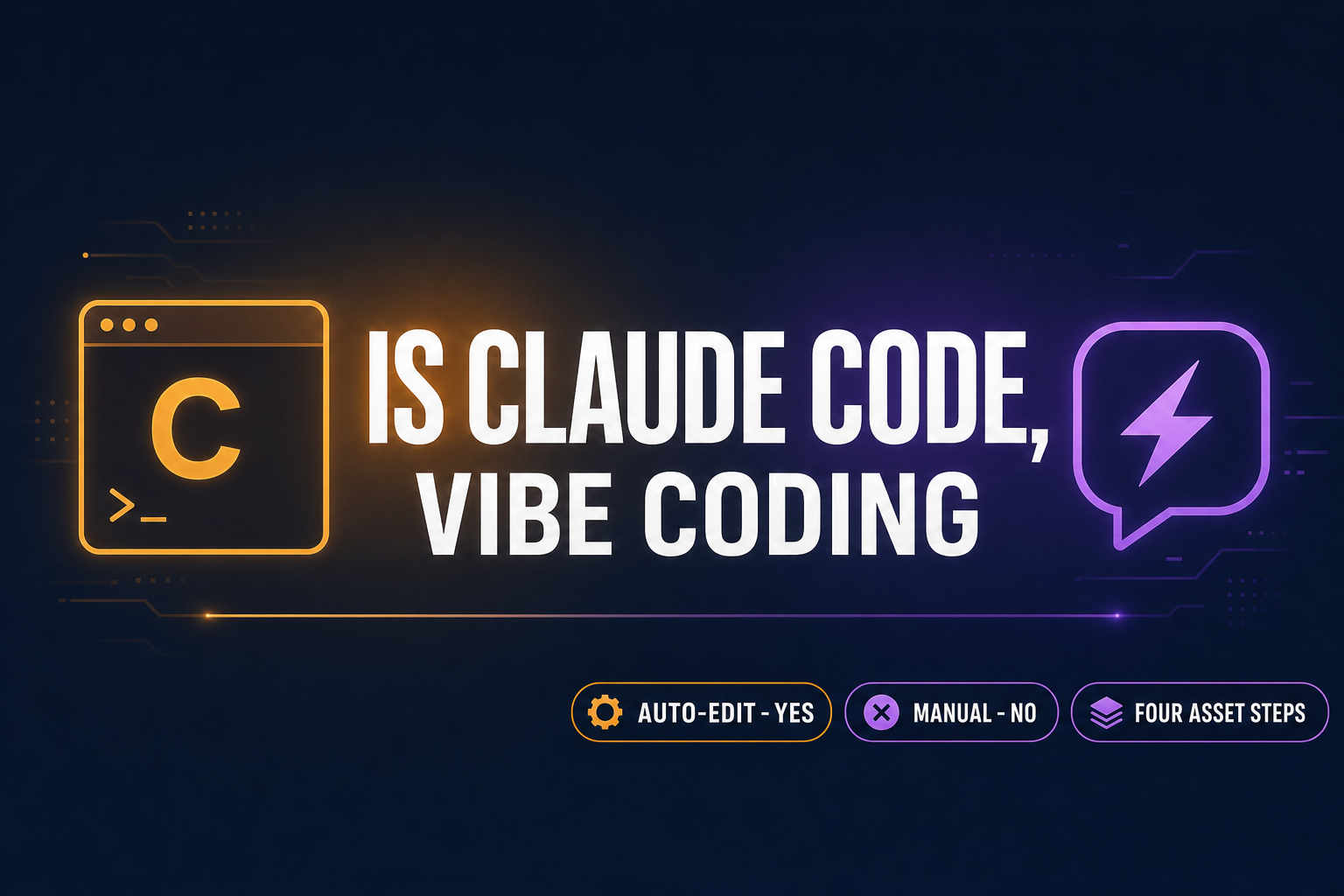
Is Claude Code vibe coding? Yes when the dev runs it in auto-edit mode and accepts the diff without reading it (Karpathy's 2025 definition). No when each change

Is Claude Code vibe coding? The short answer is yes, but only on the surface where the dev actually adopts the vibe-coding posture — describe intent, accept the diff without line-editing it, run, watch the result, paste the next prompt — instead of using Claude Code as a traditional senior-dev assistant. Anthropic ships Claude Code as a generic agentic CLI; the “vibe coding” label belongs to the workflow, not the tool. For game devs the practical follow-up is the more important question: Claude Code vibe-coding a browser game gets you the gameplay code in minutes, then strands you at the asset wall — sprites, 3D meshes, music, sound effects — that the CLI is not designed to render. This post pulls Karpathy’s definition (February 2, 2025 origin tweet), the May 2026 state of Claude Code (v2.1.139, May 11, 2026, 122,000+ stars on GitHub), and the four-step games gap together into a single read. Verified May 16, 2026 against the Anthropic pricing aggregator listings, the anthropics/claude-code GitHub release tags, and the WizardGenie model lineup in src/app/_home-v2/_data/tools.ts.
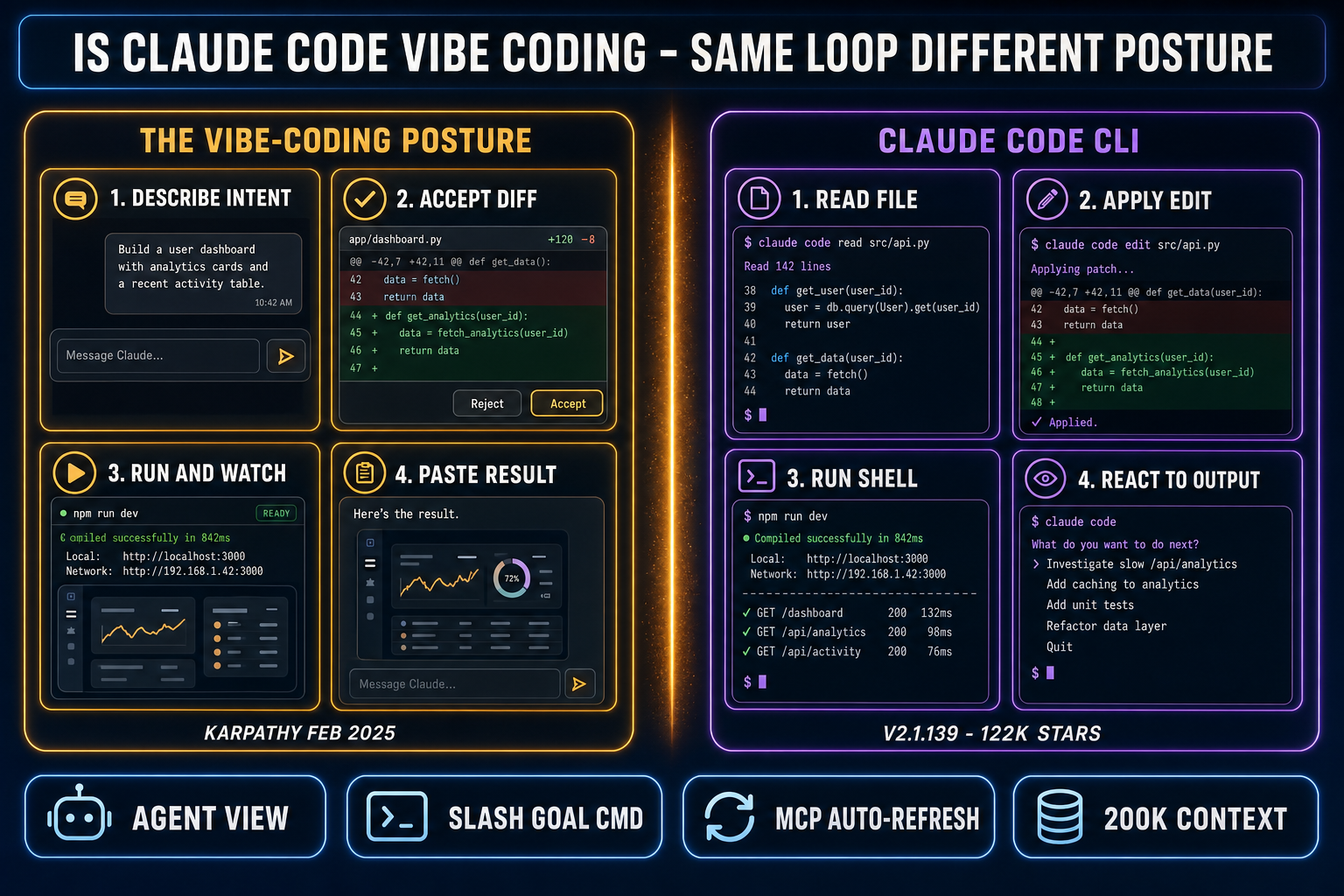
Is Claude Code vibe coding diagram showing the vibe-coding posture on one side and Claude Code agentic CLI loop on the other, with a divider labeled same loop, different posture
Is Claude Code vibe coding? The CLI is the surface; vibe coding is the posture the dev adopts on top of it. Verified against the Anthropic May 2026 pricing aggregator and the WizardGenie source on May 16, 2026.

Is Claude Code vibe coding by Karpathy’s original definition?

Andrej Karpathy coined the term on February 2, 2025 on X with about 4.5 million views and a single paragraph that the field has been quoting since. The posture has four moves: “I just see stuff, say stuff, run stuff, and copy paste stuff, and it mostly works.” Karpathy was using Cursor Composer routed to Anthropic’s Sonnet, often controlling it through voice with SuperWhisper, accepting diffs without reading them line by line, and pasting error messages straight back into the model. Independent analyst Simon Willison picked the term up four days later. The Collins Dictionary named “vibe coding” the Word of the Year for 2025. The term escaped the dev-Twitter bubble somewhere around May.

Claude Code, on the surface where Anthropic actually ships it, is a terminal CLI installed with one command (claude in your shell) that reads your workspace, applies edits, runs shell commands, and orchestrates tool use through an agentic loop. The GitHub releases for anthropics/claude-code are on v2.1.139 as of May 11, 2026, the 108th release in roughly a year. The CLI is a generic agentic coding system. It does not enforce a posture. A dev who reviews every diff line by line and asks Claude Code to explain its reasoning before accepting changes is using Claude Code in the traditional senior-engineer pair-programming style, which is the opposite of vibe coding. A dev who runs the same CLI with a one-line prompt (“add a hit-flash to the player sprite”), accepts the diff sight unseen, and pastes the screenshot of the result back into the next prompt is vibe coding. Same tool, different posture.

Is Claude Code vibe coding by the “accept the diff” test?

The cleanest behavioral test is the one Karpathy named explicitly: do you accept the diff without reading it. Claude Code makes this trivially easy. The CLI’s default flow is propose-edit-then-confirm; the dev presses one key to accept. There are also auto-edit modes that skip the confirmation entirely, where the agent proposes, applies, runs, and reacts in one loop. Setting up a Claude Code session in auto-edit mode and giving it a one-paragraph brief is the canonical vibe-coding setup. Setting up the same session with confirm-each-edit on and reading every proposed change is the canonical not-vibe-coding setup. The CLI supports both.

So is Claude Code vibe coding? On the auto-edit, prompt-once, run-watch-react path: yes, exactly. On the manual-confirm, review-each-diff path: no, that’s pair programming with an agent. The conflation in the public conversation comes from the fact that Claude Code is the most popular CLI surface where the vibe-coding workflow plays out, so the workflow gets named after the tool by default. The accurate way to talk about it is to keep the two layers separate. Claude Code is the agentic coding surface; vibe coding is the posture the dev adopts on top of it. That distinction matters when shopping for a vibe-coding tool because the same posture works on top of any agentic coding surface, including WizardGenie, which routes Claude Sonnet 4.6 and Opus 4.7 through the same model picker as seven other frontier models and surfaces the game-asset stack one click away.
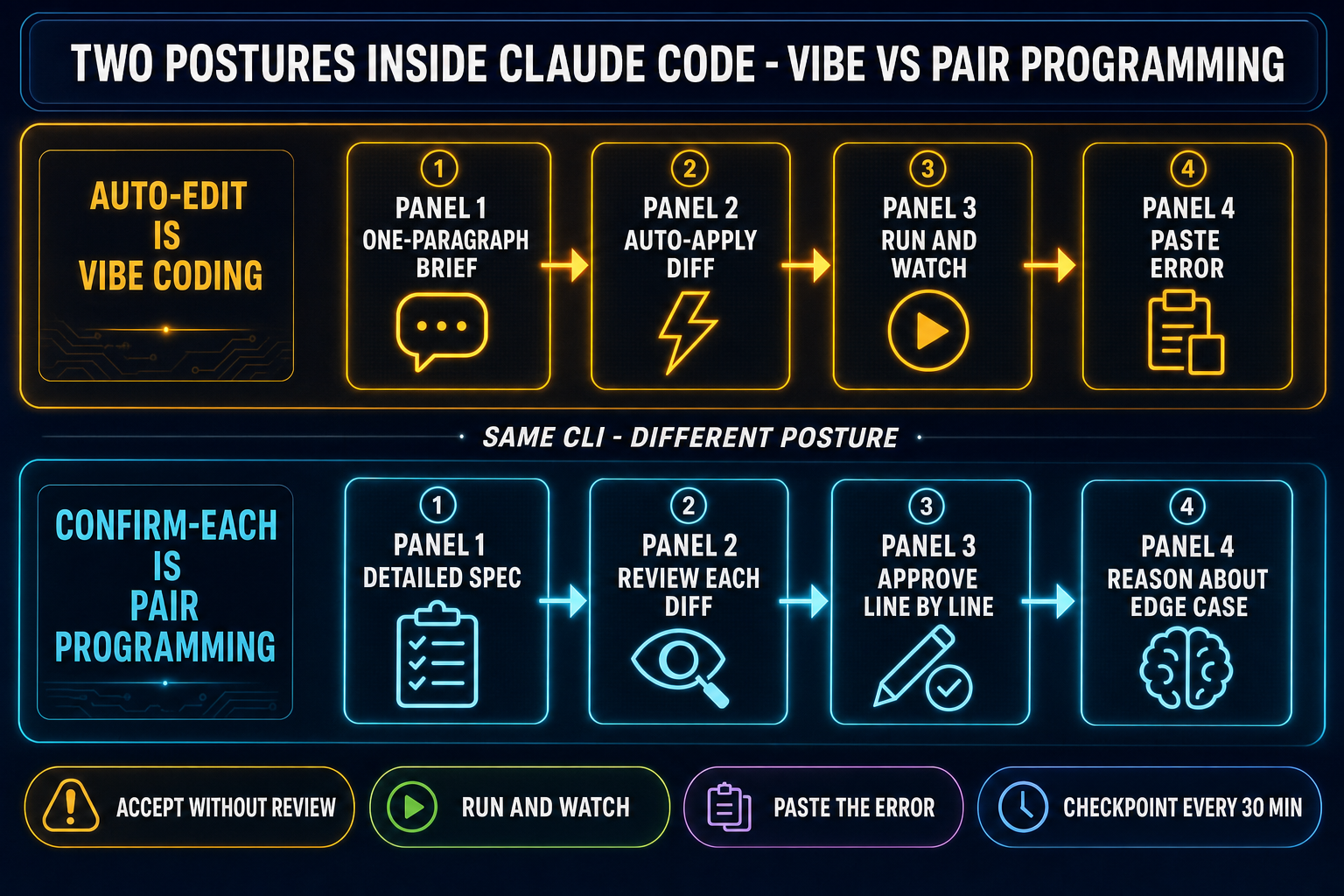
The vibe-coding posture inside Claude Code with auto-edit mode on showing the four-move loop plus the manual-confirm not-vibe-coding flow
The two postures inside Claude Code: auto-edit plus accept-without-review is vibe coding. Manual confirm plus line-by-line review is pair programming. Same CLI, different posture. Verified against the May 2026 Claude Code release notes on May 16, 2026.

What Claude Code adds to the vibe-coding loop in 2026

The v2.1.x release line shipped a handful of features that were specifically designed for the vibe-coding posture. The Agent view (research preview as of v2.1.139) shows every running, blocked, and finished Claude Code session in one list, accessed with the claude agents command. That means a vibe coder running three parallel agentic sessions — one on the gameplay code, one on the menu system, one on the build configuration — can scan the state of all three without switching terminals. The /goal command lets the dev set a completion condition (“the player can move, jump, and fire a fireball”) and Claude Code continues working across turns with a live overlay of elapsed time, turn count, and token consumption. The /scroll-speed command is small but telling: it’s a quality-of-life knob added because the dev is watching the agent type for long enough that the scroll speed matters. The MCP plumbing was reworked so .mcp.json edits auto-refresh without a restart and subagents carry an x-claude-code-agent-id header for tracing.

The economics are also priced for long agentic sessions. The Anthropic API documentation indexers list Claude Sonnet 4.6 at $3 input and $15 output per million tokens, with prompt caching at $0.30 per million on cache reads. Claude Opus 4.7 lists at $5 input and $25 output, with Opus 4.7 specifically using a new tokenizer that can produce up to 35% more tokens for the same input text compared to Opus 4.6 — meaning per-request bills can grow even when the rate card looks unchanged. A typical hour of agentic vibe-coding on a small game project on Sonnet 4.6 lands around $2 to $8 of API spend depending on how many files the agent reads per turn. Opus runs roughly 1.7x more for the same workflow because of the higher per-token rate. Both numbers are an order of magnitude lower than the deprecated Opus 4.0 list price ($15 / $75) was last year, which is part of why the “Claude is too expensive to vibe with” complaint from late 2024 has mostly faded.

The Planner-Executor variant: when single-model Claude Code costs add up

Long sessions still add up. The pattern that vibe coders running multi-hour agentic loops reach for is the Planner-Executor split: route the planning step (read the codebase, decide what to change, write the spec for the diff) to a top-tier reasoning model like Claude Opus 4.7 or GPT-5.5, and route the actual code-typing (drafting the diff, applying the edits, running the shell command) to a fast cheap model like DeepSeek V4 Pro, Kimi K2.5, MiniMax M2.7, Gemini 3.1 Flash, or GPT-5.5 Mini. The economics are real. Opus 4.7 is $5 input and $25 output per million tokens; DeepSeek V4 Pro lists at $0.435 input and $0.87 output at the May 2026 promo (75% off, valid through May 31, 2026; list $1.74 / $3.48). The output side is where the savings stack up — on a long agentic session the executor types the bulk of the tokens, so a 25:1 spread on the output rate translates to roughly a 1/5 single-frontier cost when the planner is Opus and the executor is DeepSeek V4 Pro.

The Planner-Executor pattern only works when the executor is genuinely cheap. Pairing two frontier-priced models defeats the purpose. Pairing Sonnet ($3 / $15) as the executor still saves something but loses most of the headline ratio, which is why the cost-conscious version of Claude Code vibe coding tends to put Sonnet on the planner side and a true cheap model on the typing side. Claude Code itself is single-model on a given session; running the Planner-Executor split inside WizardGenie exposes both halves of the pairing in one picker without juggling separate API keys or two terminals. We covered the full per-token landscape in the 2026 AI coding API pricing breakdown, refreshed on the same May verification cycle as this post.
Where Claude Code vibe coding stops short for games

The honest pre-flight for a game project running Claude Code vibe coding is the four-step asset gap that sits underneath every sprite-driven, mesh-driven, or audio-driven feature. Claude Code is a CLI that edits files in your workspace. It can write the gameplay code that references a sprite sheet, a 3D mesh, or a music track. It cannot generate the pixels, render the WAV, or extrude the mesh. Frontier coding LLMs are trained on text, not on pixel-art conventions, palette quantization, mocap retargeting, drum patterns, or game-engine shader graphs. Asking the CLI to generate a 64x64 walk-cycle sprite gets you a Pillow snippet that runs on a file path that doesn’t exist, or a bullet list of frame indices, or an apology. The CLI did not fail; it’s the wrong tool for the asset step.

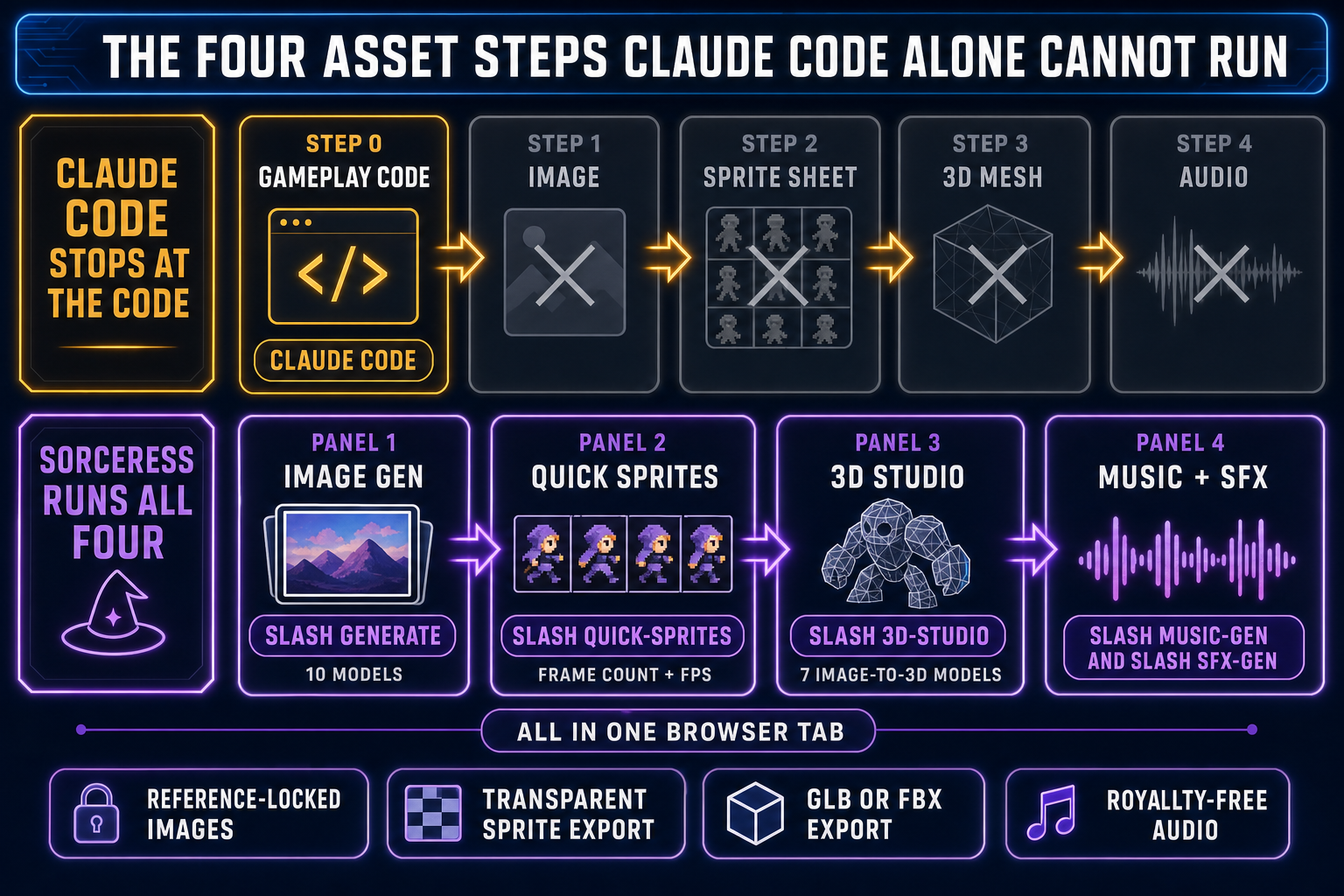
Step one is the character or environment image — one or more reference-locked illustrations the gameplay code will render. Step two is the sprite sheet — multi-frame animation grid at engine-ready dimensions on a transparent background. The sprite sheet primitive is the same one every 2D engine has read since the 1980s. Step three is the 3D mesh and rig if you’re past the 2D plane — textured manifold geometry plus a humanoid skeleton, exported as glTF 2.0 or FBX. Step four is the audio — music loop, sound effects, voice. Without those four, Claude Code’s gameplay diff lands in a project full of TODO comments and runs against a black screen. With those four, the same diff lands in a project where the punch sprite turns red, the hit sound fires, and the boss music drops the bass on the next bar.

The four-step asset gap Claude Code alone cannot run for games versus the Sorceress tool that handles each step all available in the same browser tab as WizardGenie
The four-step asset gap and the Sorceress tool that runs each step. Tool URLs and model lineups verified against the Sorceress source on May 16, 2026.

The Sorceress alternative: WizardGenie wraps the Claude vibe and the assets

WizardGenie is the surface where the Claude vibe-coding posture and the four asset steps live in the same browser tab — no second terminal, no second installer, no second login. The model picker as of May 16, 2026 lists eight options verified against src/app/_home-v2/_data/tools.ts: Claude Opus 4.7 (top-tier reasoning, the default for the planner role), Claude Sonnet 4.6 (fast and smart, the default for most vibe sessions), GPT-5.5 (frontier), Gemini 3.1 Pro (1M context for huge projects), DeepSeek V4 Pro (the cheap executor for the Planner-Executor split), Kimi K2.5 (256K coding-tuned), Grok 4.2 (2M context), and MiniMax M2.7 (agent-tuned). Same Anthropic-served Claude as Claude Code; different surface plus an asset stack and a multi-model picker. The Claude API key is bring-your-own or covered by the platform credit pool; either way the model behind the prompt is the same.

The asset steps live one click away in the same browser session. AI Image Gen at /generate runs ten image models with reference-image conditioning — the way you keep a character on-model across eight poses without each render drifting into a different face. Quick Sprites at /quick-sprites turns a character image into a packed sprite sheet with frame count, FPS, palette, and transparent background controls. 3D Studio at /3d-studio runs seven image-to-3D models (Meshy 6, Meshy 5, Rodin 2.0, TRELLIS, TRELLIS 2, Tripo v3.1, Hunyuan 3D 3.1) for the mesh step plus an auto-rigging path for the skeleton. Music Gen and SFX Gen handle the audio. The agent writes the gameplay code that references these assets; the assets get generated in the adjacent panel. The dev never has to leave the browser tab. The longer walkthrough is in the prompt-to-game-AI pipelines piece, and the side-by-side vendor read on Claude vs Cursor vs Replit for vibe coding lives in cursor vibe coding and replit vibe coding.

Common Claude Code vibe coding mistakes for game devs

Mistake one: asking the CLI for assets it cannot produce. “Generate a 64x64 sprite sheet of a wizard walking” will get you a script that runs against a file path that doesn’t exist. The fix is to keep Claude Code on the code side and run the actual sprite generation in Quick Sprites. Mistake two: running a single-model Claude Code session for hours without a Planner-Executor split. Claude Code is single-model per session by design. Once a session is long enough that the bill starts to feel real, the workflow shifts to WizardGenie where Opus plans and DeepSeek V4 Pro types in the same picker. Mistake three: long sessions without checkpoints. Claude has no memory across sessions; the “forget the code exists” posture turns into “forget the bug exists” if you don’t commit on green every 30 minutes. Mistake four: confusing Claude Code with Claude vibe coding. Claude Code is a CLI; vibe coding is a posture. A dev reviewing every diff line by line inside Claude Code is using the CLI but is not vibe coding. Mistake five: trusting the agent on netcode and save state. Vibe-coded gameplay scaffolds rarely include the edge cases that ship: multiplayer sync, save migration, accessibility, crash recovery. Spend the saved asset time on those.

The verdict: yes, Claude Code is vibe coding — for the code half

Pulled together: is Claude Code vibe coding? Yes when the dev runs it with the vibe-coding posture (auto-edit, accept-the-diff, run-and-watch, paste-the-error). No when the dev runs the same CLI as a careful diff-review pair programming session. The CLI itself is agnostic; the posture is what makes it vibe coding. For games specifically the more important framing is that Claude Code (or any single-model coding agent) is one of five pieces of the production pipeline, and that the four asset pieces underneath it — image, sprite sheet, 3D mesh, audio — live in different tools. The fastest way to feel the gap and the bridge in one sitting is to open WizardGenie, pick Claude Sonnet 4.6 in the model picker, type “a top-down dungeon crawler with a wizard who shoots fireballs,” and let the agent stub out the project. The code lands. The wizard’s sprite is a placeholder. Switch to AI Image Gen, generate a wizard with a reference image, send it to Quick Sprites for the walk and attack animations, drop the resulting sheet back into the project. Run SFX Gen for “fireball whoosh” and “hit thud,” Music Gen for the dungeon loop, and the playable build is one switch away. The deeper Claude-specific deep-dive is the claude vibe coding piece, the original definition piece is the what is vibe coding explainer, and the best-of-stack roundup is the best vibe coding tools for games piece.

Frequently Asked Questions

Is Claude Code vibe coding the same thing as Claude vibe coding?

No. Claude Code is a specific surface (Anthropic's terminal CLI, hosted at github.com/anthropics/claude-code, on v2.1.139 as of May 11, 2026 with 122,000+ stars). Claude vibe coding is the workflow on any surface where the model behind the prompt is Claude Sonnet 4.6 or Claude Opus 4.7. The workflow runs in three places today: Claude Code itself, third-party editors that route the same Claude API behind their own UX, and multi-model coding tools like WizardGenie that bundle Claude alongside seven other frontier models in a single picker. Claude Code is one of the three surfaces; Claude vibe coding is the umbrella term for the posture across all three. Confusing the two leads to incorrect setup advice - for example, telling a new vibe coder they must install Claude Code to vibe-code with Claude when the actual Claude API is reachable from any client that speaks JSON. For game projects the three-surface choice matters less than which model you point the prompt at; the surface choice is mostly about ergonomics and asset-stack integration.

How do I set up Claude Code for vibe coding specifically?

Install Claude Code with the standard one-command shell installer (the CLI lives at github.com/anthropics/claude-code). Open the terminal, run claude in your project root, and accept the default propose-then-confirm flow only if you intend to review each diff (which is pair programming, not vibe coding). For the vibe-coding posture specifically, enable auto-edit mode so the agent applies edits without per-change confirmation, write a one-paragraph brief describing what you want, and let the loop run. Use the /goal command (added in the v2.1.x release line) to set a completion condition so Claude Code keeps working across turns until the goal is met, with the live overlay showing elapsed time, turn count, and token consumption. Watch the live diff stream as the agent works; react with a follow-up prompt when something off-target lands. Commit on green every 30 minutes - the loop has no memory across sessions, so a long unchecked session can drift far from where you wanted to land. For games specifically, plan ahead for the four asset steps the CLI cannot run: image, sprite sheet, 3D mesh, audio. Those live in separate tools that you generate in parallel and reference from the gameplay code Claude Code is writing.

What is the cost of vibe coding with Claude Code versus other AI coding tools in 2026?

As of May 16, 2026 the relevant per-million-token rates from the Anthropic API documentation indexers are: Claude Sonnet 4.6 at $3 input and $15 output, with prompt caching at $0.30 per million on cache reads; Claude Opus 4.7 at $5 input and $25 output, with the new Opus 4.7 tokenizer producing up to 35% more tokens for the same input text. A typical hour of agentic Claude Code vibe coding on a small game project on Sonnet 4.6 lands around $2 to $8 of API spend depending on how many files the agent reads per turn. Opus runs roughly 1.7x more for the same workflow because of the higher per-token rate. The cheaper variant is the Planner-Executor pattern: route the planning step to Opus 4.7 and the actual code-typing to a true cheap executor like DeepSeek V4 Pro, which is around $0.435 input and $0.87 output per million tokens at the May 2026 promo (75 percent off through May 31, 2026; list $1.74 / $3.48). The output-side savings stack to roughly a 1/5 single-frontier cost on a long agentic session because the executor types the bulk of the tokens. Claude Code itself runs single-model per session by design, so the Planner-Executor split runs in multi-model editors like WizardGenie where both halves sit in the same picker.

Can Claude Code build a full game on its own?

Claude Code can build the gameplay code on its own. It cannot build the assets the gameplay code renders. A finished game is gameplay code plus a sprite sheet, plus a 3D mesh, plus a rigged skeleton, plus a music loop, plus sound effects, plus voice, plus the export and packaging step. Claude Code, as a CLI that edits files in your workspace, generates the code. It cannot render pixels for sprite sheets, synthesize WAV files for music or sound, or extrude 3D meshes from concept art. Asking the CLI to do those steps anyway gets you a Pillow snippet that runs on a file path that does not exist, or a bullet list of frame indices, or an apology. That is not a Claude Code failure - frontier coding LLMs are trained on text, not on pixel-art conventions, palette quantization, mocap retargeting, or drum patterns. The honest pre-flight for a game project running Claude Code vibe coding is the four-step asset gap: image generation, sprite sheet packing, 3D mesh extrusion, audio. Without those four, Claude Code's gameplay diff lands in a project full of TODO comments that runs against a black screen. With those four handled in adjacent tools - AI Image Gen at /generate, Quick Sprites at /quick-sprites, 3D Studio at /3d-studio, Music Gen at /music-gen, SFX Gen at /sfx-gen - the same diff lands in a project where the gameplay actually works.

How does WizardGenie compare to Claude Code for vibe coding games?

WizardGenie at /wizard-genie/app is the surface where the Claude vibe coding workflow and the four asset steps live in the same browser tab. The model picker as of May 16, 2026 lists eight options verified against src/app/_home-v2/_data/tools.ts: Claude Opus 4.7 (top-tier reasoning), Claude Sonnet 4.6 (fast and smart, the default for most vibe sessions), GPT-5.5 (frontier), Gemini 3.1 Pro (1M context), DeepSeek V4 Pro (the cheap executor), Kimi K2.5 (256K coding-tuned), Grok 4.2 (2M context), and MiniMax M2.7 (agent-tuned). Same Anthropic-served Claude as Claude Code, with two differences that matter for games. First, the Planner-Executor split runs in the same picker - Opus plans, DeepSeek V4 Pro types, total spend lands at roughly 1/5 of running Opus on both sides. Second, the asset steps live one click away: AI Image Gen at /generate runs ten image models with reference-image conditioning; Quick Sprites at /quick-sprites turns a character image into a packed sprite sheet; 3D Studio at /3d-studio runs seven image-to-3D models (Meshy 6, Meshy 5, Rodin 2.0, TRELLIS, TRELLIS 2, Tripo v3.1, Hunyuan 3D 3.1); Music Gen and SFX Gen handle the audio. Claude writes the gameplay code that references these assets, and the assets get generated in the adjacent panel without leaving the browser. The right choice depends on the project shape: Claude Code is great for pure web app vibe coding in the terminal; WizardGenie is the choice when the project is a game and the asset steps are part of the pipeline.

Sources

  1. Vibe coding - Wikipedia
  2. Andrej Karpathy on vibe coding (Simon Willison's Weblog, Feb 6 2025)
  3. anthropics/claude-code - GitHub releases
  4. Claude Sonnet 4.6 - pricing and context (Tokencost)
  5. DeepSeek V4 Pro - pricing and context (Tokencost)
  6. Sprite (computer graphics) - Wikipedia
  7. glTF 2.0 specification (Khronos Group)
Written by Arron R.·2,537 words·11 min read

Related posts