How to Make a 2D Game in Unreal Engine (Browser AI Stack)

By Arron R.15 min read
How to make a 2D game in Unreal Engine 5.7 in five steps with a browser AI stack: Quick Sprites generates the sprite sheet, AI Image Gen draws the tileset, Wiza

Anyone working through how to make a 2D game in Unreal Engine in 2026 hits the same setup decision as every other indie. The engine itself ships free under the standard royalty agreement up to a $1 million USD lifetime gross revenue threshold (5% royalty on every dollar above that, royalty-free on sales through the Epic Games Store, verified against the live unrealengine.com/en-US/license page on May 30, 2026), so the engine cost is not the obstacle for a solo developer or a small team. The obstacle is everything that wraps around the editor — the sprite sheets, the Paper 2D tilesets, the C++ classes that wire the Paper Character to the Tile Map, the placeholder audio. A developer working through how to make a 2D game in Unreal Engine from scratch this year can pay Adobe for the sprites and another subscription for an in-editor AI assistant, or run the whole pipeline through one browser stack that costs a fraction of the per-asset price. This post walks the second path, end to end, with every Unreal API and every Sorceress credit cost verified against the live source on May 30, 2026.
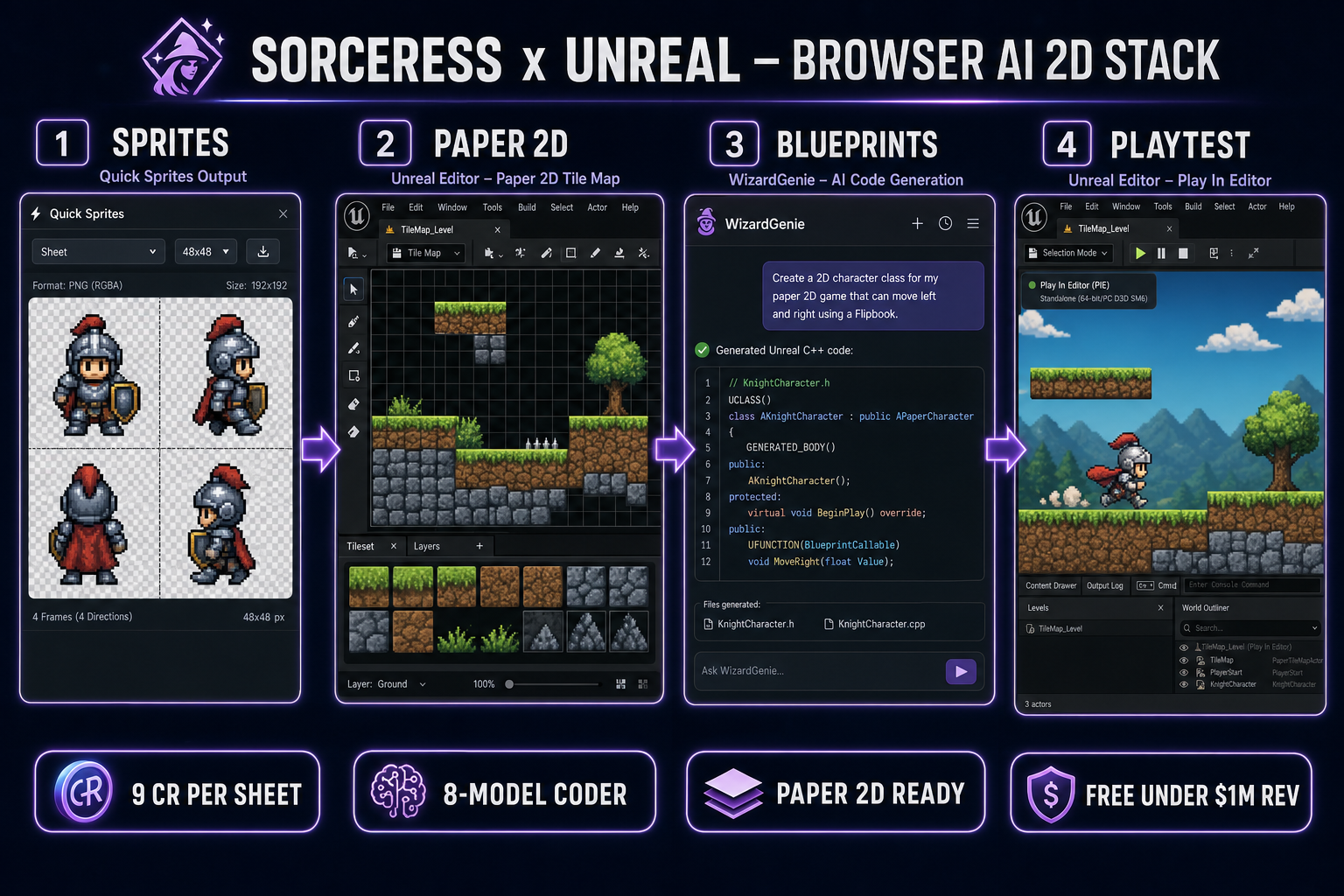
Four-panel browser pipeline diagram for how to make a 2D game in Unreal Engine — sprites, Paper 2D, blueprints, playtest — using Sorceress Quick Sprites, WizardGenie, AI Image Gen, and Sorceress Code
The four-stage Sorceress pipeline for how to make a 2D game in Unreal Engine — Quick Sprites for the player sprite sheet, AI Image Gen for the Paper 2D tileset, WizardGenie for the C++ and Blueprint glue, Sorceress Code for inline edits, all routed into an Unreal Engine 5.7 project. Hero image generated with GPT Image 2.

What “how to make a 2D game in Unreal Engine” actually means in 2026

Unreal Engine 5.7, released November 12, 2025 with Hotfix 5.7.2 already shipped (verified against the live forums.unrealengine.com release thread on May 30, 2026), is the current production version for a new 2D project this year. The 5.7 release line ships Nanite Foliage, production-ready Procedural Content Generation, production-ready Substrate materials, expanded MetaHuman support, and a new in-editor AI Assistant. For 2D work specifically, the foundation is the same Paper 2D plugin that has shipped in every Unreal 5.x release: Sprites, Flipbooks, TileSets, TileMaps, and the APaperCharacter actor class that behaves like ACharacter but uses a UPaperFlipbookComponent instead of a USkeletalMeshComponent as its visual representation.

How to make a 2D game in Unreal Engine is therefore a question about asset generation and C++ scripting, not about the engine itself. The engine handles the rendering loop with full PBR materials applied to planar sprite meshes, the Chaos physics step, the Enhanced Input subsystem (default since Unreal 5.1), the build pipeline, and the cross-platform export to Windows, macOS, Linux, iOS, Android, and HTML5 via community plugins. Everything in the editor that is not the engine itself — the sprite sheets, the tile palettes, the player controller, the camera follow, the placeholder SFX — is content the developer ships or generates. The browser AI stack in the rest of this post is the content production layer, not a replacement for the editor.

The five Unreal-side concepts this guide assumes the reader can read in the editor are: an Actor (any entity in the World Outliner), a Component (a UObject attached to an Actor, including UPaperFlipbookComponent and UCapsuleComponent), a Blueprint (a serialized Actor template with a visual scripting graph that can be instantiated in any level), a TileMap (a Paper 2D asset that paints tiles from a TileSet onto one or more layers), and an Actor C++ class (a class derived from AActor that exposes UPROPERTY variables and UFUNCTION methods to the editor and Blueprint layer). Every step below resolves to one of those five.

The browser AI stack that pairs with Unreal Engine

The browser AI stack for how to make a 2D game in Unreal Engine is four Sorceress tools, each chosen because the Unreal Editor does not ship an equivalent for free. Sorceress Quick Sprites generates animated pixel-art sprite sheets from a text prompt at CREDITS_PER_GEN = 9 credits per generation (verified at line 21 of the live /quick-sprites page source on May 30, 2026), routed through the Retro Diffusion rd-animation model. Sorceress AI Image Gen generates the tileset and prop art with seven image models on tap (Nano Banana Pro, Nano Banana 2, GPT Image 2, Seedream 5 Lite, Flux 2 Pro, Z-Image Turbo, Grok Imagine), verified against IMAGE_MODELS at lines 669–676 of src/app/_home-v2/_data/tools.ts. Sorceress WizardGenie writes the C++ APaperCharacter subclasses and Blueprint-backing functions with an eight-model picker (Claude Opus 4.7, Claude Sonnet 4.6, GPT-5.5, Gemini 3.1 Pro, DeepSeek V4 Pro, Kimi K2.5, Grok 4.2, MiniMax M2.7), verified against CODING_MODELS at lines 690–699 of the same file. Sorceress Sorceress Code wraps a Monaco-based editor for inline edits to those headers and source files before they land in the Unreal project tree.

The point of stacking four tools rather than buying an in-editor AI subscription is cost control at the per-asset level. Each tool runs on the same shared Sorceress credit pool, and image-side credits never get debited for code-side work. The stack is honest about what it does not do: it does not replace the Unreal Editor, it does not edit the .uasset binary files directly, it does not run inside the editor as a plugin. The developer still imports each generated asset into Unreal manually, configures the Texture Group, sets the LOD bias, and slices the sheet via the Paper 2D Sprite Editor. The AI stack reduces the time between I have an idea for a 2D game in Unreal Engine and I have a playable single-screen prototype from a weekend of asset hunting to about two hours of focused work.

How to make a 2D game in Unreal Engine in five steps

The five-step pipeline below is the same one a small studio uses with a junior pixel artist, with the prompt and generation steps replaced by browser AI. The order matters: target resolution and project setup come before generation, generation comes before C++ scripting, scripting comes before playtest. Every step inherits constraints from the earlier ones, which is why how to make a 2D game in Unreal Engine is almost always a five-step ordered list rather than a parallel checklist.

Step 1: Set up the Unreal Engine 5.7 project

Download the Epic Games launcher, install Unreal Engine 5.7 (or pull from GitHub if the studio prefers source-built engines), and create a new project from the Games > Blank template with Starter Content: No and Blueprint selected as the initial project type. Open the project, then go to Edit > Plugins, search for Paper 2D under the 2D category, and enable it. Restart the editor. After the restart, the Content Browser exposes the Paper 2D asset creation entries (Sprite, Flipbook, TileSet, TileMap) under right-click Create Advanced Asset > Paper 2D. Create three folders inside the Content root: Sprites, Maps, and Blueprints. Everything downstream lands in one of those three. If the project needs a proper Animation Graph and Notify system on top of Paper 2D, the third-party PaperZD plugin by Critical Failure Studio (current V2.0 architecture, agnostic of the animation source) is a clean drop-in — not required for a single-screen prototype, but worth the install when the state machine grows past five animations.

Step 2: Generate the player sprite sheet in Quick Sprites

Open Quick Sprites in a browser tab. The three animation styles verified in the live /quick-sprites page source on May 30, 2026 are Four Angle Walking (a consistent four-direction four-frame walking cycle of a humanoid character at 48×48), Small Sprites (a six-row layout with right, left, arms, look, surprise, and lay-down poses at 32×32), and VFX Effects (single-direction loops for fire, explosions, lightning between 24×24 and 96×96 on a square aspect). Type a prompt that names the character, the era, and the palette anchor — pixel knight, NES era, 4-color palette, walking, top-down view, transparent background is a complete prompt for the four-angle preset. Each generation costs nine credits and runs against the Retro Diffusion rd-animation model on Replicate. Output is a packed PNG sprite sheet with one row per direction and one column per frame, downloadable in one click.

Step 3: Generate the tileset and props in AI Image Gen

Open AI Image Gen. Pick a model from the seven on the rail — Nano Banana 2 is the workhorse default at 9 credits for 1K, 12 credits for 2K, 17 credits for 4K; Flux 2 Pro at 6 credits plus 3 credits per reference image is the right pick when style consistency across multiple tiles matters; Z-Image Turbo is the cheap fast pick at 2 credits when iterating on layout. Generate the tilesheet as a single 4K image with a clean grid layout described in the prompt — side-scrolling Paper 2D platformer tileset, 32x32 grid, grass platform, dirt edges, stone walls, parallax forest background, retro pixel-art palette, transparent gaps between tiles. AI Image Gen will not snap pixels onto a perfectly clean grid by itself; for grid-aligned tile output for Unreal’s Paper 2D UPaperTileSet, route the AI tile sheet through Tileset Forge as a second step to crop, align, and trim. The same approach handles props, collectibles, hazards, and parallax background layers.

Step 4: Write the APaperCharacter subclass with WizardGenie

Open WizardGenie in a browser tab or the Windows desktop installer. Pick the planner-executor pairing that matches the budget: Claude Opus 4.7 as the planner, DeepSeek V4 Pro as the executor on the developer’s own API key. The cost ratio runs roughly one-fifth of a single-frontier setup for the same coding throughput. Prompt the planner with the full game brief in one message — write me a 2D side-scrolling platformer player class in Unreal Engine 5.7 C++ that extends APaperCharacter, uses Enhanced Input for WASD movement at 600 units per second, adds space-bar jump with 1200 jump velocity, sets gravity scale to 3, locks the rotation on the YZ plane via the CharacterMovement component, and exposes the current Flipbook variable as BlueprintReadWrite so I can swap walk and idle cycles from the Animation Blueprint. WizardGenie writes a complete PaperPlayerCharacter.h and PaperPlayerCharacter.cpp pair the developer can paste into Source/<ProjectName>. Recompile from the editor toolbar (Compile button or Ctrl+Alt+F11), and the new class appears in the Content Browser as a valid parent for a Blueprint.

Step 5: Build the level and playtest

Drop the sprite sheet from Step 2 into Content/Sprites. Right-click the imported texture, choose Sprite Actions > Apply Paper 2D Texture Settings, then Sprite Actions > Extract Sprites — Unreal slices the sheet into individual UPaperSprite assets and (per the Paper 2D importer behavior verified against dev.epicgames.com/documentation/en-us/unreal-engine/API/Plugins/Paper2D on May 30, 2026) creates a Flipbook asset wrapping the frames as a first-pass animation. Repeat for the tilesheet, except after extraction right-click the texture and choose Create Tile Set, set the Tile Size to 32 by 32 in the Tile Set Editor, and configure the per-tile collision shapes that the Tile Map will inherit at runtime. In the Content Browser, right-click Paper 2D > Tile Map, set Map Width and Height in tiles, and paint the level with the new Tile Set in the Tile Map Editor across Background, Midground, and Ground layers. Drag the Tile Map asset into the level Viewport to instantiate a APaperTileMapActor. Drop the PaperPlayerCharacter Blueprint (with the WizardGenie C++ class as parent) into the level, assign the Flipbook in the Details panel, set the Capsule Component Half Height to 48 and Capsule Radius to 24, and configure a PlayerStart actor. Press Play in Editor.
Why the browser AI stack beats an in-editor AI subscription for Unreal 2D

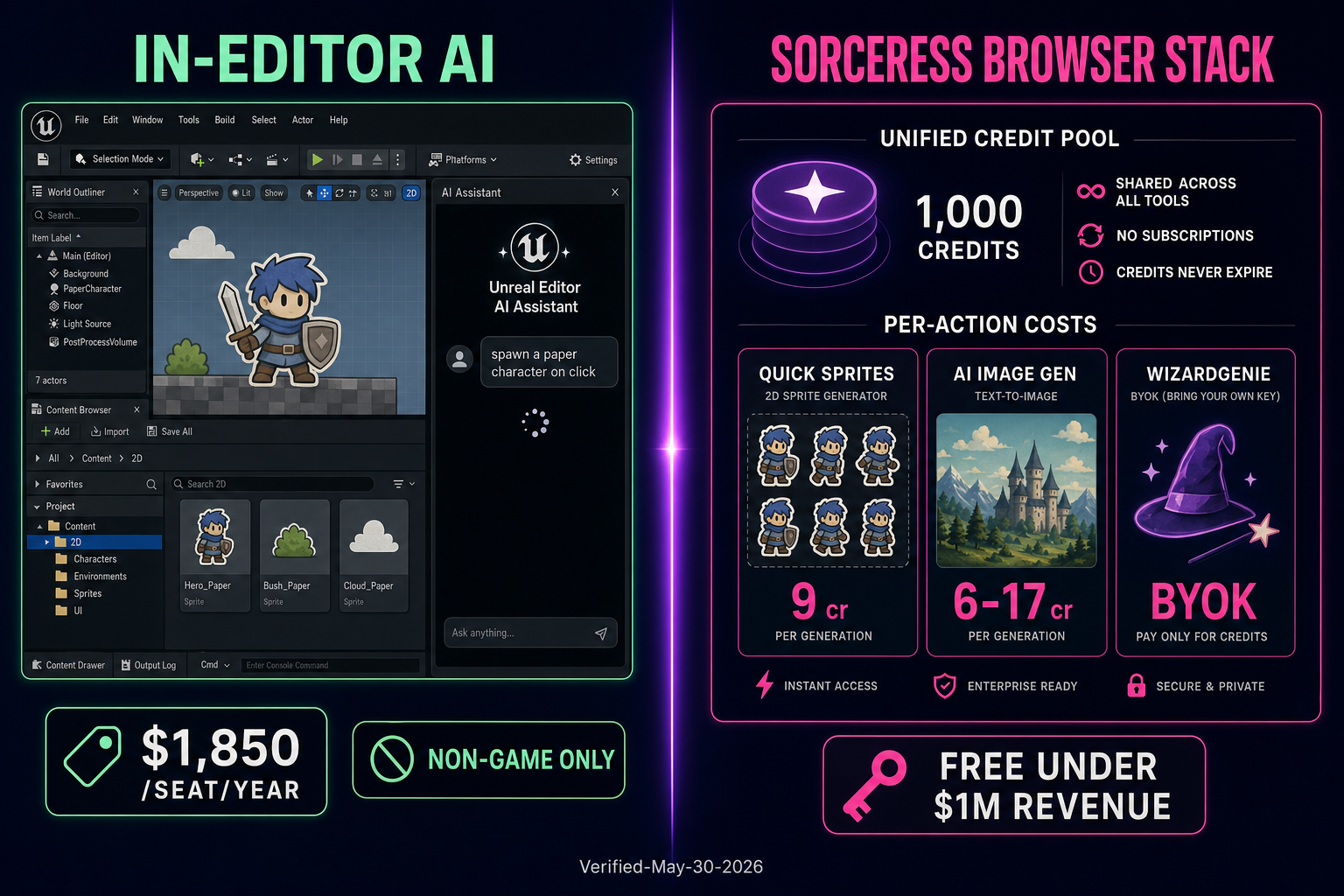
Side-by-side comparison of in-editor AI assistants for Unreal Engine vs the Sorceress browser AI stack for how to make a 2D game in Unreal Engine
The in-editor AI assistant treadmill versus the Sorceress browser AI stack for how to make a 2D game in Unreal Engine — one shared credit pool with per-action cost transparency on one side, a per-seat or per-feature subscription on the other.

Unreal Engine 5.7 shipped with a new in-editor AI Assistant as part of the November 12, 2025 release (verified against the live forums.unrealengine.com/t/unreal-engine-5-7-released announcement on May 30, 2026). For 2D work specifically the assistant is best understood as a sidekick for the engine’s 3D feature surface — sequencer, virtual production, MetaHuman, materials — not as a 2D content generator. It does not generate Paper 2D sprite sheets, it does not paint tile maps, and it does not write the kind of straight-through C++ a 2D platformer needs. For asset and code production on a 2D Unreal project, the assistant is a complement at best.

The Sorceress browser AI stack covers the gap. It runs on one shared credit pool with transparent per-action costs (9 credits per Quick Sprites sprite sheet, 6 to 17 credits per AI Image Gen output by resolution, zero Sorceress credits for the WizardGenie coding side which runs on the developer’s own API key). For a single 2D Unreal prototype, the credit math typically comes out roughly five times cheaper per finished asset than rolling a non-game Unreal Subscription at $1,850 per seat per year on top of the engine. Hobbyists and indie devs under $1 million in annual revenue do not pay that seat fee anyway — the engine is free at that scale — but the asset and code production costs still show up on every project, and the browser AI stack is the cheapest honest answer for that part of the budget.

The other reason to keep the AI off any in-editor subscription is plugin lock-in. Anything an in-editor assistant generates lands inside the Unreal Editor as assets, Blueprints, and source files tied to that project. If the developer switches engines for the next project, the assistant’s chat history and prompt context go with the project file, not with the developer. WizardGenie and the rest of the Sorceress stack run in the browser; the chat history, the prompts, the generated sprites, and the C++ source files are portable to any engine on the next project — Unity, Godot, Phaser, Three.js, all read the same PNG sprite sheets and the same plain-text C-family source the next year.

The Unreal Editor side: importing every generated asset

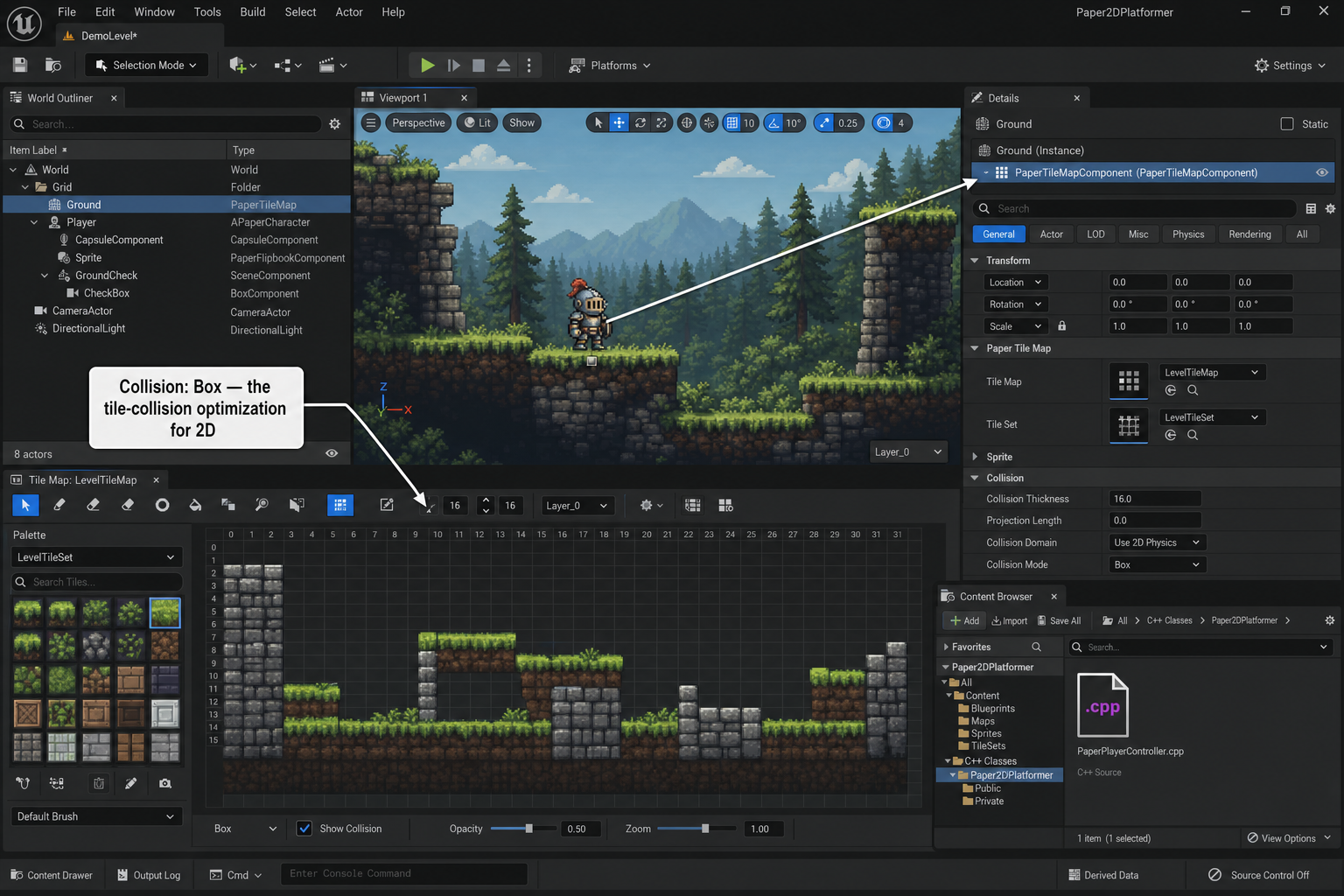
Unreal Editor screenshot mockup showing how to import a Quick Sprites sprite sheet, configure UPaperFlipbookComponent and UCapsuleComponent, and paint a Paper 2D Tile Map with AI Image Gen tiles for how to make a 2D game in Unreal Engine
Inside the Unreal Editor for how to make a 2D game in Unreal Engine — sprite import settings, Paper 2D Tile Set Editor, and the APaperTileMapActor placement that ties the generated tilesheet to a playable level.

Every generated asset crosses the same import boundary on the Unreal side. For sprite sheets from Quick Sprites, the import settings that matter most are Texture Group (set to UI for crisp pixel-art on every platform), LOD Bias (set to 0 so the texture never downsamples on lower-spec devices), Filter (set to Nearest so pixel art stays sharp at integer scaling), and Compression Settings (set to UserInterface2D (RGBA) so the alpha channel survives). After the texture lands, right-click the asset and choose Sprite Actions > Extract Sprites; the Paper 2D importer slices the sheet into individual UPaperSprite assets and creates a wrapping Flipbook (per the asset behavior documented in the Paper 2D plugin API). Open the Flipbook Editor, adjust the frame durations, drop the asset into the PaperPlayerCharacter Blueprint’s UPaperFlipbookComponent as the Source Flipbook, and the character animates as soon as the playback rate is non-zero.

For tile sheets from AI Image Gen (after the optional Tileset Forge alignment pass), the texture import settings match the sprite settings — Texture Group UI, Filter Nearest, Compression UserInterface2D. The difference is the next step: right-click the imported texture in the Content Browser and choose Create Tile Set, not Extract Sprites. The Tile Set Editor opens with the texture in the viewport; set the Tile Width and Tile Height under the Details panel, pick a Tile Width of 32 and a Tile Height of 32 for the prompts in Step 3, and the editor draws the grid lines. Click any tile to open its Per-Tile Collision settings — the collision shape painted here becomes the runtime collision for every Tile Map cell that paints with that tile. Save the Tile Set, then right-click in the Content Browser and choose Paper 2D > Tile Map to create a new Tile Map asset that paints from that Tile Set across Background, Midground, and Ground layers.

Five mistakes that ruin a how to make a 2D game in Unreal Engine attempt

The first mistake is leaving Filter on Bilinear (Unreal’s default for new textures) for pixel-art sprites. Pixel-art sprites at any non-integer scale ratio with bilinear filtering blur into mush; the fix is Filter Nearest in the texture Details panel, plus a Texture Group of UI so the engine does not downsample on lower-spec targets. The second is forgetting to set the Camera projection to Orthographic on the level’s active Camera or Player Controller view target. Paper 2D will render under Perspective projection, but the depth sorting on overlapping sprites becomes unpredictable; Orthographic with the camera locked to the X-axis or Y-axis (depending on side-scrolling or top-down) is the fix. The third is not configuring per-tile collision in the Tile Set Editor — the Tile Map paints sprites correctly but the APaperCharacter walks through every wall until the Tile Set has collision shapes assigned to the relevant tiles.

The fourth mistake is mixing Tick and BeginPlay for physics work in the APaperCharacter subclass. Anything that touches the Character Movement Component — AddMovementInput, Jump, StopJumping — belongs in an Enhanced Input Action callback bound during SetupPlayerInputComponent, not in Tick. Tick is for per-frame logic that does not touch the input layer (camera follow, animation state machine queries). Mixing them produces input that occasionally drops a frame, which feels broken in a platformer. The fifth mistake is pasting AI-generated C++ into the project without reading it — even the eight-model WizardGenie picker will occasionally write an ACharacter instead of an APaperCharacter if the prompt does not specify the Paper 2D parent, and the new class will compile against a 3D skeletal mesh interface that does not exist on the Paper 2D Flipbook side. Read the header.

The verdict on how to make a 2D game in Unreal Engine in 2026

For a solo or small-team 2D game in Unreal Engine, the honest answer to how to make a 2D game in Unreal Engine in 2026 is the browser AI stack plus Unreal Engine 5.7 with Paper 2D enabled. Quick Sprites covers the animated sprite-sheet step at nine credits per generation, AI Image Gen covers the tile and prop step with seven model choices, WizardGenie writes the APaperCharacter subclasses and the Blueprint-backing functions with an eight-model picker on the developer’s own API key, and Sorceress Code handles inline edits to the headers and source files before they land in the project tree. The full pipeline costs a fraction of the per-asset price of running an in-editor AI assistant as a primary workflow, and it leaves the developer with portable chat history and exportable assets that survive the next engine switch.

The browser AI stack is not a replacement for the Unreal Editor. The editor still owns the rendering pipeline (with the full Lumen and Nanite feature set applied to Paper 2D planar meshes when the project enables them), the Chaos physics solver, the build pipeline, the platform export, and the asset serialization. Quick Sprites does not import levels into Unreal. WizardGenie does not edit .uasset binary files. AI Image Gen does not paint tiles directly onto a UPaperTileMap. The browser AI stack handles content production; the Unreal Editor handles content composition and runtime. That separation is what makes the pipeline fast: the developer never has to wait on an in-editor AI for a sprite to regenerate before they can keep working on the level.

For a longer-form Sorceress comparison of which AI coding models actually hold up for Unreal Engine work, see Pair the Best AI for Unreal Engine (Honest 2026 Pick). For the engine-tutorial sibling on the Unity side, see How to Make a 2D Game in Unity (Browser-Native AI). For the Godot side of the same engine-tutorial trilogy, see How to Make a 2D Game in Godot (Browser AI Pipeline). For the engine-agnostic browser-first 2D path that skips the engine install entirely, see How to Make a 2D Game With AI (No Engine Install).

Frequently Asked Questions

What is the fastest way to make a 2D game in Unreal Engine from scratch with AI in 2026?

The fastest way to make a 2D game in Unreal Engine from scratch in 2026 is the browser AI stack paired with Paper 2D: Quick Sprites generates the hero sprite sheet from a text prompt at 9 credits per generation, AI Image Gen produces the tilesheet and prop art with one of seven image models, WizardGenie’s eight-model coding picker writes the C++ MonoBehaviour-equivalent (UPaperCharacter subclass) and Blueprint logic, and Sorceress Code edits the resulting headers and source files inline. The full single-screen prototype lands inside Unreal Engine 5.7 (released November 12, 2025) in about two hours of focused work, without an Adobe ID, a Photoshop license, or a $1,850 per seat per year non-game subscription. Unreal Engine remains free for hobbyists and indie devs under $1 million in annual revenue — the engine cost is not the obstacle, the asset and code production is.

Can WizardGenie write Unreal Engine C++ and Blueprint logic natively?

WizardGenie’s eight coding models (Claude Opus 4.7, Claude Sonnet 4.6, GPT-5.5, Gemini 3.1 Pro, DeepSeek V4 Pro, Kimi K2.5, Grok 4.2, MiniMax M2.7) all read and write Unreal Engine C++ fluently, including UCLASS, UPROPERTY, UFUNCTION macros, the Actor lifecycle (BeginPlay, Tick, EndPlay), and Paper 2D types (UPaperFlipbookComponent, UPaperTileMap, UPaperSpriteComponent, APaperCharacter). For Blueprint logic the models write the visual graph as a text description plus the underlying C++ that backs the BlueprintCallable function, which the developer then exposes in the Blueprint editor. Paste the C++ WizardGenie writes into a .h and .cpp file under Source/<ProjectName> in the Unreal project, recompile from the editor toolbar, and the new class becomes available as a parent for Blueprints. WizardGenie is not an Unreal Editor plugin — it writes the code the editor compiles.

Do I need to pay $1,850 per seat to follow this how to make a 2D game in Unreal Engine tutorial?

No. Unreal Engine is free for hobbyists, students, educators, and companies with under $1 million USD in annual gross revenue, and that includes anyone following this tutorial as a solo indie or small studio under that threshold. The $1,850 per seat per year Unreal Subscription (verified against the live unrealengine.com license page on May 30, 2026) only applies to non-game commercial projects above $1 million in revenue — architecture visualization, broadcast, automotive design, virtual production for film. Game developers above the $1 million threshold pay a 5% royalty on lifetime gross revenue above $1 million instead of a seat fee, and revenue earned through the Epic Games Store is royalty-free. For a 2D indie prototype the toolchain is free end to end on the engine side; the browser AI stack covers asset and code production at a fraction of any in-editor AI subscription.

What is Paper 2D and do I need PaperZD on top of it for a 2D game?

Paper 2D is the built-in Unreal Engine plugin for 2D and 2D/3D hybrid games — enable it via Edit > Plugins > 2D > Paper 2D. It ships four core assets: Sprites (planar textured meshes used as 2D characters or objects), Flipbooks (sequential playback of sprites for animation), TileSets (a collection of tiles extracted from a single texture), and TileMaps (a 2D grid that paints tiles from a TileSet onto layers). The matching actor class is APaperCharacter, which behaves like ACharacter but uses a UPaperFlipbookComponent instead of a USkeletalMeshComponent. PaperZD is a third-party community plugin by Critical Failure Studio that adds a proper Animation Graph and Notify system on top of Paper 2D — useful for projects with complex state machines, but not required for a single-screen prototype. The current PaperZD V2.0 architecture supports Paper 2D, Spine2D, and Creature2D as animation sources. For most beginner 2D Unreal projects, plain Paper 2D plus a few Animation Blueprints carries the work; reach for PaperZD when the state machine grows past five animations.

How does Unreal Engine 5.7 handle 2D sprites compared to Unity 6.3 LTS or Godot 4.6?

Unreal Engine 5.7, released November 12, 2025 (verified against the live forums.unrealengine.com release thread on May 30, 2026), still uses Paper 2D as the 2D rendering layer — Sprites, Flipbooks, TileSets, TileMaps, and the APaperCharacter actor class. Unity 6.3 LTS uses the Sprite Renderer, Tilemap, and Rigidbody 2D with a dedicated 2D physics solver. Godot 4.6.3 uses Sprite2D, AnimatedSprite2D, TileMapLayer, and CharacterBody2D. The practical difference is that Unreal Paper 2D treats sprites as planar 3D meshes inside the 3D world, which means lighting, materials, and post-processing apply natively but at the cost of more setup compared to Unity or Godot’s purpose-built 2D pipelines. For a pure pixel-art 2D game, Unity and Godot ship a slightly faster path to a first playable; for a 2D/3D hybrid with parallax lighting and dynamic shadows, Unreal Paper 2D wins on engine features. The browser AI stack in this guide ships the same PNG sprite sheets to all three engines.

Can I publish a finished 2D Unreal Engine game to mobile, WebGL, or consoles?

Yes. Unreal Engine 5.7 publishes 2D builds to Windows, macOS, Linux, iOS, Android, and HTML5 via community plugins, plus the major consoles (PlayStation, Xbox, Switch) through Epic’s console developer programs. The sprite sheets generated by Quick Sprites and the tilesets generated by AI Image Gen are PNG files that Unreal imports the same way regardless of target platform — set Texture Group to UI for crisp pixel-art on every platform. The C++ classes WizardGenie writes use Unreal’s cross-platform input layer (Enhanced Input subsystem since Unreal 5.1) and Paper 2D rendering, both of which compile to every Unreal 5.7 target. For a public web demo, Windows and a WebGL community plugin export are the fastest path; for a console release, the Epic console SDK access has to land before the project can build for that target.

How much does the browser AI stack cost when making a 2D Unreal Engine game at indie scale?

The full browser AI stack for how to make a 2D game in Unreal Engine at indie scale lands around $15 to $40 per month in credit spend for a single developer running a moderate production cadence. A single-screen prototype breakdown: one Quick Sprites generation at 9 credits for the hero sprite sheet, two to four AI Image Gen generations at 6 to 17 credits each for the tilesheet and prop art (Nano Banana 2 is the workhorse default at 9 credits for 1K, 12 credits for 2K, 17 credits for 4K; Z-Image Turbo is the cheap fast pick), and a WizardGenie session that consumes the equivalent of a few hundred thousand tokens against the chosen coding model on the developer’s own API key. Sorceress signup grants 100 starter credits, enough to generate the full sprite roster and tilesheet for a single-screen prototype before paying anything. Unreal Engine itself is free under the $1 million revenue threshold.

Written by Arron R.·3,364 words·15 min read

Related posts