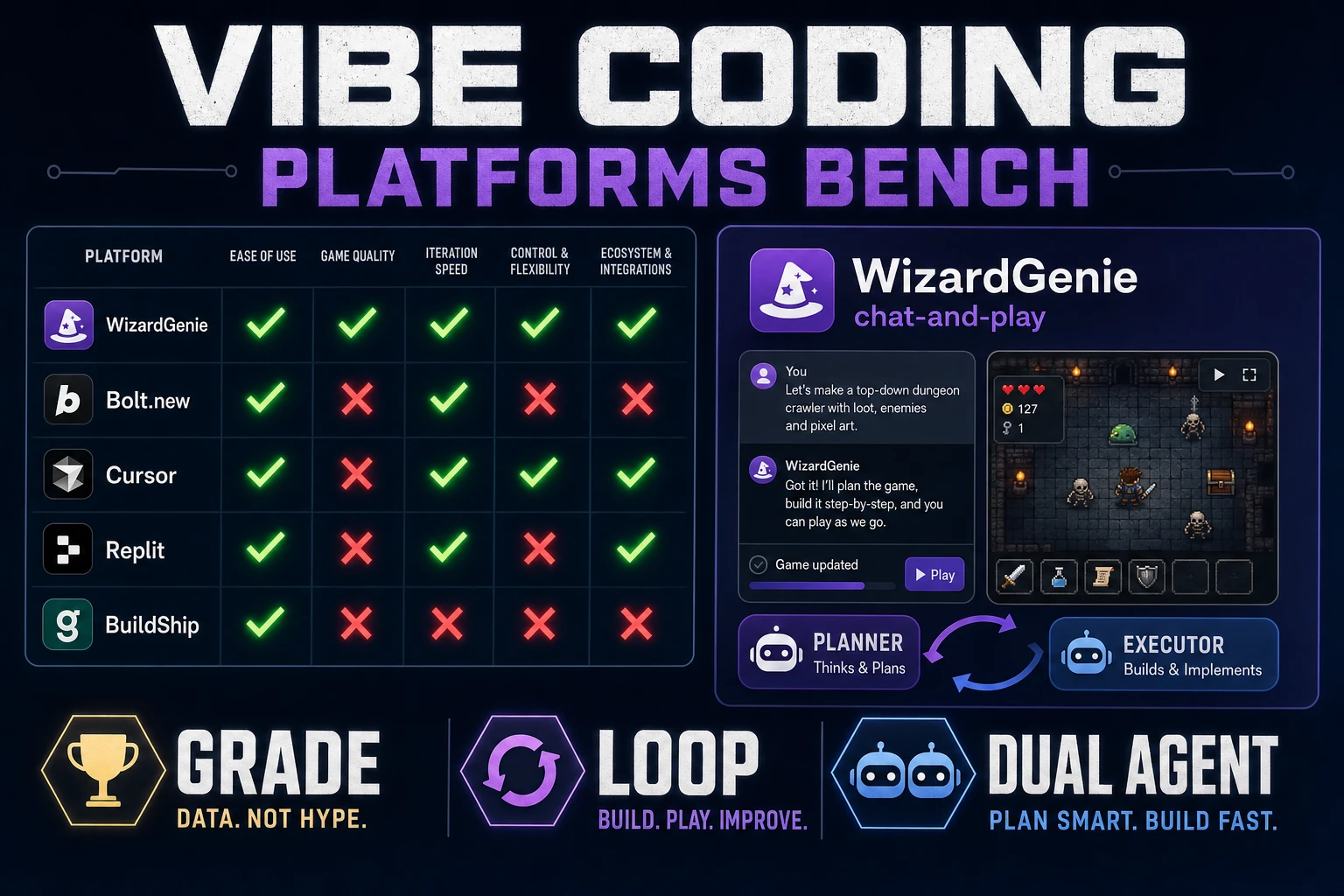
Grade Vibe Coding Platforms (Game Build Bench)

By Arron R.9 min read
The vibe coding platforms that grade well for a game jam keep a playable loop across sessions, split planner and executor spend, and absorb art without regenera

Vibe coding platforms sell landing-page reels: one prompt, a demo GIF, applause. That framing hides the second hour, which is where every weekend game jam actually lives or dies. This post grades platforms on the axes that matter for a playable loop — bench rules first, then how WizardGenie scores against generic chat apps and IDE-embedded assistants, and where AI Image Gen hooks without asking the agent to rebuild the world. Coding model names match the Sorceress CODING_MODELS catalog in src/app/_home-v2/_data/tools.ts, verified July 29, 2026. Phaser v4.2.1 "Giedi" was live-checked the same day against the official GitHub release notes.
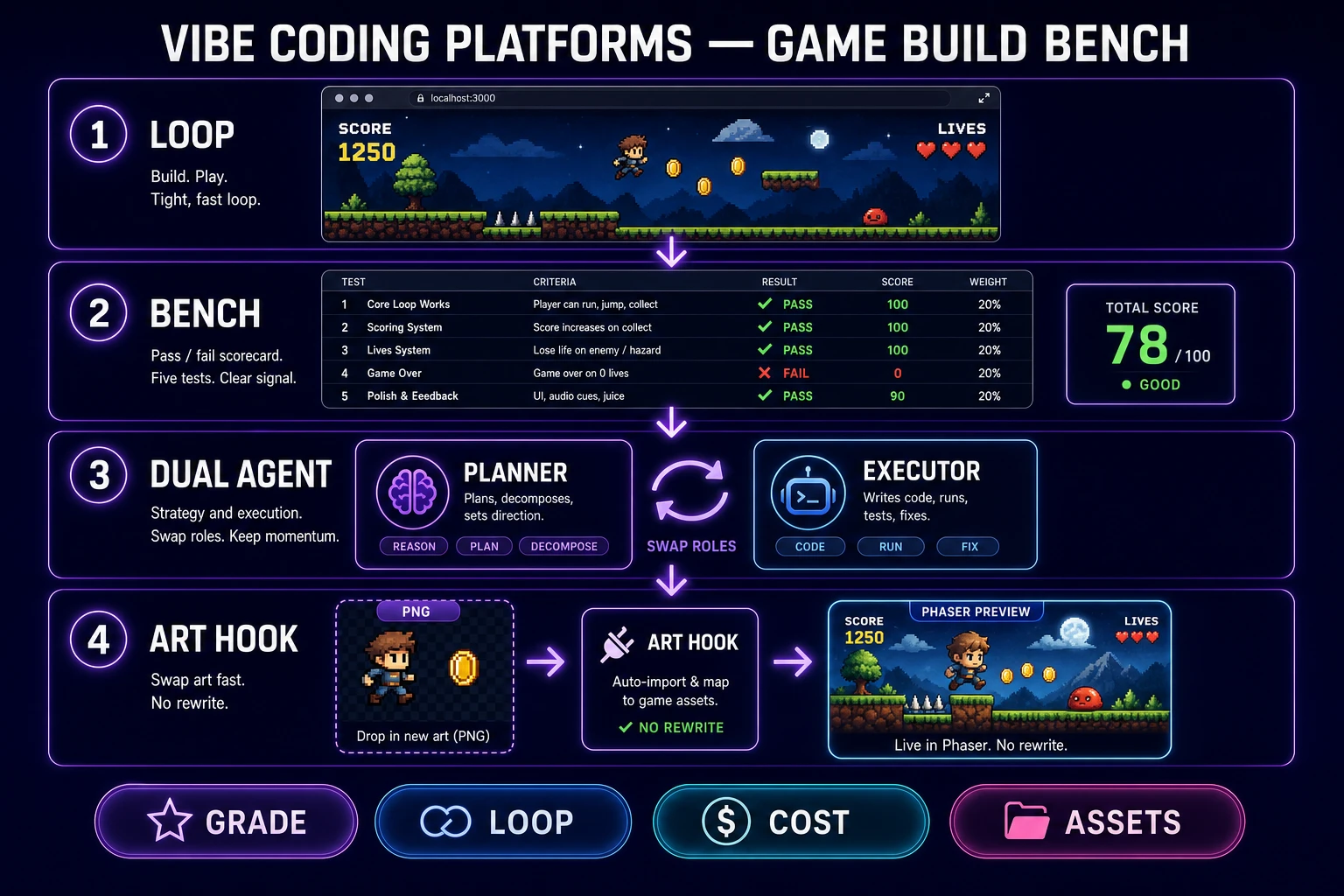
Vibe coding platforms game build bench with loop scorecard, dual-agent cost split, and art hooks
Grade vibe coding platforms on four surfaces: a live loop, a five-row bench, a dual-agent cost split, and clean art hooks.

What vibe coding platforms means for games

DataForSEO lists vibe coding platforms at 1,600 monthly searches with KD 21 in research-supplement.md, verified July 29, 2026. Readers typing that phrase are shopping for a durable surface — not the twin query vibe coding tool, which reads as "one CLI I install and forget." A platform implies multiple agents, a persistent project, and enough plumbing to hand off between roles. The sibling post on the best vibe coding tool ranks single-tool picks; this article grades whole platforms against a game-build bench.

Wikipedia's vibe coding entry (checked July 29, 2026) traces the term to Andrej Karpathy on February 2, 2025 and marks it Collins English Dictionary's Word of the Year for 2025. Martin Fowler separates pure "forget the code exists" vibe coding from agentic programming where structure still matters. Games sit firmly in the second bucket. You may not hand-type every line, but you absolutely care whether gravity, hitboxes, and score rules survive the next prompt.

So for a game jam, the phrase collapses to five demands. A vibe coding platform must:

  • Keep one project folder warm across sessions.
  • Show a live playable preview beside the chat.
  • Accept "enemy speed 90 feels unfair; set it to 70" without regenerating the scene.
  • Let sprites and SFX enter as file swaps, not full rebuilds.
  • Split expensive planning from cheap typing so feel iteration stays affordable.

Platforms that fail any single demand are demotion candidates. The bench in the next section formalizes that into a scorecard you can run before your first prompt.

Bench rules: what to grade a platform on

Ignore the trailer. Score five rows before you commit a weekend to any candidate. MDN's overview of web games still centers on a running loop, input handling, and asset intake — your bench should center on the same surfaces.

Check Pass looks like Fail looks like
Playable slice Move, collide, score, restart in one screen Pretty menu with no loop
Single-variable fix One constant changes; rest stays Whole scene regenerates
Asset add One PNG + one SFX drop in cleanly "Rebuild the game with art"
Reopen continuity Day-two folder still runs Disposable sandbox evaporates
Cost split Frontier plans; cheap model types Frontier model on every gravity tweak

Two housekeeping rules make the bench honest. First, pin a runtime before you scaffold. As of July 29, 2026, the stable Phaser release on phaser.io/download/stable is Phaser v4.2.1 "Giedi" (released July 9, 2026 per the GitHub release notes). Naming the version in every scaffold prompt keeps physics behavior identical across every platform you grade.

Second, run the same prompt on each candidate. If you vary the prompt to make one platform look smarter, the bench is a marketing exercise, not a grade. Copy this into every platform:

Build a one-screen browser action prototype on Phaser v4.2.1. Side-view. Player moves and collides with platforms. Collect three pickups to raise score. Touching an enemy restarts the run. Colored rectangles only. No inventory, no dialogue. Expose moveSpeed and enemySpeed as named constants. Do not invent extra systems.

Then demand a single-variable fix: "Enemy speed 90 feels unfair on the first screen; lower to 70 and keep player speed fixed." Any platform that rewrites the world for that request gets a red mark on row two. The rest of the sections walk each platform class through the bench.
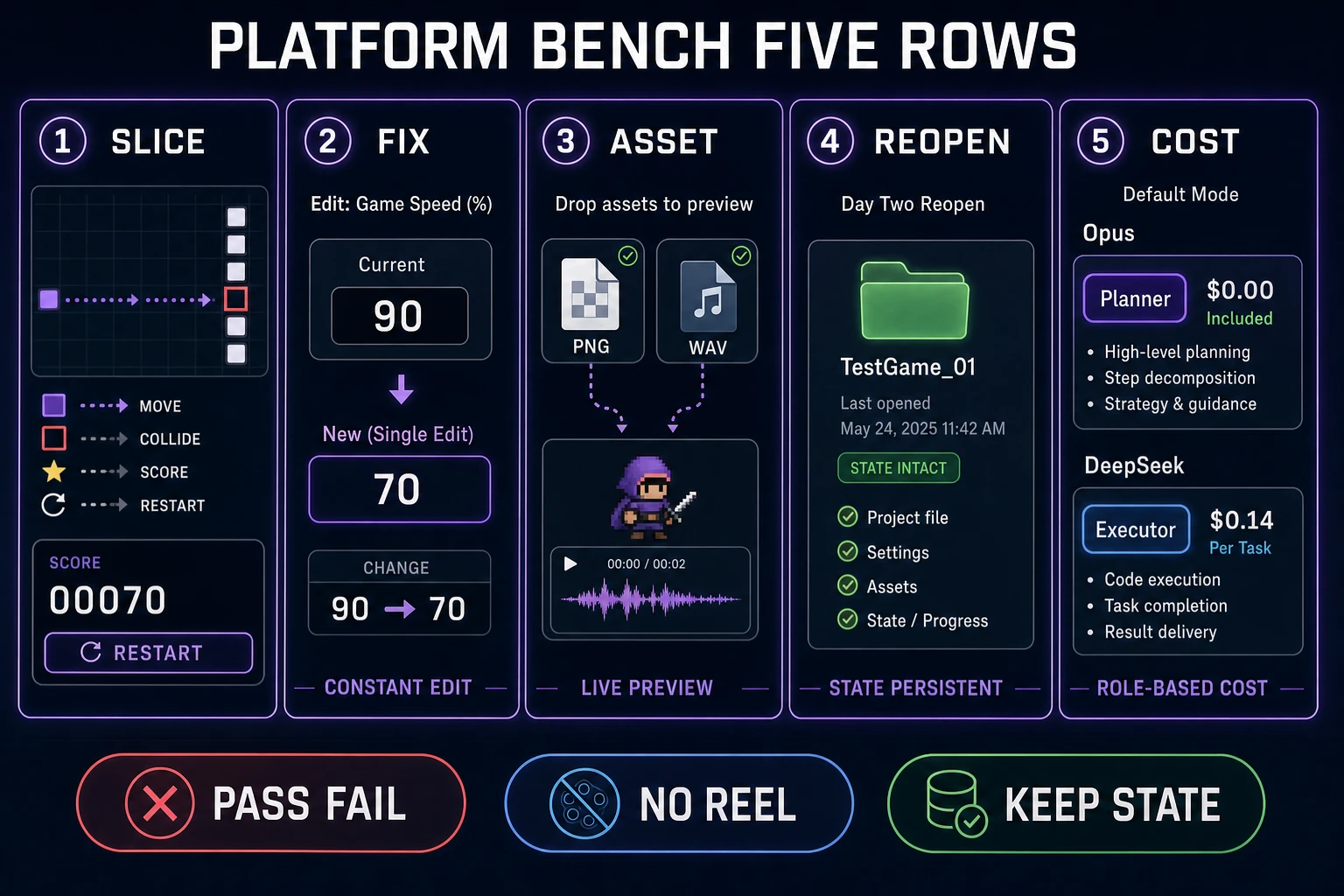
Five-row platform bench comparing slice, fix, asset add, reopen, and cost split
Five pass/fail rows beat any feature matrix: slice, single-variable fix, asset add, reopen continuity, and planner/executor cost split.

Grade WizardGenie against the loop

WizardGenie is the Sorceress AI-native game engine: describe the game, watch it run, iterate in real time. It ships as a Windows desktop app and as a web entry at /wizard-genie/app. Both paths share the same project format, so a bench run on either counts for the same grade — and the dual path is the reason WizardGenie earns a top-row pass on reopen continuity without asking you to bring your own filesystem discipline.

Row by row: the playable slice passes because the product is built around a live preview, not a code dump. The single-variable fix passes because sacred constants stay in the project instead of vaporizing when you mention art. Asset add passes because you can hand it a PNG plus a texture-swap instruction and keep the loop running. Reopen continuity passes on desktop (the folder is real) and passes on web when the project is saved to your account. Cost split passes because WizardGenie exposes a Planner and an Executor slot, so a frontier model plans and a cheap model types.

Where WizardGenie can still stumble is prompt discipline. If you type "make it more fun" instead of a scoped diff, any agent — WizardGenie included — will invent systems you did not ask for. The fix is not a new platform; the fix is a smaller prompt. Sibling advice on scoping lives in the vibe coding tool workflow post, which pairs cleanly with this bench.

Browse the wider Sorceress surface when you need non-coding assets alongside the agent: the tools guide maps image, audio, and 3D tools that stay on the same account and project habit.
Grade generic chat-first platforms

Chat-first platforms are the loudest category — a single input, a single output, and a landing page that shows a game appearing out of a paragraph. They earn narrow wins and predictable failures on the bench.

Wins: throwaway UI demos and one-shot experiments. If you need a landing page, a CRUD mock, or a sixty-second silly minigame you will never open again, a chat-first surface can be faster than any engine. Non-game side tools like marketing pages and pitch decks are also fine — those are not jam bottlenecks.

Failures: everything the bench actually measures. Row-one slice often passes on the first prompt and then collapses when you ask for a second loop. Row two fails constantly, because "lower enemy speed to 70" is heard as "regenerate the game with slower enemies." Row three fails when you drop a sprite in and the agent rewrites the collision code. Row four is the killer: without a durable project folder, the day-two session is a fresh disposable sandbox with none of your yesterday-tuned constants. Row five may pass on price but often fails on architecture — many chat platforms only expose one model and no planner/executor split.

Grade hard rule: do not crown a general coding chat as a game platform just because it writes elegant React. Games fail in the player's hands. If you cannot press play beside the chat, you are grading a text assistant, not a game surface. Chat-first platforms stay useful for the marketing lane and the one-shot experiment lane — they are not the pick when a playable loop must survive the weekend.

Grade IDE-embedded platforms

IDE-embedded assistants sit inside your existing code editor. They pass row four (reopen continuity) trivially, because the project is your own folder. They can pass row two (single-variable fix) when the diff is scoped and the assistant respects the file structure. That gives them a real footing on the bench.

Where they fall short for games is the play surface. Most IDE assistants expect you to alt-tab to a browser or run a local server to see the loop. That extra step compounds: every micro fix now costs a build cycle, and every asset drop is a manual copy into a public folder. Row three (asset add) becomes a chore, not a swap, and the "twenty gravity tweaks" reality of jam feel-tuning starts to feel expensive in wall-clock time.

Row five (cost split) varies wildly. Some IDE assistants let you pick a single model per session, which is a decent proxy for planner/executor discipline if you switch models between planning and typing passes. Others fix you to one frontier model, which burns money on the micro fixes that dominate day two. Grade those platforms on whether the model picker is per-turn, not per-session.

The honest verdict for IDE platforms: strong on continuity, weak on live play, mixed on cost. If your project is already several thousand lines of hand-written game code, they are a reasonable grade. If you are starting a jam from a paragraph, the missing play surface is a bigger drag than the continuity win.

Dual-agent cost split as a grading axis

Dual-agent work is how a graded platform stays affordable after the first scaffold. Put frontier reasoning on the Planner side for architecture, hard bugs, and "why does this collision feel wrong." Put a genuinely cheap model on the Executor side for twenty gravity tweaks.

Verified against Sorceress CODING_MODELS on July 29, 2026:

  • Strong planners: Claude Opus 4.7, GPT-5.5, Gemini 3.1 Pro, Grok 4.2 (Claude Sonnet 4.6 when you want a faster planner tier).
  • Practical cheap executors: DeepSeek V4 Pro, Kimi K2.5, MiniMax M2.7.

Never park a frontier-priced model on the typing pass. That pairing wipes the cost advantage that makes dual-agent work worth doing, and it trains you to fear iteration. The rough shape you want is Opus or GPT-5.5 thinking while DeepSeek or Kimi types the diff. A clean prompt pattern:

Planner: propose the smallest change set that lowers enemySpeed from 90 to 70 without touching playerSpeed, jump, or collision shapes. List files and constants only.
Executor: apply only that change set. Do not refactor unrelated systems.

If the executor rewrites the scene graph anyway, that is a platform failure, not a "vibes" failure. Row two of the bench is designed to catch exactly that pattern. The higher a platform's row-two pass rate, the more you can trust it with feel-tuning that dominates jam hours three through ten.

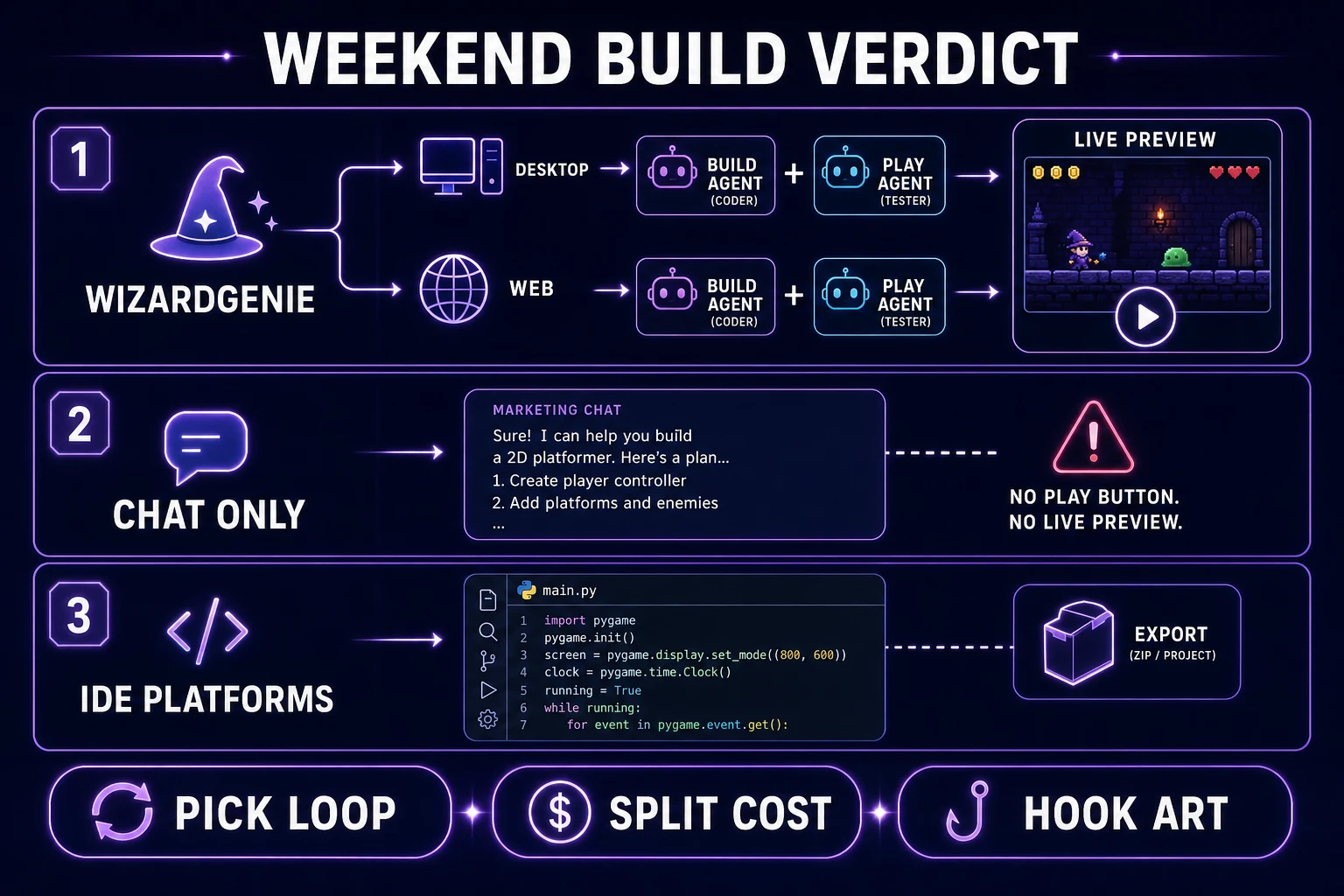
Weekend build verdict comparing WizardGenie dual-agent path to chat-only and IDE-embedded platforms
Weekend verdict: WizardGenie for the playable loop, cheap executors for feel fixes, chat-only for non-game side quests, IDE for large existing codebases.

Verdict for a weekend build

Grades collapse to picks. Here is how the bench sorts vibe coding platforms for a Friday-to-Sunday build:

Need Grade winner Why
Playable jam slice with live preview WizardGenie (web or desktop) Chat and play stay in one loop
Hard architecture / weird bug Frontier planner in WizardGenie Opus / GPT-5.5 / Gemini 3.1 Pro / Grok 4.2
Twenty feel tweaks Cheap executor slot DeepSeek V4 Pro, Kimi K2.5, or MiniMax M2.7
Roster / prop art AI Image Gen → texture swap No scene rewrite
Static marketing page only Generic chat platform Games are not the bottleneck
Existing multi-thousand-line codebase IDE-embedded assistant Continuity beats live preview at that scale
Day-two continuity for jam projects Desktop WizardGenie Real folder beats disposable sandbox

Bottom line for the SERP query: the vibe coding platforms worth benching for a weekend game build are the ones that pass the five-row scorecard, split planner and executor honestly, and let AI Image Gen swap textures without rebuilding the world. Grade WizardGenie first when you need a playable agent path. Keep generic chat platforms for non-game side quests. Reserve IDE-embedded assistants for the codebases where the play surface is already yours to open. Re-verify model names and Phaser pins on the day you ship — today's check was July 29, 2026.

When you are ready to run the loop, open WizardGenie, pin one screen, and refuse any prompt that regenerates the world to change a single number.

Frequently Asked Questions

What are vibe coding platforms in a game-dev context?

They are the browser and desktop surfaces that let you describe a game to an AI agent, watch it run, and keep iterating without leaving the platform. For games, the surface must ship a live playable preview, keep sacred constants across sessions, and accept sprites and audio without regenerating the scene.

How do I grade vibe coding platforms against each other for a jam?

Score five rows on paper: playable slice, single-variable feel fix, asset add without rewrite, day-two reopen continuity, and planner/executor cost split. A platform that fails any row is a demotion candidate for weekend work no matter how polished the landing page looks.

Which models should a vibe coding platform pair as planner vs executor?

Verified against Sorceress CODING_MODELS on July 29, 2026: strong planners include Claude Opus 4.7, GPT-5.5, Gemini 3.1 Pro, and Grok 4.2. Keep DeepSeek V4 Pro, Kimi K2.5, or MiniMax M2.7 on the executor pass so twenty micro fixes stay affordable.

Is WizardGenie desktop-only or browser-only among vibe coding platforms?

Neither. WizardGenie runs as a Windows desktop app and at /wizard-genie/app in the browser. Grade the web path when you want a zero-install start and the desktop path when you need native filesystem depth and longer agent sessions.

Which Phaser version should I pin when benching vibe coding platforms today?

Phaser v4.2.1 Giedi (released July 9, 2026) is the current stable release per the phaserjs GitHub releases page checked on July 29, 2026. Name that version in your scaffold prompt so physics APIs stay identical across every platform under bench.

Sources

  1. Vibe coding — Wikipedia
  2. Vibe Coding — Martin Fowler Bliki
  3. Phaser v4.2.1 release notes — GitHub
  4. Download Phaser stable — Phaser
  5. Games — MDN Web Docs
Written by Arron R.·1,986 words·9 min read

Related posts