Click How to Make a Point and Click Adventure (Browser Scene Loop 2026)

By Arron R.11 min read
How to make a point and click adventure in 2026: design a three-scene hotspot graph with inventory use and NPC dialogue, wire the scene interpreter in WizardGen

The point-and-click adventure is the oldest narrative game format the browser still ships cleanly. LucasArts codified the verb-and-hotspot model in the late 1980s, Telltale revived episodic dialogue trees in the 2000s, and the genre’s core loop — explore a painted scene, click objects, collect items, talk to NPCs, combine inventory pieces, use the result on a stubborn hotspot — has not changed in forty years. Most beginners who search “how to make a point and click adventure” still assume they need Adventure Game Studio, Unity, or a Ren’Py fork. A browser scene loop is different. HTML layers a full-bleed background image, invisible hotspot rectangles, an inventory bar, and a dialogue box in under 500 lines, a coding agent scaffolds the interpreter from one prompt, and AI generation covers every painted scene and voiced line. On desktop or web, that means WizardGenie for the scene interpreter, AI Image Gen for backgrounds and inventory icons, Speech Gen for NPC voice lines, and SFX Gen for examine blips and scene-transition whooshes. This guide is the honest end-to-end for how to make a point and click adventure in 2026, as a three-scene weekend build you can finish once.
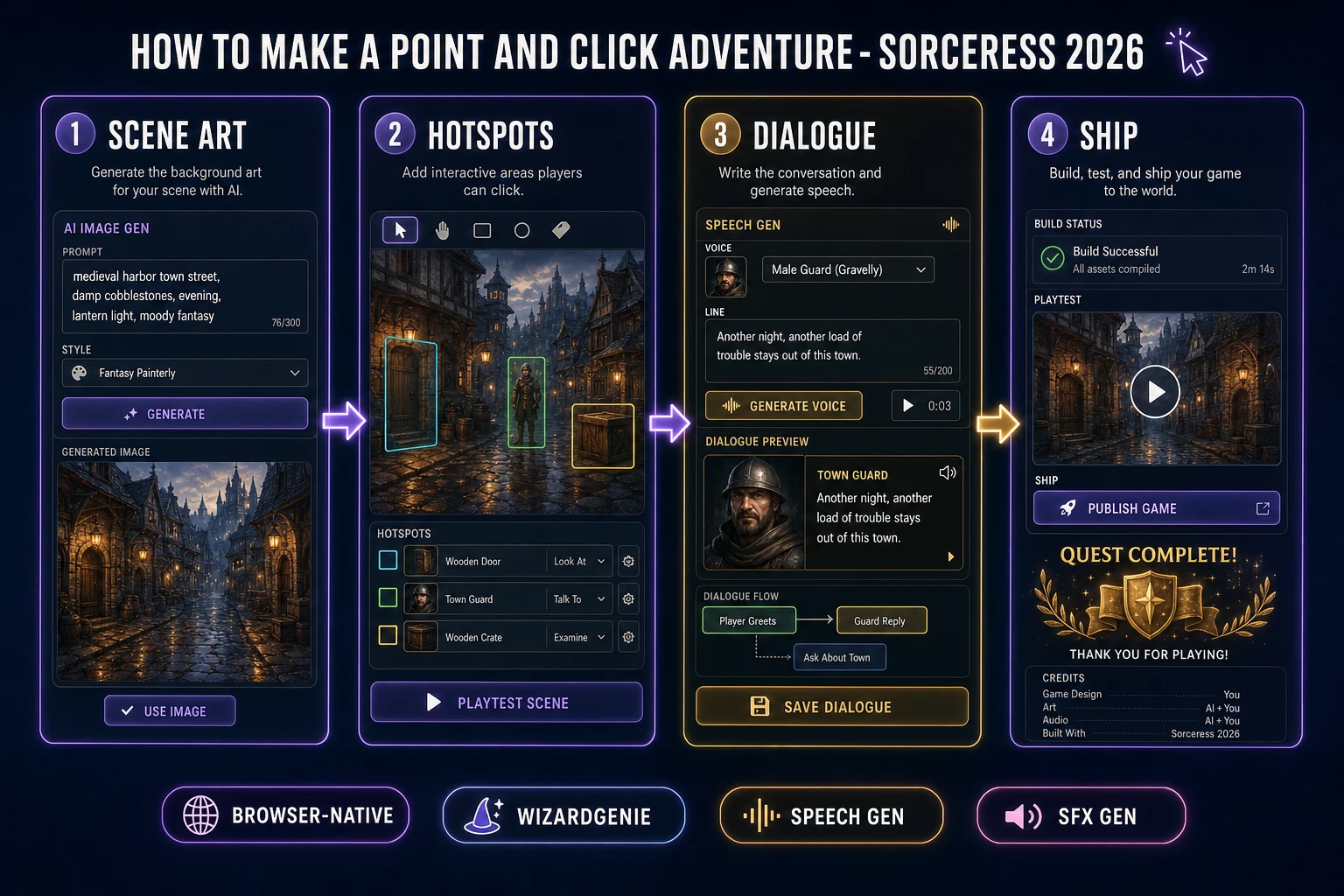
How to make a point and click adventure browser pipeline: design scene hotspots and inventory use, wire dialogue in WizardGenie, add AI Image Gen backgrounds plus Speech Gen NPC lines
The 2026 how to make a point and click adventure recipe: paint three scenes, place hotspot rectangles, wire inventory use and NPC dialogue in WizardGenie, then add Speech Gen voice lines and SFX Gen click audio.

What how to make a point and click adventure actually means in 2026

The query “how to make a point and click adventure” hides three intents. Some searchers want a commercial engine comparison — Adventure Game Studio versus Visionaire versus Godot plugins — and a licensing walkthrough. A second intent is a full episodic narrative with five characters, branching morality, and forty scenes. The third intent, and the one this guide targets, is a browser scene loop: three painted locations, four to six clickable hotspots per scene, a six-slot inventory, one NPC with two dialogue beats, and a final item-use that resolves the quest. That is a weekend build, it demos the Sorceress toolset, and it is the format most point and click tutorial and javascript adventure game searchers actually want before they scale up.

The presentation contract is small and strict. A title screen shows the game name, control hints (left-click to examine, click inventory then hotspot to use), and Play. The play screen fills the browser with one painted scene at a time. Hotspots are invisible rectangles over doors, crates, and NPCs — cursor changes to a magnifying glass on examine targets and a speech bubble on talk targets. An inventory bar along the bottom shows collected items as 48-pixel icons; clicking an item selects it for use. A dialogue box slides up from the bottom when an NPC speaks, with a name tag, two to four lines, and optional choice buttons. Scene exits cross-fade to the next background. The point-and-click adventure overview on Wikipedia (verified 2026-08-27) traces the format from 1980s text parsers through LucasArts SCUMM engines to modern narrative adventures — cite it when you write your itch.io blurb so players know you shipped a classic hotspot loop, not a walking sim. If you already shipped a single-room puzzle, the sibling guide on how to make an escape room game covers one-location inventory combine; this post owns multi-scene navigation, NPC talk trees, and cursor modes instead.

The point and click adventure loop in one minute (explore, examine, collect, talk, use, transition)

Six moving parts, repeated until the quest resolves. First, explore — render the current scene background at full-bleed with all active hotspots enabled. Second, examine — left-click a hotspot with no inventory item selected; show a one- or two-sentence description in a text overlay and play a short examine blip. Third, collect — click a pickup hotspot; add the item to inventory, remove the hotspot from the scene, play a pickup chime. Fourth, talk — click an NPC hotspot; open the dialogue box, play the matching Speech Gen voice line, advance on click. Fifth, use — with an inventory item selected, click a use hotspot; if the item id matches the required id, run the success action (reveal a hidden hotspot, unlock a door, set a story flag). Sixth, transition — click a goto hotspot on a doorway; cross-fade to the next scene id and load its hotspot set. Walk-to-point pathfinding, verb wheels with eight actions, and multi-ending morality systems are polish layered after one honest three-scene quest finishes with a declared win state.
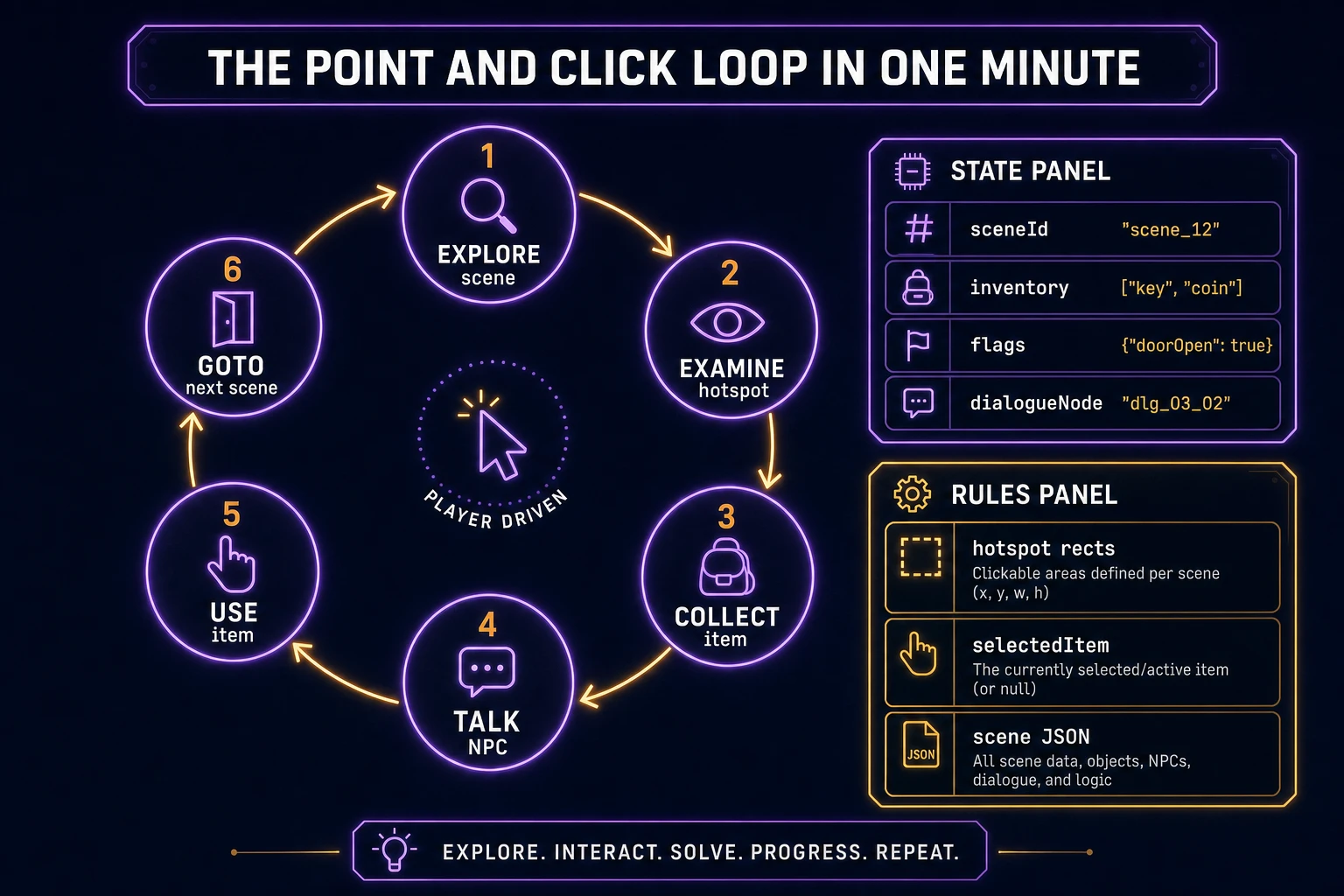
Point and click adventure loop state machine diagram showing explore scene, examine hotspot, collect item, talk NPC, use inventory item, and goto next scene
The point and click adventure loop: explore the painted scene, examine and collect hotspots, talk to NPCs, use inventory items on the right targets, then transition through doorways to the next location.

Pick your engine for how to make a point and click adventure: DOM, Phaser, or WizardGenie

Three good targets in 2026, each with a different trade-off. Vanilla JavaScript with a DOM layout is the honest default and the pick this guide recommends for a first build. One <img> for the scene background, a layer of absolutely-positioned <div> hotspots with cursor: pointer, a flexbox inventory bar, and a dialogue modal is under 480 lines including autosave. The MDN click event docs cover hotspot handlers, and the HTML Drag and Drop API covers inventory reorder if you want it. No build step, deploy as a static HTML file.

Cursor modes stay readable without a verb wheel: default Explore mode uses the normal pointer; selecting an inventory tile switches to Use mode with a crosshair cursor until the player clicks a hotspot or presses Escape to deselect. NPC hotspots show a speech-bubble cursor on hover; examine-only props show a magnifying glass. That two-mode pattern covers ninety percent of classic adventure verbs without UI clutter.

Phaser 4.1.0 (verified 2026-08-27 on the official Phaser API documentation page) becomes the right pick if you want tweened scene fades, Zone objects for pixel-perfect hit areas, or animated ambient effects (flickering street lamp, drifting fog). Phaser does not invent your inventory logic — you still need the same scene JSON, hotspot arrays, and use predicates. Use Phaser when animated transitions and cursor-swap polish are the product; use raw DOM when the product is a browser click adventure walkthrough people can read in one sitting.

WizardGenie is not a separate rendering engine — it scaffolds whichever of the two you pick from a single natural-language prompt. WizardGenie ships as both a desktop app (Windows installer with auto-update, available to Early Access supporters and above) and a no-install web build. Its coding-model lineup covers Claude Opus 4.7, GPT-5.5, Gemini 3.1 Pro, DeepSeek V4 Pro, Kimi K2.5, Grok 4.2, and MiniMax M2.7 (verified 2026-08-27 in src/app/_home-v2/_data/tools.ts). For adventure-scale projects, any frontier model scaffolds the scene interpreter in one prompt. Pair a frontier planner with a budget executor like DeepSeek V4 Pro or Kimi K2.5 for the typing pass — the Dual-agent pattern lands most projects at roughly one-fifth the single-frontier cost.
Step 1 — design the scene graph, hotspots, and inventory combine table

Nothing else in the pipeline matters if the scene graph is not designed first. Sketch three locations on paper — a street, an alley, a locked shop interior — and mark four hotspots per scene: one exit, one examine-only prop, one pickup, and one NPC or use target. The canonical first quest shape is key hunt: Scene A has an NPC who mentions a rusty key; Scene B hides the key behind a crate hotspot; Scene C has a locked door that accepts the key. Total design time: one hour on paper, zero code.

Convert the sketch into JSON. Each scene object carries id, bg (background image path), and hotspots (array of rectangles with actions). Example hotspot entries:

{
  "id": "alley",
  "bg": "assets/scenes/alley.webp",
  "hotspots": [
    { "id": "hs_crate", "x": 420, "y": 280, "w": 90, "h": 70,
      "cursor": "grab", "action": "collect", "item": "rusty_key",
      "examine": "A wooden crate. Something metal glints underneath." },
    { "id": "hs_shop_door", "x": 80, "y": 120, "w": 60, "h": 140,
      "cursor": "exit", "action": "goto", "target": "shop_interior",
      "requires": ["rusty_key"], "useItem": "rusty_key",
      "examine": "A heavy shop door. The lock looks rusty." },
    { "id": "hs_street_exit", "x": 0, "y": 200, "w": 40, "h": 100,
      "cursor": "exit", "action": "goto", "target": "street" }
  ]
}

Store inventory items separately with id, icon, and examineText. If your quest needs combine logic — torn note plus tape equals readable note — add a combines lookup table mapping pairs to result ids. A first browser click adventure with three scenes and six items needs roughly 40 lines of JSON total. Unit-test three cases before you generate art: collecting the key removes its hotspot; using the wrong item on the shop door shows a “that does not work” line; the goto hotspot loads the next scene without leaking hotspots from the prior scene.

Step 2 — generate painted scenes and inventory icons in AI Image Gen

With the scene graph locked, open AI Image Gen. Painted adventure backgrounds are 16:9 full-bleed at a fixed camera angle — usually a straight-on or slight three-quarter view so hotspots align to doors, windows, and props. Nano Banana Pro costs 18 credits per generation per src/lib/models.ts. Prompt each scene in the register “painted adventure game background, 16:9, moody evening street, no characters, storybook color palette, clear doorways and props for hotspot placement”. Three scenes at 18 credits each is 54 credits.

Inventory icons need transparent-background silhouettes at 1:1 aspect. Prompt “adventure game inventory icon, rusty old key on transparent background, painted style, centred, no shadow” for each collectable. Six icons at 18 credits each is 108 credits. Keep icons readable at 48 pixels — high contrast edges, simple shapes, no fine text.

Optional NPC portrait: one 3:4 bust for the dialogue box speaker at 18 credits. Feed the portrait into Speech Gen scene descriptions so voice casting stays consistent. Total AI Image Gen for a first hotspot puzzle game: roughly 180 credits or 1.80 USD before audio.

Step 3 — wire hotspots, dialogue, and scene transitions in WizardGenie

With scenes.json, items.json, and art paths ready, open WizardGenie. Drop in a bare index.html shell and give the agent one paragraph: Build a browser point-and-click adventure. Load scenes.json. Render the current scene background full-bleed. Overlay clickable div hotspots from the active scene with cursor styles per hotspot. Left-click with no item selected runs examine or collect or talk or goto per action type. Clicking an inventory tile selects it for use; clicking a hotspot with a selected item runs the use handler. NPC talk opens a bottom dialogue box with speaker name and lines from dialogue.json; advance on click. Scene goto cross-fades background over 400ms. Autosave scene id, inventory, and flags to localStorage after every action. Title screen with Play and Continue. Feed that to any coding model and the interpreter scaffolds in under five minutes.

The remaining hour is polish via follow-up prompts. Add a highlight hotspots hint button — flash unsolved hotspot outlines for two seconds — five lines. Add an item examine on right-click in inventory — three lines. Add a quest log panel listing the current objective from flags — ten lines. Each item is a follow-up prompt, and the whole html5 point click experience comes together over a Saturday afternoon.

Optional sibling: if your jam needs branching dialogue with affinity variables instead of inventory puzzles, borrow the scene-graph pattern from how to make a visual novel — same dialogue box, different win condition.

Step 4 — Speech Gen for NPC lines and SFX Gen for examine audio

Voice lines separate a tech demo from an adventure players finish. Open Speech Gen. Billing is 0.5 credits per 1,000 characters on MiniMax HD or 0.3 credits per 1,000 on Turbo per src/app/speech-gen/page.tsx (verified 2026-08-27). A first adventure with eight NPC lines averaging 150 characters is 1,200 characters — 1 credit minimum on HD, essentially free. Pick one preset voice for the shopkeeper from the 17 built-in voices, assign an emotion tag per line (Neutral, Calm, Happy), and export WAV into assets/voice/. Wire each line to play when the dialogue box shows that text; duck any ambient loop to 50 percent volume during playback.

Open SFX Gen for UI feedback. Billing is 1 credit per second per src/app/sfx-gen/page.tsx. Five clips cover a first build: examine blip (0.2 seconds), pickup chime (0.4 seconds), dialogue advance click (0.15 seconds), scene transition whoosh (0.6 seconds), and quest-complete swell (1.5 seconds). Total roughly 3 credits. Wire each as new Audio(path).play() at the matching event.

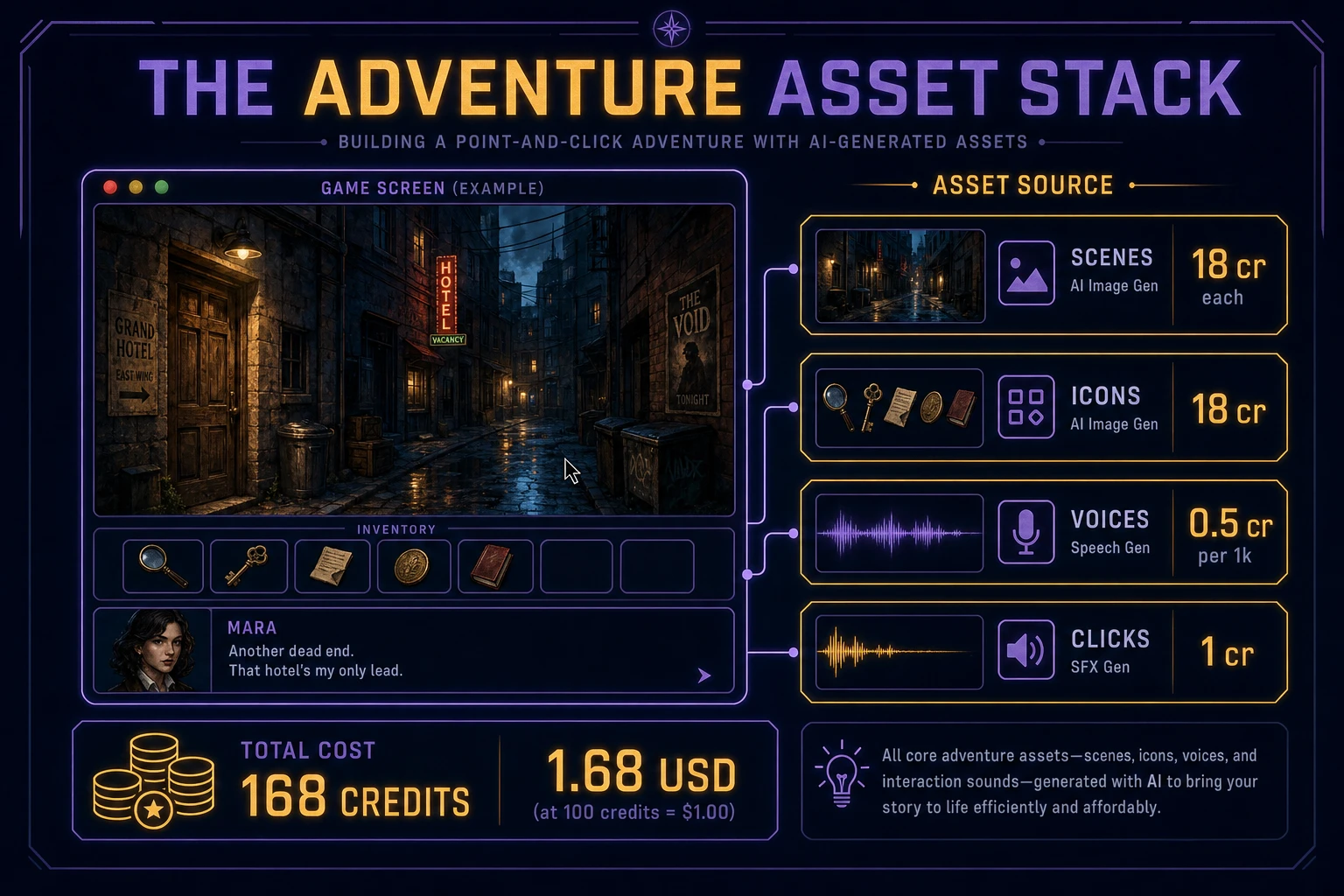
Point and click adventure asset stack diagram showing AI Image Gen scene backgrounds, inventory icons, Speech Gen NPC voice lines, and SFX Gen click audio with 168 credit total
The adventure asset stack: AI Image Gen for painted scenes and inventory icons, Speech Gen for NPC voice lines, SFX Gen for examine and transition clips — roughly 168 credits total.

Step 5 — playtest the browser scene loop like a narrative jam judge

Before you share the build, run a five-minute checklist:

  1. Hotspots align — every clickable rectangle sits over the visible prop in the painted background; no invisible walls blocking the exit.
  2. Examine text is distinct — each hotspot returns unique copy; generic “you see nothing special” lines appear only on empty wall clicks.
  3. Inventory use is deterministic — wrong items always show the same nothing-happens line; the correct item always advances the quest.
  4. Scene transitions are clean — goto actions load the new hotspot set and never leave ghosts from the prior scene.
  5. Autosave resumes — refresh mid-quest and Continue restores scene, inventory, and flags exactly.

Log issues as WizardGenie follow-ups, not rewrites. “Shop door hotspot requires rusty_key but examine text should hint at rust” is one prompt. “Add crossfade on scene goto” is another. The Sorceress tools guide lists every asset tool if you want to add Music Gen for a street ambience bed on a longer build.

What how to make a point and click adventure costs on Sorceress in 2026

A honest budget for the stack above against the 2026 Sorceress rate card (verified 2026-08-27 against local source):

  • Scene backgrounds (AI Image Gen): 3 painted scenes at Nano Banana Pro 18 credits each = 54 credits (0.54 USD).
  • Inventory icons (AI Image Gen): 6 items at 18 credits each = 108 credits (1.08 USD).
  • NPC voice lines (Speech Gen): ~1,200 characters at MiniMax HD 0.5 credits per 1,000 characters = 1 credit (0.01 USD).
  • UI stingers (SFX Gen): 5 clips at 1 credit per second, ~3 seconds total = 3 credits (0.03 USD).
  • WizardGenie coding time: effectively free on the Sorceress side. Model-side API cost for a 2-to-4-hour prompt session on a cheap Executor like DeepSeek V4 Pro is typically under 0.40 USD.
  • Total for one complete browser point and click adventure: roughly 166 credits or 1.66 USD in Sorceress credits, plus under 0.40 USD in model API time. Under 2.50 USD end-to-end for a voiced three-scene quest with painted backgrounds and inventory combine.

New accounts start with 100 free credits (SIGNUP_GRANT = 100 in src/app/api/admin/credits/route.ts), which covers the full audio pack and one scene background with room to spare. For related browser narrative pipelines that share this design-the-graph-generate-the-assets-scaffold-the-interpreter spine, the closest reads are Branch an AI Text Adventure (Browser Quest Loop 2026) for the text-only sibling, how to make an escape room game for the single-room inventory variant, and how to make a visual novel for dialogue-heavy branching without hotspot puzzles. Under three dollars, one weekend, and how to make a point and click adventure is a done deal.

Frequently Asked Questions

Which point and click rules should a beginner implement first?

Start with three painted scenes, four to six hotspots per scene, a six-slot inventory bar, and one NPC who gives a key item after two dialogue lines. Left-click examines hotspots; right-click or a Use mode applies the selected inventory item. Scene exits are hotspots on doorways that swap the background image and hotspot set. Skip walk-to-point pathfinding, verb wheels, and multi-NPC branching until one honest three-scene quest resolves with a final item use. That is what most how to make a point and click adventure and point and click tutorial searchers expect from a weekend build.

How do hotspots and inventory work in javascript adventure game code?

Store scenes as JSON objects with id, background path, and a hotspots array. Each hotspot has x, y, w, h, cursor, and an action type: examine (show text), collect (add item, hide hotspot), talk (open dialogue tree), use (require inventory item id), or goto (load another scene id). Keep inventory as an array of item ids with icon paths. On inventory tile click, set selectedItem; on hotspot click with selectedItem set, run the use handler and clear selection on success. Unit-test three cases: collecting an item removes its hotspot, using the wrong item shows a nothing-happens line, and a goto hotspot loads the next scene background without leaking prior hotspots.

Canvas, DOM, or Phaser for a browser click adventure?

DOM with absolutely positioned hotspot divs over a full-bleed background img is the honest default for a first html5 point click build — under 480 lines including inventory drag, dialogue overlay, and scene transitions. Phaser 4.1.0 (verified 2026-08-27 on the official Phaser API documentation page) adds pointer cursors, tweened scene fades, and Zone objects for hit areas if you plan eight or more locations. Pick Phaser when animated scene transitions and cursor-swap polish are the product; pick raw DOM when the product is a hotspot puzzle game walkthrough people can fork in one file.

How should dialogue, cursor modes, and scene transitions behave?

Run two cursor modes: Explore (default pointer) and Use (crosshair when an inventory item is selected). NPC talk opens a bottom dialogue box with speaker name, two to four lines, and optional choice buttons that set story flags. Scene transitions cross-fade the background over 400ms and swap the hotspot layer. Autosave scene id, inventory, and flags to localStorage after every action. On the final hotspot use that solves the quest, play a success stinger and show credits. Most javascript adventure game searchers forgive a short three-scene demo if examine text reads clearly and inventory icons are readable at 48 pixels.

How much does it cost to build a point and click adventure on Sorceress?

A first-project browser scene loop with art and audio budgets like this against the 2026 Sorceress rate card (verified 2026-08-27 against local source). Three scene backgrounds from AI Image Gen at Nano Banana Pro 18 credits each = 54 credits. Six inventory icons at 18 credits each = 108 credits. NPC dialogue via Speech Gen: roughly 1,200 characters across eight lines at 0.5 credits per 1,000 characters on HD = 1 credit minimum. Five SFX clips at 1 credit per second — examine blip, pickup chime, dialogue advance, scene whoosh, quest complete — roughly 5 credits. Total roughly 168 credits or 1.68 USD plus under 0.40 USD in coding-model API time. The free 100-credit signup grant (src/app/api/admin/credits/route.ts) covers most audio; top up once for the scene art pack.

Sources

  1. Point-and-click adventure game - Wikipedia
  2. MDN - Element: click event
  3. MDN - HTML Drag and Drop API
  4. Phaser 4.1.0 API Documentation
Written by Arron R.·2,572 words·11 min read

Related posts


