Weave How to Make a Maze (Browser Generator Loop 2026)

By Arron R.13 min read
How to make a maze in 2026: model a grid of cells with four walls each, pick a generator algorithm (recursive backtracker for corridors, Prim's for bushy dead e

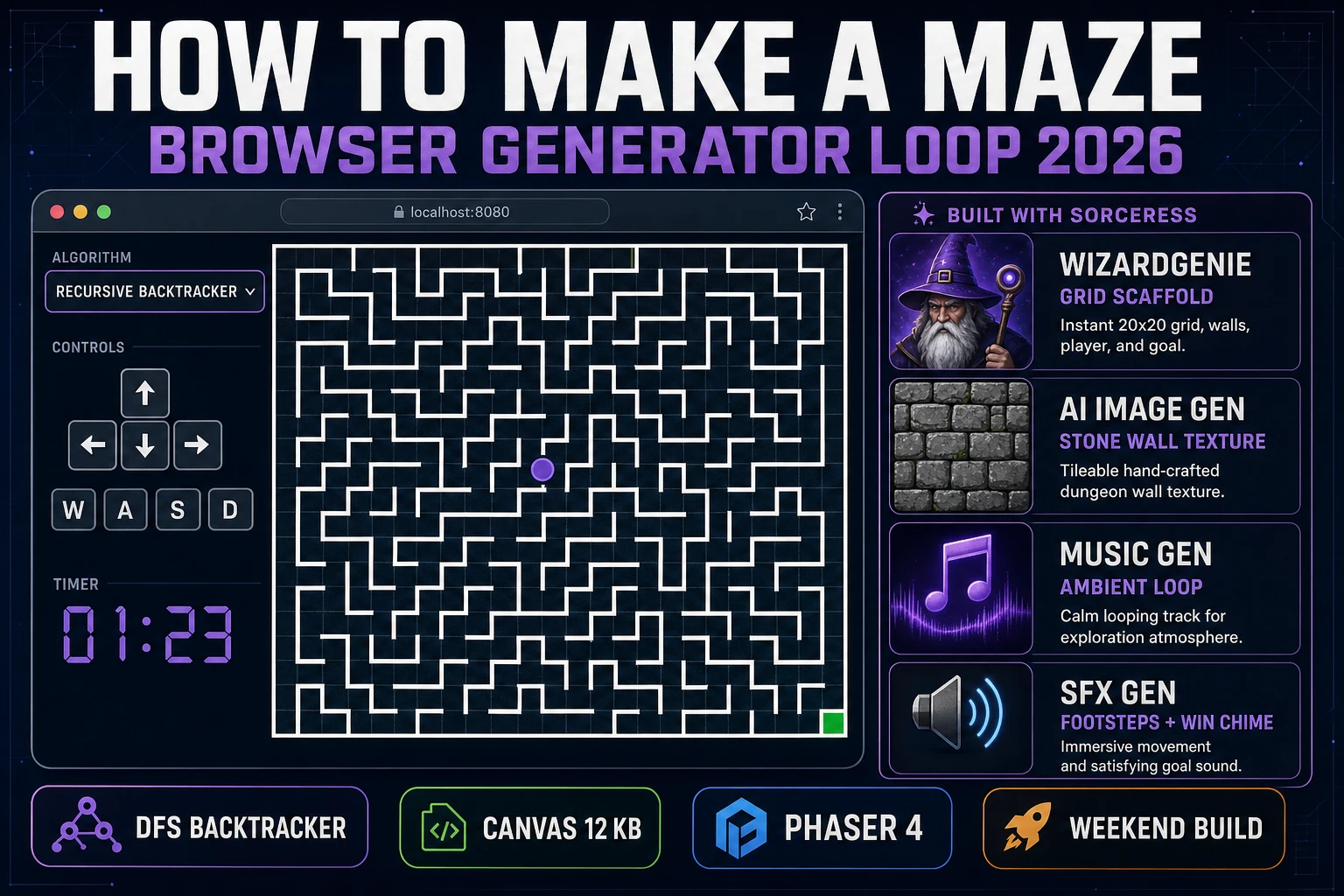
The word maze covers three completely different things depending on who's typing it into Google. It might mean a printable puzzle for a kid, a wall of hedges in a garden, or a playable browser game where a token moves through corridors to reach a goal. This post is about the third one — the browser game, procedurally generated from an algorithm, playable in about 300 lines of JavaScript. If you're searching for how to make a maze in 2026 because you want to ship a small playable thing this weekend, you're in the right place.
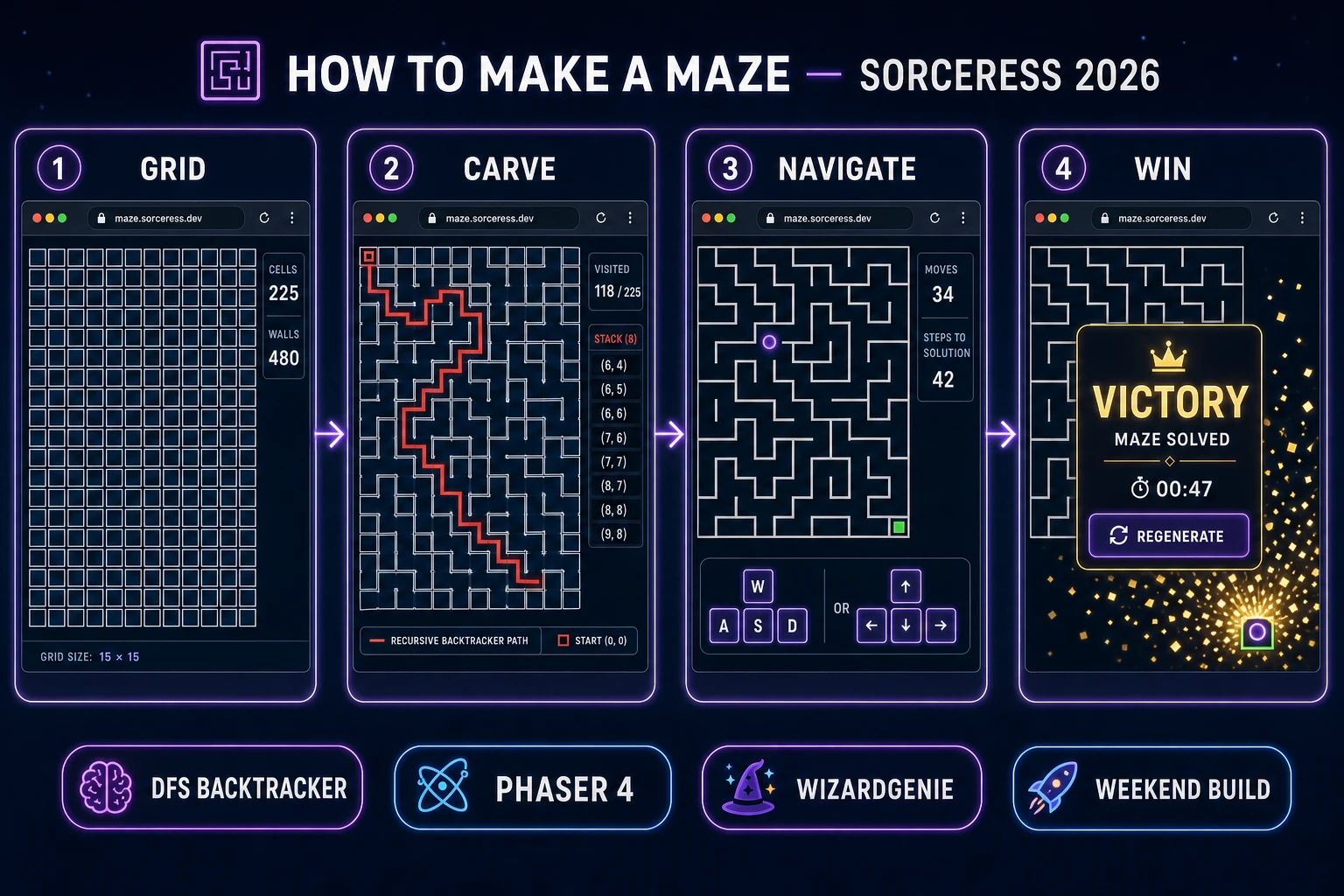
Four-step how-to-make-a-maze pipeline diagram showing grid, carve, navigate, and win panels
The four-step maze build pipeline: grid model, algorithm-carved corridors, player navigation, and win condition.

What "how to make a maze" actually means in 2026

The literal search phrase how to make a maze pulls three different reader groups. The first is the printable-puzzle crowd — parents and teachers looking for a PDF generator to hand a kid. Those readers usually add "printable" or "coloring page" and bounce off any post that starts talking about arrays and cells. The second is the paper-and-pencil crowd, drawing garden mazes on graph paper. They're looking for design tips, not code. The third — and the one this post targets — is the game-dev crowd. They want a playable maze running in a browser tab, generated at load time, walked through with the arrow keys, with a win state when the player reaches the goal.

The game-dev version breaks down into four honest concerns that every serious maze tutorial has to answer. First, the grid model: how you store the maze in memory. Second, the generator algorithm: the rule that decides which internal walls to knock down so the corridors form a connected but non-trivial layout. Third, the renderer: how you draw walls to the screen every frame. Fourth, the player and win condition: how a moving token bumps against walls and detects the goal. Skip any one of the four and you don't have a game, you have a wallpaper.

The good news: all four concerns are small. The maze grid is a 2D array. The generator is 30 lines. The renderer is a nested loop calling ctx.moveTo() and ctx.lineTo(). The player is four keydown handlers plus a bounds check. Every choice you make in this post is a swap-out — pick a different generator algorithm, pick a different engine, pick a different wall texture — and the rest of the pipeline stays intact.

The maze game loop in one minute (generate render navigate solve)

Every maze game runs the same four-beat loop, and if you internalise it before you touch code, you'll skip the "why isn't my player moving" bug that consumes an evening for most first-timers.

  1. Generate. On page load, create a 2D array of cells (rows and columns you pick, typically 20 by 20 for a comfortable first build), initialise every cell with all four walls intact and an unvisited flag, then run a maze generator algorithm to knock walls out until every cell is reachable from every other cell.
  2. Render. On every frame, clear the canvas and draw every remaining wall as a line segment. That's it — the maze is just a bunch of line segments. Draw the player token as a circle at its current cell centre. Draw the goal tile as a coloured square at the destination cell.
  3. Navigate. Listen for arrow keys or WASD. On each key press, check whether the wall in that direction (top, right, bottom, left) between the current cell and its neighbour has been knocked down. If yes, move the player token to the neighbour cell. If no, the player bumps and stays put (optionally play a bump sound).
  4. Solve. After every move, compare the player's cell coordinates to the goal cell coordinates. If they match, the player has solved the maze — fire a win overlay, play a chime, offer a regenerate button.

That's the entire game. Every additional feature (fog of war, timer, three-star scoring, ghost enemies, multiplayer) is an overlay on this loop. Ship the four steps first, extend once the base is solid.

Pick your engine for how to make a maze: Phaser 4, vanilla Canvas, or Three.js

Three engines cover 95% of how a browser maze ships in 2026. The right pick depends on how much polish you want and whether you're planning a 2D or 3D presentation.
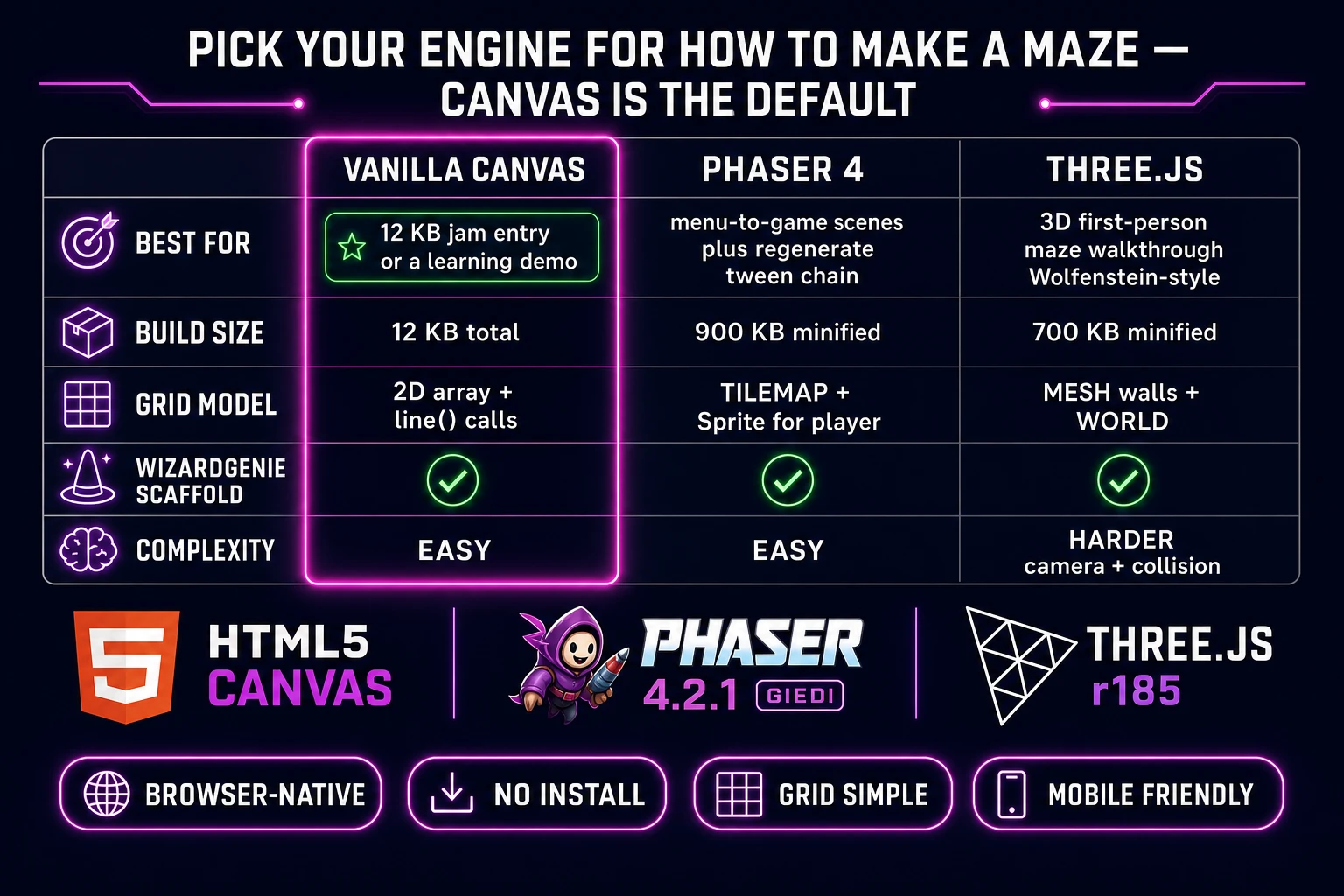
Engine comparison table for browser maze: vanilla Canvas versus Phaser 4 versus Three.js
Vanilla Canvas is the default for a maze game — Phaser adds scene management and tweens, Three.js adds a 3D first-person walkthrough option.

Vanilla HTML5 Canvas plus requestAnimationFrame is the right default for a maze game. The mechanics have no per-frame physics, no scrolling world beyond the viewport, no sprite animation beyond a single player token, and drawing the maze is a single pass of line() calls per frame that Canvas handles trivially. A complete maze game ships in about 300 lines of JavaScript and under 12 KB total, jam-entry small. Read the MDN Canvas API reference if you haven't shipped a Canvas game before — the two functions you need are strokeRect for the outer border and beginPath / moveTo / lineTo / stroke for the interior walls.

Phaser v4.2.1 "Giedi" (released 9 July 2026, verified against phaser.io/download/stable on 2026-08-08) is worth the extra ~900 KB minified download if you want polish that Canvas alone would take real effort to build: a Scene manager for a menu-to-game-to-win-screen flow, a tween chain for a wall-fade regenerate animation, or particle effects when the player reaches the goal. Phaser's TileMap system is overkill for a maze (mazes aren't tile-based in the RPG-tileset sense — the walls are between cells, not on cells) but a Group of Sprite line segments works fine.

Three.js r185 (verified against threejs.org on 2026-08-08) opens up the 3D first-person maze walkthrough — think a mini Wolfenstein where the player wanders through corridors from an in-world camera. That's a delightful genre remix but it's a bigger project: you need a proper camera controller, collision-detection against wall meshes, and enough lighting to make the corridors atmospheric. For a first browser maze, ship 2D first and Three.js second. WizardGenie will scaffold the entire project in any of the three based on the prompt.

Step 1 — choose a maze generator algorithm (recursive backtracker, Prim's, Kruskal's, recursive division, Wilson's)

The generator algorithm is the single decision that gives your maze its personality. Five families cover the landscape — all verified against the taxonomy on en.wikipedia.org/wiki/Maze_generation_algorithm on 2026-08-08 — and each produces a distinctly-shaped maze even though the underlying rule (build a spanning tree over the grid graph) is the same.
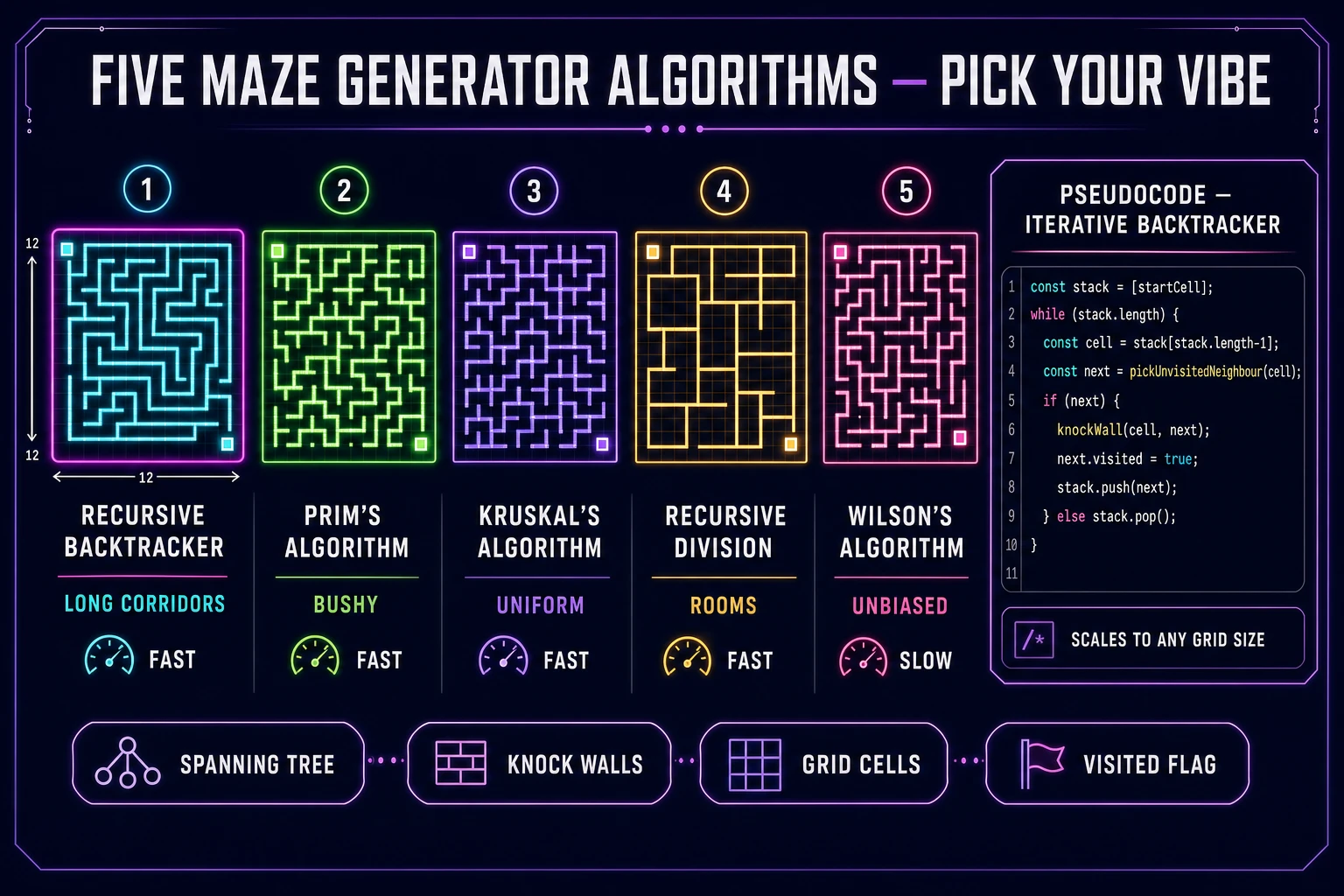
Five maze generation algorithms side-by-side: recursive backtracker, Prim's, Kruskal's, recursive division, Wilson's
Five canonical maze generation algorithms — same grid, five distinct visual styles. Pick recursive backtracker for corridors, Prim's for a bushy feel, recursive division for rooms.

Recursive backtracker (aka randomised depth-first search) is the default choice. Long winding corridors, few short dead ends. It's the maze a searcher pictures when they hear the word maze. The Wikipedia entry describes it exactly: "starting from a random cell, the computer then selects a random neighbouring cell that has not yet been visited. The computer removes the wall between the two cells and marks the new cell as visited, and adds it to the stack to facilitate backtracking." When you hit a dead end, pop the stack and try from the previous cell. When the stack is empty, the maze is done.

Iterative form (use this — the recursive form crashes browsers on grids larger than about 50 by 50):

function generateMaze(grid) {
  const start = grid[0][0];
  start.visited = true;
  const stack = [start];
  while (stack.length) {
    const cell = stack[stack.length - 1];
    const neighbours = getUnvisitedNeighbours(cell, grid);
    if (neighbours.length) {
      const next = neighbours[Math.floor(Math.random() * neighbours.length)];
      knockWall(cell, next);
      next.visited = true;
      stack.push(next);
    } else {
      stack.pop();
    }
  }
}

The Wikipedia entry explicitly recommends the iterative form because deep recursion can exceed the browser's call-stack limit — a 100-by-100 maze has 10,000 cells and the recursive form throws "Maximum call stack size exceeded" in Chrome and Firefox. The iterative form scales to any grid the GPU can render.

Prim's algorithm gives a bushy layout with many short dead ends. The rule: maintain a frontier list of walls that border a visited-and-unvisited pair, on each step pick a random wall from the frontier, knock it out, mark the unvisited side visited, add its bordering walls to the frontier. Stylistically the result reads as a hedge maze or garden puzzle rather than a catacomb.

Kruskal's algorithm uses a disjoint-set data structure. Randomly order every internal wall, then walk the list — for each wall, if the two cells it separates belong to different sets, knock the wall and merge the sets. The visual output is similar to Prim's (short dead ends, uniform mesh) but the algorithm is easier to prove correct and runs in essentially constant amortised time per wall.

Recursive division carves the space with straight walls. Start with an empty rectangle, drop a random horizontal or vertical wall through it with a single one-cell gap, then recurse on the two sub-rectangles. The output looks like a building floor plan — long straight walls, rectangular rooms, dungeon-like corridors. Great if the aesthetic you want is "castle interior" rather than "hedge maze".

Wilson's algorithm is the unbiased one — it samples uniformly from every possible maze of the given size using loop-erased random walks. The tradeoff: it's slower to run and more complex to code. Use it only if the visual output actually needs to look statistically random (research contexts, art projects) rather than "look like a maze".

If you can only ship one generator, ship recursive backtracker. If you want a dropdown that lets the player try different vibes, add Prim's and recursive division as the second and third options — they cover the aesthetic range without the complexity of Wilson's.
Step 2 — wire the grid, walls, and player movement in WizardGenie

Open WizardGenie and paste a prompt that lays out the whole project in one shot. WizardGenie's dual-agent Planner+Executor architecture (a frontier reasoner like Claude Opus 4.7 plans the file layout and function signatures, a cheaper executor like DeepSeek V4 Pro types the actual code — see the 8-model coding lineup in src/app/_home-v2/_data/tools.ts) handles a scaffold of this size in a single session.

Prompt template that reliably produces a working maze game on the first shot:

Build a browser maze game in a single index.html file. Use vanilla
JavaScript and HTML5 Canvas — no dependencies, no build step.

- 20 rows x 20 columns grid, each cell 24 pixels square
- Each cell is a plain object { row, col, walls: {top,right,bottom,left}, visited: false }
- Generate the maze with the iterative recursive-backtracker algorithm
  using an explicit stack (NOT true recursion)
- Render walls as 2px white lines on a #0b0d1f background
- Player is a purple circle at the current cell's centre
- Goal is a green square at the bottom-right cell
- Arrow keys AND WASD both move the player one cell in that direction
  if the wall between current cell and target neighbour is knocked out
- On reaching the goal, show a "MAZE SOLVED" overlay with a Regenerate button
- Add a "Regenerate" button that re-runs the generator and resets the player
- Add an algorithm dropdown (recursive backtracker, Prim's, recursive division)
- Include a move counter and a timer that starts on first move

Ship a single self-contained index.html. No frameworks.

Two implementation details that make or break the build. First, walls are shared between cells — the right wall of cell (r, c) is the same wall as the left wall of cell (r, c+1). When your generator knocks a wall, update both cells' wall records so the movement check (which reads whichever cell the player is currently in) works consistently. Second, player collision is a wall lookup, not a pixel-perfect hit test — a keypress in the "right" direction is valid if and only if the current cell's right wall is knocked out. Do not compute pixel bounding boxes, do not use Phaser's arcade physics, don't use SAT collision detection. The whole point of a grid maze is that you can pre-compute walkability.

If WizardGenie's first draft has the player moving through walls, the bug is almost always in the neighbour-lookup direction indexing (a common off-by-one where the "right" neighbour is looked up as (r, c-1) instead of (r, c+1)). Ask for a print-the-grid-to-console dump after generation to sanity-check the wall bitmasks before you touch the render code.

Step 3 — AI Image Gen wall art, Music Gen ambient loop, SFX Gen footsteps and chime

Once the maze is playable, the assets are what turn it from a wireframe demo into something that reads as a finished game. Sorceress covers the whole audio-visual layer without a per-asset budget spiral.

Wall texture (AI Image Gen). The default 2px white line looks fine for a jam, but a stone-wall or hedge texture bumps the perceived polish massively. Open AI Image Gen and prompt for "seamless top-down stone wall texture, 64x64 pixel tile, game-ready, no shadows, uniform lighting, cool grey tones". Save the returned WebP, then in the renderer switch from ctx.strokeRect for walls to ctx.drawImage(wallTexture, x, y, thickness, length). That single swap upgrades the visual by an order of magnitude. Cost: 20–40 credits for a texture generation. At the Sorceress rate of 1 credit = 1 cent (verified in src/lib/models.ts line 69 on 2026-08-08), that's under 40 cents.

Ambient loop (Music Gen). A maze game reads as "explore a mysterious space" — the audio should support that. Open Music Gen and prompt for "slow ambient loop, 60 seconds, dark corridor exploration, low pads with occasional distant reverb hits, no drums, tension without threat". Music Gen costs 10 credits per generation (verified in src/app/music-gen/page.tsx line 28 on 2026-08-08) plus 2 credits for the WAV render (line 31), so about 12 credits per attempt. Two or three iterations to nail the vibe = 24–36 credits ≈ 24–36 cents.

Footsteps and win chime (SFX Gen). Open SFX Gen and prompt for "single footstep on stone floor, dry, mono, 300ms" and "victory chime, three ascending notes, bright, 1 second, game win sound". SFX Gen charges 1 credit per second of generated audio (SEED_AUDIO_CREDITS_PER_SECOND = 1 in src/app/sfx-gen/page.tsx line 23, verified 2026-08-08), so both clips together run about 2 credits ≈ 2 cents. Play the footstep on every successful move, the chime on goal contact. If you want a bump sound for wall collisions, prompt for "muted wall bump, 100ms, dull thud" and hook it into the else-branch of the movement check.

Put all three into public/, preload them on page open (new Image() for the texture, new Audio() for the sounds), and the game reads as a shippable indie build instead of a debug wireframe.

What a how to make a maze project costs on Sorceress in 2026

Concrete asset budget for a single shippable browser maze game from empty file to hosted build, verified against Sorceress source constants on 2026-08-08.

Step Tool Cost (credits) Notes
Wall texture (1 seamless tile) AI Image Gen ~30 Single high-res WebP tile
Player token art (optional custom sprite) AI Image Gen ~30 Skip if a coloured circle is fine
Goal tile art (optional custom sprite) AI Image Gen ~30 Skip if a green square is fine
Ambient loop (60 sec, 2 iterations) Music Gen 24 10 credits gen + 2 credits WAV per attempt
Footstep + win chime + bump SFX (3 clips) SFX Gen ~4 1 credit per second, all under 1.5 sec each
Code scaffold (single WG session) WizardGenie Included in plan tier Planner + Executor covered by monthly / lifetime

Total asset spend without optional sprites: ~58 credits ≈ 58 cents. With custom player and goal art: ~118 credits ≈ $1.18. New accounts get 100 free credits at signup (SIGNUP_GRANT = 100 in src/app/api/admin/credits/route.ts line 12, verified 2026-08-08), which covers a full maze game with the barebones asset set and a good portion of a custom-art build.

The Sorceress Lifetime plan is $49 one-time (verified in src/app/plans/page.tsx line 51 on 2026-08-08) and includes access to the WizardGenie coding tools plus discounted credit purchase — worth it if you're planning more than one weekend browser game. For a single maze project, the free 100 credits are plenty.

The full workflow: pick a generator algorithm, prompt WizardGenie for the scaffold, generate the wall texture and audio in Sorceress, drop the assets into the project folder, host on GitHub Pages or itch.io. Total time under a weekend, total cost under $1.20, and you end up with a playable browser maze that runs from a single index.html file. Explore the rest of the Sorceress tools for adjacent projects — the same asset pipeline scales to a Tetris clone, a Flappy Bird build, or any of the browser-classics in the current wave.

Frequently Asked Questions

What is the easiest maze generation algorithm to code?

The recursive backtracker (also called randomised depth-first search) is the easiest maze generator to code for a first implementation and it is what most searchers hit when they type how to make a maze. The whole algorithm fits in about 30 lines of JavaScript. Model your grid as a 2D array of cells where every cell starts with four walls (top, right, bottom, left) and an unvisited flag. Pick a random start cell, mark it visited, and push it onto a stack. On each step, look at the current cell's four neighbours. If any neighbour is unvisited, pick one at random, knock down the shared wall between the two cells, mark the neighbour visited, and push it onto the stack. If every neighbour is already visited, pop the stack (this is the backtracking step) and try again from whichever cell you land on. When the stack is empty the maze is done. The generated mazes have a distinct look, verified against en.wikipedia.org/wiki/Maze_generation_algorithm on 2026-08-08 — long winding corridors with few short dead ends, because DFS explores as far as possible along each branch before backing up. That style is what most players think of when they hear the word maze, so it is a strong default choice.

Which maze algorithm gives the best-looking mazes?

It depends on the vibe you want. Recursive backtracker (DFS) gives long winding corridors and few short dead ends, which reads as a scary catacomb or a hedge maze. Prim's algorithm gives many short dead ends and a bushier layout that reads as a garden puzzle. Kruskal's is stylistically similar to Prim's but tends to feel a bit more uniform. Recursive division carves the space with straight walls and rectangular rooms, so the result looks more like a building floor plan or a dungeon. Wilson's algorithm is unique because it is unbiased — it samples uniformly from every possible maze of the given size, so no single style dominates, but it is slower and more complex to code. All five are verified in the taxonomy on en.wikipedia.org/wiki/Maze_generation_algorithm as of 2026-08-08. If you can only ship one, start with recursive backtracker (easiest) or Prim's (bushiest). If you want variety, expose an algorithm dropdown so the player can regenerate under a different rule and compare.

How long does it take to make a browser maze game?

About four to eight hours for a first shippable browser build if you follow the pipeline in this guide. Roughly one hour to model the grid class (cell record with x, y, walls-top, walls-right, walls-bottom, walls-left, visited flags) and the render pass that draws every non-removed wall to a Canvas. About two hours to prompt WizardGenie through the recursive-backtracker generator with an explicit stack (avoids the recursion-depth crash noted in the Wikipedia algorithm write-up), plus test regenerating in-browser without a full page reload. Roughly one hour to add a player character (arrow-key movement, wall collision check against the same grid) and a goal tile that triggers a win state. About one hour for a solve overlay (recolour the DFS backtrack path so the player sees the intended route after clicking hint). Around 30 minutes for AI Image Gen stone-wall texture. About 30 minutes for Music Gen ambient loop and SFX Gen footstep and chime. Experienced JavaScript developers who have written a grid-based game before can hit playable in under three hours; the extra hours cover the polish pass that makes wall rendering and player collision feel crisp instead of janky.

Which browser engine should I use for a maze game in 2026?

Vanilla HTML5 Canvas plus requestAnimationFrame is the right default for a maze game — the mechanics have no per-frame physics, no scrolling world beyond the viewport, no sprite animation beyond a single player token, and drawing the maze is a single pass of line() calls per frame that Canvas handles trivially. A complete maze game ships in about 300 lines of JavaScript and under 12 KB total, jam-entry small. Phaser v4.2.1 Giedi (released 9 July 2026, verified against phaser.io/download/stable on 2026-08-08) is worth it if you want the Scene manager for a menu-to-game transition, the tween chain for a wall-fade regenerate animation, or particle effects when the player reaches the goal. Three.js r185 (verified against threejs.org on 2026-08-08) can drive a 3D first-person maze walkthrough for a stylistic remix — think a mini Wolfenstein maze — but for the classic top-down maze, vanilla Canvas is fastest to ship. WizardGenie will scaffold the entire project in any of the three based on the prompt.

How do you avoid recursion stack overflow in a big maze?

Rewrite the recursive backtracker with an explicit stack instead of true recursion. The algorithm is identical in behaviour, but instead of the function calling itself, you keep a JavaScript array as your stack, push cells onto it when you visit them, and pop when you hit a dead end. The Wikipedia algorithm page (verified 2026-08-08) explicitly recommends this rewrite because deep recursion can exceed the browser's call-stack limit — a 100-by-100 maze has 10,000 cells and the recursive form will hit maximum call stack size exceeded in Chrome or Firefox. The iterative form scales to any grid your GPU can render. The pseudocode: initialise stack with random start cell, mark visited, while stack not empty { current = stack.top(); if current has unvisited neighbours { pick one, knock the wall, mark visited, push to stack } else { stack.pop() } }. That's the entire generator in eight lines. WizardGenie will emit either form based on the prompt; ask for iterative-with-explicit-stack if you plan to ship anything larger than a 50-cell square.

Sources

  1. Maze generation algorithm - Wikipedia (algorithm reference)
  2. Phaser 4 - HTML5 Game Framework
  3. MDN - Canvas API 2D drawing reference
  4. MDN - requestAnimationFrame (game loop timing)
Written by Arron R.·2,824 words·13 min read

Related posts