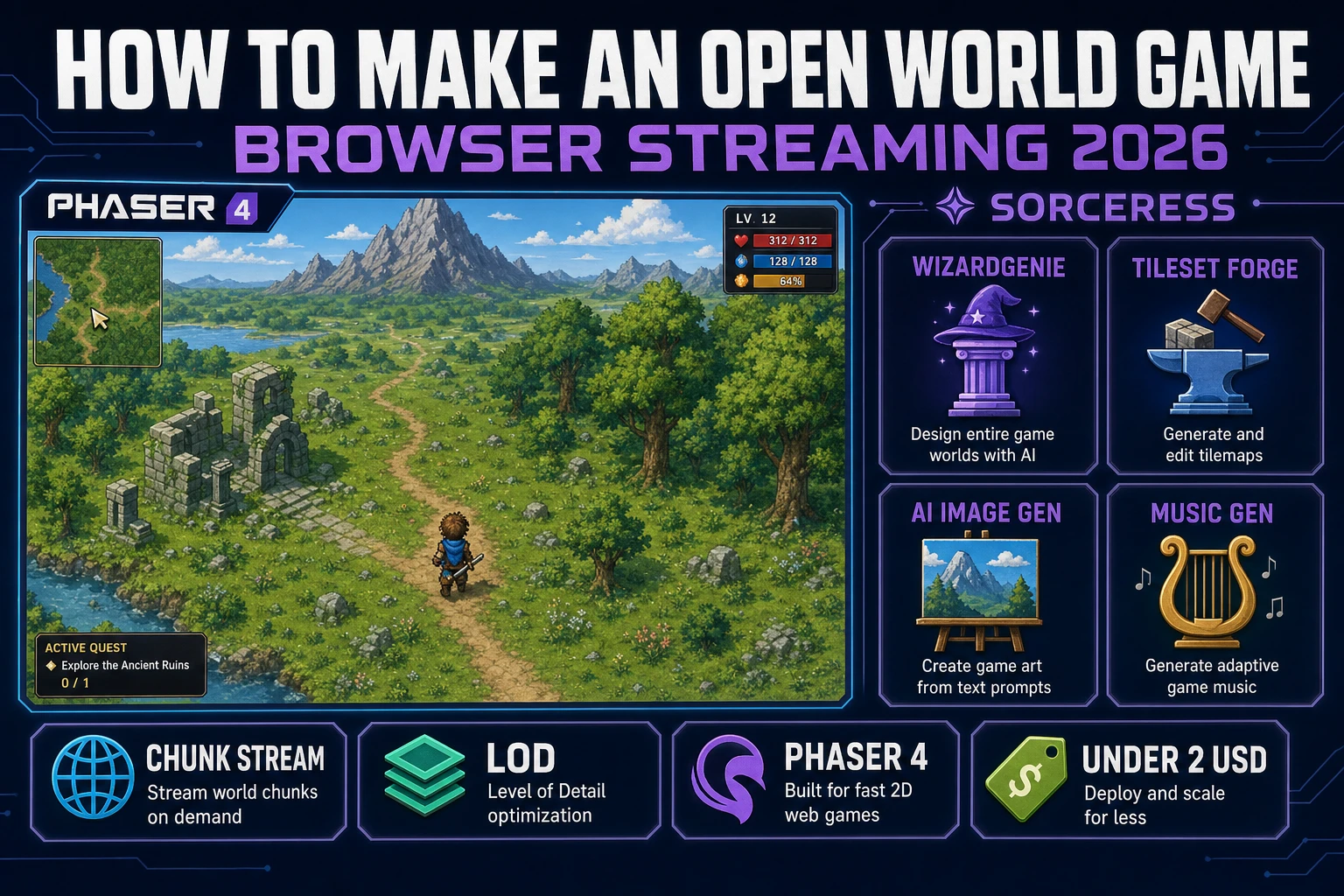
Vista How to Make an Open World Game (Streaming 2026)

By Arron R.14 min read
How to make an open world game in 2026 as an indie is a browser chunk-streaming loop, not a 200 GB Ubisoft build: a chunked heightmap holds the world as 64-tile

Searchers who type "how to make an open world game" in 2026 usually land in one of two camps - one imagines a five-year Ubisoft build with a 200 GB install, the other has already accepted that a solo weekend is a real budget and just wants to know the smallest honest streaming loop that still counts as an open world. This guide is for the second camp. A browser open world in 2026 is a chunked heightmap on disk, a Phaser v4.2.1 "Giedi" client (released 9 July 2026, verified 2026-09-02 on the Phaser stable download page) that streams the nine chunks around the player and destroys the rest, two-tier level-of-detail swaps at distance (verified 2026-09-02 on Wikipedia), and a tiny quest ticker that fires as the player crosses chunk boundaries. The whole scaffold comes out of WizardGenie in a single Saturday, and the vista dressing - terrain autotiles, horizon skies, an ambient music bed - lands under 0.61 USD via Tileset Forge, AI Image Gen, and Music Gen. Total build: one weekend, under two dollars in generation, a genuine 16-square-kilometer vista that a friend can walk across in a browser tab.
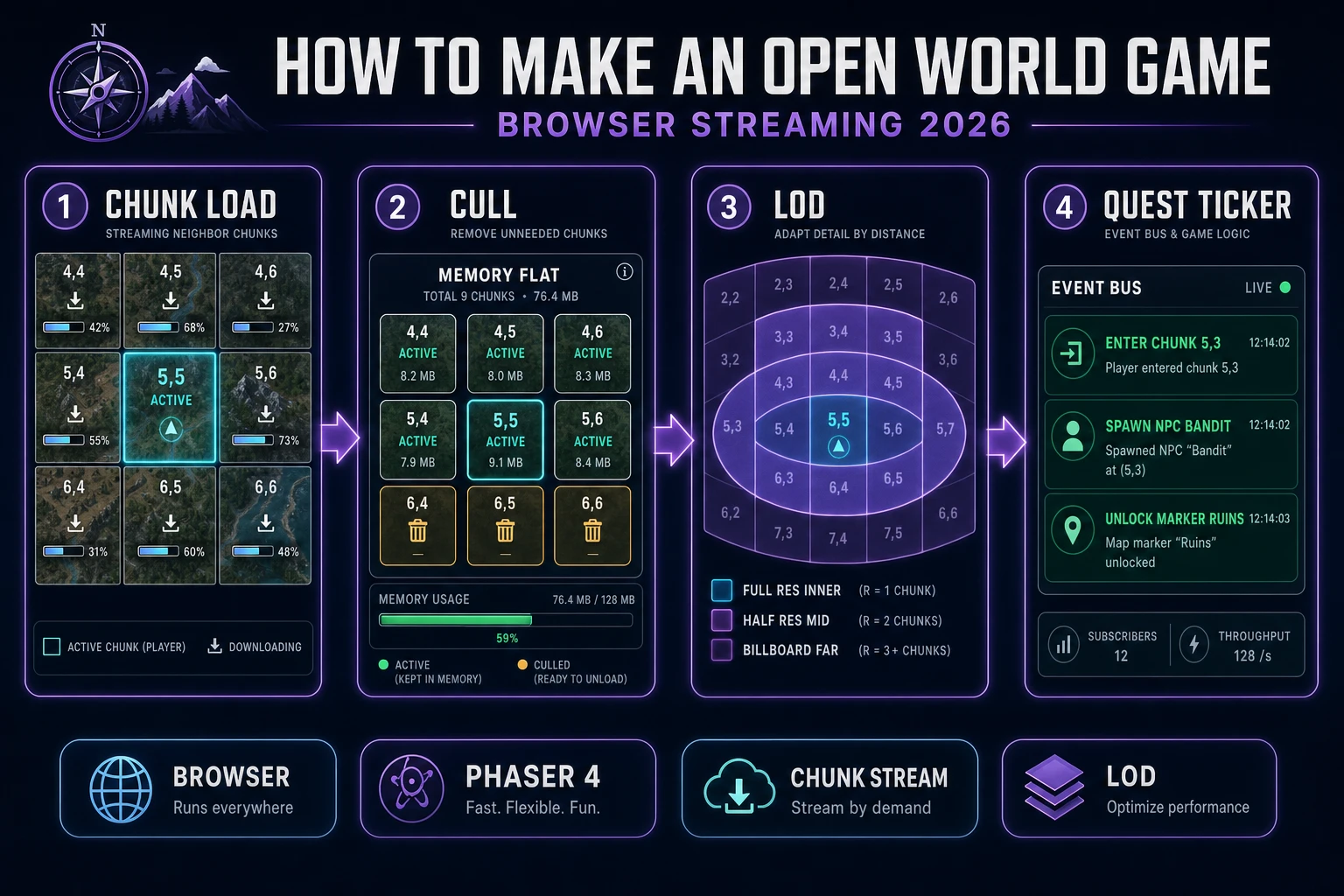
How to make an open world game in 2026 as a four-step browser streaming loop: chunk load (nine-chunk window), cull (destroy the rest), LOD (three concentric rings), and quest ticker (chunk-boundary events)
The 2026 recipe for how to make an open world game in a browser: four moving parts - chunk load, cull, LOD, quest ticker - all in one Phaser tab, all in one weekend.

What how to make an open world game means for a browser project in 2026

The phrase "how to make an open world game" carries fifteen years of AAA baggage - Skyrim, Breath of the Wild, GTA V, Elden Ring - and every one of those references is unhelpful for a solo indie. The open world Wikipedia entry (verified 2026-09-02) defines the category by two properties - non-linear traversal and persistent world state - and says nothing about square-kilometer count, install size, or NPC roster. The AAA install size is the marketing part; the non-linear-traversal and persistent-world part is the actually-required part, and it is genuinely tractable in a browser tab.

The honest 2026 reframe for how to make an open world game as a solo or two-person team is a 16x16 chunk world, not a continent. Pick a total map of 256 chunks - if a chunk is 64 tiles on a side and a tile is 32 pixels, that is a 32,768-pixel-square world, roughly 16 square kilometers of in-game space at a 2-metre-per-tile scale. That is more real navigable ground than the entirety of the first Zelda, and it fits comfortably in a static B2 bucket at under 20 MB total. Anyone selling "ship a Skyrim clone in a month" is showing a fake demo. Anyone selling "here is the smallest streaming loop that still counts as an open world" is showing the honest 2026 workflow, and that is exactly what this guide walks step by step.

The second reframe is vista, not variety. One biome on pass one - a rolling grass-and-stone heightmap with a distant mountain silhouette on the horizon. One weather system (clear day). One time of day, or a slow day-night that swaps the skybox at dusk. One quest hook (a stone ruin to the northeast). The sandbox game walkthrough covers the free-build cousin of the same tech, and the how to make an RPG guide covers the character-driven interior loop that eventually hangs off the open-world exploration layer. This how-to picks up the traversal layer and leaves the content layer for the sequel.

The open world streaming loop in one minute (chunk load, cull, LOD, quest ticker)

Four moving parts, and that is the whole thing. Verified 2026-09-02 against the Wikipedia view frustum culling and level-of-detail entries. Understand these four stages once and every future how-to-make-an-open-world-game question ("how do I add a river?", "how do I add fast travel?", "how do I add a day-night cycle?") is just adding a subsystem that hangs off one of the four:

  1. Chunk load - the client keeps track of which chunk the player is standing on, expressed as a (cx, cy) pair. When the player crosses a chunk boundary, the client asynchronously fetches the nine chunks in the 3x3 window around the new position from a static CDN or an S3 bucket - eight neighbors plus the center. Each chunk is a small JSON payload (or a compressed binary blob when the payload grows past a few kilobytes) containing the tile array, the entity list, and the quest markers.
  2. Cull - every chunk outside that 3x3 window is destroyed on the JavaScript heap. The Phaser Scene for that chunk is stopped and removed, the tile textures are released back to the browser texture cache, and the sprite instances go back into an object pool. Memory stays flat regardless of how many square kilometers the world holds on disk. A 128x128 chunk world (16,384 chunks total) and a 16x16 chunk world (256 chunks total) both consume the exact same runtime memory because only nine chunks are ever loaded.
  3. LOD - level-of-detail, the standard trick documented in the Wikipedia LOD entry (verified 2026-09-02). Entities inside the visible chunks render at full resolution, entities in the visible-but-far chunks render at half-resolution sprites, and static features on the very-far chunks render as billboards or a single silhouette tile. That two-tier LOD alone lets a browser tab hold a 200-tile horizon at 60 FPS on a five-year-old laptop.
  4. Quest ticker - a tiny in-memory event bus that fires when the player crosses a chunk boundary. Typical events: spawn the NPCs registered to the newly loaded chunk, unlock quest markers, cross-fade the ambient music if the new chunk is in a different biome, save the current player position to localStorage so the next tab load spawns the player exactly where they were.

That is the whole open world streaming loop, and the rest of this how-to walks each stage as concrete WizardGenie prompts and Sorceress tool clicks. If any part of that four-step summary reads as intimidating, it is because the phrase "how to make an open world game" carries a fifteen-year memory of C++ engines and streaming-team headcounts. The 2026 browser stack is a single Phaser tab, and a modern managed static host (B2, Cloudflare R2, S3, Fly volumes) serves the chunks for free.

Pick your engine - Canvas, Phaser scenes, or WizardGenie scaffolds the open world game for you

Three honest choices for how to make an open world game in 2026 as an indie, and picking one is entirely a "do you want to type it, or type about it" question.

Option one - raw Canvas plus tile chunks. HTML5 Canvas 2D or WebGL2, a hand-rolled chunk loader that fetches JSON blobs, one big world seed, one requestAnimationFrame loop that draws visible tiles into a viewport. Full control, zero framework magic, every draw call is yours. Best when the reader already knows Canvas and wants an exercise in engine plumbing rather than a shippable weekend build.

Option two - Phaser 4.2.1 "Giedi" scenes. Each chunk is its own Phaser Scene, Phaser handles the camera, sprite depth sorting, tilemap layers, arcade physics, and the render-to-texture optimization. Chunk boundaries live at scene boundaries; the streaming loop calls scene.launch() for each newly loaded chunk and scene.stop() plus scene.remove() for each culled chunk. The Phaser TilemapLayer handles the LOD half of the job for you when you feed it half-resolution tilesets in the far ring.

Option three - let WizardGenie scaffold it. Open WizardGenie in a browser tab (or the desktop app with the auto-updater), paste a one-page spec, and the agent produces the whole streaming loop plus the LOD swap logic in one pass. The spec prompt that reliably works in September 2026 is:

Build a browser open world game named VistaDemo.
- Renderer: Phaser v4.2.1 "Giedi", 2D top-down, 60 FPS, 960x540 canvas that scales.
- World: 16x16 chunks on disk (256 total). Each chunk is 64x64 tiles at 32 px per tile.
- Storage: static JSON per chunk, fetched from a CDN URL like /world/chunk_5_3.json.
- Streaming: keep the 3x3 window of chunks around the player loaded, destroy the rest.
- LOD: full-res tiles in the current chunk, half-res in the 8 neighbors, billboards further out.
- Quest ticker: fire an event when the player crosses a chunk boundary; spawn any NPCs registered to the new chunk, unlock any markers, save to localStorage.
- Persistence: last player position + inventory in localStorage, restored on load.
- Content: one biome (grass and stone), a distant mountain silhouette on the horizon, one NPC (a hermit at the stone ruin in chunk 12,4).
Use the Planner+Executor split - Claude Opus 4.7 as planner, DeepSeek V4 Pro as executor.

WizardGenie drives every leading coding model in a single panel (Claude Opus 4.7, Claude Sonnet 4.6, GPT-5.5, Gemini 3.1 Pro, DeepSeek V4 Pro, Kimi K2.5, Grok 4.2, MiniMax M2.7 - verified 2026-09-02 against CODING_MODELS in src/app/_home-v2/_data/tools.ts). The Planner + Executor pattern is what makes how-to-make-an-open-world-game genuinely cheap in 2026: an expensive reasoner (Opus 4.7 or GPT-5.5) plans the systems and writes each follow-up prompt while a cheap fast typer (DeepSeek V4 Pro or Kimi K2.5) grinds out the actual Phaser code. Never put Sonnet, Opus, GPT-5.5, or Gemini 3.1 Pro on the typing side; that erases most of the cost advantage. The best AI coding model breakdown covers each model against game-dev tasks, and the Claude vibe coding walkthrough covers the same Planner + Executor pattern in more detail.
Step 1 - model the world as a chunked heightmap with POIs

Every open world starts as a data model, not a render loop. Two static structures plus a tiny in-memory index and the whole world fits on one page. The heightmap is the source of truth (verified 2026-09-02 on Wikipedia): a single greyscale PNG or a flat Uint8Array where each pixel holds the elevation of one tile. Higher pixels are mountains, lower pixels are valleys, mid-band pixels are grass, near-zero pixels are water. From that one array the tile type on any (x, y) is a deterministic lookup, which means the world is fully addressable without ever holding it all in memory.

// One heightmap PNG defines the whole world
// height[y * WORLD_W + x] gives elevation 0..255
function tileTypeAt(x, y) {
  const h = height[y * WORLD_W + x];
  if (h < 40)  return 'water';
  if (h < 90)  return 'sand';
  if (h < 180) return 'grass';
  if (h < 220) return 'stone';
  return 'snow';
}

Each chunk is then a small JSON file that pre-computes the tile array for its 64x64 slice of the world plus any content that lives inside it - NPCs, quest markers, static props. Generate them once at build time (or lazily, the first time a chunk is requested and never again) and dump them into a static bucket:

// world/chunk_5_3.json
{
  "cx": 5, "cy": 3,
  "tiles": [/* 4096 ints, row-major */],
  "npcs": [
    { "id": "hermit_ruins", "x": 12, "y": 44, "kind": "hermit", "questHook": "ruins_lore" }
  ],
  "markers": [
    { "kind": "poi", "x": 20, "y": 40, "label": "Stone Ruins" }
  ],
  "biome": "grass"
}

POIs - points of interest - are what turn a heightmap into an open world instead of a walk simulator. A POI density of one every two or three chunks is the honest 2026 default for a first pass; anything denser reads as a theme park and anything sparser reads as an empty tech demo. The dungeon map generator walkthrough covers procedurally generating the POI graph when the manual placement grows tedious past a hundred POIs, and the underlying procedural generation Wikipedia entry (verified 2026-09-02) covers the general seed-based approach.

Step 2 - wire chunk streaming and LOD in WizardGenie for the open world game

The streaming loop is a single method called every time the player moves. It computes the current chunk from the player position, and if that chunk changed since the previous frame, it triggers a load-and-cull pass. WizardGenie writes the whole thing on the first prompt pass; the shape you should end up with is roughly:

const CHUNK_SIZE = 64; // tiles
const loaded = new Map(); // "cx,cy" -> Phaser.Scene

function currentChunk(px, py) {
  return { cx: Math.floor(px / CHUNK_SIZE), cy: Math.floor(py / CHUNK_SIZE) };
}

function updateStreaming(playerX, playerY) {
  const { cx, cy } = currentChunk(playerX, playerY);
  const wanted = new Set();
  for (let dy = -1; dy <= 1; dy++)
    for (let dx = -1; dx <= 1; dx++)
      wanted.add(`${cx + dx},${cy + dy}`);
  // Load any chunk in the wanted set that is not loaded
  for (const key of wanted) if (!loaded.has(key)) loadChunk(key);
  // Cull any chunk that is loaded but no longer wanted
  for (const [key, scene] of loaded)
    if (!wanted.has(key)) { scene.scene.stop(); scene.scene.remove(); loaded.delete(key); }
}

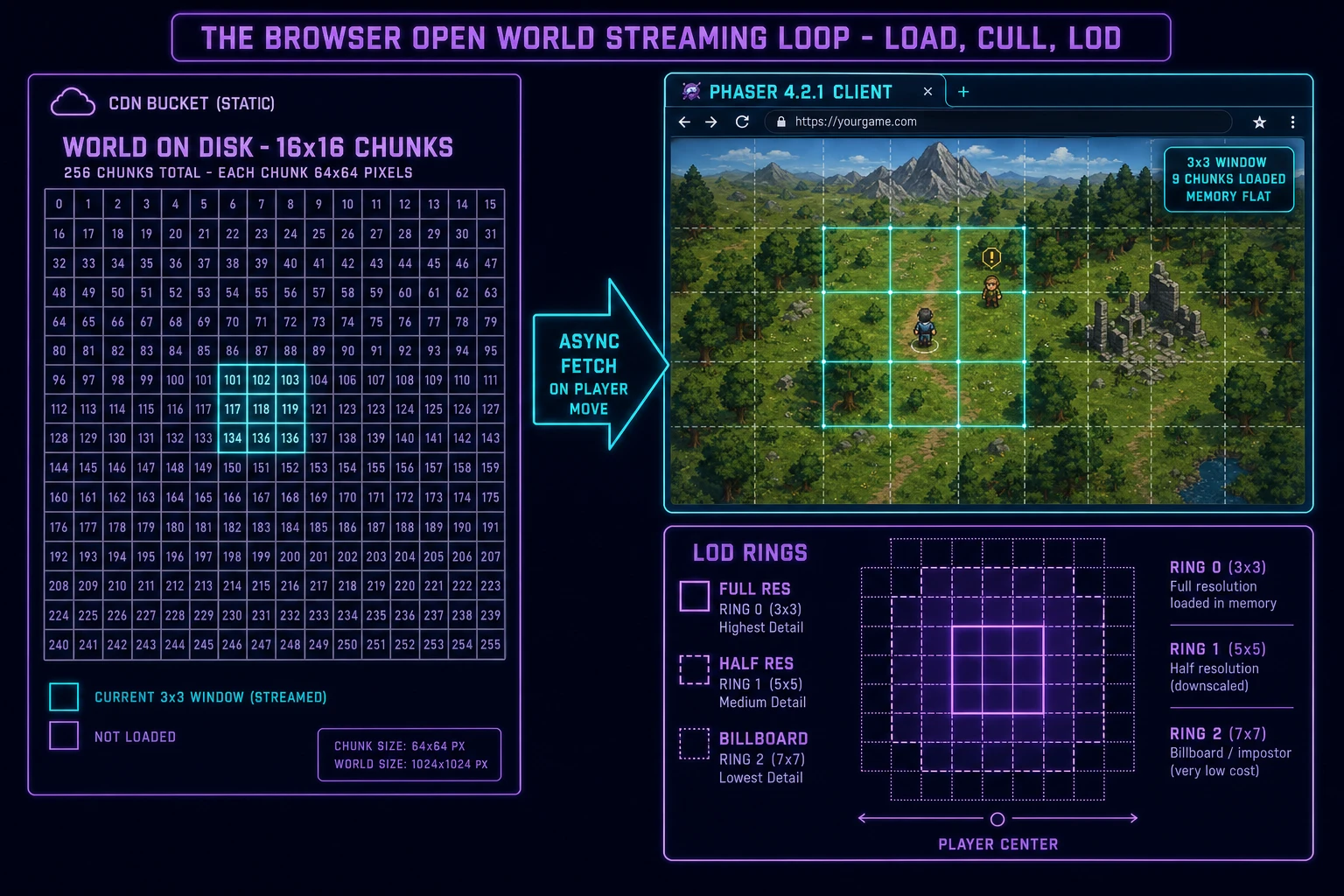
The LOD side is a second, orthogonal decision: for each loaded chunk, pick a render mode based on distance from the player's current chunk. The three-tier default that reliably feels good in a browser tab is documented in the LOD Wikipedia entry (verified 2026-09-02): the player's current chunk renders at full resolution with animated NPCs and dynamic entities, the four cardinal neighbors render at half-resolution tiles with static NPC billboards, and the four diagonal neighbors render as pre-baked textures with only the horizon silhouette visible. That single split, plus standard view frustum culling inside each chunk, holds 60 FPS on any laptop shipped in the last five years.

Browser open world game architecture: a static CDN bucket holds 256 chunks as JSON files on the left, a Phaser 4.2.1 client streams the 3x3 window around the player on the right, LOD rings render inner-full, mid-half, far-billboard, memory stays flat regardless of world size
The full streaming loop for how to make an open world game in a browser: chunks on disk, 3x3 window loaded, three concentric LOD rings. One Phaser tab, one weekend.

Step 3 - dress with Tileset Forge terrain, AI Image Gen sky, Music Gen ambience

A working chunk-streaming scaffold with placeholder rectangles is a solved technical problem in 2026; a working streaming scaffold with a genuinely playable-looking vista is where most solo how-to-make-an-open-world-game attempts stall. The Sorceress asset stack closes that gap in an hour.

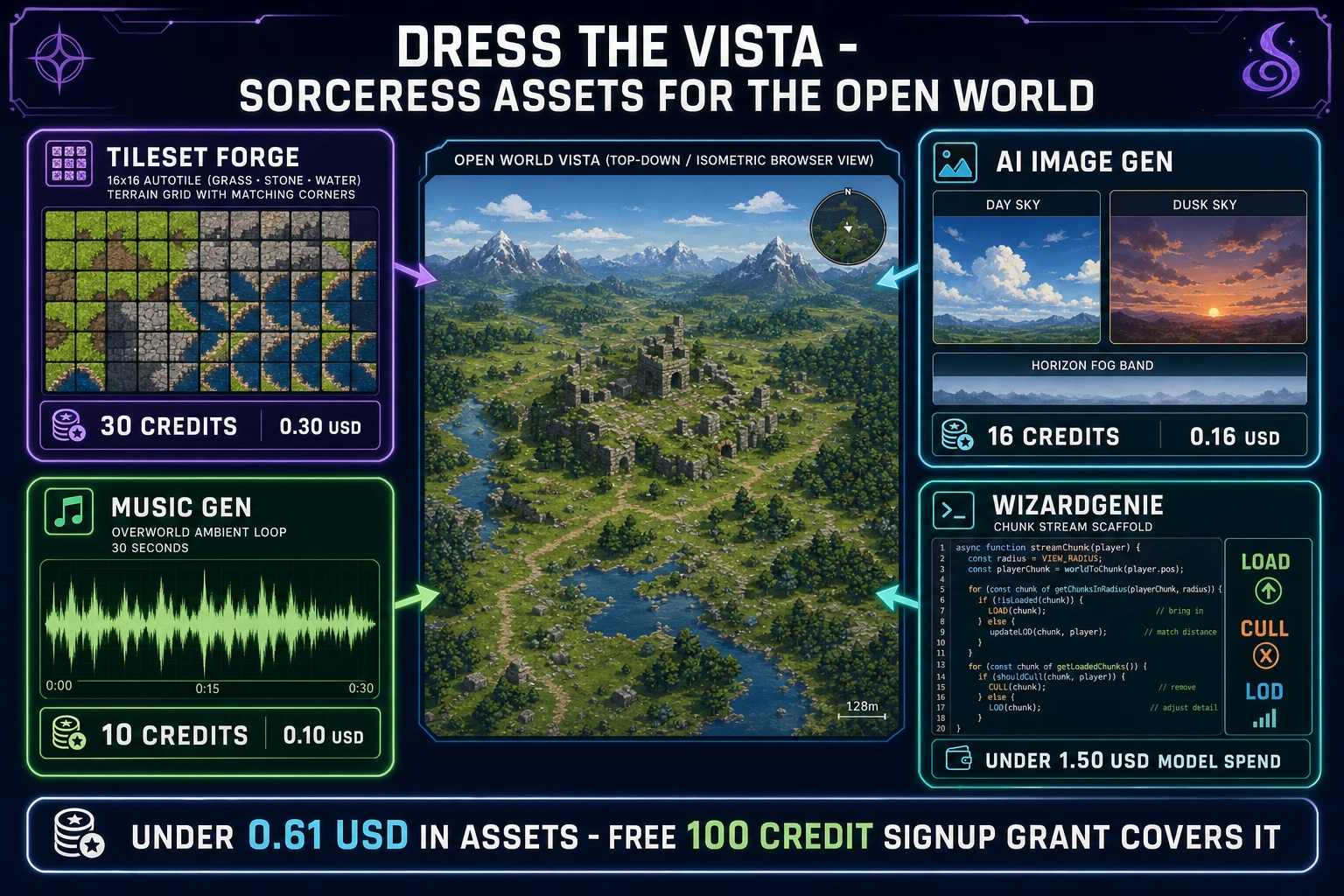
  • Terrain autotiles - open Tileset Forge, prompt "top-down 16x16 grass and stone autotile terrain, hand-painted 2D pixel-art, dappled sunlight, mossy edges, matching corner variants for a rolling-hills open world". Ships a Godot-ready or Tiled-ready tileset PNG plus a JSON with the autotile edge rules per the Tiled map editor autotile format (verified 2026-09-02), and drops straight into the Phaser TilemapLayer. Do the pass twice - once for the full-resolution inner ring, once for the half-resolution outer ring - so LOD swaps are visually consistent. Roughly 30 credits per pass (0.30 USD at CREDITS_PER_DOLLAR equals 100 in src/lib/models.ts line 69, verified 2026-09-02).
  • Horizon sky and dusk sky - open AI Image Gen, use Nano Banana Pro for consistent atmosphere. Prompt "wide 2D horizon skybox tile for a top-down open world game, soft cirrus clouds, warm sun, painted style, tileable across the horizon". Generate the day version and a matching dusk version so a slow day-night cycle can crossfade between them. Two generations, roughly 8 credits each (16 credits, 0.16 USD).
  • Distant mountain silhouette - one more AI Image Gen pass for a mountain silhouette that scrolls slowly behind the far chunks, giving the world a sense of horizon that a flat tilemap alone cannot. The parallax AI generator walkthrough covers the multi-layer parallax pipeline when you want depth beyond a single silhouette layer.
  • Ambient music bed - open Music Gen, prompt "gentle 70 BPM open world overworld ambient loop in D major, ambient strings and soft flute, no vocals, 30 seconds, loopable". One 10-credit generation via Suno V5.5 (MUSIC_CREDIT_COST equals 10 in src/app/music-gen/page.tsx line 28, verified 2026-09-02) returns two variations. Pick the one that loops cleanest and drop it into the Phaser scene as a looping WebAudio asset. A single 30-second loop is honest for the whole first-weekend build; a friend will explore for twenty minutes and not once consciously notice the repetition.

Two content rules keep the first vista honest. First, one biome on pass one - the whole 256-chunk world is one grass-and-stone rolling-hills biome. Add water, snow, or desert only after a friend has actually loaded the tab and walked from one corner to another. Second, one music bed for the whole world, not one per biome; cross-fading between biomes is a Wave 2 problem, not a Wave 1 problem. The Phaser browser game engine walkthrough covers the underlying Phaser 4 patterns that this open-world layer builds on top of.

Sorceress asset stack for a browser open world game: Tileset Forge autotiles 30 credits, AI Image Gen skyboxes 16 credits, Music Gen ambient bed 10 credits, WizardGenie under 1.50 USD - total under 0.61 USD in assets, covered by the free 100-credit signup grant
Dress the vista: the whole first-pass asset stack for how to make an open world game lands under 0.61 USD in Sorceress generation, and the free 100-credit signup grant covers it outright.

What a browser how to make an open world game build costs on Sorceress in 2026

Honest weekend budget for a first how-to-make-an-open-world-game build against the 2026 Sorceress rate card (verified 2026-09-02 against local source):

  • Tileset Forge autotile terrain (one full-res pass, one half-res pass): roughly 30 credits or 0.30 USD.
  • AI Image Gen day sky, dusk sky, distant mountain silhouette: 16 credits or 0.16 USD.
  • Music Gen 30-second ambient loop: MUSIC_CREDIT_COST equals 10 credits, 0.10 USD.
  • Coding-model API time with a Planner + Executor split for a first streaming scaffold: under 1.50 USD.
  • Static hosting for 256 chunks on a free-tier B2 or R2 bucket: 0 USD.
  • Local dev environment (Node LTS + Phaser via npm): 0 USD.

Total roughly 56 credits or 0.56 USD in Sorceress asset generation, plus a coding-model bill under 1.50 USD, for a grand total under 2 USD on a first weekend. Credits convert at 100 per dollar via CREDITS_PER_DOLLAR in src/lib/models.ts line 69 (verified 2026-09-02). The free 100-credit signup grant covers the entire asset side outright and leaves headroom for a terrain retry when the first grass tileset lands too saturated. Lifetime Early Access sits at 49 USD (LIFETIME_PRICE in src/app/plans/page.tsx line 51, verified 2026-09-02) if the second weekend is already planned - it unlocks the desktop WizardGenie with auto-update and a bigger monthly credit allowance for the biome expansion.

The vista loads at sorceress.games/play/<your-slug> once you push the Phaser client build through Sorceress Publishing, and other creators browsing the Play Arcade can walk into your open world the same day. The Sorceress tools guide lists every asset tool in one place; the AI for game development indie stack overview is the honest zoom-out on how the coding pillar plus the asset pillars plus the publish pillar assemble into a full 2026 workflow. How to make an open world game in 2026 is not a five-year plan and it is not a fake demo - it is a chunked heightmap, a 3x3 streaming window, three LOD rings, one Phaser tab, and a Saturday afternoon with a Planner Executor split doing the typing.

Frequently Asked Questions

What does how to make an open world game actually mean for an indie in 2026?

How to make an open world game in 2026 as a solo or two-person team means a persistent explorable vista with maybe sixteen or thirty-two square kilometers of navigable space and a genuine sense of horizon - not a 200 GB Ubisoft map. The honest 2026 reframe, verified 2026-09-02 against the Wikipedia open world entry, is a chunked heightmap held on disk as 64-tile chunks, a browser client that streams the nine chunks around the player, level-of-detail swaps at distance, and a light quest ticker that gates the reveal. The Wikipedia open world entry defines the category by two properties: non-linear traversal and persistent world state, and says nothing about square-kilometer count. A 16x16 chunk world with a horizon that always has something interesting inside it counts as an open world under the honest definition, and it is a first-weekend browser build in 2026.

What is the open world streaming loop in one minute?

Four moving parts, verified 2026-09-02 against the Wikipedia level of detail and view frustum culling entries. First, chunk load: the client keeps track of the player position and asynchronously fetches the nine chunks (the current one plus the eight neighbors) as small JSON or binary blobs from a static CDN or an S3 bucket. Second, cull: every chunk outside that 3x3 window is destroyed on the JS heap so memory stays flat regardless of how many square kilometers the world holds. Third, LOD: entities inside the visible chunks render at full resolution, entities in the visible-but-far chunks render as billboards or lower-poly stand-ins, verified against the level of detail Wikipedia entry. Fourth, quest ticker: a tiny in-memory event system fires when the player enters a new chunk (spawn NPCs, unlock quest markers, play music transition). That is the whole open world streaming loop; everything else is content hanging off one of the four stages.

What stack should I pick to make an open world game in a browser in 2026?

Two honest choices in 2026, verified 2026-09-02 against the current Phaser stable release and the Sorceress WizardGenie coding stack. Option one is Canvas plus tile chunks: raw HTML5 Canvas 2D or WebGL2 with a hand-rolled chunk loader, JSON per chunk, one big world seed. Full control, minimal dependencies, easy to debug because you own every draw call. Option two is Phaser 4.2.1 Giedi scenes: each chunk is its own Phaser Scene, Phaser handles the camera, sprite sorting, and physics, and the chunk boundaries live at scene boundaries. Option three (the shortcut) is let WizardGenie scaffold it: a one-page spec prompt to WizardGenie produces the whole chunk streaming loop plus the LOD swap logic in one pass. For a first open world build the WizardGenie shortcut turns a weekend of plumbing into a Saturday afternoon of tuning.

How do I keep the browser from choking when the world grows past one screen?

Chunk streaming plus aggressive culling, verified 2026-09-02 against the view frustum culling Wikipedia entry. Never hold more than the 3x3 window of chunks in memory at once. Every chunk that leaves the window gets its Phaser Scene destroyed, its texture cache purged, and its sprite pool returned. The world on disk can be 16x16 chunks (256 chunks total) or 128x128 chunks (16,384 chunks total) with zero change to the in-memory footprint because only nine are ever loaded. LOD picks up the second half of the job: entities inside the currently visible chunk render at full resolution, entities in the four cardinal neighbors render at half-res sprites, entities in the four diagonal chunks render as static billboards. That two-tier LOD alone lets a browser tab hold a 200-tile horizon at 60 FPS on a five-year-old laptop, and it is the exact pattern shipped by every 2D open world game since Terraria.

What does a first how to make an open world game build cost on Sorceress in 2026?

Under 0.61 US dollars in Sorceress generation plus a coding-model bill under 1.50 USD, verified 2026-09-02 against the local rate card in src/lib/models.ts line 69 (CREDITS_PER_DOLLAR equals 100). Terrain: one Tileset Forge autotile pass for grass, one for stone, one for water - roughly 30 credits total (0.30 USD). Sky and horizon: two AI Image Gen skybox tiles for day and dusk, at 8 credits each (16 credits, 0.16 USD). Ambient music bed: one Music Gen 30-second loop at MUSIC_CREDIT_COST equals 10 credits in src/app/music-gen/page.tsx line 28 (0.10 USD). Server hosting for a static-chunk world on a free-tier B2 bucket or Fly volume: 0 USD. Total Sorceress asset side under 0.61 USD; the free 100-credit signup grant covers it outright with headroom for retries. Lifetime Early Access sits at 49 USD (LIFETIME_PRICE in src/app/plans/page.tsx line 51) if the second weekend is already planned.

Sources

  1. Phaser v4.2.1 Giedi stable download
  2. Open world - Wikipedia
  3. Level of detail (computer graphics) - Wikipedia
  4. Heightmap - Wikipedia
  5. Tiled map editor documentation
  6. Procedural generation - Wikipedia
  7. View frustum culling - Wikipedia
Written by Arron R.·3,108 words·14 min read

Related posts